
VeryPDF DRM Protector

VeryPDF DRM Protector

Document Security & PDF DRM Protection

Menu

  • Online
  • Purchase
  • Products
    • PDF DRM Protector
    • Secure PDF Viewers
  • Solutions
    • Industry sectors
    • Vertical sectors
    • Business processes
    • Business benefits
    • Regulatory compliance
  • Downloads
  • Support
    • My Account
    • User Portal Login
    • URL Shortener
    • Contact Us
    • Submit a Ticket
    • Send an Email
  • Blog
    • Solutions
    • User Manual
    • PDF DRM Protector
    • DRM Technology
    • Document Security
    • Video DRM Protector
    • Image DRM Protector
    • Audio DRM Protector

VeryPDF DRM Protector — Detailed Guide to Three Entry Points: Online DRM Protector, Admin Management Panel, and End-User Viewer

VeryPDF DRM Protector — Detailed Guide to Three Entry Points: Online Protector, Admin Panel, and End-User Viewer

This document provides an in-depth explanation of the three main entry points of the VeryPDF DRM Protector system:

  1. Online PDF DRM Protector
  2. Admin Panel for Managing Files & Users
  3. End-User Viewer Login Page

Each section explains all available options and how they work together to secure your PDFs.


1. Online PDF DRM Protector

URL: https://drm.verypdf.com/online/

This is the main interface where you upload a PDF and apply DRM protection. It allows you to modify document metadata, add watermarks, apply standard PDF encryption, and enable advanced DRM restrictions.


1.1 Modify PDF Info

This section allows you to update embedded PDF metadata:

  • Title
  • Subject
  • Author
  • Keywords
  • Create Date
  • Modify Date
  • Creator
  • Producer

These fields help you correct or customize document identity information before DRM protection is applied.


1.2 Watermark Options
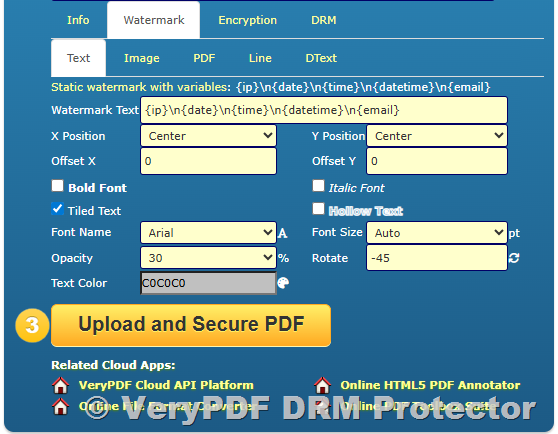
VeryPDF DRM Protector — Detailed Guide to Three Entry Points: Online DRM Protector, Admin Management Panel, and End-User Viewer

VeryPDF DRM Protector offers a rich set of watermark types:

Static Text Watermark

Add fixed text such as “Confidential” or “Private Copy”.

Image Watermark

Embed logos, seals, or background images to identify the document owner.

PDF Watermark

Insert an entire PDF page or overlay as a watermark layer.

Line Watermark

Add repeated line-based watermark backgrounds for strong protection.

Dynamic Text Watermark

Automatically insert user-specific information such as:

  • Viewer’s name
  • Email
  • IP address
  • Current date/time
  • Device information

Dynamic watermarks are an effective method to deter sharing.


1.3 PDF Encryption
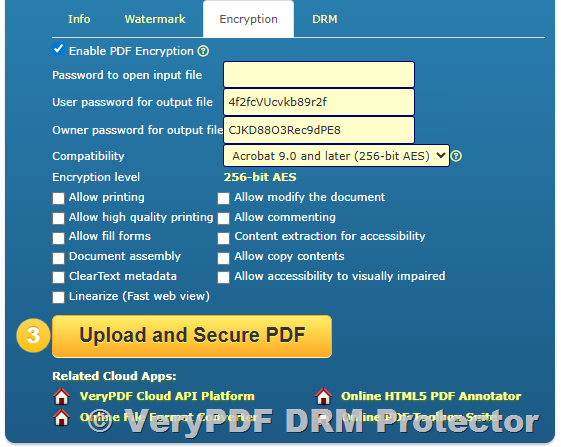
VeryPDF DRM Protector — Detailed Guide to Three Entry Points: Online DRM Protector, Admin Management Panel, and End-User Viewer

You may enable standard PDF encryption to protect the file before applying DRM.

Password Options

  • Password to open input file
  • User password for output file
  • Owner password for output file

Compatibility

  • Acrobat 6.0 and later (128-bit RC4)

Encryption Level

  • 128-bit RC4

Granular Permission Controls

You may allow or deny the following:

  • Allow printing
  • Allow high-quality printing
  • Allow modifying the document
  • Allow commenting
  • Allow fill forms
  • Allow content extraction
  • Document assembly
  • Allow copying
  • ClearText metadata
  • Accessibility for visually impaired
  • Linearize PDF (Fast Web View)

1.4 Advanced DRM Options

This is the most powerful part of VeryPDF DRM Protector.
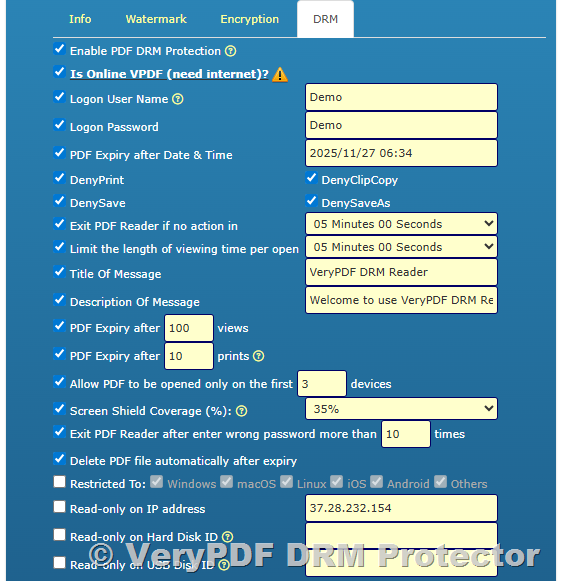
VeryPDF DRM Protector — Detailed Guide to Three Entry Points: Online DRM Protector, Admin Management Panel, and End-User Viewer
Enable by selecting:

✔ Enable PDF DRM Protection

Authentication Options

  • Is Online VPDF (need internet)?
  • Logon User Name (example: Demo)
  • Logon Password (example: Demo)

Expiry Options

  • Expire after date & time
  • Expire after X views
  • Expire after X prints
  • Delete PDF automatically after expiry

User Behavior Restrictions

  • Deny Print
  • Deny Clip Copy
  • Deny Save
  • Deny Save As
  • Limit viewing time per open (e.g., 5 minutes)
  • Exit reader if no action (inactivity timeout)
  • Exit reader after multiple wrong passwords

Device & Platform Restrictions

  • Allow opening only on the first X devices
  • Restrict opening to selected OS:
    • Windows
    • macOS
    • Linux
    • iOS
    • Android
    • Others

Hardware & Network Locking

  • Read-only on specific IP address
  • Read-only on Hard Disk ID
  • Read-only on USB Disk ID

Screen Shield

  • Set Screen Shield Coverage (%) to block partial screen/capture

Custom Messages

  • Title of message
  • Description of message (e.g., welcome notice, support instructions)

These settings provide deep document control beyond standard PDF password security.


2. Admin Panel — Manage Uploaded Files & Users

URL: https://drm.verypdf.com/wp-admin/admin.php?page=VeryPDFDRMFiles

This is the management backend where administrators control uploaded files, user access, activities, and statistics. You can configure document settings even after upload.
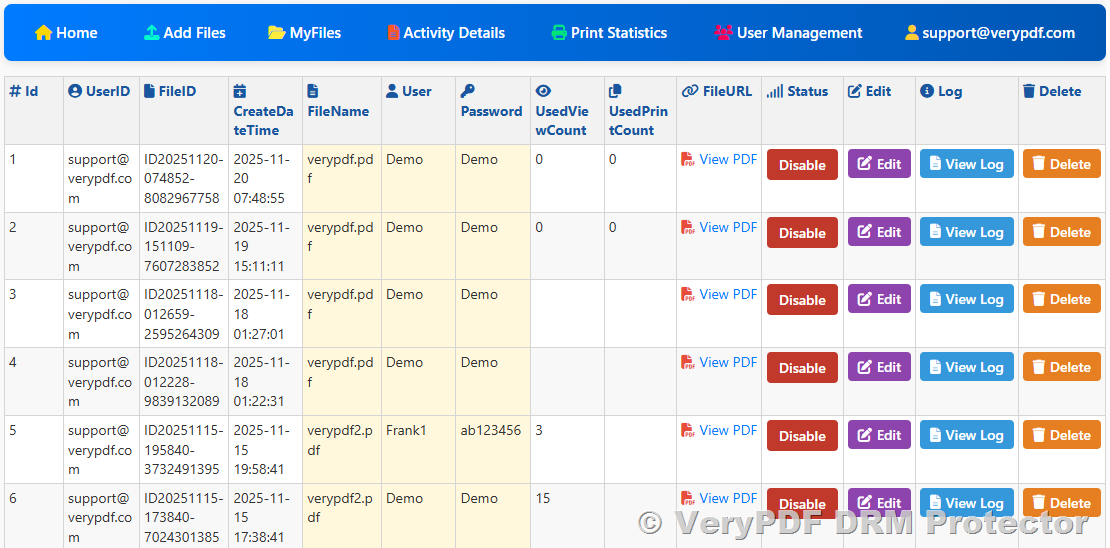
VeryPDF DRM Protector — Detailed Guide to Three Entry Points: Online DRM Protector, Admin Management Panel, and End-User Viewer

The Admin Panel includes the following functions:


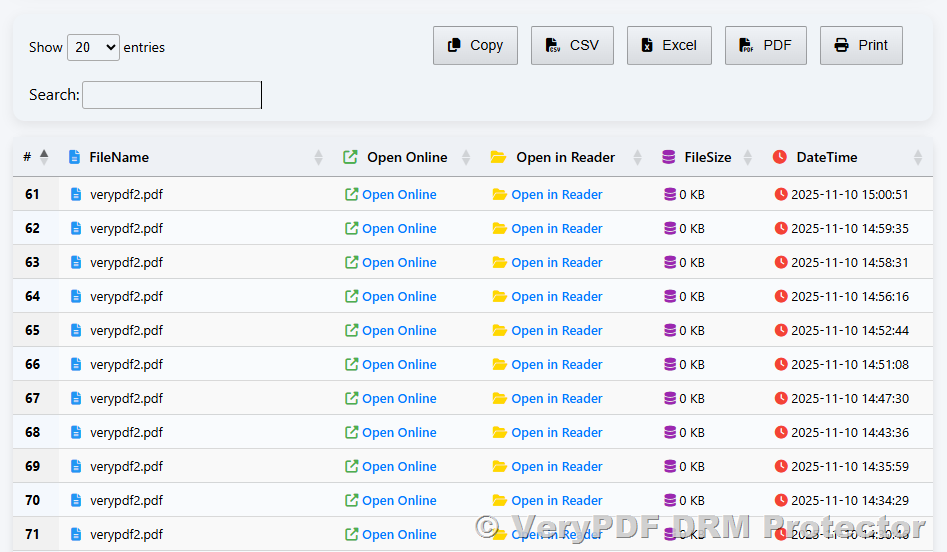
2.1 Manage MyFiles

  • View all uploaded PDF files
  • Edit DRM settings
  • Update expiry rules
  • Replace files
  • Delete files
  • Reassign user permissions

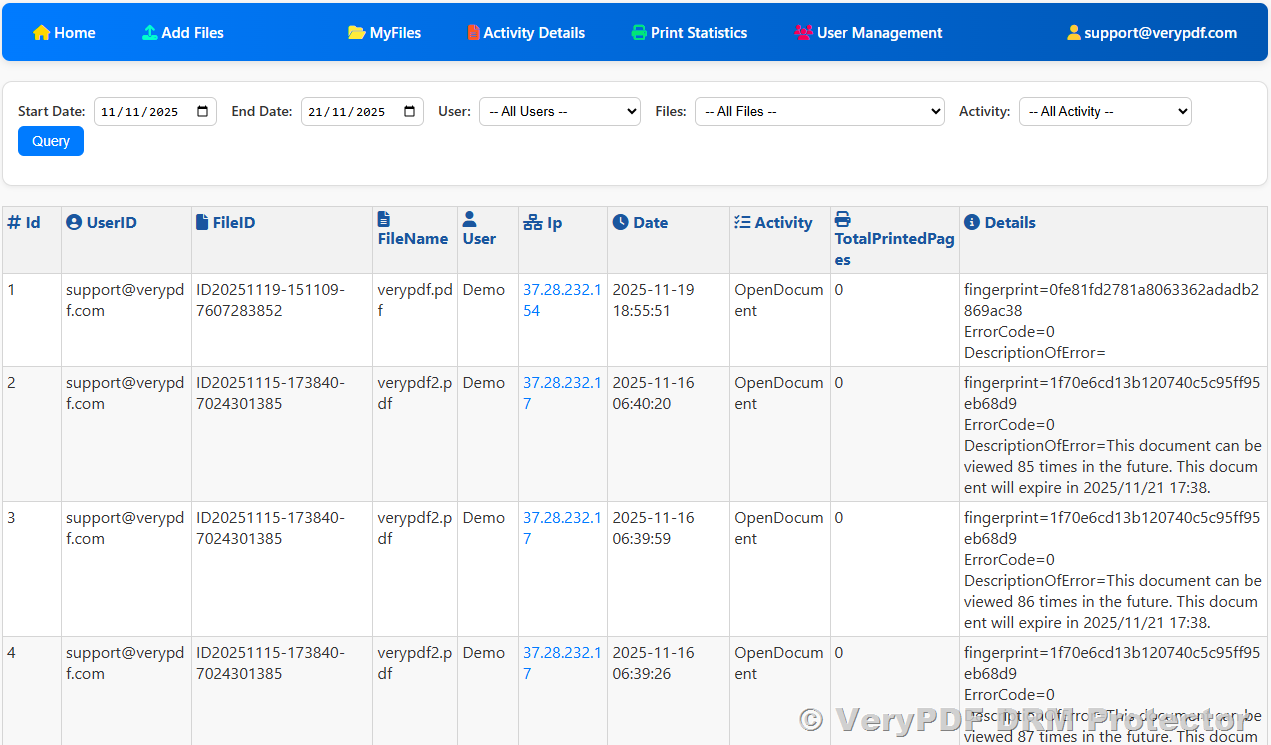
2.2 View Activity Details

Monitor how users interact with protected documents:

  • Open attempts
  • Successful logins
  • Expired access
  • Permission-denied events
  • Device-binding checks

This is useful for compliance audits.
VeryPDF DRM Protector — Detailed Guide to Three Entry Points: Online DRM Protector, Admin Management Panel, and End-User Viewer


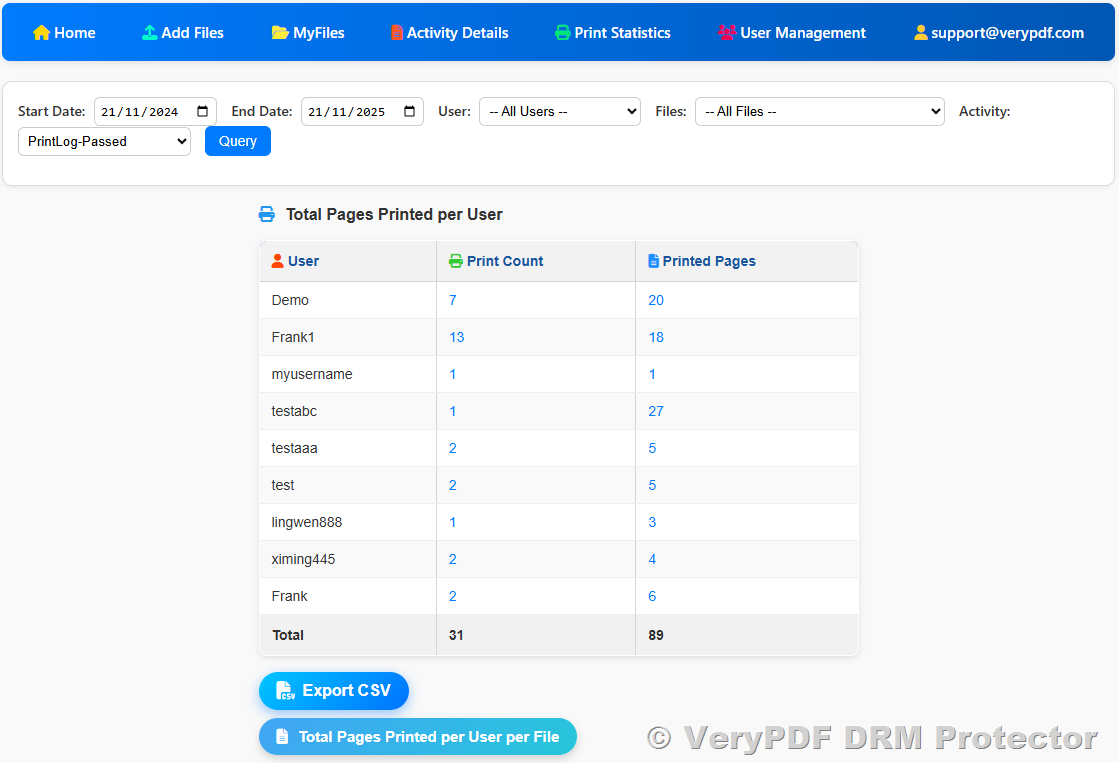
2.3 View Print Statistics

Track printing behavior:

  • Number of prints per user
  • Remaining allowed prints
  • Print-blocking incidents

This helps detect abnormal usage or unauthorized distribution.
VeryPDF DRM Protector — Detailed Guide to Three Entry Points: Online DRM Protector, Admin Management Panel, and End-User Viewer


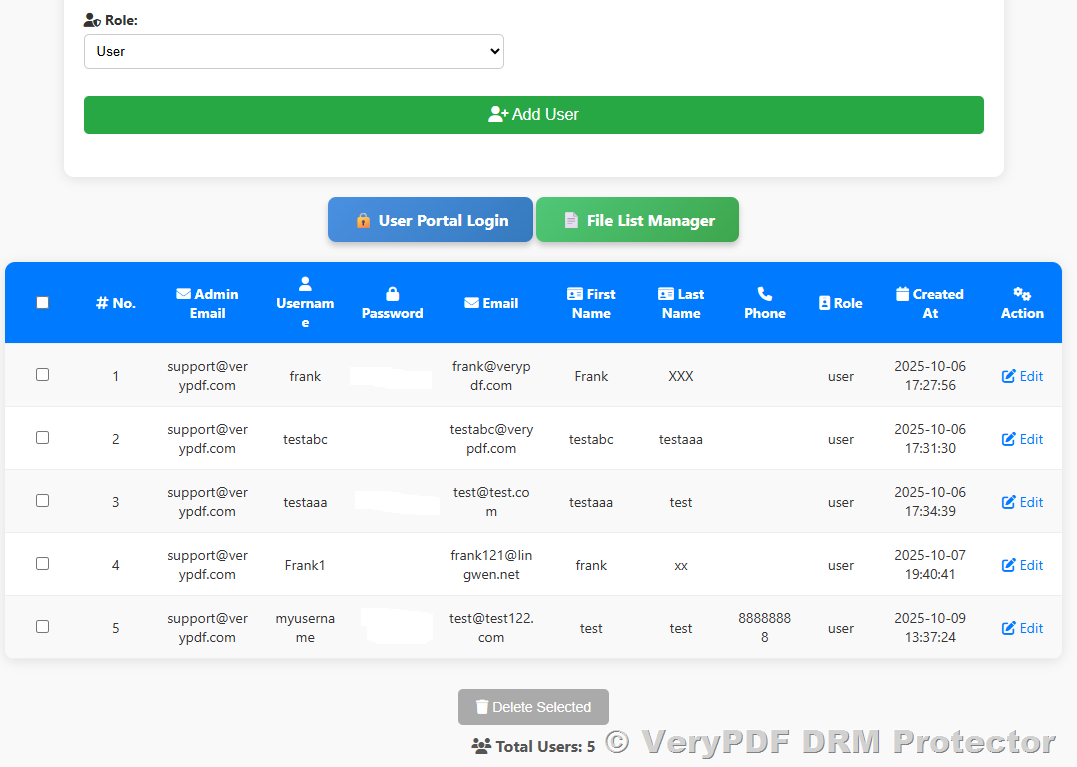
2.4 User Management

Manage the users who are allowed to access your protected documents:

  • Add new users
  • Reset passwords
  • Enable/disable users
  • Assign document access
  • View login history
  • Bind or unbind devices
  • Review user metadata

The Admin Panel acts as the control center for all document access.
VeryPDF DRM Protector — Detailed Guide to Three Entry Points: Online DRM Protector, Admin Management Panel, and End-User Viewer


3. End-User Login Page

URL: https://online.verypdf.com/app/pdfdrm/login.php
VeryPDF DRM Protector — Detailed Guide to Three Entry Points: Online DRM Protector, Admin Management Panel, and End-User Viewer

This is where your customers, students, employees, or readers log in to view protected PDF documents.

Key Features

  • Secure username/password authentication
  • Enforced DRM policies (no print, no copy, no save, etc.)
  • Online PDF viewer (no software installation needed)
  • Automatic watermark display
  • Device-lock and IP-lock enforcement
  • Expiry and print/view count tracking

End users simply log in and access their assigned documents through a clean, simple interface.


Conclusion

These three entry points work together to deliver a complete, cloud-based DRM solution:

  1. Online DRM Protector — apply DRM rules and generate protected files
  2. Admin Panel — manage files, users, and access control
  3. End-User Viewer — securely view protected documents online

This system ensures maximum protection for sensitive documents while maintaining a smooth experience for end users and administrators.

Related posts:

How to Protect Your PDF Files from Unauthorized Copying, Printing, and Sharing in Educational Settin...
How to Print High-Resolution PDFs for Professional Use with VeryPDF PDF Print Command Line SDK
Protecting Confidential and Sensitive Documents with DRM Technology: Safeguarding Commercially Sensi...
How to ensure only one person can view a PDF link you send
VeryPDF DRM USB Portable: The Best Way to Protect PDF Files on USB Devices - The Ultimate Solution f...
How to Use DRM to Lock Access to a PDF eBook Unless Payment Is Verified
Sell PDFs, Ebooks, Courses & Research Reports Online Securely with VeryPDF DRM Protector
Protecting Corporate Training Materials How to Ensure Only Authorized Employees Can Access Sensitive...
How to Track Printing Activity and Bill Users Accurately Using VeryPDF DRM Protector Pay-Per-Print F...
VeryPDF DRM Protector — Detailed Guide to Three Entry Points: Online DRM Protector, Admin Management Panel, and End-User Viewer

Related Posts

  • Free VeryPDF Reader and Free VeryPDF Web Viewer — The Ultimate Way to View and Protect DRM-Protected PDF Files
  • User Management and User Portal Login in VeryPDF DRM Protector
  • How to Protect Your PDF Documents with Static and Dynamic Text Watermarks in VeryPDF DRM Protector
  • Automatically Expiring PDFs: Protect Corporate Training and eLearning Materials with DRM
  • Professional PDF Security and DRM Protection Solutions – Protect, Encrypt, and Control Access to PDF Files with VeryPDF DRM Protector
  • VeryPDF DRM Protector Print Control: Restrict, Track, and Monitor PDF Printing with Detailed Statistics, Print Limits, Secure Reports, and Virtual Printer Blocking
  • VeryPDF Secure Web Viewer & PDF DRM Protector: PDF Security, Encryption, Anti-Copy, Device Limits, and E-Book Protection
  • [Solution] Your Documents, Your Server, Your Rules — The Most Powerful Self-Hosted PDF DRM Solution
  • VeryPDF DRM Protector – The Complete Hosted PDF DRM Solution for Secure Document Distribution, Device Locking, Offline Access, Print Control, and Enterprise PDF Protection
  • VeryPDF DRM Protector Configuration Guide: How to Use Other Options for PDF Locking, Screen Shield, and Toolbar Permissions
  • Using VeryPDF DRM Protector as a Virtual Data Room: Secure File Sharing and Document Protection
  • PDF vs VPDF: Understanding the Difference Between Standard PDF and DRM-Protected VPDF Files for Secure Document Sharing
  • How to Protect a PDF File with DRM Options and View PDF File Access Statistics Report
  • VeryPDF DRM Protector: Secure PDF, eBook, and Video DRM Protection for Digital Content Online
  • How VeryPDF DRM Protector Secures PDF Files and Enables Controlled Sharing
  • How to Securely Share PDF Documents Across Departments While Controlling Views and Printing Using VeryPDF DRM
  • How to Create, Share, and View DRM-Protected PDF Files with VeryPDF
  • Share investor updates, financial models, and private valuations via protected PDF documents
  • How to Enable Secure Cloud-Based and Offline PDF Sharing With Expiry, Watermarks, and Device Locking Using VeryPDF DRM
  • Create Interactive SWF Diagrams From DWG Blueprints for Online Engineering Tutorials
Tagged on: access control access logs access monitor admin panel admin tools audit logs cloud drm content admin content demo content lockdown content manager content protection content shielding content viewer copy blocking data protection demo testing device lock digital rights digital watermark disable copying disable printing document security document tracking document viewer drm features drm protector drm testing dynamic watermark ebook protection expiration rules file actions file controls file encryption file library file monitor file policies file preview file revoke file tracking file upload license issuance license manager license revoke login portal online demo online protection online viewer pdf access pdf admin pdf control pdf control system pdf drm pdf encryption pdf issue pdf management pdf manager pdf policy pdf protection pdf restrict pdf security pdf trial pdf viewing pdf watermark policy creation print blocking protected files protected pdf secure access secure documents secure interface secure links secure platform secure sharing secure storage secure viewer secure workflow security panel time limit training materials user dashboard user groups user lock user login user management user roles viewer access viewer login viewer portal viewer settings web viewer
PDFDRM November 21, 2025November 21, 2025 DRM Technology, PDF DRM Protector, User Manual
  • ← [Solution] Your Documents, Your Server, Your Rules — The Most Powerful Self-Hosted PDF DRM Solution
  • How to Fully Protect Your PDF Workbooks and Block Virtual Printers Using VeryPDF DRM Protector (Business Plan) →

Custom Development Services

VeryPDF offers customized development services to meet your unique business needs, including PDF Processing, Document Automation, Document Analysis, Format Conversion, OCR, DRM, Barcode Solutions, Virtual Printer, Digital Signature, AI Integration, and more. Contact us today to get a personalized solution!

Meta

  • Register
  • Log in
  • Entries feed
  • Comments feed
  • VeryPDF.com
  • VeryDOC.com
  • VeryUtils.com
  • imPDF.com

Solutions

  • [Solution] VeryPDF File Protection: Comprehensive DRM Solutions for Docum…
  • [Solution] Securely Sell eBook PDFs on Gumroad: Prevent Copying, Printing…
  • [Solution] How to Safely Sell Your eBook PDF on PayHip Platform and Preve…
  • [Solution] DRM Software for Secure eBook Distribution: Starter Plan, Prof…
  • [Solution] How to Protect Digital Books and PDFs with DRM: Device Binding…

Recent Posts

  • How to Enable Printing for DRM-Protected PDFs on Windows, macOS, iOS, iPa…
  • File Sharing with DRM: Prevent Data Leaks & Theft with VeryPDF
  • How to Print a DRM-Protected PDF with VeryPDF DRM Protector on macOS
  • Managing Device Bind Limits in VeryPDF DRM Protector: Preventing Incorrec…
  • How to Sell and Protect Your eBook Online Using VeryPDF DRM Protector wit…

Categories

Archives

Tags

Calendar

December 2025
M T W T F S S
1234567
891011121314
15161718192021
22232425262728
293031  
« Nov    

Recent Posts

  • How to Enable Printing for DRM-Protected PDFs on Windows, macO…
  • File Sharing with DRM: Prevent Data Leaks & Theft with Ver…

Solutions

  • [Solution] VeryPDF DRM Protector for Standards Publishing: Saf…
  • [Solution] Custom Audio and Video DRM Protection Software &nda…

Solutions

  • Document Security Solution
  • Secure File Sharing Solution
  • Image & Photo DRM Controls
  • Subscription-based PDF Publishing
  • eBook Publishing Solution

Related Websites

  • Website: https://www.verypdf.com
  • Website: https://www.verydoc.com
  • Website: https://online.verypdf.com
  • Website: https://veryutils.com
  • Support: http://support.verypdf.com
Copyright © 2025 VeryPDF DRM Protector Company. All rights reserved.
  • Terms of Trade
  • Privacy Policy
  • VeryPDF
  • VeryDOC
  • VeryUtils
  • Contact Us
  • My Account