
VeryPDF DRM Protector

VeryPDF DRM Protector

Document Security & PDF DRM Protection

Login Book Demo Free Trial

Menu

  • Online
  • Purchase
  • Products
    • PDF DRM Protector
    • Secure PDF Viewers
  • Solutions
    • Industry sectors
    • Vertical sectors
    • Business processes
    • Business benefits
    • Regulatory compliance
  • Downloads
  • Support
    • My Account
    • User Portal Login
    • Tutorial Videos
    • Schedule a Demo
    • URL Shortener
    • Contact Us
    • Submit a Ticket
    • Send an Email
  • Blog
    • Solutions
    • User Manual
    • PDF DRM Protector
    • DRM Technology
    • Document Security
    • Video DRM Protector
    • Image DRM Protector
    • Audio DRM Protector

User Management and User Portal Login in VeryPDF DRM Protector

Here’s a detailed article introducing User Management and User Portal Login in the VeryPDF DRM Protector Platform:

In today’s digital world, securing sensitive documents and controlling access is more important than ever. VeryPDF DRM Protector provides robust solutions for document security, ensuring that your PDFs are protected from unauthorized access, copying, or distribution. Two key features that make this possible are User Management and the User Portal Login. These features allow organizations to manage who can access their protected PDF files and provide an easy, secure portal for users to read and print their documents.


User Management and User Portal Login in VeryPDF DRM Protector


User Management

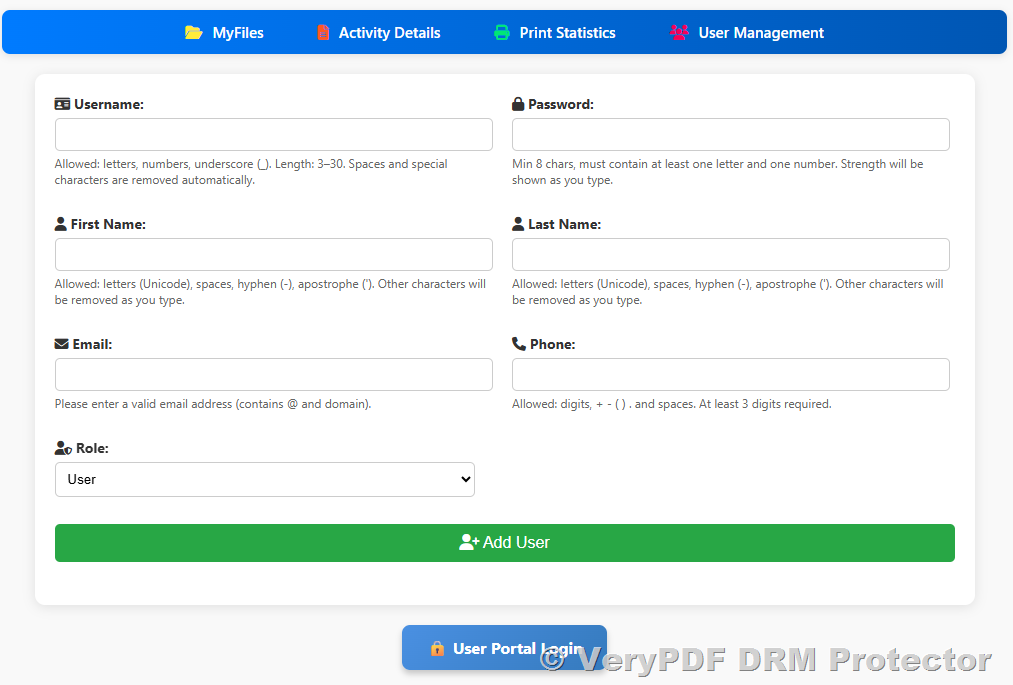
The User Management feature is designed for administrators who want complete control over access to protected PDF documents. Through the VeryPDF DRM Protector platform, admins can:

1. Add or Remove Users: Quickly create new user accounts for individuals who need access to protected documents. Similarly, remove users when access is no longer required.
2. Assign Permissions: Set different permission levels for users, including whether they can read, print, or download PDF files (coming soon).
3. Track Usage: Monitor who accessed which documents and when. This provides valuable insights into document usage and helps prevent unauthorized sharing.
4. Centralized Administration: Manage all users from a single admin console, saving time and improving efficiency.

Administrators can access User Management via the web interface at:

[VeryPDF DRM Admin Console]
https://drm.verypdf.com/wp-admin/admin.php?page=VeryPDFDRMFiles

This central hub ensures that your documents are only accessible to authorized individuals, keeping your intellectual property safe.
User Management and User Portal Login in VeryPDF DRM Protector

User Portal Login

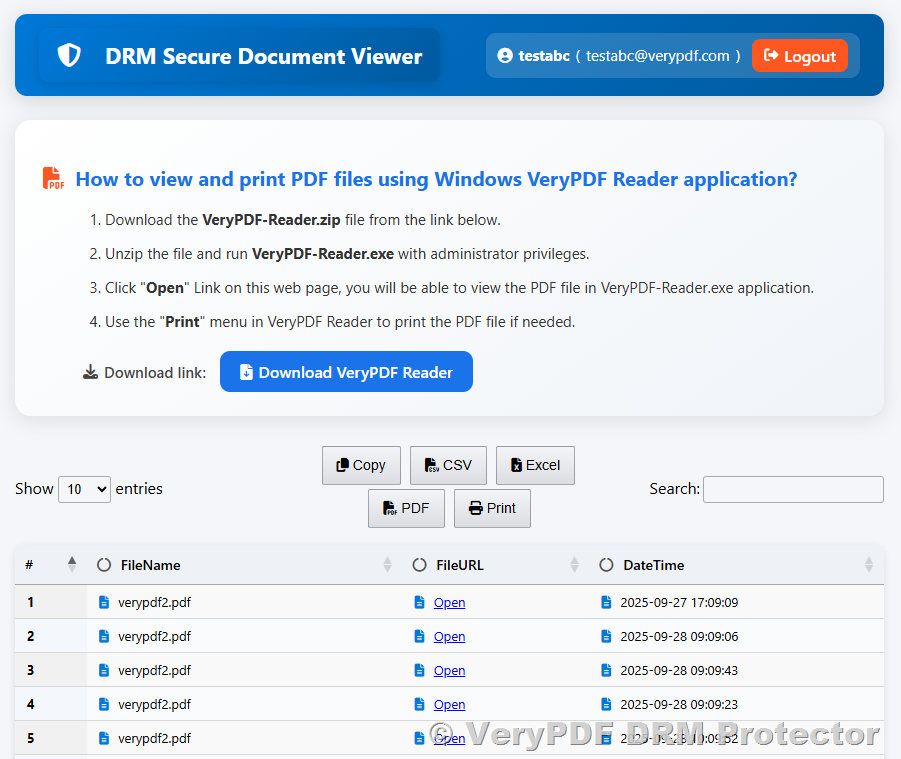
For end-users, the User Portal Login provides a secure and convenient way to access protected PDF files. Key aspects include:

1. Secure Login: Users must authenticate themselves before accessing any protected documents, ensuring that only authorized individuals can view your PDFs.
2. Read and Print Access: Depending on the permissions set by the administrator, users can read, print, or interact with PDF files safely.
3. User-Friendly Interface: The portal is designed for simplicity, allowing users to access their documents without technical difficulties.
4. Cross-Device Compatibility: Users can log in from desktops, laptops, or tablets, providing flexibility for remote or mobile work environments.

Users can log in to the portal here:

[VeryPDF DRM User Portal]
https://online.verypdf.com/app/pdfdrm/login.php

With this portal, organizations can confidently distribute protected documents, knowing that access is controlled and monitored.
User Management and User Portal Login in VeryPDF DRM Protector

Benefits of User Management and User Portal Login

Combining User Management with the User Portal Login offers several key benefits:

* Enhanced Security: Only authorized users can access sensitive documents.
* Access Control: Admins can define permissions, controlling how documents are used.
* Audit Trail: Track user activity to ensure compliance and prevent unauthorized sharing.
* Convenience: Users can easily access their documents through a simple login process.

—

In conclusion, the User Management and User Portal Login features of the VeryPDF DRM Protector platform provide a comprehensive solution for controlling access to sensitive PDF documents. By managing users and providing a secure portal for document access, organizations can protect their intellectual property, maintain compliance, and ensure that their content is only accessed by the right people.

Related posts:

Automatic API Integration with VeryPDF DRM Protector: Cost, Access, and Implementation Guide
[Solution] Hardware-Locked PDF Encryption: Ensuring Documents Open Only on Authorized Devices. PDF H...
How to Protect Your Trifold PDFs from Screenshots, Copying, and Editing with VeryPDF DRM Protector
Protecting Confidential Documents: Why You Need Digital Rights Management (DRM)
How to Protect and Monitor Printing of Educational Workbooks for Licensed Learning Centers and Preve...
How to Create a PDF to QR Code for Quick and Easy Sharing with VeryPDF DRM Protector
Add Permanent Watermark to PDF Documents with recipient name
Import PDF as a Watermark with Transparency in VeryPDF DRM Protector
10 Tips, Tricks, and Best Practices for Sending Secure PDF Documents
User Management and User Portal Login in VeryPDF DRM Protector

Related Posts

  • Protect and Secure Your PDF Books Online: Key Features, Benefits, and Tools of VeryPDF DRM Protector for Authors and Publishers
  • VeryPDF Secure Web Viewer & PDF DRM Protector: PDF Security, Encryption, Anti-Copy, Device Limits, and E-Book Protection
  • VeryPDF DRM Protector Fully Supports Cloudflare R2: Comprehensive PDF Security and Customer Benefits
  • Protecting Multiple PDFs in VeryPDF DRM Protector: Manual Uploads vs. User Portal Access vs. Full Automation
  • VeryPDF DRM Protector MyFiles Actions Menu: Complete Guide to Secure PDF Management, Viewing, Sharing, and DRM Features
  • Step-by-Step Guide: How to Use VeryPDF DRM Protector Online Application to Secure and Protect PDF Files
  • VeryPDF DRM Protector – Advanced PDF Security and DRM Protection to Secure/Protect PDF Files & Documents
  • How VeryPDF DRM Protector Secures PDF Files and Enables Controlled Sharing
  • Why the Society of Certified Senior Advisors Needs VeryPDF DRM Protector: Protecting Educational Content with Confidence
  • Why the Actuaries Institute Needs VeryPDF DRM Protector: Securing Professional Content with Confidence
  • Max Authorized Users Explained: Understanding User Accounts in VeryPDF DRM Protector
  • How to Protect Your PDF Documents with Static and Dynamic Text Watermarks in VeryPDF DRM Protector
  • How to Protect a PDF File with DRM Options and View PDF File Access Statistics Report
  • VeryPDF Screen Shield: Protect PDFs by Showing Only Part of Each Page and Prevent Screenshots
  • VeryPDF DRM Protector — Detailed Guide to Three Entry Points: Online DRM Protector, Admin Management Panel, and End-User Viewer
  • VeryPDF DRM USB Portable: The Best Way to Protect PDF Files on USB Devices – The Ultimate Solution for Secure Document Distribution
  • Vitrium Security vs. VeryPDF DRM Protector: A Detailed Comparison and Why VeryPDF DRM Protector is the Superior Choice
  • How to Add Tiled Watermark Text to PDF Files Using VeryPDF DRM Protector Web Application
  • [Solution] VeryPDF File Protection: Comprehensive DRM Solutions for Documents, Images, Videos, and Audio Files
  • How to Protect and Monitor Printing of Educational Workbooks for Licensed Learning Centers and Preventing Printing to PDF or Virtual Printers
Tagged on: access control access management access monitoring access rights access tracking admin console admin management content control content management content security digital document portal digital documents digital protection digital rights digital rights management document access document access control document encryption document management document monitoring document portal document portal login document protection document security document sharing drm protector file encryption file monitoring file protection file security online access online portal pdf access pdf access control pdf administration pdf authentication pdf authorization pdf compliance pdf control pdf distribution pdf distribution portal pdf document security pdf encryption pdf governance pdf management pdf management system pdf monitoring pdf permissions pdf policy pdf portal pdf printing pdf protection pdf rights pdf rights management pdf rules pdf safety pdf safety system pdf security pdf security system pdf sharing pdf software pdf tracking pdf user portal pdf users pdf viewing pdf workflow permission settings portal access portal login portal security print control protected content protected documents protected files protected pdf read access secure access secure document access secure documents secure file secure login secure pdf secure pdf files secure portal secure sharing user access user accounts user admin user authentication user control user dashboard user login user management user permissions user portal user roles user tracking
PDFDRM October 9, 2025November 21, 2025 Document Security, PDF DRM Protector, User Manual
  • ← VeryPDF DRM Protector Print Control: Restrict, Track, and Monitor PDF Printing with Detailed Statistics, Print Limits, Secure Reports, and Virtual Printer Blocking
  • How to Use Image Watermarks, Transparency, and Opacity in VeryPDF DRM Protector →

Custom Development Services

VeryPDF offers customized development services to meet your unique business needs, including PDF Processing, Document Automation, Document Analysis, Format Conversion, OCR, DRM, Barcode Solutions, Virtual Printer, Digital Signature, AI Integration, and more. Contact us today to get a personalized solution!

Recent Posts

  • Protect Your Academic Content From Being Shared With Unauthorized People …
  • Ensure Your Teaching Materials Stay in the Right Hands and Are Not Shared…
  • Stop Unauthorized Distribution of Your Lecture Files Online and Keep Them…
  • Protect Your Course Materials From Being Shared Without Your Permission a…
  • Ensure Your Academic Files Are Only Accessible by Your Approved Students …

Meta

  • Register
  • Log in
  • Entries feed
  • Comments feed
  • VeryPDF.com
  • VeryDOC.com
  • VeryUtils.com
  • imPDF.com

Solutions

  • [Solution] VeryPDF File Protection: Comprehensive DRM Solutions for Docum…
  • [Solution] Securely Sell eBook PDFs on Gumroad: Prevent Copying, Printing…
  • [Solution] How to Safely Sell Your eBook PDF on PayHip Platform and Preve…
  • [Solution] DRM Software for Secure eBook Distribution: Starter Plan, Prof…
  • [Solution] How to Protect Digital Books and PDFs with DRM: Device Binding…

Categories

Archives

Tags

Calendar

January 2026
M T W T F S S
 1234
567891011
12131415161718
19202122232425
262728293031  
« Dec    

Recent Posts

  • Protect Your Academic Content From Being Shared With Unauthori…
  • Ensure Your Teaching Materials Stay in the Right Hands and Are…

Solutions

  • [Solution] VeryPDF DRM Protector for Legal and Contracts: Safe…
  • [Solution] Protect Product Images with VeryPDF DRM Protector &…

Solutions

  • Document Security Solution
  • Secure File Sharing Solution
  • Image & Photo DRM Controls
  • Subscription-based PDF Publishing
  • eBook Publishing Solution

Related Websites

  • Website: https://www.verypdf.com
  • Website: https://www.verydoc.com
  • Website: https://online.verypdf.com
  • Website: https://veryutils.com
  • Support: https://support.verypdf.com
Copyright © 2026 VeryPDF DRM Protector Company. All rights reserved.
  • Terms of Trade
  • Privacy Policy
  • VeryPDF
  • VeryDOC
  • VeryUtils
  • Contact Us
  • My Account