
If you distribute confidential PDF files, one question always comes up:
How can I stop users from taking screenshots or recording my PDF documents?
Password protection is not enough.
Standard PDF permissions are easy to remove.
Even many PDF DRM products cannot fully stop screen capture software.
VeryPDF DRM Protector solves this problem with multiple security layers. When users open protected PDF files in VeryPDF Reader for Windows, screenshots and screen recording are blocked. Screen Shield Protection, dynamic watermarks, and invisible watermarks work together to make document leaks much more difficult.
Whether your users read documents online or offline, your PDF files remain protected.
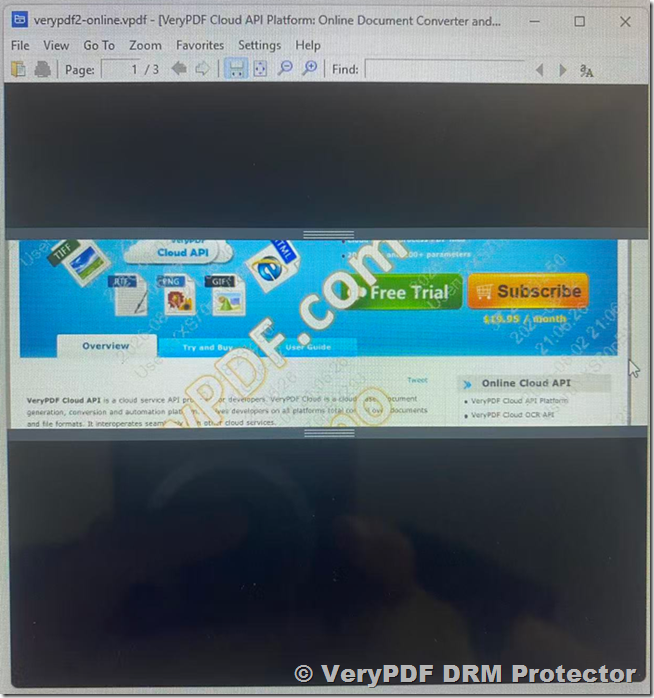
The First Layer: Block Screenshots and Screen Recording
VeryPDF Reader for Windows is designed to protect sensitive documents.
When users open a DRM protected PDF, the reader prevents common screenshot tools and screen recording software from capturing the document.
This includes many popular screen capture utilities available on Windows.
Instead of relying only on PDF encryption, VeryPDF protects the document while it is being viewed.
This is much safer than a normal PDF reader.
The Second Layer: Screen Shield Protection
Even if someone tries to capture the screen with another device, Screen Shield Protection adds another level of security.
Instead of showing the entire PDF page, VeryPDF Reader only displays a small part of the page.
The rest of the screen is covered.
Users move the reading window to continue reading the document.
This means:
- A screenshot only captures part of the page.
- Screen recording only records part of the page.
- A mobile phone camera can only photograph a small section.
Even if someone records the screen for several minutes, they never see the complete page at one time.
The Third Layer: Dynamic Watermarks
Every protected document can include a dynamic watermark.
The watermark can automatically display information such as:
- User name
- Email address
- Company name
- Date
- Time
- IP address
- Custom text
Because every user sees a different watermark, people are much less likely to share confidential documents.
If leaked screenshots appear online, the owner can immediately identify the source.
The Fourth Layer: Invisible Watermarks
Visible watermarks discourage leaks.
Invisible watermarks help investigate them.
VeryPDF DRM Protector can embed hidden information inside every protected document.
The invisible watermark cannot be seen by users.
However, if someone leaks the document, the hidden watermark can be extracted using forensic tools.
This allows organizations to trace where the leaked copy came from.
Even photographs taken with a mobile phone can still contain the invisible watermark.
Multiple Security Layers Work Together
One security feature is helpful.
Several security features working together provide much stronger protection.
| Security Feature | Purpose |
|---|---|
| Screenshot Protection | Blocks screenshots |
| Screen Recording Protection | Blocks recording software |
| Screen Shield | Shows only part of the page |
| Dynamic Watermark | Discourages sharing |
| Invisible Watermark | Identifies leak sources |
| Strong Encryption | Protects document data |
| File Integrity Check | Detects tampering |
| DRM Permissions | Controls document access |
Instead of relying on one protection method, VeryPDF uses several security technologies at the same time.
Works for Online and Offline DRM Protected PDF Files
Many DRM products only provide advanced protection when users are connected to the Internet.
VeryPDF supports both modes.
| Feature | Online DRM | Offline DRM |
|---|---|---|
| Screenshot Protection | ✔ | ✔ |
| Screen Recording Protection | ✔ | ✔ |
| Screen Shield | ✔ | ✔ |
| Dynamic Watermark | ✔ | ✔ |
| Invisible Watermark | ✔ | ✔ |
| Strong Encryption | ✔ | ✔ |
| File Integrity Verification | ✔ | ✔ |
Users can safely read protected documents whether they are online or offline.
Strong Encryption and File Integrity Verification
VeryPDF DRM Protector also protects the PDF file itself.
Offline DRM protected PDF files use strong encryption and built-in file integrity verification.
Every time the document opens, VeryPDF Reader checks whether the file has been modified.
If someone changes the encrypted content, removes DRM information, or attempts to bypass the protection, the integrity check fails and the document will not open.
This makes offline DRM protected PDF files much harder to attack or modify.
Who Should Use These Features?
These security features are useful for many industries.
- Publishers protecting eBooks
- Universities sharing course materials
- Companies distributing employee manuals
- Engineering firms protecting drawings
- Law firms sharing confidential contracts
- Financial companies protecting reports
- Healthcare organizations protecting medical documents
- Government agencies distributing sensitive information
Why Multiple Security Layers Matter
No single technology can stop every possible attack.
For example:
- Software can block screenshots.
- Screen Shield limits what is visible.
- Dynamic watermarks discourage sharing.
- Invisible watermarks help identify the source of leaks.
- Strong encryption protects the document.
- File integrity verification prevents tampering.
Together, these technologies provide a much higher level of protection than traditional PDF security.
Why Choose VeryPDF DRM Protector?
VeryPDF DRM Protector is more than a PDF encryption tool.
It is a complete document protection platform that helps organizations control how PDF files are viewed, shared, and protected.
Key benefits include:
- Block screenshots
- Block screen recording software
- Screen Shield Protection
- Dynamic watermarks
- Invisible forensic watermarks
- Strong PDF encryption
- File integrity verification
- Online and offline DRM
- Device authorization
- User authentication
- Printing and copying control
- Expiration dates
- Open limits
- Access control
If your documents contain valuable information, these features work together to reduce the risk of leaks and unauthorized distribution.
Conclusion
Protecting confidential PDF files requires more than encryption.
VeryPDF Reader for Windows combines screenshot protection, screen recording protection, Screen Shield, dynamic watermarks, invisible watermarks, strong encryption, and file integrity verification into one solution.
Each feature adds another layer of security.
Together, they help protect your documents from unauthorized copying, recording, sharing, and tampering, giving you much greater confidence when distributing sensitive PDF files.
Frequently Asked Questions
1. Can VeryPDF completely block screenshots?
VeryPDF Reader for Windows blocks common screenshot tools while viewing DRM protected PDF files.
2. Does it stop screen recording software?
Yes. VeryPDF Reader prevents many Windows screen recording applications from capturing protected documents.
3. What is Screen Shield?
Screen Shield only displays a small part of the PDF page at one time, making screenshots and recordings much less useful.
4. Does Screen Shield work offline?
Yes. It supports both online and offline DRM protected PDF files.
5. What is a dynamic watermark?
It is a visible watermark that automatically displays user information such as name, email, company, date, and time.
6. What is an invisible watermark?
It is hidden information embedded inside the protected document that can help identify the source of a leaked copy.
7. Can offline DRM protected PDF files be modified?
No. VeryPDF uses strong encryption and file integrity verification to detect unauthorized modifications.
8. What happens if someone changes the protected file?
VeryPDF Reader detects the modification and refuses to open the document.
9. Does this work without an Internet connection?
Yes. Offline DRM protected PDF files can be securely viewed without Internet access.
10. Is this better than password-protected PDFs?
Yes. Password protection only encrypts the file. VeryPDF adds access control, screenshot protection, Screen Shield, watermarking, encryption, and integrity verification.
11. Can organizations identify document leaks?
Yes. Dynamic and invisible watermarks make it much easier to identify the source of leaked documents.
12. Which operating system supports these protections?
These features are available in VeryPDF Reader for Windows, with online viewing also supported through the VeryPDF secure web reader.