
Many companies need to share confidential PDF files with employees, customers, partners, or students. They want users to read the documents, but they do not want people to copy the content, take screenshots, record the screen, or share the files with others.
Most PDF DRM software can stop printing and copying. Some can stop screenshots, but only when the PDF is opened online. The problem starts when users need to read PDF files without an Internet connection.
Can you stop screenshots and screen recording in offline DRM protected PDF files?
The answer is yes.
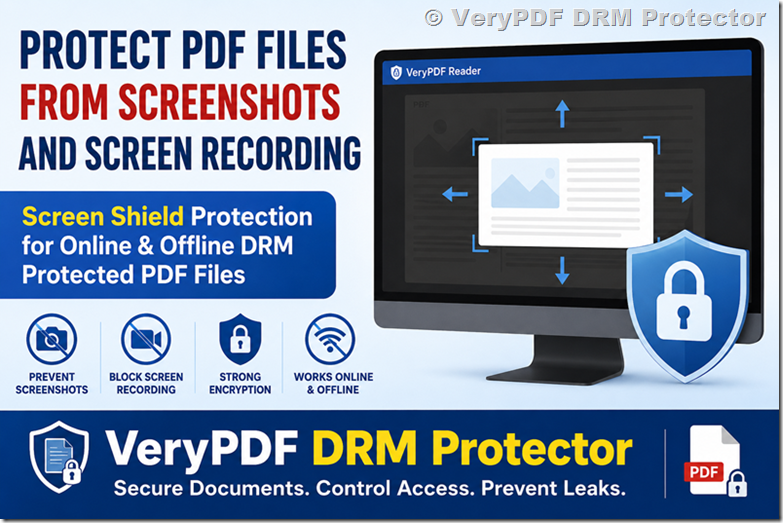
VeryPDF DRM Protector now supports Screen Shield Protection in VeryPDF Reader for Windows. This feature works with both online DRM protected PDF files and offline DRM protected PDF files, giving document owners much stronger protection.
What Is Screen Shield Protection?
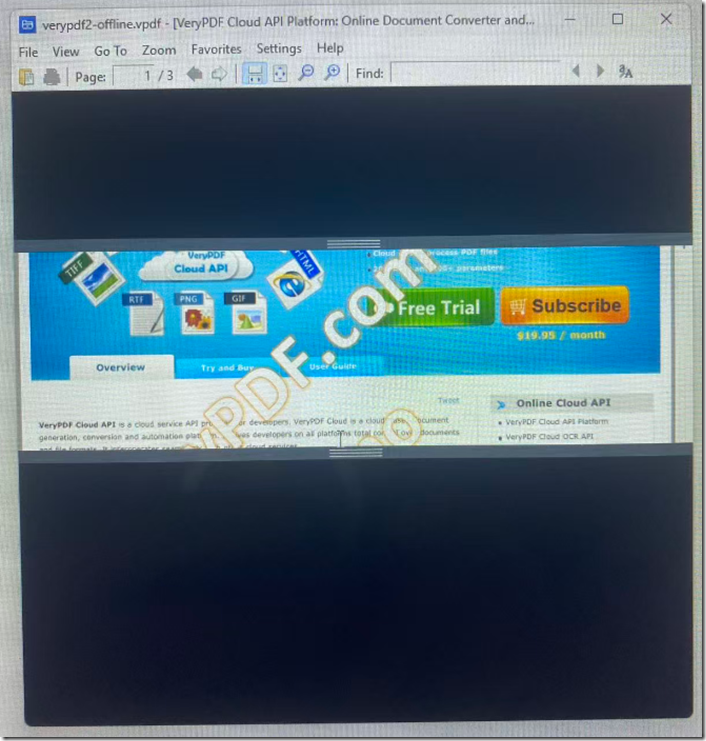
Screen Shield Protection only shows part of the PDF page on the screen. The rest of the page is covered by a black overlay.
Instead of displaying the whole page, users only see a small viewing window. They can move this window up and down to read the document.
If someone takes a screenshot or records the screen, they only capture the visible area instead of the complete page.
This makes content theft much harder.
Why Normal Screenshot Protection Is Not Enough
Windows provides several ways to capture the screen.
Examples include:
- Print Screen
- Snipping Tool
- Xbox Game Bar
- Third-party screenshot software
- Screen recording software
VeryPDF Reader already blocks most screenshot methods by using Windows screen capture protection.
However, there are still situations where someone may:
- Use another computer
- Use a virtual machine
- Use a camera or mobile phone
- Record only the visible content
No software can completely stop someone from pointing a phone camera at the monitor.
This is where Screen Shield Protection becomes useful.
Instead of trying to stop the camera, it limits what the camera can see.
How Screen Shield Works
When Screen Shield is enabled:
| Feature | Result |
|---|---|
| Full page display | Disabled |
| Visible reading area | Small movable window |
| Remaining page | Black overlay |
| Screenshot | Only visible area captured |
| Screen recording | Only visible area recorded |
| Mobile phone photo | Only visible area photographed |
Users simply move the reading window while reading the document.
The protected content is never fully displayed on the screen.
Online DRM vs Offline DRM
Many users ask whether Screen Shield only works online.
The answer is no.
VeryPDF now supports this feature in both modes.
| Feature | Online DRM PDF | Offline DRM PDF |
|---|---|---|
| Open without Internet | No | Yes |
| Screenshot protection | Yes | Yes |
| Screen recording protection | Yes | Yes |
| Screen Shield Protection | Yes | Yes |
| Dynamic watermark | Yes | Yes |
| DRM permissions | Yes | Yes |
This means users can safely read protected documents even when they have no Internet connection.
Stronger Encryption for Offline DRM Protected PDF Files
VeryPDF has also upgraded the encryption used in offline DRM.
The new encryption makes it much more difficult to:
- Modify protected PDF files
- Remove DRM protection
- Change user permissions
- Bypass license checking
- Tamper with encrypted data
Offline DRM files remain protected even after being copied to another storage device.
This gives organizations better protection against reverse engineering and unauthorized changes.
What Problems Does This Solve?
Many organizations face the same security problems.
| Problem | Solution |
|---|---|
| Employees take screenshots | Screen Shield Protection |
| Users record the screen | Screen Shield limits visible content |
| Sensitive contracts are copied | DRM permissions prevent copying |
| Confidential manuals are shared | User authentication controls access |
| Training materials are leaked | Watermarks identify the reader |
| Offline users need protection | Offline DRM keeps files encrypted |
Who Needs Screen Shield Protection?
This feature is useful for many industries.
Corporate Documents
Protect:
- Business plans
- Financial reports
- Internal documents
- Company policies
Education
Schools and universities can protect:
- Course materials
- Exam papers
- Research documents
- Training manuals
Healthcare
Hospitals and medical companies can secure:
- Medical reports
- Patient information
- Research documents
- Clinical procedures
Legal
Law firms can protect:
- Contracts
- Court documents
- Legal evidence
- Confidential agreements
Publishing
Publishers can protect:
- eBooks
- Digital magazines
- Technical manuals
- Paid reports
What Happens If Someone Uses a Phone Camera?
This is one of the most common questions.
No Windows application can completely stop someone from taking a picture of the monitor with a mobile phone.
However, Screen Shield greatly reduces the value of those photos.
Instead of capturing an entire page, the camera only captures a small section.
When Screen Shield is combined with visible watermarks or invisible forensic watermarks, document leaks become much easier to trace.
Additional Security Features
VeryPDF DRM Protector includes many other security features.
| Security Feature | Available |
|---|---|
| AES encryption | ✔ |
| Prevent copy | ✔ |
| Prevent printing | ✔ |
| Prevent screenshots | ✔ |
| Prevent screen recording | ✔ |
| Screen Shield | ✔ |
| Dynamic watermark | ✔ |
| Static watermark | ✔ |
| Offline viewing | ✔ |
| Online viewing | ✔ |
| Device authorization | ✔ |
| User authentication | ✔ |
| Expiration control | ✔ |
| Open limits | ✔ |
| Geographic restrictions | ✔ |
| IP restrictions | ✔ |
Offline DRM Protected PDF Files Cannot Be Modified
VeryPDF DRM Protector also includes file integrity verification for offline DRM protected PDF files.
When an offline DRM protected PDF is created, VeryPDF generates integrity information for the entire file. Every time the document is opened, VeryPDF Reader checks the file before allowing access.
If someone tries to modify the file, remove security information, change the encrypted data, or bypass the DRM protection, the integrity check will fail and the document will not open.
This extra layer of protection helps prevent tampering and makes offline DRM protected PDF files much more secure. Even if an attacker copies the file or attempts to modify it, VeryPDF Reader can detect the changes and reject the file.
Combined with stronger encryption, screenshot protection, screen recording protection, and Screen Shield Protection, file integrity verification provides another important security layer for organizations that need to distribute confidential PDF documents without an Internet connection.
Why Organizations Choose VeryPDF DRM Protector
Many PDF security products only protect files while users are online.
VeryPDF offers protection for both online and offline reading.
Organizations can:
- Protect confidential PDF documents.
- Allow offline reading.
- Prevent screenshots.
- Prevent screen recording.
- Limit what users can see with Screen Shield.
- Apply stronger encryption.
- Control who can open each document.
- Revoke access at any time for online documents.
This combination provides better protection than traditional password-protected PDFs.
Try VeryPDF DRM Protector
If you need to protect confidential PDF files from screenshots, screen recording, unauthorized copying, and document leaks, VeryPDF DRM Protector is a powerful solution.
It supports both online DRM protected PDF files and offline DRM protected PDF files, while providing advanced security features such as Screen Shield Protection, stronger encryption, watermarking, access control, expiration settings, and device authorization.
Whether you distribute training materials, legal documents, engineering drawings, financial reports, or eBooks, VeryPDF DRM Protector helps keep your PDF files secure.
Frequently Asked Questions
1. Can VeryPDF stop screenshots?
Yes. VeryPDF Reader for Windows blocks common screenshot tools and supports Screen Shield Protection to reduce captured content.
2. Does Screen Shield work in offline mode?
Yes. It works with both online and offline DRM protected PDF files.
3. Can users still read documents without Internet access?
Yes. Offline DRM allows authorized users to read protected documents without an Internet connection.
4. Does Screen Shield stop screen recording?
It greatly limits what is recorded because only part of the page is visible at any time.
5. Can someone take a photo with a mobile phone?
Yes. No Windows software can completely prevent this. Screen Shield limits how much content appears in each photo.
6. Can I choose how much of the page is visible?
Yes. The visible reading area can be configured to show only part of each page.
7. Can users move the visible window?
Yes. The reading window can be moved so users can read the entire document while never seeing the full page at once.
8. Does offline DRM use encryption?
Yes. VeryPDF uses strong encryption to protect offline DRM files against tampering and unauthorized modification.
9. Can I prevent printing and copying?
Yes. VeryPDF DRM Protector supports printing restrictions, copy protection, and many other permission controls.
10. Is this better than password-protected PDFs?
Yes. Password-protected PDFs can often be shared freely after the password is known. DRM protection gives document owners much more control.
11. Which operating system supports Screen Shield?
Currently, Screen Shield Protection is available in VeryPDF Reader for Windows. The web-based secure reader also supports this feature.
12. Where can I try VeryPDF DRM Protector?
You can test online and offline PDF protection, Screen Shield Protection, watermarking, and many other DRM features by using VeryPDF DRM Protector.