
In today’s digital world, businesses share confidential files every day, contracts, financial reports, compliance documents, training materials, investment pitch decks, legal documents, and internal corporate files. But many companies are now discovering a major problem with traditional cloud storage platforms like Google Drive, Dropbox, and OneDrive:
Once a file is shared, control is often lost.
Users can forward links, download files, share copies externally, take screenshots, or distribute sensitive documents without authorization. For industries handling confidential information, this creates serious security, compliance, and intellectual property risks.
This is where VeryPDF DRM Protector becomes fundamentally different from traditional cloud storage services.
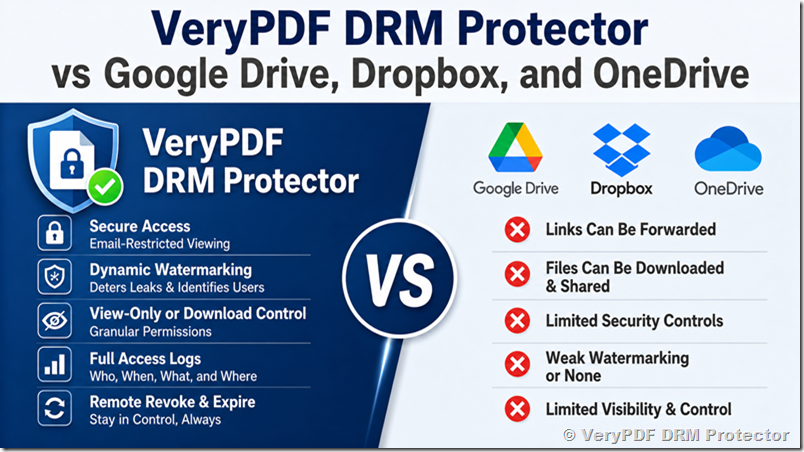
The Growing Demand for Secure Document Sharing
Many organizations today are searching for:
- secure file sharing software
- DRM protected PDF sharing
- confidential document sharing solutions
- secure PDF viewer
- document access control software
- prevent PDF sharing
- stop unauthorized file sharing
- secure virtual data room alternatives
- document watermarking software
- track document views and downloads
- secure financial document sharing
- protected document delivery system
- secure client document portal
Traditional cloud drives were designed mainly for collaboration and convenience — not for strict document control.
That difference matters.
What Google Drive, Dropbox, and OneDrive Do Well
Google Drive
Google Drive is excellent for:
- team collaboration
- real-time editing
- document syncing
- cloud backups
- file sharing between coworkers
However, when it comes to protecting sensitive documents, there are limitations:
- shared links can be forwarded
- downloaded files become uncontrolled
- watermarking is limited
- screenshots cannot be prevented
- no true DRM protection
- no granular document usage control
Dropbox
Dropbox is popular because of:
- easy file synchronization
- fast sharing
- simple user experience
- cross-platform compatibility
But Dropbox still primarily operates as a cloud storage platform, not a document security platform.
Common issues include:
- public link exposure risks
- unauthorized redistribution
- limited protection after download
- no persistent DRM controls
- weak protection for confidential PDFs
Microsoft OneDrive
OneDrive integrates well with:
- Microsoft Office
- enterprise workflows
- Teams and SharePoint
- corporate environments
But even enterprise environments face challenges:
- files can still be copied externally
- downloaded documents lose centralized control
- audit visibility may be incomplete
- link forwarding risks remain
- document leakage is still possible
Why VeryPDF DRM Protector Is Different
VeryPDF DRM Protector is not trying to become another cloud drive or collaboration platform.
Instead, it focuses on one mission:
“Share a file and stay in control.”
This makes it ideal for:
- financial institutions
- universities
- training companies
- legal firms
- healthcare organizations
- consulting firms
- publishers
- compliance teams
- enterprises handling confidential documents
Core Security Features of VeryPDF DRM Protector
1. Email-Restricted Secure Document Access
Unlike normal shared links, VeryPDF DRM Protector allows access only to authorized email accounts.
Even if someone forwards the link, unauthorized users cannot open the protected document.
This helps prevent:
- link forwarding abuse
- unauthorized document access
- accidental external exposure
- uncontrolled file distribution
SEO Keywords:
secure document access, restricted PDF sharing, protected file sharing, secure client document portal
2. Dynamic Watermarking for Every Viewer
One of the most important enterprise security features is dynamic watermarking.
VeryPDF DRM Protector can automatically add:
- viewer email address
- timestamp
- IP information
- custom watermark text
to every viewed page dynamically.
This creates accountability and discourages leaks.
For regulated industries, dynamic watermarking is extremely valuable because it:
- deters insider leaks
- identifies unauthorized sharing
- improves compliance auditing
- protects intellectual property
SEO Keywords:
dynamic watermarking software, PDF watermark security, confidential document watermarking, forensic watermarking
3. Separate Viewing and Download Permissions
Traditional cloud drives often treat viewing and downloading similarly.
VeryPDF DRM Protector separates them completely.
Administrators can:
- allow viewing only
- block downloads entirely
- permit temporary downloads
- revoke download access later
- prevent printing
- disable copy/paste
This level of granular document control is critical for sensitive files.
SEO Keywords:
view-only PDF sharing, prevent PDF downloads, secure document viewer, DRM protected documents
4. Access Logs and Audit Trails
VeryPDF DRM Protector provides detailed access tracking, including:
- who opened the file
- when it was viewed
- download activity
- IP/location information
- failed access attempts
This creates enterprise-grade audit visibility.
Cloud drives typically provide only limited activity information.
SEO Keywords:
document audit trail, file access tracking, PDF activity logs, compliance document tracking
5. Remote Revocation and Expiration
One of the biggest weaknesses of traditional cloud sharing is that downloaded files usually remain permanently accessible.
With VeryPDF DRM Protector, administrators can:
- revoke access instantly
- expire documents automatically
- disable previously shared files
- terminate access remotely
Even after distribution.
This is essential for:
- confidential contracts
- financial statements
- training materials
- investor reports
- internal corporate documents
SEO Keywords:
revoke PDF access, remote document control, expire shared files, secure document distribution
Direct Comparison: VeryPDF DRM Protector vs Cloud Drives
|
Feature |
VeryPDF DRM Protector |
Google Drive |
Dropbox |
OneDrive |
|
Secure View-Only Access |
Yes |
Limited |
Limited |
Limited |
|
Dynamic Watermarking |
Yes |
No |
No |
Limited |
|
Email-Restricted Viewing |
Yes |
Partial |
Partial |
Partial |
|
Prevent Unauthorized Sharing |
Strong |
Weak |
Weak |
Moderate |
|
DRM Protection |
Yes |
No |
No |
Partial |
|
Remote Access Revocation |
Yes |
Limited |
Limited |
Partial |
|
Full Audit Logs |
Detailed |
Basic |
Basic |
Moderate |
|
Screenshot Deterrence |
Watermark-based |
No |
No |
No |
|
Granular Download Control |
Advanced |
Limited |
Limited |
Moderate |
|
Focus on Sensitive Documents |
Yes |
No |
No |
No |
Why Financial and Regulated Industries Need More Than Cloud Storage
The original customer discussions raise a very real industry problem:
“Once you share a file, you lose control.”
For fintech companies, law firms, investment firms, universities, and compliance-heavy organizations, ordinary cloud storage is no longer enough.
They need:
- secure financial document sharing
- protected investor deck sharing
- confidential contract distribution
- secure training document delivery
- DRM protected PDF systems
- enterprise document protection
- secure client file portals
This is exactly the problem that VeryPDF DRM Protector was designed to solve.
Is Dynamic Watermarking Actually Useful?
Yes, especially in regulated industries.
Dynamic watermarking changes user behavior because every viewed document becomes traceable.
If a screenshot or leaked document appears online, organizations can identify:
- who viewed it
- when it was accessed
- which account leaked it
This creates a strong deterrent effect.
That is why many organizations now search for:
- secure PDF sharing with watermark
- forensic watermarking solutions
- anti-leak document systems
- protected PDF viewer
- secure virtual data room alternatives
Final Thoughts
Google Drive, Dropbox, and OneDrive are excellent cloud collaboration tools.
But they were not built primarily for persistent document security and DRM-based access control.
VeryPDF DRM Protector focuses on something fundamentally different:
- protecting confidential documents
- controlling file usage
- preventing unauthorized sharing
- tracking document access
- enabling secure document delivery
- maintaining control after sharing
For organizations handling sensitive documents, that difference is extremely important.
If your business needs secure file sharing with real document control, DRM protection, dynamic watermarking, audit logs, and revocable access, VeryPDF DRM Protector provides capabilities that traditional cloud drives were never designed to offer.