
Introduction: The New Reality of Internal Data Leakage
In modern enterprises, data is no longer confined to secure servers or isolated networks. Sensitive information flows continuously across departments, devices, remote teams, and external partners. Financial reports, product roadmaps, engineering designs, legal contracts, HR records, and strategic presentations are routinely accessed, shared, and reviewed in digital form.
While this level of accessibility improves productivity, it also introduces a critical vulnerability: internal data leakage.
Unlike external cyberattacks, internal leaks are far more difficult to detect and prevent. They often originate from:
- Employees taking screenshots of confidential documents
- Staff forwarding sensitive files to personal devices
- Contractors downloading and redistributing proprietary materials
- Partners accessing documents beyond their intended scope
Traditional security mechanisms, password-protected PDFs, VPN access, or basic permissions, are no longer sufficient. Once a document is opened, organizations typically lose visibility and control.
This is where VeryPDF DRM Protector fundamentally changes the equation.
By combining advanced screenshot blocking with granular document tracking and analytics, it enables enterprises to not only prevent data leakage but also trace every interaction with sensitive documents at a forensic level.
This article explores how VeryPDF DRM Protector addresses real-world enterprise pain points, supported by detailed case studies and practical implementation scenarios.
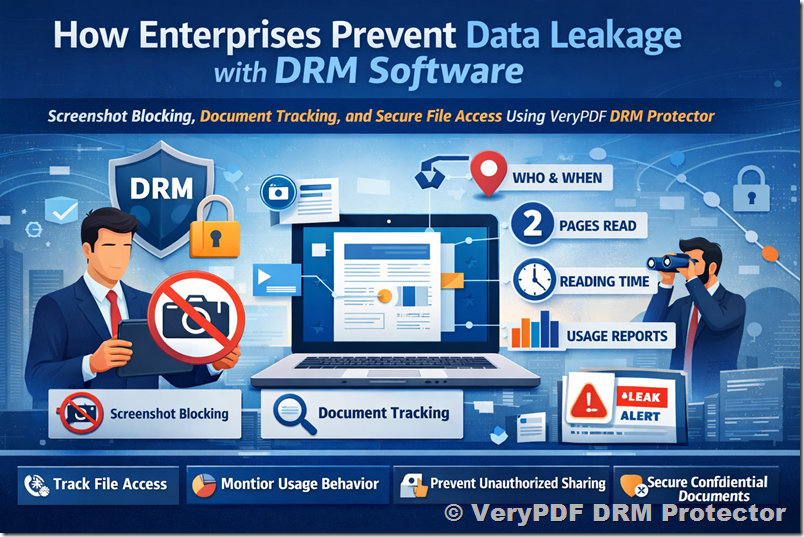
The Core Problem: Lack of Visibility After Document Distribution
Most organizations operate under a flawed assumption: once access is restricted, the data is secure.
In reality, the most critical risks occur after access is granted.
Consider these common questions that traditional systems cannot answer:
- Who actually opened the document?
- When was it accessed?
- Which pages were read?
- How long did the user spend on each page?
- Was the document skimmed or thoroughly reviewed?
- Did someone capture screenshots or attempt to extract content?
Without answers to these questions, organizations operate blindly. When a leak occurs, they can only speculate.
VeryPDF DRM Protector introduces full lifecycle visibility, turning every document into a trackable, auditable asset.
Feature 1: Screenshot Blocking – Eliminating the Easiest Data Exfiltration Method
Why Screenshot Blocking Matters
Among all data leakage methods, screenshots are the simplest and most difficult to control.
An employee does not need technical skills to:
- Press a keyboard shortcut
- Use a screen capture tool
- Take a photo with a mobile phone
Even if printing, copying, and downloading are disabled, screenshots remain a loophole in most systems.
How VeryPDF DRM Protector Solves This
VeryPDF DRM Protector implements multi-layer screenshot prevention mechanisms, including:
- OS-level screen capture blocking
- Detection of third-party screen recording tools
- Blackout rendering when capture is attempted
- Dynamic watermark overlays tied to user identity
When a user attempts to take a screenshot:
- The screen may turn black
- The capture may result in a blank image
- The system logs the attempt for audit purposes
This transforms screenshots from an invisible risk into a detectable and preventable action.
Feature 2: Full Document Tracking – Turning Documents into Observable Assets
What “Tracking” Really Means
VeryPDF DRM Protector goes far beyond simple access logs.
It captures fine-grained behavioral analytics, including:
- User identity (who opened the document)
- Timestamp (when it was accessed)
- Device and location context
- Page-level tracking:
- Which pages were viewed
- Order of navigation
- Time spent per page
- Session-level metrics:
- Total reading time
- Number of sessions
- Frequency of access
This creates a complete reading profile for every user interaction.
Case Study 1: Financial Institution Preventing Insider Leaks
Background
A mid-sized financial advisory firm regularly distributes:
- Investment strategy reports
- Market forecasts
- Client portfolio analyses
These documents are highly sensitive and directly tied to revenue.
The Problem
The firm experienced a recurring issue:
Confidential reports were appearing in competitor circles shortly after internal distribution.
Despite strict access controls, they could not determine:
- Which employee leaked the information
- Whether the leak was intentional or accidental
Implementation
The firm deployed VeryPDF DRM Protector with:
- Screenshot blocking enabled
- External sharing restrictions
- Full document tracking activated
What Happened Next
Within weeks, the system revealed critical insights:
- One employee consistently accessed reports outside business hours
- They spent unusually long time on specific high-value pages
- Multiple screenshot attempts were logged
- The same documents were accessed repeatedly in short intervals
Outcome
Using the tracking logs, the firm identified:
- Who accessed the document
- When it was accessed
- Which pages were targeted
- How long was spent analyzing those pages
This evidence allowed the company to take immediate action and prevent further leaks.
Case Study 2: Technology Company Securing Product Roadmaps
Background
A software company was preparing a major product launch. Internal documents included:
- Feature roadmaps
- Competitive analysis
- Pricing strategies
The Risk
Any leak could:
- Undermine competitive advantage
- Impact stock value
- Disrupt launch strategy
Deployment Strategy
The company used VeryPDF DRM Protector to:
- Restrict document access to specific teams
- Disable screenshots and screen recording
- Enable detailed usage tracking
Key Findings
The tracking system revealed:
- Certain users opened the document but only viewed the first few pages
- Others spent extensive time on pricing sections
- One external partner accessed the document far more frequently than expected
Insights Gained
The company could now differentiate between:
- Casual readers
- Engaged stakeholders
- Potential risk actors
They also detected abnormal behavior early, allowing them to:
- Revoke access instantly
- Update document permissions
- Prevent further exposure
Case Study 3: Legal Department Monitoring Contract Access
Scenario
A corporate legal team shared sensitive contracts with multiple stakeholders:
- Internal executives
- External legal advisors
- Business partners
Challenge
They needed to ensure:
- Documents were not redistributed
- Only authorized parties accessed them
- Sensitive clauses were not selectively extracted
Solution
Using VeryPDF DRM Protector, the legal team tracked:
- Page-by-page engagement
- Time spent reviewing each clause
- Frequency of document access
Results
They discovered:
- Some partners never read critical compliance sections
- Others focused heavily on specific clauses
- One external user attempted multiple screenshot captures
Business Impact
The legal team could:
- Confirm compliance review activity
- Identify negotiation priorities
- Detect suspicious behavior early
Deep Dive: What Data You Can Actually See
VeryPDF DRM Protector provides a level of transparency that is typically unavailable in document security systems.
For each document, administrators can access:
1. User-Level Insights
- Username / identity
- Organization or department
- Device type and environment
2. Access Timeline
- Exact timestamps of document opening
- Duration of each session
- Frequency of access
3. Page-Level Analytics
- Pages viewed
- Sequence of navigation
- Time spent per page
Example:
- Page 1: 5 seconds
- Page 2: 8 seconds
- Page 10 (pricing): 3 minutes
This immediately highlights what content matters most to the reader.
4. Aggregate Reading Metrics
- Total reading time
- Total pages read
- Average engagement per session
5. Security Events
- Screenshot attempts
- Unauthorized access attempts
- Expired access violations
Solving Key Enterprise Pain Points
Pain Point 1: “We Don’t Know Who Leaked the Document”
Solution:
Full tracking logs provide a complete audit trail, enabling precise identification of responsible users.
Pain Point 2: “Employees Can Easily Take Screenshots”
Solution:
Screenshot blocking ensures that even authorized users cannot capture or extract content.
Pain Point 3: “We Lose Control Once Files Are Sent Out”
Solution:
Documents remain under DRM control regardless of location, with continuous tracking and access enforcement.
Pain Point 4: “We Can’t Prove Misuse”
Solution:
Detailed logs serve as forensic evidence, supporting internal investigations and compliance requirements.
Pain Point 5: “We Don’t Know How Documents Are Being Used”
Solution:
Behavioral analytics reveal how users interact with content, enabling better decision-making.
External File Tracking: Extending Control Beyond the Organization
One of the most powerful capabilities of VeryPDF DRM Protector is external tracking.
Even after a document is shared outside the company:
- Access remains controlled
- All interactions are logged
- Permissions can be revoked instantly
Example Scenario
A consulting firm sends a confidential report to a client.
With VeryPDF DRM Protector, they can see:
- When the client opened the file
- How many times it was accessed
- Which sections were read most carefully
- Whether the document was shared internally within the client organization
This transforms document sharing into a controlled, observable process.
Strategic Benefits Beyond Security
While the primary goal is data protection, the tracking capabilities also deliver strategic value:
1. Understanding Stakeholder Behavior
Identify which parts of a document receive the most attention.
2. Improving Content Strategy
Optimize reports based on real engagement data.
3. Enhancing Accountability
Ensure all stakeholders fulfill their review responsibilities.
4. Supporting Compliance
Maintain detailed audit logs for regulatory requirements.
Implementation Best Practices
To maximize the effectiveness of VeryPDF DRM Protector:
1. Classify Sensitive Documents
Identify which files require the highest level of protection.
2. Apply Granular Permissions
Define access based on roles and responsibilities.
3. Enable Full Tracking by Default
Ensure all interactions are recorded.
4. Monitor Analytics Regularly
Use dashboards to detect anomalies early.
5. Combine with Dynamic Watermarks
Display user-specific information on screen to deter misuse.
Conclusion: From Passive Protection to Active Control
In today’s enterprise environment, protecting sensitive information requires more than restricting access. It demands continuous visibility, proactive prevention, and actionable intelligence.
VeryPDF DRM Protector delivers exactly that by:
- Blocking screenshots to eliminate a major leakage channel
- Providing detailed tracking of every document interaction
- Enabling organizations to identify, investigate, and prevent misuse
Instead of asking “What happened after the leak?”, enterprises can now ask:
- Who accessed the document?
- What did they read?
- How did they interact with it?
- And most importantly, was anything suspicious?
This shift from reactive to proactive security is what defines modern document protection.
For enterprises serious about internal confidentiality, compliance, and data control, VeryPDF DRM Protector is not just a tool, it is a strategic infrastructure for secure information management.