
If you are selling PDF ebooks, coaching materials, training courses, or digital downloads, one of the biggest problems you will face is this:
“How can I protect my PDF files and still sell them to many customers without complex account management?”
Many users are also confused about another question:
“Do I need to create a separate account for every customer? What if I have hundreds or thousands of buyers?”
This article will explain everything in simple English, step by step, based on a real customer question.
We will focus on one important topic:
✅ How to use Anonymous Users (Shared Access) in VeryPDF DRM Protector
Why PDF Sellers Need DRM Protection
When you sell a normal PDF file, it is very easy for customers to:
- Download the file
- Copy and paste content
- Forward it to friends
- Upload it to Google Drive or Telegram
- Share or resell it without permission
This creates serious problems:
- Lost sales
- Copyright theft
- Income loss
- Unlimited illegal sharing
- No control over your content
This is especially painful for:
- Online coaches
- Nurses and healthcare educators
- Course creators
- Teachers and tutors
- Consultants
- Ebook sellers
- Training companies
That is why many people now use DRM protected PDF systems.
What Is DRM Protected PDF?
A DRM protected PDF is a secure PDF file controlled by a Digital Rights Management system.
It allows you to control how your document is used.
With DRM protection, you can:
- Stop downloading (view online only)
- Disable copy and paste
- Control printing permissions
- Add dynamic watermarks
- Expire access after a time period
- Track user activity
- Revoke access anytime
This is much stronger than a normal PDF password.
Because passwords can be easily shared.
The Customer Problem (Real Situation)
A real customer asked this question:
“I want to try the system for one month first before I buy a yearly plan. Also, how do I create an anonymous user account?”
This is a very common question from new users.
Most people want:
- Easy setup
- No complicated user management
- Ability to sell to many customers
- Low risk before buying long-term
So the best solution is:
✅ Anonymous User (Shared Access Mode)
What Is an Anonymous User in DRM?
An Anonymous User means:
- You do NOT create one account per customer
- You create ONE shared account
- All customers use the same login or link
For example:
- Username: Anonymous
- Password: 123456
Then you send ONE secure link to all buyers.
Key Idea (Very Important)
Instead of:
❌ Creating 100 accounts for 100 customers
You do:
✅ 1 shared account for unlimited customers
This is why it is called:
✅ Unlimited Shared Access Mode
How to Create an Anonymous User (Step-by-Step)
Here is the simple setup process:
Step 1: Open DRM Online Tool
Go to:
https://drm.verypdf.com/online/
Step 2: Enable DRM Protection
Click the DRM tab and turn on:
✅ “Enable PDF DRM Protection”
Step 3: Set Anonymous Login
In the user section, set:
- Logon User Name: Anonymous (or your brand name)
- Logon Password: choose a simple shared password
This will be used by all customers.
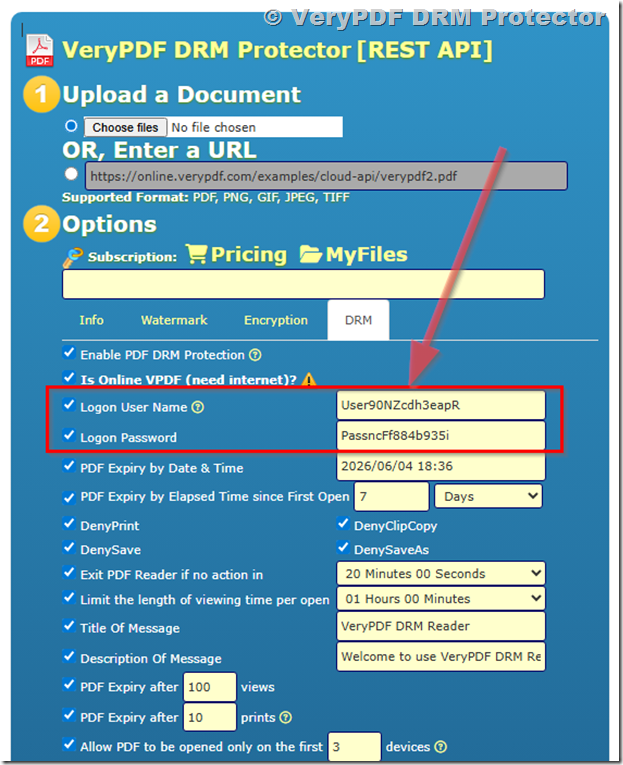
Step 4: Configure Security Settings
You can now set protection options such as:
- Watermark (name, email, time, IP address)
- Disable copy and paste
- Disable printing (optional)
- Expiration date (optional)
- Device restrictions
This helps protect your PDF content.
Step 5: Upload and Protect PDF
Click:
✅ “Upload and Secure PDF”
The system will process your file and protect it with DRM.
Step 6: Get Secure Sharing Link
After processing, you will get a secure URL like:
✅ “Open in Enhanced Web Viewer”
This is the link you send to customers.
Example:
https://online.verypdf.com/app/reader2/reader.php?url=https%3A%2F%2Fonline.verypdf.com%2Fu%2Fpublic%2Fapi%2F20260529-173046-2635009294.vpdf&username=User90NZcdh3eapR&password=PassncFf884b935i
Step 7: Share with Customers
Now you can send this link to:
- 10 customers
- 100 customers
- 1,000+ customers
There is no limit.
Why Anonymous Users Are Powerful
This method is very useful because:
1. No account management
You don’t need to create user accounts one by one.
2. Unlimited customers
You can sell your PDF to as many people as you want.
3. Very simple setup
Perfect for beginners and non-technical users.
4. Fast content delivery
Just share one link and you are done.
Trade-Off (Important to Understand)
Anonymous mode is simple, but it has limitations:
You lose individual tracking
- You cannot see exactly which user opened the file
- All activity is grouped together
Watermark is shared
- No personalized user watermark (like name/email per user)
Less control per customer
- No per-user device locking
When Should You Use Anonymous Users?
Use Anonymous Users if you want:
- Selling ebooks online
- Sharing course materials with large groups
- Membership content access
- Simple digital product delivery
- No need for complex tracking
Best for:
- Ebook sellers
- Online training platforms
- Public educational content
- Large audience courses
When Should You NOT Use It?
Avoid Anonymous Users if you need:
- Strong anti-sharing protection per user
- Individual user tracking
- Personal watermark per customer
- Corporate or confidential document control
In that case, use Named Users instead.
Real Business Insight
Many creators make this mistake:
They think DRM is complicated.
But actually, there are only two simple models:
- Named Users = Strong control
- Anonymous Users = Simple + scalable sales
Once you understand this, everything becomes easy.
Final Summary
If you are selling PDF files online, the biggest challenge is not creating content.
The real challenge is:
✅ “How do I stop people from sharing my PDF for free?”
With VeryPDF DRM Protector, you can solve this in two ways:
- Named Users → for strict control and tracking
- Anonymous Users → for easy, unlimited selling
If you are just starting, Anonymous Users is the fastest way to test and launch your digital product business.
Try It Online
You can test the system here: