
Selling PDF eBooks is easy. The difficult part starts after a customer pays.
You need to deliver the correct PDF, send the customer a private reading link, stop customers from sharing that link, and control how many devices can open the PDF.
For example, if a customer buys an eBook from your website, you may want this process:
Customer pays → your order system sends customer email + PDF ID → DRM system creates the user → customer receives a private reading link → PDF is locked to 2 devices
This can be built as a custom eBook automatic delivery system with the VeryPDF DRM API.
The seller does not need to manually create accounts or send PDF links after every order.
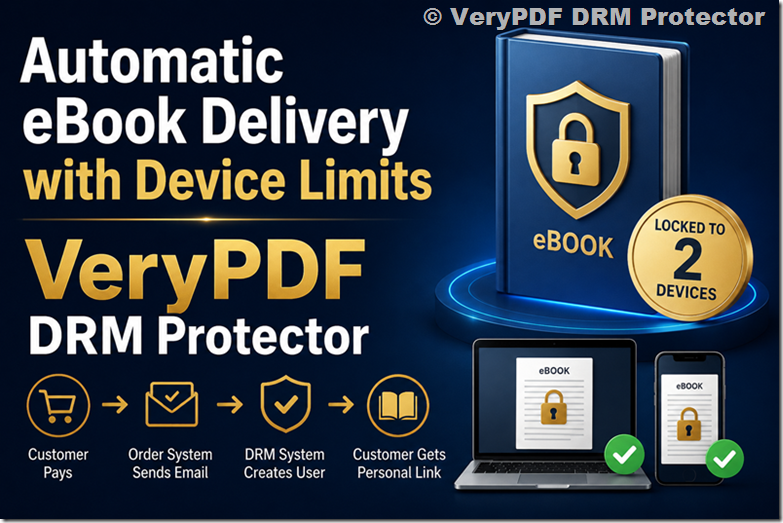
What Is an Automatic eBook Delivery System?
An automatic eBook delivery system connects your online store or order system with a PDF DRM system.
After a successful payment, your website sends a small amount of information to the DRM server.
For example:
Customer Email: john@example.com
PDF ID: ebook-123
That is enough for the DRM system to handle the rest.
| Step | What happens |
|---|---|
| 1 | Customer buys an eBook |
| 2 | Your order system confirms payment |
| 3 | Your website sends the customer email to the DRM API |
| 4 | Your website sends the purchased PDF ID |
| 5 | DRM creates or updates the customer account |
| 6 | DRM gives the customer access to the correct PDF |
| 7 | A personal reading link is created |
| 8 | The reading link is sent to the customer |
| 9 | The PDF is limited to the allowed number of devices |
The important point is that your order system does not need to send us the customer’s full order information.
It only needs to tell VeryPDF DRM:
This customer bought this PDF.
Why Use Customer Email + PDF ID?
Many online stores already have a lot of order information:
- Order number
- Product name
- Product price
- Payment method
- Billing address
- Shipping information
- Customer email
- Product ID
- Transaction ID
A DRM delivery system normally does not need all of this.
For eBook delivery, two pieces of information may be enough:
Customer email + PDF ID
For example:
email = john@example.com
pdf_id = business-training-2026
This keeps the integration simple.
Your website does not need to give the DRM system access to your complete customer database or order database.
How Automatic PDF Delivery Works
Imagine that you sell three PDF books:
| PDF ID | eBook |
|---|---|
| ebook-001 | Business English Guide |
| ebook-002 | Sales Training Manual |
| ebook-003 | Marketing Certification Guide |
A customer purchases ebook-002.
Your order system sends:
Email: customer@example.com
PDF ID: ebook-002
VeryPDF DRM can then automatically identify the customer and the purchased PDF.
The customer receives a personal reading link instead of a common link that can be shared with other people.
This is especially useful if you sell:
- eBooks
- Training manuals
- Course materials
- Certification PDFs
- Technical documents
- Professional guides
- Paid reports
- Membership documents
Why a Shared PDF Link Is a Problem
Many websites use a simple link such as:
https://example.com/download/book.pdfThe problem is that the customer can forward the link to someone else.
You may also have a shared reading link such as:
https://drm.verypdf.com/r/tDA2r3If everyone receives the same link, it becomes difficult to know who is actually allowed to read the PDF.
A customer can send the link to:
- A friend
- A colleague
- A student
- Another customer
- A group chat
- A website or forum
This creates a simple problem:
One purchase can become access for many people.
A personal DRM reading link is different. The link is connected to a specific customer and the PDF access rules.
Automatically Lock a PDF to 2 Devices
One of the most useful features is device limits.
For example, you can allow:
One customer → maximum 2 devices
The customer might use:
- Windows PC
- Mac
- iPhone
- iPad
- Android device
Once the customer has reached the device limit, another device cannot simply be added and used to read the same protected PDF.
This helps reduce account sharing and PDF sharing.
Example
John purchases an eBook.
He opens the reading link on his Windows computer.
Device 1 is registered.
Later, he opens the same eBook on his iPad.
Device 2 is registered.
Now he has reached the limit of 2 devices.
If another person tries to use John’s account on another device, access can be blocked according to your DRM settings.
Automatic Device Locking vs. Sending a PDF
There is a big difference between these two delivery methods.
| Traditional PDF delivery | DRM eBook delivery |
|---|---|
| Send PDF file | Send personal reading link |
| Easy to forward | Access can be controlled |
| No device limit | Device limit can be applied |
| Difficult to revoke access | Access can be revoked |
| Same file can be shared | User access is tied to DRM rules |
| Little control after delivery | More control after purchase |
If your PDF is a paid product, simply sending the original PDF file may give you very little control after the customer receives it.
Two Ways to Build the System
There are two practical ways to deliver protected eBooks.
Option 1: Automatic API Integration
This is best when you have many orders.
After the payment succeeds, your website calls the VeryPDF DRM API.
For example:
Customer purchases PDF
        ↓
Payment successful
        ↓
Order system calls DRM API
        ↓
Customer email + PDF ID
        ↓
VeryPDF DRM creates customer access
        ↓
Personal reading link created
        ↓
Email sent to customer
        ↓
Customer reads protected PDF
Your staff does not need to manually process every order.
Good for
- Online bookstores
- eBook websites
- Course platforms
- Training companies
- Certification providers
- Publishers
- Websites with many daily orders
Option 2: Manual One-Click eBook Delivery
Not every seller needs API integration.
If you only sell a small number of eBooks each month, a simple manual system may be better.
For example, you could have an admin page like:
| Customer Email | Action | |
|---|---|---|
| john@example.com | Sales Guide | Send Reading Link |
| mary@example.com | Training Manual | Send Reading Link |
You add the customer and select the PDF.
Then click:
Send Reading Link
The system automatically sends the customer’s private reading link.
The link can also have a device limit, such as 2 devices per customer.
This avoids the need to develop an API integration with your shopping cart.
Which Method Should You Choose?
The best choice depends on your order volume.
| Situation | Recommended method |
|---|---|
| Few eBook orders | Manual one-click delivery |
| Dozens of orders | API integration |
| Hundreds of orders | API integration |
| Large online bookstore | API integration |
| Training company | API integration |
| Certification platform | API integration |
| Small publisher | Manual or API |
| Custom eCommerce website | API integration |
You do not need to build a complicated system if you only have a few orders.
But when order volume increases, manual delivery becomes a problem.
A Custom eBook Delivery System Can Be Very Simple
A common mistake is thinking that a DRM integration must exchange a lot of customer data.
It does not have to.
A simple custom integration can work like this:
Your Website
Customer buys PDF
       ↓
Payment confirmed
       ↓
Send:
customer email
+
PDF ID
       ↓
VeryPDF DRM API
       ↓
Create customer
       ↓
Assign PDF
       ↓
Create personal reading link
       ↓
Send email
The order system remains responsible for the sale.
VeryPDF DRM handles the protected PDF access.
This separation makes the system easier to maintain.
What Happens If a Customer Buys Multiple eBooks?
The PDF ID becomes important when you sell multiple books.
For example:
customer@example.com
ebook-001
means the customer purchased one book.
Another purchase might be:
customer@example.com
ebook-003
The DRM system can then give the same customer access to another protected PDF.
This is much better than creating a completely separate account for every book.
What If the Customer Buys the Same eBook Again?
Your system can also define how repeat purchases should work.
For example:
| Situation | Possible action |
|---|---|
| Customer already has access | Keep existing access |
| Customer buys another PDF | Add another PDF |
| Customer’s access was revoked | Restore access |
| Customer changes email | Update account |
| Customer reaches device limit | Block new device |
| Customer needs a new device | Admin can manage device access |
The exact rules can be customized for your business.
Protecting eBooks Without Making the Customer Experience Difficult
Security should not make the buying process confusing.
A good eBook delivery system should look simple to the customer:
Buy → Receive email → Click reading link → Read
The security controls work in the background.
The customer does not need to understand how the DRM system works.
They simply know that their purchased eBook is available through their personal reading link.
Use VeryPDF DRM Protector for Automatic eBook Delivery
VeryPDF DRM Protector can be used as the protected PDF layer behind your eBook delivery system.
It can help you control:
- Who can access a PDF
- Which PDF a customer can read
- How many devices can be used
- PDF printing
- PDF copying
- PDF access
- Reading links
- User access
- Access expiration
- Access revocation
The important part is that you do not need to replace your existing order system.
Your website can continue handling:
Products → Payments → Orders → Customers
VeryPDF DRM can handle:
Protected PDFs → User access → Reading links → Device limits
This makes it possible to build a custom eBook delivery system around your existing website.
Example: Selling a Paid Training PDF
Suppose a training company sells a $99 PDF training manual.
A customer called Sarah buys it.
The order system sends:
Email: sarah@example.com
PDF ID: training-manual-001
VeryPDF DRM receives the information.
The system creates Sarah’s DRM account and gives her access to the correct PDF.
Sarah receives her personal reading link.
She opens the PDF on her laptop.
Later, she opens it on her iPad.
Now she has two registered devices.
If the account is limited to two devices, a third device cannot simply be used to access the same protected PDF.
The seller does not have to manually send the PDF.
What About a Small eBook Business?
If you sell only a few books every day, you may not need a complicated API system.
A simple admin tool can be enough.
For example:
Customer Email:
[ sarah@example.com ]
PDF:
[ Training Manual ▼ ]
[ Send Reading Link ]
After clicking the button, the system can create the user, assign the PDF, and send the protected reading link.
This can be much easier than integrating your entire shopping cart.
Automatic eBook Delivery Reduces Manual Work
Imagine receiving 50 eBook orders in one day.
With manual delivery, someone may need to:
- Check each order.
- Find the correct PDF.
- Create the customer.
- Generate a reading link.
- Send the email.
- Check whether the customer already exists.
- Handle device-limit problems.
This quickly becomes repetitive.
With an API integration, the process can happen automatically after payment.
That means your team can spend less time sending links and more time dealing with real customer questions.
Frequently Asked Questions
1. Can I automatically send an eBook after payment?
Yes. Your order system can call the VeryPDF DRM API after payment succeeds. The API can then create or update the customer and provide access to the purchased PDF.
2. What information does the DRM API need?
A simple integration can use the customer’s email address and the PDF ID they purchased. You do not need to send all order details.
3. Can one customer buy multiple PDFs?
Yes. Each PDF can have its own PDF ID, so one customer can have access to multiple protected eBooks.
4. Can I limit an eBook to two devices?
Yes. A device limit can be used to control how many devices a customer can use to read the protected PDF.
5. Can I use three devices instead of two?
Yes, if your business rules require it. The allowed device count can be configured according to your needs.
6. Do I have to send the PDF file to the customer?
No. Instead of sending the original PDF file, you can send a personal reading link to the protected PDF.
7. Can customers share their reading links?
A personal reading link can be combined with user and device controls to reduce unauthorized sharing. The exact protection depends on the DRM settings you choose.
8. What if I have very few orders?
You can use a manual delivery system. An admin can add the customer, select the PDF, and click a button to send the reading link.
9. Do I need to replace my current shopping cart?
Not necessarily. Your existing order system can remain in place. It only needs to notify the DRM system after a successful purchase.
10. Can this work with a custom website?
Yes. A custom website can call the VeryPDF DRM API after an order is completed.
11. Can this work with an eBook store selling many books?
Yes. The PDF ID lets the system identify exactly which eBook the customer purchased.
12. Can I revoke a customer’s PDF access?
Yes. DRM access can be managed after the purchase, which is useful when an account needs to be disabled.
13. Can I prevent customers from printing or copying the PDF?
VeryPDF DRM Protector provides controls for PDF printing and copying, depending on your selected protection settings.
14. Is API integration necessary?
No. API integration is useful when you have many orders. For a small eBook business, a manual one-click delivery system may be enough.
15. Can the whole process be automatic?
Yes. With an API integration, the basic process can be:
Payment → Customer Email + PDF ID → DRM → Personal Reading Link → Email → Protected PDF
That is the main idea behind a custom automatic eBook delivery system.
Final Takeaway
If you sell paid PDF eBooks, the most important question is not only “How do I deliver the PDF?”
It is also:
“How do I make sure the PDF is delivered to the right customer and does not become a freely shared file?”
A custom system using customer email + PDF ID + VeryPDF DRM API can keep this process simple.
For high-volume sales, the process can be fully automated.
For smaller businesses, a simple manual system with a Send Reading Link button may be enough.
In both cases, you can give each customer a personal reading link and limit the protected PDF to a specific number of devices, such as 2 devices per customer.