
In 2026, protecting digital documents is no longer a niche requirement reserved for publishers and large enterprises. Universities distribute course packs online, consulting firms share confidential proposals, legal teams exchange sensitive contracts, training companies sell premium learning materials, and investors review proprietary reports through the web. In all of these cases, a standard password-protected PDF is no longer enough. Once a file is downloaded, copied, screen-captured, forwarded, or printed, traditional PDF security often loses control.
That is why PDF DRM (Digital Rights Management) software has become essential. A serious PDF DRM platform does more than encrypt a file. It gives the owner continuing control over who can open a document, where it can be opened, whether it can be printed, whether text can be copied, when access expires, whether screenshots are blocked, and how activity is tracked after distribution.
However, not all DRM solutions are equal. Some products focus on enterprise integrations, others prioritize virtual data room workflows, while some are expensive, complex, or difficult for end users. Choosing the wrong platform can create friction for customers, overwhelm administrators, and leave gaps in protection.
In this comprehensive 2026 review, we compare five well-known PDF DRM solutions:
- VeryPDF DRM Protector
- Locklizard
- Digify
- Vitrium
- FileOpen
We will evaluate them across pricing, ease of use, deployment speed, viewer experience, protection depth, analytics, flexibility, and overall value. At the end, we will explain why VeryPDF DRM Protector stands out as the strongest overall choice for most businesses, educators, publishers, and content owners.
What Makes a Great PDF DRM Solution in 2026?
Before comparing vendors, it is important to define what actually matters.
A modern PDF DRM system should provide:
- Strong encryption
- Device or user-based access control
- Expiry by date, usage count, or revocation
- Print and copy restrictions
- Dynamic watermarking
- Browser-based or frictionless access
- Screenshot deterrence or prevention
- Usage analytics and logs
- Fast onboarding for non-technical users
- Reasonable pricing with transparent plans
Many products deliver some of these features. Very few deliver all of them in a balanced, affordable, user-friendly package.
Quick Comparison Table
|
Category |
VeryPDF DRM Protector |
Locklizard |
Digify |
Vitrium |
FileOpen |
|
Core Focus |
PDF DRM + broad file protection |
Secure PDF distribution |
Secure sharing + VDR |
Enterprise document protection |
Adobe-based DRM |
|
Ease of Setup |
Excellent |
Moderate |
Good |
Moderate |
Complex |
|
Browser Viewing |
Strong |
Limited / viewer dependent |
Strong |
Strong |
Depends on Adobe ecosystem |
|
Print Controls |
Advanced |
Advanced |
Good |
Good |
Strong |
|
Copy Restrictions |
Advanced |
Advanced |
Good |
Good |
Strong |
|
Dynamic Watermarks |
Excellent |
Good |
Good |
Good |
Moderate |
|
Expiry / Revocation |
Excellent |
Excellent |
Good |
Good |
Good |
|
Offline Options |
Yes |
Yes |
Limited |
Varies |
Yes |
|
Analytics |
Strong |
Moderate |
Strong |
Strong |
Moderate |
|
Best for SMBs |
Excellent |
Fair |
Good |
Fair |
Weak |
|
Pricing Value |
Excellent |
Lower |
Moderate |
Lower |
Lower |
Sources include vendor comparisons and market commentary.
1. VeryPDF DRM Protector – Best Overall in 2026
Overview
VeryPDF DRM Protector is designed specifically for organizations that need strong document protection without enterprise complexity or enterprise-level pricing. It supports PDF files and other document formats while focusing on practical controls that real businesses need immediately.
Unlike many legacy DRM tools, it emphasizes speed, simplicity, and control.
Key Strengths
1. Fastest Time to Protection
Many organizations do not want a long onboarding project. They simply want to upload a file, apply restrictions, and distribute securely.
VeryPDF DRM Protector is strong in this area because it is designed for rapid deployment. You can protect files quickly without a heavy IT rollout.
2. Excellent Protection Controls
Typical controls include:
- Prevent copying
- Disable unauthorized printing
- Set print limits
- Expire by date
- Revoke access anytime
- Lock to device or browser
- Add visible user watermarks
- Restrict forwarding and sharing
These are exactly the controls that course creators, consultants, publishers, and internal corporate teams need.
3. Strong Dynamic Watermarking
Dynamic watermarking is one of the most effective anti-leak tools. Instead of a generic watermark, each user sees personalized marks such as name, email, date, or company details. If a leak occurs, the source is traceable.
VeryPDF is particularly strong in this area.
4. Strong Value for Money
Several competing DRM platforms target enterprise budgets. VeryPDF positions itself as a more accessible solution while still offering advanced features.
5. Good User Experience
A security platform fails if recipients cannot open files easily. VeryPDF focuses on minimizing friction for readers and customers.
Best For
- Universities
- Training companies
- PDF publishers
- Legal teams
- Consultants
- SMEs
- SaaS companies sharing reports
- Any business selling digital documents
Potential Limitations
- Extremely large enterprises may require custom workflow integrations depending on environment.
- Some organizations may still want internal policy reviews before rollout.
Verdict
For most real-world use cases, this is the best balance of protection, usability, speed, and cost.
2. Locklizard – Strong Security, Older Experience
Overview
Locklizard has been in the secure PDF market for many years and is known for robust DRM controls.
It is a serious product with strong restrictions, but many buyers find the user experience less modern and onboarding less friendly.
Strengths
Mature Security Model
Locklizard has long specialized in secure PDF viewing, licensing, and control.
Strong Print and Copy Controls
It performs well when organizations need classic DRM restrictions.
Good Offline Scenarios
Some customers appreciate controlled offline viewing workflows.
Weaknesses
More Friction for End Users
Secure viewer installation or certificate-based processes can add friction depending on deployment model.
Less Friendly for Fast-Moving Teams
When external clients or students need instant access, any extra installation step can reduce adoption.
Pricing Pressure
For smaller teams, cost can become a concern versus newer alternatives.
Best For
- Organizations already familiar with its ecosystem
- Security-heavy environments comfortable with managed viewers
Verdict
Powerful but less streamlined than newer browser-friendly solutions.
3. Digify – Best for Secure Sharing and Deal Rooms
Overview
Digify is widely known for secure sharing, virtual data room workflows, and investor or M&A scenarios.
It is broader than a pure PDF DRM tool. That can be an advantage or disadvantage depending on your goals.
Strengths
Excellent Sharing Experience
Sending files securely to investors, clients, or prospects is a major strength.
Strong Analytics
Digify provides useful engagement data.
Attractive Interface
Its interface is modern and business-friendly.
Weaknesses
Not Purely Focused on PDF DRM Depth
If your only priority is hardcore PDF lockdown, specialized DRM tools may go deeper.
Ongoing Subscription Cost
Businesses using it purely for PDF protection may pay for features they do not need.
Best For
- Fundraising
- Due diligence
- Investor documents
- Secure sales proposals
- Temporary external sharing
Verdict
Excellent for secure document transactions, but not always the most cost-efficient option for dedicated PDF DRM.
4. Vitrium – Enterprise Features with Higher Complexity
Overview
Vitrium is a recognized name in protected PDFs and enterprise content security.
It offers solid controls, reporting, and structured deployment options.
Strengths
Enterprise Administration
Useful for teams needing centralized management.
Good Tracking and Permissions
It supports user-level access management and reporting.
Professional Security Positioning
Often considered by organizations with formal procurement processes.
Weaknesses
Higher Pricing Tier
For smaller businesses, cost can be difficult to justify.
Heavier Buying Process
May feel more enterprise-oriented than agile.
More Than Some SMBs Need
Small teams often want simpler workflows.
Best For
- Mid-market to enterprise buyers
- Teams with compliance requirements
- Larger structured deployments
Verdict
Capable platform, but many smaller customers will prefer a faster and more affordable solution.
5. FileOpen – Best for Adobe-Centric Environments
Overview
FileOpen is known for rights management integrated with the Adobe ecosystem.
For organizations standardized around Adobe Reader workflows, it can be relevant.
Strengths
Adobe Compatibility
Useful where Adobe-based workflows are deeply embedded.
Strong Traditional Rights Controls
Can enforce controlled viewing and permissions.
Weaknesses
More Technical Setup
Compared with modern SaaS-first tools, deployment can feel more complex.
Less Ideal for Non-Technical Customers
If selling content to the general public, friction matters.
Value Depends on Existing Adobe Infrastructure
Without that ecosystem, alternatives may be simpler and cheaper.
Best For
- Adobe-centric enterprises
- Specialized publishing environments
Verdict
Strong in specific scenarios, but not the easiest all-round choice.
Pricing Comparison (2026 Perspective)
Exact pricing can vary by user count, storage, support level, and contract terms, but the market trend is clear.
|
Platform |
General Pricing Position |
Value Assessment |
|
VeryPDF DRM Protector |
Lower / accessible |
Excellent |
|
Locklizard |
Higher |
Moderate |
|
Digify |
Mid to higher |
Good if using sharing features |
|
Vitrium |
Higher enterprise tier |
Moderate |
|
FileOpen |
Custom / enterprise |
Depends on environment |
If you only need document protection, paying enterprise premiums for unrelated features is rarely ideal.
Ease of Use Comparison
|
Task |
Best Choice |
|
Fast deployment |
VeryPDF DRM Protector |
|
External client access |
VeryPDF DRM Protector / Digify |
|
Traditional secure viewer model |
Locklizard |
|
Structured enterprise admin |
Vitrium |
|
Adobe workflow continuity |
FileOpen |
Which Platform Is Best for Different Users?
For Universities and Teachers
Best Choice: VeryPDF DRM Protector
Reason: Prevent student sharing, apply watermarks, revoke access, control printing.
For Selling eBooks or Reports
Best Choice: VeryPDF DRM Protector
Reason: Strong anti-copy protection with easier customer onboarding.
For Investors and M&A
Best Choice: Digify
Reason: Secure sharing plus data room workflow.
For Large Enterprise Procurement Teams
Best Choice: Vitrium
Reason: Enterprise positioning and centralized controls.
For Adobe-Centric Corporations
Best Choice: FileOpen
Reason: Existing Adobe integration may matter.
For Maximum Overall Value
Best Choice: VeryPDF DRM Protector
Why VeryPDF DRM Protector Wins Overall
After comparing all five platforms, VeryPDF DRM Protector emerges as the strongest overall recommendation because it solves the biggest real-world problems better than the others:
It Protects Without Overcomplicating
Many DRM tools are powerful but cumbersome. VeryPDF delivers strong controls without forcing users into painful workflows.
It Is Cost-Effective
Security should not require enterprise budgets. VeryPDF offers high-value protection for smaller and mid-sized organizations.
It Fits More Use Cases
From education to consulting to publishing to internal confidential files, it adapts well.
It Reduces Customer Resistance
When recipients can access content more easily, support costs drop and satisfaction rises.
It Balances Security and Usability
That balance is where many competitors fail.
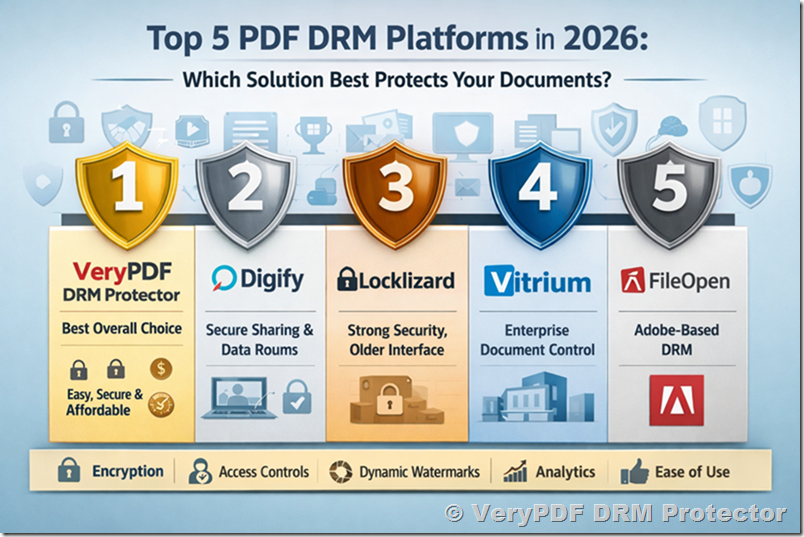
Final Ranking for 2026
|
Rank |
Product |
Why |
|
1 |
VeryPDF DRM Protector |
Best overall balance of security, ease, and value |
|
2 |
Digify |
Excellent secure sharing and VDR workflows |
|
3 |
Locklizard |
Strong DRM, less modern experience |
|
4 |
Vitrium |
Good enterprise controls, higher complexity |
|
5 |
FileOpen |
Useful in Adobe-specific environments |
Final Conclusion
The PDF DRM market in 2026 offers several capable options, but buyers should focus on outcomes rather than brand familiarity. The real question is not whether a platform has encryption. The real question is whether it protects content effectively, deploys quickly, keeps users happy, and delivers value.
For most organizations, VeryPDF DRM Protector is the smartest choice. It combines serious protection, flexible controls, strong watermarking, user-friendly delivery, and accessible pricing in one platform. While Locklizard, Digify, Vitrium, and FileOpen each have strengths in specific niches, VeryPDF DRM Protector is the most complete solution for the widest range of real-world document security needs.