
In today’s digital workflow, PDFs are no longer static attachments, they are marketing assets, sales documents, training materials, and lead-generation tools. But there is one critical question most freelancers and small businesses struggle with:
“Are people actually reading my PDF?”
With VeryPDF and its advanced VeryPDF DRM Protector, you can track PDF views, measure engagement, and protect your documents, all in one secure system.
This guide explains how PDF tracking works, why it matters, and how you can set it up in just a few minutes.
Why Tracking PDF Views Matters
Simply sending a PDF via email or download link gives you zero visibility. You don’t know:
- Whether the file was opened
- How long the reader stayed on each page
- Which sections were ignored
- Whether the document was forwarded
PDF tracking solves this by turning every document into an analytics-enabled asset.
Key benefits of tracking PDF views:
- Measure real engagement instead of assumptions
- Identify high-performing content and weak sections
- Capture leads through controlled access
- Improve conversion rates for proposals and sales decks
- Protect sensitive documents with controlled access
- Understand audience behavior across devices and regions
For freelancers, consultants, and small businesses, this insight can directly improve revenue and client conversions.
How Do You Track PDF Views with VeryPDF DRM Protector?
With VeryPDF DRM Protector, PDF tracking is designed to be simple, fast, and secure. You don’t need technical skills, just follow a few steps.
Step 1: Choose a Professional PDF Tracking System
Start by using a secure platform like VeryPDF DRM Protector that provides:
- Real-time view tracking
- Page-by-page engagement analytics
- Geographic location tracking
- Device and browser insights
- Email capture (lead generation)
- Access control and encryption
- GDPR-compliant data handling
Unlike basic file-sharing tools, DRM-based tracking ensures your document remains protected even after it is accessed.
Step 2: Upload Your PDF Document
Upload your PDF file into the DRM Protector system.
Once uploaded:
- The system scans the file for security risks
- The document is converted into a secure tracking format
- A protected viewing environment is created
This ensures your original PDF cannot be freely redistributed without control.
Step 3: Configure Tracking and Security Settings
This is where you define how your document behaves.
View Tracking Options
- Total views and unique visitors
- Session duration tracking
- Page-by-page analytics
Access Control Options
- View-only mode (disable downloads)
- Password protection
- Expiry-based access links
Lead Capture Options
- Email requirement before access
- Name or company data collection
- Integration with CRM workflows
Security Controls
- Encryption protection
- Anti-sharing controls
- GDPR-compliant tracking rules
This step transforms your PDF from a simple file into a controlled digital asset.
Step 4: Share Your Secure Tracking Link
After configuration, generate a secure tracking link.
You can share it via:
- Email campaigns
- Client proposals
- Social media
- Website downloads
- Internal corporate distribution
Every interaction is now tracked automatically in the background.
Step 5: Monitor Real-Time Analytics Dashboard
Once your PDF is live, you can monitor everything from your dashboard.
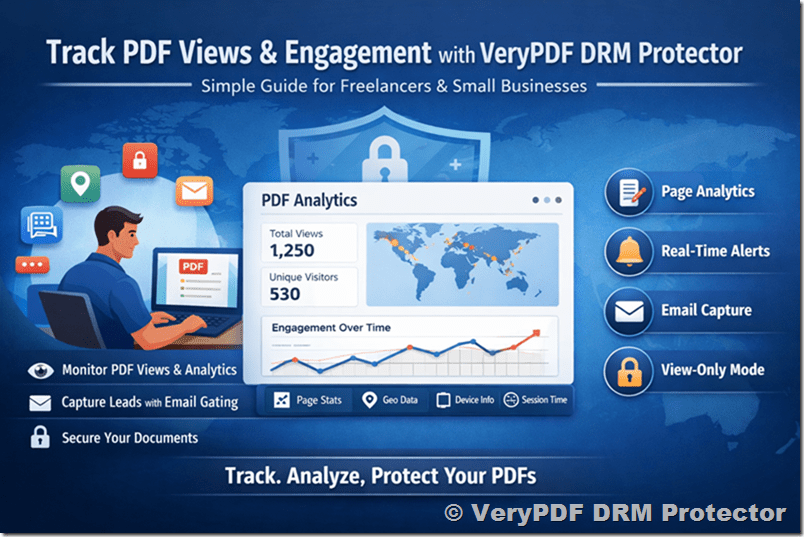
You can track:
- Total Views – How many times your PDF was opened
- Unique Visitors – How many individual readers engaged
- Page Analytics – Which pages get the most attention
- Geographic Data – Where your audience is located
- Device Insights – Mobile, desktop, or tablet usage
- Time Analytics – When your PDF is being read
- Engagement Depth – How far users scroll or read
This gives you a complete picture of document performance.
Advanced Features of PDF Tracking with VeryPDF DRM Protector
1. Page-by-Page Engagement Tracking
Understand exactly where readers lose interest or stay engaged.
This helps you:
- Improve proposals
- Optimize marketing PDFs
- Refine training materials
- Increase conversion rates
2. Real-Time Notifications
Get instant alerts when someone opens your PDF.
This is especially useful for:
- Sales teams tracking proposals
- Freelancers monitoring client interest
- Educators tracking course material engagement
3. Secure View-Only Access
Prevent users from downloading or redistributing your document.
This ensures:
- Your content stays protected
- All engagement remains trackable
- No loss of control over sensitive files
4. Data Retention & Privacy Compliance
VeryPDF DRM Protector follows strict data policies:
- Session data retention: 30 days
- Summary analytics retention: up to 26 months
- Automatic data cleanup
- GDPR-compliant tracking system
Best Practices for PDF Tracking Success
1. Define Your Objective First
Ask yourself:
- Do you want leads?
- Do you want engagement data?
- Do you want content protection?
2. Use Clear File Names
Avoid generic names like “final.pdf”. Use meaningful names such as:
- Proposal-WebDesign-2026.pdf
- Training-Module-Sales.pdf
3. Segment Your Audience
Use separate tracking links for:
- Different clients
- Marketing campaigns
- Internal vs external users
4. Review Analytics Regularly
Don’t just collect data, act on it.
Look for:
- Drop-off pages
- High-engagement sections
- Repeat viewers
Common PDF Tracking Challenges (and Solutions)
Challenge 1: “People download instead of viewing”
Solution:
Enable view-only mode in VeryPDF DRM Protector to ensure all activity happens inside the tracked environment.
Challenge 2: “I don’t know who viewed my PDF”
Solution:
Enable email capture before access. This turns anonymous views into qualified leads.
Challenge 3: “I can’t see page-level analytics”
Solution:
Use DRM Protector’s page-by-page tracking to identify exactly which sections are read most.
Challenge 4: “I manage many client documents”
Solution:
Use separate tracking links and organize dashboards by project or client.
Frequently Asked Questions (FAQ)
How fast can I set up PDF tracking?
Setup takes less than 2 minutes. Upload your PDF, configure settings, and share your link.
Can I track PDFs already sent to clients?
Yes. Simply replace old links with new DRM-protected tracking links.
What data can I see?
You can track:
- Views and unique users
- Geographic location
- Device and browser
- Page-by-page engagement
- Session duration
Is PDF tracking legal?
Yes. When implemented transparently and in compliance with GDPR, PDF tracking is fully legal and widely used in business environments.
Can I export analytics data?
Yes, you can export reports for CRM integration, sales reporting, or business analysis.
Final Thoughts
PDFs are no longer passive documents, they are measurable digital assets. With VeryPDF DRM Protector, freelancers and small businesses can finally understand:
- Who is reading their content
- What sections matter most
- How to improve engagement and conversions
Instead of guessing, you can now make data-driven decisions based on real reader behavior.
If you want to turn every PDF into a powerful tracking and lead-generation tool, VeryPDF DRM Protector gives you everything you need in one secure platform.