
Looking for a Locklizard alternative that is easier to use, works in a browser, and gives you more control over secure document sharing?
VeryPDF DRM Protector is a cloud-based document security platform for protecting PDFs and other sensitive documents. It helps businesses control who can view, print, download, share, and access documents, while also providing detailed document usage tracking.
For organizations that find Locklizard too complex, difficult to deploy, or inconvenient for external users, VeryPDF DRM Protector offers a simpler approach.
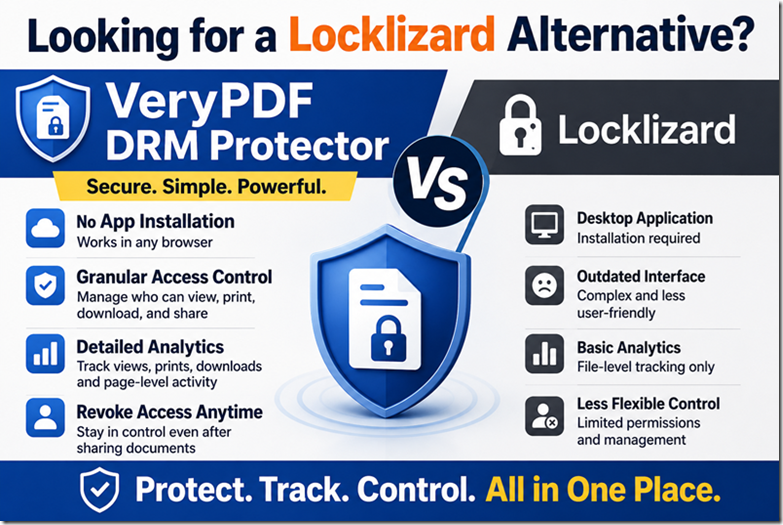
Why Look for a Locklizard Alternative?
Locklizard is designed to protect sensitive PDF documents, but its desktop-based workflow can create problems when documents need to be shared with customers, partners, students, contractors, or other external users.
Common problems include:
- Recipients need to install software.
- External users may be reluctant to install a desktop application.
- Secure document sharing can take more steps.
- User and document management can become difficult as the number of users grows.
- Document usage analytics may not provide enough detail.
- Pricing may be difficult to understand before contacting sales.
VeryPDF DRM Protector takes a different approach. Documents can be securely accessed through a web browser, while administrators get detailed controls for users, files, folders, printing, downloading, sharing, and access expiration.
VeryPDF DRM Protector vs Locklizard
| Feature | VeryPDF DRM Protector | Locklizard |
|---|---|---|
| Pricing | Transparent and flexible plans | Pricing can be less transparent |
| User interface | Modern and easy to use | Desktop-based workflow |
| App installation | Not required | Desktop application required for protected document workflows |
| Secure browser viewing | Yes | More dependent on desktop software |
| Document analytics | Detailed page-level tracking | More basic file-level tracking |
| Access permissions | Granular permissions for files and folders | Simpler access controls |
| View control | Yes | Yes |
| Download control | Yes | Yes |
| Print control | Yes | Yes |
| Screenshot prevention | Yes, with Screen Shield | Yes |
| Copy prevention | Yes | Yes |
| Sharing control | Yes | Yes |
| Access expiration | Yes | Yes |
| User revocation | Yes | Yes |
| Document revocation | Yes | Yes |
| Dynamic watermarks | Yes | Yes |
| Protection after download | Yes | Yes |
Features and limits can vary by plan and product version. The comparison above focuses on capabilities that are important for secure document sharing.
1. No App Installation for Recipients
One of the biggest differences between VeryPDF DRM Protector and Locklizard is how recipients access protected documents.
With VeryPDF DRM Protector, recipients can open a secure document through a web browser. They do not need to install a desktop application just to read the document.
This can make a big difference when you are sharing documents with people outside your organization.
For example, imagine a company sending a confidential PDF to 500 customers. Asking every customer to download and install special document protection software creates unnecessary friction.
With browser-based secure viewing, the customer can simply open the document and authenticate.
2. More Flexible Document Access Control
A secure PDF should not simply be “protected” or “unprotected.”
You may want to allow someone to read a document but prevent printing. Another user may be allowed to print but not download it. You may also want access to expire automatically after a certain date.
VeryPDF DRM Protector provides granular controls for managing document access.
You can control things such as:
- Who can view a document
- How long they can access it
- Whether they can download it
- Whether they can print it
- Whether they can copy content
- Whether they can share access
- Whether access should be revoked
- Whether a document should display a dynamic watermark
- Which users can access specific files or folders
This is useful for confidential documents, training materials, paid PDFs, certification documents, technical manuals, business reports, and sensitive company files.
3. Detailed Document Tracking and Analytics
Knowing that someone opened a PDF is useful.
Knowing how they actually read it is much more useful.
VeryPDF DRM Protector provides detailed document analytics, including page-level reading activity and information related to views, prints, and downloads.
For example, a training company may discover that:
- 90% of users read pages 1–20.
- Most users stop around page 21.
- A particular chapter is rarely viewed.
- Some users print specific pages.
- A customer accessed the document several times.
This information can help organizations understand how protected documents are being used.
For paid training materials, manuals, and digital publications, document analytics can be especially useful.
4. Better for Secure External Sharing
Traditional document protection often works well inside an organization but becomes harder when documents must be shared externally.
VeryPDF DRM Protector is designed for situations where you need to securely share documents with:
- Customers
- Business partners
- Contractors
- Students
- Training participants
- Certification candidates
- Consultants
- Distributors
- External reviewers
You can give each user controlled access without giving them the original unprotected PDF file.
This reduces the risk of simply sending a sensitive PDF as an email attachment.
5. Protection Against Copying, Printing and Screenshots
VeryPDF DRM Protector can control common ways people try to redistribute documents.
Depending on your configuration, you can restrict:
- Printing
- Copying text
- Downloading
- Sharing
- Unauthorized viewing
- Editing
- Screenshots
- Screen recording
The Screen Shield feature provides additional protection against screenshots and screen capture.
No DRM system can guarantee that a person will never reproduce information—for example, someone can always photograph a screen with another device—but multiple protection layers can make unauthorized copying much harder.
6. Dynamic Watermarks
A watermark can make unauthorized sharing easier to trace.
VeryPDF DRM Protector supports dynamic watermarks that can display information such as the user’s identity or other access-related information on the document.
For example:
Confidential — John Smith — john@example.com
If a protected document appears on a file-sharing website or is forwarded to another person, the watermark can provide useful information about where the copy came from.
This is particularly useful for:
- Confidential business documents
- Financial reports
- Legal documents
- Training materials
- Paid ebooks
- Technical documentation
- Certification materials
7. Revoke Access When You Need To
Sending a PDF by email creates a major problem: once the recipient receives the file, you generally lose control over it.
With DRM protection, access can be managed after the document has been distributed.
If an employee leaves your company, a customer cancels a service, or a confidential document is replaced, you can revoke access to the protected document or user.
This is one of the main reasons businesses use PDF DRM and document access control instead of ordinary PDF passwords.
8. A Simpler User Experience
Security is only useful when people can actually use it.
A complicated document security system can create support requests, slow down customers, and make employees look for workarounds.
VeryPDF DRM Protector focuses on making secure document sharing easier for both administrators and recipients.
The browser-based experience means you can send a secure document to an external user without asking them to install a special application.
For companies sharing documents with hundreds or thousands of external users, this can remove a significant amount of friction.
VeryPDF DRM Protector vs Locklizard: Which One Should You Choose?
| Your requirement | Better fit |
|---|---|
| Browser-based document viewing | VeryPDF DRM Protector |
| No software installation for recipients | VeryPDF DRM Protector |
| Simple external document sharing | VeryPDF DRM Protector |
| Detailed document analytics | VeryPDF DRM Protector |
| Granular user and file permissions | VeryPDF DRM Protector |
| PDF DRM protection | Both |
| Print and download control | Both |
| Screenshot protection | Both |
| Dynamic watermarking | Both |
| Revoking document access | Both |
| Existing Locklizard environment | Locklizard may be suitable |
| Looking for a simpler Locklizard alternative | VeryPDF DRM Protector |
The right choice depends on your requirements. If your main concern is protecting high-value documents and you already have a Locklizard workflow, switching may not be necessary.
But if you want browser-based secure document sharing, easier deployment, detailed tracking, and flexible access controls, VeryPDF DRM Protector is worth considering.
Who Should Consider a Locklizard Alternative?
VeryPDF DRM Protector can be a good choice for organizations that sell, distribute, or share sensitive digital documents.
Online Course Creators
Protect paid course PDFs from being freely downloaded and shared.
Training Companies
Control access to training manuals, course materials, and certification documents.
Certification Providers
Protect exam preparation materials, study guides, and other paid resources.
Publishers
Control access to paid ebooks, reports, research documents, and technical publications.
Professional Associations
Protect member-only publications, reports, standards, and other valuable documents.
Businesses
Secure confidential reports, proposals, technical documents, contracts, and customer materials.
What Is the Main Difference Between VeryPDF DRM Protector and Locklizard?
The biggest difference is the user experience and deployment model.
VeryPDF DRM Protector is cloud-based and designed for browser-based secure document sharing, while Locklizard uses a more traditional desktop application approach.
VeryPDF DRM Protector is therefore particularly suitable when documents need to be shared with many external users who should not have to install special software.
Is VeryPDF DRM Protector Easier to Use Than Locklizard?
For many organizations, yes.
VeryPDF DRM Protector is designed around browser-based access and a simpler document-sharing workflow. Users can access protected documents without installing a desktop application.
This can make deployment easier when you have customers, students, partners, or other external users.
Does VeryPDF DRM Protector Require Recipients to Install Software?
No.
Recipients can securely view protected documents through a web browser. They do not need to install a dedicated desktop application simply to view a protected document.
This is one of the main advantages of using a cloud-based DRM platform for external document sharing.
Can VeryPDF DRM Protector Prevent PDF Downloading?
Yes.
Administrators can control whether users are allowed to download protected documents. Access permissions can be configured according to your security requirements.
Can VeryPDF DRM Protector Control Printing?
Yes.
You can control printing permissions and apply restrictions to protected documents.
This is useful when you want users to read a document but do not want them to create unrestricted printed copies.
Can VeryPDF DRM Protector Prevent Screenshots?
Yes.
VeryPDF DRM Protector provides screenshot protection, including enhanced protection through Screen Shield.
However, no software can completely prevent someone from taking a photo of a screen with another physical device.
Can I Revoke Access to a Protected Document?
Yes.
You can revoke access to users or documents when access is no longer required.
This is useful when a contract ends, an employee leaves, a customer cancels a subscription, or confidential information needs to be withdrawn.
Does VeryPDF DRM Protector Support Dynamic Watermarks?
Yes.
Dynamic watermarks can help identify the user accessing a protected document and discourage unauthorized sharing.
Can VeryPDF DRM Protector Track How Users Read a PDF?
Yes.
VeryPDF DRM Protector provides document usage analytics, including page-level reading activity and information about views, prints, and downloads.
This gives you more information than simply knowing whether a PDF was opened.
Is VeryPDF DRM Protector Good for Secure External Document Sharing?
Yes.
It is especially useful when you need to share sensitive or paid documents with people outside your organization.
Recipients can access protected documents through a browser, while you retain control over permissions and access.
Is VeryPDF DRM Protector a Good Locklizard Alternative?
If you are looking for a Locklizard alternative because you want easier deployment, browser-based document viewing, flexible access control, and more detailed document analytics, VeryPDF DRM Protector is a strong option to evaluate.
The best way to compare the two systems is to test them with your actual documents and users.
If Locklizard feels too complicated for your customers or external users, try VeryPDF DRM Protector and see how browser-based PDF DRM changes the document-sharing experience.
Frequently Asked Questions
1. What is the best Locklizard alternative?
VeryPDF DRM Protector is a strong Locklizard alternative for organizations that want browser-based PDF DRM, granular access control, document analytics, watermarking, and secure external sharing without requiring recipients to install desktop software.
2. Is there a cloud-based alternative to Locklizard?
Yes. VeryPDF DRM Protector provides cloud-based document protection and browser-based secure viewing, making it an alternative for businesses that do not want recipients to install desktop applications.
3. Can I use VeryPDF DRM Protector to protect paid PDFs?
Yes. It can be used to protect paid ebooks, training materials, manuals, reports, certification documents, and other valuable PDF content.
4. Can VeryPDF DRM Protector stop people from sharing PDFs?
It can restrict downloading and sharing and can control who is allowed to access a protected document. Dynamic watermarks can also help identify the person who accessed the document.
5. Can I control PDF printing?
Yes. Printing permissions can be controlled for protected documents.
6. Can I stop users from copying PDF text?
Yes. VeryPDF DRM Protector supports controls designed to prevent unauthorized copying of protected document content.
7. Does VeryPDF DRM Protector work on mobile devices?
Protected documents can be accessed through supported browsers and devices, depending on the specific configuration and protection method.
8. Does VeryPDF DRM Protector support document expiration?
Yes. You can set access expiration so that users cannot continue accessing a document after a specified date.
9. Can I revoke access after sending a protected PDF?
Yes. You can revoke access to users or documents when necessary.
10. Does VeryPDF DRM Protector provide PDF analytics?
Yes. It provides detailed document usage tracking, including page-level reading activity and information related to views, printing, and downloads.
11. Can VeryPDF DRM Protector add watermarks automatically?
Yes. Dynamic watermarks can be used to display user or access information on protected documents.
12. Is VeryPDF DRM Protector suitable for training companies?
Yes. Training companies can use it to protect course PDFs, manuals, certification materials, and other paid learning content while controlling student access.
13. Is VeryPDF DRM Protector suitable for publishers?
Yes. Publishers can use it to protect ebooks, research reports, technical documents, and other digital publications from unauthorized distribution.
14. Does VeryPDF DRM Protector require users to install a PDF reader?
No special desktop application is required for browser-based viewing. Users can access protected documents through a web browser.
15. Why choose VeryPDF DRM Protector instead of Locklizard?
The main reasons are browser-based access, easier deployment, flexible permissions, detailed analytics, and a simpler experience for external users.
If these are important to your business, VeryPDF DRM Protector is worth testing as a Locklizard alternative.