
PDFs have become an essential format for sharing information in the modern digital workspace. They are commonly used for legal contracts, invoices, financial statements, internal reports, marketing materials, and confidential presentations because they preserve formatting across devices and software platforms. This reliability makes PDFs highly convenient for both business and personal use. However, the very attributes that make PDFs so useful also make them vulnerable if they fall into the wrong hands. Without proper security measures, sensitive information—such as client data, financial details, or proprietary business content—can be intercepted, copied, or misused. Sending a PDF may be as simple as attaching it to an email, but ensuring it is protected from unauthorized access, leakage, or tampering requires thoughtful strategies, including encryption, password protection, and digital rights management. Using tools like VeryPDF DRM Protector, you can maintain full control over who accesses your documents, how they are used, and for how long, turning a simple PDF into a secure, manageable asset.
This article will guide you through sharing PDFs securely via file transfer platforms while maximizing protection with VeryPDF DRM Protector.
Why Security Matters When Sharing PDFs
PDFs often carry sensitive information:
- Legal contracts
- Financial reports and invoices
- ID scans and medical records
- Confidential business presentations
While you might trust your recipient, the risk lies in the channels your PDF passes through—unsecured email servers, public Wi-Fi, or cloud services with weak security. Interception or unauthorized access can happen at any stage, making robust protection essential.
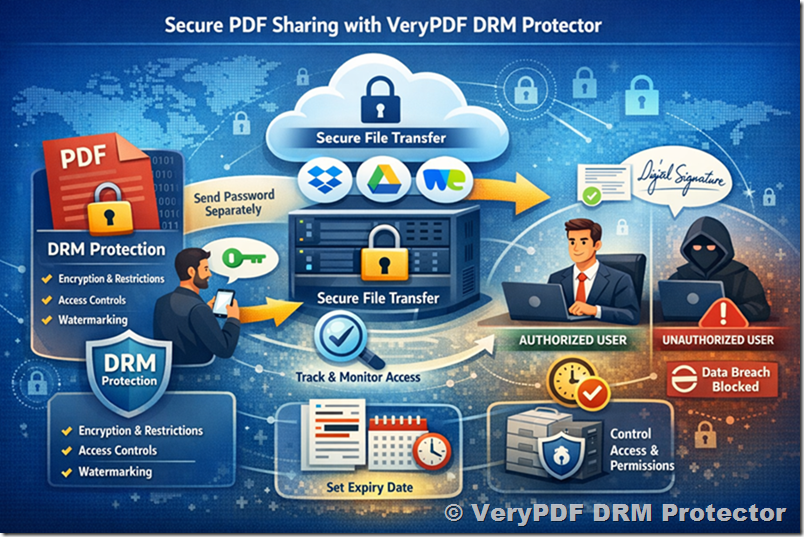
Step 1: Protect Your PDF with VeryPDF DRM Protector
Before sharing your file, it’s crucial to add strong protection. VeryPDF DRM Protector enables advanced PDF security that goes far beyond simple passwords. With this tool, you can:
- Encrypt your PDF with high-level DRM encryption.
- Restrict copying, printing, and forwarding of your file.
- Set expiration dates or limit access to specific recipients.
- Add dynamic watermarks to discourage unauthorized sharing.
Unlike traditional password protection, DRM ensures that your PDF remains protected even if it’s downloaded or sent outside the intended platform.
Step 2: Avoid Sending Passwords in the Same Message
If you choose to use password protection alongside DRM, never send the password via the same channel. Use secure messaging apps or phone calls to convey access codes. This simple precaution prevents easy breaches, keeping your confidential data safe.
Step 3: Use Encrypted File Transfer Platforms
Even the most protected PDF can be vulnerable if sent through insecure channels. File transfer platforms with built-in encryption add a crucial layer of security. Here are reliable options:
- Dropbox Professional – Allows password-protected links, expiration dates, and limited recipient access.
- Google Drive – Share with specific email addresses, disable downloads, and require two-step verification.
- WeTransfer Pro – Supports large files, password protection, and detailed download tracking.
When combined with VeryPDF DRM Protector, these platforms ensure that only authorized users can open, view, or interact with your PDFs, providing end-to-end security.
Step 4: Redact Sensitive Information if Needed
Before sending a PDF, remove or anonymize sensitive content. DRM does not replace redaction for critical information. Use redaction tools like Adobe Acrobat Pro or PDFized to permanently remove confidential data. This step ensures your PDF only exposes information that recipients should see.
Step 5: Track and Control Access
One of the standout features of VeryPDF DRM Protector is real-time tracking and access control. You can see:
- Who opens your PDF
- When and where it’s accessed
- Whether attempts were made to copy, print, or forward
This audit trail provides peace of mind for contracts, NDA-protected documents, or any highly sensitive material.
Step 6: Add Digital Signatures for Authenticity
For legal documents or contracts, add a digital signature to verify the sender and maintain integrity. Digital signatures work alongside DRM protections to provide both authentication and confidentiality.
Extra Tips to Maximize PDF Security
- Always delete sensitive PDFs from your inbox after sharing.
- Keep PDF software updated for the latest security patches.
- Avoid public Wi-Fi when sending confidential documents.
- Use two-factor authentication for email and cloud accounts.
- Consider watermarking PDFs to discourage unauthorized sharing.
Common Mistakes to Avoid
- Sending PDFs via email without protection.
- Sharing open cloud links without recipient restrictions.
- Leaving sensitive files stored in the cloud indefinitely.
- Using untrusted online PDF tools that may store files.
- Sending passwords in the same message as the PDF.
Conclusion
Sharing PDFs securely is not just about encryption, it’s about controlling access, tracking usage, and protecting your data at every stage. By combining secure file transfer platforms with VeryPDF DRM Protector, you can safely share sensitive documents without risking unauthorized distribution or data leaks.
Whether it’s contracts, business reports, or confidential client data, protecting your PDFs safeguards not only your files but also your professional reputation. Next time you share a PDF, take advantage of DRM protection, secure transfer channels, and access control, it’s worth the extra effort for peace of mind.