
Understanding Device Limits in PDF DRM Systems: Per Book vs Per User
Digital Rights Management (DRM) has become an essential component for authors, publishers, and educational content providers who distribute their materials in PDF format. Protecting intellectual property while ensuring a seamless user experience is a delicate balance. One of the most critical settings in DRM systems is the “Limit maximum number of devices,” which controls how many devices can access a protected PDF. However, this feature can be applied in two fundamentally different ways: per book or per user. Understanding the difference between these two approaches is essential for anyone managing digital content distribution, especially in scenarios involving multiple users and devices.
This article provides a detailed exploration of both methods, practical examples, technical implementation, and strategies for achieving optimal user experience.
1. What Is Device Limiting in DRM?
Before diving into the differences between per-book and per-user limits, it’s important to understand what “device limiting” means in the context of DRM systems.
Device limiting is a DRM control mechanism that restricts the number of devices or reading channels on which a protected PDF can be opened. The goal is to prevent unauthorized sharing and copying of copyrighted content while still allowing legitimate users to access it.
Key Concepts:
- Reading Channels: Modern DRM systems often use the concept of “reading channels” rather than physical devices. A reading channel is defined by a combination of factors such as browser fingerprint, IP address, or device identifier. This allows the system to recognize a user’s device without relying solely on hardware IDs, which may not be consistent across platforms.
- Access Control: When a PDF is opened, the system checks if the maximum number of allowed devices or channels has been reached. If it has, additional attempts to open the PDF are blocked or prompted for authorization.
- Dynamic Watermarking: To further discourage sharing, many DRM systems overlay dynamic watermarks on the document, showing the user’s email or other identifying information.
With these concepts in mind, let’s explore the two main strategies for limiting devices.
2. Limit Maximum Number of Devices Based on Book
2.1 Definition
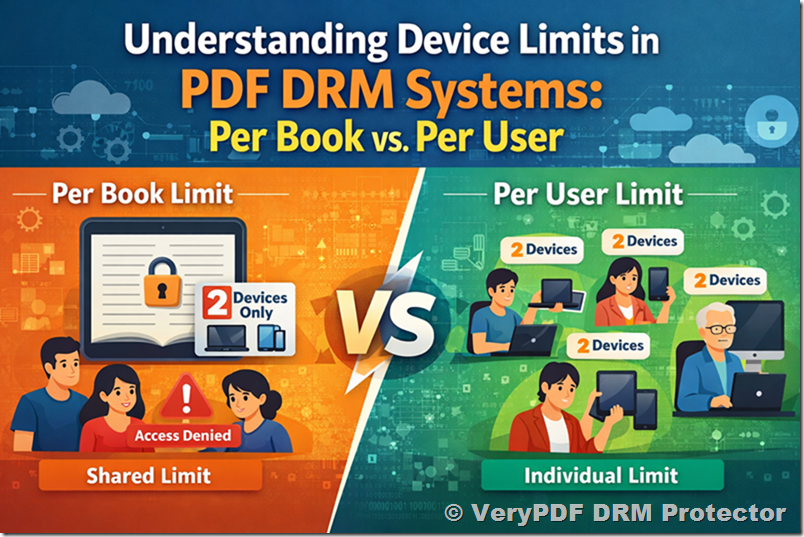
When the device limit is applied per book, the restriction is tied to the book itself, not the individual users. This means that a fixed number of devices can access the book collectively, regardless of who the users are.
2.2 How It Works
Suppose a book is protected with a two-device limit per book:
- The first two devices to open the book will be granted access.
- Any additional device attempting to open the book will be blocked, even if it belongs to a different user.
- The system does not distinguish between users; it only tracks the total number of active reading channels for that book.
2.3 Example Scenario
Imagine a publisher releases a PDF textbook and enables a two-device limit per book:
- User A opens the book on their laptop → access granted.
- User B opens the book on their tablet → access granted.
- User C tries to open the same book → access denied because the two-device limit has been reached.
Observation: This method is suitable for highly restricted environments where the book is intended for very limited sharing. However, it creates problems in multi-user contexts, as legitimate readers may be denied access if the first N devices are occupied.
2.4 Pros and Cons
Pros:
- Simple to implement.
- Ensures tight control over total device access.
- Reduces the risk of mass unauthorized distribution.
Cons:
- Not suitable for multi-user environments.
- Can lead to legitimate users being blocked unexpectedly.
- Difficult to manage when books are distributed to multiple customers simultaneously.
3. Limit Maximum Number of Devices Based on User
3.1 Definition
When the device limit is applied per user, the restriction is tied to individual accounts rather than the book itself. Each user has their own independent device limit, allowing multiple users to access the same book without interfering with one another.
3.2 How It Works
Suppose the DRM system allows each user to access a book on two devices:
- User A can use two devices to read the book.
- User B can also use two devices independently.
- User C can use their own two devices without being blocked by User A or B.
The DRM system tracks device access at the user level, ensuring fair distribution of access rights while maintaining security.
3.3 Example Scenario
Consider a training manual distributed to multiple employees:
- Employee A opens the manual on a laptop and a smartphone → access granted on both devices.
- Employee B opens the manual on a tablet and a desktop → access granted on both devices.
- Employee C opens the manual on a phone → access granted, unaffected by A or B.
Observation: This approach provides flexibility for businesses, schools, and digital content platforms where multiple users need independent access to the same material.
3.4 Pros and Cons
Pros:
- Ideal for multi-user distribution.
- Avoids blocking legitimate users.
- Allows each user to manage their own devices.
Cons:
- Slightly more complex to implement than per-book limits.
- Requires user account management to track device assignments.
4. Key Differences Between Per-Book and Per-User Device Limits
|
Feature |
Per-Book Limit |
Per-User Limit |
|
Scope |
Applies to the book as a whole |
Applies individually to each user |
|
User Impact |
All users share the same device pool |
Each user has independent device allocation |
|
Suitable For |
Single-user sales, highly restricted books |
Multi-user distribution, subscriptions, classroom access |
|
Flexibility |
Low |
High |
|
Risk of Denying Access |
High |
Low |
|
Implementation Complexity |
Simple |
Moderate |
|
Options in Advanced Settings |
VeryPDFDRM_LockToFirstNDevices |
LockToFirstNDevicesForUser |
Device Limitation Settings Explanation
* VeryPDFDRM_LockToFirstNDevices
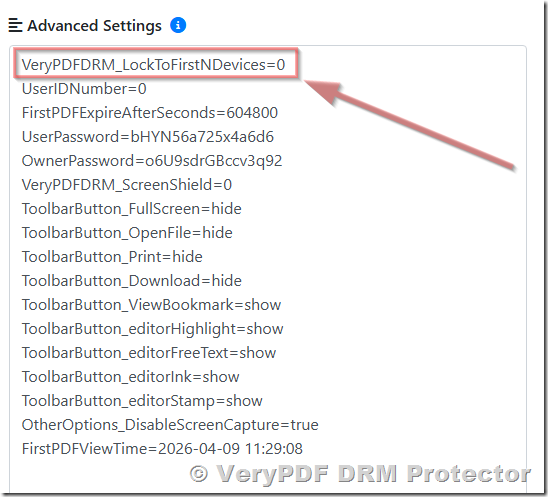
Setting `VeryPDFDRM_LockToFirstNDevices=0` indicates that there is no restriction on the number of devices that can access the specified book. When this parameter is set to any value greater than 0, it limits the maximum number of devices that can open the book. This setting applies at the book level, meaning the device limit is associated with the book itself. It is typically used in scenarios where a single book is intended for access by a single user.
* LockToFirstNDevicesForUser
Setting `LockToFirstNDevicesForUser=0` indicates that there is no restriction on the number of devices that a specific user can use. When this parameter is set to any value greater than 0, it limits the maximum number of devices that the user can use to access protected content. This setting applies at the user level, meaning the device limit is enforced individually for each user. It is particularly suitable for scenarios where a single book is shared among multiple users, and each user is allowed to access the book on a limited number of their own devices.
4.1 Practical Implications
- Sales Model Impact
- Per-book limits can disrupt subscription models or multi-user purchases.
- Per-user limits align better with modern content delivery models where users pay once and expect controlled but flexible access.
- Customer Experience
- A per-book limit can frustrate customers if they cannot open their purchased book on multiple devices.
- Per-user limits enhance satisfaction by allowing legitimate multi-device access.
- Technical Considerations
- Per-book systems track devices globally per document, often using IP + browser fingerprinting.
- Per-user systems track devices at the user account level, requiring robust account management and API support for device assignment.
5. Implementing Per-User Device Limits Using API
Modern DRM systems, such as VeryPDF DRM Protector, provide API endpoints to manage user access and device limits. Here’s a practical example of how to configure per-user device limits.
5.1 Steps to Set Up
- Disable Per-Book Device Limit
To ensure the system does not block new users, the per-book limit should be disabled:
VeryPDFDRM_LockToFirstNDevices=0
Click below URL to login your account,
https://drm.verypdf.com/wp-admin/admin.php?page=VeryPDFDRMFiles
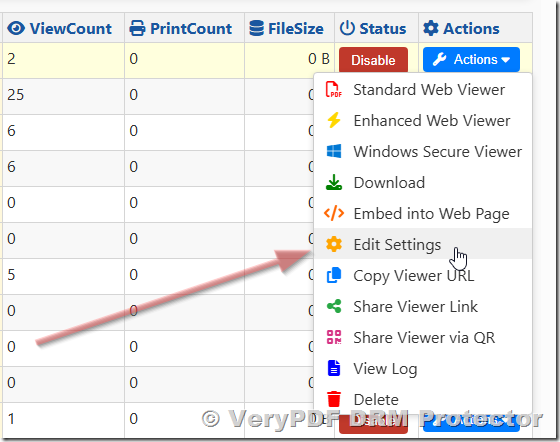
Click “Actions” button on the right of the book, click “Edit Settings” menu item,
 In the Advanced Settings field, set VeryPDFDRM_LockToFirstNDevices=0 to disable “Limit maximum number of devices” for this book,
- Create Users With Device Limits
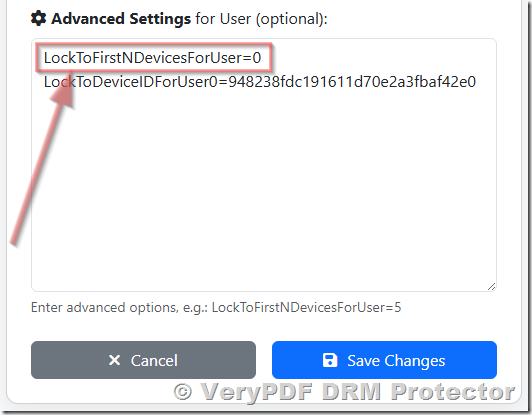
To ensure the system does not block the new devices for a special user, the per-user limit should be disabled:
LockToFirstNDevicesForUser=0
Click below URL to login your account,
https://drm.verypdf.com/wp-admin/admin.php?page=VeryPDFDRMUserManagement
Click Edit button to edit an user,
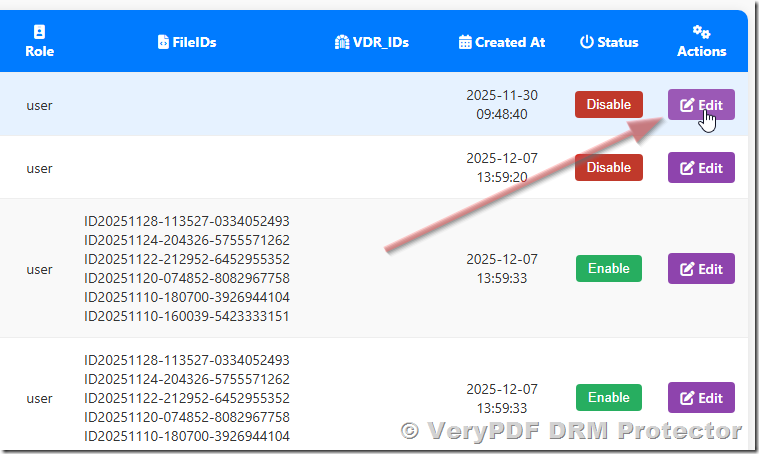
In the Advanced Settings field, set LockToFirstNDevicesForUser=0 to disable “Limit maximum number of devices” for this user,
When creating a user via VeryPDF DRM Protector REST API, specify the maximum number of devices for that user:
https://online.verypdf.com/app/pdfdrm/api.php?action=user_add
&email=your_email@example.com
&app_password=your_app_password
&username=testuser
&password=securepassword
&useremail=testuser@example.com
&role=user
&phone=12345678
&firstname=First
&lastname=Last
&options=LockToFirstNDevicesForUser%3D2
- The LockToFirstNDevicesForUser=2 parameter sets a two-device limit for this user.
- This ensures that each user can independently use their allocated number of devices without affecting others.
- Update Existing Users
Device limits can be modified for existing users via VeryPDF DRM Protector REST API:
https://online.verypdf.com/app/pdfdrm/api.php?action=user_update
&email=your_email@example.com
&app_password=your_app_password
&username=testuser
&password=newpassword
&options=LockToFirstNDevicesForUser%3D2
&user_id=123
- List Users
Administrators can list all users and their device assignments:
https://online.verypdf.com/app/pdfdrm/api.php?action=user_list
&email=your_email@example.com
&app_password=your_app_password
This ensures transparency and control over device allocation across the system.
6. Device Recognition Across Browsers and Networks
A challenge in implementing device limits is accurately recognizing devices, particularly when users have multiple devices or switch networks.
6.1 Techniques Used
- Browser Fingerprinting: Captures browser characteristics like user agent, screen resolution, and installed fonts.
- IP Address Tracking: Monitors the network location, though this may change for mobile users.
- Cookies and Local Storage: Store device identifiers locally.
- Hybrid Approach: Combines multiple techniques for robust recognition.
6.2 Considerations for Users
- Using the same browser consistently helps maintain access.
- Mobile users may appear as new devices when moving across networks.
- Per-user limits reduce the risk of accidental lockouts because each user’s devices are tracked separately.
7. Real-World Scenarios
7.1 Educational Publishing
Schools often purchase digital textbooks for students:
- Per-book limits are impractical because multiple students need access simultaneously.
- Per-user limits allow each student to use the textbook on multiple devices while preventing excessive sharing.
7.2 Corporate Training
Companies provide manuals or training content to employees:
- Per-book limit: Only the first few devices can access; others may be blocked → poor UX.
- Per-user limit: Each employee has their own device allocation → seamless access across devices.
7.3 Individual Sales
Authors selling e-books directly:
- If an author wants strict control over distribution, a per-book limit may be sufficient.
- For customers expecting flexible access, per-user limits offer a better experience.
8. Common Challenges and Solutions
|
Challenge |
Solution |
|
Users blocked unexpectedly |
Use per-user limits instead of per-book limits |
|
Multiple networks causing new device counts |
Relax IP check, rely more on browser fingerprinting |
|
Updating user device limits |
Use API to adjust LockToFirstNDevicesForUser per user |
|
Customers confused by limits |
Provide clear instructions and display current device usage |
9. Best Practices
- Use per-user limits for multi-user scenarios. This is the standard for platforms, subscriptions, and educational distribution.
- Combine with dynamic watermarking. Display user information on each document to discourage sharing.
- Monitor device usage via API. Admins can track usage patterns and adjust limits if necessary.
- Educate end users. Inform users about device limits and how to maintain uninterrupted access.
- Flexible IP management. Allow users to access content from multiple networks without accidental lockouts.
10. Summary
Device limiting is a cornerstone of DRM, ensuring content security while controlling legitimate access. Understanding the distinction between per-book and per-user limits is essential:
- Per-book: All users share the device limit. Suitable for extremely restricted distribution but risky for multi-user environments.
- Per-user: Each user has an independent device allocation. Ideal for subscriptions, educational platforms, and multi-user sales.
For modern digital content distribution, per-user device limits combined with intelligent device recognition and dynamic watermarking provide the most reliable balance between security and user experience.
Implementing these limits via API ensures scalable, automated management, allowing content providers to maintain control while offering flexibility to legitimate readers. By carefully choosing the appropriate strategy, publishers and authors can protect their content, optimize customer satisfaction, and uphold their business model effectively.