
In the digital era, content piracy is a major concern for authors, publishers, educators, and businesses. Every year, millions of PDF eBooks, reports, and proprietary documents are illegally shared online, costing content creators billions in lost revenue. While traditional DRM (Digital Rights Management) protects PDF files from unauthorized access or printing, it often cannot trace the source of a leaked file.
This is where PDF Digital Fingerprinting, also known as digital watermarking or invisible watermarking, becomes invaluable. By embedding unique, invisible information into each distributed PDF, authors and publishers can identify the source of leaks and deter piracy without disrupting the reader’s experience.
In this article, we’ll dive deep into PDF Digital Fingerprinting: what it is, how it works, practical use cases, implementation options, and why it’s a game-changer for secure publishing.
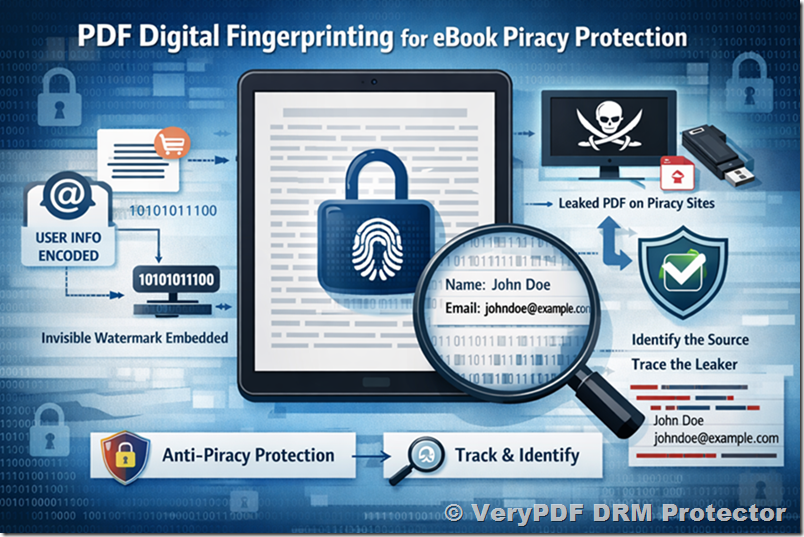
What is PDF Digital Fingerprinting?
PDF Digital Fingerprinting is the practice of embedding hidden, unique identifiers into PDF files. These identifiers are typically invisible to the end user but can be detected by special software. The fingerprint often contains information such as:
- Purchaser’s name
- Email address
- Purchase ID
- Date and time of purchase
- Transaction or invoice number
These invisible identifiers are unique to each copy of the PDF, which allows the publisher to trace the source if the file appears on unauthorized websites. This method differs from traditional watermarks, which are visible, such as “Copyrighted – Do Not Copy.”
Key Characteristics:
- Invisible to the Reader: Unlike visible watermarks that may interfere with reading, digital fingerprints do not alter the user experience. The PDF looks identical to a normal file.
- Hard to Remove: Advanced digital fingerprinting techniques make it extremely difficult for the average user to remove or alter the watermark without specialized knowledge.
- Traceable: Every copy has a unique fingerprint. If it appears on piracy platforms, the publisher can identify the original purchaser.
- Integrable with Payment Systems: When combined with platforms like Stripe, Gumroad, or Shopify, the system can automatically embed purchaser information at the moment of sale.
How PDF Digital Fingerprinting Works
PDF Digital Fingerprinting works by embedding data into the document in ways that are imperceptible to the reader. There are several techniques used:
1. Text-based Watermarking
In this method, invisible characters or zero-width spaces are added to the PDF text. For example:
- Inserting invisible characters between words or letters
- Using Unicode or zero-width characters to encode purchaser information
These modifications are invisible in standard PDF viewers but can be extracted using specialized software.
2. Image-based Watermarking
Digital fingerprints can also be embedded in images inside the PDF. This method modifies the pixel values slightly in ways that are imperceptible to the human eye but can be decoded later to extract the fingerprint.
- Slight adjustments to image brightness or color channels
- Adding invisible patterns in scanned images or graphics
3. Metadata-based Fingerprinting
Some PDF fingerprinting solutions embed unique identifiers directly in PDF metadata. Examples include:
- Custom metadata fields (e.g., /Author, /Creator)
- Hidden annotations or properties not visible to standard readers
While metadata is easier to implement, it may be more vulnerable to tampering if the user knows how to manipulate PDFs.
4. Structural PDF Fingerprinting
Advanced PDF fingerprinting can modify the PDF’s internal structure in subtle ways without affecting the visible content:
- Reordering objects or elements
- Changing object IDs or indirect references
- Slight modifications to internal fonts or streams
These structural fingerprints are invisible in the viewing experience and very hard to remove without specialized tools.
Advantages of PDF Digital Fingerprinting
PDF Digital Fingerprinting offers several benefits for publishers and authors compared to traditional DRM or visible watermarks:
- Deterrence Against Piracy: Knowing that a PDF is uniquely traceable discourages users from sharing files illegally.
- Preservation of User Experience: Unlike visible watermarks or aggressive DRM, fingerprints do not disrupt reading.
- Source Identification: When a pirated copy appears online, fingerprinting allows tracing back to the original purchaser, enabling legal action or deterrent measures.
- Integration with Sales Platforms: Automating fingerprint embedding at the moment of purchase ensures each file is uniquely marked.
- Compliance-Friendly: Fingerprints are invisible, respecting user privacy, unlike DRM systems that may track users’ reading behavior.
Practical Use Cases
1. Self-Publishing Authors
A self-publishing author selling eBooks on platforms like Amazon KDP, Gumroad, or Shopify can embed invisible fingerprints for each purchase. If a copy is leaked online:
- The fingerprint reveals the original buyer
- The author can request the platform to take action or warn the buyer
- Piracy can be significantly reduced without impacting legitimate readers
2. Educational Institutions
Universities and training organizations distribute lecture notes, research papers, and textbooks in PDF format. Fingerprinting ensures:
- Each student receives a uniquely marked PDF
- Unauthorized sharing is traceable
- Sensitive academic content is better protected
3. Corporate Document Distribution
Corporations sharing sensitive documents, such as business plans, financial reports, or proprietary research, can benefit from digital fingerprints:
- Each copy sent to employees or partners has a unique identifier
- If a document leaks externally, the source can be traced
- Internal compliance and security audits are simplified
4. Publishing Industry
Publishers can protect pre-release manuscripts, drafts, or digital magazines:
- Distributors or reviewers receive fingerprinted PDFs
- Any unauthorized distribution of the content online can be traced
- Risk of revenue loss from piracy is reduced
Implementing PDF Digital Fingerprinting
Implementing digital fingerprinting can range from simple metadata insertion to complex structural modifications. For maximum security, a professional tool or library is recommended.
1. Standalone Software Tools
Commercial software like VeryPDF DRM Protector allows publishers to embed digital fingerprints automatically:
- Supports invisible watermarking for PDF pages
- Embeds purchaser information in a secure, invisible manner
- Allows later verification using VeryPDF’s online tool
- Fully compatible with PDF readers, without altering the visible content
2. Custom Integration with Payment Platforms
For developers, integrating fingerprinting with payment platforms is possible:
- Capture purchaser information (name, email, transaction ID) from Stripe, Gumroad, or similar services
- Use a PDF processing library to embed the fingerprint invisibly in the PDF
- Deliver the fingerprinted PDF to the purchaser automatically
This approach ensures that every PDF is uniquely marked at the moment of purchase, preventing mass leaks.
3. Cloud-based Services
Some fingerprinting solutions provide SaaS platforms:
- Upload a master PDF
- The system generates unique copies with embedded fingerprints for each buyer
- PDFs are delivered securely via email or cloud links
Advantages of cloud-based services include simplified workflow, centralized tracking, and compatibility with multiple payment gateways.
Limitations and Challenges
While PDF Digital Fingerprinting is highly effective, it’s important to be aware of its limitations:
- Sophisticated Attackers: Advanced users with PDF editing skills may attempt to strip fingerprints, although most modern fingerprinting methods are extremely resilient.
- Legal Action Required: Fingerprinting identifies the source but does not automatically remove pirated copies; enforcement requires legal or procedural follow-up.
- Implementation Complexity: Integrating fingerprinting into an automated sales workflow requires some technical expertise, especially for structural or image-based methods.
- File Sharing Risks Beyond PDFs: Fingerprinting protects PDFs, but users may still share screenshots, printed copies, or converted formats.
Despite these limitations, invisible watermarking remains one of the most effective deterrents against casual piracy.
VeryPDF DRM Protector and Digital Fingerprinting
VeryPDF DRM Protector is a professional solution for embedding invisible fingerprints into PDF documents. Key features include:
- Invisible Watermarks: Embeds purchaser data without affecting the PDF layout or user experience.
- Page-level Fingerprinting: Each page can carry the fingerprint, increasing traceability.
- Verification Tool: VeryPDF provides an online tool to detect and verify digital fingerprints in any PDF.
- Integration-ready: Works alongside sales platforms to automate the fingerprinting process.
This solution is particularly useful for authors, publishers, and educators who distribute sensitive or high-value content.
Case Study: Protecting Self-Published eBooks
Consider a self-published author selling an eBook via Gumroad:
- Purchase: Alice buys the eBook using her email and payment details.
- Fingerprinting: The DRM system embeds an invisible watermark containing Alice’s name, email, and transaction ID.
- Distribution: Alice receives a standard-looking PDF with no visible differences.
- Leak Detection: If the eBook appears on a piracy website, the publisher can scan it to extract the fingerprint.
- Action: The fingerprint identifies Alice’s copy, and the publisher can issue warnings or take legal steps.
This approach deters piracy without affecting legitimate readers’ experience.
Best Practices for Digital Fingerprinting
- Embed Buyer Information Uniquely: Avoid generic fingerprints; each copy should be individually marked.
- Use Multiple Embedding Methods: Combining text, image, and metadata watermarking increases resilience.
- Automate the Process: Integrate with your sales workflow to reduce manual effort and human error.
- Secure Verification Tools: Ensure that the tool to detect fingerprints is controlled by the publisher to prevent tampering.
- Educate Buyers: Inform customers that PDFs are traceable. This alone often deters unauthorized sharing.
Conclusion
PDF Digital Fingerprinting is a powerful, practical, and minimally intrusive method to combat piracy. Unlike traditional DRM, which focuses solely on access control, invisible watermarking allows publishers to trace the source of leaks, enforce copyright, and protect revenue.
For authors, educators, publishers, and businesses distributing high-value PDF content, adopting a digital fingerprinting solution like VeryPDF DRM Protector ensures:
- Each PDF is uniquely traceable
- User experience is preserved
- Piracy is deterred through accountability
Combined with automated sales platforms like Stripe or Gumroad, fingerprinting provides a seamless, scalable way to protect digital content from being copied, shared, or resold illegally.
In a world where digital content is easily duplicated and shared, PDF Digital Fingerprinting is no longer optional, it’s essential for anyone serious about protecting their intellectual property.
References & Further Reading:
- Adobe: PDF Security Overview
- VeryPDF DRM Protector Documentation
- Digital Watermarking and Fingerprinting Techniques in PDFs
- Best Practices for eBook Piracy Prevention