
If you sell or share PDF files online, you may have an important question:
If I send someone a web PDF viewer link, can anyone with the link open my PDF?
The answer depends on how the PDF viewer is configured.
A normal online PDF viewer may only hide the original PDF URL. That does not provide strong document protection. If the PDF is important, such as an eBook, training manual, paid report, course material, legal document, or business document, you may need more than a simple viewer.
A secure DRM PDF viewer can control who can open the document, which devices they can use, how many times they can print it, whether they can copy content, and whether access can later be revoked.
This is where VeryPDF DRM Protector can be useful.
Can Anyone With a PDF Viewer Link Open the Document?
This is one of the most common questions about web PDF viewers.
A web viewer link does not automatically mean that everyone on the internet can read the PDF. A properly configured DRM system can connect the document to a user account, email address, device, or other access rules.
For example, you could configure a protected PDF so that:
| Protection | Example |
|---|---|
| User access | Only registered users can open the PDF |
| Device limit | The customer can use the PDF on their first 2 or 3 devices |
| Password/account | The reader must sign in before reading |
| Printing control | Printing can be disabled or limited |
| Copy protection | Copying text can be disabled |
| Screenshot protection | Attempts to capture the document can be restricted |
| Dynamic watermark | User information can appear on every page |
| Access control | Access can be removed when necessary |
| Expiration | Access can expire after a selected period |
This is very different from simply uploading a PDF to a website and sending people a public URL.
A PDF link is not the same as PDF access control
For example, imagine that you sell a $50 training manual.
You could send the customer:
https://example.com/files/manual.pdf
Anyone who gets that URL may be able to download the file.
A DRM web viewer works differently. The customer may receive a personal reading link and must pass the access rules before the document is displayed.
This makes it much harder for customers to simply share the original PDF with other people.
How Does a Secure Web PDF Viewer Protect Your Documents?
A secure web PDF viewer normally adds several layers of protection around the document.
The exact protection depends on the DRM system and its configuration.
1. User-based access
You can require the reader to have an authorized account before opening the PDF.
This is useful when selling:
- Paid eBooks
- Online courses
- Training manuals
- Technical documents
- Research reports
- Private documents
- Customer-only documentation
- Membership content
Instead of giving every customer the same public PDF URL, access can be connected to the customer.
2. Limit the number of devices
Device control is especially useful for paid digital products.
For example, you could allow a customer to use a protected PDF on their first two devices.
A typical setup might look like this:
Customer → Login → Open PDF → Device 1 registered
Later:
Customer → Login → Open PDF → Device 2 registered
If the customer tries to use a third device, the DRM system can block the new device according to your settings.
This can reduce casual account sharing.
3. Dynamic watermarks
Dynamic watermarks can show information about the person reading the document.
For example:
Licensed to: Frank
Email: Frank@example.com
IP: 192.168.1.1
Phone: 8559999988
The watermark can be displayed while the customer reads the PDF.
This is useful because even if someone takes a photo or screenshot of a page, the captured content may still contain identifying information.
For business documents, you can also use information such as:
- Customer name
- Email address
- Company name
- User ID
- Date and time
- Custom text
Can DRM Stop Screenshots and Screen Recording?
No DRM system should be described as making screenshots or screen recording completely impossible on every device.
A person can always use another camera to photograph a screen, for example.
However, DRM software can make common forms of copying much harder.
Depending on the platform and configuration, protection can include controls against:
- Normal screenshots
- Screen recording
- Copy and paste
- Printing
- Downloading the original PDF
- Browser-based file access
- Unauthorized device access
The goal is not to make a document magically impossible to copy. The goal is to reduce the easy ways people can copy and redistribute it.
This distinction is important when choosing a secure PDF viewer.
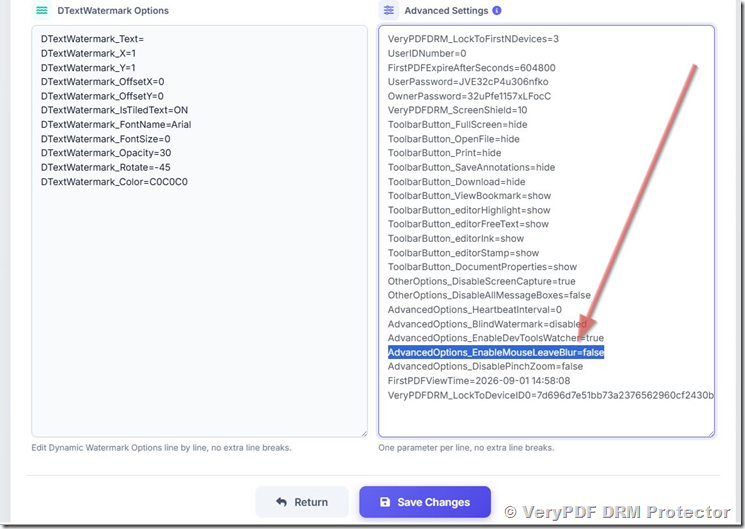
What Is AdvancedOptions_EnableMouseLeaveBlur?
Some secure PDF viewers include screen protection features that react when the user’s mouse leaves the reading area.
One setting in VeryPDF DRM Protector is:
AdvancedOptions_EnableMouseLeaveBlur
When this option is enabled, the reader may blur or black out the document when the mouse moves outside the reading window.
This can provide additional protection against certain screen capture situations.
However, some users may find this behavior annoying during normal reading.
For example, a customer may move the mouse outside the reading window and suddenly see a black screen.
If this happens, you may want to disable the option.
Set:
AdvancedOptions_EnableMouseLeaveBlur=false
How to Change AdvancedOptions_EnableMouseLeaveBlur=false
If you are using VeryPDF DRM Protector, you can change this setting from the administration panel.
Step 1: Open the DRM administration page
Go to:
VeryPDF DRM Files Administration
Step 2: Find your protected PDF
Locate the PDF file you want to change.
Click:
Actions → Edit Settings → Advanced Settings
Step 3: Change the advanced option
Find:
AdvancedOptions_EnableMouseLeaveBlur
Set it to:
false
Then save the settings.
This should prevent the viewer from automatically blurring or blacking out the document when the mouse leaves the reading area.
Why Does My Secure PDF Viewer Show a Black Screen?
A black screen does not always mean that the PDF is broken.
In a DRM-protected viewer, black or blurred content can be caused by a screen protection feature.
Possible causes include:
| Problem | Possible reason |
|---|---|
| Screen becomes black when moving the mouse | Mouse-leave blur protection |
| PDF does not open | Account or access problem |
| PDF disappears after a short time | Trial account protection |
| Links do not work | PDF or viewer configuration |
| Reader cannot use another computer | Device limit |
| Printing does not work | Printing is disabled |
| Text cannot be copied | Copy protection is enabled |
| Customer cannot open the PDF | Account may not have permission |
If the black screen appears when the mouse moves outside the reading area, check:
AdvancedOptions_EnableMouseLeaveBlur
You can try setting it to:
false
Why Did My Trial PDF Disappear?
This is another issue that can confuse new users.
When testing VeryPDF DRM Protector with a trial account, protected PDFs are intended for evaluation.
Trial protected files may be automatically deleted after a limited period.
For example, a PDF uploaded under a trial account may be removed after 2 hours.
This means you should not use a trial upload as your permanent production document.
If you need the protected PDF to remain available, use the email address associated with your paid subscription in the appropriate Subscription field.
Paid subscriber files are not automatically removed in the same way as trial files.
Is a Web PDF Viewer Safer Than Giving Customers a PDF Download?
For many paid digital products, yes.
Compare these two approaches:
| Feature | Direct PDF Download | DRM Web Viewer |
|---|---|---|
| Customer gets original PDF | Yes | Can be restricted |
| Account-based access | Usually no | Yes |
| Device control | No | Yes |
| Dynamic watermark | Usually no | Yes |
| Printing control | Limited | Yes |
| Copy control | Limited | Yes |
| Screen protection | No | Yes |
| Revoke access | Difficult | Yes |
| Track reading activity | Usually no | Can be supported |
| Control how customers share files | Limited | Much better |
A direct PDF download is convenient, but once the customer has the PDF, it is difficult to control what happens next.
A DRM viewer keeps more control on the server side.
When Should You Use a Secure PDF Viewer?
A secure web PDF viewer is particularly useful when the PDF has commercial value.
Paid eBooks
If you sell an eBook, you probably do not want customers to download one unrestricted PDF and upload it to file-sharing websites.
A DRM viewer can let customers read the book online while applying access and device controls.
Training materials
Training companies often sell manuals, guides, workbooks, and course PDFs.
Device restrictions and watermarks can help prevent customers from sharing the material with an entire class.
Technical documentation
Companies may need to provide customers with expensive technical manuals without giving unrestricted copies to everyone.
A protected web viewer can provide controlled access.
Legal and professional documents
Law firms, consultants, publishers, and professional organizations may need to give selected users access to confidential or paid documents.
Account-based access and watermarks can provide an additional layer of control.
Online courses
Course creators often provide PDFs together with videos and other learning materials.
A DRM viewer can make the PDF part of the protected course environment.
VeryPDF DRM Protector for Secure Web PDF Viewing
If you need more than a basic online PDF viewer, VeryPDF DRM Protector provides DRM controls designed for protected PDF distribution.
It can be used to protect documents with features such as:
- Secure web PDF viewing
- PDF encryption
- User access control
- Device restrictions
- Dynamic watermarks
- Print restrictions
- Copy restrictions
- Screenshot and screen-recording protection
- Access expiration
- Access revocation
- Reading activity tracking
- Offline reading support
- Cross-platform document protection
The important point is that you can combine several controls instead of depending on one protection method.
For example, a paid eBook could use:
User account + 2-device limit + dynamic watermark + disabled printing + disabled copying
A training company could use:
Customer account + device control + watermark + reading analytics
A business document could use:
Restricted access + watermark + expiration date + remote revocation
This gives you more control over how the PDF is used after it has been delivered to the customer.
What Should You Check Before Choosing a PDF DRM Solution?
Do not only ask whether a service has a “secure PDF viewer.”
Ask more specific questions.
Can I control who opens the PDF?
A secure viewer should provide some way to control access.
Can I limit devices?
This is important if customers are allowed to use the same account on several computers or phones.
Can I add a dynamic watermark?
Watermarks can discourage users from sharing screenshots or printed pages.
Can I disable printing?
If printing is not part of your business model, this can be important.
Can I disable copying?
This helps reduce simple copy-and-paste sharing.
Can I revoke access?
If a customer violates your terms, you may need to remove their access.
Can I control trial files?
Make sure you understand what happens to files uploaded during a trial.
Can I change advanced viewer settings?
This is important when a security feature affects the normal reading experience.
For example, the ability to change:
AdvancedOptions_EnableMouseLeaveBlur=false
can be useful when screen protection causes unwanted black-screen behavior.
Security vs. Reading Experience
There is always a balance between document protection and user convenience.
If you turn on every possible security feature, the document may become harder to read.
For example:
Strong screen protection
→ Better protection against some screen capture methods
but:
→ Users may see a black or blurred screen when moving the mouse.
Similarly:
Strict device control
→ Better control over account sharing
but:
→ A genuine customer may need help when changing computers.
The best setup is usually not “maximum security at any cost.”
Instead, choose protection rules that match the value of your document and the needs of your customers.
Example: Protecting a Paid eBook
Suppose you sell a $30 PDF book.
You could configure your DRM system like this:
| Setting | Example |
|---|---|
| Access | Customer account required |
| Devices | Maximum 2 devices |
| Download original PDF | Disabled |
| Copy text | Disabled |
| Printing | Disabled |
| Watermark | Customer email |
| Screen protection | Enabled |
| Mouse-leave blur | Optional |
| Access expiration | No expiration |
| Revocation | Available |
This gives the customer a normal reading experience while making casual file sharing much more difficult.
Example: Protecting a Training Manual
A training company might use:
Login + 3 devices + watermark + limited printing + copy protection
The customer can read the manual on their computer, tablet, or another approved device.
If the customer shares their account with many people, the device limit can help prevent unlimited account sharing.
Is Any PDF Protection 100% Secure?
No.
This is an important point for anyone selling digital documents.
There is no way to guarantee that a digital document can never be copied.
Someone can photograph a screen with another phone. A determined attacker may also look for technical weaknesses.
The purpose of DRM is to make unauthorized use much harder, less convenient, and easier to control.
A good DRM system should therefore provide several layers of protection rather than relying on one feature.
Frequently Asked Questions
1. Can anyone with my web PDF viewer link open the PDF?
Not necessarily. A DRM viewer can require authentication and apply access rules before showing the document. The exact behavior depends on your configuration.
2. Can I limit a customer to two devices?
Yes. Device limits can be used to restrict a customer account to a defined number of devices, such as two or three.
3. Can I add a watermark to every PDF?
Yes. Dynamic watermarks can display information such as the customer’s name, email address, or other identifying information.
4. Can I stop customers from downloading the original PDF?
A DRM web viewer can be configured so that customers read the protected document through the viewer instead of receiving an unrestricted original PDF.
5. Can I disable PDF printing?
Yes, printing restrictions can be used when you do not want customers to create printed copies.
6. Can I stop customers from copying text?
Copy restrictions can make normal copy-and-paste operations unavailable in the protected viewer.
7. Why does my PDF viewer sometimes turn black?
A screen protection feature may cause the document to become blurred or black when certain actions occur. Check the advanced viewer settings, especially AdvancedOptions_EnableMouseLeaveBlur.
8. How do I disable mouse-leave blur?
Open the DRM file management page, select your PDF, and go to Actions → Edit Settings → Advanced Settings. Set AdvancedOptions_EnableMouseLeaveBlur to false.
9. Why did my trial PDF disappear?
Trial protected files may be automatically deleted after a limited evaluation period. In the example configuration described above, trial files are removed after 2 hours.
10. Can I protect an eBook with DRM?
Yes. DRM is commonly useful for paid eBooks because it can combine user access, device limits, watermarks, and other restrictions.
11. Can I revoke access after giving someone a PDF?
With a DRM system, access can be controlled after the document has been distributed. This is much harder with a normal PDF download.
12. Can I use DRM for training materials?
Yes. Training manuals, course PDFs, workbooks, and other paid educational documents are good use cases for DRM.
13. Does DRM completely prevent screenshots?
No DRM solution can guarantee that nobody can ever capture a document. DRM can, however, block or limit common screenshot and screen-recording methods and make unauthorized copying harder.
14. Is a web PDF viewer enough to protect a paid PDF?
A basic viewer alone may not be enough. If the PDF has commercial value, look for access control, device limits, watermarking, printing and copying restrictions, and other DRM features.
15. What is a good solution for secure PDF web viewing?
VeryPDF DRM Protector is designed for businesses and publishers that need to distribute protected PDFs through a controlled web viewer instead of sending unrestricted PDF files.
Final Thoughts
If you are selling or sharing valuable PDF documents, simply hiding the PDF URL is not enough.
A better approach is to control who can read the document, which devices they can use, what they can do with the content, and whether you can remove access later.
For many businesses, a combination such as account-based access, device limits, dynamic watermarks, copy protection, print control, and screen protection provides much better protection than a normal PDF download.
If your web PDF viewer shows a black screen during testing, check the advanced settings first. In particular, AdvancedOptions_EnableMouseLeaveBlur=false can be useful when mouse-leave blur is interfering with normal reading.
For businesses that need secure online PDF distribution, VeryPDF DRM Protector is a practical option to consider.