
Advanced PDF Security and DRM Protection
VeryPDF DRM Protector provides enterprise-level PDF restriction controls to fully protect your confidential documents, eBooks, training materials, and business reports. Using military-grade encryption and advanced Digital Rights Management (DRM) technology, you can prevent unauthorized access, copying, editing, printing, and saving of your PDF files, no matter where they reside.
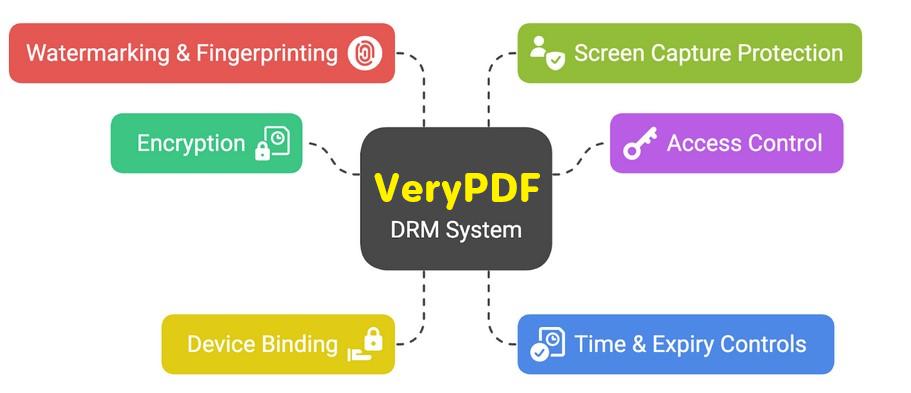
Prevent Unauthorized Access and Distribution
Protect PDF documents even after they have been shared or downloaded.
- Stop unauthorized viewing and sharing of confidential files.
- Block distribution and prevent users from forwarding protected PDFs.
- Enforce license and access control with US Government–strength encryption and secure DRM keys.
Control PDF Usage and Printing Permissions
Define exactly how recipients can use your PDF documents:
- Disable editing, copying, text extraction, and screenshots.
- Prevent printing entirely or limit the number of prints per user.
- Lock PDF files to specific devices, users, or locations for maximum security.
- Control viewing rights and enforce usage rules with flexible DRM license settings.
Set Automatic PDF Expiration Dates
Ensure your PDF content is only accessible for a limited time.
- Expire PDF documents automatically on a specific date.
- Set access to expire after a number of days, views, or prints.
- Perfect for subscription services, e-learning courses, or temporary business use.
Instantly Revoke PDF Access Anywhere
Take back control at any time, even after distribution.
- Revoke a document for all users instantly, regardless of where the file is stored.
- Revoke individual user access to one, several, or all PDF files.
- Automatically revoke access after the allowed number of views, prints, or days.
Add Dynamic and Static Watermarks to PDFs
Protect your intellectual property with secure watermarks that identify each user.
- Add dynamic watermarks to displayed or printed pages.
- Include personalized user data such as name, email address, company name, IP address, and date/time.
- Unlike normal watermarks, VeryPDF DRM watermarks are permanent, non-removable, and tamper-proof.
- Customize a single protected PDF for multiple users without re-encrypting it.
Track and Log Document Usage
Monitor how and where your protected PDF files are used.
- Track and log each document view and print event.
- Identify the devices, operating systems, and locations of users.
- Get detailed usage analytics to prove document access, comply with audit trails, and improve content security.
Meet Compliance & Data Protection Regulations
Stay compliant with global data protection and privacy regulations.
- Ensure only authorized users can view, print, or download confidential PDFs.
- Enforce document retention and expiry policies automatically.
- Maintain audit logs for legal proof of document access and use.
Protect Intellectual Property (IPR) and Maximize ROI
Prevent document leaks, content theft, and unauthorized sharing.
- Safeguard revenue streams for publishers, educators, and enterprises.
- Reduce operational risks and compliance costs.
- Protect intellectual property, prevent data breaches, and maintain business integrity.
PDF DRM Controls -– Secure PDF Document Management and Licensing
Complete Control Over PDF Document Usage
VeryPDF DRM Protector gives you total control over every aspect of document security and user access:
- Block saving, copying, modifying, and printing.
- Prevent Windows Print Screen and third-party screen capture software.
- Disable printing to file, PDF drivers (Acrobat Distiller), or virtual image printers.
- Lock documents to user devices or specific IP ranges.
Flexible License & Expiry Management
- Set user and document expiry dates for trials, subscriptions, or limited-time access.
- Define expiry rules: by date, number of views, prints, or offline access days.
- Enable or disable offline access with periodic online validation.
- Instantly revoke user or document access remotely.
- Change view and print permissions after publication without re-encrypting the PDF.
Enterprise-Grade DRM Features
- Enforce document retention policies and access timelines.
- Suspend or delay document activation until a specified start date.
- Restrict viewing to authorized office networks or VPN locations.
- Decide whether documents can be opened in Citrix, Remote Desktop, or virtualized environments.
Advanced PDF Auditing, Reporting, and Security Management
Comprehensive PDF Auditing and Reports
Monitor, track, and analyze every user action with VeryPDF DRM Protector’s advanced auditing and reporting tools.
Gain full visibility into your PDF document security and user interactions with detailed analytics and system logs.
Key Features:
- Track user registrations and login locations for complete visibility into your PDF access network.
- Log every document open, view, and print action for detailed activity monitoring.
- Identify your top 5 most accessed, viewed, and printed documents, and see exactly who used them.
- Record complete system activity, including logons, logoffs, and document or user additions and deletions.
- Capture full eCommerce and license activity — track which commands were executed, by whom, and when.
- Monitor license delivery reports — know when emails were delivered, opened, or bounced.
- Log sub-administrator actions and permissions for accountability and compliance.
- Generate custom reports for users, documents, and publications—e.g., users with access to a specific file, expired users, or PDF usage reports showing who viewed or printed each document.
Company Branding and Customization Options
Enhance your corporate identity and maintain consistent brand visibility across your secured PDF documents.
With VeryPDF DRM Protector, your protected files always display your brand style, logos, and watermark messages.
Branding Highlights:
- Enforce corporate style guides to ensure your PDFs display in your approved format only.
- Customize warning messages, license expiry notices, and redirect URLs.
- Enable or disable PDF splash screens for branded document access.
- Apply custom text and image watermarks for brand reinforcement and anti-piracy control.
- Display a welcome message or web page when users open your document or eBook.
- Send all system emails from your company domain for professional delivery.
- Optionally brand the secure PDF viewer with your company logo for full brand ownership.
Ease of Use and Administration
Designed for performance and scalability, VeryPDF DRM Protector offers an intuitive admin interface, batch processing, and automated PDF encryption tools.
Ease-of-Use Features:
- Choose from installation-based or zero-installation viewers (Web Viewer & Secure USB Viewer).
- Manage thousands of users and documents efficiently using advanced filters and smart search tools.
- Apply batch changes — grant or revoke access for multiple users instantly.
- Perform license transfers — suspend or re-enable user licenses anytime.
- Simplify document organization with the unique publication grouping system.
- Enable offline and online access control — decide how long users can view protected PDFs offline.
- Provide complete offline document access without requiring an Internet connection.
- Utilize real-time web-based license verification for transparent user authorization.
- Experience 5-minute setup — import existing user data instantly without server configuration.
- Protect PDF files effortlessly with right-click encryption in Windows Explorer.
- Process multiple PDF files simultaneously with batch automation using our PDF encryption command-line utility.
- Fully integrate with your existing eCommerce platform for 24/7 PDF delivery and access control.
- Choose between fully hosted or self-hosted deployment options.
- Simplify data import/export for easier user management.
- Control sub-administrator roles, auditing, and permissions.
- Backup and restore all system data easily.
Unbreakable PDF Document Protection
Experience bulletproof PDF security with AES encryption and advanced DRM protection.
VeryPDF DRM Protector eliminates weak passwords and plug-ins by using public key cryptography for persistent document control.
Protection Highlights:
- Protect PDF documents using US Government-grade AES encryption and DRM licensing.
- No passwords required — no forgotten or shared credentials.
- No insecure plug-ins or add-ons — our DRM engine is tamper-proof and fully encrypted.
- Maintain end-to-end document protection across your PDF lifecycle.
- Control PDF access inside or outside your firewall, online or offline.
- You maintain complete hosting and distribution control — we never access your documents.
- Apply dynamic PDF watermarks showing user name, email, and IP address to deter leaks.
- Restrict document access by IP address or country.
- Lock protected PDFs to specific devices, ensuring they can’t be copied or shared.
Additional PDF Protection Features
- Free secure multi-lingual PDF viewer — no purchase required for users.
- Zero-installation access using Safeguard Web Viewer or Secure USB Viewer.
- Automatically enforce viewer updates to ensure users always use the latest security version.
Summary — The Ultimate PDF DRM Security Solution
With VeryPDF DRM Protector, you can:
- Prevent saving, copying, editing, or printing of PDF documents.
- Apply dynamic watermarks for visible user identification.
- Enforce automatic expiration and instant access revocation.
- Track usage, comply with privacy laws, and protect your intellectual property.
VeryPDF DRM Protector is an advanced PDF security and document protection software that combines powerful DRM controls, AES encryption, and flexible licensing management to safeguard your documents from unauthorized access, copying, printing, or sharing. It delivers enterprise-grade protection and complete document lifecycle control, ensuring your PDFs remain secure everywhere — online or offline.
Built for businesses, publishers, government agencies, and educators, VeryPDF DRM Protector enables you to protect confidential information, enforce access permissions, and monitor usage through detailed auditing and reporting. You can lock PDFs to specific users or devices, apply dynamic watermarks to deter leaks, and manage licenses and user access in real time.
With custom branding options, you can display your company logo, watermarks, and personalized messages on every protected document, maintaining a consistent brand identity. Its scalable and easy-to-use administration console supports batch processing, automation, and full integration with e-commerce systems, helping you deliver protected documents 24/7 with minimal manual effort.
Whether you need unbreakable encryption, secure document sharing, or advanced access control, VeryPDF DRM Protector provides a powerful, all-in-one platform to protect, manage, and track your PDF documents — ensuring maximum security, compliance, and peace of mind.