
If you sell ebooks, training materials, reports, manuals, or other PDF files online, you may want to protect your PDF without making the customer deal with a complicated login process.
A common problem is this: How can I send a secure PDF reading link to a customer so they can open the file easily, without entering their email address every time?
With VeryPDF DRM Protector, there are several ways to do this. You can send a secure reading link directly to the customer, create a user account manually, control how many devices can open the PDF, and track reading activity.
This article explains the different options and how they work.
Can customers open a protected PDF without entering their email every time?
Yes.
If you use the Invite User feature, you can enter the customer’s email address yourself when creating the invitation.
The customer receives the secure reading link by email. They do not need to enter their email address again.
For example, imagine that a customer buys a $50 training ebook from your website.
Instead of asking the customer to:
- Create an account
- Verify their email
- Log in
- Find the ebook
- Enter their email again
you can simply create a secure reading link and send it to them.
The customer clicks the link and starts reading.
This can make the buying and reading process much easier.
Option 1: Use Invite User to send a secure PDF link
The easiest method is to use Invite User.
Go to the DRM Protected Files Management page and select the PDF file you want to protect.
Then choose:
Actions → Invite User
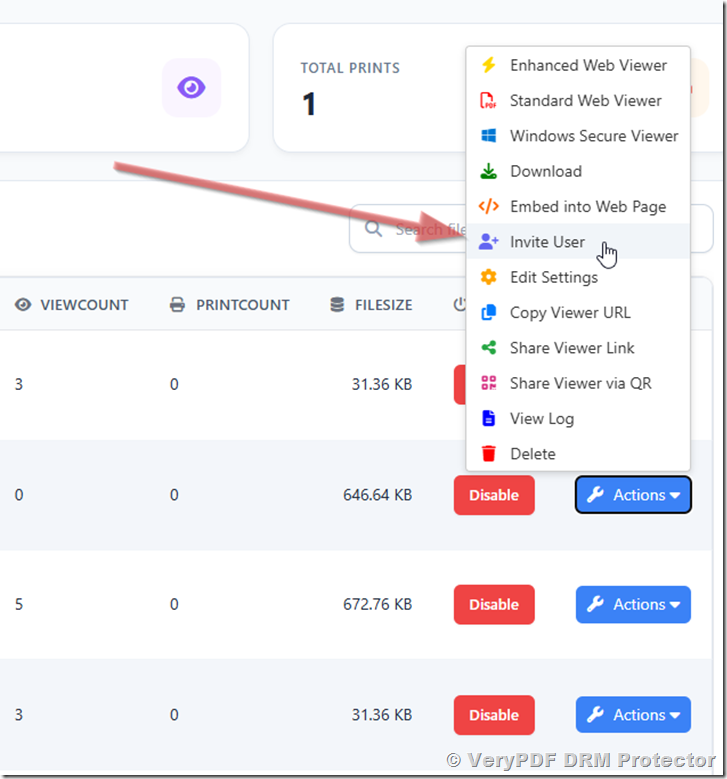
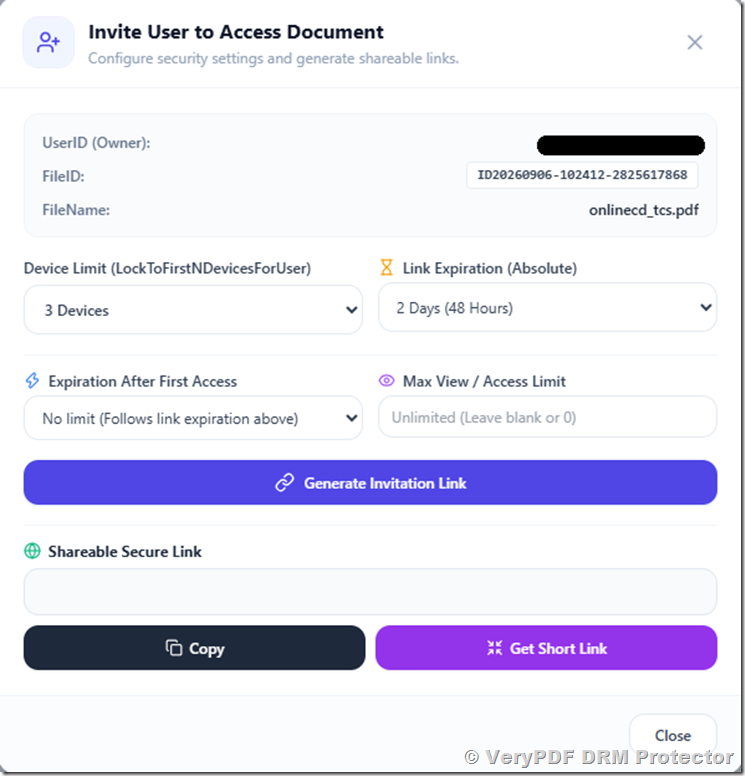
You can enter the customer’s email address and set options such as the device limit.
For example:
| Setting | Example |
|---|---|
| Customer email | customer@example.com |
| Device limit | 2 devices |
| PDF access | Enabled |
| Expiration | No expiration |
| Secure reader | Yes |
The customer receives the reading link and can use that link to open the protected PDF.
This is useful for ebooks, paid PDF reports, online courses, certification materials, and training documents.
What if the customer enters their own email address?
That is also possible.
If you let customers enter their own email address to receive the reading link, they do not have to repeat this process every time.
Once they receive their personal reading link, they can save the link and use it again later.
So there are two simple workflows:
| Method | Who enters the email? | Does the customer need to enter it every time? |
|---|---|---|
| Invite User | You | No |
| Customer requests link | Customer | No, after receiving the link |
For a paid ebook or document, the first method can be more convenient because your company controls when the customer receives access.
Option 2: Create a username and password yourself
There is another method that can be useful if you want more control over the reading link.
On the DRM Protected Files Management page, select:
Actions → Share Viewer Link
The system will create a viewer URL containing a username and password.
For example:
https://online.verypdf.com/app/reader2/reader.php?url=...&username=UseruYXS70pBV293&password=PassJ9ZpsRjg616You can then create your own user account from the User Management page.
For example:
Username: UserAAA
Password: PassBBB
You can replace the default username and password in the viewer URL with the username and password you created.
The final reading link could look like:
https://online.verypdf.com/app/reader2/reader.php?url=...&username=UserAAA&password=PassBBBYou can then send this link directly to your customer.
The customer simply clicks the link and reads the protected PDF online.
Why would you use a custom username and password?
This method can be useful when your business already has its own customer database or order system.
For example, suppose your website sells 500 copies of a training manual.
After a customer pays, your system could create or assign a customer account and send a personalized reading link.
This can reduce manual work when you have many customers.
It also gives you more control than simply publishing a public PDF download link.
How can I remove the black screen?
VeryPDF DRM Protector has a security feature that can blur or hide the reader when the mouse leaves the reading area.
If you do not want this effect, you can turn it off.
Go to:
DRM Protected Files Management → Actions → Edit Settings → Advanced Settings
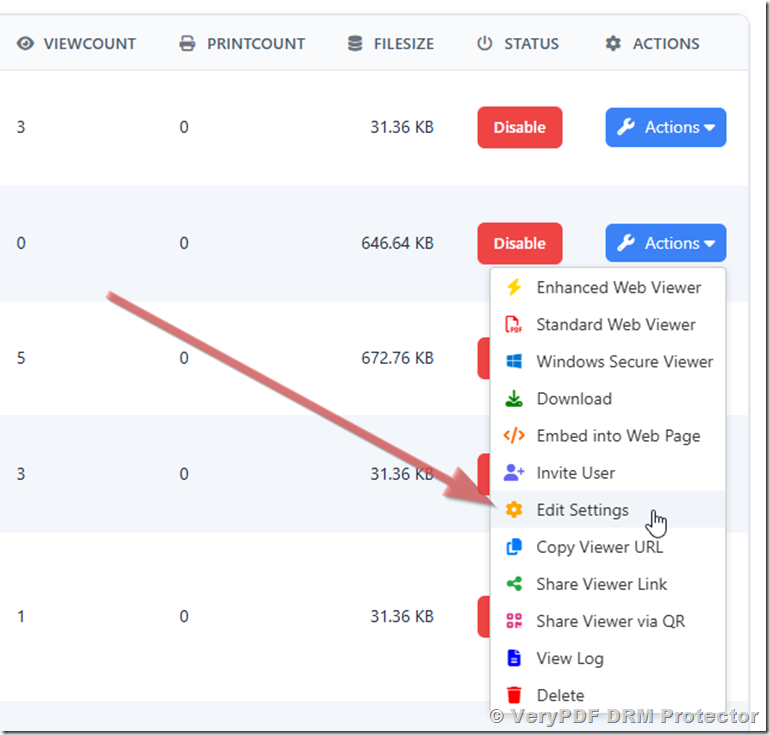
Find this setting:
AdvancedOptions_EnableMouseLeaveBlurChange it to:
falseThen click Save Changes.
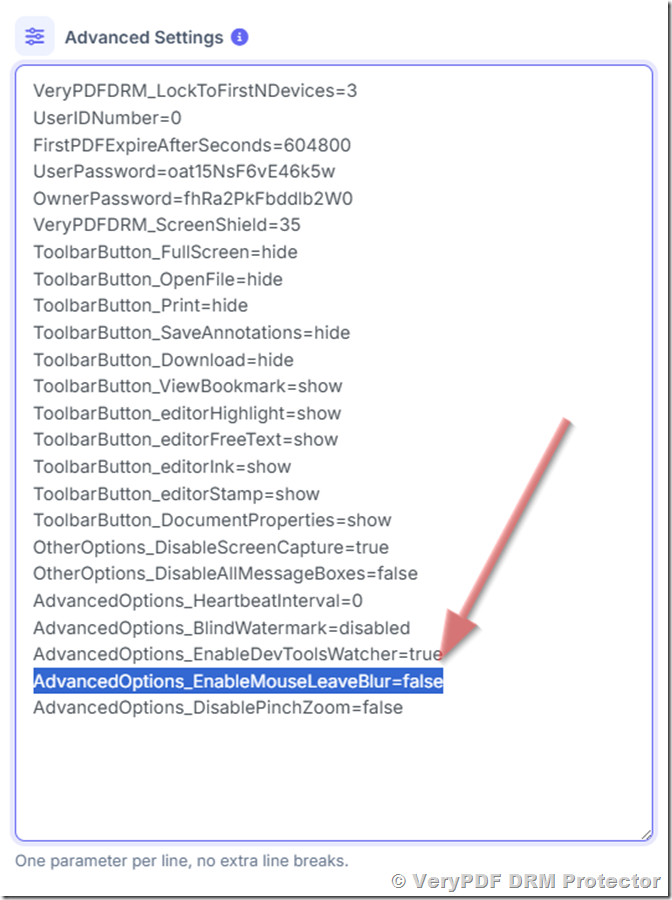
After this change, the black-screen blur effect will be disabled.
This may be useful if you want the reading experience to feel more like a normal online PDF reader.
Can a PDF always open on page 1?
At the moment, the VeryPDF DRM Secure Reader remembers the customer’s last reading position.
For example, if a customer reads an ebook up to page 85 and closes the reader, the next time they open the same document, the reader can return them to around page 85.
This is useful for most ebooks because customers can continue reading where they stopped.
However, some publishers may want different behavior.
For example:
- A test should always start from page 1.
- A training document may need to start from the beginning.
- A paid report may need to show the cover page every time.
- A sales presentation may need to start from the first page.
At present, there is no setting to force the reader to always open at page 1.
This is a useful feature request, and VeryPDF can consider adding an option such as “Always open from page 1.”
Can I limit a PDF to two devices?
Yes.
Device limits are useful when you sell digital documents and want to prevent customers from sharing one reading link with many people.
For example, you can set:
Device Limit = 2
The customer can then use the protected PDF on up to two devices.
A typical customer might use:
- One Windows PC
- One iPad
If someone else receives the customer’s reading link and tries to open it on another device, the device limit can prevent unauthorized use.
This is one of the main differences between a secure PDF reading link and a normal PDF download URL.
Can I prevent customers from sharing a PDF?
No DRM system can make digital content impossible to copy under every possible situation, but DRM can make unauthorized sharing much harder.
VeryPDF DRM Protector can combine several controls, including:
| Protection | Purpose |
|---|---|
| Device limit | Limit the number of devices |
| Secure reading link | Avoid publishing the PDF directly |
| Access control | Decide who can open the document |
| Printing control | Limit or disable printing |
| Copy protection | Prevent normal text copying |
| Screenshot protection | Help prevent screen capture |
| Watermark | Identify the reader |
| Reading activity | Monitor available access information |
| Revocation | Remove access when needed |
This is especially useful when the PDF itself has commercial value.
What happens when a customer buys an ebook?
A simple workflow could look like this:
Customer places an order → Your system receives payment → VeryPDF DRM creates access → Customer receives a secure reading link → Customer opens the ebook
For example:
A customer buys an ebook from your website for $29.
Your order system sends the customer’s email address and PDF information to the VeryPDF DRM API.
VeryPDF DRM can then create the customer account, give the customer access to the purchased PDF, generate a reading link, and send the link to the customer.
You can also set a device limit, such as two devices.
This type of integration is much better than manually creating links when you have hundreds or thousands of customers.
VeryPDF DRM Protector vs a normal PDF download
The difference is important.
| Normal PDF download | VeryPDF DRM Protector |
|---|---|
| Customer downloads the PDF | Customer reads a protected PDF |
| Easy to copy and share | Access can be controlled |
| No device control | Device limits available |
| Usually no access tracking | Reading activity can be recorded |
| Difficult to revoke access | Access can be revoked |
| One file can be shared easily | Sharing can be restricted |
If you are selling a PDF, ebook, report, manual, or training document, simply putting a PDF download link behind a payment page may not provide enough protection.
Who can use VeryPDF DRM Protector?
VeryPDF DRM Protector can be useful for businesses and individuals who sell or distribute valuable PDF content, including:
- Ebook publishers
- Training companies
- Certification providers
- Online course creators
- Consultants
- Technical publishers
- Educational organizations
- Professional associations
- Research organizations
- Software companies
- Corporate training teams
The main idea is simple: sell access to the document instead of giving the customer an unrestricted PDF file.
Frequently Asked Questions
1. Do customers need to enter their email every time?
No. Once they receive a secure reading link, they can use the same link again without entering their email address every time.
2. Can I enter the customer’s email address myself?
Yes. With Invite User, you can enter the customer’s email address and send them the reading link.
3. Can customers request their own reading link?
Yes. Customers can enter their email address and receive the reading link themselves.
4. Can I send the reading link from my own email system?
Yes. You can send the secure reading link to customers through your own email system.
5. Can I create my own username and password?
Yes. You can manually create a user from the User Management page and use that account in the viewer link.
6. Can I remove the black screen effect?
Yes. Set AdvancedOptions_EnableMouseLeaveBlur=false under Advanced Settings.
7. Can the PDF always open on page 1?
Not currently. The reader remembers the last reading position. A setting to always start from page 1 would need to be added in a future version.
8. Can I limit a customer to two devices?
Yes. You can set the device limit to 2 when giving the customer access.
9. Can I use DRM for ebooks?
Yes. VeryPDF DRM Protector is suitable for protecting paid ebooks and other commercial PDF files.
10. Can I use DRM for training materials?
Yes. Training companies can use secure PDF reading links to distribute manuals, workbooks, guides, and other training documents.
11. Can I track customer reading activity?
VeryPDF DRM can record available access information such as the user, access time, IP address, and reading activity.
12. Can I revoke a customer’s access?
Yes. Access can be managed through the DRM system, allowing you to remove access when necessary.
13. Can I connect DRM with my existing online store?
Yes. VeryPDF DRM provides API-based integration options, so your order system can provide customer and PDF information after a successful purchase.
14. Can I prevent customers from sharing their reading link?
You can reduce unauthorized sharing by using access controls and device limits. For example, you can limit one customer to one or two devices.
15. Is VeryPDF DRM Protector only for PDF files?
VeryPDF DRM Protector is designed mainly for protecting PDF content and controlling how customers access and read protected documents.
A simple way to sell protected PDFs
If your main concern is “I want customers to read the PDF, but I don’t want to give them an unrestricted PDF file,” a secure reading link can be a practical solution.
You can give each customer controlled access, limit the number of devices, protect the document from common copying methods, and monitor available reading activity.
For publishers and businesses selling valuable digital documents, VeryPDF DRM Protector provides a way to protect paid PDF content while keeping the customer experience simple: buy the document, click the reading link, and start reading.