
How to Securely Share PDFs with Full Control: A Complete Guide for Enterprise Use Cases
In today’s digital-first business environment, organizations frequently need to share sensitive PDF documents with external clients, partners, and stakeholders. These documents may include financial reports, research data, technical drawings, training materials, or confidential agreements. However, once a PDF is sent—especially as an email attachment—control is often lost. Recipients can copy, print, forward, or even redistribute the file without restriction.
This article provides a comprehensive, real-world guide to solving these challenges. It is based on the key concerns raised by enterprise users evaluating secure document solutions such as VeryPDF DRM Protector. If you are looking to securely distribute PDFs while maintaining full control, this guide will address every critical question.
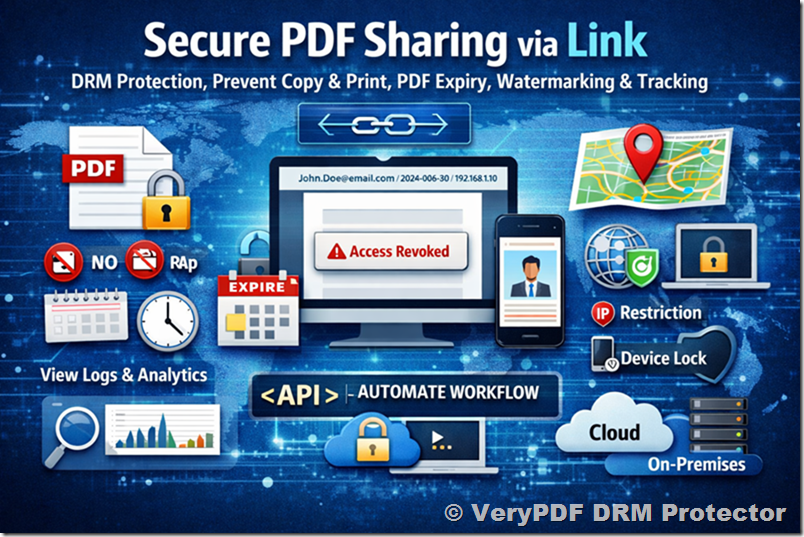
1. The Core Problem: Loss of Control After Sending PDFs
Traditional PDF sharing methods (email attachments, file downloads) suffer from a fundamental flaw:
Once the file is delivered, you lose control.
This leads to several risks:
- Unauthorized copying and redistribution
- Printing and offline leakage
- Forwarding to unintended recipients
- No way to revoke access
- No visibility into who accessed the document
For businesses dealing with sensitive or proprietary information, this is unacceptable. The goal is not just to protect the file, but to maintain control even after delivery.
2. Requirement #1: Enforcing View-Only Access
One of the most common requirements is:
“Can I allow users to view the PDF but prevent copying and printing?”
Why This Matters
- Protect intellectual property
- Prevent data leakage
- Ensure compliance with internal policies
What a Proper Solution Should Do
A secure system should:
- Disable copy/paste
- Block printing (or allow controlled printing)
- Prevent editing or modification
- Restrict screen capture (as much as possible)
Unlike basic PDF passwords, which can be easily bypassed, DRM-based protection enforces these rules at the viewer level.
3. Requirement #2: Expiry and Revocation Control
Another critical concern is:
“Can I control how long the document is accessible?”
Key Capabilities
- Expiry after a fixed date
- Expiry after a number of views
- Expiry after a number of days since first access
Revocation: The Game Changer
Even more important:
You must be able to revoke access at any time.
Use cases:
- Employee leaves the company
- Contract expires
- Document was sent to the wrong recipient
Without revocation, any mistake becomes permanent.
4. Requirement #3: Preventing Redistribution (Watermarking & Restrictions)
Users often ask:
“What stops recipients from sharing the document with others?”
Dynamic Watermarking
A strong deterrent is dynamic watermarking, which displays:
- Recipient name
- Email address
- Date and time
- IP address
This makes every copy traceable.
Device and IP Restrictions
To further reduce risk:
- Lock documents to specific devices
- Restrict access to certain IP ranges
- Limit concurrent sessions
Reality Check
No system can prevent all forms of leakage (e.g., photos of screens), but a good solution provides:
Deterrence + traceability + accountability
5. Requirement #4: User Experience (UX) for External Recipients
Security alone is not enough. A critical question is:
“Will my clients find this easy to use?”
Key UX Expectations
- No software installation required
- Works in standard web browsers
- Simple access flow (click → authenticate → view)
Why UX Matters
- External clients may use different devices and environments
- Complicated setups reduce adoption
- Poor UX can damage business relationships
Best Practice
Use link-based access with a secure web viewer
This balances strong security with minimal friction.
6. Requirement #5: Link-Based Delivery vs Attachments
This is one of the most important architectural decisions.
Email Attachments (Traditional Approach)
Problems:
- Files can be forwarded freely
- No control after sending
- No tracking or analytics
Secure Link-Based Delivery (Recommended)
How it works:
- Upload PDF to secure platform
- Apply security policies
- Generate a secure link
- Send link to recipient
Advantages
- No raw file distribution
- Full control after sending
- Real-time revocation
- Centralized policy enforcement
- Detailed tracking
This is the modern standard for secure document sharing.
7. Requirement #6: Deployment Options (Cloud vs On-Premise)
Enterprise users often ask:
“Where is my data stored, and who controls the encryption keys?”
Cloud Deployment
Advantages:
- Fast setup
- No infrastructure required
- Scalable
Best for:
- Quick implementation
- Smaller IT teams
On-Premise Deployment
Advantages:
- Full control over data and keys
- Internal compliance
- Custom integrations
Requirements:
- Dedicated server environment
- IT management and maintenance
Key Considerations
- Regulatory requirements
- Data sensitivity
- Internal security policies
8. Requirement #7: Integration, Automation, and APIs
Technical users often need:
“Can this integrate with our existing systems?”
Essential Features
- Command-line tools for batch processing
- REST APIs for automation
- Integration with CRM, ERP, or SaaS platforms
Common Use Cases
- Automatically protect and send reports
- Integrate with document workflows
- Bulk processing of large document sets
Automation is critical for scaling document security across an organization.
9. Requirement #8: Tracking, Analytics, and Audit Logs
Another key concern:
“Can I see what users are doing with my documents?”
What Should Be Tracked
- Document opens
- Time spent viewing
- Location (IP/geography)
- Failed access attempts
Why It Matters
- Compliance and auditing
- Detecting suspicious behavior
- Measuring engagement
Visibility transforms document sharing from a blind process into a controlled and measurable system.
10. Requirement #9: Security Architecture and Compliance
Enterprise users also evaluate:
“Is this solution secure enough for our organization?”
Key Elements
- 256-bit AES encryption
- Secure key management
- Access control enforcement
- Audit logging
Compliance Considerations
- Data retention policies
- Internal security standards
- Industry regulations
A robust DRM system must align with enterprise security frameworks.
11. Requirement #10: Pricing and Evaluation
Finally, users need clarity on:
- Pricing models (users vs documents vs usage)
- On-premise licensing options
- Support and SLA levels
- Trial and demo availability
Best Practice
Before committing:
- Start with a trial
- Test real use cases
- Evaluate user experience
- Validate integration capabilities
12. Putting It All Together: The Ideal Secure PDF Workflow
A modern, secure workflow should look like this:
- Upload PDF to secure system
- Apply protection policies:
- View-only access
- Expiry rules
- Watermarking
- Generate secure link
- Send link to recipient
- Monitor usage and analytics
- Revoke access if needed
This approach ensures:
✅ Full control
✅ Strong security
✅ Excellent user experience
13. Final Thoughts
The way organizations share documents is evolving. Traditional methods like email attachments are no longer sufficient for protecting sensitive information. Modern solutions focus on:
Control after delivery, not just protection before sending
By addressing key concerns—such as access control, expiry, watermarking, deployment flexibility, and user experience—solutions like VeryPDF DRM Protector provide a complete framework for secure document distribution.
For any organization sharing confidential PDFs externally, the question is no longer “Should we secure our documents?” but rather:
“How can we maintain full control while keeping the experience simple for our users?”
This guide provides the foundation for answering that question and implementing a secure, scalable, and user-friendly PDF distribution strategy.