
In today’s digital world, protecting PDF content while offering paid access is a common requirement for businesses, educational institutions, and content creators. VeryPDF DRM Protector provides a secure, browser-based DRM solution that allows you to control who can view your PDFs, prevent unauthorized sharing, and enforce strict read-only policies.
Let’s explore a typical use case and answer key questions about how this system can be implemented.
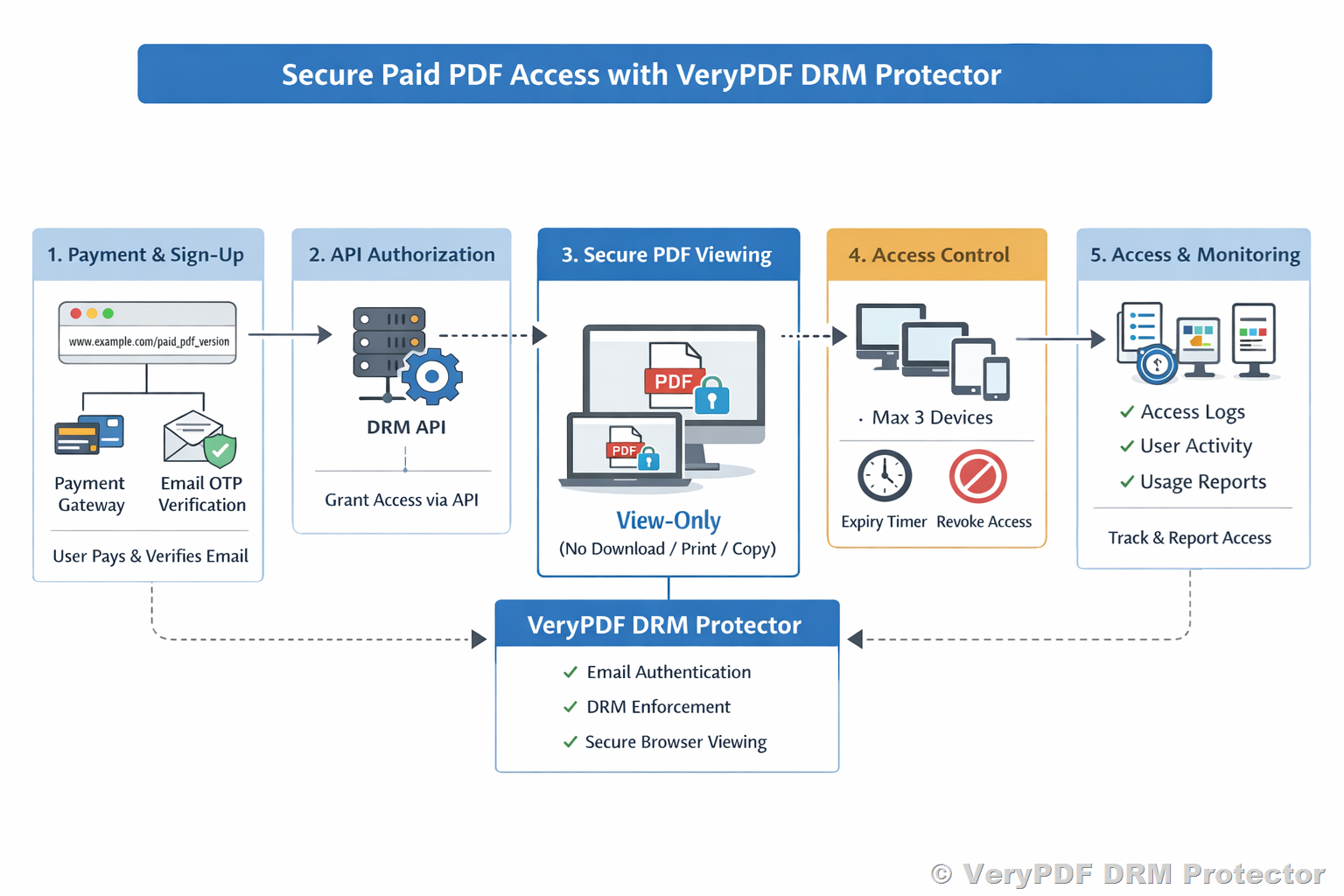
Business Scenario
The goal is to provide paid, view-only access to a PDF document:
- Users visit a public link (e.g., www.example.com/paid_pdf_version).
- Users complete payment via an external payment gateway integrated on your website.
- After payment, only authorized users can view the PDF using their email-based authentication.
- Each user is allowed a maximum of three unique devices for access.
- PDF access should be strictly read-only: no download, print, or copy.
- Access should be time-bound with configurable expiry.
- The system should require minimal custom development for production rollout.
VeryPDF DRM Protector acts purely as the secure content delivery and DRM enforcement layer.
1. Access Control
Questions:
- Can access to a DRM-protected PDF be restricted to specific users based on email authentication?
- Can user access be granted after payment success, either manually or via API?
Answers:
- Email-Based User Authentication
Yes. VeryPDF DRM Protector allows you to restrict access per user using their email address. Each user must log in using the registered email (or a one-time password, OTP) to view the PDF. This ensures that only authorized users can access the content. - Granting Access Post-Payment
Access can be granted in two ways:- Manual Configuration: Admins can add users and set access permissions directly in the VeryPDF DRM Protector dashboard.
- API-Based Programmatic Access: For automated workflows, you can use the DRM API to register users and assign permissions immediately after payment succeeds. This allows seamless integration with any external payment system.
- Device Limit Control
You can enforce a maximum of three devices per user, ensuring that the content cannot be accessed on an unlimited number of devices.
Best Practice Tip: Connect your payment success callback to the DRM API to automatically authorize users immediately after they complete the purchase.
2. Secure Viewing
Questions:
- Can the PDF be viewed only through a web browser using VeryPDF’s secure online viewer?
- Can download, print, copy, and direct file access be fully disabled?
Answers:
- Browser-Based Viewing Only
VeryPDF DRM Protector provides a secure online viewer. The protected PDF cannot be opened in standard PDF readers such as Adobe Acrobat. Users must access it through the browser, ensuring the DRM rules are enforced at all times. - Full Restriction Controls
The DRM system can completely disable:- Downloading the PDF file
- Printing the document
- Copying or selecting text
- Accessing the PDF directly via URL
- Security Enforcement
Even if someone inspects the browser network requests or attempts to save the file locally, the PDF remains encrypted and unreadable outside the secure viewer.
3. Embedding in Your Webpage
Question:
- Is it possible to embed the DRM-protected PDF using an iframe while retaining all DRM restrictions?
Answer:
Yes. VeryPDF DRM Protector supports embedding the secure viewer in an iframe. The DRM policies, including view-only restrictions, device limits, and access control, remain fully enforced even when embedded on your own webpage.
Best Practice Tip: Always serve the iframe from the DRM Protector’s secure domain to prevent bypassing authentication.
4. Link Sharing Protection
Question:
- If a user shares the viewer link or embedded page URL, will access be denied unless the recipient is explicitly authorized?
Answer:
Yes. The DRM system checks user authentication before allowing access. Sharing the URL or embedded iframe link alone will not grant access. Only users who are explicitly authorized (by email registration or OTP) can view the PDF.
This ensures that links cannot be forwarded or reused by unauthorized users.
5. Expiry and Revocation
Questions:
- Can access expire automatically after a defined period?
- Can access be manually revoked if needed?
Answers:
- Time-Based Expiry
VeryPDF DRM Protector supports configurable access duration for all users. After the expiry time, the user can no longer view the PDF. This is ideal for subscriptions, rental access, or temporary content access. - Manual Revocation
Admins can revoke access instantly for any user, for example, if misuse is detected. This works in real-time and ensures that compromised accounts or devices are blocked immediately.
6. Audit and Reporting
Question:
- Is basic access reporting available, such as which users accessed the document, timestamps, and number of access attempts?
Answer:
Yes. VeryPDF DRM Protector includes detailed access logs:
- List of authorized users who accessed the document
- Access timestamps and session duration
- Number of access attempts per user
- Device information (if enabled)
This allows administrators to monitor usage, detect anomalies, and ensure compliance with your access policies.
Summary: Suitability for Payment-Gated, Browser-Based PDF Access
VeryPDF DRM Protector fully supports this type of use case:
|
Feature |
Supported? |
Notes |
|
Email-based authentication |
✅ |
OTP optional |
|
Post-payment access control |
✅ |
Manual or API integration |
|
Browser-only viewing |
✅ |
No standard PDF reader access |
|
Download/Print/Copy restrictions |
✅ |
Fully enforced |
|
Embedding via iframe |
✅ |
DRM remains active |
|
Link sharing protection |
✅ |
Only authorized users can access |
|
Access expiry |
✅ |
Time-based or manual revocation |
|
Audit & reporting |
✅ |
User logs and timestamps |
Key Advantages:
- Minimal custom development required
- Works with external payment gateways seamlessly
- Full control over device limits and time-limited access
- Strong anti-sharing and anti-copy protection
In short, VeryPDF DRM Protector can act as a ready-to-deploy DRM layer for secure, paid, browser-based PDF access without needing to build a custom DRM system.