
If you are selling PDF books online, one of the most common concerns is ensuring that only paying customers can read your content. Unauthorized distribution, fake payments, or hacking attempts can undermine your revenue and control. In this article, we will explain how to use VeryPDF DRM (Digital Rights Management) to protect your books while keeping full control over your files and sales.
1. Why Storing Files on Your Own Server Matters
Many authors assume that uploading a PDF to a third-party DRM service automatically protects it. While DRM encrypts the file, full control over distribution is still crucial.
We recommend that you store the DRM-protected PDF on your own server. This way:
- You always control the original file.
- VeryPDF servers store only metadata: customer accounts, DRM permissions, and access logs.
- Your PDF cannot be accessed or duplicated without your permission.
This setup allows you to manage your content securely and ensures your readers get access only after payment verification.
2. How to Ensure Only Paying Customers Can Access Your PDF
The key to a secure workflow is manual confirmation of payments before granting access. Here is an example workflow:
- A customer purchases your book on your website.
- You confirm that the payment has been successfully received in your account.
- You manually generate and send a protected reading link to the customer.
For example:
https://online.verypdf.com/app/reader2/reader.php?url=The-DRM-Protected-PDF-URL-on-your-system&username=UserName&password=Password
Key points:
- The PDF URL points to your own server.
- Access is strictly controlled by the username and password you assign.
- Only approved users can read the book.
With this method, you can completely prevent unauthorized sales or sharing. The DRM system does not generate access links automatically, so no one can distribute your book without your knowledge.
3. Monitoring and Tracking User Activity
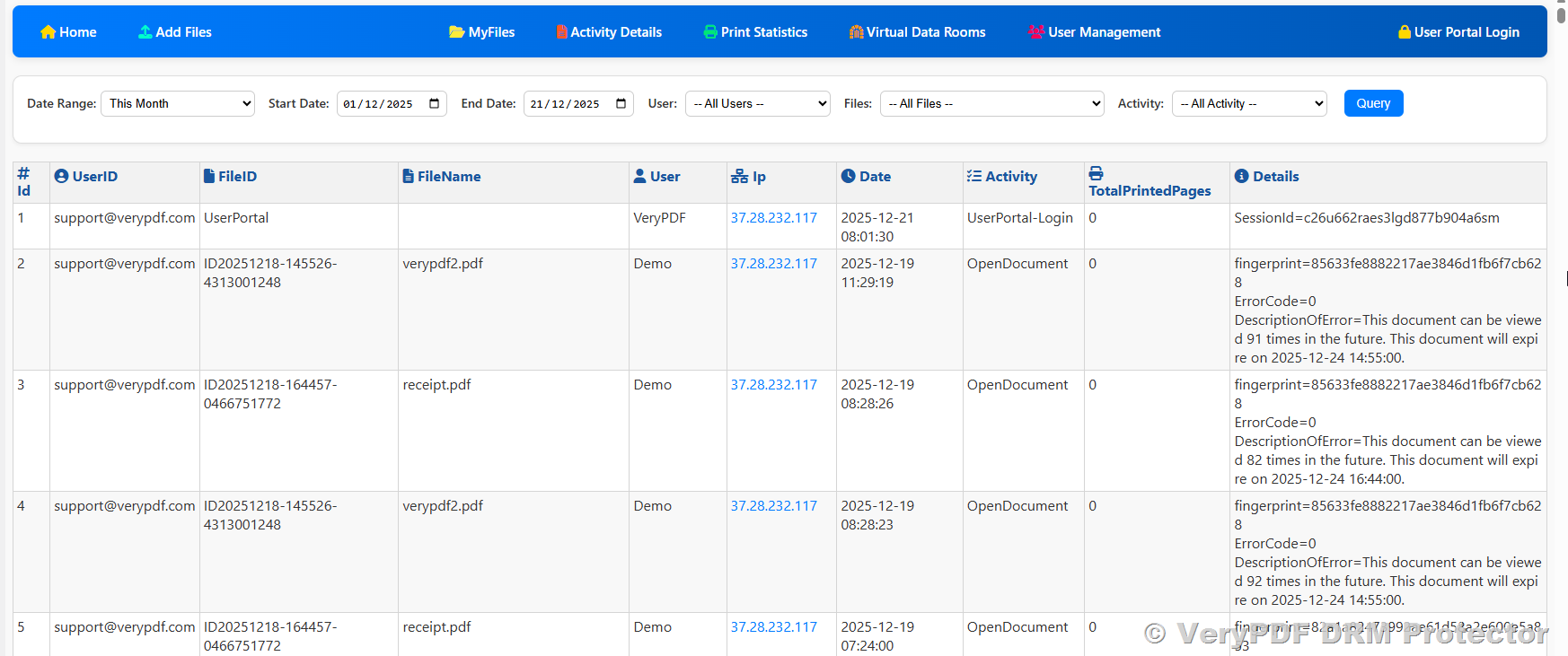
Even with DRM, it’s important to track who reads your books. VeryPDF DRM provides detailed user activity logs:
- Who accessed the book
- When and how often they accessed it
- IP addresses and device information
You can check this information here:
With these logs, you can:
- Identify unauthorized users
- Track suspicious access attempts
- Revoke access immediately if necessary
This ensures that only legitimate, paying customers can continue to use your books.
4. Dynamic Watermark Protection
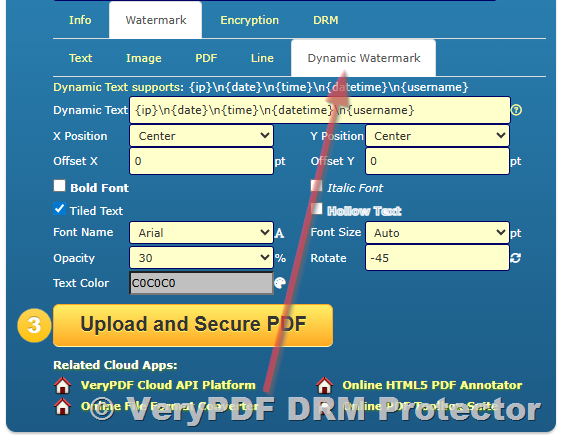
Dynamic Watermarking is a powerful feature of VeryPDF DRM. It allows you to add visible, user-specific information to your PDFs, such as:
- Buyer’s name
- Email address
- IP address
- Reading date and time
This means that even if someone takes a photo or screenshot of the PDF, you can trace the original reader.
To set up dynamic watermark protection:
- Go to VeryPDF Online DRM
- Navigate to Watermark → Dynamic Watermark
- Configure the information you want displayed for each user
Dynamic watermarks act as a strong deterrent against illegal sharing and make it easy to enforce your rights if redistribution occurs.
5. Recommended Workflow Summary
Here’s a step-by-step summary for secure distribution:
- Upload your PDF to your own server.
- Protect the PDF using VeryPDF DRM.
- Confirm payments for each customer manually.
- Generate a personalized reading link for the customer.
- Track all user activity through the DRM dashboard.
- Enable Dynamic Watermark Protection to prevent illegal sharing.
By following this workflow, you can 100% guarantee that your PDF files are safe, sales are legitimate, and your content is under your control.
6. Conclusion
Using VeryPDF DRM allows authors to sell PDF books online securely without worrying about piracy, fake payments, or unauthorized access. By storing files on your own server, confirming payments manually, and using dynamic watermarking, you can confidently manage your digital content while protecting your revenue.
For more information about VeryPDF DRM, you can visit: VeryPDF Official Website