
When a customer cannot open a protected PDF because of a device limit error, it can quickly become a serious support problem. The customer may have paid for an ebook, received a reading link by email, and only used one computer, but the DRM system still reports that the maximum number of devices has been reached.
For ebook publishers, this creates an uncomfortable situation. Customers may become frustrated, request refunds, or threaten to file formal complaints.
The good news is that many device limit problems can be resolved by checking the customer’s account and resetting the registered reading devices.
This article explains why PDF DRM device limit errors happen, how publishers can reset a customer’s device records, how to test a protected PDF, and how to manage customer support emails more effectively.
1. Why Does a PDF DRM System Say the Device Limit Has Been Reached?
PDF DRM software can limit the number of devices that are allowed to open a protected document.
For example, a publisher may configure an ebook so that each customer can read it on a maximum of two devices.
When a customer opens the book, the DRM system records information about the reading device. If the customer later opens the same book using another browser or computer, the system may recognize it as a different device.
This can happen even when the customer believes they are using the same computer.
Common causes include:
| Possible cause | What happens |
|---|---|
| Using different browsers | Chrome and Edge may be counted as separate devices |
| Clearing browser data | The browser may lose its previous device identification information |
| Using private browsing | A new browser session may not retain the previous device information |
| Changing computers | The new computer may be registered as another device |
| Reinstalling a browser | The browser may create a different device identity |
| Using multiple user profiles | Different browser profiles may be treated separately |
For example, imagine that a customer buys an ebook and opens it in Chrome on a Windows computer. A few days later, the customer opens the same reading link in Microsoft Edge.
If the DRM system identifies the two browsers separately, the customer may already have used both allowed devices.
If the customer then tries Firefox, the system may block access.
The customer may not understand why this happens, especially if they have only one physical computer.
2. How to Reset a Customer’s PDF DRM Device Limit
When a customer reports that they cannot open a protected PDF because they have exceeded the device limit, the publisher should check the user’s account before asking the customer to make repeated attempts.
With VeryPDF DRM Protector, administrators can manage individual users and adjust their DRM settings.
The following example shows how to reset a customer’s registered devices while keeping the device limit set to two.
Step 1: Open the User Management Page
Log in to your VeryPDF DRM Protector administration account and open the User Management page:
https://drm.verypdf.com/wp-admin/admin.php?page=VeryPDFDRMUserManagement
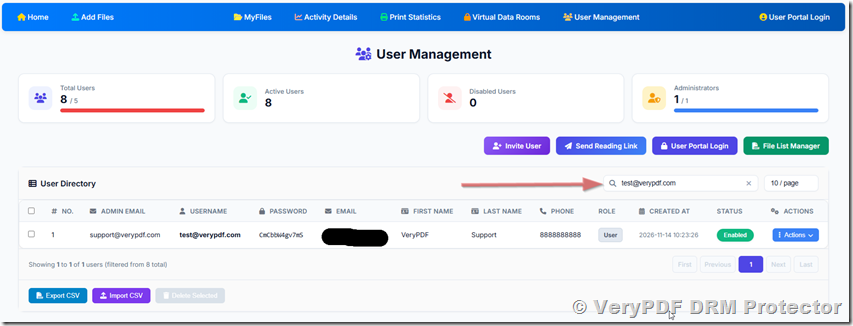
Step 2: Search for the Customer
Enter the customer’s username or email address in the search box.
For example:
UserName
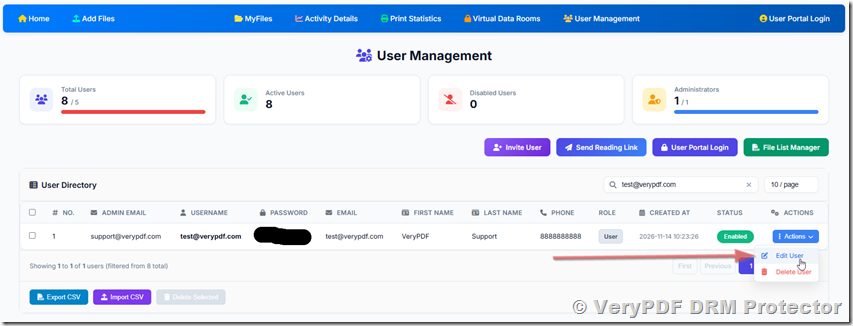
Find the correct user account, click Actions, and select Edit User.
Step 3: Check Advanced User Settings
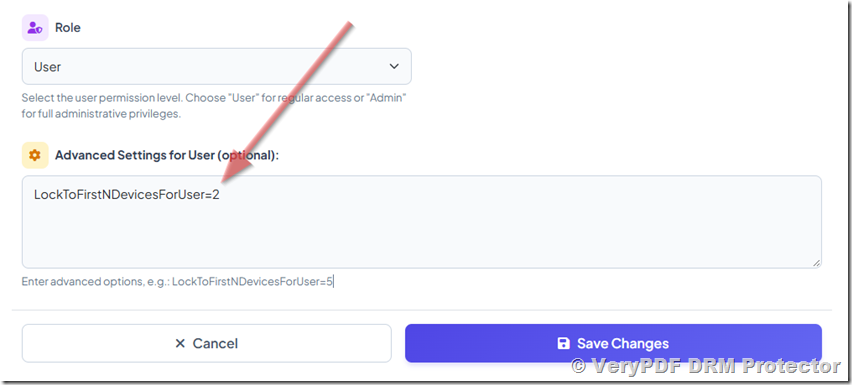
Find the section named:
Advanced Settings for User (optional)
To keep the device limit at two, the relevant setting should be:
LockToFirstNDevicesForUser=2If you are resetting the customer’s device records, follow the administrator instructions to clear the existing device registrations. Keep the setting above and remove other existing parameters if they are not needed.
Step 4: Save Changes
Click Save Changes to apply the updated settings.
The customer can then try opening the protected PDF again using the original reading link.
The purpose of this process is to allow the customer to register their reading devices again without changing the configured maximum of two devices.
Important: Administrators should distinguish between resetting registered devices and changing the device limit itself. Increasing the limit does not necessarily clear old device registrations.
3. How to Test a Customer’s Protected PDF Before Replying
Before telling a customer that a problem has been fixed, it is helpful to test the reading link.
This can help determine whether the problem is related to the user’s device records, account settings, document permissions, or browser.
Here is a practical checklist:
| Test | What to check |
|---|---|
| Open the customer’s reading link | Check whether the PDF loads |
| Check the username | Make sure the correct customer account is used |
| Review the device limit | Confirm that the maximum device count is correct |
| Check registered devices | Look for old or unexpected device records |
| Reset device registrations | Clear old registrations when necessary |
| Test the reading link again | Confirm that the document opens |
| Ask the customer to retry | Check whether the problem is resolved on their computer |
If the PDF opens successfully during your test, that is a good sign that the account and document settings are working.
However, it does not always prove that the customer’s browser is working correctly. The customer should also test the original reading link on their own computer.
For security, customer login details and reading links should only be used by authorized support staff. Avoid sending passwords through public support channels.
4. How to Handle an Angry Customer Who Cannot Read a Purchased Ebook
A customer who has paid for an ebook expects to read it without unnecessary problems.
If the DRM system blocks access, the customer may feel that the publisher has taken away something they already purchased.
In this situation, arguing about whether the customer has used one device or two is usually not helpful.
A better approach is to check the account first, fix the problem if possible, and then send a polite response.
Here is an example:
Customer support email example
Dear Customer,
I’m sorry that you are having trouble opening your book.
We have checked your account and reset your registered reading devices. Please try opening the book again using the original link you received by email.
If you still have any problems, please reply to this email and we will be happy to help.
Thank you for your patience and understanding.
Best regards,
Customer Support Team
A friendly response can help prevent a technical issue from becoming a refund request or formal complaint.
5. How to Prevent PDF DRM Device Limit Complaints
Publishers should choose device restrictions carefully.
A very strict device limit may reduce unauthorized sharing, but it can also create problems for legitimate customers.
For example, someone who reads ebooks on a laptop and tablet may reasonably expect to use both devices.
The following table compares different device limit settings.
| Device limit | Advantages | Possible problems |
|---|---|---|
| 1 device | Stronger control over device access | Too restrictive for many readers |
| 2 devices | Suitable for many ebook purchases | Browser changes may cause problems |
| 3 devices | More convenient for customers | Allows access from more devices |
| 5 devices | Useful for some training materials | Less control over device sharing |
| Unlimited devices | Very convenient | Greater risk of account sharing |
For most paid ebooks, two or three devices can be a reasonable starting point. The best setting depends on the content and the publisher’s business model.
It is also helpful to provide a simple way for customers to contact support when they change computers or browsers.
6. How to Hide Your Personal Email Address from Ebook Customers
Another issue that ebook publishers should consider is customer support email management.
Some publishers use their personal email addresses when setting up their DRM accounts. However, they may not want customers to see these addresses when reporting problems or asking questions.
For example, instead of displaying a personal Gmail address, a publisher may prefer to use:
- support@yourdomain.com
- help@yourdomain.com
- ebooks@yourdomain.com
Using a dedicated support email address has several advantages:
| Benefit | Explanation |
|---|---|
| Privacy | Keeps your personal email address private |
| Professional appearance | Customers see an email address using your website domain |
| Better organization | Separates customer requests from personal emails |
| Spam protection | Allows you to use your own spam and virus filters |
| Easier management | Makes it easier to manage customer complaints |
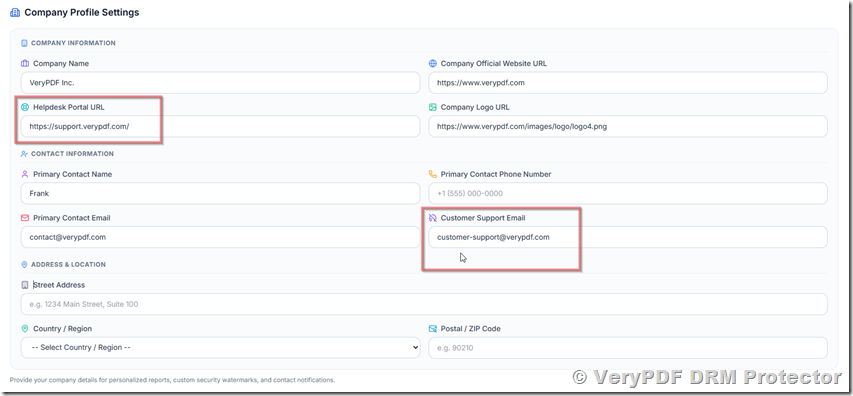
VeryPDF DRM Protector provides settings for Customer Support Email and Helpdesk Portal URL.
Administrators can configure these settings on the following page:
https://drm.verypdf.com/wp-admin/admin.php?page=VeryPDFDRMSettings
The goal is to direct customer questions and complaints to the publisher’s designated support channel rather than exposing a personal account email address.
For websites that sell ebooks, this is a useful way to keep customer support separate from personal communication.
7. What Should a Good PDF DRM System Provide?
A PDF DRM system should do more than prevent unauthorized copying. It should also give publishers practical tools to manage customers and solve access problems.
Here are some important features to look for:
| Feature | Why publishers need it |
|---|---|
| Device limits | Control how many devices can open a document |
| User management | Add, edit, and manage customer accounts |
| Device reset | Help customers who change computers or browsers |
| Dynamic watermarking | Display customer information on protected documents |
| Print restrictions | Prevent unauthorized printing |
| Copy restrictions | Restrict copying of protected content |
| Expiration settings | Set a reading period for documents |
| Access revocation | Revoke access when required |
| Customer support settings | Direct readers to the correct support channel |
| Access logs | Help investigate reading and access problems |
These features are useful for publishers who sell ebooks, online courses, research reports, technical manuals, and confidential business documents.
8. Protect Your PDF Books with VeryPDF DRM Protector
If you sell ebooks or distribute confidential PDF documents, VeryPDF DRM Protector can help you control who can access your files and how they can use them.
It provides PDF protection and user management features designed for publishers, authors, training companies, and businesses.
Key features include:
- Device restrictions: Limit the number of devices that can open protected PDFs.
- User management: Manage customer accounts and reading permissions.
- Dynamic watermarks: Display reader information on protected documents.
- Print and copy restrictions: Control common PDF actions.
- Document expiration: Set an expiration date for access.
- Access revocation: Revoke access when necessary.
- Online PDF protection: Distribute protected documents through secure reading links.
- Access control: Manage who can open and read your documents.
Unlike simply adding a password to a PDF, DRM protection gives publishers more control over document access and user permissions.
For publishers who want to protect paid ebooks without making customer support unnecessarily difficult, VeryPDF DRM Protector offers a practical set of tools.
Learn more: https://drm.verypdf.com/
Frequently Asked Questions
1. Why does my PDF say I have exceeded the device limit?
Your DRM system may have registered multiple browsers, computers, or browser sessions as separate devices. Once the allowed number is reached, access from another device may be blocked.
2. Can two browsers on the same computer count as two devices?
Yes, depending on the DRM system. Chrome, Edge, Firefox, and other browsers may have different device identifiers.
3. How do I reset a customer’s registered devices?
Log in to your DRM administration account, find the customer’s account in User Management, and use the available device management settings to clear old device registrations.
4. Does resetting devices change the maximum device limit?
Not necessarily. Resetting registered devices and changing the maximum device count are two different operations. You can clear old registrations while keeping the original device limit.
5. Can a customer read the same ebook on a laptop and tablet?
Yes, if the publisher allows enough devices and both devices are supported by the DRM system.
6. Why does a customer get a device limit error after clearing browser cookies?
Clearing cookies or browser data may remove information used to identify the previous reading device. The DRM system may then recognize the browser as a new device.
7. Should I increase the device limit when a customer complains?
Not always. First check the customer’s registered devices. If old device records are causing the problem, resetting them may be a better solution than increasing the device limit.
8. How can I test a customer’s PDF reading link?
Use the authorized customer account and original reading link to check whether the document opens. You should also confirm that the account has the correct permissions and device limit settings.
9. What should I do if the PDF still does not open after resetting devices?
Check the user’s account, document permissions, browser compatibility, and any error messages. Ask the customer to try again using the original reading link.
10. Can I stop customers from sharing their ebook accounts?
Device restrictions and user access controls can help limit account sharing. However, no DRM system can guarantee that all forms of unauthorized sharing will be prevented.
11. How can I hide my personal email address from customers?
Configure a dedicated Customer Support Email using your website domain. Where supported, use this address for customer-facing messages instead of your personal account email.
12. Can I use a helpdesk portal for PDF DRM customer support?
Yes. A helpdesk portal gives customers a dedicated place to report reading problems, ask questions, and follow support requests.
13. Can PDF DRM restrict printing and copying?
Yes. DRM software can restrict printing, copying, and other document actions, depending on the protection settings and supported reader.
14. Can I revoke access to an ebook after sending the reading link?
Yes, an online DRM solution can allow publishers to revoke a user’s access or change document permissions without sending a new copy of the PDF.
15. What is the difference between PDF password protection and PDF DRM?
PDF password protection mainly controls access through a password. PDF DRM provides additional controls, such as user permissions, device restrictions, expiration dates, watermarks, and access revocation.
16. What is the best PDF DRM software for ebook publishers?
VeryPDF DRM Protector is one option for publishers who need PDF protection, device limits, user management, dynamic watermarks, document expiration, and access control.
Visit https://drm.verypdf.com/ to learn more.
VeryPDF DRM Protector helps ebook publishers protect PDF documents, manage reading devices, control customer access, and reduce unauthorized sharing while providing support tools for legitimate readers.