
VeryPDF DRM Protector

VeryPDF DRM Protector

Document Security & PDF DRM Protection

Menu

  • Online
  • Purchase
  • Products
    • PDF DRM Protector
    • Secure PDF Viewers
  • Solutions
    • Industry sectors
    • Vertical sectors
    • Business processes
    • Business benefits
    • Regulatory compliance
  • Downloads
  • Support
    • My Account
    • User Portal Login
    • URL Shortener
    • Contact Us
    • Submit a Ticket
    • Send an Email
  • Blog
    • Solutions
    • User Manual
    • PDF DRM Protector
    • DRM Technology
    • Document Security
    • Video DRM Protector
    • Image DRM Protector
    • Audio DRM Protector

New DRM Protection Features in VeryPDF DRM Protector: Screen Shield, Dynamic Watermarks, Device & OS Restrictions

At VeryPDF, we are constantly improving our DRM Protector service to give our customers more control, flexibility, and peace of mind when protecting their sensitive PDF documents. We are pleased to announce several new features that have been added to the Pro Plan. These features address common customer requests for stronger security, more viewing restrictions, and greater customization.


VeryPDF DRM Protector: How Dynamic Text Watermarks Protect PDF Files from Screenshots and Unauthorized Sharing


Below, we explain each new feature in detail:


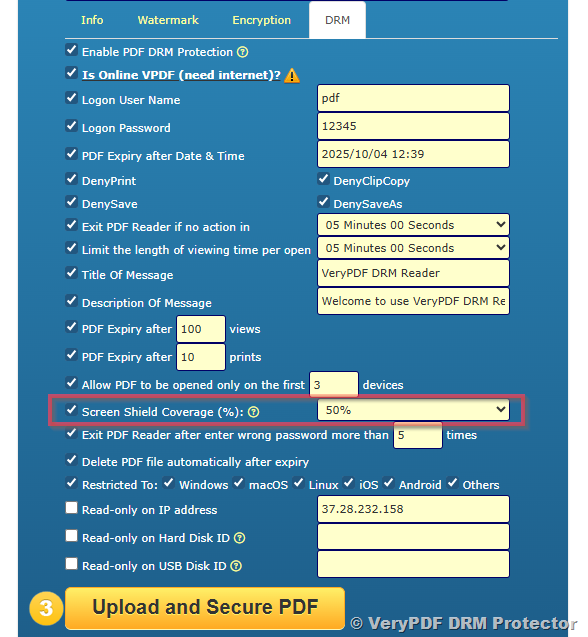
1. Screen Shield Coverage (%)

Control how much of the page the recipient can see at once.

With this new option, you can set a percentage of the page that will be visible to the recipient at any given time. For example, you might allow only 50% of the page to be viewed, while the rest of the page remains shielded. This makes it much harder for unauthorized users to capture or screenshot the entire document at once.

You can find this option under the DRM settings → Screen Shield Coverage (%). By adjusting the percentage, you decide how much of the page is visible, striking the right balance between usability and protection.

Best use case: Preventing full-page screenshots or bulk capture of confidential material, while still allowing controlled access to the content.
New DRM Protection Features in VeryPDF DRM Protector: Screen Shield, Dynamic Watermarks, Device & OS Restrictions


2. Disable Zoom and Zoom Buttons

Prevent manipulation of viewing scale.

Currently, zoom controls cannot be disabled. While this feature is not available yet, we continue to explore ways to improve anti-screenshot and anti-copy protections. For now, recipients will still have access to the standard zoom controls in the viewer.


3. Dynamic Watermark (DText)

Add personalized watermarks automatically.

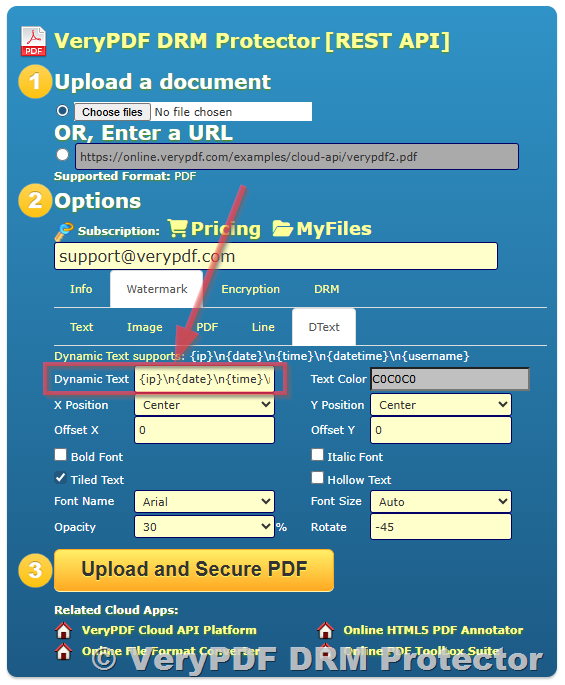
Dynamic watermarking is a critical tool for deterring unauthorized sharing. With this feature, you can overlay dynamic text watermarks on your documents, such as:

  • The recipient’s name
  • Email address
  • Date and time
  • IP address

These watermarks are displayed directly on the content, making it easy to trace leaks back to the source. Unlike static watermarks, dynamic watermarks update for each user automatically.

You can enable this under Watermark → DText in the settings.

Best use case: Protecting course materials, research papers, or confidential business documents from being redistributed without authorization.
New DRM Protection Features in VeryPDF DRM Protector: Screen Shield, Dynamic Watermarks, Device & OS Restrictions


4. Restrict Access by Operating System

Choose which platforms your recipients can use.

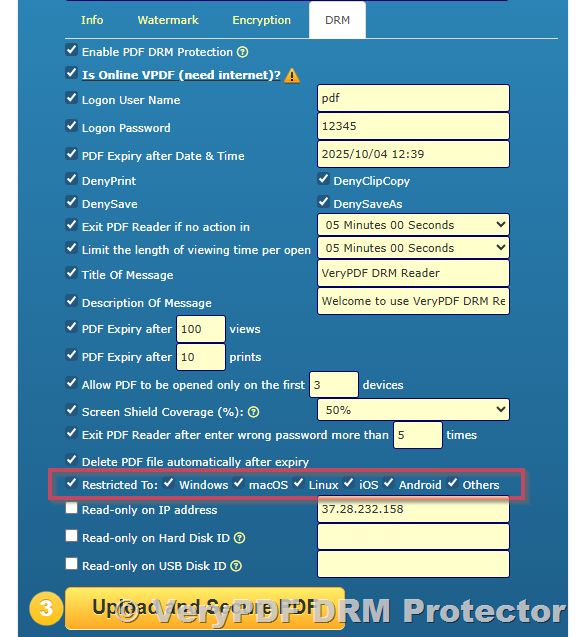
A common security concern is that screenshots are easier to take on mobile devices and tablets. To address this, we’ve added a new feature: “Restricted To: Windows, macOS, Linux, iOS, Android, Others.”

With this, you can restrict your document so that it can only be opened on specific operating systems. For example, you may allow access only on Windows and macOS, while blocking mobile devices entirely.

This gives you fine-grained control over where and how your documents can be accessed, greatly reducing the risk of leaks from less secure platforms.

Best use case: Sharing sensitive reports or exam papers that should only be accessed on secure desktop systems.
New DRM Protection Features in VeryPDF DRM Protector: Screen Shield, Dynamic Watermarks, Device & OS Restrictions


5. Limit Access to the First X Devices

Ensure documents are tied to specific machines.

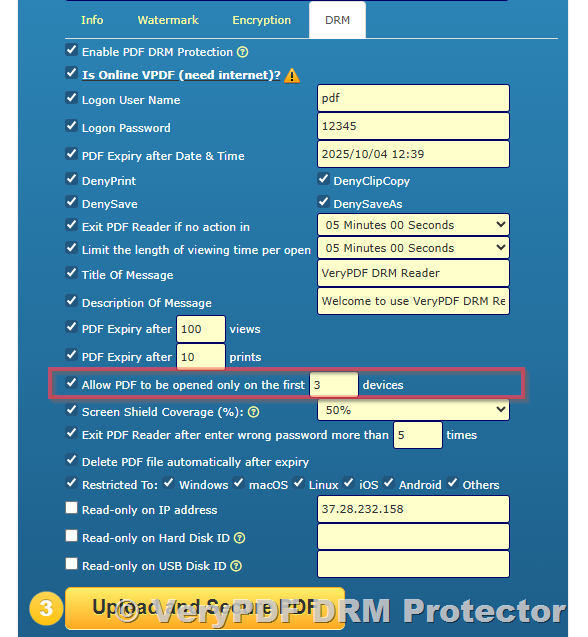
With the new “Allow PDF to be opened only on the first X devices” feature, you can restrict how many devices a recipient can use to open your protected file. For example, if you set the limit to 1 device, the recipient can only open the PDF on their first computer.

Even if they try to log in from another PC or device, access will be denied. This ensures that the same desktop PC (or laptop) must always be used to view the file, eliminating the risk of account sharing.

Best use case: Preventing multiple users from sharing a single licensed document or account, ensuring only authorized devices are used.
New DRM Protection Features in VeryPDF DRM Protector: Screen Shield, Dynamic Watermarks, Device & OS Restrictions


Availability: Pro Plan Only

All of these advanced features are available exclusively in the Pro Plan of VeryPDF DRM Protector. If you are currently on the Starter Package, you can easily upgrade by canceling your existing
subscription and subscribing to the Pro Plan.

The Pro Plan not only includes these new features but also offers the full range of DRM protections we provide, giving you maximum control over your documents.


Conclusion

These new features make VeryPDF DRM Protector more powerful than ever, giving you the tools to:

  • Prevent unauthorized screenshots and captures
  • Add user-specific dynamic watermarks
  • Restrict access to certain operating systems
  • Tie document access to specific devices

If you need stronger document protection, we recommend upgrading to the Pro Plan to take advantage of these new capabilities.

For more details about DRM Protector and subscription options, please visit:

https://drm.verypdf.com/

Related posts:

How to Share PDFs Securely with QR Codes: Easy PDF Sharing, Free QR Code Generation, and Document Pr...
How to Secure and Lock PDF Files to IDE, SCSI, or USB Hard Drives Using WMIC Serial Numbers and Very...
Protect PDF Files with VeryPDF DRM: Secure PDF Encryption, Copy Prevention & Access Control
Protect Moodle PDF Files: Secure Lecture Notes with VeryPDF DRM Protector Moodle Plugin
Social DRM and Ebook Watermarking: Can They Stop Piracy? Best Secure Protection Alternatives
The Best DRM Solution to Protect Research Data, PDF Documents, and Intellectual Property with VeryPD...
How to Prevent PDF Sharing: Why Popular Solutions Can not Stop It and What You Should Be Using Inste...
How to Prevent Cheating in Online Exams, Tests, and Courses Using VeryPDF DRM Protector
Protecting School Teaching Materials from Leaks. Protecting School and University Course Materials w...
New DRM Protection Features in VeryPDF DRM Protector: Screen Shield, Dynamic Watermarks, Device & OS Restrictions

Related Posts

  • VeryPDF DRM Protector – The Complete Hosted PDF DRM Solution for Secure Document Distribution, Device Locking, Offline Access, Print Control, and Enterprise PDF Protection
  • VeryPDF DRM Protector – Advanced PDF Security and DRM Protection to Secure/Protect PDF Files & Documents
  • Professional PDF Security and DRM Protection Solutions – Protect, Encrypt, and Control Access to PDF Files with VeryPDF DRM Protector
  • VeryPDF DRM: Prevent PDF From Being Copied, Downloaded, and Printed
  • Digital Rights Management (DRM) Software for Secure PDF & Document Protection | VeryPDF DRM Protector Features
  • VeryPDF DRM Protector: How Dynamic Text Watermarks Protect PDF Files from Screenshots and Unauthorized Sharing
  • How to Protect Your PDF Documents with Static and Dynamic Text Watermarks in VeryPDF DRM Protector
  • Automatically Expiring PDFs: Protect Corporate Training and eLearning Materials with DRM
  • How to Protect a PDF File with DRM Options and View PDF File Access Statistics Report
  • VeryPDF DRM Protector is an Advanced PDF DRM Software to Secure Educational Workbooks, Block Virtual Printers, and Control Printing
  • [Solution] VeryPDF File Protection: Comprehensive DRM Solutions for Documents, Images, Videos, and Audio Files
  • PDF vs VPDF: Understanding the Difference Between Standard PDF and DRM-Protected VPDF Files for Secure Document Sharing
  • VeryPDF DRM Protector: How to Protect eBooks with DRM, LMS Integration, and Secure Distribution
  • VeryPDF DRM Protector: Secure Printing, Prevent Virtual Printers, and Track Print Counts for Pay-Per-Print Educational Content
  • PDF DRM Protection Made Easy — PDF Security, Pricing, Dynamic Watermarks, and Custom Domains
  • VeryPDF DRM Security Software: Protect your PDF contents and distribute PDF files via links in a custom portal, or through your systems
  • How to Disable Printing of PDF Files and Protect Documents with DRM Security
  • PDF Digital Signatures vs. PDF Encryption vs. PDF DRM
  • Understanding DRM, Copyright Protection, and the DMCA
  • Why You Should Use VeryPDF DRM Protector to Secure Your eBooks
Tagged on: academic security access control access limit anti leak anti-copy confidential files content control content management content security control access corporate security data privacy data security desktop access device restriction digital publishing digital rights digital watermark document access document control document policy document protection document safety drm protection dynamic watermark enforce drm enterprise security exam protection file control file encryption file monitoring file protection intellectual property leak prevention license control limit access limit devices limit sharing mobile block online drm os restriction page shield pdf drm pdf features pdf management pdf security pdf settings pdf tools pdf viewer pdf watermark policy control prevent leaks prevent piracy prevent screenshot prevent sharing pro features pro plan protect content protect ebooks protect materials protect pdf protect reports protect training research papers restrict devices restrict os restrict sharing restrict use restrict zoom safe viewing school security screen coverage screen shield secure access secure collaboration secure courseware secure distribution secure documents secure exams secure login secure pdf secure plan secure platform secure publishing secure reading secure reports secure sharing secure solution sensitive files starter package subscription upgrade trace leaks user identity user tracking user watermark viewer control
PDFDRM September 28, 2025September 28, 2025 Document Security, PDF DRM Protector
  • ← How to Protect a PDF File with DRM Options and View PDF File Access Statistics Report
  • Digital Rights Management (DRM) Software for Secure PDF & Document Protection | VeryPDF DRM Protector Features →

Custom Development Services

VeryPDF offers customized development services to meet your unique business needs, including PDF Processing, Document Automation, Document Analysis, Format Conversion, OCR, DRM, Barcode Solutions, Virtual Printer, Digital Signature, AI Integration, and more. Contact us today to get a personalized solution!

Meta

  • Register
  • Log in
  • Entries feed
  • Comments feed
  • VeryPDF.com
  • VeryDOC.com
  • VeryUtils.com
  • imPDF.com

Solutions

  • [Solution] VeryPDF File Protection: Comprehensive DRM Solutions for Docum…
  • [Solution] Securely Sell eBook PDFs on Gumroad: Prevent Copying, Printing…
  • [Solution] How to Safely Sell Your eBook PDF on PayHip Platform and Preve…
  • [Solution] DRM Software for Secure eBook Distribution: Starter Plan, Prof…
  • [Solution] How to Protect Digital Books and PDFs with DRM: Device Binding…

Recent Posts

  • Why VeryPDFs Virtual Data Room with DRM Is the Best Alternative to DocSen…
  • How to Lock PDF Documents to Authorized Devices Only Using VeryPDF DRM Pr…
  • The Most Effective Way to Secure Investor Documents During M&A Using …
  • How VeryPDF DRM Protector Solves Insider Threat Risks With Per-User Acces…
  • Top Reasons Legal Firms Prefer VeryPDF DRM-Protected Virtual Data Rooms f…

Categories

Archives

Tags

Calendar

December 2025
M T W T F S S
1234567
891011121314
15161718192021
22232425262728
293031  
« Nov    

Recent Posts

  • Why VeryPDFs Virtual Data Room with DRM Is the Best Alternativ…
  • How to Lock PDF Documents to Authorized Devices Only Using Ver…

Solutions

  • [Solution] How to Protect PDF Files With VeryPDF?
  • [Solution] Secure and Protect Academic and Educational Materia…

Solutions

  • Document Security Solution
  • Secure File Sharing Solution
  • Image & Photo DRM Controls
  • Subscription-based PDF Publishing
  • eBook Publishing Solution

Related Websites

  • Website: https://www.verypdf.com
  • Website: https://www.verydoc.com
  • Website: https://online.verypdf.com
  • Website: https://veryutils.com
  • Support: http://support.verypdf.com
Copyright © 2025 VeryPDF DRM Protector Company. All rights reserved.
  • Terms of Trade
  • Privacy Policy
  • VeryPDF
  • VeryDOC
  • VeryUtils
  • Contact Us
  • My Account