
Many developers try to pass user data from PHP into a PDF watermark, like user ID, full name, and email. It sounds simple, but in VeryPDF DRM Protector it works in a controlled way. You cannot just send random PHP variables into a protected PDF.
There is a clear reason for this. The system only applies dynamic watermark data when the user exists inside the DRM user database first.
Why your PHP variables don’t work directly
If you try something like this in PHP:
{username}
{email}
It will not work unless the user is already created in the system.
VeryPDF DRM Protector links watermark data to registered users. This keeps documents safe and stops fake or unauthorized access.
Step 1: Create users in VeryPDF DRM system
Before anything else, you must add users here:
https://drm.verypdf.com/wp-admin/admin.php?page=VeryPDFDRMUserManagement
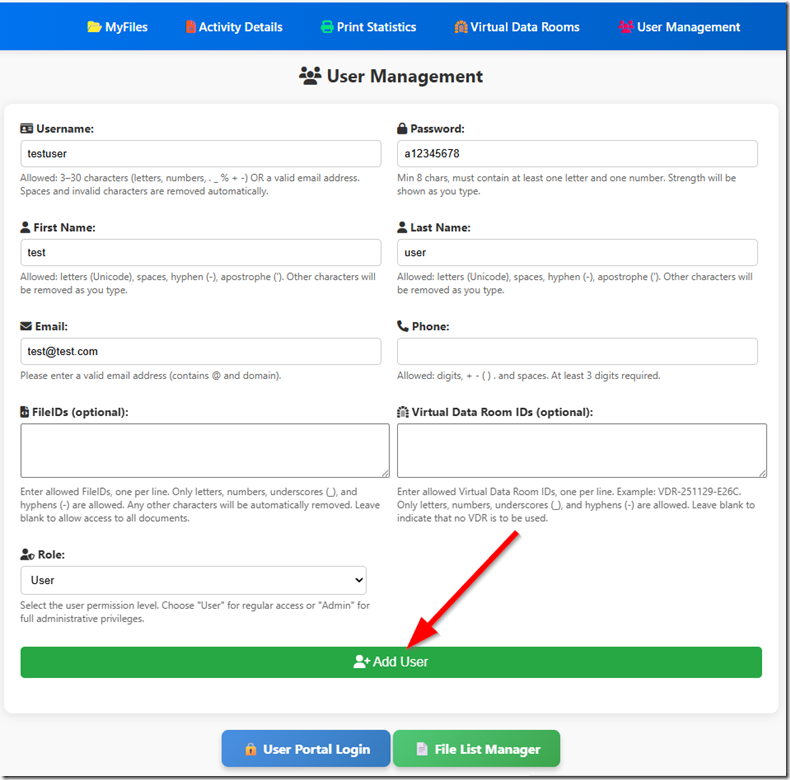 Then create users like this:
|
DRM Field |
PHP Value Source |
|
Username |
$row_usuario[‘id_usr’] |
|
First Name |
$row_usuario[‘firstname_usr’] |
|
Last Name |
$row_usuario[‘lastname_usr’] |
|
|
$row_usuario[’email_usr’] |
You can also upload or create users in bulk if you have hundreds or thousands of accounts.
Step 2: Use dynamic watermark tags
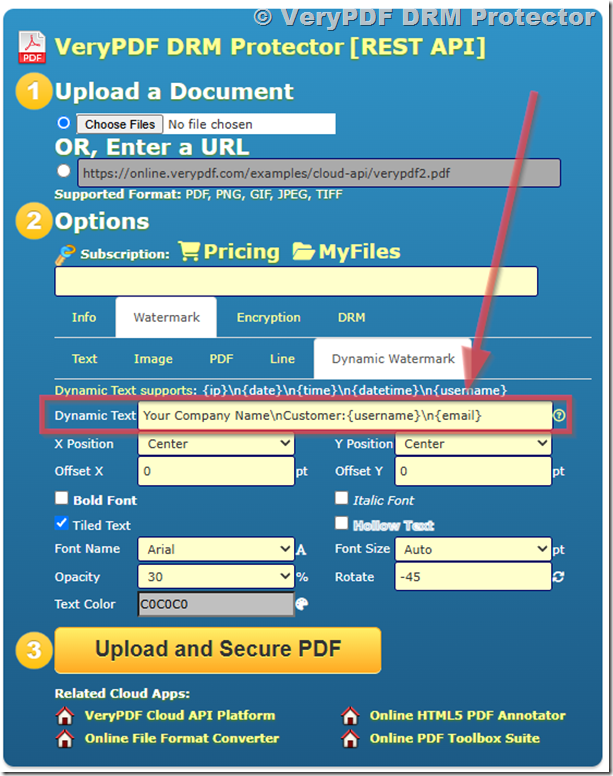
After the user exists in the DRM system, you can use these tags inside watermark settings:
|
Watermark Tag |
Meaning |
|
{username} |
User ID or login name |
|
{firstname} |
First name |
|
{lastname} |
Last name |
|
{email} |
Email address |
Example watermark text:
ID: {username}
Name: {firstname} {lastname}
Email: {email}
When the user opens the PDF, these values will be filled automatically.
Step 3: PHP integration (simple redirect example)
Your PHP system does not inject watermark directly. Instead, it controls login and access.
Here is the clean way to pass user access:
// Get user data from your database
$username = $row_usuario[‘username’];
$password = $row_usuario[‘password’];
// Build DRM reader URL
$url = “https://online.verypdf.com/app/reader2/reader.php?url=”
. “https://online.verypdf.com/u/public/api/20260625-151446-1756196252.vpdf”
. “&username=” . urlencode($username)
. “&password=” . urlencode($password);
// Redirect user to protected PDF viewer
header(“Location: ” . $url);
exit;
This is the only safe way to pass user identity into the DRM viewer.
Step 4: Why this system is designed this way
VeryPDF DRM Protector does not accept random PHP variables inside watermark text.
This is intentional.
If any system allowed direct variable injection, users could fake names, emails, or access identity. That would break document security.
Instead, the system works like this:
- User must exist in DRM database
- Watermark pulls data from that record
- PDF viewer applies watermark at runtime
Step 5: PHP data vs DRM system mapping
|
Your PHP System |
DRM System |
|
$row_usuario[‘id_usr’] |
{username} |
|
$row_usuario[‘firstname_usr’] |
{firstname} |
|
$row_usuario[‘lastname_usr’] |
{lastname} |
|
$row_usuario[’email_usr’] |
{email} |
Think of PHP as the data source, and DRM as the secure display layer.
Step 6: Full workflow summary
- Store users in your PHP database
- Sync users into VeryPDF DRM system
- Assign watermark template using {username}, {email}, etc.
- Redirect user to DRM PDF viewer
- Watermark is applied automatically when PDF opens
Common problems developers face
Problem 1: Watermark shows as plain text
This happens when user is not created in DRM system.
Problem 2: Email or name not appearing
Usually the user record is missing or not synced correctly.
Problem 3: PHP variables not working
That is expected. PHP variables are not read by DRM watermark engine.
Why developers use VeryPDF DRM Protector
VeryPDF DRM Protector is used by companies that need controlled document sharing and tracking.
It helps with:
- PDF access control per user
- Dynamic watermark per login
- Preventing file sharing outside the organization
- Tracking who opened the document
- Protecting training materials and internal files
It is commonly used in education, finance, and internal company document systems.
Reference guide
Step-by-step official guide:
FAQs
1. Can I pass PHP variables directly into watermark?
No. You must create the user in DRM system first.
2. Why do I need to create users in DRM system?
Because watermark data is linked to secure user records, not external variables.
3. Can I automate user creation?
Yes, you can build a PHP sync script to push users into DRM system.
4. What happens if user is not found?
If the user is not found in the DRM system, the PDF will not open. The viewer will block access, so the file cannot be viewed at all.
5. Can I use only email as watermark?
Yes, if email exists in DRM user record.
6. Does DRM support batch user creation?
Yes, you can import multiple users at once.
7. Can I change watermark format later?
Yes, you can update watermark templates anytime.
8. Is watermark visible on all devices?
Yes, it appears when PDF is opened in DRM viewer.
9. Can users share PDF without watermark?
Yes, if you don’t set a watermark in the DRM policy, the PDF will open without any watermark. But once a dynamic watermark is enabled, it is generated at runtime for each user, so any viewed or shared file will show the user-specific watermark information.
10. Can I integrate this with my login system?
Yes, PHP login systems are commonly used with DRM access flow.
11. What if I have thousands of users?
You should use automated sync from your user database to VeryPDF DRM system.