
Digital Rights Management (DRM) has evolved from a blunt instrument of restriction into a sophisticated balance of security and accessibility. For content providers, the challenge is no longer just “how to lock a file,” but “how to ensure the paying customer can read the file anytime, anywhere, without technical friction.”
This technical guide outlines a strategic framework for managing device limits, implementing self-service recovery, and utilizing the VeryPDF DRM Protector to create a robust, user-centric protection environment.
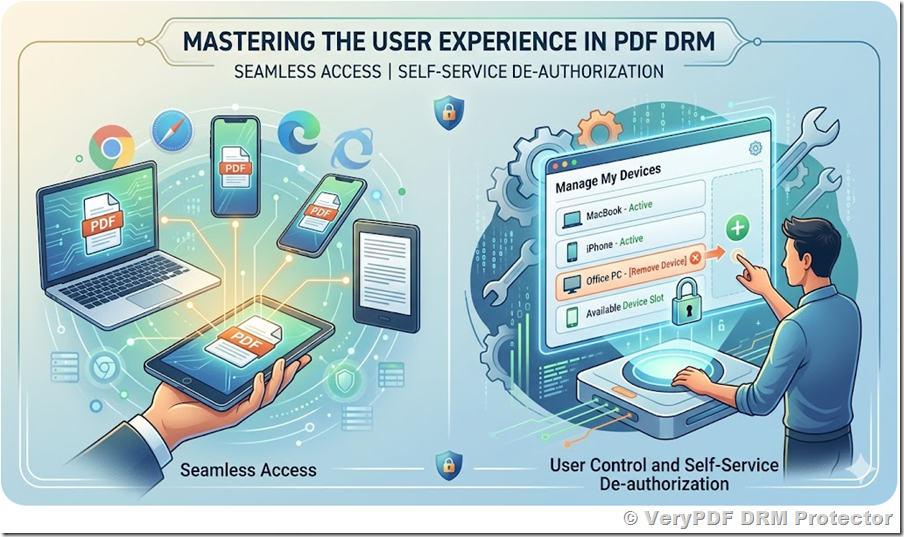
1. The Philosophy of Device Limits: Perception vs. Reality
In the early days of DRM, strict “1-Device” policies were common. However, in an era where the average professional uses a laptop, a smartphone, and a tablet, a rigid limit is a recipe for customer dissatisfaction.
The “Buffered Limit” Strategy
The most effective strategy for modern DRM is the 5-to-2 Buffer Model.
- Public Limitation (2 Devices): This is your stated policy. It discourages users from sharing their login credentials with a large group of friends or colleagues. It sets a clear boundary for the commercial value of the license.
- Technical Maximum (5 Slots): Internally, the system is configured to allow up to five unique identifiers.
Why this ratio works:
- Browser Diversity: A user might open a book in Chrome, then later in Edge, and perhaps once in a “private” window. To a server, these appear as different environments. A 5-slot buffer handles these “phantom” devices without triggering a lockout.
- Hardware Upgrades: Users replace phones and laptops. If a user upgrades their iPhone, they shouldn’t be locked out of their library until they contact support. The buffer allows for a natural transition.
- Network Fluctuations: In high-security environments where network data is part of the identity, minor changes can shift the device’s signature. The buffer absorbs these inconsistencies.
2. Implementing Self-Service Device De-authorization
Even with a generous buffer, users will eventually hit their limit. Traditionally, this resulted in a support ticket, costing the provider time and money. The modern solution is Self-Service De-authorization.
The User Journey
When a user attempts to access a document from a 6th device, they should not see a “Permission Denied” error. Instead, they should be redirected to a Device Management Portal.
Core Features of the Portal:
- Visualization: List the currently “Active” devices. Since technical IDs (hashes) are meaningless to users, the portal should display friendly names derived from metadata (e.g., “Windows / Chrome” or “MacOS / Safari”).
- Last Access Date: Showing when a device was last used helps the user identify which “slot” is obsolete.
- The “Reset” Action: A clear button to “De-authorize this Device.”
Security Best Practices for De-authorization
To prevent “musical chairs” (where a group of people share one account by constantly unlinking and relinking devices), consider these constraints:
- Cool-down Periods: Limit how often a device can be unlinked (e.g., once every 30 days).
- Email Verification: Require the user to click a confirmation link sent to their registered email before a device is removed. This ensures that only the actual purchaser can manage the license.
3. VeryPDF DRM Protector: Device Binding Mechanism
The VeryPDF DRM Protector utilizes a multi-factor identification approach to ensure that a document is tethered to a specific environment. Understanding how it binds a user to a device is key to configuring it correctly.
The Binding Logic
VeryPDF creates a “Digital Link” between the user’s identity and their reading environment. When a document is first opened, the system captures a unique Hardware Identity (HID).
This HID is a composite of several non-sensitive data points:
- Operating System Characteristics: The underlying version and build of the OS.
- Browser Engine Metadata: The specific rendering engine and its versioning.
- Language and Locale: Regional settings that remain consistent across a single machine.
Avoiding Misidentification
To ensure that a user isn’t identified as “new” every time they change their location, the system prioritizes Environment Stability over Network Location.
- Dynamic Identity Management: The system looks for “Persistent Tokens” stored locally within the user’s browser environment. If this token exists, the system recognizes the device regardless of the IP address.
- Signature Weighting: The DRM engine assigns “weights” to different identity factors. For example, a change in the user-agent string (caused by a browser update) is weighted lower than a change in the OS platform, allowing the system to “recognize” the user even after a software update.
4. Technical Integration for Developers
For teams using the VeryPDF DRM API, managing these slots is straightforward. The user profile within the DRM database contains specific parameters that hold the device signatures.
(VeryPDF PDF DRM API Documentation | PDF Protection Integration | PDF Security Management | User & Book Management APIs)
The API Workflow
When a developer needs to clear a device slot to allow a new login, they interact with the user_update endpoint. The primary parameters involved are:
LockToFirstNDevicesForUser=N
Defines the maximum number of devices that a user is allowed to use to access protected documents.
Only the first N registered devices will be authorized.
Set to 0 to allow access from an unlimited number of devices.
LockToDeviceIDForUseri=Hardware fingerprint
Represents the unique device identifier stored in each authorized device slot.
The index i ranges from 0 to N−1, corresponding to the configured number of device slots.
Each entry records a device that has been authorized for the user.
Example:
- If LockToFirstNDevicesForUser = 2, then:
- LockToDeviceIDForUser0 → First authorized device
- LockToDeviceIDForUser1 → Second authorized device
Device De-authorization via REST API
Users can de-authorize previously registered devices by calling the following REST API endpoint:
https://online.verypdf.com/app/pdfdrm/api.php?action=user_update&email=support@verypdf.com&app_password=********&username=TestUser&password=******&options=LockToFirstNDevicesForUser%3D5&user_id=95
De-authorization Workflow
1. The user selects a device to remove from the custom web portal.
2. The portal sends an API request to the VeryPDF DRM server.
3. The corresponding LockToDeviceIDForUseri entry is cleared (set to an empty value or removed).
4. Upon the next document access, the system detects an available device slot and automatically registers the new device.
Behavior Notes
* Each LockToDeviceIDForUseri represents a device slot assigned to the user.
* Clearing a slot effectively de-authorizes the associated device.
* When a slot becomes available, it can be automatically assigned to a new device upon access.
* If all slots are occupied, additional devices will be denied access until a slot is freed.
5. Strategic Benefits of the Combined Approach
By combining a Buffered Device Limit with a Self-Service Portal, organizations achieve three major goals:
A. Operational Efficiency
By automating device resets, you eliminate up to 70% of DRM-related support inquiries. This allows your technical team to focus on content quality rather than password and device resets.
B. Frictionless Mobility
Users who travel or switch between home and work networks are never interrupted. The DRM works silently in the background, utilizing persistent environment signatures to verify the user’s right to access.
C. Psychological Deterrence
Announcing a “2-Device Limit” creates a sense of exclusivity and value. It signals that the content is a premium asset that should not be distributed, while the hidden slots act as a “safety net” for honest users.
6. Conclusion: The Future-Proof Content Strategy
Content protection should never be a barrier to content consumption. By implementing the internal 5-slot policy and providing users with the tools to manage their own hardware transitions, you create a professional, secure, and modern digital library.
The VeryPDF DRM Protector provides the necessary API hooks to make this a reality. By focusing on hardware-linked identities and local persistence rather than volatile network data, you ensure that your protected PDFs remain accessible to your customers, and only your customers, no matter where they are in the world.