
Your complete guide to every file, directory, and tool in the ZIP package
The VeryPDF DRM Protector Command Line package is a comprehensive command-line toolkit designed to help you apply DRM (Digital Rights Management) protection to PDF files.
It provides multiple approaches — from PHP scripts to Windows batch executables — enabling flexible integration into automated workflows, servers, and content processing systems.
This article explains every file and folder included in the package: what it does, when you should use it, and best practices for real-world usage.
✅ Package Contents Overview
Below is a high-level view of what’s in the ZIP package:
VeryPDF-DRM-Protector-Command-Line.zip
│
├── PHP Scripts
│   ├── batch-drm-protector-recursively.php
│   ├── batch-drm-protector-recursively.php.bat
│   ├── batch-drm-protector-recursively.php.mp4
│   ├── batch-drm-protector-recursively.php.view-protected-pdf-files.mp4
│   ├── drm-protector-with-curl.exe.php
│   ├── drm-protector-with-curl.exe.php.bat
│   ├── drm-protector-with-with-pure-php.php
│   └── drm-protector-with-with-pure-php.php.bat
│
├── Folders
│   ├── pdf-in-folder
│   └── pdf-out-folder
│
├── Documentation
│   ├── VeryPDF DRM Protector User Manual.docx
│   ├── VeryPDF DRM Protector User Manual.pdf
│   └── verypdf.pdf
│
└── (Optional)
    └── Other support or utility files
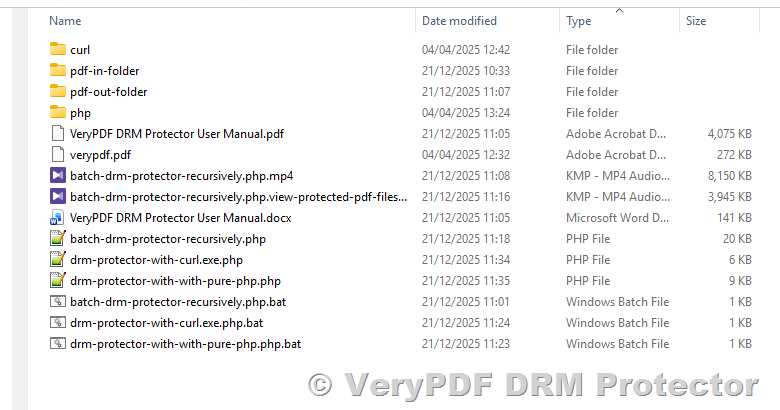
Let’s go through each item in detail.
✅ PHP Scripts — Flexible Batch DRM Tools
✅ batch-drm-protector-recursively.php
This is the primary batch processing script included in the package.
Purpose:
Recursively scans directories to find all PDF files, uploads them to the VeryPDF DRM service, applies robust DRM protection, and downloads the DRM-encrypted output to a specified folder.
Key Features:
- Recursive directory traversal: Finds PDFs in nested subfolders.
- Automatic output folder creation: Keeps folder structure intact.
- Skip logic: Only processes unprotected files; skips those already done.
- Idempotent design: Safe to run multiple times without duplicating work.
Typical usage:
php batch-drm-protector-recursively.php your@email.com /path/to/pdf-in-folder /path/to/pdf-out-folderUse case: Automate DRM protection for thousands of PDFs in production environments.
✅ batch-drm-protector-recursively.php.bat
A Windows batch wrapper for the PHP script above.
Purpose:
Make it easier to run the PHP script on Windows systems without typing the full PHP command.
Usage:
Double-click the .bat file or run it from a Windows Command Prompt.
✅ batch-drm-protector-recursively.php.mp4
A video tutorial showing how to execute the batch script in practice.
Contents include:
- Running the script
- Picking input and output folders
- Logging progress
- Verifying protected file output
Use case: Great for onboarding new team members or training.
✅ batch-drm-protector-recursively.php.view-protected-pdf-files.mp4
This video focuses on how to view and verify the DRM-protected PDFs.
Includes:
- How to view protected
.vpdffiles in drm.verypdf.com web site. - Verifying DRM restrictions (print deny, copy deny, etc.)
- Recommended viewer setups
✅ drm-protector-with-curl.exe.php
This script demonstrates how to upload a PDF using PHP + cURL and process the VeryPDF DRM response.
Use case:
When you want programmatic control over the upload process or integrate DRM protection directly into your backend.
This script:
- Uses curl.exe for Windows to upload PDF files
- Extracts DRM protection output links (e.g.,
.vpdf) - Logs and handles errors robustly
✅ drm-protector-with-curl.exe.php.bat
A Windows batch wrapper for the cURL-based PHP script.
✅ drm-protector-with-with-pure-php.php
A variation of DRM upload logic that avoids cURL entirely.
When to use it:
- cURL.exe is not available
- Only pure PHP HTTP requests are allowed
- Restricted hosting environments
✅ drm-protector-with-with-pure-php.php.bat
Windows batch executable for the pure PHP uploader script.
✅ Folder Structure — Input and Output
✅ pdf-in-folder
Dedicated input directory for original PDF files.
- Place all unprotected PDFs here
- Organize subfolders for easier tracking
- Avoid mixing non-PDF files
✅ pdf-out-folder
Output folder for DRM-protected PDFs.
- Mirrors input folder structure
- Outputs DRM-protected files (usually
.vpdf) - Skips existing files to avoid re-processing
✅ Documentation — Guides and Manuals
✅ VeryPDF DRM Protector User Manual.docx
- DRM concepts
- Command-line usage
- Parameter descriptions
- Expiration, watermarking, print restrictions
✅ VeryPDF DRM Protector User Manual.pdf
PDF version suitable for sharing and printing.
✅ verypdf.pdf
Sample PDF for testing DRM workflows.
- Place in
pdf-in-folder - Run batch script
- Verify output
✅ Practical Workflow
- Prepare input
- Test with samples
- Run batch
- Repeat safely
- Review output
✅ Tips and Best Practices
- Always use the correct account email
- Test small batches first
- Use pure PHP when cURL is unavailable
- Use
.batfiles on Windows - Keep documentation handy
✅ Summary
- Automate PDF DRM protection
- Integrate with internal systems
- Train users with videos
- Maintain consistent workflows