
1. Introduction: The Shift from Static PDFs to Interactive Learning
In modern education, digital learning materials have replaced traditional printed textbooks in many classrooms. However, most PDF documents remain static by nature, offering limited interactivity for students. Teachers distribute lecture notes, assignments, and reading materials, but students often struggle to actively engage with these documents in a structured and persistent way.
VeryPDF DRM Protector addresses this gap by transforming standard PDFs into interactive, secure, and fully trackable learning environments. Instead of passive reading, students can annotate, highlight, write, draw, and insert images directly into protected PDFs, while all their work is securely saved to their individual accounts.
Unlike conventional PDF tools where annotations are stored locally or lost when files are shared, VeryPDF DRM Protector ensures that every annotation is bound to both the user identity and the document, enabling persistent learning across devices and sessions.
This makes it particularly powerful in educational environments such as universities, online courses, corporate training, and research institutions.
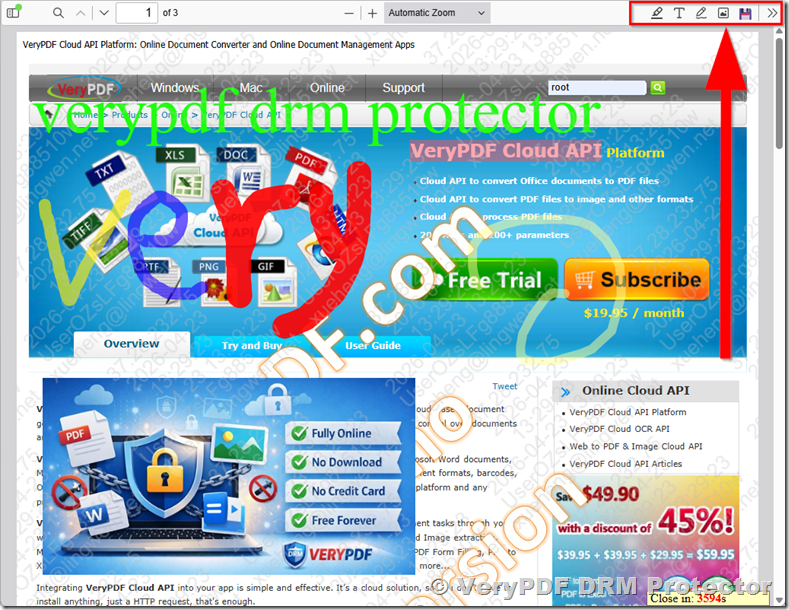
2. Core Concept: Secure PDF Annotation Inside a DRM-Controlled Environment
The most important difference between traditional PDF annotation tools and VeryPDF DRM Protector is security integration with DRM (Digital Rights Management).
In standard PDF workflows:
- Students annotate files locally
- Notes are stored on a single device
- Files can be copied or redistributed
- Instructor has no control over annotation integrity
In VeryPDF DRM Protector:
- PDF is protected by DRM rules
- Annotation tools are embedded in a secure web viewer
- Every annotation is tied to a specific student account
- Copying, exporting, or unauthorized sharing is blocked
- Instructor maintains full control over content usage
This means annotation becomes part of a controlled learning ecosystem rather than a loose file-based system.
3. FreeText Annotation: Personalized Learning Notes
One of the most widely used features in VeryPDF DRM Protector is FreeText Annotation.
What it does:
FreeText allows students to type directly into the PDF anywhere they choose, just like writing notes on paper.
Educational use cases:
- Writing explanations beside lecture content
- Adding summaries of paragraphs
- Translating foreign language notes
- Recording teacher instructions during class
Key advantage:
Each FreeText annotation is:
- Stored in the student’s account
- Automatically reloaded when the PDF is reopened
- Invisible to other students
This ensures that every student builds a personal learning layer on top of the same shared document.
4. Ink Annotation: Handwritten Thinking and Problem Solving
The Ink Annotation tool simulates handwriting using a mouse, stylus, or touchscreen.
What students can do:
- Draw diagrams in engineering and math courses
- Solve equations step-by-step
- Sketch scientific processes
- Annotate lecture slides visually
Ink annotation is especially powerful in STEM education because it supports freehand reasoning, not just text input.
Example classroom scenario:
A physics student can draw force diagrams directly on lecture slides while watching recorded lectures or attending live classes.
Unlike static PDFs, this turns documents into interactive digital notebooks.
5. Highlight Annotation: Structured Reading and Exam Preparation
Highlighting is one of the most essential learning techniques, and VeryPDF DRM Protector enhances it with precision and persistence.
Features:
- Highlight key sentences or paragraphs
- Use multiple colors for categorization
- Combine with FreeText notes for deeper understanding
Educational benefits:
- Helps students identify important concepts quickly
- Supports exam revision workflows
- Encourages structured reading habits
Advanced capability:
Unlike many PDF tools where highlights are device-dependent, in VeryPDF DRM Protector:
- Highlights are stored in the cloud
- They appear on any device where the student logs in
- They remain intact even if the PDF is reopened later
This ensures long-term academic continuity.
6. Image Annotation: Visual Learning and Diagram Integration
VeryPDF DRM Protector also supports Image Annotation, which allows students to insert images directly into PDFs.
Common use cases:
- Adding screenshots of external references
- Inserting diagrams or charts
- Uploading handwritten images from notebooks
- Embedding experimental results in reports
Educational value:
This feature transforms PDFs into multimedia learning journals, allowing students to combine text, drawing, and external visual references in one place.
For example:
A biology student can insert microscope images directly into lecture notes and annotate them with FreeText or Ink tools.
7. Annotation Types Supported in VeryPDF DRM Protector
The platform supports a comprehensive set of annotation tools designed for academic and professional use:
- FreeText Annotation
- Ink (Handwriting/Drawing)
- Highlight Annotation
- Image Annotation
- Strikeout & Underline (for editing and revision workflows)
- Shapes (circle, rectangle, arrows, polygons)
- Stamps (teacher feedback or grading marks)
These tools provide a complete digital replacement for paper-based note-taking systems.
8. Per-Student Annotation Storage System
One of the most powerful features of VeryPDF DRM Protector is its per-user annotation storage architecture.
How it works:
- Each student logs into their account
- Opens the same protected PDF
- Adds personal annotations
- All annotations are saved automatically to their account
Key benefits:
1. Personal learning space
Each student builds their own annotated version of the same document.
2. Privacy protection
Annotations are not visible to other students.
3. Cross-device synchronization
Students can continue their work on:
- Laptop
- Tablet
- Mobile phone
4. Persistent learning history
Annotations remain available for future review, revision, or exam preparation.
This creates a cloud-based academic memory system tied to each student.
9. Instructor Control and Learning Management Advantages
For educators, the annotation system is not just about student interaction, it also provides administrative control.
Teachers can:
- Enable or disable specific annotation types
- Monitor student engagement
- Control access to documents
- Ensure content cannot be redistributed
For example:
A teacher may allow:
- Highlight + FreeText for reading assignments
But disable: - Image insertion or Ink tools for exams
This flexibility makes it suitable for structured learning environments.
10. Real Classroom Workflow Example
A typical university workflow using VeryPDF DRM Protector might look like this:
- Teacher uploads lecture PDF
- Enables:
- Highlight
- FreeText
- Ink
- Image Annotation
- Distributes secure link to students
- Students log in and open PDF online
- Students:
- Highlight key points
- Write personal notes using FreeText
- Draw diagrams using Ink
- Insert reference images
- System automatically saves all annotations to each student account
At exam time:
- Students review their personalized annotated PDFs
- No need for external note-taking apps
- All learning history is centralized and preserved
11. Why This System Is Different from Traditional PDF Tools
Traditional PDF tools like desktop editors or browser extensions:
- Store annotations locally
- Lack user-level control
- Cannot enforce security policies
- Are prone to file sharing and duplication
VeryPDF DRM Protector differs fundamentally because:
- It integrates DRM + annotation system
- It enforces user-based access control
- It stores annotations in a secure cloud environment
- It prevents unauthorized redistribution
This combination makes it suitable not only for education but also for:
- Corporate training
- Online certification programs
- Paid course platforms
- Research document distribution
12. Conclusion: A New Generation of Interactive Secure Learning
VeryPDF DRM Protector redefines what PDF documents can be in an educational environment. Instead of static files, PDFs become interactive, secure, and personalized learning spaces.
By supporting:
- FreeText for structured note-taking
- Ink for visual thinking
- Highlight for knowledge extraction
- Image annotation for multimedia learning
- Per-student cloud storage for persistence
it transforms the PDF into a complete digital learning notebook system.
Most importantly, the integration with DRM ensures that all of this happens in a secure, controlled, and traceable environment, giving educators full confidence that their content remains protected while students enjoy a rich and interactive learning experience.