How to Safely Provide API Access to Your VeryPDF Account to List, Add, Delete, and Update Users and Books Without Sharing Your Password

Integrating your VeryPDF account with a website, web application, or any third-party system may seem complicated and risky, especially if you are concerned about sharing sensitive login credentials. Giving someone your main username and password could potentially expose your account to unauthorized access or accidental misuse. Fortunately, VeryPDF provides a secure and professional solution through the use of App Passwords combined with API access. With this approach, you can safely grant developers or external applications the ability to interact with your PDFs—such as managing content, adding users, or generating protected links, without ever revealing your main account credentials. This ensures that your account remains fully protected while still allowing seamless integration and automated workflows for your website or server.

How to Safely Provide API Access to Your VeryPDF Account to List, Add, Delete, and Update Users and Books Without Sharing Your Password

Below is a step-by-step guide, starting with how to create an App Password in VeryPDF DRM Protector.


1. How to Create an App Password in VeryPDF DRM Protector

To allow developers to securely manage your PDF content via API without exposing your main account password, VeryPDF DRM Protector supports creating App Passwords directly from your dashboard. Follow these steps:

Step 1: Log in to VeryPDF DRM Protector Dashboard

  1. Open your VeryPDF DRM Protector profile panel.
  2. Log in with your administrator account, which has permissions to manage users and plugin settings.

https://drm.verypdf.com/wp-admin/profile.php

Note: Only admins or users with sufficient permissions can create App Passwords.

How to Safely Provide API Access to Your VeryPDF Account to List, Add, Delete, and Update Users and Books Without Sharing Your Password

Step 2: Access DRM Protector User Settings

  1. Navigate to Users or your personal profile page.
  2. Click on Profile.
  3. Scroll down to the VeryPDF DRM Protector / App Password section.

Step 3: Generate a New App Password

  1. Click Generate New App Password.
  2. Enter a descriptive name, e.g., mywebsite.integration, to identify this password.
  3. Copy and save the generated password immediately, as it may only be displayed once.

Step 4: Share App Password with Your Developer

Provide the developer with:

  • App Name
  • App Password
  • API Documentation Link

This allows them to access the API without needing your VeryPDF DRM Protector login credentials.

Step 5: Manage and Revoke App Passwords

  • To stop an application’s access, go to the App Password list and click Revoke.
  • You can create separate passwords for different applications or developers for flexible, secure access.

Summary

Creating App Passwords allows you to:

  1. Enable API access securely
  2. Assign separate passwords per developer or application
  3. Revoke or update passwords anytime

Your PDFs remain secure while developers integrate them into your website or server.


2. Your Personal VeryPDF Account

Your standard VeryPDF account is your hub for uploading and managing PDF files. You do not need to share your username or password. All uploads should be done manually to ensure security.


3. What is an App Password and Why It’s Safe

An App Password is a unique code created for a specific application:

  • Allows the app to access specific API features, e.g., managing books or users.
  • Does not allow logging in to your main account, keeping your profile secure.

Think of it as giving a key to a single room instead of the entire house.


4. What to Share with Your Developer

Provide only:

  • App Name
  • App Password
  • API Documentation Link

This is sufficient for the developer to integrate your website with VeryPDF API securely.


5. Uploading Your PDF Books

  • Upload books manually via your VeryPDF account.
  • Once uploaded, you will receive a protected .vpdf file.
  • Developers can use this .vpdf on your server and connect it to your site via API.

6. Using the VeryPDF API

The API allows developers to:

  • Add new users
  • List existing users
  • Generate secure reading links

This can all be done without access to your main account credentials. Detailed instructions are available in the VeryPDF PDF DRM API documentation.


7. Key Takeaways

  • Never share your main account credentials.
  • Use App Passwords for secure third-party access.
  • Upload PDFs manually for maximum security.
  • Developers can manage users and protected PDFs via API without seeing your login details.

This ensures your protected PDF content remains secure while still integrating seamlessly with websites or servers.

[Solution] How to Sell Your PDF Publications on Gumroad While Protecting Against Unauthorized Distribution Using VeryPDF DRM Protector

If you are an author, researcher, or educator, selling PDF publications online is a common way to reach your audience and monetize your work. However, a critical challenge is protecting your digital content from unauthorized downloads, sharing, and piracy. Standard platforms like Gumroad allow you to sell PDFs, but by default, customers can download the file, making it easy to redistribute without your permission.

Fortunately, with VeryPDF DRM Protector, you can secure your PDF publications and safely distribute them, even through marketplaces like Gumroad, while limiting access to authorized readers only.


Why Standard PDFs Are Vulnerable

A regular PDF file, even if sold legitimately, can be:

  • Downloaded and shared multiple times.
  • Printed or copied without your consent.
  • Uploaded to other websites, forums, or email chains.

This lack of control makes it difficult to monetize digital content like e-books, research journals, or training materials. Once the file is out, you lose control over who can read it.

[Solution] How to Sell Your PDF Publications on Gumroad While Protecting Against Unauthorized Distribution Using VeryPDF DRM Protector


What VeryPDF DRM Protector Does

VeryPDF DRM Protector adds a layer of digital rights management (DRM) to your PDF documents, providing powerful access control features:

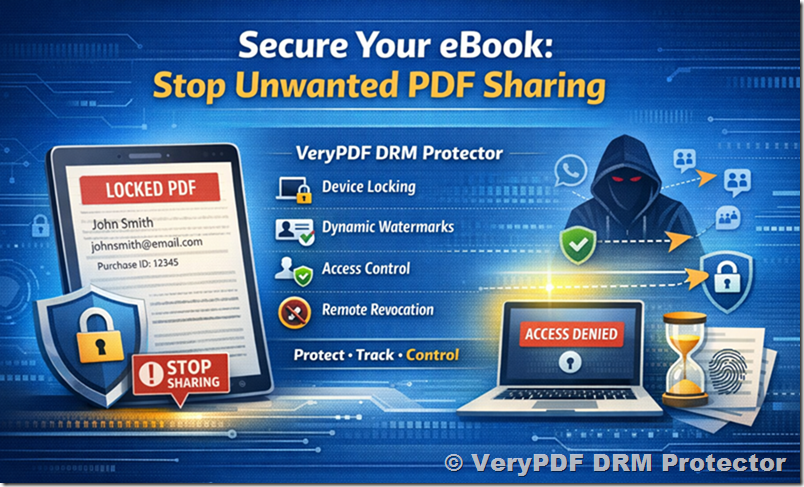
  1. Read-only Access: Readers can view the PDF but cannot save, copy, or print it.
  2. Device Locking: Access can be restricted to specific devices or user accounts.
  3. Dynamic Watermarking: Each reader sees a personalized watermark, deterring sharing.
  4. Password and Time Expiry Controls: You can limit access duration or revoke permissions at any time.
  5. Cross-Platform Viewing: Authorized users can read the PDF on Windows, Mac, iOS, and Android.

This transforms your PDFs from easily shareable files into protected digital publications, similar to Kindle e-books or subscription-based research portals.


Selling DRM-Protected PDFs via Gumroad

Even though Gumroad itself allows customers to download files, you can still integrate VeryPDF DRM Protector to make downloaded files secure. Here’s how:

Step 1: Protect Your PDF

  • Use VeryPDF DRM Protector to encrypt your PDF.
  • Set the desired restrictions: disable printing, copying, saving, and sharing.
  • Optionally, enable watermarks with the buyer’s email or username.

Step 2: Upload to Gumroad

  • Upload the DRM-protected PDF to Gumroad as your product.
  • Because the file is encrypted, even if someone downloads it, they cannot open or distribute it without authorization.
  • Gumroad handles the payment and file delivery, while VeryPDF DRM Protector ensures security.

Step 3: Deliver and Manage Access

  • Customers receive the file along with instructions for authorized viewing.
  • Only devices or accounts with permission can open the PDF.
  • If a user attempts unauthorized sharing, the file will not open, or the watermark will reveal the source.

Advantages of This Approach

  1. Read-Only Experience: Your content behaves like a secure, view-only online resource.
  2. Piracy Deterrence: Watermarks and device binding discourage unauthorized redistribution.
  3. Easy Integration: You can sell on platforms like Gumroad, your own website, or even via email links.
  4. No Subscription Needed: Buyers do not need to log into a separate portal—they simply open the DRM-protected PDF with the authorized viewer.
  5. Professional Presentation: Your PDFs retain full formatting and multimedia content while remaining secure.

Practical Use Case

Suppose you publish a medical research journal biannually. You want readers to pay for access but prevent PDFs from being shared freely:

  • Encrypt each issue with VeryPDF DRM Protector.
  • Include a dynamic watermark showing the buyer’s name and purchase date.
  • Upload the encrypted file to Gumroad.
  • When a customer purchases, they download the file but can only read it on authorized devices.
  • Even if they try to send the file to a friend, it cannot be opened without authorization.

This ensures that your high-value content remains secure while still reaching paying customers efficiently.


Conclusion

Selling PDFs online does not have to mean losing control over your intellectual property. By combining VeryPDF DRM Protector with platforms like Gumroad, you can:

  • Protect your PDF from unauthorized copying and printing.
  • Provide a seamless purchase experience for your customers.
  • Reduce piracy risks while monetizing your content effectively.

Whether you are selling research papers, training courses, or e-books, this method gives you the control you need, similar to Kindle’s secure reading experience.

You can try VeryPDF DRM Protector for free and see how it protects your PDFs: https://drm.verypdf.com/

[Solution] How to Prevent PDF eBook Copying and Sharing with VeryPDF DRM Protector and Sell Securely via ClickFunnels

Selling eBooks through ClickFunnels is an effective way to build funnels, automate sales, and scale digital products. However, one major weakness remains: PDF files are inherently easy to copy, share, and redistribute.

If you simply upload a standard PDF to ClickFunnels, even if it is password-protected, your content can still be:

  • Copied and pasted
  • Printed and scanned
  • Shared with others
  • Uploaded to piracy websites
  • Converted to Word or other editable formats
  • Modified or rebranded

For serious digital product sellers, especially those selling high-value courses, proprietary research, or premium training materials, this is unacceptable.

The correct approach is to apply professional DRM (Digital Rights Management) protection to your PDF before delivering it to customers. This article explains in detail how to use VeryPDF DRM Protector to secure your eBook and then distribute it through ClickFunnels safely and professionally.


Understanding the Core Problem

ClickFunnels is a sales funnel platform. It excels at:

  • Building landing pages
  • Processing payments
  • Automating follow-ups
  • Delivering digital downloads

However, ClickFunnels does not provide built-in DRM-level document protection. When you upload a file to ClickFunnels, it simply hosts and delivers it. It does not prevent:

  • File redistribution
  • Unauthorized copying
  • Content extraction
  • Device sharing
  • License abuse

Therefore, document security must be implemented before the file reaches ClickFunnels.

This is where VeryPDF DRM Protector becomes essential.

[Solution] How to Prevent PDF eBook Copying and Sharing with VeryPDF DRM Protector and Sell Securely via ClickFunnels


What Is VeryPDF DRM Protector?

VeryPDF DRM Protector is a professional PDF document security system that applies strong encryption and usage control policies to PDF files.

Unlike standard PDF password security, which only adds superficial restrictions, VeryPDF DRM Protector enforces document control through encrypted licensing mechanisms.

Once protected, the PDF is no longer a freely distributable file. It becomes a controlled digital asset governed by permissions you define.


What Problems Does VeryPDF DRM Protector Solve?

When you protect your PDF with VeryPDF DRM Protector, you can:

Prevent copying of text and images
Prevent printing entirely or limit the number of prints
Prevent conversion to Word, HTML, or other formats
Prevent editing or modification
Prevent screen grabbing (depending on settings)
Control how many devices can open the document
Set expiration dates
Revoke access if needed
Bind licenses to specific users

This transforms your PDF from a simple downloadable file into a licensed product.


Why This Matters When Selling Through ClickFunnels

When selling through ClickFunnels, your funnel may include:

  • Sales page
  • Order form
  • Upsell page
  • Thank-you page
  • Automated email delivery

Once payment is complete, ClickFunnels typically sends a download link. If that link points to an unprotected PDF, your product can spread instantly without control.

However, if the file delivered is DRM-protected:

  • Even if shared, unauthorized users cannot open it.
  • Even if uploaded elsewhere, it cannot be accessed without a valid license.
  • Even if downloaded multiple times, usage can be limited.

This allows you to use ClickFunnels for sales while relying on VeryPDF for protection.


Detailed Step-by-Step Process

Step 1: Finalize Your eBook

Create your eBook in Word, InDesign, or any authoring tool. Export the final version as a clean PDF.

Ensure that:

  • All formatting is finalized
  • No editable fields remain
  • Metadata is correct
  • Branding and copyright notice are included

Once exported, treat this as your master file.


Step 2: Apply DRM Protection Using VeryPDF DRM Protector

Open VeryPDF DRM Protector.

Load your original PDF.

Now configure your security settings carefully.

You may configure:

  1. Copy Protection
    Disable text copying and image extraction.
  2. Print Control
    Disable printing entirely or limit number of prints.
  3. Device Limitations
    Restrict the number of devices allowed per license.
  4. Expiration Policy
    Set document expiration after a fixed date or number of days.
  5. License Binding
    Bind access to a specific email address or user.
  6. Offline or Online Control
    Choose the appropriate activation method based on your business model.

Once settings are configured, generate the protected PDF.

The resulting file is encrypted and controlled.


Step 3: Test the Protected File

Before distributing your product, thoroughly test it.

Open the file on:

  • Windows PC
  • Mac
  • Tablet (if supported)
  • Multiple devices if multi-device licensing is allowed

Test:

  • Copying text
  • Printing
  • Saving as another format
  • Opening on unauthorized device

Make sure restrictions behave exactly as intended.


Step 4: Prepare License Delivery Strategy

Depending on how you configure VeryPDF DRM Protector, customers may need:

  • A license file
  • A license key
  • An activation process

Plan how this will integrate with ClickFunnels.

There are two common methods:

Method A: Manual License Issuance
After purchase, manually generate and send license credentials.

Method B: Automated License Delivery
Integrate your order system to generate licenses automatically after purchase.

For small sellers, manual issuance may be sufficient initially.


Step 5: Upload to ClickFunnels

Inside ClickFunnels:

  1. Go to your product settings.
  2. Upload the DRM-protected PDF file.
  3. Configure the fulfillment email.
  4. Add instructions explaining how to open and activate the protected file.

The key point: you are not uploading the original PDF. You are uploading the DRM-protected version.


Step 6: Write Clear Delivery Instructions

Customers must understand how to open their protected file.

Your delivery message should explain:

  • How to download the file
  • How to activate the license
  • What limitations exist (no copying, no sharing, etc.)
  • How to contact support if needed

Clear communication reduces confusion and refund requests.


Security Comparison: Standard PDF vs DRM-Protected PDF

Standard PDF:

  • Password can be shared
  • Restrictions can be removed with tools
  • Unlimited redistribution possible
  • No tracking
  • No expiration

DRM-Protected PDF with VeryPDF:

  • License required to open
  • Copying blocked at enforcement level
  • Printing controlled
  • Device limits enforced
  • Expiration supported
  • Revocation possible

This is a fundamental difference.


How This Reduces Piracy

Most piracy happens because:

  • Files are easy to forward.
  • Restrictions are weak.
  • There is no enforcement.

With DRM protection:

  • Even if a buyer shares the file, others cannot open it.
  • Even if uploaded to a website, it remains unusable.
  • Each buyer receives controlled access.

This dramatically reduces casual piracy.

No system can stop 100 percent of piracy, but DRM significantly raises the barrier.


Business Advantages

Using VeryPDF DRM Protector while selling through ClickFunnels provides:

Stronger intellectual property protection
Higher perceived product value
Greater control over distribution
Ability to sell premium-priced content
Reduced revenue leakage

For creators selling high-value materials, this is a professional solution.


Suitable Use Cases

This approach works well for:

Paid online course materials
Premium industry reports
Certification preparation guides
Financial research
Legal documentation
Technical manuals
Internal corporate training

If your content has value, it deserves protection.


Implementation Strategy for Scaling

As your sales volume increases, consider:

  • Automating license generation
  • Integrating order confirmation with license API
  • Offering subscription-based expiration
  • Using recurring billing with time-limited document access

VeryPDF DRM Protector allows flexibility for different business models.


Conclusion

ClickFunnels is an excellent platform for selling digital products, but it does not provide real document protection.

VeryPDF DRM Protector fills that gap.

By protecting your PDF before uploading it to ClickFunnels, you transform your eBook from a simple downloadable file into a licensed digital product under your control.

The process is straightforward:

  1. Create your PDF.
  2. Protect it with VeryPDF DRM Protector.
  3. Upload the protected file to ClickFunnels.
  4. Deliver licenses to customers.
  5. Maintain control over your content.

If you are serious about selling professional digital products and preventing unauthorized copying and sharing, combining ClickFunnels with VeryPDF DRM Protector is a practical and cost-effective solution.

Why CAD Professionals Should Protect DWG and DXF Files — And How VeryPDF DRM Protector Helps

AutoCAD’s native formats — especially DWG and its ASCII equivalent DXF — are the standard for storing 2D and 3D design data in engineering, architecture, and construction industries. DWG files contain detailed design intelligence and metadata that represent years of intellectual labor, and DXF files are often used to exchange drawing data between applications. Without proper security, these valuable assets can be inadvertently exposed, copied, or misused once they leave your firm’s walls.

A discussion on Reddit about protecting proprietary AutoCAD files highlights this very concern: many professionals avoid sending DWG files entirely because once they’re out of their control, there’s no reliable way to ensure proprietary information stays confidential. Some choose to export only PDF versions of drawings, or strip out sensitive content before sharing — but these approaches come with limitations and workflow friction.

Here’s the core problem:

Once a DWG or DXF file is sent by email or shared via cloud storage, there’s no built‑in mechanism to prevent unauthorized copying, redistribution, or reuse of that file — not even with a simple NDA.

This is where VeryPDF DRM Protector becomes invaluable.

Why CAD Professionals Should Protect DWG and DXF Files — And How VeryPDF DRM Protector Helps


What Makes VeryPDF DRM Protector Different?

VeryPDF DRM Protector provides digital rights management (DRM) and dynamic watermarking for design files — including DWG and DXF drawings — giving you control long after the file leaves your network.

Here’s how it helps:

1. Traceable Dynamic Watermarks

Instead of static logos or text, VeryPDF’s dynamic watermarks embed viewer‑specific information (e.g., name, email, timestamp) directly into each drawing. This means every individual who opens a file sees a unique identifier — making leakage traceable.

2. Access Control and Permissions

You can set who can view, print, or export drawings — and even restrict access to certain devices or IP addresses. This prevents unauthorized copying and sharing.

3. Real‑Time Tracking and Revocation

Unlike sending an unsecured attachment, DRM‑protected files can be monitored for access activity — i.e., you can see who opened what and when — and you can revoke access instantly if needed.


Real‑World Scenarios Where Protection Matters

Professionals across engineering and design firms encounter situations like:

  • Sending plans to subcontractors — you want them to see only what they need, not access to your proprietary blocks or scripts.
  • Sharing drawings with overseas clients — traditional ZIP or email attachments offer no tracking or enforcement once delivered.
  • Protecting R&D designs and prototypes — leakage here could mean lost contracts or competitive disadvantage.

With VeryPDF DRM Protector, you’re not just watermarking a file — you’re locking it down with accountability.


Good Practice for CAD File Security

While some professionals choose to clean up DWG content manually or export generic formats (like PDF) before sharing, these approaches can be time‑consuming and still leave room for unauthorized reuse. VeryPDF’s DRM tools add a technical layer of protection on top of policies such as NDAs, ensuring:

  • The original drawing can remain in its usable DWG/DXF form.
  • Sensitive design intelligence isn’t exposed just because it’s been forwarded.
  • File integrity and author ownership remain respected and enforceable.

Final Thoughts

If you work with sensitive AutoCAD drawings — whether architectural plans, mechanical designs, or proprietary blocks and macros — having a digital rights strategy isn’t optional anymore — it’s essential.

VeryPDF DRM Protector is a practical and powerful solution that aligns with modern CAD workflows: it protects your files, preserves their usability, and gives you long‑term control and traceability over your intellectual property.

Try it for yourself here: https://drm.verypdf.com/