Protecting Moodle Content with DRM: PDFs, ePub, and Moodle Book Resources

In today’s digital education landscape, protecting intellectual property is more important than ever. Educational institutions and e-learning platforms like Moodle often deal with large catalogs of digital resources, including PDFs, ePubs, and HTML-based content within Moodle Books. Ensuring these resources are securely distributed while preventing unauthorized access or sharing is critical for both publishers and institutions.

Recently, we received an inquiry from Marco, who is evaluating a DRM (Digital Rights Management) solution for a client using Moodle extensively. Their client’s setup includes approximately 5,000 books, delivered in different formats:

  • HTML content via Moodle Book resources

  • ePub files uploaded through Moodle File resources

The client’s requirements were clear: they needed a DRM solution that could secure not only PDFs but also Moodle Book content and ePub files, with seamless integration into Moodle.

Protecting Moodle Content with DRM: PDFs, ePub, and Moodle Book Resources


Challenges in Protecting Moodle Content

When working with Moodle, content can be delivered in multiple ways:

  1. PDF Files: Traditional and widely used, PDFs are straightforward to protect with DRM solutions.

  2. ePub Files: Common in digital publishing, ePubs require DRM protection compatible with standard readers.

  3. Moodle Book Resources: HTML-based content displayed directly within Moodle presents a unique challenge — traditional file-based DRM may not suffice, as the content is rendered dynamically on the platform rather than downloaded as a single file.

Institutions often struggle to find a solution that can handle all three types of content without requiring multiple tools or complicated workflows.


How Our DRM Solution Addresses These Needs

We replied to Marco with a comprehensive solution that addresses the client’s needs for Moodle integration and content protection:

1. Bulk Conversion for DRM Protection

For HTML and ePub content, we provide tools to convert these resources into PDFs in bulk. Once converted, our DRM system can be applied to protect each file effectively. This ensures that both existing and future content can be secured without manual intervention. Importantly, the conversion tool can be provided free of charge to our clients, simplifying the adoption process.

2. Native Moodle Integration

We have developed a Moodle plugin to enable seamless integration of our DRM system directly within the platform. This plugin ensures that:

  • Content displayed in Moodle Books can be protected from unauthorized access.

  • PDFs and ePub files uploaded to Moodle retain DRM protection.

  • Educators and administrators can manage content security without leaving the Moodle interface.

This native integration eliminates the need for additional platforms or complex workflows.

3. Versatile Protection Capabilities

Our DRM solution is designed to protect both:

  • Individual files, such as PDFs or ePubs downloaded by users.

  • Content displayed within Moodle, including HTML rendered in Moodle Book resources.

This dual approach ensures that whether learners are viewing content online or downloading it for offline use, access is controlled and secure.

4. Customized Deployment and Support

For clients with extensive content catalogs, like Marco’s client with 5,000 books, we can provide a formal quote and a tailored implementation plan. This includes bulk conversion, DRM application, and full Moodle integration.


Why DRM Matters for E-Learning

Implementing DRM for educational content is not just about preventing piracy—it also enables institutions to:

  • Control access based on enrollment or subscription.

  • Monitor usage and track content engagement.

  • Protect intellectual property, ensuring authors and institutions are properly credited and compensated.

  • Maintain content integrity, preventing unauthorized modifications or redistribution.

For large e-learning platforms like Moodle, these protections are essential to sustain digital publishing operations and ensure the long-term viability of educational resources.


Conclusion

Protecting digital educational content in Moodle requires a flexible and integrated DRM solution. By converting HTML and ePub resources to PDF, applying DRM, and leveraging our Moodle plugin, institutions can ensure secure access to all types of content, whether files are downloaded or displayed directly within Moodle.

If your institution is managing large digital catalogs and looking for a comprehensive DRM strategy, our solution provides:

  • Bulk conversion for ePub and HTML resources

  • Full Moodle integration through a dedicated plugin

  • Protection for both downloadable files and online content

For more information or to request a formal quote tailored to your e-learning environment, contact us today and secure your Moodle content with confidence.

[Solution] How VeryPDF DRM Protector Secures PDFs for Digital Publishing, Education, and Training Industries

In today’s digital age, protecting intellectual property and sensitive content is more critical than ever. VeryPDF DRM Protector offers a robust PDF protection solution that allows businesses and organizations to securely distribute eBooks, textbooks, and training materials while preventing unauthorized copying or sharing. This article explores how VeryPDF DRM Protector serves different industries and clients, including digital publishers, educational institutions, training companies, and content aggregators, highlighting its key benefits and applications.

[Solution] How VeryPDF DRM Protector Secures PDFs for Digital Publishing, Education, and Training Industries


1. Digital Publishing

Digital publishing has revolutionized content distribution, from eBooks to online journals. Protecting the value of digital content is essential, and VeryPDF DRM Protector provides multiple layers of security, including 256-bit AES encryption, access control, dynamic watermarking, and user management, ensuring content remains secure across devices.

Who We Serve:
  • K-12 (School) Publishers
    K-12 educational publishers face the challenge of protecting textbooks and learning materials from unauthorized sharing. With VeryPDF DRM Protector, schools and publishers can:

    • Bind content access to student accounts, preventing unauthorized device usage

    • Apply dynamic watermarks to track document distribution

    • Integrate PDFs securely into online learning platforms, safeguarding classroom resources

  • Associations & Societies
    Professional associations often distribute reports, journals, and learning materials to members. With VeryPDF DRM Protector:

    • Members access content via secure accounts

    • Digital publications can be regularly updated while maintaining security

    • Member engagement and retention improve through protected digital learning experiences


2. Traditional Publishers

Traditional publishers, particularly trade publishers, are increasingly moving toward digital content delivery. Ensuring copyright protection during eBook and digital journal distribution is crucial. VeryPDF DRM Protector enables:

  • Efficient batch encryption and DRM application

  • Customizable access permissions by subscription, membership, or time limits

  • Prevention of unauthorized printing, copying, or sharing

This ensures digital content is safely delivered, protecting authors’ rights while maintaining a smooth reader experience.


3. Training Companies

Training companies and corporate learning platforms frequently use PDF materials for employee and client training. These documents often contain confidential information or proprietary content. VeryPDF DRM Protector allows training organizations to:

  • Restrict document access to authorized users

  • Set expiration dates to prevent outdated content misuse

  • Apply dynamic watermarks with usernames, emails, or company info for traceability

This protects intellectual property and reinforces trust in online learning environments.


4. Content Aggregators

Content aggregators provide users with access to large volumes of eBooks and digital resources. Even for free or zero-revenue-share content, protection remains critical. VeryPDF DRM Protector offers:

  • Lightweight DRM solutions without altering existing PDF formats

  • Flexible control over user access and reading behavior

  • Bulk encryption and distribution for large-scale content

This allows content aggregators to safeguard digital materials while enhancing user experience and platform credibility.


5. Key Advantages of VeryPDF DRM Protector

  1. Multi-Layer Security – 256-bit AES encryption with restrictions on printing, copying, and screenshots

  2. Dynamic Watermarking – Each PDF can display user information to trace leaks

  3. Flexible Access Control – Limit access by user, device, or time period

  4. Cloud and On-Premise Deployment – Supports SaaS and local deployment for various security needs

  5. Ease of Use – Simple batch encryption process without requiring advanced technical knowledge


6. SEO Keywords to Optimize

For better search engine visibility, include these keywords throughout your blog:

  • PDF DRM protection

  • Digital publishing copyright protection

  • K-12 eBook security

  • Online training PDF security

  • Content aggregator PDF protection

  • eBook anti-copying and anti-sharing

  • Trade publisher digital publishing solution


Conclusion

As digital content continues to expand, protecting PDFs and intellectual property has become an essential need for publishers, educational institutions, and training companies. VeryPDF DRM Protector provides a reliable, efficient, and flexible solution to securely distribute digital content and safeguard its value.

Whether you are a K-12 school publisher, professional association, trade publisher, training company, or content aggregator, VeryPDF DRM Protector offers tailored PDF protection strategies to secure your digital content and maintain user trust.

Try VeryPDF DRM Protector for free online today: https://drm.verypdf.com/

[Solution] VeryPDF DRM Protector: Comprehensive Secure PDF Cloud Deployment and Enterprise Document Security Management Solution for Businesses

In today’s digital environment, protecting sensitive documents while maintaining accessibility is a critical requirement for enterprises, educational institutions, and publishers. VeryPDF DRM Protector provides a robust solution for secure PDF distribution, offering both cloud-based and on-premise deployment options.

Understanding VeryPDF DRM Protector

VeryPDF DRM Protector is designed to safeguard confidential PDF content while enabling authorized users to view, annotate, and interact with documents in a secure environment. Unlike traditional DRM solutions that only restrict file copying, VeryPDF employs a layered security approach that protects documents at the content, application, and server levels.

Key features of VeryPDF DRM Protector include:

  • Secure Web Viewer: HTML5 and WebAssembly (WASM)-based PDF viewing in modern browsers and mobile devices, without requiring plugins.
  • Fine-Grained DRM Controls: Access policies can be configured per user, device, and document, including expiration dates, IP restrictions, and device limits.
  • User-Isolated Annotations: Users can take notes directly in the browser; these annotations are securely stored server-side and visible only to the authorized user.
  • REST API Integration: Seamless integration with LMS, CRM, e-commerce platforms, and custom applications.
  • Dynamic Watermarking: Personalized watermarks (username, email, IP, timestamp) prevent unauthorized sharing.

[Solution] VeryPDF DRM Protector: Comprehensive Secure PDF Cloud Deployment and Enterprise Document Security Management Solution for Businesses


Deployment Options

Depending on organizational needs and compliance requirements, VeryPDF DRM Protector offers both cloud and on-premise options.

1. SaaS / Cloud Deployment

Cloud deployment provides enterprise-level accessibility with minimal infrastructure overhead. For large-scale organizations, the cloud platform includes:

  • Secure Web Viewer and user-isolated annotations
  • DRM enforcement preventing download, copy, and print
  • REST API access for integration
  • Dynamic watermarking
  • Annual subscription: Available upon request

Cloud deployment is optimized for high availability, ensuring consistent 99.99% uptime with multi-region storage and redundancy.

2. On-Premise / Private Deployment

For organizations requiring strict control over data and storage, VeryPDF provides an on-premise deployment:

  • All PDF files and databases hosted internally
  • DRM services deployed on local servers
  • Full control of access and security policies
  • One-time license: Available upon request
  • Annual maintenance: Available upon request

This option ensures full data residency and compliance with internal security policies.


Cloud Security and Architecture

Security is central to VeryPDF DRM Protector. The cloud architecture is designed to provide high availability, robust protection, and compliance readiness. Key components include:

1. Client & Web Viewer

The Web Viewer renders PDFs securely in a browser using HTML5 and WASM. This ensures:

  • Content is displayed without exposing the original PDF file
  • DRM policies are enforced at runtime
  • Copying, printing, and screen capturing are blocked
  • Protection against malicious browser extensions

2. DRM Enforcement & Policies

  • Access controls per user, device, or document
  • Expiration dates and IP restrictions
  • Dynamic watermarks embedded in real-time
  • Online annotations stored securely on the server

3. Authentication & User Management

  • Supports OAuth2 and SSO for enterprise integration
  • REST API allows authentication and automated access control
  • Batch import/export of users for large-scale deployments

4. Cloud Storage

Protected PDFs are stored in secure cloud storage, providing:

  • AES-256 encryption at rest and in transit
  • Multi-region redundancy for high availability
  • Regular automated backups for disaster recovery
  • SLA-backed uptime and global content delivery optimization

5. Monitoring, Logging & Security

  • Full audit trails of user activity
  • Security alerts and intrusion detection systems
  • Firewalls and DDoS protection

6. Disaster Recovery

  • Multi-region replication of data
  • Automated backup and restoration
  • Fast recovery in case of system failure or disaster

This architecture ensures that the cloud deployment is not only secure but also compliant with enterprise-level requirements for sensitive document management.


User Experience and Annotations

One of the standout features is the Enhanced Web Viewer:

  • Users can take notes, highlight text, draw, and insert images within the browser
  • Notes are stored securely on the server, never embedded in downloadable PDFs
  • Access to annotations is strictly user-specific
  • Works across multiple platforms: Windows, macOS, Linux, iOS, Android

For very large PDFs, optimized page streaming ensures fast loading times, only fetching the pages the user is viewing.


Compliance, Integration, and Customization

VeryPDF DRM Protector can be tailored for specific compliance needs. For organizations with data residency requirements, private cloud or on-premise deployment ensures all data remains under organizational control. Additionally:

  • DRM-protected PDFs can be embedded in iframes on your own website
  • REST APIs enable seamless e-commerce, LMS, or CRM integration
  • Page-level and time-spent tracking features are under development, ensuring future-ready analytics capabilities

Conclusion

VeryPDF DRM Protector offers a comprehensive, enterprise-grade solution for secure PDF distribution. By combining robust cloud security, fine-grained DRM policies, secure annotations, and flexible deployment models, the platform addresses the needs of organizations managing large volumes of sensitive documents.

Whether opting for cloud deployment with high availability and minimal maintenance or choosing on-premise deployment for maximum control, VeryPDF DRM Protector ensures your documents remain secure, accessible, and compliant with modern security standards.

For more information, explore the full suite of VeryPDF products available online or contact the VeryPDF support team for inquiries.

How to Keep Your PDFs Safe in the Cloud: A User-Friendly Look at VeryPDF DRM Protector

In today’s digital world, PDFs are the go-to format for sharing documents. From corporate reports to university course materials, PDFs are everywhere. But with convenience comes risk: unauthorized downloads, copies, screenshots, and even browser extensions can expose sensitive content.

So how do you keep your PDFs safe in the cloud without making it hard for your team or students to use them? This is where VeryPDF DRM Protector comes in. Let’s break down how it works from a user’s perspective.

How to Keep Your PDFs Safe in the Cloud: A User-Friendly Look at VeryPDF DRM Protector


1. Cloud Security You Can Trust

Many organizations worry about uploading confidential PDFs to the cloud. VeryPDF DRM Protector addresses this concern with multiple layers of security:

  • Strong encryption: All PDF files are protected with AES-256 encryption, both when stored and during transmission via HTTPS/TLS.

  • Full access control: You can decide who can view a document, which devices they can use, their IP addresses, and how long the document is accessible.

  • No downloads of usable PDFs: End users never get the actual PDF file on their device. The original document stays secure on the server.

  • Private deployment options: For organizations with strict compliance rules, you can host the system on your private cloud or on-premise, keeping all data under your control.

In other words, your sensitive files stay safe—even your internal IT team or VeryPDF staff cannot access protected PDFs without your explicit permission.


2. Safe Note-Taking and Annotations

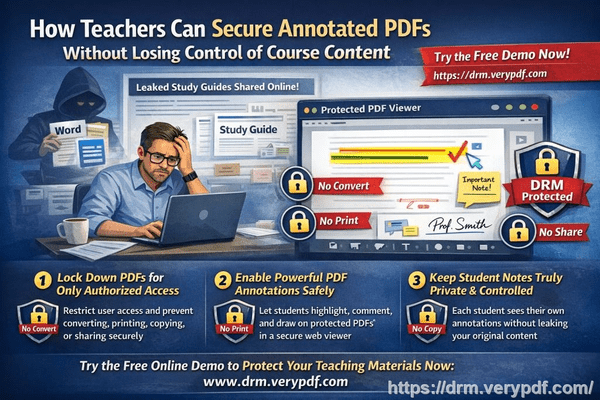
One major concern for educators and corporate trainers is collaboration. People need to highlight, comment, or make notes—but without risking document security. VeryPDF DRM Protector solves this with secure online annotations:

  • Server-side storage: Notes, highlights, drawings, and comments are stored securely on the server, not inside the PDF itself.

  • Customizable access: You can turn annotations on or off per document or per user role.

  • Only authorized users can see notes: There’s no way for someone to export or share annotations outside the system.

You can try it out yourself using this demo link:

https://drm.verypdf.com/online/

In the output page, View protected PDF file in Enhanced Web Viewer application, Simply click the Highlight, Text, Draw, or Image buttons to add your own notes to a protected PDF. This allows for real collaboration without risking your content.


3. Handling Large PDFs Without Slowdowns

Large files like textbooks, manuals, or corporate reports can be hundreds of megabytes. VeryPDF DRM Protector handles this smartly:

  • No strict file size limits: You can protect files of hundreds of MB, or even larger.

  • Optimized page streaming: Users only load the pages they are viewing, which keeps performance smooth.

  • Fast and reliable: Loading speed depends mainly on the user’s internet connection and the security settings applied.

This means your team or students can access big documents quickly, without compromising security.


4. Protection Against Browser Extensions

It’s true—malicious browser extensions can be used to steal content. VeryPDF DRM Protector addresses this directly:

  • Secure Canvas rendering: PDFs are displayed in a secure canvas environment rather than standard PDF elements.

  • Copy, print, and screenshot blocked: The system prevents copying, printing, and developer tool access.

  • Dynamic watermarks: Each user’s PDF view can display their name, email, IP, and timestamp, discouraging leaks.

Even if someone tries to use a plugin or extension, the document is never exposed in a usable form. This approach is trusted by universities, publishers, and online training providers.


5. Why VeryPDF DRM Protector Works for You

In simple terms, VeryPDF DRM Protector lets you:

  1. Share PDFs securely in the cloud.

  2. Allow users to take notes and collaborate safely.

  3. Protect large files without performance issues.

  4. Prevent unauthorized access, copying, or leaks—even from browser plugins.

Whether you’re an educator sharing course materials, a trainer distributing manuals, or a business protecting sensitive reports, VeryPDF DRM Protector makes sure your content stays safe without frustrating your users.


If you want to experience it yourself, check out the online demo here:

Experience VeryPDF DRM Protector

https://drm.verypdf.com/online/

Try highlighting, adding text, or drawing on a protected PDF—see how it works in real time.

Anti-OCR Structural Protection for Publishers Make it impossible for pirates to Copy-Paste your books text into a new document or AI summary tool

Anti-OCR Structural Protection for Publishers: Make It Impossible for Pirates to Copy-Paste Your Book’s Text into a New Document or AI Summary Tool

As I was preparing my latest lecture slides for an online course, I caught myself worrying again: what if a student shared these PDFs with someone outside the class? Worse, what if parts of my carefully crafted materials ended up in an AI summary tool or copied into someone else’s document without my permission? For educators like me, this isn’t just a hypotheticalit’s a very real frustration. Students sharing homework, lecture slides, or paid course materials can undermine both teaching integrity and intellectual property. Over the years, I’ve learned that protecting PDF content isn’t just about locking filesit’s about keeping control over who sees, prints, or copies your work.

Anti-OCR Structural Protection for Publishers Make it impossible for pirates to Copy-Paste your books text into a new document or AI summary tool

In my search for a practical solution, I came across VeryPDF DRM Protector, a tool designed specifically for situations like this. It’s been a game-changer in managing PDF security for educators, and here’s why it works so well for classroom scenarios.

One of the first problems most professors face is students sharing PDFs outside the intended audience. In the past, I’ve had entire sets of assignments or lecture notes circulated on forums and group chats before the semester even ended. Even if you watermark your materials, once a PDF is shared, anyone can copy, edit, or reformat it. VeryPDF DRM Protector addresses this by locking access to specific users or enrolled students. PDFs can be tied to individual devices or accounts, meaning unauthorized recipients simply cannot open them. No more worrying about someone forwarding files or downloading your content without permission.

Another major headache is unauthorized printing, copying, or converting. I remember preparing a detailed case study for a management course. By the second week, a student had converted the PDF into Word, altered parts of it, and submitted it under their own name. With VeryPDF DRM Protector, you can prevent exactly this type of misuse. The software stops copy-paste, printing, and even prevents PDFs from being converted to Word, Excel, or images. It also enforces dynamic watermarks, so if a student tries to print, the document clearly identifies them, discouraging misuse. This simple step alone saved me countless hours of chasing down content leaks.

For paid course materials, the stakes are even higher. Online courses and e-books can easily end up on free-sharing platforms if they aren’t secured. VeryPDF DRM Protector offers expiry controls and self-destruct features, which means you can set PDFs to automatically expire after a certain number of views, prints, or days. You can even revoke access instantly if needed. This level of control is something traditional PDF passwords or secure data rooms can’t matchthey rely on login credentials that can be shared or copied, leaving your content vulnerable.

Implementing these protections doesn’t have to be complicated. Here’s how I integrated VeryPDF DRM Protector into my workflow:

  • Lock PDFs to specific students or devices: Before distributing homework or lecture slides, I assign each file to the student’s device. Only they can open it.

  • Prevent unauthorized actions: Copying, printing, or converting the PDF is automatically blocked. This stops students from taking screenshots or repurposing content.

  • Dynamic watermarks: I apply watermarks with the student’s name and email, which appear on both screen and print. This discourages redistribution.

  • Expiry & revocation: If a student drops the course or if a PDF accidentally leaks, I can immediately revoke access or set files to expire after a pre-set number of views.

The anti-piracy benefits are huge. It’s not just about controlling accessit’s about maintaining full control over your content’s distribution. Even if someone tries to bypass the protection, the software prevents screen sharing, screenshots, and other common hacks that students or pirates often use. This was particularly useful during remote learning sessions via Zoom. Before using VeryPDF DRM Protector, I constantly worried about students taking screen grabs of sensitive lecture slides. Now, screen sharing and recording attempts are blocked automatically, giving me peace of mind.

One practical example comes to mind: I had prepared an advanced statistics module with original case studies and analysis exercises. In the past, students would share PDFs with peers in other universities. With VeryPDF DRM Protector, I distributed the PDFs securely to each enrolled student. The software ensured that even if a student tried to copy, print, or share, the content remained secure. The feedback I received was overwhelmingly positivestudents could still read and complete assignments easily, but the risk of piracy was eliminated.

Here are some easy tips for educators using DRM protection:

  • Start small: Protect your most sensitive PDFs firstlike exams or proprietary lecture content.

  • Apply watermarks consistently: This deters copying and keeps accountability visible.

  • Use expiry dates wisely: Limit access to course materials to the semester period or assignment deadlines.

  • Lock PDFs to devices: Prevents sharing between students.

  • Revoke access when necessary: Immediately cut off any unauthorized or outdated access.

For me, the real win wasn’t just preventing piracyit was simplifying my workflow. I no longer have to chase down leaked PDFs or worry about my materials ending up on free-sharing websites. I can confidently distribute course PDFs knowing that VeryPDF DRM Protector ensures secure, controlled access while keeping it frictionless for legitimate students.

In summary, for educators dealing with sensitive PDFswhether lecture slides, homework, or paid course contentVeryPDF DRM Protector is an essential tool. It stops piracy, prevents unauthorized sharing or conversion, and keeps you in full control of your materials. I highly recommend this to anyone distributing PDFs to students.

Try it now and protect your course materials: https://drm.verypdf.com

Start your free trial today and regain control over your PDFs.

FAQs

How can I limit student access to PDFs?

You can lock PDFs to individual students or devices, ensuring that only authorized users can open them.

Can students still read without copying, printing, or converting?

Yes. The software allows full reading access while blocking printing, copying, screen grabs, and conversion to other formats.

How do I track who accessed the files?

Dynamic watermarks and user-specific controls make it easy to identify who opened, viewed, or printed your PDFs.

Does it prevent PDF piracy and unauthorized sharing?

Absolutely. DRM controls, device locking, dynamic watermarks, and revocation features stop unauthorized distribution and copying.

How easy is it to distribute protected lecture slides and homework?

Very easy. You can distribute PDFs via web, email, or USB without worrying about them being compromised. Access is controlled at the device or user level.

Can I revoke access after distributing PDFs?

Yes, you can terminate access instantly, even after the documents have been shared.

Is it compatible with online classes and remote learning?

Yes. It blocks screen sharing and recording during virtual classes while allowing legitimate students to read the content.

Keywords: protect course PDFs, prevent PDF piracy, stop students sharing homework, secure lecture materials, prevent DRM removal, anti-conversion PDF DRM, secure PDF distribution, DRM-protected lecture slides, prevent PDF copying, control course materials.