Using PDF tracking to detect which proposals require updates or revisions based on prospect interaction data

Using PDF Tracking to Spot Which Proposals Need Updates Based on Client Interaction

Secure your market research and business reports while tracking client engagement to prevent leaks or unauthorized access.

Using PDF tracking to detect which proposals require updates or revisions based on prospect interaction data

I remember one afternoon, staring at my laptop, feeling that familiar anxiety. I’d just sent out a crucial market research report to a potential client, and I had no idea if they were actually reading itor worse, if it had already been forwarded around without my permission. Every business professional knows this tension: the fear that sensitive reports could leak, be misused, or sit unopened in someone’s inbox while deals slip through our fingers. For me, the question was simple: how could I protect my documents and actually understand how clients engage with them?

One of the biggest frustrations in business today is the loss of control over confidential documents. Market research reports, strategic proposals, and internal business plans carry vital information that could compromise competitive advantage if shared improperly. Too often, these PDFs are forwarded outside authorized circles, printed without permission, or converted into editable formats like Word or Excel. And as a sales or management professional, you’re left in the dark about whether clients are genuinely engaging with your content.

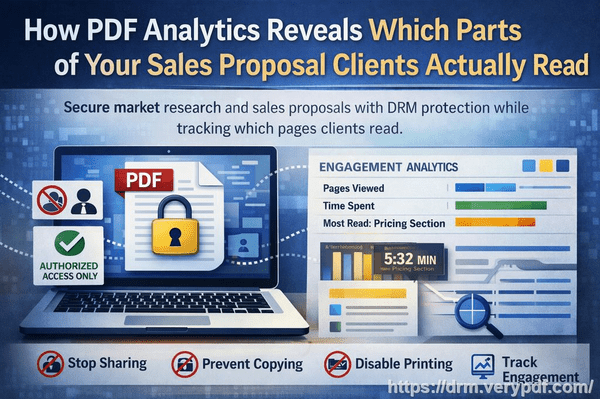
This is where PDF Analytics for Sales by VeryPDF DRM Protector comes in. It doesn’t just secure your PDFsit transforms them into smart, trackable assets. By restricting access to authorized users and departments, preventing printing, copying, or forwarding, and tracking exactly how each recipient interacts with the document, it gives you insights that were previously impossible to obtain. You can see which pages a client lingered on, how long they spent reading each section, and the total time they engaged with your proposal.

Imagine sending a product pricing proposal and noticing through PDF Analytics that a prospect spent several minutes analyzing the pricing table. That’s a clear signal of interest. Conversely, if they skimmed quickly past the competitive analysis, you know that section may need revision or further clarification in your next outreach. This real-time feedback allows you to adjust your strategy, refine proposals, and engage clients more effectively.

Practical Ways PDF Analytics Protects Your Business

  • Access Control: Restrict each PDF to specific users or departments. Unauthorized recipients cannot open the document.

  • Anti-Piracy Measures: Stop printing, copying, or converting your PDFs to Word, Excel, or images. Your confidential data remains secure.

  • Engagement Tracking: See which pages clients read, how long they spent on each, and overall reading time. This gives your sales team actionable intelligence.

  • Version Control: Know when a document was last accessed and prevent outdated proposals from circulating.

  • Audit Trail: Maintain full control over content distribution, including who opened the document and when.

I’ve personally experienced how these features save time and protect sensitive information. Once, a competitor tried to obtain a confidential market study through one of our contacts. Thanks to PDF Analytics, I was alerted that someone attempted to open the document from an unauthorized device, immediately halting the leak. In another case, I observed that a potential client spent almost half an hour on a single section of our pricing model. Armed with that insight, I followed up with targeted questions and closed the deal faster than I would have relying on guesswork alone.

Step-by-Step Guidance for Implementing PDF Analytics in Your Workflow

  1. Protect Your PDF: Apply VeryPDF DRM Protector before distribution. Assign specific users or groups who are authorized to access the document.

  2. Set Restrictions: Disable printing, copying, and file conversion. Choose whether users can forward the file.

  3. Distribute Securely: Share the protected PDF through email or your internal system. Every interaction is tracked automatically.

  4. Monitor Engagement: Use PDF Analytics to check which sections clients read, time spent per page, and overall engagement metrics.

  5. Adjust and Follow Up: Analyze behavior to refine your proposals, adjust sales pitches, or follow up where engagement is low.

  6. Maintain Control: Revoke access instantly if a document falls into the wrong hands or becomes outdated.

The power of PDF Analytics lies not just in security, but in insight. Your PDFs become living documents, offering intelligence that informs business decisions and improves client interactions. You can confidently share sensitive materials without fear of leaks, while simultaneously understanding how each client interacts with your content.

Why Anti-Piracy Matters for Your Business

Unauthorized sharing and piracy are not just theoretical risksthey’re real threats. A leaked market research report or proposal can undercut your competitive advantage, expose confidential strategies, and even damage client trust. Traditional PDFs, even with password protection, are vulnerable to conversion tools and forwarding. VeryPDF DRM Protector closes these loopholes. By locking down your content and preventing copying, printing, or format changes, it ensures your business insights remain under your control.

Equally important is the ability to track engagement. Without knowing whether your clients are reading the key sections of your report, you’re essentially flying blind. PDF Analytics eliminates this uncertainty, allowing you to see engagement patterns, identify high-interest areas, and proactively address client needs.

Real Business Scenarios

  • Market Research Reports: A research firm sends quarterly reports to multiple clients. Using PDF Analytics, they discovered that a section on consumer trends was being skipped frequently. They updated the report with clearer visuals and saw engagement spike.

  • Sales Proposals: A B2B company shared proposals for a new service package. Analytics showed prospects spent extra time on the pricing breakdown, highlighting where negotiation conversations should start.

  • Internal Confidential Documents: HR or finance teams can protect salary studies or strategic plans while monitoring access to prevent leaks within the organization.

These examples illustrate how PDF Analytics doesn’t just protect documentsit actively improves business outcomes. Knowing exactly how a PDF is being consumed allows managers and sales teams to act decisively, reduce risk, and close deals faster.

Practical Tips for Maximizing Client Engagement

  • Highlight critical pages or sections that you want clients to focus on.

  • Use engagement data to tailor follow-up communications. If a client skimmed a key section, clarify or expand on it in your next conversation.

  • Schedule document updates strategically, based on which pages are most read. If analytics reveal confusion in a certain section, revise it promptly.

  • Combine DRM protections with your CRM for a seamless workflowdocument engagement insights feed directly into client relationship strategies.

I highly recommend PDF Analytics for any business distributing sensitive or high-value content. It gives you the dual advantage of protection and intelligence. Not only do you prevent unauthorized access, but you also gain actionable insights into client behavior. This is a game-changer for anyone dealing with confidential proposals, market research reports, or internal strategic documents.

Try it now and protect your business reports: https://drm.verypdf.com

Start your free trial today, secure your market research, and track PDF engagement.

FAQs

Q1: How can I limit access to confidential business documents?

A1: You can restrict PDFs to specific users or departments using VeryPDF DRM Protector. Only authorized recipients can open and view the documents.

Q2: Can I prevent others from copying, printing, or converting my reports?

A2: Yes. DRM settings allow you to disable printing, copying, forwarding, and prevent conversion to Word, Excel, or images.

Q3: How do I track which pages my clients are reading and how long they spend?

A3: PDF Analytics records engagement metrics for each page, including time spent and total reading duration, giving you detailed insight into client interactions.

Q4: Does DRM technology prevent unauthorized sharing of PDFs?

A4: Absolutely. DRM restricts access, prevents bypassing, and maintains an audit trail of document activity to ensure content remains secure.

Q5: How easy is it to distribute protected business reports to clients or colleagues?

A5: Distribution is simple via email or internal systems. Every interaction is automatically tracked, and access can be revoked at any time.

Q6: Can PDF Analytics help improve my sales strategy?

A6: Yes. By analyzing which sections clients focus on, your sales team can follow up more effectively and prioritize high-interest areas.

Q7: What happens if a protected PDF falls into the wrong hands?

A7: You can immediately revoke access or block the document from being opened on unauthorized devices, keeping your content safe.

Tags/Keywords

protect business reports, secure market research, prevent PDF piracy, stop unauthorized access, track PDF engagement, protect confidential data, monitor PDF reading, PDF Analytics, DRM protection, client engagement tracking

How marketers can leverage PDF engagement dashboards to monitor document performance across different campaigns

Maximizing Client Insights: Track PDF Engagement and Protect Business Reports

Ever sent a detailed market research report to a client only to wonder if they actually read itor worse, if it ended up in the wrong hands? As a business owner, I’ve faced that exact frustration. Confidential PDFs can easily be shared, copied, or converted without permission, leaving sensitive data exposed and leaving us blind to how clients interact with our content. Knowing exactly who’s reading your documents and what they focus on can make a world of difference in closing deals and protecting your company’s intellectual property.

How marketers can leverage PDF engagement dashboards to monitor document performance across different campaigns

Many businesses struggle with similar issues. Market research reports, pricing strategies, or internal analysis often leak outside the intended audience. Even if you trust your recipients, PDFs can be forwarded, printed, or converted to editable formats like Word or Excel. Without insight into client engagement, sales teams operate in the darkthey don’t know if a prospect spent five minutes reviewing a proposal or skipped straight to the appendix. This lack of visibility can slow down decision-making, reduce deal conversions, and, in the worst cases, result in sensitive data being misused.

This is where PDF Analytics for Sales by VeryPDF DRM Protector comes into play. It’s not just a tool to lock down your filesit’s a solution that combines robust security with actionable insights. By restricting access to authorized users or specific departments, you maintain control over who sees your content. Printing, copying, forwarding, or removing DRM protections are prevented, ensuring that your documents remain confidential.

Beyond security, PDF Analytics gives you a clear picture of client engagement. Imagine sending a proposal and instantly knowing which pages your client spent the most time on. Did they linger on the pricing section? You can prioritise follow-ups. Did they skim quickly through the features? That signals a need for clarification or a personal touch. These insights allow your sales team to act strategically rather than guessing.

In practice, here’s how it works:

  • Restrict access: Only specific emails or departments can open the PDF, preventing accidental or malicious sharing.

  • Prevent unauthorized actions: Printing, copying, and file conversions are blocked. DRM removal attempts are logged and stopped.

  • Track engagement: Page-by-page analytics show time spent on each section, total reading duration, and which parts your clients focus on most.

  • Actionable sales insights: Identify high-interest prospects based on reading behaviour and adjust follow-ups accordingly.

I recall a recent situation where a sensitive market forecast report was sent to several key partners. Within the first 24 hours, PDF Analytics showed that one recipient spent significant time on the competitor analysis section. I immediately reached out with tailored insights, which helped secure a strategic partnership. Without these analytics, we might have missed the opportunity entirely.

Another time, an internal report meant only for the executive team was accidentally forwarded to a wider group. Thanks to the DRM restrictions, recipients outside the approved list couldn’t open the document, preventing potential leaks. That one feature alone saved hours of follow-up and avoided exposing confidential strategies.

Using PDF Analytics also helps prevent piracy. PDFs are notoriously easy to convert into editable formats or screenshots, but DRM Protector blocks these actions. This means your intellectual propertybe it pricing strategies, design specifications, or research findingsremains secure, no matter where the document travels.

For sales and marketing teams, this dual approach of security and analytics is transformative. You not only control distribution but also gain insights that improve client interactions. It turns every PDF into a strategic asset, offering both protection and intelligence.

Here’s a practical step-by-step approach to using PDF Analytics effectively:

  1. Identify sensitive content: Determine which reports, proposals, or market research documents require protection.

  2. Set permissions: Use DRM Protector to specify who can access the PDF and set expiration dates if necessary.

  3. Enable analytics: Track reading behaviour, page views, and total engagement time.

  4. Monitor insights: Review which sections clients focus on and use that information to prioritise follow-ups.

  5. Act strategically: Contact clients based on their engagement patterns to provide clarifications, offer demos, or negotiate terms.

  6. Audit distribution: Ensure no unauthorized sharing occurs and adjust access if needed.

In my experience, integrating PDF Analytics into our workflow has saved countless hours, prevented leaks, and improved client engagement significantly. It’s particularly invaluable when sending sensitive financial reports, strategic plans, or proprietary research to external partners or high-value clients.

I highly recommend PDF Analytics for Sales by VeryPDF DRM Protector to anyone distributing confidential business documents. The combination of advanced security features and detailed engagement tracking provides peace of mind and actionable business intelligence. Whether it’s preventing piracy, controlling access, or understanding how clients interact with your PDFs, this tool covers all bases.

Try it now and protect your business reports: https://drm.verypdf.com

Start your free trial today, secure your market research, and track PDF engagement.

FAQ

How can I limit access to confidential business documents?

You can set specific email addresses or user accounts to open the PDF, restrict departments, and set expiration dates to control access precisely.

Can I prevent others from copying, printing, or converting my reports?

Yes. DRM Protector blocks printing, copying, and conversion attempts, ensuring your content cannot be extracted or shared without permission.

How do I track which pages my clients are reading and how long they spend?

PDF Analytics provides page-level engagement data, showing time spent per page and total reading duration, helping you understand client interest.

Does DRM technology prevent unauthorized sharing of PDFs?

Absolutely. DRM prevents forwarding, unauthorized access, and removes the risk of PDFs being opened outside approved users.

How easy is it to distribute protected business reports to clients or colleagues?

It’s straightforward: upload the document, set permissions, and send it. Recipients can view the content without hassle, while you retain full control.

Can I see which sections of a report a client focuses on most?

Yes. The analytics dashboard shows detailed engagement per section, allowing sales teams to tailor follow-ups and improve interactions.

Will DRM protection affect the user experience for legitimate clients?

No. Authorized users can access and read PDFs smoothly, while security features run in the background to prevent unauthorized actions.

Tags or Keywords

protect business reports, secure market research, prevent PDF piracy, stop unauthorized access, track PDF engagement, protect confidential data, monitor PDF reading, secure business documents, prevent data leaks, DRM PDF analytics

Using PDF analytics to optimize sales collateral for mobile devices by analyzing reading patterns and page duration

Using PDF Analytics to Protect Business Reports and Track Client Engagement

As a business owner, I often feel uneasy sending out market research reports or proprietary business plans. I’ve lost sleep wondering if a sensitive PDF I emailed last week ended up in the wrong hands, or if my client even opened it. It’s frustrating to invest time and resources into creating valuable insights, only to have no visibility over how they’re consumedor worse, risk them being shared without permission. This is exactly the challenge many businesses face today: distributing confidential information securely while understanding client engagement.

Using PDF analytics to optimize sales collateral for mobile devices by analyzing reading patterns and page duration

Confidential business documents are often the backbone of strategic decisions, from market research insights to pricing strategies. Yet, once you send a PDF, you lose control. Anyone with the file could forward it, print it, or convert it to Word or Excel, exposing your intellectual property. Even within a company, documents can be mishandled or shared with unauthorized personnel. For sales and marketing teams, this is not just a security problemit’s an operational blind spot. Without knowing how your clients interact with your documents, you’re left guessing which content resonates and which pages are ignored.

This is where PDF Analytics for Sales, powered by VeryPDF DRM Protector, comes in. It addresses both security and engagement insights in a single solution, allowing businesses to distribute PDFs with confidence. Let’s explore the key problems and how this technology solves them.

Business Pain Points

1. Unauthorized Sharing and Data Leaks

One of the most common issues businesses face is the uncontrolled circulation of sensitive documents. A market research report sent to a client can easily end up on multiple devices, emailed to competitors, or even posted online. Traditional PDFs provide no protection once distributed, leaving companies exposed.

2. Loss of Control Over Content

Even if documents remain in-house, employees or clients might copy text, print pages, or convert content into editable formats like Word or Excel. Each of these actions risks compromising confidentiality and intellectual property.

3. Limited Insight into Client Engagement

Without knowing which sections of a PDF your clients read, how long they spend on each page, or whether they skip critical information, sales teams can’t prioritise follow-ups effectively. You might spend hours on leads that show little interest or miss opportunities because engagement signals go unnoticed.

How PDF Analytics for Sales Solves These Problems

VeryPDF DRM Protector protects your PDFs from unauthorized access while providing detailed insights into client behavior. Here’s how it works in practical scenarios:

  • Restrict Access: Only authorized users or specific departments can open your PDFs. Permissions can be set by user, department, or time period, ensuring sensitive reports are never viewed by unintended recipients.

  • Prevent Unauthorized Actions: Printing, copying, forwarding, or converting your PDFs is blocked, preventing leaks and misuse. Even sophisticated attempts to bypass security are detected and stopped.

  • Track Engagement: PDF Analytics reveals which pages clients viewed, how long they lingered on each page, and the total time spent reading. This turns static PDFs into actionable intelligence for sales teams.

For example, a sales team sending a new pricing strategy report to prospects can see exactly who spent time reviewing the pricing pages. A client who scrolls quickly past may need a follow-up call to clarify details, while a client who spends significant time reviewing specific sections may be ready for a proposal discussion. This real-time insight allows sales teams to prioritise efforts efficiently.

Real-World Examples

  • Preventing Data Leaks: A marketing director shared a confidential market research PDF with a small group of clients. Within minutes, an attempt was made to copy the content to Word. DRM Protector blocked the action, and the director received an alert, preventing a potential breach.

  • Understanding Client Behavior: A sales manager distributed a competitive analysis report to several leads. PDF Analytics showed that one lead spent most of their time on product comparison charts, while another skipped straight to pricing. This insight allowed the team to tailor follow-up conversations effectively, saving time and increasing conversion chances.

  • Saving Time: Teams no longer spend hours guessing who read a document. Analytics reports summarize engagement patterns, enabling managers to focus on leads showing real interest.

Step-by-Step Guide to Protect and Monitor Your PDFs

  1. Upload PDF to VeryPDF DRM Protector: Secure your document by setting access permissions.

  2. Set Usage Restrictions: Prevent printing, copying, forwarding, or file conversion.

  3. Distribute to Clients or Teams: Share securely with authorized users via email or secure link.

  4. Monitor Engagement: Access PDF Analytics dashboard to track reading patterns, time per page, and total engagement duration.

  5. Act on Insights: Prioritize sales follow-ups, refine marketing strategies, and adjust content based on engagement metrics.

Benefits Beyond Security

  • Anti-Piracy: Stops unauthorized users from bypassing DRM controls or converting PDFs to other formats.

  • Actionable Insights: Sales teams gain intelligence about client interests and behavior, enabling smarter follow-ups.

  • Control and Compliance: Maintains complete records of who accessed what and when, supporting internal audits and compliance needs.

  • Peace of Mind: Knowing that sensitive documents are protected allows businesses to focus on growth instead of worrying about leaks.

I’ve personally seen situations where PDF Analytics prevented costly mistakes. In one case, a confidential strategic report was accidentally forwarded internally without proper authorization. The DRM alert notified the sender instantly, allowing immediate corrective action. In another instance, tracking engagement helped the sales team identify which leads were truly interested in a proposal, ultimately closing the deal faster and avoiding wasted effort.

Taking Action

If your business relies on distributing sensitive documentsbe it market research, pricing strategies, or internal reportsPDF Analytics for Sales by VeryPDF DRM Protector is essential. It protects your intellectual property, prevents unauthorized access, and provides actionable insights into client engagement.

I highly recommend this to anyone distributing confidential business documents and wanting insight into client behavior. Try it now and protect your business reports: https://drm.verypdf.com. Start your free trial today, secure your market research, and track PDF engagement.

Frequently Asked Questions

Q: How can I limit access to confidential business documents?

A: VeryPDF DRM Protector allows you to set access permissions for specific users or departments, and even restrict access by time, device, or location.

Q: Can I prevent others from copying, printing, or converting my reports?

A: Yes, DRM restrictions block printing, copying, forwarding, and file conversions to Word, Excel, or image formats.

Q: How do I track which pages my clients are reading and how long they spend?

A: PDF Analytics provides a detailed dashboard showing page views, time spent per page, and total reading duration for each user.

Q: Does DRM technology prevent unauthorized sharing of PDFs?

A: Absolutely. DRM controls prevent unauthorized users from opening, sharing, or tampering with your PDFs.

Q: How easy is it to distribute protected business reports to clients or colleagues?

A: Distribution is simple. Upload your PDF, set permissions, and share via secure links or email. Recipients can access the document without compromising security.

Q: Can PDF Analytics help sales teams prioritize leads?

A: Yes, engagement metrics reveal which clients are most interested in specific content, helping sales teams focus efforts strategically.

Q: Will my team still be able to collaborate if PDFs are protected?

A: Yes, permissions can be customized to allow collaboration among authorized users while keeping sensitive content secure.

Keywords

protect business reports, secure market research, prevent PDF piracy, stop unauthorized access, track PDF engagement, protect confidential data, monitor PDF reading, secure business documents, prevent document leaks, analyze client engagement

PDF analytics for lead management track reading time, page views, and engagement across prospects

Maximise Client Insights with PDF Analytics and Protect Your Business Reports

Unlocking the full potential of your business reports and market research can feel like navigating a minefield. I’ve often faced the frustration of sending carefully prepared reports to clients only to wonder: are they reading them? Are they sharing them with competitors? It’s a common scenarioyour hard work, data, and insights floating around with no way to track who’s actually engaging with it.

PDF analytics for lead management track reading time, page views, and engagement across prospects

Confidential business documents slipping into the wrong hands is more than a minor inconvenienceit can cost deals, erode trust, and compromise competitive advantage. Add to that the challenge of understanding client engagement: are prospects carefully reviewing your proposals, or just skimming through key pages? Without clarity, your sales follow-ups can miss the mark. That’s where VeryPDF’s DRM Protector and PDF Analytics step in, transforming how you protect and monitor your PDFs.

Many businesses face recurring pain points when sharing sensitive documents:

  • Unauthorized sharing and leaks: Market research reports, financial projections, and internal strategy documents often get forwarded outside the intended audience, jeopardizing confidentiality.

  • Loss of content control: Clients or colleagues might print, copy, or convert PDFs into editable formats like Word or Excel, making it impossible to maintain ownership of proprietary content.

  • Limited insight into client engagement: Without knowing which pages are being read or how much time is spent on them, it’s difficult to gauge interest, intent, or areas requiring follow-up.

These challenges are precisely what PDF Analytics for Sales by VeryPDF DRM Protector addresses.

Here’s how it works in real business scenarios:

  • Controlled access: You can restrict PDFs to specific users, teams, or departments, ensuring that only authorised recipients can open sensitive reports. No more guessing who has your data.

  • Full anti-piracy protection: Printing, copying, forwarding, or DRM removal attempts are blocked. PDFs cannot be converted into Word, Excel, or images, so your insights remain secure.

  • Deep engagement tracking: PDF Analytics lets you see which pages were viewed, how long each page was read, and total time spent on the document. This transforms your sales strategyif a prospect lingers on a pricing page, you know there’s strong purchase intent. If they skim, you can follow up with targeted guidance.

I’ve personally used this tool in situations where market research reports were being shared with potential partners. Before implementing DRM and analytics, I had no idea if they were reviewing the key insights or passing them along without consideration. After protecting the reports, I was able to monitor page-by-page engagement. In one instance, I noticed a prospect spent an unusually long time on a competitor comparison section. This insight allowed my team to schedule a personalised follow-up call, ultimately securing the deal.

Other practical applications include:

  • Step-by-step guidance for teams:

    1. Upload your PDF report to VeryPDF DRM Protector.

    2. Assign access permissions and restrict printing, copying, or forwarding.

    3. Enable PDF Analytics to track reading behaviour.

    4. Review engagement dashboards to prioritise follow-ups with high-interest clients.

  • Protect sensitive market research: Your competitive analysis, pricing models, or strategic plans stay secure while still providing clients with the insights they need.

  • Save time and prevent leaks: No more chasing clients to see if they’ve reviewed your reports. Analytics delivers clear visibility into engagement, reducing wasted follow-ups and reinforcing security.

  • Support your sales strategy: By knowing which sections of your PDFs attract the most attention, sales teams can tailor conversations, refine presentations, and close deals more effectively.

I highly recommend PDF Analytics for Sales by VeryPDF DRM Protector to anyone distributing confidential business documents. It protects your reports from piracy, prevents unauthorized access, and gives you invaluable insight into client behaviour. The ability to track engagement and control document distribution has been a game-changer for my business.

Try it now and protect your business reports: https://drm.verypdf.com

Start your free trial today, secure your market research, and track PDF engagement.

FAQ

How can I limit access to confidential business documents?

You can restrict PDFs to specific users or groups, ensuring that only authorised recipients can open your documents. Access can be set by email, department, or role.

Can I prevent others from copying, printing, or converting my reports?

Yes. VeryPDF DRM Protector blocks printing, copying, forwarding, and conversion attempts, keeping your content secure from unauthorized use.

How do I track which pages my clients are reading and how long they spend?

PDF Analytics provides detailed reports showing page-by-page views, time spent on each page, and total reading duration, giving you actionable insights into client engagement.

Does DRM technology prevent unauthorized sharing of PDFs?

Absolutely. DRM ensures that only authorized users can access the document and prevents attempts to remove protection or distribute files to unauthorized recipients.

How easy is it to distribute protected business reports to clients or colleagues?

Very easy. You can send protected PDFs just like regular files, while controlling access, monitoring engagement, and keeping sensitive content secure.

Can PDF Analytics help my sales team identify high-interest prospects?

Yes. By tracking which sections of a PDF a client focuses on, your team can spot strong interest signals and follow up strategically to increase conversion rates.

Is it suitable for market research reports and internal strategy documents?

Definitely. Any confidential business material, from market studies to strategic plans, can be protected and tracked, ensuring insights remain secure.

Tags or Keywords

protect business reports, secure market research, prevent PDF piracy, stop unauthorized access, track PDF engagement, protect confidential data, monitor PDF reading, PDF DRM, client engagement insights, business document security

How PDF tracking improves customer insights by showing which document pages generate the highest attention and retention

How PDF Analytics Protects Business Reports and Reveals Client Engagement

In today’s fast-paced business world, keeping market research and internal reports secure while understanding how clients interact with your content is more critical than ever. Many of us have faced the frustration of sending a carefully prepared PDF to a client, only to wonder if they actually read itor worse, if it has been shared with unauthorized parties. How can you protect your valuable business intelligence and gain meaningful insights into client engagement at the same time? That’s where PDF Analytics for Sales by VeryPDF DRM Protector comes in.

How PDF tracking improves customer insights by showing which document pages generate the highest attention and retention

I remember a situation with a mid-sized consulting firm I worked with. They had just completed a detailed market research report for a high-profile client. They emailed the report with excitement, only to hear weeks later that it had been forwarded to multiple stakeholders without their knowledge. Not only did this breach confidentiality, but it also meant they had no idea which insights the client actually reviewed. For many businesses, this scenario is all too commonsending valuable information without control or insight is risky.

The good news is that businesses can now protect their confidential documents and monitor engagement seamlessly. PDF Analytics for Sales by VeryPDF DRM Protector solves these problems in a practical, user-friendly way.

Many business professionals face recurring pain points:

  • Market research reports, proposals, and internal documents are often shared outside the intended audience, leading to potential leaks of sensitive data.

  • PDFs can be copied, printed, or converted to Word, Excel, or image formats without permission, removing your control over proprietary content.

  • Even when documents are delivered securely, there’s usually no visibility into client engagementno idea which pages are read, which insights are skipped, or how long a reader spends on critical sections.

PDF Analytics for Sales addresses these challenges head-on. It allows you to:

  • Restrict access to authorized users or specific departments, ensuring only the right people can view sensitive information.

  • Prevent unauthorized printing, copying, forwarding, or removal of DRM protections.

  • Track client engagement with precision: see which pages were viewed, how long each page was read, and total time spent in the document.

This is particularly useful for sales and marketing teams. For example, if a potential client spends significant time on your pricing or solution pages, you can interpret that as a strong purchase signal. Conversely, if a reader skims quickly or ignores key sections, you know where to intervene or follow up proactively.

I once worked with a technology company that used VeryPDF DRM Protector for a product proposal. They noticed from the PDF Analytics dashboard that the prospect spent more than 15 minutes on the feature comparison pages, but very little time on pricing. Using this insight, the sales team followed up with a targeted call addressing value and ROI rather than discounting. The deal closed successfully, and the client expressed appreciation for the tailored follow-up. Without analytics, the sales team would have assumed everything was fine or missed the opportunity entirely.

Preventing piracy is another critical benefit. VeryPDF DRM Protector ensures that your PDFs cannot be easily converted into editable formats like Word, Excel, or images. Even if a file is shared outside the intended audience, unauthorized recipients cannot bypass security. This protects not just your intellectual property but also your reputation and competitive advantage.

Here’s a practical example of how PDF Analytics for Sales enhances document security and engagement:

  • Scenario: A consulting firm sends a strategic market research report to a client with multiple stakeholders.

  • Action: They use DRM Protector to restrict access only to the intended email addresses and prevent printing or copying.

  • Outcome: Each recipient’s interaction is tracked, revealing which sections are most valuable. The firm notices that stakeholders focus heavily on emerging market trends and skip less relevant appendices.

  • Result: The sales and strategy team can follow up with tailored insights, avoid sending unnecessary follow-ups, and safeguard their report from leaks.

The tool also saves time. Instead of manually calling clients or sending multiple versions of documents, you have a real-time dashboard showing who read what and for how long. You can prioritize leads, schedule timely follow-ups, and reduce the uncertainty that often comes with distributing PDFs.

Some step-by-step guidance for using PDF Analytics effectively:

  1. Protect your PDF: Apply VeryPDF DRM Protector before distribution. Set access restrictions and disable unauthorized actions like printing or copying.

  2. Distribute securely: Send the PDF only to authorized users via email or secure download links.

  3. Monitor engagement: Check the PDF Analytics dashboard to see which pages clients are reading, how long they spend on each section, and total reading time.

  4. Act on insights: Use engagement data to guide follow-ups, answer questions proactively, or adjust your messaging.

  5. Review and improve: Over time, the data helps identify which types of content resonate most with clients and which may need refinement.

Using this approach, businesses maintain full control over content distribution while gaining actionable insights. Reports are protected against piracy, confidential data remains secure, and sales teams are empowered to make data-driven decisions rather than guesswork.

From personal experience, I’ve seen this approach prevent potentially disastrous leaks. One marketing agency used DRM-protected PDFs for a high-profile client pitch. Within hours of sending the documents, they noticed an unauthorized login attempt. The security features immediately blocked access, preventing the pitch from being shared externally. The agency avoided a major breach, and the client felt reassured knowing their sensitive data was handled securely.

Another story involved a business sending a competitive analysis report. PDF Analytics revealed that the recipient spent the most time on two specific charts about market share and growth potential. With this insight, the sender knew exactly which areas to focus on during the follow-up meeting, making the conversation more relevant and increasing the likelihood of closing a deal.

In summary, PDF Analytics for Sales by VeryPDF DRM Protector offers a comprehensive solution for businesses distributing confidential documents. It prevents unauthorized access, stops PDF piracy, and provides detailed engagement insights that are invaluable for sales, marketing, and business development. I highly recommend this to anyone distributing sensitive business reports and wanting a clear view of client behavior.

Try it now and protect your business reports: https://drm.verypdf.com

Start your free trial today, secure your market research, and track PDF engagement.

FAQs

Q1: How can I limit access to confidential business documents?

A1: Use VeryPDF DRM Protector to restrict PDFs to authorized users, specific email addresses, or departments. You can also set expiration dates and revoke access at any time.

Q2: Can I prevent others from copying, printing, or converting my reports?

A2: Yes, DRM Protector allows you to disable printing, copying, forwarding, and conversion to Word, Excel, or image formats.

Q3: How do I track which pages my clients are reading and how long they spend?

A3: PDF Analytics provides detailed insights, showing page-by-page views, reading time, and total engagement duration. This allows you to understand exactly which sections capture attention.

Q4: Does DRM technology prevent unauthorized sharing of PDFs?

A4: Absolutely. Even if someone tries to forward or distribute the file, DRM protections block access for unauthorized users and maintain your control over the content.

Q5: How easy is it to distribute protected business reports to clients or colleagues?

A5: Distribution is simple. You send the DRM-protected PDF via email or secure link. Only authorized users can open the file, and analytics track engagement automatically.

Q6: Can PDF Analytics help sales teams identify high-interest prospects?

A6: Yes. By seeing which pages a client spends the most time on, sales teams can gauge interest, follow up strategically, and prioritize high-potential leads.

Q7: What types of business documents can be protected with VeryPDF DRM Protector?

A7: Any confidential PDF, including market research reports, proposals, financial documents, internal strategy papers, and proprietary presentations, can be secured and tracked.

Tags / Keywords

protect business reports, secure market research, prevent PDF piracy, stop unauthorized access, track PDF engagement, protect confidential data, monitor PDF reading, secure client reports, DRM PDF protection, business document analytics