
How to Keep Your Business Reports and Market Research Secure from Unauthorized Sharing
Last quarter, I experienced a frustrating situation that any business professional dreads. A detailed market research report I had prepared and sent to a prospective client ended up in the hands of a competitor. The report contained sensitive insights that directly influenced strategic decisions, and its leak cost us a potential contract worth tens of thousands of dollars. Situations like this underscore a painful reality: sharing critical business documents externally carries real risks. Without proper protections, your proprietary research, strategy documents, and client reports can be copied, converted, or forwarded without your knowledge, leading to lost revenue, compromised client trust, and exposure of intellectual property.
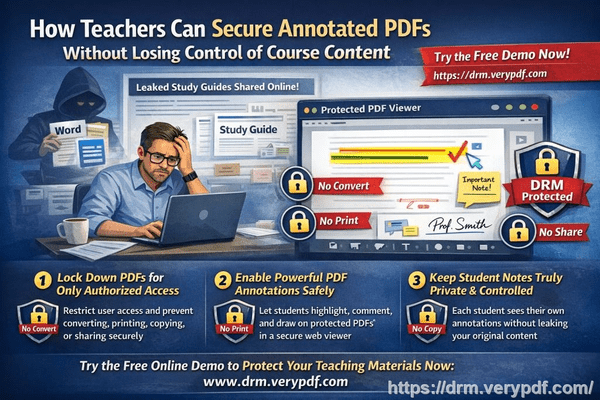
The challenges of managing confidential business documents are more visible than ever. Business owners, analysts, and managers constantly face scenarios where sensitive information could slip outside authorized channels. Here are a few common pain points I’ve encountered and seen in many organizations:
-
Unauthorized sharing of strategic documents: Reports and research often need to be shared with clients, partners, or colleagues outside the organization. Without strict access controls, these files can be forwarded or downloaded by unauthorized users, resulting in lost deals or compromised competitive advantage.
-
Revenue leakage from document misuse: Many companies underestimate the risk of their documents being printed, copied, or converted to editable formats like Word, Excel, or images. Once converted, these materials can be redistributed or resold without any trace back to the original owner. I’ve personally seen a scenario where a competitor used copied research to pitch to our own client, nearly taking the business away.
-
Loss of control over sensitive data: Even within your team, improper sharing or weak security policies can result in confidential data being exposed. The lack of visibility over who accesses your documents and when makes it nearly impossible to prevent leaks proactively.
Faced with these challenges, I found a practical solution that changed the way I handle sensitive business documents: VeryPDF DRM Protector. This tool allows you to maintain full control over your PDFs, ensuring that only authorized users can access and interact with them, even after sharing externally.
Here’s how it helps in real-world scenarios:
-
Restrict access to authorized users only: You can control who opens each document based on user accounts, departments, or teams. For example, I shared a financial strategy report with select clients using DRM-protected PDFs, knowing that only their accounts could open it. No one else, even if they received the file, could access its contents.
-
Prevent printing, copying, and forwarding: With DRM restrictions, your PDFs can’t be printed or copied without authorization. I’ve seen companies stop internal leaks instantly by enabling these controlsemployees can view documents but can’t remove sensitive content or create unauthorized copies.
-
Protect against conversion and piracy: VeryPDF DRM prevents PDFs from being converted to Word, Excel, or images. This means competitors or unauthorized recipients cannot easily repurpose your intellectual property. In my experience, this has prevented costly scenarios where market research or product strategy documents were repackaged and shared externally.
-
Maintain operational visibility: You can track who accessed each document and when. This audit trail provides peace of mind and enables proactive follow-ups if suspicious activity occurs.
In practical terms, implementing DRM protection is straightforward. When I distribute a market research report to a client:
-
I assign access only to the client’s email or account.
-
I restrict printing and copying to prevent unauthorized offline use.
-
I enable DRM expiration dates to limit long-term exposure of sensitive documents.
-
I monitor access logs to see exactly when and by whom the report was opened.
The benefits are tangible. A competitor once tried to access one of our strategic documents from an external source, but the file was locked, and I immediately received an alert. This proactive protection not only prevented a potential revenue loss but also reinforced our client’s trust in handling sensitive information. Another instance involved sharing proprietary research with a partner company. With DRM controls, they could use the data for the project without the risk of it being forwarded to competitors.
Implementing VeryPDF DRM Protector has simplified document management and saved us money. Instead of worrying about potential leaks, we now focus on leveraging our research and insights confidently.
I highly recommend this to anyone distributing confidential business documents who wants to avoid costly leaks. Try it now and protect your business reports: https://drm.verypdf.com
Start your free trial today and keep your market research secure from leaks or misuse.
Frequently Asked Questions (FAQs)
-
How can I limit access to confidential business documents to prevent revenue loss?
You can use DRM-protected PDFs to assign access only to specific users, departments, or teams, ensuring that only authorized individuals can open the files.
-
Can I stop others from copying, printing, or converting my reports into editable formats?
Yes. DRM Protector prevents unauthorized printing, copying, and conversion to Word, Excel, or image formats, keeping your content secure.
-
How do I track who accessed my business reports and when?
VeryPDF DRM Protector includes access logs, so you can see exactly who opened each document and at what time.
-
Does DRM technology prevent unauthorized sharing of PDFs outside my organization?
Absolutely. Even if someone tries to forward the PDF, DRM restrictions ensure only authorized accounts can open it.
-
How easy is it to securely distribute protected business reports to clients or colleagues without risk?
The process is straightforward. You assign access to authorized users, set restrictions, and share the file. Recipients can open the PDF securely, while unauthorized users cannot.
-
Can I set expiration dates on confidential documents?
Yes. DRM Protector allows you to define expiration dates, limiting access over time and reducing long-term exposure.
-
Will using DRM affect my clients’ ability to view documents easily?
No. Authorized users can open and read the documents seamlessly, while all restrictions apply only to unauthorized use.
Tags / Keywords
protect business reports, secure market research, prevent PDF piracy, stop unauthorized access, protect confidential PDFs, prevent PDF conversion, business document security, secure client reports, DRM PDF protection, stop document leaks