
One of the biggest problems with offline PDF protection is file sharing.
You send a protected PDF to an authorized user. The user can read it without an Internet connection, which is convenient. However, they may forward the file to someone else using email, WhatsApp, WeChat, Telegram, Skype, Microsoft Teams, Google Drive, Dropbox, a USB drive, or any other file sharing method.
How can you make sure that the forwarded file cannot be opened on another computer?
VeryPDF DRM Protector provides a unique solution for Offline PDF DRM.
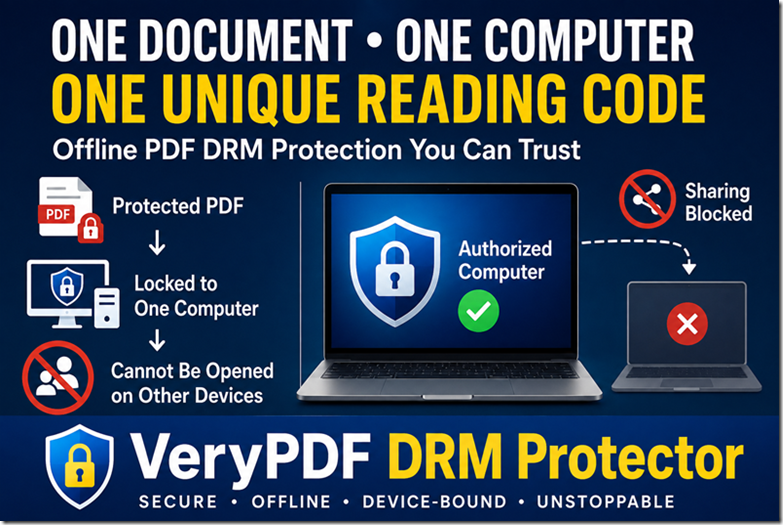
Every protected PDF is linked to one computer through one unique reading code.
Even if someone forwards the protected file to another person, the document cannot be opened because the reading code is only valid for the original computer.
The Problem with Traditional Offline PDF DRM
Many offline PDF DRM solutions encrypt the document.
Once an authorized user activates the file, the document can often be copied together with its offline license.
If another person receives both the file and the license information, there is a risk that the protected document may still be opened.
Organizations that distribute confidential documents need stronger protection.
They want offline access, but they do not want users sharing protected documents with others.
One Computer + One Document + One Reading Code
VeryPDF DRM Protector solves this problem with a unique device-bound authorization system.
Every protected document has its own unique document ID.
Every computer has its own hardware information.
When the document is opened for the first time, VeryPDF Reader calculates a unique reading code using both:
- The unique document ID
- The computer’s hardware information
The result is simple.
One document on one computer always produces one unique reading code.
One Reading Code Can Only Open One PDF File on One System
Each protected PDF file has its own unique document ID.
When VeryPDF Reader generates a reading code, it combines the document’s unique ID with the computer’s hardware information. This means the reading code is valid for only one PDF file on one specific computer.
For example:
| PDF File | Computer | Reading Code |
|---|---|---|
| Employee Handbook.pdf | Office PC | Reading Code A |
| Financial Report.pdf | Office PC | Reading Code B |
Although both PDF files are opened on the same computer, they require different reading codes because each document has a different document ID.
Likewise, if the same PDF file is copied to another computer, a completely different reading code will be generated because the hardware information is different.
This creates a true one PDF file, one computer, one reading code security model.
Even if a user forwards a protected PDF file through email, WhatsApp, Telegram, WeChat, Skype, USB drives, or cloud storage, the recipient cannot open it. The reading code for the original computer cannot be reused, and a new computer will generate a different reading code that has not been authorized.
This design prevents users from sharing authorized PDF files with others while still allowing secure offline reading on approved devices.
Every Document Has Its Own Reading Code
This is an important difference.
Suppose a user has two protected PDF files.
| Document | Computer | Reading Code |
|---|---|---|
| Contract.pdf | Office PC | Reading Code A |
| FinancialReport.pdf | Office PC | Reading Code B |
Although both files are opened on the same computer, each document has its own unique reading code.
Now suppose the same document is copied to another computer.
| Document | Computer | Reading Code |
|---|---|---|
| Contract.pdf | Office PC | Reading Code A |
| Contract.pdf | Home Laptop | Different Reading Code |
Because the hardware is different, the reading code is also different.
The original authorization no longer matches.
The document cannot be opened.
Why Forwarding the PDF Does Not Work
Many users believe they can simply send the protected PDF file to someone else.
For example, they may use:
- Telegram
- Skype
- Microsoft Teams
- Google Drive
- Dropbox
- OneDrive
- USB flash drives
- External hard disks
The file can certainly be copied.
However, copying the file is not enough.
When the new computer tries to open the document, VeryPDF Reader generates a completely different reading code because the hardware is different.
The authorization fails.
The protected PDF will not open.
Hardware-Based Authorization
The reading code is generated using hardware information from the computer.
Depending on your deployment requirements, the hardware identity may include:
- Hard disk ID
- SSD serial number
- Network adapter ID
- MAC address
- CPU information
- Motherboard information
- Other hardware identifiers
Because the reading code depends on both the hardware and the document ID, it cannot simply be copied to another device.
Works Completely Offline
One of the biggest advantages of this solution is that it works without an Internet connection.
There is no need to contact a license server every time the document opens.
After authorization, users can continue reading offline while the document remains locked to the authorized computer.
This makes the solution ideal for:
- Secure corporate environments
- Manufacturing facilities
- Military networks
- Government departments
- Oil and gas companies
- Remote construction sites
- Research laboratories
- Air-gapped computers
Protection Against Unauthorized Sharing
This solution protects against many common sharing methods.
| Sharing Method | Can Another Person Open the PDF? |
|---|---|
| No | |
| No | |
| Telegram | No |
| No | |
| Skype | No |
| Microsoft Teams | No |
| USB Drive | No |
| Dropbox | No |
| Google Drive | No |
| OneDrive | No |
| NAS Storage | No |
The protected PDF file can be copied.
The authorization cannot.
Multiple Security Layers
The unique reading code is only one part of the protection.
VeryPDF DRM Protector also provides:
- Strong PDF encryption
- File integrity verification
- Screenshot protection
- Screen recording protection
- Screen Shield Protection
- Dynamic watermarks
- Invisible forensic watermarks
- Copy protection
- Printing control
- Expiration dates
- Device authorization
These features work together to provide much stronger security than password-protected PDF files.
How the Process Works
The workflow is simple.
- Protect the PDF using VeryPDF DRM Protector.
- Every protected document receives a unique document ID.
- The authorized computer generates its unique reading code.
- The administrator activates the reading code.
- The document can now be opened only on that computer.
- If the PDF is copied to another computer, a different reading code is generated.
- Because the reading code does not match the authorization, the document cannot be opened.
This creates a true one document, one computer, one reading code protection model.
Why Organizations Choose This Solution
Many organizations cannot rely on online DRM because their users work without Internet access.
At the same time, they cannot risk confidential documents being forwarded to unauthorized people.
VeryPDF Offline DRM provides both:
- Offline reading
- Device-bound security
Users enjoy the convenience of offline access.
Document owners keep full control over where each protected PDF can be opened.
Conclusion
If your organization distributes confidential PDF files and needs them to work offline, simply encrypting the document is not enough.
VeryPDF DRM Protector adds a unique device-bound reading code that is generated from both the document ID and the computer’s hardware information.
Every document has its own unique reading code on every authorized computer.
Even if users forward the protected PDF through email, WhatsApp, Telegram, WeChat, Skype, cloud storage, or USB drives, the recipient cannot open the file because the authorization only works on the original computer.
Combined with strong encryption, file integrity verification, screenshot protection, Screen Shield Protection, dynamic watermarks, and invisible watermarks, VeryPDF DRM Protector provides one of the most secure offline PDF protection solutions available today.
Frequently Asked Questions
1. What is a reading code?
A reading code is a unique authorization code generated from the protected PDF’s document ID and the computer’s hardware information.
2. Does every PDF have the same reading code?
No. Every protected PDF generates its own unique reading code.
3. Can two documents use the same reading code?
No. Each document has its own unique document ID, so each document produces a different reading code.
4. Can the same PDF be opened on another computer?
Not unless that computer has been separately authorized.
5. Can users forward protected PDF files?
Yes, they can copy or forward the file, but the recipient cannot open it without authorization.
6. Does this require an Internet connection?
No. The solution is designed for Offline PDF DRM.
7. What hardware information is used?
The reading code can be generated from hardware identifiers such as disk ID, MAC address, CPU information, motherboard information, and other device identifiers.
8. Does this stop sharing through WhatsApp or Telegram?
Yes. The file may be transferred, but it cannot be opened on another computer.
9. Can the protected PDF be modified?
No. Strong encryption and file integrity verification detect unauthorized modifications.
10. Does this work together with Screen Shield?
Yes. Device-bound authorization, Screen Shield, screenshot protection, dynamic watermarks, invisible watermarks, and DRM permissions work together to provide multiple layers of security.
11. Is this suitable for government or military use?
Yes. It is especially useful for organizations that require secure offline document access.
12. Why is this better than a password-protected PDF?
Passwords can be shared. A hardware-bound reading code cannot simply be copied to another computer, providing much stronger protection for offline PDF documents.