How to choose the best software to protect CAD files after your architectural blueprints were reused in a competing proj

How to Protect Your CAD Files and Market Research from Costly Leaks

Last quarter, one of our architectural blueprints somehow ended up in a competitor’s hands, and I watched a project we had meticulously planned get copied almost verbatim. The loss was more than just timeit was client trust, future revenue, and months of strategic work. As business owners and managers, these are the types of risks we can’t ignore. Whether it’s CAD designs, market research reports, or sensitive client documents, one unsecured PDF can lead to significant business damage.

How to choose the best software to protect CAD files after your architectural blueprints were reused in a competing proj

In my experience, the root problem isn’t careless employeesit’s the lack of proper document protection. Traditional password-protected PDFs are no longer enough. Once a file leaves your organization, anyone with the right tools can copy, print, or convert it to Word, Excel, or images. That’s where a robust solution like VeryPDF DRM Protector comes in, allowing you to maintain control, prevent leaks, and secure your business-critical documents effectively.

When sensitive files such as CAD designs, strategy documents, or proprietary market research leave your direct control, the consequences are immediate:

  • Lost Revenue When a competitor gains access to your plans, they can replicate your work and win the clients you’ve invested time and money in.

  • Damaged Client Trust Clients expect discretion. A leaked report or design can erode confidence in your ability to protect confidential information.

  • Intellectual Property Theft Unauthorized conversion of PDFs into editable formats means your hard-earned ideas could be reused, resold, or distributed without consent.

To prevent these visible business losses, I implemented VeryPDF DRM Protector across all client-facing documents. It has been a game-changer in multiple ways:

  • Restricted Access Only authorized users, teams, or departments can open the files. If someone outside your control receives the document, they cannot access it.

  • Controlled Permissions Printing, copying, forwarding, and DRM removal are fully restricted. No one can convert a protected PDF into Word, Excel, or images to misuse it.

  • Real Operational Protection From market research reports to detailed CAD blueprints, every sensitive document remains fully under your control.

For instance, when distributing a new market research report, I shared it with select clients using DRM protection. One client mistakenly attempted to forward it to an external consultantbut the file wouldn’t open outside the authorized users. This simple restriction prevented potential leaks, saved me from client complications, and reinforced trust. Similarly, for CAD designs, the DRM solution ensured that only my internal team could access and edit the blueprints, even if a file was accidentally shared outside the company.

Implementing these protections doesn’t have to be complicated. With VeryPDF DRM Protector, here’s how I manage document security step by step:

  1. Identify Sensitive Documents Pinpoint files like CAD designs, strategy reports, or proprietary research that need protection.

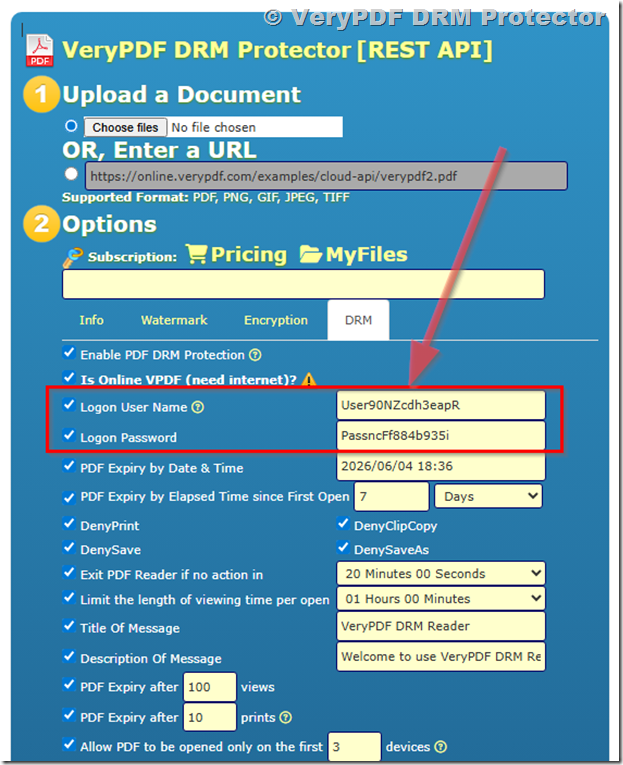
  2. Apply DRM Controls Restrict access to authorized individuals and set permissions to prevent printing, copying, or forwarding.

  3. Distribute Securely Share files via email or cloud storage; only approved recipients can open the document.

  4. Monitor Access Track who opens your PDFs, when, and from which devices, ensuring compliance and control.

  5. Update Permissions as Needed Modify access instantly if a team member leaves or a contract ends.

This approach not only prevents visible business risks but also simplifies managing sensitive content. For example, a colleague once attempted to copy a protected client report to their personal drive. DRM instantly blocked the action, keeping our IP safe without any manual intervention. Over time, this system has saved us money, prevented intellectual property theft, and ensured clients feel confident sharing their data with us.

The anti-piracy benefits are equally crucial. VeryPDF DRM Protector stops unauthorized users from bypassing PDF security, reducing the risk of:

  • Revenue loss from competitors gaining your insights.

  • Your reports being converted and misused in editable formats.

  • Exposure of sensitive strategic or technical data.

I’ve personally seen the difference: after implementing DRM, no sensitive file left our control without proper authorization. It’s reassuring to know that even if an email is forwarded accidentally, the file remains secure. The peace of mind alone is worth the investment.

If you’re serious about protecting your business, I highly recommend using VeryPDF DRM Protector. It’s straightforward to deploy, integrates with existing workflows, and ensures your confidential reports and designs remain in safe hands.

Try it now and protect your business reports: https://drm.verypdf.com

Start your free trial today and keep your market research secure from leaks or misuse.

FAQs

How can I limit access to confidential business documents to prevent revenue loss?

By using DRM protection, you can assign documents to specific users, teams, or departments, ensuring only authorized personnel can access the file.

Can I stop others from copying, printing, or converting my reports into editable formats?

Yes. DRM controls allow you to restrict printing, copying, forwarding, and prevent conversion to Word, Excel, or image files.

How do I track who accessed my business reports and when?

VeryPDF DRM Protector provides access logs, showing exactly who opened each document, from which device, and at what time.

Does DRM technology prevent unauthorized sharing of PDFs outside my organization?

Absolutely. Files are encrypted and access-restricted, making it impossible for anyone outside authorized recipients to open or use the documents.

How easy is it to securely distribute protected business reports to clients or colleagues without risk?

Distribution is seamless. Simply apply DRM controls before sending the file; only authorized recipients can open it, regardless of email forwarding or cloud sharing.

Can I modify permissions after a document has been shared?

Yes. You can update or revoke access at any time, ensuring that former employees, expired contractors, or outdated projects no longer have access.

Does DRM work for large files like CAD designs or extensive market research reports?

Yes. DRM protects all PDF files, including large and complex designs or multi-page research documents, without compromising usability for authorized users.

Tags/Keywords

protect business reports, secure market research, prevent PDF piracy, stop unauthorized access, protect confidential PDFs, prevent PDF conversion, secure CAD files, control document access, anti-piracy for business, safeguard client reports

Best way to protect AutoCAD DWG files from unauthorized copying and reuse by subcontractors in 2026, after losing valuab

Best Way to Protect AutoCAD DWG Files from Unauthorized Copying by Subcontractors

Last month, I faced a scenario no engineering firm wants to encounter: a major contract slipped through our fingers because subcontractors had shared our AutoCAD DWG files without permission. These files contained weeks of detailed designs, and once leaked, our competitive advantage evaporated overnight. Losing that contract wasn’t just disappointingit was a tangible hit to revenue and client trust. If your team handles sensitive engineering drawings, market research reports, or proprietary business data, this risk is very real.

Best way to protect AutoCAD DWG files from unauthorized copying and reuse by subcontractors in 2026, after losing valuab

The problem is simple: once a file leaves your secure environment, you lose control. Subcontractors, partners, or even internal staff might unintentionallyor intentionallyshare files with competitors. Unauthorized copying, printing, or converting files to editable formats like Word or Excel can cause direct financial losses and damage long-term client relationships. For businesses that rely on intellectual property, every leak is a potential revenue hit.

This is where VeryPDF DRM Protector becomes a lifeline. In our firm, implementing DRM protection changed the way we distribute sensitive DWG files. Instead of relying on trust or manual permissions, we could now control exactly who could open, view, print, or copy our designs. DRM Protector ensures that even if a file ends up outside our network, unauthorized users can’t misuse it.

One major pain point is subcontractor misuse. When working with multiple external teams, you need to share DWG files for collaborationbut not for redistribution. With DRM, you can assign access only to verified users and set strict permissions. For example:

  • Allow viewing but block printing or exporting to other formats.

  • Set expiration dates on files so access is temporary.

  • Track who opened files and when, giving accountability for sensitive information.

Another common scenario is internal leakage. A colleague might need files to work remotely, but without DRM, those files can be forwarded accidentally. DRM Protector prevents copying, forwarding, or printing beyond the intended audience. In one instance, a junior engineer attempted to send our designs to a partner without authorization. DRM blocked the transfer automatically, preventing a potential IP breach and saving the company from costly legal exposure.

Unauthorized conversion is another hidden risk. DWG files or PDFs can be converted into Word, Excel, or images, enabling competitors to reuse your work without permission. DRM Protector locks the file format, stopping anyone from converting files for resale or competitive advantage. One competitor tried to reverse-engineer a leaked drawing, but because our DRM policies prevented conversion, they couldn’t access editable contentsaving months of lost potential revenue.

Practical application is simple. Here’s how we use it effectively:

  1. Assign user-level permissions: Only authorized staff and subcontractors can open the file.

  2. Set operation restrictions: Disable printing, copying, and exporting to prevent data leaks.

  3. Monitor activity: Track file access logs for accountability.

  4. Apply expiration controls: Limit file availability to necessary project timelines.

In our engineering projects, these steps made a measurable difference. Previously, we lost contracts due to unauthorized sharing; after implementing DRM, every external file distribution became trackable and secure. Client trust improved because we could guarantee that sensitive designs would not leave authorized hands.

Even for market research or strategy documents, the same principles apply. A PDF containing pricing analysis or product plans can be protected with DRM just like DWG files. For example, when sharing quarterly forecasts with a consulting partner, DRM ensured they could view the report but could not copy, print, or share it. This prevented potential leaks to competitors and maintained our revenue streams.

The anti-piracy benefits are clear:

  • Stops unauthorized users from bypassing file security.

  • Prevents conversion to Word, Excel, or image formats, safeguarding intellectual property.

  • Maintains full control over distribution and access, reducing business risk.

I’ve personally witnessed situations where DRM prevented costly mistakes. One notable instance involved a subcontractor attempting to forward DWG files to a competitor. Thanks to DRM, access was denied, and our designs remained secure. In another case, a client mistakenly forwarded a confidential PDF report. DRM ensured the report could not be opened by anyone outside our authorized list, preventing potential financial and reputational damage.

Implementing DRM Protector doesn’t require a complex IT overhaul. It’s user-friendly, integrates with existing workflows, and offers step-by-step guidance for setting permissions and restrictions. Teams can continue working with familiar tools while ensuring sensitive files are protected against real-world risks.

For businesses dealing with sensitive informationbe it engineering drawings, market research, or proprietary strategiesthe cost of inaction is high. Lost revenue, compromised client trust, and exposure to competitors are all real consequences. DRM protection turns these risks into manageable processes, giving you peace of mind and measurable security.

I highly recommend this to anyone distributing confidential business documents who wants to avoid costly leaks. Try it now and protect your business reports: https://drm.verypdf.com. Start your free trial today and keep your market research secure from leaks or misuse.

Frequently Asked Questions

How can I limit access to confidential business documents to prevent revenue loss?

By using DRM Protector, you can assign access only to authorized users, departments, or teams and set expiration dates to restrict file usage.

Can I stop others from copying, printing, or converting my reports into editable formats?

Yes. DRM allows you to disable printing, copying, and exporting to Word, Excel, or images, preventing unauthorized duplication.

How do I track who accessed my business reports and when?

DRM Protector provides detailed access logs, allowing you to monitor who opened files and when, ensuring accountability.

Does DRM technology prevent unauthorized sharing of PDFs outside my organization?

Absolutely. Files remain encrypted and can only be accessed by authorized users, preventing leaks or forwarding to outsiders.

How easy is it to securely distribute protected business reports to clients or colleagues without risk?

Very easy. DRM Protector integrates with your existing workflow, enabling secure file distribution without complex IT setups.

Can I protect multiple file types, like DWG, PDF, and Excel, with DRM?

Yes. DRM Protector supports various formats, ensuring all your confidential documents remain secure regardless of type.

What happens if someone tries to bypass DRM restrictions?

The system prevents unauthorized operations such as printing, copying, or converting, effectively stopping any misuse of the file.

Tags/Keywords

protect business reports, secure market research, prevent PDF piracy, stop unauthorized access, protect confidential PDFs, prevent PDF conversion, DRM for DWG files, business data protection, prevent IP theft, secure document distribution

What tools can help you secure your course materials effectively

How to Secure Your Business Reports and Stop PDF Leaks Effectively

Last month, I discovered that a market research report I sent to a client had been forwarded to a competitor, costing us a major contract. It was one of those gut-wrenching moments where I realized that even a single unsecured PDF could result in tangible business losses. For anyone distributing sensitive reports or proprietary business documents, this is a scenario that hits close to home. Losing control of confidential content isn’t just frustratingit can directly affect revenue, client trust, and your company’s competitive edge.

What tools can help you secure your course materials effectively

Many businesses face similar challenges daily. Market research reports, strategy documents, and client-facing materials are often shared via email or cloud storage without sufficient protection. In today’s fast-moving corporate environment, one leaked file can travel far beyond your intended audience, and the consequences are visible and measurable: lost deals, damaged client relationships, and the potential theft of intellectual property.

I’ve faced this problem myself, and over time, I found a solution that not only secures documents but also prevents unauthorized copying, printing, or conversion: VeryPDF DRM Protector. Here’s how it addresses the business risks you might not even realize you’re facing.


Unauthorized Sharing of Reports Can Cost You

One of the most immediate risks for businesses is the uncontrolled sharing of sensitive PDFs. Even trusted partners or clients can inadvertentlyor deliberatelyforward your reports to competitors. For example, a marketing strategy document intended for internal stakeholders could be circulated externally, giving competitors insight into pricing, campaigns, or client lists. In my experience, losing control over a single high-value report has caused contract cancellations worth tens of thousands of dollars.

VeryPDF DRM Protector tackles this problem by allowing you to restrict PDF access strictly to authorized users. You can define access by individuals, teams, or departments, ensuring that only the intended audience can open and view your documents. This level of control prevents accidental forwarding and ensures that sensitive information stays where it belongs.


Preventing Copying, Printing, and Conversion Protects Revenue

Another common issue is the unauthorized reproduction of PDFs. When a report can be copied, printed, or converted into editable formats like Word, Excel, or images, it becomes a tangible revenue risk. A competitor could repurpose your proprietary data, or a client could distribute it further without paying for it.

With VeryPDF DRM Protector, these risks are mitigated. The tool can:

  • Block printing entirely or restrict it to secure devices.

  • Disable copying of text and images.

  • Prevent conversion to Word, Excel, or image formats.

In one case, a client tried to convert a protected business intelligence report into Excel for redistribution. The DRM protection stopped the conversion immediately, and I was able to address the situation before the data was misused. That’s a direct, measurable prevention of potential revenue loss.


Maintaining Control Over Distribution

Managing who can access your documents isn’t just about preventing leaksit’s about maintaining operational control. When PDFs are sent via email or cloud storage, you often have no way to know who opens them or when. This lack of visibility can be disastrous if sensitive material reaches unintended parties.

VeryPDF DRM Protector solves this by providing access tracking and control features. You can see exactly who has opened your reports and when, and you can revoke access at any time if necessary. This visibility ensures that even if a file is misplaced or a client leaves your organization, you retain full control.

For example, we once distributed an industry analysis report to a large client. Using DRM, we monitored access and noticed that a former employee still had access. We revoked it immediately, preventing any potential misuse. Without this control, sensitive insights could have ended up in competitor hands.


Real-Life Impact of DRM Protection

Here’s a snapshot of how DRM has changed the way we handle confidential documents:

  • A strategy report that was previously shared via unsecured email is now protected; access is limited to senior managers only.

  • Market research reports sent to clients are watermarked and monitored, ensuring any leak can be traced.

  • Proprietary templates and internal documents are safe from printing or conversion, preserving intellectual property.

The practical benefits are clear: reduced risk of IP theft, fewer unauthorized copies floating around, and a tangible reduction in potential business losses.


Step-by-Step Example for Securing a Business Report

To illustrate, here’s how I secure a market research PDF before sending it to clients:

  1. Open the report in VeryPDF DRM Protector.

  2. Assign user-specific accessonly the intended recipients can open the document.

  3. Enable restrictions on printing, copying, and conversion.

  4. Add tracking and watermarking to monitor usage.

  5. Distribute via secure email or internal portal.

  6. Review access logs to ensure compliance and revoke access if necessary.

By following these steps, I can confidently share sensitive reports without worrying about leaks, unauthorized copies, or misuse.


Why Anti-Piracy Measures Matter

Preventing piracy is not just a technical issueit has measurable business consequences. Unprotected PDFs can be easily converted, shared, or sold, directly impacting revenue. VeryPDF DRM Protector prevents these risks by:

  • Stopping unauthorized users from bypassing PDF security.

  • Preventing conversion to editable formats for resale or misuse.

  • Maintaining total control over document distribution.

This translates into real business savings, preserved client trust, and fewer headaches managing sensitive content.


I highly recommend this to anyone distributing confidential business documents who wants to avoid costly leaks. Protecting your reports, market research, and proprietary materials isn’t just a precautionit’s a critical business strategy. Try it now and protect your business reports: https://drm.verypdf.com

Start your free trial today and keep your market research secure from leaks or misuse.


FAQs

How can I limit access to confidential business documents to prevent revenue loss?

You can assign PDF access to specific users, teams, or departments, ensuring only authorized individuals can view your documents.

Can I stop others from copying, printing, or converting my reports into editable formats?

Yes, VeryPDF DRM Protector allows you to disable copying, printing, and conversion, protecting your content from unauthorized reproduction.

How do I track who accessed my business reports and when?

The DRM tool provides access logs that show exactly who opened a document and when, allowing for real-time monitoring and control.

Does DRM technology prevent unauthorized sharing of PDFs outside my organization?

Yes, it restricts PDF access to authorized recipients and prevents forwarding, printing, or converting, ensuring sensitive material stays secure.

How easy is it to securely distribute protected business reports to clients or colleagues without risk?

Distribution is simpleyou assign access, apply protections, and share via secure channels. The DRM ensures documents remain protected even after delivery.

Can I revoke access after sharing a PDF?

Absolutely. If a recipient should no longer have access, you can revoke it instantly, maintaining full control over your documents.

Will DRM protection affect the readability or usability of my reports for authorized users?

No, authorized users can view and interact with the documents normally, while unauthorized actions like printing or conversion are blocked.


Tags/Keywords: protect business reports, secure market research, prevent PDF piracy, stop unauthorized access, protect confidential PDFs, prevent PDF conversion, secure business documents, DRM PDF protection, control document distribution, stop intellectual property theft

How to prevent students from screen recording and redistributing your course content

Stop PDF Leaks: How to Protect Business Reports and Market Research from Unauthorized Access

Last month, I realized that a strategic market research report I had sent to a key client had been forwarded to a competitor without my knowledge. That single incident not only risked a major contract but also exposed months of confidential research and analysis. For anyone handling sensitive business documents, this scenario is all too familiarunauthorized sharing, copying, and redistribution can have serious financial and reputational consequences.

How to prevent students from screen recording and redistributing your course content

Confidential business contentmarket research, strategic reports, client proposalsis constantly at risk. Employees, partners, or clients may accidentally or intentionally share PDFs, allowing competitors to gain an unfair advantage. Worse, PDFs can be copied, printed, or converted into editable formats like Word or Excel, creating an invisible revenue leak. I quickly realized that standard password protection wasn’t enough. I needed a solution that kept my reports secure while still allowing authorized colleagues and clients to access them safely.

The first problem I faced was unauthorized sharing. Market research reports, competitor analysis, and strategic business plans often circulate within internal teams and external partners. Without strict controls, a single forwarded email can multiply access exponentially. Even if you trust your recipients, leaks happen. I once discovered that a draft product launch strategy had been shared outside our company before the official announcement, costing us a competitive edge.

The second pain point was the conversion and piracy risk. PDFs are easy to copy into Word, Excel, or image files. An employee or external collaborator could convert a research report into an editable format, make changes, and redistribute itsometimes even selling the insights without your knowledge. This is a real revenue leak and intellectual property theft.

Finally, maintaining control over access is a major challenge. Once a PDF leaves your system, it’s almost impossible to track who opens it and when. Without visibility, your business is vulnerable. I needed a solution that allowed me to grant access selectively and revoke it if necessary, ensuring sensitive information stayed in the right hands.

That’s when I found VeryPDF DRM Protector. This tool became a game-changer for securing our business documents. With DRM protection, I could restrict access to authorized users onlywhether internal teams, specific departments, or individual clients. Printing, copying, forwarding, or removing DRM became impossible without authorization. Even if someone attempted to convert a PDF into Word or Excel, the protection remained intact.

Implementing VeryPDF DRM Protector was surprisingly straightforward. I could set up access permissions per user, define expiration dates for document availability, and even restrict viewing to specific devices. For example, when distributing a quarterly market research report to multiple clients, I ensured that each client could only open their version on their authorized device and could not forward it to anyone else. This single step prevented potential leaks and preserved client trust.

One of the moments that stood out was when a partner tried to print and share one of our business strategy reports. Thanks to the DRM restrictions, the action was blocked immediately, and I received a notification. That incident saved us from a potential breach that could have affected ongoing negotiations with another client. In another case, a competitor attempted to reconstruct a leaked report from converted Word filesbut DRM protection ensured the original content stayed secure, keeping our intellectual property safe.

Here’s how I use VeryPDF DRM Protector to safeguard sensitive business reports:

  • Assign document access only to specific team members or clients.

  • Restrict printing, copying, and forwarding of PDFs.

  • Prevent conversion to Word, Excel, or image files.

  • Set expiration dates or revoke access anytime.

  • Track who opened the document and when for accountability.

These steps gave me peace of mind. I could share reports and proposals confidently, knowing that sensitive data remained under control. The DRM tool also simplified content management. No more worrying about unauthorized copies floating around or complex manual tracking. Everything was centralized, secure, and visible.

The anti-piracy benefits are tangible. Preventing unauthorized access stops potential revenue loss immediately. Stopping PDFs from being converted or redistributed protects intellectual property and ensures that proprietary insights do not fall into the wrong hands. By maintaining control over distribution, you reduce business risks that are often invisible until it’s too late.

I remember a situation with a client-facing proposal. We had invested significant resources into market analysis for a potential collaboration. Without DRM protection, that PDF could have easily been shared outside the client’s company, compromising our unique insights and potentially harming future opportunities. Using VeryPDF DRM Protector, I ensured the proposal could be viewed but not copied or forwarded. This step preserved the value of our work and reinforced our professional credibility.

For business owners, managers, and content creators, these features are crucial. The solution is practical and aligns with real operational needs. You can distribute confidential reports, track access, and enforce usage policies without slowing down workflows. VeryPDF DRM Protector offers a balance between usability and security that standard PDF passwords or encryption cannot match.

I highly recommend this tool to anyone distributing sensitive business documents who wants to prevent costly leaks, maintain client trust, and safeguard proprietary information. Its real-world impact on preventing unauthorized access, copying, and conversion cannot be overstated.

Try it now and protect your business reports: https://drm.verypdf.com

Start your free trial today and keep your market research secure from leaks or misuse.

FAQs

How can I limit access to confidential business documents to prevent revenue loss?

VeryPDF DRM Protector allows you to assign access to specific users, teams, or departments, ensuring only authorized personnel can view the document. You can also set expiration dates or revoke access anytime.

Can I stop others from copying, printing, or converting my reports into editable formats?

Yes. DRM protection restricts printing, copying, forwarding, and prevents conversion to Word, Excel, or image files, preserving the integrity of your content.

How do I track who accessed my business reports and when?

The tool provides detailed logs showing each user who opened the document, along with timestamps, allowing you to monitor usage and maintain accountability.

Does DRM technology prevent unauthorized sharing of PDFs outside my organization?

Absolutely. DRM ensures that only approved users can open the document, blocking forwarding or redistribution attempts to unauthorized parties.

How easy is it to securely distribute protected business reports to clients or colleagues without risk?

VeryPDF DRM Protector makes secure distribution simple. You can share documents via email or cloud storage, and the DRM restrictions will enforce access rules automatically.

Can I revoke access after a document has been shared?

Yes, you can revoke access anytime, even after the PDF has been sent, preventing further viewing or copying.

Does DRM protect my intellectual property from piracy and unauthorized resale?

Yes. By preventing conversion, copying, and redistribution, DRM ensures your proprietary content remains protected and cannot be exploited by third parties.

Tags/Keywords: protect business reports, secure market research, prevent PDF piracy, stop unauthorized access, protect confidential PDFs, prevent PDF conversion, safeguard intellectual property, DRM for PDFs, confidential document security, business document protection

What strategies can help you stop content leakage in online education

Stop PDF Leaks and Protect Business Reports from Unauthorized Sharing

Last month, I discovered that a strategic market research report I had sent to a key client had been forwarded to a competitor. The consequences were immediate: a potential partnership stalled, client trust eroded, and the time and resources spent on research felt wasted. If you’ve ever faced the frustration of confidential business documents being shared without permission, you know just how costly these leaks can be. In today’s digital age, even a single unsecured PDF can lead to significant revenue loss and intellectual property theft.

What strategies can help you stop content leakage in online education

Many businesses underestimate the real risk of PDF leaks. You might think that sending a report via email is safe, but once it’s in someone else’s inbox, you lose control. Unauthorized users can print, copy, or even convert your documents into Word, Excel, or image files. Suddenly, a report meant for internal strategy discussions or a client pitch is available to competitors or the public. The tangible losses go beyond moneythey include client trust, market advantage, and the reputation of your business.

The Risks Businesses Face with Unsecured PDFs

  1. Leaked Market Research Reports

    Market research reports are a goldmine of insights and strategy. When shared outside the intended audience, they can directly impact your business outcomes. Imagine sending a competitor analysis to a client and realizing it has been circulated beyond the intended team. Lost contracts, weakened negotiation positions, and a compromised competitive edge are real consequences.

  2. Unauthorized Printing, Copying, and Conversion

    Even a well-intentioned recipient can inadvertently share sensitive information. PDFs can be easily copied, printed, or converted into editable formats. Once converted to Word, Excel, or images, your proprietary data can be manipulated, repurposed, or resold, leading to direct revenue loss.

  3. Loss of Control Over Sensitive Business Data

    Without proper controls, your team has no way to track who accessed a report or when. A single leak could undermine months of research and strategy development. In industries where insights are tightly linked to revenue, this is a risk businesses cannot afford to ignore.

How VeryPDF DRM Protector Solves These Problems

After struggling with document leaks myself, I turned to VeryPDF DRM Protector, and it changed the way I handle confidential business content. This tool is designed specifically to prevent PDF piracy and unauthorized access while keeping distribution practical for legitimate users. Here’s how it works in real business scenarios:

  • Restrict Access to Authorized Users

    You can assign document access to specific individuals, teams, or departments. Even if a file is forwarded, unauthorized users cannot open it. This ensures that only the people who need to see your market research or business reports actually can.

  • Prevent Printing, Copying, or Forwarding

    The software blocks printing, copying, and forwarding attempts. You maintain control over how your documents are used. This feature is especially valuable when dealing with external clients or partners who need to view reports but shouldn’t redistribute them.

  • Protect Against Conversion

    DRM Protector stops PDFs from being converted to Word, Excel, or images. This prevents your proprietary data from being misused, ensuring that your intellectual property stays protected even if someone attempts to bypass standard security measures.

Real-World Examples

  1. Securing Market Research Reports

    A consulting firm I worked with frequently shared industry analysis reports with clients. After implementing VeryPDF DRM Protector, they prevented several instances of internal reports being shared outside the intended recipients. This maintained client trust and avoided potential revenue loss from leaked strategies.

  2. Managing Proprietary Business Documents

    An e-learning company distributing course materials to corporate clients faced frequent unauthorized sharing of PDFs. By applying DRM protection, they could restrict access to enrolled companies only. Attempts to print or copy content were blocked, saving the company thousands in lost licensing fees.

  3. Preventing IP Theft

    In one case, a product roadmap PDF accidentally reached a competitor. Because it was DRM-protected, they couldn’t access the file. The potential risk of IP theft was avoided entirely, and the client retained full control over their confidential information.

How to Use DRM Protection Effectively

  • Identify which documents require protection: market reports, strategy plans, client-facing proposals.

  • Set user-level permissions: allow only specific teams or individuals to access content.

  • Apply restrictions: prevent printing, copying, and conversion to editable formats.

  • Monitor access: track who opens the files and when to ensure compliance.

  • Communicate with recipients: let authorized users know the files are protected and why, ensuring smooth workflow without risking security.

The Anti-Piracy Benefits You Can See

  • Stops Unauthorized Users Instantly

    Even if a PDF falls into the wrong hands, DRM ensures it cannot be opened, printed, or shared. You avoid revenue loss caused by unauthorized distribution.

  • Prevents Document Conversion

    Files cannot be converted into Word, Excel, or image formats for resale or misuse. Your intellectual property stays safe, and your business retains its competitive edge.

  • Maintains Full Control Over Distribution

    You decide who can access your documents and for how long. Expired permissions automatically restrict access, reducing the risk of old documents being leaked or reused.

Conclusion

I highly recommend VeryPDF DRM Protector to anyone distributing confidential business documents. It transforms how you handle sensitive information, preventing costly leaks and protecting your market research, reports, and proprietary materials. By restricting access, blocking unauthorized actions, and tracking usage, you maintain control and reduce tangible business risks.

Try it now and protect your business reports: https://drm.verypdf.com

Start your free trial today and keep your market research secure from leaks or misuse.

Frequently Asked Questions

  1. How can I limit access to confidential business documents to prevent revenue loss?

    You can assign access to specific users or teams, ensuring only authorized personnel can open your PDFs.

  2. Can I stop others from copying, printing, or converting my reports into editable formats?

    Yes, DRM Protector blocks printing, copying, forwarding, and conversion to Word, Excel, or images.

  3. How do I track who accessed my business reports and when?

    The tool provides access logs so you can monitor who opened files and at what time, maintaining accountability.

  4. Does DRM technology prevent unauthorized sharing of PDFs outside my organization?

    Absolutely. Even if a PDF is forwarded, unauthorized users cannot open or modify it.

  5. How easy is it to securely distribute protected business reports to clients or colleagues without risk?

    Distribution is simple: assign user permissions, send the DRM-protected files, and your recipients can access them safely without compromising security.

  6. Will DRM protection interfere with legitimate use of reports internally?

    No. Authorized users can access, read, and use documents as intended while restrictions apply only to unauthorized actions.

  7. Can I set expiration dates or time-limited access for sensitive files?

    Yes, DRM Protector allows you to define access periods, automatically restricting files once permissions expire.

Tags / Keywords

protect business reports, secure market research, prevent PDF piracy, stop unauthorized access, protect confidential PDFs, prevent PDF conversion, DRM for PDFs, secure document distribution, anti-piracy business, confidential data protection