
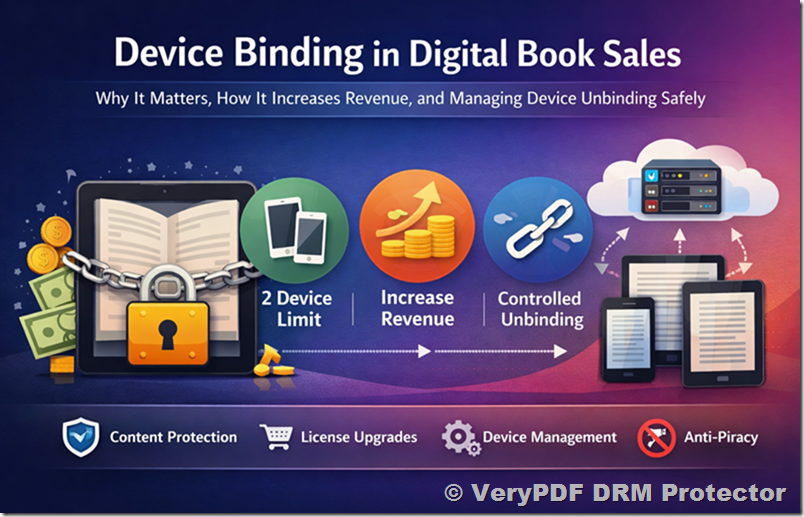
In the modern digital publishing ecosystem, selling books is no longer just about distributing files. It is about controlling access, protecting intellectual property, and optimizing user experience across multiple devices. One of the most powerful mechanisms enabling this balance is device binding technology.
For authors, publishers, and SaaS platforms distributing digital books, device binding is not just a technical feature, it is a business model enabler. When implemented correctly, it improves content protection, enhances user satisfaction, and creates new revenue opportunities.
This article explores:
- Why device binding is essential in digital book distribution
- How device limits can directly increase revenue
- Why a 2-device model is often optimal
- How controlled device unbinding improves user experience
- Why unbinding must be limited to prevent abuse
- How modern systems (such as API-based DRM platforms) can implement this effectively
1. Why Device Binding Is Critical in Digital Book Sales
Device binding refers to the process of linking a purchased digital book license to a specific number of devices (e.g., smartphone, laptop, tablet).
Without device binding, a single purchased book can easily be:
- Shared across unlimited users
- Distributed illegally via forwarded files
- Used in uncontrolled environments
- Accessed by multiple people using one purchase
This leads to:
- Revenue loss
- Piracy risk
- Loss of content exclusivity
- Reduced perceived value of the book
With device binding, each license becomes:
“A controlled access right tied to real users and real devices”
This transforms a simple file into a secure digital product with enforceable usage rules.
2. Why Device Limits Improve the Customer Experience
A common misconception is that limiting devices harms user experience. In reality, when designed properly, it does the opposite.
Most readers today use:
- A mobile phone for reading on the go
- A laptop or desktop for deeper reading or work
This naturally aligns with a 2-device usage pattern.
A 2-device model ensures:
- Users can open the book on their primary phone
- They can also access it on a second device (laptop or tablet)
- No unnecessary friction in daily usage
At the same time, it avoids:
- Over-complicated licensing rules
- Excessive device tracking confusion
- Abuse from unlimited sharing across devices
A well-designed system ensures:
The first experience is frictionless, and the second device becomes a natural extension of usage.
3. How Device Limits Directly Increase Revenue
Device binding is not just about protection, it is also a revenue optimization tool.
When a user is limited to 2 devices per purchased link:
3.1 Natural Upgrade Behavior
If users want access on additional devices, they have two options:
- Purchase another license link
- Stay within the limit
Many users choose to purchase additional access because:
- They want convenience
- They use multiple environments (work, home, travel)
- They share devices across contexts
This creates a natural expansion revenue model without aggressive selling.
3.2 Value Per License Increases
Instead of:
- One book = unlimited uncontrolled sharing
You get:
- One book = controlled, high-value digital asset
This increases:
- Perceived value
- Willingness to pay
- Long-term customer retention
3.3 Predictable Licensing Structure
A fixed rule like:
- “Each link supports 2 devices”
makes pricing and customer expectations extremely clear, which reduces:
- Support tickets
- Refund requests
- Confusion
4. Why a 2-Device Limit Is Often the Optimal Choice
In real-world usage, a 2-device limit is usually sufficient:
Typical scenarios:
- Phone + laptop
- Tablet + phone
- Work computer + home computer
A 3-device model often introduces:
- More complexity
- Higher risk of sharing
- Increased system maintenance (device cleanup, resets, false positives)
Even with more allowed devices, users may still experience:
- Network changes
- Browser resets
- Device fingerprint updates
These can cause the system to mistakenly treat the same user as multiple devices.
Therefore:
Reducing the model to 2 devices simplifies both user experience and system reliability.
5. The Problem of “Device Noise” and Why Refresh Mechanisms Are Needed
In real-world environments, device identification is not always stable.
Users may:
- Change browsers
- Reinstall systems
- Switch networks
- Use private browsing modes
- Move between Wi-Fi and mobile networks
This creates what can be described as:
“device and network noise”
As a result:
- The same real device may appear as multiple devices
- The system may incorrectly interpret legitimate usage as a third device
To solve this, modern DRM systems introduce:
- Manual refresh buttons
- Automatic periodic refresh (e.g., every 12 hours)
This ensures:
- Stable user experience
- Reduced false device limit triggers
- Lower support burden
6. Allowing Device Unbinding: A Necessary Feature
Even with a perfect system, users will need flexibility.
Common cases:
- User buys a new phone or laptop
- User resets their operating system
- User changes workplace or device environment
- User accidentally reaches device limit
Without unbinding, users would be forced to:
- Contact support
- Wait for manual resets
- Experience frustration
Therefore, a self-service device management system is essential.
6.1 What Users Should Be Able to Do
A well-designed system should allow users to:
- View all bound devices
- See device type (iPhone, Windows, macOS, Android, etc.)
- Identify last access information
- Remove a specific device binding
6.2 Why Device Type Information Matters
Modern systems can store additional metadata such as:
- Device User-Agent string
- IP address
- Device category (mobile, desktop, tablet)
This enables:
- Better transparency for users
- Easier device recognition
- More informed unbinding decisions
For example:
- “iPhone 15 Pro – Safari – Lisbon”
- “Windows 11 – Chrome – Office PC”
This reduces confusion and improves trust.
7. Why Unbinding Must Be Limited (Very Important)
While unbinding is necessary, unlimited unbinding would destroy the protection model.
If users could freely:
- Bind → unbind → rebind endlessly
Then the system could be abused:
- Sharing accounts across multiple users
- Rotating devices to bypass limits
- Simulating unlimited access with one license
7.1 Recommended Restriction Model
A balanced approach is:
- Allow unbinding
- But limit it (e.g., 3 times per user/license)
After reaching the limit:
- No further unbinding is allowed
- User must purchase a new license if needed
7.2 Why 3 Times Is a Good Threshold
Three unbindings are typically enough for:
- Device upgrades
- Accidental bindings
- Normal usage lifecycle changes
At the same time, it is low enough to:
- Prevent abuse
- Maintain system integrity
- Protect revenue
8. Advanced DRM Systems and API-Based Control
Modern DRM systems can implement all of this through API-based parameters such as:
- Maximum allowed devices per user
- Device binding records
- Dynamic adjustment of limits
- Device metadata tracking
For example:
- LockToFirstNDevicesForUser
- Device ID tracking parameters
- User-Agent logging per device
This allows publishers to:
- Dynamically adjust licensing rules
- Offer premium plans with more devices
- Monitor usage patterns
- Optimize monetization strategies
How to Control Device Binding Using Lock Parameters
To enforce strict device limits and prevent account sharing, the system provides a set of binding parameters that allow you to control how many devices a single user can activate and which specific devices are allowed.
8.1. Limit the Number of Devices per User
The parameter LockToFirstNDevicesForUser defines how many devices a single user is allowed to bind.
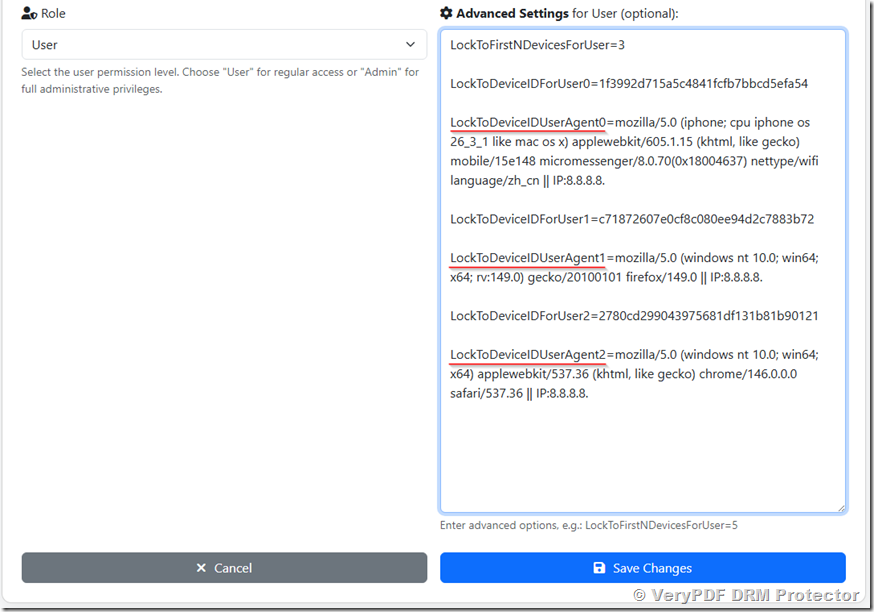
LockToFirstNDevicesForUser=3
In this example:
- Each user is allowed to activate up to 3 devices
- The first 3 unique devices that successfully open the protected content will be automatically recorded
- Any additional device beyond this limit will be blocked
This is the main control for enforcing subscription or license tiers (e.g., 1-device, 2-device, or 3-device plans).
8.2. Locking Specific Devices by Device ID
Each device is identified by a unique DeviceID. You can explicitly bind or track devices using indexed parameters:
LockToDeviceIDForUser0=1f3992d715a5c4841fcfb7bbcd5efa54
LockToDeviceIDForUser1=c71872607e0cf8c080ee94d2c7883b72
LockToDeviceIDForUser2=2780cd299043975681df131b81b90121
Explanation:
- ForUser0, ForUser1, ForUser2 represent the device slot index
- Each value stores a hashed device fingerprint (DeviceID)
- The system uses these values to recognize whether a device is already authorized
This ensures that even if a user logs in again, the system can detect known devices and avoid re-consuming a license slot.
https://drm.verypdf.com/wp-admin/admin.php?page=VeryPDFDRMUserManagement
8.3. Capturing and Logging Device Identity
In addition to DeviceID, the system records the device environment using UserAgent information:
LockToDeviceIDUserAgent0=mozilla/5.0 (iphone; cpu iphone os 26_3_1 like mac os x) applewebkit/605.1.15 (khtml, like gecko) mobile/15e148 micromessenger/8.0.70(0x18004637) nettype/wifi language/zh_cn || IP:11.22.33.44
This LockToDeviceIDUserAgent includes:
- Device type (iPhone, Windows, etc.)
- Browser engine (Chrome, Firefox, WebKit)
- Application context (e.g., WeChat browser)
- Network information (IP address)
- Net type (e.g., Wifi)
- Language (e.g., en, zh_cn, etc.)
This data is used for:
- Security auditing
- Fraud detection
- Device troubleshooting
- User session verification
8.4. How the Full Mechanism Works Together
When a user opens a protected document, the system performs the following checks:
- Extract device fingerprint (DeviceID + UserAgent)
- Check if DeviceID already exists in:
LockToDeviceIDForUserX
- If it exists → allow access immediately
- If it does not exist:
- Check current number of bound devices
- Compare with LockToFirstNDevicesForUser
- If limit not exceeded → bind new device
- If limit exceeded → deny access
8.5. Practical Example Scenario
With this configuration:
LockToFirstNDevicesForUser=3
A user can access the content on:
- iPhone (Safari browser)
- Windows PC 1 (Firefox)
- Windows PC 2 (Chrome)
But if they try to use:
- Another tablet or phone
The system will block access because the device limit has been reached.
8.6. Benefits of This Approach
- Prevents account sharing outside allowed limit
- Works across browsers and platforms
- Automatically remembers trusted devices
- Provides full audit trail for security
- Supports flexible licensing models (1/2/3+ devices)
9. Business Strategy Summary
A successful digital book protection strategy should combine:
9.1 Protection
- Device binding prevents unauthorized sharing
- Ensures each purchase remains valuable
9.2 Simplicity
- 2-device model is easy to understand
- Reduces customer confusion
9.3 Revenue Growth
- Additional device needs lead to additional purchases
- Licensing becomes scalable
9.4 Flexibility
- Users can unbind devices when needed
- Reduces customer support burden
9.5 Controlled Abuse Prevention
- Limited unbinding (e.g., 3 times max)
- Prevents system exploitation
10. Conclusion
Device binding is not just a technical restriction, it is a core pillar of modern digital publishing economics.
When implemented correctly, it achieves three critical goals simultaneously:
- Protects digital content from uncontrolled sharing
- Provides a smooth and flexible reading experience for users
- Creates a scalable and predictable revenue model for publishers
A 2-device-per-user model, combined with controlled unbinding and intelligent device tracking, represents a practical and powerful balance between security and usability.
In the end, the goal is simple:
Make it easy for legitimate users to read anywhere, while ensuring the content remains valuable and protected.