
If you sell eBooks, training materials, reports, or internal documents, one question comes up again and again:
- Which users opened my files?
- How many books did each user read?
- Which books are the most popular?
- How many times was a document opened?
- Can I see the top readers and top documents?
VeryPDF DRM Protector now includes built-in statistics in the Activity Details page, making it easy to answer these questions.
You can find the statistics page here:
https://drm.verypdf.com/wp-admin/admin.php?page=VeryPDFDRMActivityDetails
The new statistics feature gives you a clear view of user activity and document usage. It also includes visual Top 10 charts for users and books.
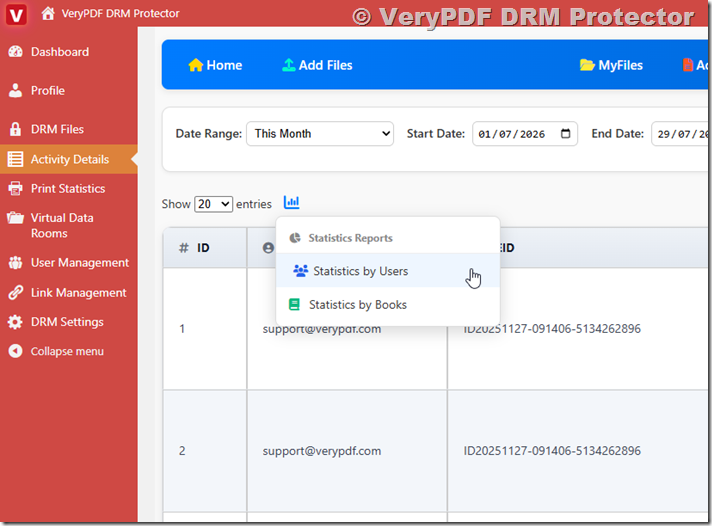
What Can You Track?
The Activity Details page now supports two types of statistics:
| Statistics Type | What It Shows |
|---|---|
| Statistics by Users | How many books each user opened and how many times each book was viewed |
| Statistics by Books | How many users opened each book and how many times each user opened it |
This helps answer common questions from publishers, schools, training companies, and businesses.
For example:
| User | Books Opened | Total Opens |
|---|---|---|
| John Smith | 5 | 37 |
| Sarah Lee | 3 | 22 |
| Michael Brown | 8 | 64 |
You can immediately see which users are most active.
Statistics by Users
The “Statistics by Users” report shows:
- User name or email.
- Number of books opened.
- Total open count.
- Which books were opened.
- How many times each book was viewed.
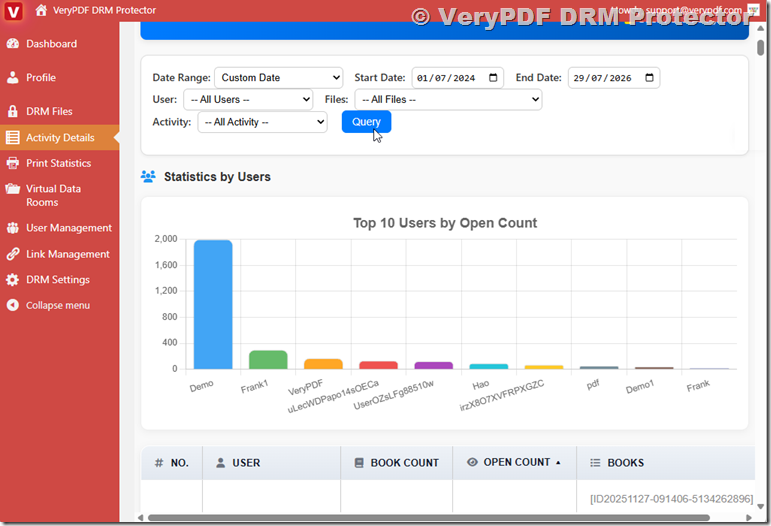
Example:
| User | Book | Open Count |
|---|---|---|
| john@example.com | Employee Handbook | 12 |
| john@example.com | Safety Training Guide | 8 |
| john@example.com | Company Policies | 17 |
This is useful if you want to know:
- Which customers are actively reading your content.
- Which students completed course materials.
- Which employees viewed company documents.
- Which subscribers are using their accounts.
Many customers ask:
“Can I see how many unique users accessed my PDF files?”
The answer is yes.
You can also see:
“How many books has a specific user opened?”
VeryPDF DRM Protector provides both pieces of information.
Statistics by Books
The “Statistics by Books” report focuses on documents.
It shows:
- Book name.
- Number of users who opened the book.
- Total number of opens.
- List of users.
- Open count for each user.
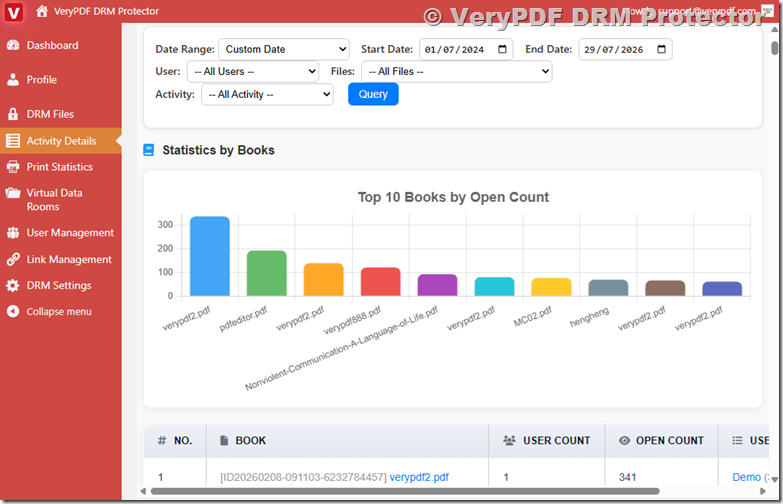
Example:
| Book | Users | Total Opens |
|---|---|---|
| Employee Handbook | 85 | 542 |
| DRM Training Manual | 43 | 218 |
| Sales Guide | 29 | 177 |
This report helps answer questions like:
- Which PDF is the most popular?
- Which training materials are being used?
- Which books are rarely opened?
- Are customers reading the content they purchased?
For content publishers, this data is very valuable.
If a document has 500 downloads but only 10 opens, that tells you something important.
Top 10 Users and Top 10 Books Charts
Numbers are useful, but charts are easier to understand.
VeryPDF DRM Protector now supports bar charts for:
- Top 10 Users by Open Count
- Top 10 Books by Open Count
The charts appear directly above the statistics tables.
Example:
| Chart | Purpose |
|---|---|
| Top 10 Users | Shows your most active readers |
| Top 10 Books | Shows your most viewed documents |
This makes it easy to spot trends without reading long tables.
For example:
| Rank | User | Opens |
|---|---|---|
| 1 | john@example.com | 124 |
| 2 | mary@example.com | 96 |
| 3 | tom@example.com | 81 |
And:
| Rank | Book | Opens |
|---|---|---|
| 1 | Employee Handbook | 542 |
| 2 | DRM Training Manual | 218 |
| 3 | Sales Guide | 177 |
With one look, you can see which users and books matter most.
Real Use Cases
Online Course Creators
Track:
- Which students are reading course materials.
- Which lessons are most popular.
- Which students are inactive.
Corporate Training
Track:
- Employee compliance.
- Policy document access.
- Training completion.
Publishers
Track:
- Reader activity.
- Best-selling eBooks.
- Customer engagement.
Universities
Track:
- Student access.
- Course material usage.
- Reading trends.
Membership Websites
Track:
- Premium content usage.
- Subscriber engagement.
- Popular resources.
Why PDF Statistics Matter
Many DRM systems only protect files.
VeryPDF DRM Protector helps you understand how your files are being used.
| Feature | VeryPDF DRM Protector |
|---|---|
| Prevent copying | Yes |
| Prevent printing | Yes |
| Dynamic watermark | Yes |
| Expiration control | Yes |
| User tracking | Yes |
| Activity logs | Yes |
| Statistics by Users | Yes |
| Statistics by Books | Yes |
| Top 10 Charts | Yes |
This means you get both protection and analytics in one platform.
Questions People Ask
Can I see who opened my protected PDF?
Yes. VeryPDF DRM Protector records user activity and displays it in the Activity Details page.
Can I see how many times a PDF was opened?
Yes. You can see the total number of opens for every document and every user.
Can I track PDF usage by user?
Yes. The Statistics by Users report was designed for this purpose.
Can I track PDF usage by document?
Yes. The Statistics by Books report shows document activity.
Can I see the most popular PDF files?
Yes. The Top 10 Books chart shows the most viewed documents.
Can I find inactive users?
Yes. Users with very low open counts are easy to identify.
Can I know which customers are reading my eBooks?
Yes. You can see which books each customer opened and how often.
Can I use these statistics for employee training?
Yes. Many companies use VeryPDF DRM Protector to monitor training materials.
Are the statistics available for all protected files?
Yes. Activity information is collected for documents protected with VeryPDF DRM Protector.
Can I export the statistics?
Yes. The statistics tables support CSV export.
Can I see unique users for a document?
Yes. Statistics by Books shows how many users accessed each document.
Can I see all books opened by one user?
Yes. Statistics by Users shows every book opened by each user.
Final Thoughts
If you need more than basic PDF protection, VeryPDF DRM Protector gives you a simple way to understand how people use your documents.
You can see:
- Who opened your files.
- Which books they read.
- How many times they opened them.
- Which books are most popular.
- Which users are most active.
- Top 10 users and Top 10 books in easy-to-read charts.
For publishers, training companies, schools, and businesses, these statistics make it much easier to measure engagement and improve your content strategy.
VeryPDF DRM Protector combines PDF DRM protection, activity tracking, and usage analytics in a single solution.