Effective Document DRM Solutions: Overcoming the Honor System in PDF, Email, and Document Security

In the ever-evolving world of digital document sharing, the need to protect sensitive content has never been more important. Whether it’s a business proposal, confidential legal documents, or proprietary information, protecting your PDF files from unauthorized access, printing, copying, and forwarding is crucial. While some solutions rely on the honor system for document security, the risks associated with this approach are high. In this article, we explore the concept of Document DRM (Digital Rights Management), the limitations of relying on honor-based security systems, and how VeryPDF DRM Protector offers a more secure alternative.
Effective Document DRM Solutions: Overcoming the Honor System in PDF, Email, and Document Security

Understanding the Limitations of Honor-Based DRM Systems

Document DRM systems, particularly in the realm of PDFs, are designed to restrict how users interact with digital files. Some services like Gmail’s confidential mode or Google Docs attempt to prevent actions like printing, copying, or forwarding documents. While these tools seem effective on the surface, they rely heavily on the browser or application honoring the security settings, which is a significant flaw. For example, Google’s method involves hiding text and data using CSS styles and JavaScript to prevent unauthorized copying. However, these measures can be bypassed by simple tricks, such as disabling style sheets in the browser’s developer tools, revealing the hidden content for copying.

The issue is clear: when a DRM system depends on the “honor system,” where users are expected to obey restrictions voluntarily, there is no real enforcement. It’s like asking a burglar not to steal – without a proper lock, the request will easily be ignored. This is where VeryPDF DRM Protector comes in, offering a more reliable and enforceable solution.

The Need for Secure Document Protection

The key to successful DRM lies in strong security mechanisms that do more than rely on the goodwill of users. For instance, Adobe’s password-protected PDFs might prevent users from printing or copying content, but this too is based on trust. Users can easily remove these restrictions using various online tools, such as Google Drive, making these protections virtually useless.

The same issues exist with other platforms that try to enforce document security through external plugins or browser-specific features. In these cases, when the plugins or the platforms experience updates or compatibility issues, security can be compromised, leaving documents vulnerable. Furthermore, these methods do not provide a stable, long-term solution for document protection, as they are not specifically designed with DRM in mind.

Why VeryPDF DRM Protector is the Best Solution

Unlike other DRM tools that rely on external plugins or browser features, VeryPDF DRM Protector takes a more robust approach. It ensures PDF files are securely protected with tailored applications designed specifically for PDF security. Here’s how VeryPDF DRM Protector works:

  1. PDF Upload for Protection: To secure your PDF document, simply upload your PDF file to VeryPDF DRM Protector. This eliminates the need for third-party software and ensures your documents are protected immediately without relying on plugins or complex setups.

  2. Make Your PDF Secure: After uploading your document, select the “Make Secure PDF” option. This will encrypt your document and prevent unauthorized access, printing, copying, or editing.

  3. Customizable Security Settings: With VeryPDF DRM Protector, you have control over what actions users can take with your document. You can restrict printing, copying, or editing, and even set expiration dates or watermarks for added protection.

  4. Encrypted Viewers: VeryPDF DRM Protector provides secure PDF viewers for your protected files. These specialized viewers ensure that your PDF documents are displayed securely, without exposing them to external attacks or manipulation. Unlike typical PDF viewers, these viewers are designed to prevent security breaches.

  5. No Need for Honor-Based Security: With VeryPDF DRM Protector, you are not relying on users to honor your document restrictions. The security features are enforced directly by the software, providing a stronger, more reliable solution for document protection.

Secure Document Sharing with VeryPDF DRM Protector

Once your document is secured using VeryPDF DRM Protector, you can share it confidently, knowing that the protection will remain intact regardless of where or how the document is opened. Whether you’re sharing via email, cloud storage, or another method, your content will be protected against unauthorized access, duplication, or distribution.

Moreover, VeryPDF DRM Protector allows you to embed your protected PDFs into platforms like Google Docs or send them via Gmail without compromising their security. This ensures that you can continue using your preferred services while maintaining full control over the security of your documents.

Advantages of Using VeryPDF DRM Protector Over Traditional DRM Solutions
  1. Ease of Use: Unlike other DRM tools that may require complicated installations or configurations, VeryPDF DRM Protector offers a simple online solution. Upload your PDF, select your security settings, and you’re done.

  2. No Plugin Dependency: There’s no need to rely on external plugins or third-party applications that may become outdated or incompatible. VeryPDF DRM Protector provides a complete, self-contained solution for PDF protection.

  3. Comprehensive Control: You have full control over the security of your documents, including the ability to restrict printing, copying, and editing, as well as setting expiration dates and watermarks.

  4. Secure Viewing: Unlike traditional PDF viewers, VeryPDF DRM Protector ensures that your document is viewed in a secure environment, reducing the risk of data breaches or unauthorized access.

  5. Free Trial: You can try VeryPDF DRM Protector for free online at https://drm.verypdf.com/online/, allowing you to test its capabilities before making a commitment.

FAQs about Document DRM and VeryPDF DRM Protector

Q: Can I use VeryPDF DRM Protector with any PDF document?
A: Yes, VeryPDF DRM Protector works with all standard PDF documents. Simply upload your file, and the software will secure it with your chosen settings.

Q: Is it possible to set an expiration date for my PDF document?
A: Yes, VeryPDF DRM Protector allows you to set an expiration date for your protected PDF, after which the document will become inaccessible.

Q: Can I allow users to view but not print my document?
A: Yes, you can restrict printing while allowing users to view the document. This ensures that your content is only accessible in a secure way.

Q: Do I need to install any software to use VeryPDF DRM Protector?
A: No, VeryPDF DRM Protector is an online tool that doesn’t require any installation. Simply upload your document and apply the security settings.

Q: Can I share my protected PDF via email or cloud storage?
A: Yes, once your document is protected, you can share it via email, cloud storage, or any other method without worrying about unauthorized access.

Q: How does VeryPDF DRM Protector differ from other DRM solutions?
A: Unlike other DRM systems that rely on the honor system or external plugins, VeryPDF DRM Protector provides a comprehensive and secure solution that doesn’t depend on third-party software. It offers full control over document security with encrypted viewers and customizable restrictions.

Conclusion

Digital document protection is an essential part of safeguarding sensitive content in today’s digital age. While traditional DRM solutions rely on the honor system, which can be easily bypassed, VeryPDF DRM Protector offers a more secure and effective approach to protecting your PDF documents. By using a combination of strong encryption, secure viewing, and customizable restrictions, VeryPDF DRM Protector ensures that your documents are kept safe from unauthorized access, printing, and distribution. Try it today for free online at https://drm.verypdf.com/online/ and experience the power of real document security.
Securing Financial Documents: Why Financial Advisers Need DRM Protection for Document Security

As financial advisers increasingly work with sensitive data, the need to protect these documents from unauthorized access and misuse is more crucial than ever. Financial documents often contain confidential information, such as personal data, financial records, healthcare details, and legal information. These documents are frequently shared with other professionals like auditors, investors, and insurance companies, making the risk of data breaches a serious concern. The importance of keeping these documents secure has led to the rise of Digital Rights Management (DRM) technology, which ensures that documents remain protected throughout their lifecycle.

Securing Financial Documents: Why Financial Advisers Need DRM Protection for Document Security

The Risks of Sending Financial Documents

One of the most pressing challenges for financial advisers is how to securely send and share sensitive documents. While cloud storage and email have become common methods for document exchange, they come with inherent security risks. For instance, emails can easily be intercepted, and documents shared through unsecured channels can be forwarded, modified, or printed without authorization. Even if a document is encrypted, the recipient can still misuse it once they have access, rendering the encryption ineffective.

This vulnerability has become a significant issue for regulatory bodies and financial institutions that must comply with stringent data protection laws, such as GDPR in Europe, PIPEDA in Canada, and the Australian Privacy Act. Failing to protect sensitive financial documents properly can result in severe penalties, including hefty fines and criminal charges. Financial advisers need a robust system to ensure that they meet these regulatory requirements and prevent unauthorized access to their clients’ information.

How Can DRM Protect Financial Documents?

Digital Rights Management (DRM) is a technology that provides an additional layer of protection to financial documents. It goes beyond encryption by ensuring that even authorized users cannot misuse the content of the documents. DRM uses encryption to prevent unauthorized individuals from viewing the document, but it also adds restrictions on what the authorized recipient can do with it. This includes prohibiting the forwarding of the document, preventing modifications, and restricting printing.

Unlike traditional encryption methods, DRM offers tighter control over how financial documents are used. For example, a financial adviser can set an expiration date for a document, ensuring that it becomes inaccessible after a certain period. This is particularly useful for time-sensitive documents, such as investment recommendations or policy quotes, which have a limited validity.

Moreover, DRM systems can prevent documents from being printed or allow printing only with a watermark that links the document to the recipient. This makes it easier to track potential leaks if a document is shared or copied. The watermarking feature ensures that any printed copies of sensitive documents are authenticated, making it harder for unauthorized individuals to forge or manipulate the content.

Why Choose VeryPDF DRM Protector?

For financial advisers looking to protect sensitive documents, VeryPDF DRM Protector offers a comprehensive and easy-to-use solution. VeryPDF DRM Protector is a robust PDF DRM system designed to meet the security needs of professionals dealing with confidential data. By using this software, financial advisers can ensure that their documents are secure and compliant with regulatory requirements.

The process of protecting financial documents with DRM is simple and straightforward. You can upload your PDF file to VeryPDF’s online DRM tool and select the “Make Secure PDF” option. From there, you can customize the document’s security settings, such as setting an expiration date, restricting printing, or adding watermarking features. The system will then apply DRM protection to the document, ensuring that it is secure from unauthorized access or misuse.

Key Features of VeryPDF DRM Protector

  1. Encryption & Access Control: DRM encryption ensures that only authorized users can access the document. You can control who sees the document and what actions they can perform, such as forwarding, editing, or printing.

  2. Expiration & Time-Limited Access: Set expiration dates for documents, automatically disabling access after a certain time. This is particularly useful for quotes, policy details, and other time-sensitive documents.

  3. Watermarking & Print Protection: Prevent unauthorized printing or apply watermarking to printed copies. Watermarks identify the authorized user and prevent the misuse of printed documents.

  4. Audit Trail & Tracking: Track document access, printing, and sharing. DRM systems log the activities of authorized users, providing an audit trail that can be used for compliance purposes.

  5. Compliance with Regulations: VeryPDF DRM Protector helps financial advisers comply with data protection regulations like GDPR and PIPEDA. It ensures that sensitive financial documents are securely shared and stored in line with legal requirements.

  6. Ease of Use: With a user-friendly interface, VeryPDF DRM Protector simplifies document security. Financial advisers can quickly upload and secure documents without needing technical expertise.

Why Financial Advisers Need DRM

With the increasing complexity of regulations and the growing number of cyber threats, financial advisers must take proactive steps to protect sensitive financial documents. DRM provides a reliable and efficient solution, ensuring that documents are not only protected during transmission but also remain secure throughout their lifecycle.

Without DRM protection, advisers risk exposing their clients’ sensitive data to unauthorized parties. Whether it’s financial records, healthcare data, or legal information, these documents need to be treated with the highest level of security. DRM technology offers a cost-effective and practical way to safeguard these documents while maintaining compliance with regulatory requirements.

Start Protecting Your Documents Today

If you’re ready to protect your sensitive financial documents, you can try VeryPDF DRM Protector for free online at https://drm.verypdf.com/online/. By uploading your PDF files to this platform and selecting “Make Secure PDF,” you can immediately begin securing your documents with encryption, access control, and other powerful DRM features.

FAQs

1. What is DRM, and how does it protect documents?
DRM (Digital Rights Management) is a technology that ensures only authorized users can access and use a document. It also restricts actions like printing, copying, or forwarding to prevent misuse of the document.

2. How do I secure my PDF documents with DRM?
You can easily secure your PDF documents by uploading them to VeryPDF’s online DRM tool and selecting “Make Secure PDF.” This applies encryption and other security settings to the document.

3. Is the DRM service free to use?
Yes, VeryPDF DRM Protector offers a free trial online, allowing you to secure your PDF documents without any initial costs.

4. Can I track who accesses my protected documents?
Yes, DRM systems provide audit trails that log document access, printing, and sharing activities, helping you monitor how your documents are being used.

5. How does DRM help with compliance?
DRM helps financial advisers comply with data protection regulations like GDPR by securing sensitive documents and ensuring they are shared in a controlled manner.

6. Can I set expiration dates for my documents?
Yes, DRM allows you to set expiration dates for documents, making them inaccessible after a specified time.

7. Can I print protected documents?
You can restrict or permit printing of protected documents with options for watermarking printed copies to identify the authorized user.

Microsoft RMS Document Security vs. VeryPDF DRM Protector: A Superior Solution for Securing Documents in the Digital Age

In today’s fast-paced digital world, protecting sensitive documents has become increasingly crucial. Whether for business, education, or personal use, unauthorized access, distribution, or alteration of important files can lead to significant risks and losses. Document protection technologies like Microsoft’s Rights Management Services (RMS) were designed to offer solutions, but recent findings have raised concerns about their vulnerabilities. In this context, VeryPDF DRM Protector stands out as an advanced and reliable alternative for document security. This article will explore the significance of Document Rights Management (DRM) and demonstrate how VeryPDF DRM Protector can effectively safeguard your documents.

Microsoft RMS Document Security vs. VeryPDF DRM Protector: A Superior Solution for Securing Documents in the Digital Age

The Rise of Microsoft RMS and Document Protection

Microsoft Rights Management Services (RMS) was introduced to help organizations manage and protect documents through encryption and access control policies. Initially, it seemed to offer a comprehensive solution to prevent unauthorized access, copying, and distribution of sensitive documents. Microsoft’s solution was particularly appealing for enterprises seeking to control how documents are shared and interacted with.

However, as noted in various studies, including the paper “How to Break Microsoft Rights Management Services (Microsoft RMS)” published by Usenix in 2016, RMS has its limitations. The paper demonstrates how attackers can bypass Microsoft RMS’s security features, allowing them to access, modify, and even forge documents that should have been secure. While Microsoft RMS utilizes cryptography, the system’s reliance on policy enforcement has been a significant weakness. If someone has legitimate access to a document, it becomes almost impossible to prevent them from reproducing the document through manual methods or screen capture.

A More Secure and Robust Solution: VeryPDF DRM Protector

Unlike RMS, VeryPDF DRM Protector offers a more comprehensive and reliable solution for securing documents. This advanced DRM system combines cryptographic encryption with a series of additional security features to make unauthorized access, copying, and printing difficult and unappealing.

Key Features of VeryPDF DRM Protector
  1. Encryption-Based Protection: VeryPDF DRM Protector ensures that documents are encrypted, which means that unauthorized users cannot view or alter the contents of a protected document without the appropriate authorization. This level of encryption guarantees that even if someone gains access to a file, they cannot open or modify it without a decryption key.

  2. Preventing Unauthorized Copying: While RMS and other systems have been shown to be vulnerable to simple screen capturing techniques, VeryPDF DRM Protector goes a step further by making screen copying difficult and unattractive. The software employs various tactics such as detecting screen capture applications and blocking known tools that could be used to bypass the document protection.

  3. Watermarking for Enhanced Security: VeryPDF DRM Protector allows you to add personalized watermarks to documents. These watermarks can include the name, email address, or other identifiers of the authorized user, making it harder to distribute unauthorized copies. Even if someone attempts to take a photo of the screen or share the document, the watermark remains, making the document traceable.

  4. Controlling Printing Capabilities: Many documents require printing for legal or technical reasons. VeryPDF DRM Protector allows organizations to control the printing of documents. In cases where printing is necessary, the software ensures that the printed version is unattractive for unauthorized distribution by embedding watermarks on the printed material.

  5. Expiry Controls: One of the essential features of VeryPDF DRM Protector is the ability to set expiry dates for documents. This is particularly useful for time-sensitive materials such as training manuals, contracts, and market reports. After the expiration date, the document becomes inaccessible, ensuring that outdated information does not circulate.

  6. User-Specific Access Permissions: Unlike Microsoft RMS, which can be bypassed by individuals with legitimate access, VeryPDF DRM Protector allows for granular access control. Organizations can set specific permissions for individual users, dictating whether they can view, edit, copy, or print the document. These permissions can be enforced with strong cryptographic methods, ensuring that even authorized users cannot bypass the controls.

Trying VeryPDF DRM Protector for Free

If you’re interested in seeing how VeryPDF DRM Protector can enhance your document security, you can try the software for free online. Simply visit VeryPDF DRM Protector Online and upload your PDF file. From there, select the “Make Secure PDF” option to begin protecting your document. The free trial allows you to test the full functionality of the software and experience firsthand the ease and effectiveness of the security features.

Microsoft RMS vs. VeryPDF DRM Protector: A Clear Choice

While Microsoft RMS was once a popular solution for document protection, its vulnerabilities have made it clear that alternative systems like VeryPDF DRM Protector offer far more robust protection. Microsoft’s RMS focuses on policy enforcement, which has been shown to have significant gaps that attackers can exploit. In contrast, VeryPDF DRM Protector combines cryptographic encryption with a series of advanced security features that make unauthorized access and copying extremely difficult.

Furthermore, VeryPDF DRM Protector offers the flexibility to customize security policies, watermarking, expiry dates, and permissions. This level of control is vital in today’s complex digital landscape, where documents are shared across multiple platforms and devices.

Additional FAQs on Document Protection and DRM
1. What is DRM (Digital Rights Management)?

DRM refers to technologies used to control and manage access to digital content, ensuring that it is only used by authorized users under predefined conditions. DRM solutions like VeryPDF DRM Protector use encryption and access control to prevent unauthorized copying, distribution, and modification of documents.

2. Can DRM prevent screenshots of protected documents?

While it’s impossible to fully prevent screenshots, VeryPDF DRM Protector significantly reduces the effectiveness of capturing screen content through features such as detecting screen capture tools and adding watermarks to documents.

3. How does watermarking help protect documents?

Watermarking adds identifying information (e.g., the user’s name) to documents, making it easier to trace unauthorized copies back to the original user. This discourages sharing or distributing protected documents without permission.

4. Can VeryPDF DRM Protector be used for both PDFs and other document formats?

Yes, VeryPDF DRM Protector is designed to work with various document formats, including PDFs, Microsoft Office files, and more.

5. How long is the free trial for VeryPDF DRM Protector?

The free trial can be accessed online at https://drm.verypdf.com/online/. It provides users with the full functionality of the software, allowing them to test all its features.

In conclusion, VeryPDF DRM Protector offers an advanced and reliable solution for document security that is far more effective than Microsoft RMS. With features designed to prevent unauthorized copying, printing, and distribution, it provides comprehensive protection for both individuals and businesses. Don’t wait—protect your documents today by trying VeryPDF DRM Protector for free online.

Document DRM: Replacing Encryption for Modern Document Protection and Enhanced File Security

In an era where digital information flows freely across borders and devices, protecting sensitive content has become more challenging than ever. While encryption has been the traditional tool to safeguard information, it is no longer sufficient for modern document protection needs. Document Rights Management (DRM) has emerged as a superior method for controlling the distribution and use of documents, addressing the limitations of encryption and offering a more robust solution for intellectual property (IP), trade secrets, and personal data protection.

Document DRM: Replacing Encryption for Modern Document Protection and Enhanced File Security

The Limitations of Encryption

For centuries, encryption has been the go-to solution for securing sensitive information. Ancient civilizations, like the Egyptians, used encryption to protect military secrets and trade messages. Fast forward to today, and encryption remains prevalent, particularly in the form of Secure Sockets Layer (SSL), which protects information transmitted over the internet. However, while encryption protects data during transit, it does not address what happens once the data reaches its destination or is stored on a device or server.

Encryption is primarily designed to keep unauthorized parties from accessing information. However, once a file is decrypted by an authorized user, there are no inherent controls to prevent them from sharing, copying, or distributing the content. This limitation makes encryption insufficient when dealing with the distribution of sensitive documents.

Why DRM is Essential for Document Protection

Document Rights Management (DRM) has evolved as a solution to address the shortcomings of encryption. Unlike encryption, DRM allows organizations to enforce specific usage restrictions on their documents, providing more granular control over who can access the document and how they can interact with it. DRM goes beyond simply preventing unauthorized access to documents; it also ensures that content cannot be copied, shared, or redistributed inappropriately.

In modern business environments, controlling the distribution of documents is essential. Intellectual property (IP), trade secrets, personal data, and proprietary information all reside within documents that require protection. DRM enables organizations to enforce security measures such as preventing unauthorized copying, printing, and editing, while also ensuring that content cannot be shared without permission.

The Benefits of DRM Over Encryption

Encryption, on its own, does not offer sufficient protection for documents once they are decrypted. A user with access to a decrypted file can freely share it with others, print it, or modify it. This lack of control makes encryption a less effective solution in today’s digital landscape.

Document DRM, on the other hand, provides a range of features designed to protect documents from unauthorized use:

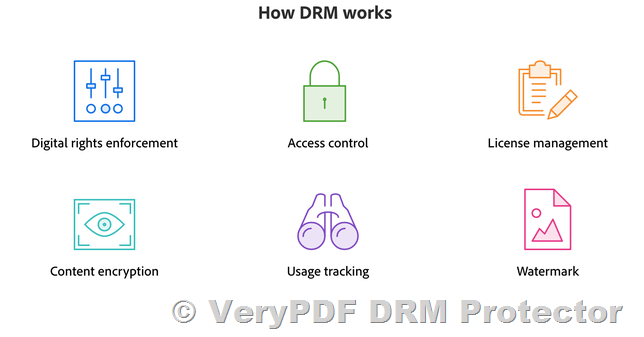
  1. Restricting Access by Location, Date, or Device: DRM allows document owners to limit access to specific locations, devices, or time frames. This ensures that documents are only accessible to authorized users under specific conditions, adding an extra layer of security.

  2. Preventing Copying and Redistribution: DRM includes features that prevent users from copying content or sharing it with others. It can block screen grabs, disabling the ability to take screenshots of protected content.

  3. Controlling Editing and Printing: With DRM, document owners can prevent users from making edits to the document or printing it. This is particularly useful for protecting the integrity of sensitive information and preventing unauthorized distribution.

  4. Dynamic Watermarking: Another valuable feature of DRM is the ability to add dynamic watermarks to documents. These watermarks can include the user’s identity, IP address, or other identifying information, helping to track and trace unauthorized activity if a document is leaked.

  5. Tracking Usage: DRM allows document owners to track how their documents are used, including who has accessed the document, when, and what actions were taken. This level of monitoring is crucial for ensuring that documents are being used within the bounds of the owner’s permissions.

The Need for Document DRM in Corporate and Government Environments

As businesses and governments deal with an increasing amount of sensitive information, the need for secure document management has never been greater. Corporate information, government data, and personal records all require protection against unauthorized access, duplication, or theft.

One of the key advantages of DRM is that it can help prevent mistakes that may occur when documents are distributed internally or externally. People can inadvertently share documents with the wrong recipients, or they might mistakenly believe that certain individuals or groups should have access to the content. DRM helps mitigate these risks by giving document owners complete control over who can access the document and how it can be used.

Moreover, DRM is essential for managing the distribution of intellectual property and trade secrets. These types of documents need to be protected from unauthorized copying or sharing, as any leak can lead to significant financial or reputational damage. DRM provides the necessary tools to protect this sensitive content from such risks.

VeryPDF DRM Protector: A Powerful Solution for Document Protection

One of the most effective tools for securing documents and controlling their distribution is VeryPDF DRM Protector. This powerful software allows users to protect their PDFs with advanced DRM features, ensuring that sensitive information is kept safe from unauthorized access and misuse. With VeryPDF DRM Protector, you can take control of your documents in a way that traditional encryption simply cannot.

To get started with VeryPDF DRM Protector, you can upload your PDF file to https://drm.verypdf.com/online/ and select the option to “Make Secure PDF.” This online service allows you to test the tool for free and experience the full range of DRM features available. Once your document is secured, you can control access, prevent unauthorized sharing or copying, and track usage to ensure your content remains protected.

Key Features of VeryPDF DRM Protector:

  • Free Trial: Try the tool for free online at https://drm.verypdf.com/online/.
  • Secure PDF: Easily upload and secure your PDF files with DRM protections, such as preventing copying, printing, and editing.
  • Advanced DRM Controls: Restrict access by location, device, and time, and prevent unauthorized distribution.
  • Watermarking: Add dynamic watermarks to documents to trace unauthorized activity.
  • Usage Tracking: Monitor who is accessing your document and what actions they are taking.

Frequently Asked Questions (FAQs)

1. What is DRM and how does it work? DRM (Document Rights Management) is a technology used to control the access and distribution of digital documents. It allows document owners to set permissions that restrict how their documents can be used, such as preventing copying, printing, and editing.

2. Why should I use DRM instead of traditional encryption? While encryption protects the file itself, DRM goes a step further by controlling how the document is used after it is decrypted. DRM can prevent unauthorized copying, sharing, and distribution, while encryption cannot.

3. How can I try VeryPDF DRM Protector? You can try VeryPDF DRM Protector for free online by uploading your PDF file to https://drm.verypdf.com/online/ and selecting the “Make Secure PDF” option.

4. Can I restrict access to my document by location or device? Yes, VeryPDF DRM Protector allows you to restrict access to your document based on location, device, or time, providing additional control over your content.

5. Can I add a watermark to my document? Yes, you can add dynamic watermarks to your document using VeryPDF DRM Protector. This helps track and trace unauthorized activity.

6. What types of documents can I protect with DRM? You can protect any PDF document with DRM using VeryPDF DRM Protector. This includes corporate documents, intellectual property, trade secrets, personal data, and more.

Understanding Document DRM, DCMA, and EUCD: How the EU Copyright Directive Affects Publishers and Protects Intellectual Property in the Digital Age

In the modern digital world, the protection of intellectual property (IP) is becoming increasingly complex. With the rapid growth of digital content and the ease of sharing and distributing it across various platforms, the need for effective protection mechanisms has never been more critical. The advent of new regulations such as the European Copyright Directive (EUCD) and the Digital Millennium Copyright Act (DCMA) has highlighted the need for better systems to safeguard digital works. In this context, Document Digital Rights Management (DRM) has emerged as a vital tool for publishers, businesses, and organizations to protect their copyrighted content and ensure that unauthorized distribution is prevented.

This article will explore the significance of Document DRM, particularly focusing on the advantages it provides to publishers and content creators. We will also look at how tools like VeryPDF DRM Protector can help protect documents in a way that complies with these evolving regulations.

Understanding Document DRM, DCMA, and EUCD: How the EU Copyright Directive Affects Publishers and Protects Intellectual Property in the Digital Age

The Role of the European Copyright Directive (EUCD) and the DCMA

EUCD: A New Era in Copyright Protection

The European Copyright Directive (EUCD) was introduced to address the challenges posed by the increasing digitization of content. It aims to strengthen copyright protections across the European Union and facilitate better enforcement of these protections across member states. One of the key aspects of the EUCD is the introduction of more robust controls for content distributors and the creation of rules that balance the interests of content creators and distributors.

For publishers, the EUCD sets new standards for managing content, ensuring that creators can benefit from their work without the fear of it being exploited without permission. This is especially important for industries like education, research, and publishing, where original content is often shared and used in various ways. The EUCD emphasizes the importance of protecting content but also introduces exceptions for specific uses, such as for educational or cultural purposes.

DCMA: Strengthening Digital Copyright Laws

The Digital Millennium Copyright Act (DCMA), enacted in the United States in 1998, laid the groundwork for enforcing copyright protections in the digital age. This law made it illegal to circumvent digital copyright protections, including the creation or use of tools that bypass security measures. The DCMA also allowed copyright owners to request the removal of unauthorized content from websites, offering a faster and more efficient way to address copyright infringement.

While the DCMA was a significant step forward, it primarily addressed digital content that had already been made publicly available. However, it did not specifically target confidential documents or internal materials that might be shared or distributed without proper authorization. This gap in protection left many businesses and publishers vulnerable to unauthorized use of their intellectual property.

The Growing Need for Document DRM

What is Document DRM?

Document Digital Rights Management (DRM) refers to a set of technologies used to control and protect access to digital content. DRM solutions help prevent unauthorized sharing, copying, and distribution of digital documents by imposing various restrictions. These restrictions can be customized based on factors such as the location of the user, the device being used, or the time period during which the document can be accessed. By enforcing these restrictions, DRM technologies give publishers and businesses greater control over how their content is used, shared, and distributed.

Why Do Publishers Need DRM?

Publishers and content creators in industries such as education, business, and research often deal with sensitive, proprietary, or copyrighted information that must be protected from unauthorized distribution. Without effective DRM measures, there is always the risk that documents will be copied, shared, or leaked, leading to financial losses, reputational damage, or legal repercussions.

The rise of platforms like YouTube and Wikipedia, which host large amounts of user-uploaded content, has further emphasized the need for stricter controls. However, industries that prefer to deal directly with customers and avoid distributing their content via public platforms are particularly vulnerable to piracy. Document DRM can help these organizations keep their content secure while still allowing for legitimate use by authorized individuals.

How VeryPDF DRM Protector Helps Secure Your Documents

If you are a publisher, business, or organization looking to protect your documents, VeryPDF DRM Protector is an excellent tool for ensuring that your intellectual property remains secure. This innovative solution allows you to upload your PDF files and apply a range of DRM protections with ease.

Easy and Secure Document Protection

To get started with VeryPDF DRM Protector, simply upload your PDF file to https://drm.verypdf.com/online/ and select the option to “Make Secure PDF.” The software will then apply a range of security features to your document, ensuring that only authorized users can access and interact with it.

Key Features of VeryPDF DRM Protector
  1. Restrict Access by Device: One of the most powerful features of VeryPDF DRM Protector is the ability to lock documents to specific devices. This means that unauthorized users cannot access your documents, even if they have the file.

  2. Time-based Restrictions: You can set an expiration date for your documents, ensuring that access is granted only within a specific time frame. Once the time limit expires, the document becomes inaccessible.

  3. Prevent Copying and Sharing: VeryPDF DRM Protector enables you to prevent users from copying, pasting, or printing the content of your protected documents. This is essential for ensuring that your intellectual property is not distributed without your permission.

  4. Dynamic Watermarks: If someone tries to share your document without authorization, you can add a dynamic watermark that displays the source of the unauthorized activity, making it easier to track and take appropriate action.

  5. Audit and Revocation: VeryPDF DRM Protector allows you to monitor how your documents are being used. You can also revoke access to specific users at any time, providing an added layer of control over your content.

Frequently Asked Questions (FAQs) about Document DRM

1. What is Document DRM and why is it important?

Document DRM is a technology that helps protect digital content from unauthorized access, copying, or distribution. It is crucial for businesses and publishers to safeguard their intellectual property, prevent piracy, and ensure that only authorized users can view or interact with the content.

2. How does VeryPDF DRM Protector work?

VeryPDF DRM Protector allows users to upload their PDF files and apply various security measures, such as restricting access by device, setting expiration dates, and preventing copying or printing. The software ensures that documents are only accessible to authorized individuals and provides audit logs for tracking usage.

3. Can I try VeryPDF DRM Protector for free?

Yes, you can try VeryPDF DRM Protector for free online at https://drm.verypdf.com/online/. The free trial allows you to test out the features and see how the software can help protect your documents.

4. How can I revoke access to a document?

With VeryPDF DRM Protector, you can revoke access to specific users at any time. This ensures that you have full control over who can access your content, even after it has been distributed.

5. Can I track how my documents are being used?

Yes, VeryPDF DRM Protector provides auditing features that allow you to track how your documents are being used, including which devices are accessing them and when. This helps you monitor and enforce your copyright protections more effectively.


Document DRM is a powerful tool for businesses and publishers looking to protect their intellectual property. By leveraging technologies like VeryPDF DRM Protector, you can secure your content and prevent unauthorized distribution, ensuring that your digital assets are protected in compliance with evolving copyright regulations like the EUCD and DCMA.