How VeryPDF DRM Protector Solves Insider Threat Risks With Per-User Access Limits, Device Binding, and Real-Time Tripwire Leak Alerts

How VeryPDF DRM Protector Solves Insider Threat Risks With Per-User Access Limits, Device Binding, and Real-Time Tripwire Leak Alerts

Every time I’ve had to share sensitive documents with team members or external partners, I’ve worried about one thing: someone accidentallyor deliberatelyleaking critical information. In the past, I’ve seen colleagues forward confidential files without thinking, or worse, leave sensitive data exposed on shared drives. For companies handling legal contracts, financial statements, or intellectual property, even a small slip can have massive consequences. That’s when I stumbled upon VeryPDF DRM Protector, a virtual data room solution designed specifically to prevent insider threats and protect sensitive digital assets.

How VeryPDF DRM Protector Solves Insider Threat Risks With Per-User Access Limits, Device Binding, and Real-Time Tripwire Leak Alerts

From the moment I started exploring VeryPDF DRM Protector, I realised this wasn’t just another file-sharing platform. It’s a comprehensive virtual data room (VDR) combined with powerful digital rights management (DRM) controls, which means it gives you granular control over who can access your documents, how they interact with them, and what happens if something goes wrong. This is particularly useful for sectors like finance, legal, healthcare, or technology, where documents often carry high stakes. Whether it’s a merger and acquisition due diligence file, a patent application, or a financial report, VeryPDF ensures that your files are never truly “out of your hands.”

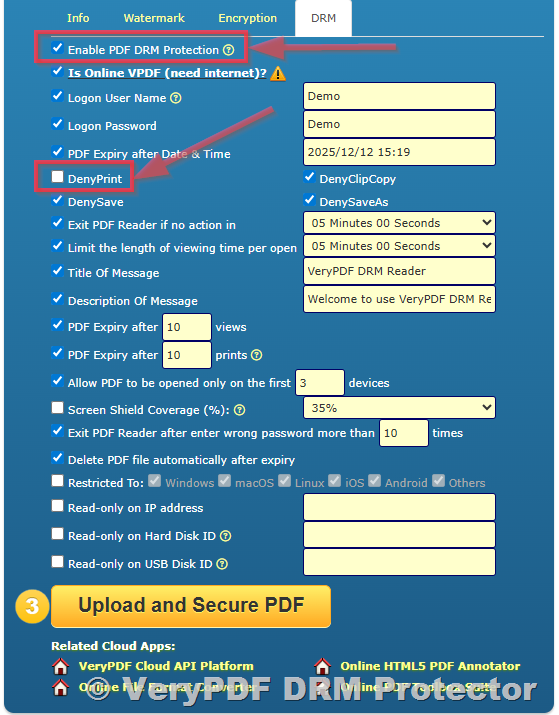
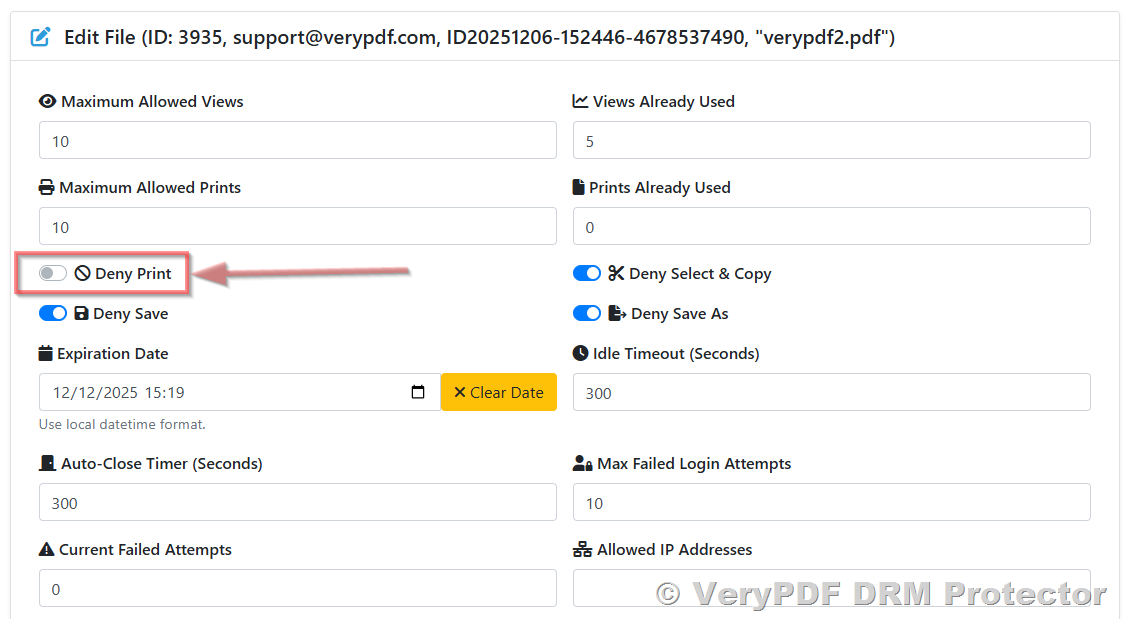
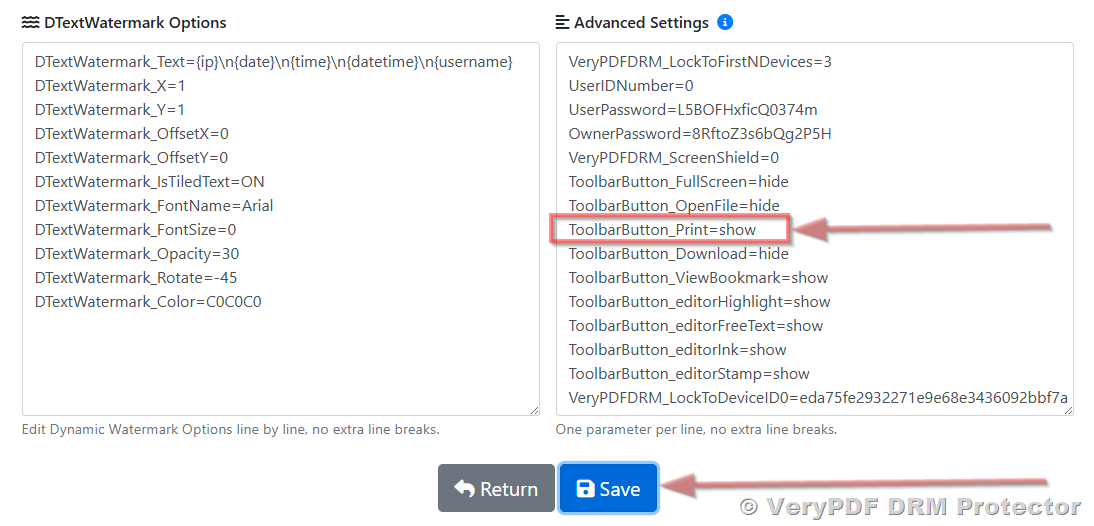
One of the first things that impressed me was the per-user access limits. Unlike conventional systems where a single file can be downloaded and copied indefinitely, VeryPDF lets you set individual access restrictions. For example, I could allow a colleague to view a contract only until a certain date or prevent another user from opening the file on more than one device. This feature alone eliminated a lot of the anxiety I used to have when distributing sensitive documents. The ability to control access on a per-user basis, rather than applying blanket permissions, is a game-changer for maintaining confidentiality.

Device binding was another feature that truly caught my attention. In the past, I worried about files being copied to personal laptops or USB drives. VeryPDF’s DRM system ties each document to authorized devices, making it impossible for a file to be opened elsewhere. I remember sharing a confidential financial analysis with a partner and being able to track exactly which device had access. If a device wasn’t registered, the file simply wouldn’t opengiving me peace of mind that our sensitive data wasn’t wandering into unintended hands.

But what really sets VeryPDF apart is the real-time tripwire leak alerts. This is not just a passive security measure; it actively monitors document interactions and sends immediate notifications if suspicious activity occurs. I had an incident where a user tried to forward a highly sensitive report to an unauthorized account. Within seconds, I received an alert and could revoke access instantly. The combination of proactive alerts and the ability to revoke permissions midstream is something I hadn’t seen in other virtual data rooms or secure document systems.

Beyond these features, VeryPDF DRM Protector also offers a range of other capabilities that make it highly versatile:

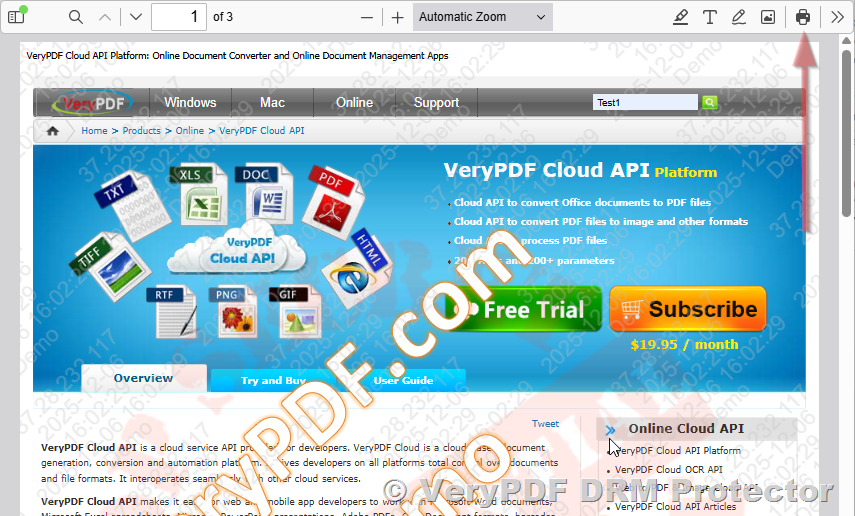
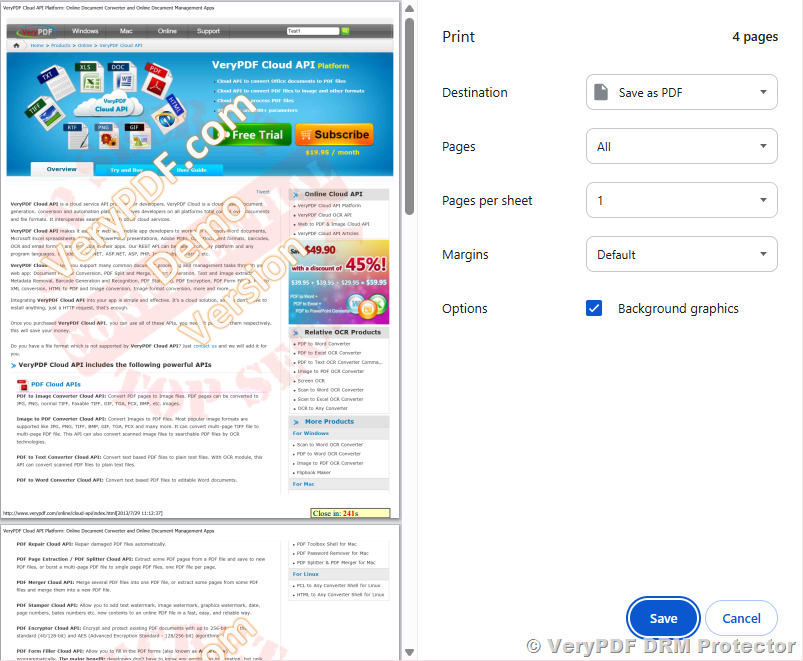
  • Dynamic watermarking ensures that every document viewed carries user-specific identifiers, deterring unauthorized sharing. I found this especially useful for investor presentations where confidentiality is paramount.

  • Offline access controls let you set limits on local document usage, without sacrificing convenience for authorized users. This was perfect for team members who travel frequently and need secure access without a constant internet connection.

  • IP address and location restrictions further tighten security by ensuring documents can only be accessed from trusted networks. I’ve used this to prevent international data exposure while collaborating with domestic teams.

  • Full audit logs and analytics provide a clear view of who accessed what and when. During one particularly complex project, being able to generate a comprehensive audit report helped me ensure compliance and demonstrate accountability to senior management.

Comparing VeryPDF DRM Protector to other solutions I’ve tried, the differences were stark. Many traditional secure file-sharing platforms lack granular per-user controls or real-time leak detection. Others claim to offer DRM, but only restrict printing or copying, leaving screen captures and screenshots unmonitored. VeryPDF combines all these controls with intuitive usabilitysomething I’ve always struggled to find. The interface is straightforward, even for users who aren’t tech-savvy, which reduced the amount of time I spent training staff on secure document handling.

In practical terms, using VeryPDF has saved me hours of worry and follow-up. Before, I had to manually track who had access to which files and constantly update permissions. Now, I can set up a secure workspace, assign access, and let the system enforce the rules. I recall a particularly stressful week during a merger project where I had to ensure dozens of contracts were reviewed by multiple parties. VeryPDF allowed me to distribute documents with confidence, knowing that each recipient had access only to what they were authorized to see, and I could monitor every interaction in real-time.

VeryPDF DRM Protector isn’t just about keeping secretsit’s about enabling secure collaboration without compromising productivity. For legal teams, financial institutions, or any organisation handling confidential data, the ability to enforce per-user access limits, bind files to specific devices, and receive instant leak alerts provides a level of control that I can’t overstate. It transforms a risky process into a manageable, auditable workflow.

If you’re struggling with insider threats or worrying about sensitive information leaking from within your organisation, I’d highly recommend giving VeryPDF DRM Protector a try. The peace of mind it provides is worth every minute of setup. Click here to try it out for yourself: https://drm.verypdf.com/. Start your free trial now and see how you can secure your critical documents while maintaining seamless collaboration.

VeryPDF also offers custom development services for organisations with specific technical requirements. Whether you need tailored PDF processing utilities for Linux, macOS, Windows, or server environments, or custom integrations via Python, PHP, C/C++, Windows API, Linux, Mac, iOS, Android, JavaScript, C#, .NET, and HTML5, VeryPDF has the expertise to deliver. Services include creating Windows Virtual Printer Drivers for PDF, EMF, and image formats, capturing and monitoring print jobs, and implementing system-wide or application-specific API hooks. VeryPDF also provides solutions for OCR table recognition, barcode generation and scanning, secure document workflows, cloud-based document management, and advanced PDF DRM technologies. For bespoke projects, contact their support centre at https://support.verypdf.com/ to discuss your requirements.

FAQ

1. What is VeryPDF DRM Protector?

VeryPDF DRM Protector is a virtual data room solution with integrated digital rights management controls. It protects sensitive documents by enforcing per-user access, device binding, and real-time monitoring.

2. Can I set different access levels for different users?

Yes. You can assign unique permissions for each user, including view-only access, expiry dates, device limits, and restrictions on printing, copying, or screenshots.

3. How does device binding work?

Device binding restricts document access to authorised devices only. Users must open the document on a registered device, preventing unintentional or malicious sharing.

4. Will I be notified if a document is leaked?

Absolutely. VeryPDF DRM Protector includes real-time tripwire alerts that notify you immediately of any suspicious activity, enabling quick action.

5. Can VeryPDF DRM Protector be used offline?

Yes. Documents can be accessed offline, and the same DRM protections remain enforced, ensuring security even when users are not connected to the internet.

6. Does VeryPDF DRM Protector support all file types?

It supports all common file types, including PDFs, Word documents, Excel files, images, audio, and video, providing a comprehensive solution for secure collaboration.

7. Is training required for my team?

VeryPDF is designed for ease of use, even for non-technical users. Minimal training is needed, making adoption fast and painless.

Tags or keywords:

Virtual Data Room, Insider Threat Protection, Digital Rights Management, Secure Document Sharing, Device Binding, Tripwire Leak Alerts, Document Security, File Access Control, Corporate Data Protection, VeryPDF DRM

Top Reasons Legal Firms Prefer VeryPDF DRM-Protected Virtual Data Rooms for Secure Case File Distribution, Client Collaboration, and Document Access Tracking Analytics

Top Reasons Legal Firms Prefer VeryPDF DRM-Protected Virtual Data Rooms for Secure Case File Distribution, Client Collaboration, and Document Access Tracking Analytics

Every Monday morning, I used to dread the thought of sending confidential case files to multiple clients and partners. The constant worry that sensitive documents could leak, get forwarded to unintended parties, or be accessed on unsecured devices made my mornings stressful. Even with traditional email and cloud storage solutions, there was always that nagging fear that someone could download, copy, or misuse confidential files. That’s when I discovered VeryPDF DRM Protector, a virtual data room solution that completely changed how my legal team handles sensitive documents.

Top Reasons Legal Firms Prefer VeryPDF DRM-Protected Virtual Data Rooms for Secure Case File Distribution, Client Collaboration, and Document Access Tracking Analytics

When I first came across VeryPDF DRM Protector, I was looking for a platform that could do more than just store files. I needed a secure, user-friendly environment where we could share legal documents, track engagement, and retain control over who sees what, even after files were shared. VeryPDF DRM Protector provides all of that and more. It combines a virtual data room with robust digital rights management (DRM) controls, giving us a secure workspace akin to having a high-tech safe in our office for each document. This setup ensures that only authorised personnel can access specific files, and it restricts the number of devices, sets expiration dates, and even prevents copying or printing.

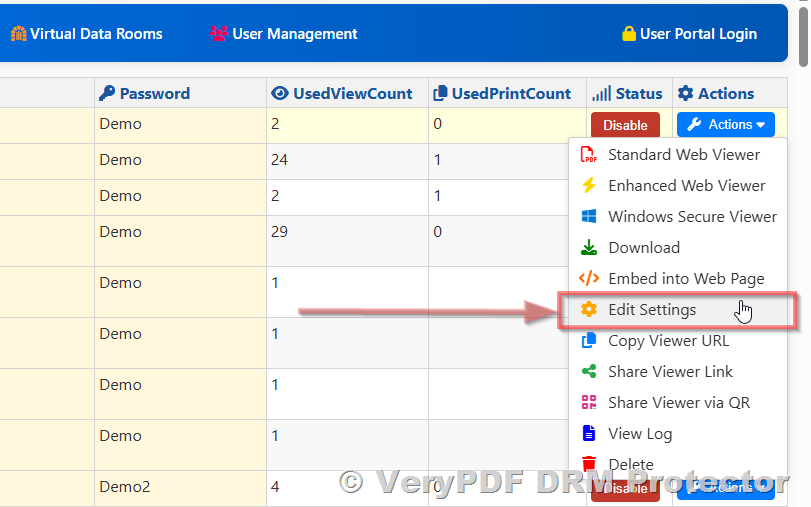
One of the standout features for my team has been the shared link access controls. Before using VeryPDF, we had to rely on encrypted email links or third-party file-sharing services, which often felt cumbersome and unreliable. With VeryPDF, I can send a single link, and control who can view it, for how long, and on which devices. If I ever need to revoke access, it’s just a few clicks, no more awkward follow-ups or emergency emails. I remember a particularly tricky case where an external consultant accidentally forwarded a file. With VeryPDF, we immediately revoked access, and the document was no longer viewable on their deviceproblem solved, no panic needed.

Another feature that completely won me over was the real-time engagement notifications and analytics. Now, I know exactly when a client opens a document, which sections they spend the most time on, and if they try to forward or print it. This visibility is invaluable, especially during critical negotiations or M&A transactions where timing and document security are paramount. For example, during a recent due diligence review, I could monitor exactly which contracts the investor team accessed, and the dashboard provided clear insights on engagement patterns. It’s like having a window into the client’s attention without compromising confidentiality.

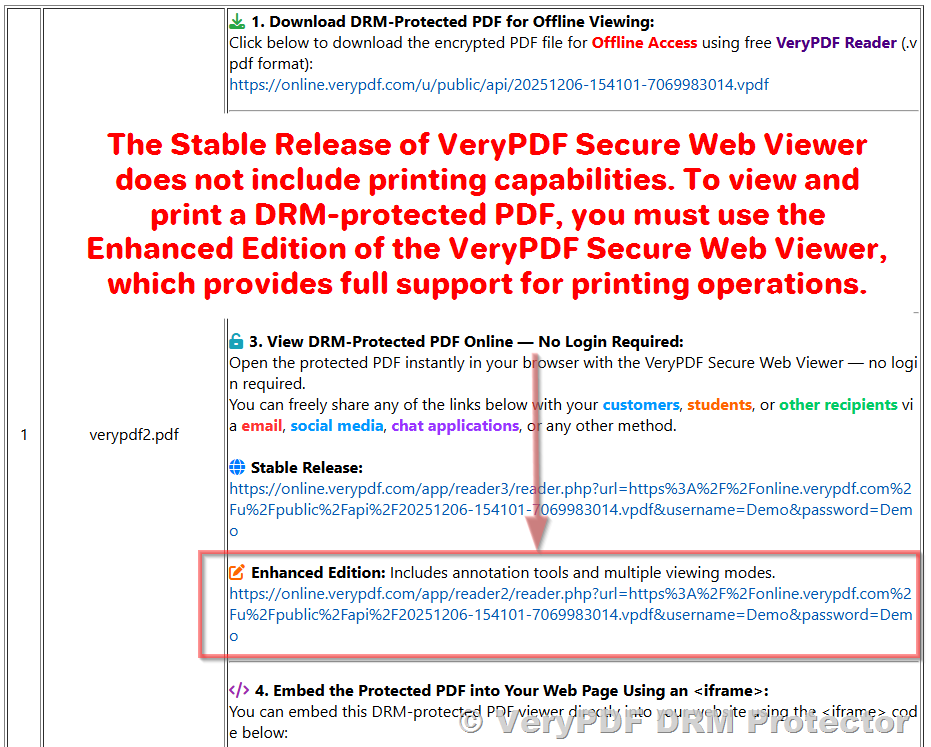
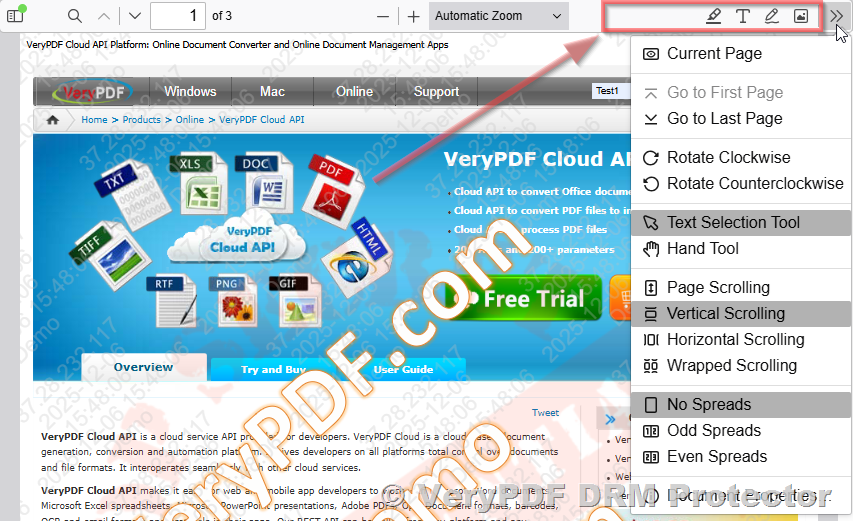
The Secure Web Viewer and Secure Document Viewer are also game changers. Some of our clients prefer not to download anything, so the Secure Web Viewer allows them to view documents safely in a browser without ever having the physical file on their devices. For highly sensitive files, we use the Secure Document Viewer, which prevents screenshots, screen sharing, and printing. I remember sending a particularly sensitive healthcare compliance file to a government partner. Using the Secure Document Viewer, I felt confident knowing the information couldn’t be leaked, copied, or misused, yet collaboration remained smooth.

Compared to other virtual data room solutions I tried, VeryPDF DRM Protector stands out for its ease of use and seamless integration. Many platforms are overly complex, requiring extensive training for both internal teams and external clients. VeryPDF simplifies this with intuitive dashboards, full-text search, and customizable folders, making document access straightforward even for less tech-savvy clients. On top of that, the ability to integrate with Google, Microsoft, and over 6000 apps via Zapier has allowed us to embed VeryPDF seamlessly into our existing workflow.

One other area where VeryPDF really shines is customisable branding and reporting. Our law firm can present a polished, professional image with branded login screens, custom colours, and even white-labeled URLs. Meanwhile, detailed audit logs and document visit exports make compliance reporting effortless. During one complex cross-border case, the audit logs were crucial in demonstrating secure handling of sensitive documents to regulatory authorities. It saved hours of manual reporting and gave us peace of mind.

I also want to highlight the dynamic DRM features that set VeryPDF apart. This includes device restrictions, offline access controls, IP address limits, and even country-specific restrictions. For international cases, this means we can share files globally without worrying about leaks in regions where certain data is sensitive. The automatic file indexing and content library further streamline our workflow, reducing the time spent on organising and locating documents, which is a huge relief when deadlines are tight.

In short, VeryPDF DRM Protector solves the practical problems legal teams face every day: secure file sharing, controlled collaboration, and actionable analytics. The platform empowers our team to distribute confidential documents without fear of leaks, monitor client engagement in real-time, and maintain full control over digital assets at every step. I’d highly recommend this to any legal firm or organisation that handles sensitive data and wants to combine security with efficiency. Click here to try it out for yourself: https://drm.verypdf.com/

VeryPDF offers comprehensive custom development services to meet unique technical needs. Whether you need specialised PDF processing tools for Linux, macOS, Windows, or server environments, VeryPDF’s expertise spans a wide range of technologies and functionalities. Services include development using Python, PHP, C/C++, Windows API, Linux, Mac, iOS, Android, JavaScript, C#, .NET, and HTML5. VeryPDF excels in creating Windows Virtual Printer Drivers capable of generating PDF, EMF, and image formats, as well as tools for capturing and monitoring print jobs across all Windows printers. They also provide solutions for system-wide and application-specific hooks to monitor and intercept Windows APIs, including file access operations.

VeryPDF’s capabilities extend to document analysis and processing for formats such as PDF, PCL, PRN, Postscript, EPS, and Office documents. Their services cover barcode recognition and generation, layout analysis, OCR, OCR table recognition, report and form generation, image conversion, and cloud-based document conversion, viewing, and digital signatures. Advanced PDF security, digital signatures, DRM protection, TrueType font technology, and Office/PDF document printing are also part of their offerings. For custom solutions, reach out to VeryPDF via their support center at https://support.verypdf.com/.

FAQ

1. What is a virtual data room and why is it important for legal firms?

A virtual data room is a secure online repository for sensitive documents. Legal firms use it to safely share case files, track access, and maintain control over confidential data.

2. How does VeryPDF DRM Protector prevent unauthorized access?

It uses digital rights management controls including file-level encryption, device restrictions, access expiration, and screenshot prevention to ensure only authorised users can view documents.

3. Can clients access documents without downloading special software?

Yes. VeryPDF offers a Secure Web Viewer for browser-based access and a Secure Document Viewer for higher-security needs, allowing collaboration while maintaining document protection.

4. How does document tracking work in VeryPDF DRM Protector?

The platform provides real-time engagement notifications, location alerts, and analytics dashboards showing which documents were accessed, when, and by whom.

5. Is it possible to customise VeryPDF DRM Protector for my firm’s workflow?

Absolutely. VeryPDF supports integration with multiple platforms, custom branding, workflow automation, and API access to tailor the virtual data room to your specific needs.

Tags or keywords: VeryPDF DRM Protector, Virtual Data Room, Legal Document Security, Secure File Sharing, Client Collaboration, Document Analytics, Digital Rights Management, Case File Protection, Secure Data Room, Legal Tech Solutions

How Accounting Teams Use VeryPDF DRM Protector Virtual Data Rooms to Protect Financial Reports, Audit Files, and Sensitive Statements with Precise File-Level Control

How Accounting Teams Use VeryPDF DRM Protector Virtual Data Rooms to Protect Financial Reports, Audit Files, and Sensitive Statements with Precise File-Level Control

Discover how accounting teams use VeryPDF DRM Protector Virtual Data Rooms to secure financial reports and audit files with precise file-level control.

How Accounting Teams Use VeryPDF DRM Protector Virtual Data Rooms to Protect Financial Reports, Audit Files, and Sensitive Statements with Precise File-Level Control


Every month-end close used to fill me with dread. Sorting through spreadsheets, audit reports, and sensitive financial statements, I constantly worried about accidental leaks, mismanaged permissions, or misplaced documents. Sharing these files with auditors or internal stakeholders without compromising security felt like walking a tightrope. I knew there had to be a better way, and that’s when I discovered VeryPDF DRM Protector and its Virtual Data Room solution.

From the moment I first logged into VeryPDF’s platform, I was impressed by how intuitive and secure it felt. Unlike traditional shared drives or generic cloud storage, this isn’t just a folder on the internet; it’s a secure workspace with file-level DRM controls that make accidental exposure nearly impossible. The tool caters specifically to teams like ours accounting departments, finance professionals, auditors, and even corporate legal teams who need to protect sensitive financial data while collaborating efficiently.

One of the first features that stood out was the granular permission settings. Instead of giving blanket access to an entire folder of financial reports, I could assign permissions down to the individual file. For example, I could allow our internal auditors to view a full set of quarterly statements but restrict them from downloading, printing, or forwarding those files. This meant our intellectual property like financial projections or audit findings remained secure even if someone tried to bypass the system. In practice, I no longer had to second-guess whether sensitive spreadsheets had been forwarded to the wrong people.

The dynamic watermarking and DRM enforcement added another layer of peace of mind. Every document shared through the data room automatically carried watermarks identifying the viewer and time of access. During one particularly stressful audit, I could track which reports had been opened, how often, and by whom. It was like having a digital paper trail without the hassle of manually monitoring email forwards or downloads. The real-time notifications kept me in the loop without having to micromanage; I knew immediately when someone accessed a critical audit file.

Another feature that truly transformed our workflow was version control and instant revocation of access. In accounting, documents are updated constantly. With VeryPDF, I could upload revised statements and immediately update permissions so that every authorized user automatically received the latest version. If a user’s access needed to be revoked for example, if an external consultant’s project ended it happened instantly. No more emailing new files or worrying about old versions floating around insecurely. This saved us countless hours and reduced the risk of compliance mishaps.

Compared to other tools I’ve tried, VeryPDF feels remarkably user-friendly. Some secure data rooms are clunky, require extensive training, or make even basic file sharing a headache. VeryPDF strikes a balance: it’s powerful enough to satisfy stringent security needs yet simple enough that even team members with minimal tech experience can navigate the platform. The Secure Web Viewer and Secure Document Viewer options are especially handy you can share files in-browser or via a client with screenshot and screenshare protections. In real-world terms, this means auditors and finance teams can collaborate on sensitive documents without ever having the files physically leave the secure environment.

One particular use case that impressed me was during a merger project. We had multiple external partners who needed access to our financial statements for due diligence. With VeryPDF, I created a dedicated virtual data room, assigned individual permissions, and monitored engagement in real-time. Even when one partner tried to download a report outside of their permitted access, the system blocked it. The combination of offline access controls, IP restrictions, and time-limited access meant I could confidently share sensitive data without fearing leaks. In my years in finance, I’ve never seen a solution that delivered both security and ease of use like this.

The analytics and reporting tools also proved invaluable. I could generate a complete audit log, showing every interaction with the documents, from views and prints to forwards and downloads. This not only helped maintain compliance but also offered insights into which reports were being actively reviewed and which were being overlooked. It transformed how our accounting team approached reporting we weren’t just sharing files; we were actively monitoring engagement and responding to potential issues before they became problems.

What sets VeryPDF apart isn’t just the security it’s the holistic approach to virtual data rooms. Features like full-text search, local file uploads, content libraries with folders and subfolders, and seamless integration with storage providers mean that managing large volumes of financial data is surprisingly smooth. I’ve used other VDRs before where even a simple upload felt cumbersome. Here, everything is optimised for speed and reliability, which is essential when working with time-sensitive audit cycles or financial close periods.

In short, VeryPDF DRM Protector allows accounting teams like mine to share, collaborate, and protect financial reports, audit files, and sensitive statements without the constant worry of data leaks. From precise file-level permissions to real-time notifications, watermarking, and secure viewers, it’s a tool built for the realities of finance and accounting.

I’d highly recommend this to anyone who handles large volumes of sensitive financial data. If you want to experience a secure, efficient, and user-friendly way to manage your most critical files, start your free trial now and see how it transforms your workflow: https://drm.verypdf.com/.


VeryPDF Custom Development Services

VeryPDF offers tailored development services to meet your unique technical requirements. Whether you need specialised PDF processing solutions for Linux, macOS, Windows, or server environments, VeryPDF can deliver custom solutions across multiple platforms.

Our services include development with Python, PHP, C/C++, Windows API, Linux, Mac, iOS, Android, JavaScript, C#, .NET, and HTML5. We build Windows Virtual Printer Drivers capable of generating PDF, EMF, and image formats, along with printer job monitoring solutions that intercept and save print jobs from any Windows printer.

VeryPDF also offers expertise in document format analysis and processing PDF, PCL, PRN, Postscript, EPS, and Office documents as well as technologies for barcode recognition and generation, OCR and OCR table recognition, report and document form generation, image conversion, cloud-based document solutions, PDF security, digital signatures, DRM protection, and Office and PDF printing.

For project-specific requirements or custom solutions, contact VeryPDF via its support center: https://support.verypdf.com/.


Frequently Asked Questions

1. How secure is VeryPDF DRM Protector for financial reports?

VeryPDF uses advanced DRM controls, file-level encryption, watermarking, and secure viewers to ensure that your sensitive documents remain protected against unauthorized access.

2. Can I control who accesses each financial document?

Yes. VeryPDF allows granular, file-level permissions, including download, print, copy, and share restrictions, plus time-limited access.

3. Does VeryPDF support offline access?

Yes. You can set offline access permissions with limits, ensuring that documents remain protected even when viewed without an internet connection.

4. How do I monitor document activity?

You can view real-time engagement notifications, aggregate dashboards, and detailed audit logs, showing who accessed what and when.

5. Can I revoke access after sharing a document?

Absolutely. Access can be revoked instantly, even after the document has been shared, giving you complete control over your sensitive files.

6. Is VeryPDF suitable for external collaborators or auditors?

Yes. The platform supports unlimited visitors, external collaborators, and secure sharing without compromising security.


Tags / Keywords:

Virtual Data Room, Financial Document Security, Accounting DRM Software, Secure Audit Files, VeryPDF DRM Protector, File-Level Access Control, Secure File Sharing, Finance Collaboration Tools

Why VeryPDFs DRM-Enabled Virtual Data Room Outperforms Adobe and Smallpdf for Secure Document Sharing, Offline Access Protection, and Multi-Device Restriction Management

Why VeryPDF’s DRM-Enabled Virtual Data Room Outperforms Adobe and Smallpdf for Secure Document Sharing, Offline Access Protection, and Multi-Device Restriction Management

Every time I had to send confidential documents to clients or partners, I felt a knot in my stomach. Even when using well-known platforms like Adobe or Smallpdf, I constantly worried about someone forwarding files, sharing screenshots, or accessing my documents offline without permission. The idea of losing control over sensitive business data was stressful, to say the least. That’s when I discovered VeryPDF DRM Protector, and it completely changed the way I manage secure documents.

Why VeryPDFs DRM-Enabled Virtual Data Room Outperforms Adobe and Smallpdf for Secure Document Sharing, Offline Access Protection, and Multi-Device Restriction Management

From the moment I started using VeryPDF DRM Protector, I realized this wasn’t just another file-sharing tool. It’s a full-fledged Virtual Data Room (VDR) solution with built-in Digital Rights Management (DRM) controls. What makes it stand out is that it doesn’t just store files securely in the cloudit actively enforces who can see them, on how many devices, and for how long. If you’re handling high-stakes documents like M&A reports, legal contracts, or sensitive financial records, this is a game-changer.

I set up my first data room with VeryPDF for a client due diligence project. The onboarding process was incredibly simpleway easier than Adobe’s clunky interface. Once the documents were uploaded, I could instantly set file-level protections, including limits on offline access, number of devices, and even geographic restrictions. The peace of mind knowing that even if someone downloaded a file, they couldn’t freely distribute or view it outside my control was priceless.

Here’s what I loved most about VeryPDF DRM Protector:

  • Secure Web Viewer and Secure Document Viewer: I can share files directly through a web browser without forcing recipients to download a heavy client, thanks to the lightweight Secure Web Viewer. But for highly sensitive files, the Secure Document Viewer adds a second layer of protection, preventing screenshots, screen sharing, and printing. I remember sending a confidential investor pitch and feeling completely safe knowing recipients could interact with the content but couldn’t leak it.

  • Dynamic Watermarking and Access Revocation: One of the standout features is the ability to revoke access to documents at any time, even after they’ve been shared. Plus, every file can carry dynamic watermarks tied to the user’s identity. I ran a test sharing some internal financial documents with my team, and seeing the watermarks update in real-time reassured me that unauthorized sharing would be immediately traceable.

  • Granular Multi-Device Restrictions: Unlike other platforms where a user could log in from multiple devices freely, VeryPDF lets you define exactly how many devices a user can use. This was a lifesaver during a recent project where contractors needed temporary access but I didn’t want the files floating around on personal devices indefinitely.

Another feature that really separates VeryPDF from Adobe or Smallpdf is its real-time analytics and notifications. I can track who’s opening files, where they’re viewing them, and how long they spend on each document. During one project, I noticed a visitor accessing sensitive material from an unusual location and was able to immediately revoke access, which could have prevented a potential leak.

VeryPDF DRM Protector also excels in ease-of-use. I was concerned that my clients, some of whom aren’t very tech-savvy, would struggle with DRM protections. But the interface is clean, intuitive, and doesn’t require complex logins. Users just click a link, and the DRM protections work seamlessly in the background. This simplicity means I spend less time explaining access issues and more time focusing on actual work.

Compared to other VDR solutions I’ve tried, VeryPDF also offers full-text search, unlimited visitors, local file uploads, and audit logs, which makes managing large volumes of documents much easier. I remember handling a merger where dozens of folders with hundreds of documents had to be shared securely. With VeryPDF, everything was indexed and searchable, and I could monitor each visitor’s activity effortlessly. Adobe and Smallpdf simply didn’t offer this level of control and visibility.

What I find most impressive is that VeryPDF DRM Protector protects content even offline. This was a big concern for me because some of my collaborators often work on planes or in areas with limited internet. Traditional platforms fail here, but with VeryPDF, files downloaded to authorized devices remain encrypted and controlled. I had a team member access documents during a flight, and knowing that the DRM still enforced restrictions made me completely confident in the system.

The product also supports multi-format files, including PDFs, images, videos, and audio files, which is essential for my projects that often include a mix of media. I can consolidate everything in one VDR rather than juggling multiple platforms, which saves a ton of time and reduces the risk of errors.

For businesses, law firms, financial institutions, or any organization that handles sensitive information, VeryPDF DRM Protector is a must-have. It’s not just about file storageit’s about total control and peace of mind. I’ve switched all my secure document workflows to VeryPDF and can confidently say it outperforms both Adobe and Smallpdf in DRM capabilities, offline access protection, and multi-device management.

If you’re tired of worrying whether your confidential documents are truly secure, I highly recommend giving VeryPDF DRM Protector a try. You can start your free trial here: https://drm.verypdf.com/. Seriously, it changed the way I think about document security, and I know it can do the same for you.

VeryPDF also offers custom development services to meet unique technical needs. Whether you require specialized PDF processing solutions for Linux, macOS, Windows, or server environments, their team can build utilities with Python, PHP, C/C++, Windows API, Linux, Mac, iOS, Android, JavaScript, C#, .NET, and HTML5. They create virtual printer drivers for PDF, EMF, and image formats, capture and monitor printer jobs, and develop tools for document analytics, OCR, barcode recognition, secure document viewing, and DRM enforcement. For tailored solutions, contact VeryPDF at https://support.verypdf.com/.

FAQ

1. Can VeryPDF DRM Protector prevent screenshots and screen sharing?

Yes, the Secure Document Viewer prevents screenshots, screen sharing, and printing while enforcing access limits.

2. Does it support offline document access?

Yes, authorized devices can access files offline while maintaining DRM protections.

3. Can I revoke access after sharing a document?

Absolutely. You can revoke access anytime, even after files are downloaded.

4. What types of files are supported?

VeryPDF supports PDFs, images, audio, video, and most basic file types used in business workflows.

5. Can I track who viewed my documents and for how long?

Yes, real-time analytics provide detailed insights into document visits, location, engagement, and more.

Tags or keywords:

Virtual Data Room, DRM Protector, Secure Document Sharing, Offline Access Protection, Multi-Device Restrictions, Document Security, File-Level Encryption, Data Room Analytics, Confidential Document Management, Digital Rights Management

Complete Guide to Setting Up a Hyper-Secure Virtual Data Room with VeryPDF DRM Protector to Control File Access, Printing, Copying, and Screenshots Across All Devices

Complete Guide to Setting Up a Hyper-Secure Virtual Data Room with VeryPDF DRM Protector to Control File Access, Printing, Copying, and Screenshots Across All Devices

Every time I needed to share sensitive business documents with partners or investors, I found myself worrying: “Who else can see this? Can it be printed or copied without my permission?” The traditional methods of emailing PDFs or storing files on shared drives never gave me full confidence. There had to be a solution that allowed collaboration without sacrificing security. That’s when I discovered VeryPDF DRM Protector.

Complete Guide to Setting Up a Hyper-Secure Virtual Data Room with VeryPDF DRM Protector to Control File Access, Printing, Copying, and Screenshots Across All Devices

From the moment I started exploring VeryPDF DRM Protector, I realised this wasn’t just another virtual data room (VDR). It’s a hyper-secure digital workspace that gives me control over every aspect of file usageacross all devices. The platform is designed for businesses, legal teams, financial institutions, and anyone who needs to share highly confidential documents safely.

What I love most is the way it balances security with usability. Setting up a virtual data room with DRM controls is surprisingly straightforward. You simply upload your documentsPDFs, videos, audio, or imagesinto the data room. From there, you can define who gets access, for how long, and on which devices. Even if someone manages to log in without authorization, the file-level encryption and DRM protection ensure your content remains secure.

One feature that stands out is the shared link access control. I’ve often needed to send sensitive contracts to multiple parties without giving them full ownership of the files. With VeryPDF, I can generate links that only allow viewing, prevent copying, block printing, and even stop screenshots. The ability to revoke access instantly has saved me from worrying about files being forwarded or leaked after sharing. Compared to other VDRs I’ve tried, this is a game-changerno more chasing after rogue copies or explaining to clients why their document shouldn’t be shared.

Another standout is the Secure Web Viewer and Secure Document Viewer. The web viewer is light, intuitive, and perfect for users who just need browser access without downloading anything. But for highly sensitive projects, I use the Secure Document Viewer. It’s a heavier-duty client that actively blocks screenshots, screen sharing, and printing. For example, when I collaborated with our finance team on confidential reports, I could confidently share files knowing every viewer’s actions were controlled and logged. The real-time engagement notifications and analytics dashboards also helped me track who accessed which document and whena feature I wish I had years ago.

VeryPDF DRM Protector also shines with dynamic watermarking and multi-level security. In one scenario, we shared an investment proposal with external consultants. By applying a dynamic watermark with their names and emails, any attempt to misuse the document could be traced instantly. It’s a simple but highly effective deterrent that other platforms rarely offer with such flexibility.

Beyond security, the platform’s usability impressed me. The interface is clean, and even team members who aren’t tech-savvy can navigate without frustration. Integrations with Google, Microsoft accounts, and over 6000 apps via Zapier make daily operations seamless. Plus, the platform supports unlimited visitors, full-text search, and local uploads, which means I can scale without worrying about bottlenecks.

The benefits extend to audit and compliance as well. VeryPDF provides detailed data room analytics, audit logs, and visit exports, which is invaluable during legal reviews or investor due diligence. I remember a moment when I needed to provide proof of document access for a client review; within minutes, I had a complete report detailing every action taken on our shared files. No more manual tracking, no more stress.

The more I used VeryPDF DRM Protector, the more I appreciated its flexible DRM controls. Unlike other solutions that rely solely on cloud servers, I can protect files locally while still enforcing access rights. The DRM system manages keys transparently, so users never need to handle passwords manuallyeverything is encrypted and securely transmitted. Even offline access can be controlled, making it ideal for consultants who travel or work from remote locations.

I also love how branding and customization are handled. You can tailor your data room visuallycustom logos, branded email templates, and even white-labeled URLs. For a professional presentation to clients or investors, this level of polish makes a big difference. It’s one of those subtle touches that makes the platform feel premium without overcomplicating things.

In short, VeryPDF DRM Protector solves real-world problems: controlling who can see your files, preventing unauthorized copying, blocking printing, and protecting sensitive data against leaks. It’s particularly useful for legal firms, investment banks, healthcare, defense, and any business managing confidential information. I’d highly recommend this to anyone who deals with large volumes of sensitive documents. Start your free trial now and boost your productivity: https://drm.verypdf.com/

VeryPDF offers custom development services to meet specific technical requirements. Whether you need advanced PDF processing on Linux, macOS, Windows, or server environments, VeryPDF can create tailored solutions. Services include Python, PHP, C/C++, Windows API, Linux, Mac, iOS, Android, JavaScript, C#, .NET, and HTML5 development. They also specialise in Windows Virtual Printer Drivers, document interception and monitoring, API hooks, OCR and table recognition, barcode generation, reporting tools, image and document management, and cloud-based services like digital signatures, document conversion, and secure viewing. If you have unique needs, reach out to VeryPDF support at https://support.verypdf.com/ to discuss your project requirements.

Frequently Asked Questions

1. What file types does VeryPDF DRM Protector support?

VeryPDF supports all common file types, including PDFs, images, audio, and video files. You can also upload directly from local storage or integrate with cloud storage providers.

2. Can I control who accesses my documents after sharing?

Yes. VeryPDF allows you to revoke access at any time, set expiry dates, limit devices, and even prevent printing or copying of shared documents.

3. Is there a way to track document engagement?

Absolutely. The platform provides real-time notifications, analytics dashboards, visitor logs, and engagement reports so you can monitor exactly who accessed your files and when.

4. Do I need to install software to use VeryPDF DRM Protector?

You can use the Secure Web Viewer for browser-based access without downloads. For high-security needs, the Secure Document Viewer client can be installed for enhanced protection.

5. Can I customise the data room branding?

Yes. VeryPDF allows you to customise logos, colours, email templates, and even URLs for a fully branded experience, helping maintain a professional look for clients and stakeholders.

Tags or Keywords

Virtual Data Room, Secure Document Sharing, DRM Protection, File Access Control, Data Room Analytics, Confidential Document Security, VeryPDF DRM Protector, Online Data Room, Document Watermarking, Secure Collaboration