How to restrict PDF access to only authorized students, employees, or subscribers while preventing piracy and DRM bypass

How to restrict PDF access to only authorized students, employees, or subscribers while preventing piracy and DRM bypass


Ever had that sinking feeling when you discover your carefully prepared lecture slides or homework PDFs circulating online? Last semester, I spent weeks creating a set of detailed lecture notes for my course on digital marketing. I uploaded them to our course portal, thinking my students would access them responsibly. A week later, I noticed copies showing up on public forums, shared by someone who clearly didn’t appreciate the work that went into them. As a professor, moments like that are frustratingand unfortunately, all too common.

How to restrict PDF access to only authorized students, employees, or subscribers while preventing piracy and DRM bypass

The reality is, PDFs are easy to share, copy, or even convert to other formats. Students sometimes forward them to classmates who aren’t enrolled, or worse, post them online. And while passwords or email restrictions help a bit, they’re easy to bypass. That’s why I started using VeryPDF DRM Protectorit completely changed the way I manage my course PDFs and gave me peace of mind knowing my content stays secure.


One of the most common headaches in teaching is students sharing PDFs outside the classroom. It’s not always malicioussometimes a student just wants to help a friend. But this can quickly spiral into unauthorized distribution, especially for paid or restricted course materials. I’ve seen homework assignments, exam prep PDFs, and even full lecture slides being circulated freely.

Another major pain point is unauthorized printing, copying, or converting. Students can easily take a PDF and turn it into Word, Excel, or image files. Once that happens, it’s almost impossible to track or control. Before I implemented DRM protection, I had multiple instances where exam answers and homework solutions ended up on third-party websites.

Finally, the loss of control over paid or restricted content is a serious concern. I’ve offered online workshops and short courses that cost a small fee, but I constantly worried that someone would download the PDFs and redistribute them for free. It’s disheartening to know that your intellectual property could be devalued so easily.

This is where VeryPDF DRM Protector comes in. Unlike standard password protection or browser-based viewers, this tool locks PDF access to authorized users only. It doesn’t rely on students remembering login credentials, which means there’s no weak link for someone to exploit. I can distribute my course PDFs securely via email, USB, or web links without worrying about them being shared online.

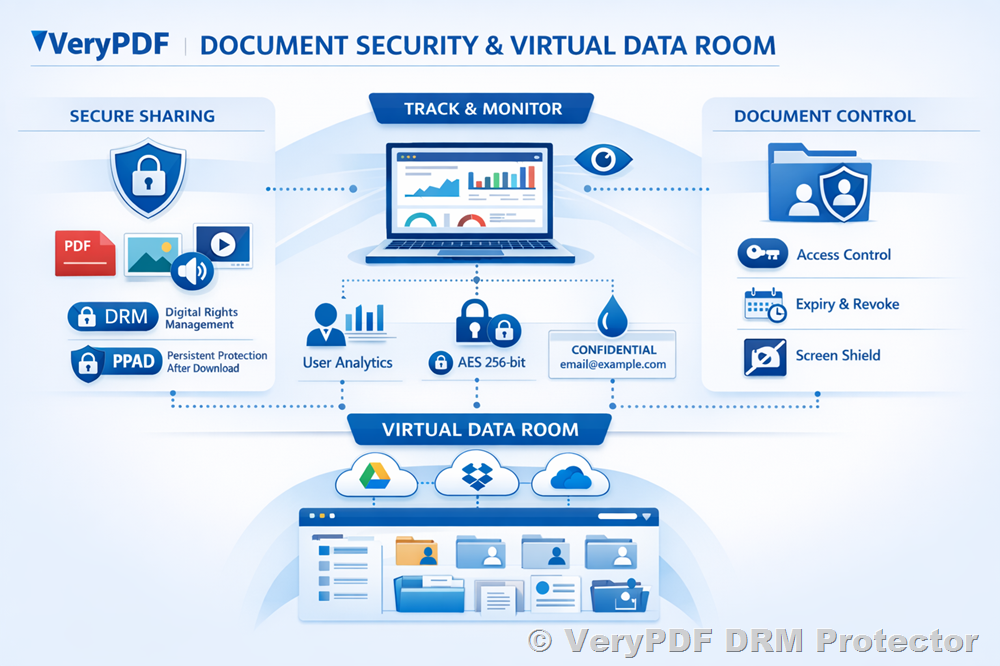
With VeryPDF DRM Protector, I can prevent printing or limit the number of prints. Copying and editing are completely disabled, so no one can convert a PDF into Word or Excel. It even blocks screen sharing, recording, and screenshots during Zoom or WebEx sessions. This level of control is a game-changer, especially for online courses where you can’t physically supervise who’s accessing your materials.

Dynamic watermarks are another feature I love. Each PDF displays the student’s name, email, and timestamp when viewed or printed. It’s subtle, but it’s a huge deterrent against photocopying or taking photos of the screen. I’ve had situations where a student considered sharing a PDF, but the watermark reminded them that it could be traced back to them instantly.

Setting up the DRM is straightforward. I can:

  • Lock PDFs to specific devices like laptops, tablets, or USB sticks.

  • Set expiry dates for course materialsperfect for assignments or short-term access.

  • Revoke access instantly if a student leaves the course or violates sharing policies.

  • Enforce view or print limits to prevent overuse.

For example, last term I created a set of revision PDFs for my graduate seminar. Instead of emailing them as regular attachments, I applied VeryPDF DRM Protector. Each student’s copy was locked to their laptop, and printing was restricted to one high-quality print per document. When one student asked if they could share the PDF with a friend in another department, I could revoke their access immediately. Problem solved. No content leaked, no awkward conversations needed.

Another time, I ran a paid online workshop with over 50 participants. Normally, distributing materials would have been risky, but with DRM protection, I could:

  • Ensure that only registered participants accessed the PDFs.

  • Stop screen sharing and printing to PDFs during live sessions.

  • Apply watermarks to every slide and handout automatically.

The feedback from my students was surprisingly positive. They appreciated the clarity and accessibility of the materials, and I appreciated not having to worry about piracy. The DRM controls operate quietly in the background without interrupting the learning experience.

If you’re wondering how to implement this yourself, here are some simple tips:

  1. Identify sensitive materialslecture slides, assignments, exams, paid content.

  2. Apply device or user lockstie PDFs to student laptops or tablets.

  3. Set printing limits and expiry rulescontrol how many times a document can be printed or viewed.

  4. Enable dynamic watermarksautomatically display identifying info on prints or on-screen.

  5. Revoke access if neededinstantly terminate access for anyone misusing content.

  6. Distribute securelyvia email, course portal, USB, or web links without exposing unprotected files.

The anti-piracy benefits are significant. PDFs can no longer be converted to Word or Excel. Screenshots and recordings are blocked. Unauthorized forwarding or redistribution is virtually impossible. Essentially, you regain full control over your teaching materials while keeping the student experience smooth and professional.

Over the years, I’ve experimented with different methods of securing course PDFs. Simple passwords were cracked, browser-based viewers were manipulated, and secure data rooms always felt like a false promisethey protect the login, not the content itself. VeryPDF DRM Protector, however, combines strong AES encryption with smart DRM controls, device locks, and dynamic watermarks to ensure PDFs remain exactly where they belong: in the hands of authorized students.

In my own teaching workflow, this tool has saved me countless hours. No more monitoring forums for leaked materials. No more worrying about intellectual property theft. No more frantic emails to students asking them to remove unauthorized copies. It’s peace of mind for educators, and the time saved can be spent improving course content instead of policing it.

In short, VeryPDF DRM Protector addresses all the major pain points educators face when distributing PDFs. It stops students sharing homework, prevents piracy, protects lecture materials, and keeps DRM controls intact even in tricky online environments.

I highly recommend this to anyone distributing PDFs to students, whether you teach in-person, online, or a mix of both. It’s easy to use, robust, and gives you complete control over your content.

Try it now and protect your course materials: https://drm.verypdf.com

Start your free trial today and regain control over your PDFs.


Frequently Asked Questions

How can I limit student access to PDFs?

You can lock PDFs to specific devices or users, set expiry dates, and revoke access at any time using VeryPDF DRM Protector.

Can students still read PDFs without copying, printing, or converting?

Yes, they can view the content normally. All DRM controls work in the background to prevent copying, printing, or converting without interrupting reading.

How do I track who accessed the files?

Dynamic watermarks and access logs allow you to identify who viewed or printed each PDF, helping track usage and discourage sharing.

Does it prevent PDF piracy and unauthorized sharing?

Absolutely. It blocks copying, forwarding, printing to other formats, screenshots, and screen sharing, effectively stopping piracy.

How easy is it to distribute protected lecture slides and homework?

Very easy. You can distribute files via email, USB, web links, or course portals without exposing unprotected copies.

Can I revoke access if a student leaves the course or misuses content?

Yes, you can instantly revoke access to any PDF, even after it has been downloaded.

Does it work for both online and offline PDF viewing?

Yes, VeryPDF DRM Protector supports offline viewing on authorized devices as well as secure online viewing in browsers or apps.


Keywords: protect course PDFs, prevent PDF piracy, stop students sharing homework, secure lecture materials, prevent DRM removal, anti-conversion PDF DRM, PDF DRM controls, lecture PDF protection, homework PDF security, digital course material security

Protect your PDFs from unauthorized copying, printing, forwarding, or conversion while maintaining secure distribution for users

Protect your PDFs from unauthorized copying, printing, forwarding, or conversion while maintaining secure distribution for users

As a lecturer, nothing frustrates me more than seeing my carefully prepared lecture slides and homework PDFs floating around online, shared without my permission. You spend hours crafting clear explanations, diagrams, and examples, only for a few careless clicks to ruin the exclusivity of your content. I remember last semester, when an entire set of my paid course materials appeared on a public forum, it felt like weeks of work evaporated overnight. It’s a scenario many of us in education face, but thankfully, there’s a practical solution: VeryPDF DRM Protector.

Protect your PDFs from unauthorized copying, printing, forwarding, or conversion while maintaining secure distribution for users

In my classroom and online courses, I’ve often dealt with students sharing PDFs with classmates who aren’t enrolled, printing assignments they shouldn’t, or converting materials into Word documents to bypass restrictions. This not only compromises academic integrity but also puts the value of paid or restricted content at risk. VeryPDF DRM Protector offers a way to regain control and keep teaching materials secure without making life complicated for students who genuinely need access.

One of the most common challenges is students sharing PDFs online. In one course, I had created a set of problem-solving exercises that were part of a paid workshop. Within days, a few students had uploaded them to a cloud drive accessible to anyone. Apart from copyright concerns, it diluted the learning experience because students started skipping exercises, thinking they already had the answers. By applying VeryPDF DRM Protector, I was able to restrict access so only enrolled students could open the files. Each PDF was locked to their devices, ensuring no unauthorized forwarding could occur. It felt like finally reclaiming control over my own classroom resources.

Another headache is unauthorized printing or copying. I once noticed that students were printing high-quality versions of my lecture slides and passing them around. Some even converted them into Word documents to edit or distribute further. This is where VeryPDF DRM Protector shinesit allows you to stop printing entirely or limit the number of prints, enforce print quality, and prevent printing to PDF or image formats. Dynamic watermarks are applied automatically, displaying the user’s information whenever the PDF is printed or viewed. Suddenly, it became clear who was sharing files and students knew their access was being monitored, which naturally discouraged misuse.

Loss of control over course content is another pain point for educators distributing paid materials. When teaching online courses, I need to ensure students can access homework PDFs, lecture slides, or supplemental readings, but only in the intended format and timeframe. VeryPDF DRM Protector allows you to set document expiryafter a certain number of views, prints, or days, the PDF self-destructs. You can also revoke access at any time, even after distribution. For instance, if a student withdraws from a course midway, I can instantly terminate their access without affecting others. This level of control not only protects intellectual property but also maintains fairness across the class.

Using this tool is surprisingly straightforward. Here’s how I apply it in my workflow:

  • Lock PDFs to specific devices or USB sticks so students can’t share login credentials or open files on other devices.

  • Prevent unauthorized copying and conversions to Word, Excel, or images. The encryption is strong, and there are no weak plugins or JavaScript hacks that can bypass the protection.

  • Enable dynamic watermarks showing the user’s name, email, and date whenever the PDF is opened or printed, deterring redistribution.

  • Set access expiry based on the number of views, prints, or a specific date. Perfect for timed assignments or short-term workshops.

  • Revoke documents instantly if you detect unauthorized use or need to update content.

I remember a particular case last term where I had released a batch of lecture notes for a paid summer course. Within 24 hours, one student attempted to share the PDFs with friends outside the class. Thanks to the DRM controls, the files wouldn’t open on unregistered devices, and the dynamic watermark immediately highlighted the source. It prevented a potential breach before it escalated, saving me hours of follow-up emails and student management.

Another feature that impressed me is how it stops screen sharing and screenshots, which is vital for online classes or virtual workshops. Students often use Zoom or other platforms to capture content during live sessions. VeryPDF DRM Protector blocks screen grabs and screen recording apps, ensuring your lectures and assignments stay in your control. You can even allow offline access without compromising security, which is great for students in areas with intermittent internet access.

From a teaching perspective, it also simplifies content distribution. I can send PDFs via email, web portals, or USB drives, knowing they’re protected. There’s no need for complicated logins, credentials, or browser-based viewers that can be bypassed. The decryption happens seamlessly on the student’s device, which means less technical support for me and a smoother experience for the students.

Here are a few tips for maximizing PDF protection in your courses:

  • Plan your distribution strategy: Decide whether students need offline access or online-only viewing.

  • Use device locking for sensitive materials: Lock critical PDFs to the devices of enrolled students.

  • Apply dynamic watermarks: Always use dynamic watermarks on printable materials to discourage redistribution.

  • Set view and print limits: Especially useful for graded homework or limited-access resources.

  • Regularly audit access logs: Track who is opening or printing your materials to spot unusual activity.

In short, VeryPDF DRM Protector addresses the key pain points professors face: preventing PDF piracy, stopping students from sharing homework, securing lecture materials, and maintaining control over content. It combines ease of use with robust security, making it a reliable tool for any educator distributing PDFs.

I highly recommend this to anyone distributing PDFs to students. Protecting your hard work doesn’t have to be complicated, and the peace of mind knowing your materials aren’t floating freely online is worth it. Try it now and protect your course materials: https://drm.verypdf.com. Start your free trial today and regain control over your PDFs.

FAQ

Q: How can I limit student access to PDFs?

A: VeryPDF DRM Protector allows you to lock PDFs to specific devices or USB drives, and you can revoke access at any time.

Q: Can students still read PDFs without copying, printing, or converting?

A: Yes. The DRM system permits reading while restricting copying, printing, and converting to other formats.

Q: How do I track who accessed the files?

A: Dynamic watermarks and usage logs make it easy to identify users and track views and prints.

Q: Does it prevent PDF piracy and unauthorized sharing?

A: Absolutely. It stops unauthorized distribution, conversion, screen grabs, and printing outside your control.

Q: Is it easy to distribute protected lecture slides and homework?

A: Yes. PDFs can be shared via email, web, or USB while maintaining full protection without requiring login credentials.

Q: Can I set PDFs to expire or self-destruct?

A: Yes. You can configure PDFs to expire after a number of views, prints, days, or on a fixed date.

Q: Are the watermarks removable?

A: No. The dynamic watermarks are permanent, identifying the user and discouraging sharing or photocopying.

Keywords/Tags: protect course PDFs, prevent PDF piracy, stop students sharing homework, secure lecture materials, prevent DRM removal, anti-conversion PDF DRM, protect online course materials, PDF content security, secure teaching PDFs, lecture PDF protection

How to prevent DRM removal attempts and protect PDFs containing paid or sensitive content from illegal sharing online

How to prevent DRM removal attempts and protect PDFs containing paid or sensitive content from illegal sharing online

As a professor, I’ve had those frustrating mornings when I discover my lecture slides have mysteriously appeared on student forums. You spend hours preparing detailed course materials, only to find them floating around where anyone could access them. It’s not just annoyingit can compromise the integrity of your course, devalue paid content, and even make students feel entitled to share copyrighted materials without permission. Protecting PDFs from illegal sharing and stopping DRM removal attempts has become an essential part of managing digital course content. That’s where tools like VeryPDF DRM Protector come in, giving educators control and peace of mind.

How to prevent DRM removal attempts and protect PDFs containing paid or sensitive content from illegal sharing online

One of the most common headaches I face is students sharing PDFs of assignments or lecture notes. Even when files are distributed for legitimate reasons, they can quickly end up on messaging apps, forums, or cloud drives. Suddenly, content intended for a closed classroom becomes accessible to anyone. This not only undermines your authority but also affects students who rely on accessing materials the right way.

Another challenge is unauthorized copying, printing, or converting of PDFs. I remember giving out a set of homework PDFs for an advanced course. Within a week, several students had converted the files to Word and shared editable versions. It’s one thing for students to reference materials, but another for them to redistribute or modify content without permission. These actions can dilute the value of your paid courses or proprietary teaching materials.

Finally, there’s the issue of losing control over sensitive or paid content. Online courses, premium resources, and research PDFs are investmentsboth for the instructor and the students. Once files are out in the wild, it’s nearly impossible to track who has them or prevent misuse. The thought of a carefully prepared lecture appearing in the wrong hands is enough to keep any educator awake at night.

This is where VeryPDF DRM Protector changes the game. The software allows me to secure every PDF I distribute, whether it’s lecture slides, homework, or paid course materials. With it, I can restrict access to only enrolled students or specific users, ensuring that only the intended audience can open the documents. Printing, copying, forwarding, and even attempts to remove DRM are blocked automatically.

One feature I’ve found invaluable is the ability to stop printing entirely or limit prints. For a large class, this ensures students can reference materials digitally without producing multiple hard copies that could easily circulate. I’ve also used the dynamic watermark feature, which embeds student-specific details like name and email directly onto the document. Not only does this deter sharing, but if a copy does end up online, it’s easy to trace back to the source.

Preventing DRM removal is another key benefit. Unlike standard password-protected PDFs or browser-based viewers, VeryPDF’s system locks files to specific devices or USB sticks. This means even if someone tries to bypass protections using scripts or plugins, the document remains secure. I’ve seen colleagues struggle with data room security, only to discover that shared credentials allowed unauthorized access. With VeryPDF, decryption keys are handled behind the scenes, and students never enter credentials that could be passed around.

In practical classroom terms, setting up protections is surprisingly simple. Here’s how I manage it:

  • Restrict Access: Assign PDFs to enrolled students only, either by device, USB, or web viewer.

  • Control Printing: Decide whether students can print at all, or limit the number of prints.

  • Apply Watermarks: Enable dynamic watermarks displaying user info for every view or print.

  • Set Expiry Dates: PDFs can expire after a fixed date, a certain number of views, or prints.

  • Revoke Access: Instantly revoke access to any document if needed, even after distribution.

I recall a recent course where I distributed a set of premium research PDFs. Normally, I would worry about them leaking online. Using VeryPDF DRM Protector, I locked the PDFs to student devices and set dynamic watermarks. Weeks later, one student accidentally shared a screenshot with a friend. Because the watermark clearly identified the original user, I was able to address it quickly, preventing wider circulation. It was a small incident, but it demonstrated how effective these protections can be in real scenarios.

Another classroom scenario involved online homework submissions. Students often try to convert PDF assignments to Word or Excel to manipulate the content. With DRM protections in place, these conversion attempts were blocked completely. This saved me hours of chasing down altered assignments and maintained academic integrity across the class.

For educators distributing paid courses online, VeryPDF DRM Protector also provides anti-piracy safeguards that make a huge difference. PDFs can no longer be converted to other formats, screen captured, or shared through Zoom and other screen-sharing tools. Even if someone tries, the software prevents screenshots and records no useful output. This kind of protection is critical when you’re monetising educational content or releasing sensitive research.

Here are some tips for making the most of PDF DRM in your teaching:

  • Always lock files to devices or USB drives to prevent unauthorized distribution.

  • Use dynamic watermarks on every PDF to discourage students from photographing screens or printing and sharing.

  • Limit printing and set clear expiry rules so content isn’t misused after it’s no longer relevant.

  • Regularly review access logs to track who viewed or printed files.

  • Revoke access immediately if needed to prevent unauthorized circulation.

I’ve personally found that implementing these protections has simplified my workflow. I spend less time worrying about leaks, and students understand that the content is protected. It also reassures parents and administrators that paid or sensitive materials are handled responsibly. VeryPDF DRM Protector turns a potentially stressful part of digital teaching into a smooth, manageable process.

Ultimately, the goal is to maintain control over your teaching materials while giving students secure access. VeryPDF DRM Protector helps me achieve that balance. By preventing DRM removal, blocking unauthorized printing and copying, and providing detailed watermarks and revocation controls, I can confidently distribute PDFs knowing that my work remains protected.

I highly recommend this to anyone distributing PDFs to students, whether for homework, lecture slides, or premium course content. It’s straightforward to use, highly effective, and protects your intellectual property in ways that standard PDF protections cannot.

Try it now and protect your course materials: https://drm.verypdf.com

Start your free trial today and regain control over your PDFs.

FAQs

How can I limit student access to PDFs?

You can restrict access to enrolled students only by locking PDFs to specific devices, USB drives, or a web viewer. This prevents unauthorized users from opening the files.

Can students still read PDFs without copying, printing, or converting them?

Yes. VeryPDF DRM Protector allows students to view content safely while preventing printing, copying, forwarding, or conversion.

How can I track who accessed my PDFs?

Dynamic watermarks and access logs let you identify which users viewed or printed files, making it easy to monitor usage.

Does it prevent PDF piracy and unauthorized sharing?

Absolutely. It stops DRM removal attempts, blocks screen grabs, prevents conversion to other formats, and allows you to revoke access at any time.

How easy is it to distribute protected lecture slides and homework?

Very simple. You can distribute PDFs by email, web, or USB. The documents remain protected without requiring students to enter login credentials.

Can I expire or revoke access to PDFs after distribution?

Yes. You can set PDFs to expire after a certain number of views, prints, days, or on a fixed date. Access can also be revoked instantly at any time.

Will dynamic watermarks help deter students from sharing files?

Definitely. Watermarks display user-specific information such as name, email, and date/time on every view or print, discouraging redistribution.

Tags/Keywords

protect course PDFs, prevent PDF piracy, stop students sharing homework, secure lecture materials, prevent DRM removal, anti-conversion PDF DRM, restrict PDF access, secure educational content, block PDF copying, online course protection

Stop hackers or students from bypassing PDF security while keeping authorized access simple and secure for learning or work

Stop hackers or students from bypassing PDF security while keeping authorized access simple and secure for learning or work

As a professor, I’ve had countless mornings where I opened my email to see my lecture slides or homework PDFs circulating on forums I didn’t even know existed. It’s frustratinghours of preparation, carefully crafted notes and assignments, suddenly out of my control. I want my students to learn, not to unintentionallyor intentionallyshare content with the world. But protecting PDFs has always felt like walking a tightrope: too much restriction frustrates legitimate students, too little leaves content exposed. That’s where I discovered VeryPDF DRM Protector, a solution that finally lets me secure my PDFs without complicating access for my students.

Stop hackers or students from bypassing PDF security while keeping authorized access simple and secure for learning or work

One of the biggest headaches in teaching is keeping control over digital materials. Students sharing PDFs is one thingsometimes it’s innocent, like wanting to help classmatesbut often it means losing control over paid course content or homework assignments. I remember last semester, an assignment I uploaded to our learning management system ended up on a student forum. Suddenly, I had to scramble to update the content, track down the original files, and figure out which students had accessed them. It’s not just inconvenientit undermines the learning process.

Another common problem is unauthorized printing, copying, or converting PDFs. I’ve seen students convert slides to Word or Excel to annotate them, thinking it’s harmless. But once a file is converted, shared, or printed, the material spreads beyond the classroom. Before I implemented any protective measures, I’d occasionally find entire problem sets posted online within hours of release. It’s demoralising, to say the least.

Finally, there’s the challenge of paid or restricted course content. If you’re a lecturer selling online modules or sharing resources for a certification course, losing control over PDFs can directly affect your income. When students bypass security measures or distribute files, it becomes impossible to track who has legitimate access. That’s where DRM really changes the game.

VeryPDF DRM Protector addresses all these pain points without making life difficult for students. It restricts PDF access to enrolled students or specific users, ensuring only those who should view the files can open them. At the same time, it prevents printing, copying, forwarding, or removing DRM. This means lecture slides, homework assignments, and paid course materials remain protected no matter where they go.

In practical terms, here’s how it works in a classroom scenario:

  • Restrict access to specific users: Each student gets a unique, device-locked PDF. Even if they try to share it, the file won’t open on another device.

  • Prevent copying, printing, or conversion: Students can read the content but can’t copy text into Word, convert slides to images, or print multiple times. Printing can be controlled, limited, or completely blocked.

  • Dynamic watermarks: Every view or print shows the student’s name, email, and date/time, deterring redistribution.

  • Screen sharing protection: Zoom, WebEx, and other platforms won’t let students screenshot or record slides, keeping your content secure even in live sessions.

  • Expiry and revocation: You can automatically expire access after a certain number of views, prints, days, or revoke access instantly if needed.

I recall a situation where I uploaded my semester’s lecture slides to the cloud for remote students. Within days, I noticed unusual downloads from unknown devices. Using VeryPDF DRM Protector, I was able to revoke access to those files immediately. No more guessing who had the slides or worrying about them ending up on forums. It gave me peace of mind and saved hours I would have spent chasing down leaks.

Using it day-to-day is surprisingly simple. For example, when preparing homework PDFs:

  • Step 1: Apply device-specific DRM to each PDF before distribution.

  • Step 2: Set printing limits or block printing entirely to prevent mass photocopying.

  • Step 3: Enable dynamic watermarks to display student information on all views and prints.

  • Step 4: Decide on expiry rulesafter a fixed date, number of views, or prints.

  • Step 5: Distribute files via email, LMS, or USB sticksno need to worry about security being compromised in transit.

This workflow has made managing my course materials easier and safer. Students can focus on learning rather than bypassing rules, and I retain complete control over my content.

One of the things I appreciate most is how DRM Protector handles both online and offline access. Students can view PDFs on their devices without needing constant internet access, but the files remain fully protected. Unlike browser-based viewers or secure data rooms, which can be manipulated, VeryPDF DRM Protector locks content at the device level, eliminating the “weakest link” problem.

Another big advantage is how it discourages piracy. Since documents are encrypted and access is tied to a specific user’s device, even if someone attempts to share files online, they won’t open elsewhere. Add dynamic watermarks, and you’ve essentially put your name on every copy, making students think twice before trying to redistribute.

Over time, I’ve noticed that DRM-protected PDFs improve the overall classroom workflow. I no longer spend hours chasing missing files or worrying about unauthorized access. Assignments get submitted on time, students respect the rules, and I can confidently distribute paid course materials without fearing they’ll be leaked.

If you’re a professor, lecturer, or educational content creator struggling with PDF security, I highly recommend VeryPDF DRM Protector. It’s straightforward, powerful, and keeps your content safe while letting authorized users access it seamlessly.

Try it now and protect your course materials: https://drm.verypdf.com
Start your free trial today and regain control over your PDFs.

FAQs

Q: How can I limit student access to my PDFs?

A: VeryPDF DRM Protector allows you to restrict files to specific users or devices. Only authorized students can open them.

Q: Can students still read PDFs without copying, printing, or converting?

A: Yes. Students can view the content normally, but DRM controls prevent copying, printing, and format conversion.

Q: How do I track who accessed my files?

A: Dynamic watermarks and DRM logs identify each user and their activity, helping you monitor access and spot potential leaks.

Q: Does it prevent PDF piracy and unauthorized sharing?

A: Absolutely. Device-locked files, dynamic watermarks, and restricted access make it nearly impossible to redistribute PDFs.

Q: How easy is it to distribute protected lecture slides and homework?

A: Very easy. Files can be sent via email, LMS, USB, or web distributionstudents access them securely without extra login credentials.

Q: Can I revoke access after distribution?

A: Yes. You can terminate access to any document or user instantly, regardless of location.

Q: Does it work for online and offline viewing?

A: Yes. Students can read PDFs offline while full DRM protection remains active, ensuring security in all environments.

Tags/Keywords

protect course PDFs, prevent PDF piracy, stop students sharing homework, secure lecture materials, prevent DRM removal, anti-conversion PDF DRM, control PDF printing, revoke PDF access, dynamic watermark PDFs, secure educational content

Prevent PDF piracy and maintain control over intellectual property for ebooks, course materials, and internal business files

Prevent PDF piracy and maintain control over intellectual property for ebooks, course materials, and internal business files

As I prepared my lecture slides for a new semester, a nagging worry kept me awake: what if my carefully crafted PDFs ended up circulating online without my permission? I had spent weeks developing assignments, examples, and course notes, and yet, once a PDF leaves my hands, I have little control over how it’s used. It’s a situation many professors, teachers, and educational content creators face daily: students sharing homework files, lecture materials being copied or converted, and the painstaking loss of control over intellectual property. This is where digital rights managementor DRMbecomes essential. Specifically, VeryPDF DRM Protector has changed the way I manage and protect my course PDFs, giving me peace of mind and more control over my teaching materials.

Prevent PDF piracy and maintain control over intellectual property for ebooks, course materials, and internal business files

One of the first challenges I faced in the classroom was students sharing PDFs. It often starts innocentlysomeone emails a classmate a homework assignmentbut quickly escalates. Files appear in online groups or shared drives, accessible by students who didn’t even enroll in my course. Suddenly, my carefully structured content is out in the wild, freely distributed, and the educational value I intended is diluted. Worse, it opens up possibilities for plagiarism and academic dishonesty.

Another pain point is unauthorized printing and copying. Even if a student doesn’t share files online, PDFs are easily printed, copied, or converted into Word documents. I once discovered that a set of lecture slides had been copied and posted to a forum as editable files. Not only did this breach copyright, but it also undermined the integrity of the course materials. Maintaining control over the exact format and content of your teaching files is essential, particularly when they include paid or restricted materials.

And let’s not forget the digital content creators and professors who sell online courses or distribute premium content. Without proper protection, your files could be downloaded, converted, or shared, directly impacting revenue and intellectual property rights. The fear of losing control can make you hesitant to share digital materials at all.

This is where VeryPDF DRM Protector becomes a practical solution. Unlike traditional PDF protection methods, it provides a robust set of tools that address these teaching pain points directly. With VeryPDF DRM Protector, you can restrict access to your PDFs so that only enrolled students or specific users can view them. This means you can confidently distribute homework, lecture slides, or ebooks, knowing they are protected from unauthorized sharing.

The software also prevents printing, copying, forwarding, or DRM removal, keeping your files intact and secure. In practice, this has saved me countless headaches. For example, last semester, I distributed a set of exam review PDFs to my students. Normally, I would worry about them being shared outside the class, but with VeryPDF DRM Protector, I was able to lock the documents to my students’ devices and even limit printing. When I checked access logs, I could see who had viewed the files, giving me confidence that they were only accessed by the right people.

A particularly helpful feature is dynamic watermarks. These display user-specific information such as name, email, and date whenever a file is viewed or printed. I remember a scenario where a student attempted to share a homework PDF on a messaging platform. The watermark immediately identified the user, deterring misuse and reinforcing accountability. It’s a subtle but powerful deterrent against piracy.

VeryPDF DRM Protector also addresses screen sharing and screenshot concerns. In today’s virtual classroom environment, it’s easy for students to record lectures or capture PDF content during online sessions via Zoom, WebEx, or other platforms. The software prevents this, stopping both screen recording and screenshot tools from capturing your protected content. I’ve had instances where this feature literally saved my course materials from being uploaded to unauthorized platforms.

For professors who distribute paid courses or ebooks, the expiry and self-destruct features are a game changer. You can automatically expire PDF access after a set number of views, prints, days, or even on a fixed date. This allows you to maintain control over time-sensitive materials or subscription-based content without having to manually track every file.

The software is also incredibly flexible in distribution. Protected PDFs can be locked to specific devices, USB sticks, or accessed through a web viewer. Unlike secure data rooms, which rely on login credentials that can be shared or hacked, VeryPDF DRM Protector ensures that users never need to enter credentials. Decryption keys are transparently relayed to a secure client keystore locked to the user’s device, meaning your files remain secure even outside your immediate network.

Here are some practical tips I’ve found useful in using VeryPDF DRM Protector:

  • Lock PDFs to devices: Assign your files to specific computers, tablets, or USB sticks. This prevents them from being shared elsewhere.

  • Limit printing or disable it completely: Decide whether students can print at all or allow only a limited number of prints.

  • Add dynamic watermarks: Include user information on PDFs to discourage unauthorized copying.

  • Set expiry dates: Automatically revoke access after a course ends or after a certain number of views.

  • Monitor access: Use logs to see who has opened your files, helping identify any unauthorized attempts.

In my experience, VeryPDF DRM Protector doesn’t just secure PDFsit simplifies the teaching workflow. I no longer spend hours worrying about whether my course materials might leak or be converted. It gives me the freedom to distribute digital content with confidence, whether for homework, lecture notes, or paid online courses.

Moreover, it has clear anti-piracy benefits. Students and hackers cannot bypass the DRM security to convert PDFs to Word, Excel, or images. It ensures that content stays exactly as intended, preventing unauthorized redistribution and maintaining the integrity of the teaching materials. I’ve even revoked access to specific users mid-semester when misuse was detected, which was impossible with traditional PDF security.

In conclusion, VeryPDF DRM Protector addresses the real pain points professors and educators face in managing digital course content. From stopping students from sharing homework and securing lecture materials to preventing unauthorized printing and conversion, it gives you full control over your intellectual property. I highly recommend this to anyone distributing PDFs to students, especially if you want to prevent piracy and maintain content integrity.

Try it now and protect your course materials: https://drm.verypdf.com
Start your free trial today and regain control over your PDFs.

Frequently Asked Questions (FAQs)

How can I limit student access to my PDFs?

You can restrict access to enrolled students or specific users, lock files to their devices, and set viewing permissions.

Can students still read PDFs without copying, printing, or converting?

Yes, VeryPDF DRM Protector allows students to view content while preventing printing, copying, or file conversion.

How can I track who accessed my files?

The software provides access logs and audit tools, so you can see who opened a document and when.

Does it prevent PDF piracy and unauthorized sharing?

Absolutely. It blocks printing, copying, forwarding, DRM removal, screen grabbing, and unauthorized conversions.

How easy is it to distribute protected lecture slides and homework?

Very easyyou can send files via web, email, USB sticks, or enable web viewer access without worrying about unauthorized use.

Can I revoke access after distribution?

Yes, you can terminate access at any time, even after files have been distributed, ensuring full control.

Does it work with online teaching platforms and virtual classrooms?

Yes, it prevents screen sharing and screenshots, making it ideal for Zoom, WebEx, and other online learning environments.

Keywords/Tags:

protect course PDFs, prevent PDF piracy, stop students sharing homework, secure lecture materials, prevent DRM removal, anti-conversion PDF DRM, PDF content protection, secure digital teaching materials, stop unauthorized PDF sharing, PDF DRM software