When distributing digital publications, especially sensitive works such as academic materials, research, or exclusive books, one of the greatest challenges is ensuring that access is strictly controlled. Publishers and authors want to allow readers to enjoy their work, but at the same time prevent copying, unauthorized sharing, or uncontrolled distribution.
Recently, a customer approached us with a project to protect and distribute their digital book Homo Escravis. Their requirements are very representative of what many publishers, authors, and organizations need. In this article, we will walk through their key questions, explain what VeryPDF DRM Protector offers, and outline how our solution can meet similar needs for anyone seeking strong, flexible document security.
![[Solution] How to Protect Digital Books and PDFs with DRM: Device Binding, Expiration, Copy Prevention, and License Control Using VeryPDF DRM Protector](https://drm.verypdf.com/wp-content/uploads/2025/09/image_thumb-11.png "[Solution] How to Protect Digital Books and PDFs with DRM: Device Binding, Expiration, Copy Prevention, and License Control Using VeryPDF DRM Protector")
✔ Key Requirements and Our Answers
1. Device Binding — License Tied to a Single Device
Requirement: Publishers often want each license to be usable only on the device where it was first activated, preventing the same account or file from being shared with others. Without such restrictions, a single purchase could easily be copied and distributed to multiple readers, resulting in revenue loss and loss of control.
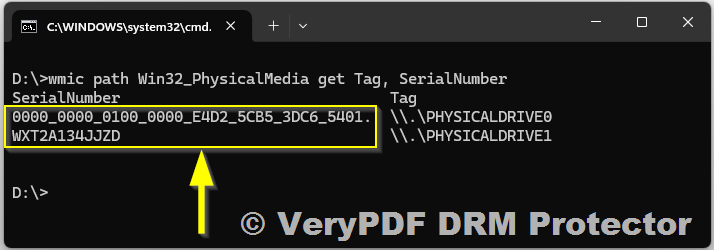
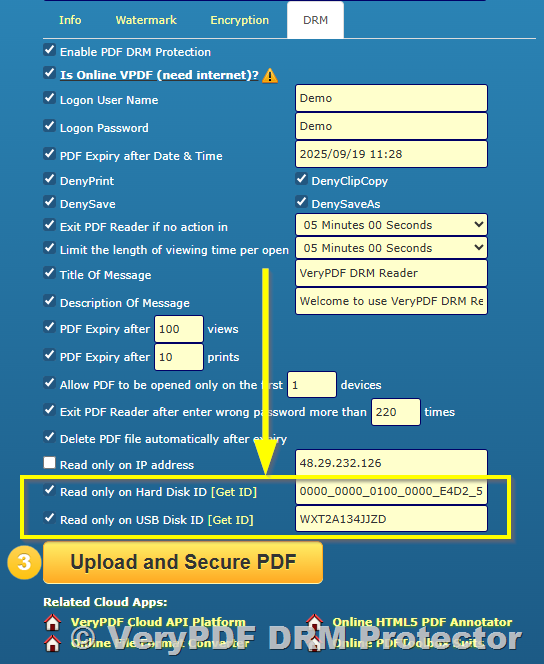
Our Solution: ✔ Fully supported. VeryPDF DRM Protector includes a powerful feature called “Allow PDF to be opened only on the first N devices.”
![[Solution] How to Protect Digital Books and PDFs with DRM: Device Binding, Expiration, Copy Prevention, and License Control Using VeryPDF DRM Protector](https://drm.verypdf.com/wp-content/uploads/2025/09/image_thumb-12.png "[Solution] How to Protect Digital Books and PDFs with DRM: Device Binding, Expiration, Copy Prevention, and License Control Using VeryPDF DRM Protector")
Here’s how it works in practice:
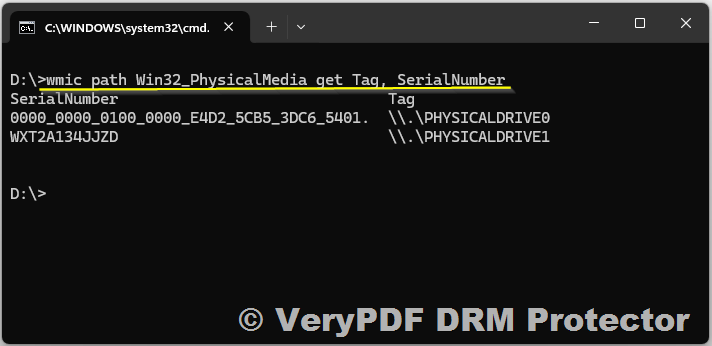
- First Activation: When a reader opens the protected PDF for the first time, the system automatically records the unique hardware fingerprint of the device.
- Device Locking: If the license is configured with N = 1, the document becomes permanently bound to that device. This means it cannot be opened on any other computer, tablet, or phone, even if the file itself is copied.
- Flexible Options: If publishers want to allow limited portability, they can set N = 2 or 3, which would let the reader use the same license on multiple personal devices (e.g., a laptop + tablet).
- Security Benefits: Device binding ensures that only the rightful purchaser can access the content. It prevents file sharing via email, USB drives, or cloud storage because the DRM license won’t work outside the authorized device list.
- Use Cases:
- Academic publishers who want to stop students from sharing textbooks.
- Authors selling premium eBooks who want to guarantee that only paying readers can access their work.
- Corporations distributing internal training materials or confidential documents.
With this feature, device binding creates a one-to-one relationship between license and user hardware, ensuring strict control and preventing unauthorized duplication.
2. Automatic Expiration After 12 Months, with Renewal
Requirement: Many publishers and authors want to offer their digital books or PDFs on a subscription or time-limited basis. For example, a license may be valid for 12 months, after which the reader must renew their subscription or purchase a new license to continue access. Without such control, readers could keep the file indefinitely, which reduces ongoing revenue and undermines the subscription model.
Our Solution: ✦ This feature can be implemented as a custom development within VeryPDF DRM Protector.
Here’s how it works in practice:
- Fixed License Duration: The license is configured to automatically expire after 12 months from the date of activation. Once the expiration date is reached, the file will no longer open for the reader.
- Automatic Enforcement: The expiration happens without manual intervention by the publisher. Readers cannot bypass or reset the expiration date by changing the system clock or reinstalling the file.
- Renewal Options:
- Readers can request a renewal license directly from the publisher.
- Administrators can issue renewal codes or extend access from the DRM management console.
- Renewal periods can be flexible — for example, another 6 months, 12 months, or any custom duration.
- Subscription Business Model Support: This allows publishers to move from a one-time sale to a recurring revenue model, where readers pay annually (or at another interval) to retain access.
- Practical Use Cases:
- Academic publishers — grant students access to textbooks for the duration of a semester or academic year.
- Corporate training providers — provide training manuals or certifications that expire after one year, encouraging renewal for updates.
- Authors of premium eBooks — offer subscription-based access where content is updated or refreshed annually.
By adding automatic expiration and renewal, VeryPDF DRM Protector ensures that publishers retain long-term control over their digital assets, while readers enjoy a seamless experience of accessing content as long as their subscription is active.
3. Mandatory Revalidation Every 30 Days
Requirement: Publishers and organizations often want to ensure that a digital book, training manual, or confidential PDF is not just activated once and then forgotten about. Instead, they want a continuous validation process so that only active, authorized users can access the document. A common approach is to require that the document revalidates every 30 days. If the revalidation does not occur — for example, because the license expired, the user’s account was suspended, or the device lost authorization — the reader should be blocked from accessing the file.
Why This Matters:
- Prevents unattended or abandoned access to secure content.
- Ensures that subscription-based readers are actively checked against the publisher’s database.
- Adds an extra layer of security for sensitive material that should not remain accessible indefinitely.
Our Solution: ✦ This feature requires custom development within VeryPDF DRM Protector, and we can build it to meet your exact needs.
Here’s how it would work in practice:
- Initial Activation:
- When a reader first opens the protected document, it validates their license online against the DRM server.
- 30-Day Revalidation Cycle:
- Every 30 days (or any custom interval you specify), the DRM system requires the document to “call home” and verify the license again.
- If the license is still valid, the document continues to open normally.
- If the license is expired, revoked, or suspended, access is immediately blocked.
- User Notifications:
- Readers can receive reminders (e.g., “Your license needs revalidation in 3 days”) so they have time to reconnect and validate.
- Hybrid Online/Offline Support:
- During the 30-day window, the reader can work offline without interruption.
- At the end of the period, the system forces an online check. If the device cannot connect, the cached license becomes invalid, and the file locks automatically.
- Administrative Benefits:
- Publishers gain real-time usage insights — for example, who is still reading, which devices are active, and which readers have stopped revalidating.
- This provides better compliance control for audit-heavy industries (education, research, corporate training, healthcare, finance).
Practical Use Cases:
- Educational publishers — ensure that students’ access to textbooks is checked every semester or month.
- Corporate compliance manuals — enforce that only active employees can keep using the files.
- Subscription eBooks — maintain recurring access control without relying solely on expiration dates.
With mandatory 30-day revalidation, VeryPDF DRM Protector gives publishers a dynamic way to enforce subscription policies, monitor reader activity, and prevent unauthorized long-term access.
4. Offline Reading with Automatic Blocking if Validation Fails
Requirement: Many readers want the flexibility to access digital books or protected PDFs offline, especially when traveling, working in areas without internet, or studying on mobile devices. However, publishers and organizations still need strong security controls to ensure that the document does not remain open forever without revalidation. The challenge is: how to allow offline access, while still enforcing license checks and blocking unauthorized use.
Why This Is Important:
- Readers expect convenience and the ability to read offline, but publishers cannot risk uncontrolled distribution.
- Without periodic validation, a file copied to a device could remain open indefinitely, defeating DRM protection.
- A balanced solution must combine usability and security, giving readers freedom but keeping publishers in control.
Our Solution: ⚠ A fully offline file can never be permanently blocked, because it would have no way to “phone home” and check its validity. However, VeryPDF DRM Protector can implement a hybrid offline + online model that offers strong protection while still allowing offline reading.
Here’s how it works:
- Temporary Offline License Cache:
- When a document is opened online and validated, the system issues a temporary license token that is stored locally.
- This token allows the reader to continue accessing the document offline for a limited period (e.g., 30 days).
- Automatic Revalidation Requirement:
- Once the offline period expires, the file forces revalidation by connecting to the DRM server.
- If the reader cannot connect, or if the license is revoked or expired, access is automatically blocked.
- Blocking Mechanism:
- The offline license is cryptographically bound to the device and the expiration date.
- If the device clock is tampered with, the DRM system can detect inconsistencies and block access.
- User Experience Flow:
- Day 1: Reader activates the license online.
- Day 2–30: Reader enjoys offline access, even without internet.
- Day 31: The DRM system requires revalidation. If successful, a new offline token is issued; if not, access is blocked.
- Practical Scenarios:
- Students traveling abroad can still read textbooks offline but must reconnect once a month.
- Corporate employees in restricted environments (with no Wi-Fi) can access internal manuals temporarily but must revalidate later.
- Subscription-based eBooks ensure that readers who cancel their subscription cannot continue using files indefinitely offline.
Benefits of Hybrid Offline Protection:
- Flexibility: Readers are not penalized for being offline occasionally.
- Security: Access is never permanent — it always cycles back to online validation.
- Scalability: Publishers can define the offline grace period (7, 15, 30 days, or more).
- Compliance: Audit logs record each validation, giving publishers visibility into when and where files are being used.
With this model, VeryPDF DRM Protector balances convenience and control. Readers can access digital content offline, but publishers retain the power to automatically block access if validation fails — protecting revenue, preventing unauthorized long-term use, and ensuring compliance with licensing policies.
5. Remote License Revocation
Requirement: Publishers and organizations need the ability to instantly revoke access to a digital book, PDF, or secure document if a risk situation arises. This could be due to unauthorized sharing, a security breach, cancellation of a subscription, or an employee leaving a company. Without remote control, once a file is distributed, the publisher loses the ability to enforce access rights.
Why This Is Critical:
- Protects against data leaks if files are copied or shared outside the intended audience.
- Enables fast response to suspicious activity (e.g., multiple logins from unusual locations).
- Supports business policies such as refund processing, subscription cancellations, or employee offboarding.
- Gives publishers peace of mind, knowing they can always pull back access if needed.
Our Solution: ✔ Fully supported in VeryPDF DRM Protector.
Here’s how remote revocation works:
- Centralized Control via Admin Console:
- Administrators log into the web-based DRM management console.
- They can search for a specific user, device, or license ID.
- With one click, the administrator can revoke access immediately.
- Effect on the Reader’s Device:
- If the reader is online, the revocation is applied instantly — the document becomes inaccessible at the next open attempt.
- If the reader is offline, the revocation takes effect as soon as the device reconnects and attempts validation (e.g., at the next 30-day revalidation cycle).
- Flexible Revocation Options:
- Revoke access for a single document while leaving others available.
- Revoke access for a specific user account across all documents.
- Revoke access for a device if it is lost, stolen, or compromised.
- Audit Trail and Transparency:
- Every revocation action is logged in the system, including administrator details, time, and reason for revocation.
- Publishers can maintain a full compliance record of license changes.
Practical Use Cases:
- Academic institutions: A student drops out mid-semester; their digital textbook license is revoked to prevent continued access.
- Corporations: An employee leaves the company; their access to training manuals and internal PDFs is terminated instantly.
- Authors and publishers: A suspicious user shares login credentials; their license is revoked to protect against piracy.
- Subscription services: A reader cancels their plan; their license is disabled at the end of their billing period.
Benefits of Remote Revocation with VeryPDF DRM Protector:
- Immediate protection against unauthorized use.
- Granular control — revoke one document, one user, or an entire device.
- Reduced risk of piracy and data loss.
- Business flexibility — adapt quickly to customer changes, security incidents, or compliance needs.
With remote license revocation, VeryPDF DRM Protector ensures that publishers, authors, and organizations never lose control over their digital content, even after distribution. It gives you the ability to pull the plug at any time, protecting both intellectual property and business interests.
6. Blocking of Copying, Printing, and Redistribution
Requirement: One of the most common concerns for publishers, authors, and organizations is preventing readers from copying text, printing entire documents, or redistributing files without permission. Once a PDF or eBook is distributed in unprotected form, it can easily be copied, shared on unauthorized platforms, or printed and scanned, creating uncontrolled duplicates. A strong DRM solution must enforce strict rules that stop these activities while still allowing legitimate readers to enjoy the content.
Why This Matters:
- Unauthorized copying reduces the value of intellectual property and makes piracy easier.
- Uncontrolled printing can lead to physical distribution outside the publisher’s control.
- Redistribution of files (via email, file-sharing services, or social networks) is one of the main ways that digital rights are violated.
- Without proper restrictions, publishers lose revenue, exclusivity, and control.
Our Solution: ✔ VeryPDF DRM Protector includes built-in controls that allow administrators to block, limit, or customize how copying, printing, and redistribution are handled.
Here’s how it works:
- Copy/Paste Protection:
- By default, DRM-protected documents disable copy and paste functions at the viewer level.
- Readers cannot select text or images and transfer them into other applications.
- This prevents content leakage through simple methods like Ctrl+C / Ctrl+V.
- Printing Restrictions:
- Administrators can choose to completely block printing, or limit printing to a certain number of copies.
- When printing is allowed, documents can include dynamic watermarks (with user ID, email, timestamp, etc.) so any leaked printouts can be traced.
- Attempts to “print to PDF” or virtual printers are also blocked, closing common loopholes.
- File Redistribution Prevention:
- DRM licenses are device- and user-bound, meaning even if a file is copied and shared, it cannot be opened on another device without proper authorization.
- Shared files without a license key or valid user assignment remain unreadable gibberish to unauthorized recipients.
- Watermarking for Traceability:
- Publishers can add dynamic, non-removable watermarks that display reader-specific information (name, email, IP address).
- Even if screenshots or photos are taken, the watermarks act as a strong deterrent and provide forensic evidence of unauthorized use.
- Flexible Administration:
- Copying, printing, and redistribution settings can be applied globally (for all documents) or individually (for specific books, PDFs, or users).
- This gives publishers control to allow limited printing for trusted customers while blocking it entirely for others.
Practical Use Cases:
- Academic publishers: Prevent students from copying textbook chapters into unauthorized study guides.
- Corporate organizations: Stop employees from printing or forwarding sensitive policy documents outside the company.
- Authors of premium eBooks: Protect against piracy by ensuring that shared copies cannot be opened by non-paying readers.
- Training providers: Allow printing with watermarks only for verified trainees, while blocking mass duplication.
Benefits of Copy/Print/Redistribution Control with VeryPDF DRM Protector:
- Ensures intellectual property remains secure.
- Protects against both casual sharing and deliberate piracy.
- Provides traceability through watermarking.
- Gives publishers flexible control to adapt policies based on business needs.
With these features, VeryPDF DRM Protector ensures that your digital books, PDFs, and documents cannot be freely copied, printed, or redistributed. This keeps your content secure, maintains exclusivity, and safeguards your revenue model — whether you’re distributing to hundreds of students, corporate employees, or thousands of paying readers worldwide.
7. Screenshot Protection
Requirement: One of the hardest challenges in digital rights management is stopping readers from taking screenshots or screen recordings of protected content. Even if copying, printing, and redistribution are blocked, a user can still capture the screen using built-in OS shortcuts, third-party tools, or even external cameras. Publishers therefore want screenshot protection to prevent or at least strongly discourage this kind of content leakage.
Why Screenshot Protection Is Important:
- Screenshots can be shared instantly on social media, messaging apps, or piracy websites.
- Unlike printing or copying, screenshots bypass most traditional DRM restrictions.
- A single captured page of an eBook or confidential PDF can spread quickly, damaging the value of premium content.
- For corporate, legal, or medical documents, even one unauthorized capture may constitute a serious compliance breach.
Our Solution: ✦ While no DRM system can 100% prevent screenshots on all devices and platforms, VeryPDF DRM Protector provides a range of strong mitigation strategies to minimize risk and deter users.
Here’s how we approach it:
- OS-Level Screenshot Blocking (Where Supported):
- On Windows and macOS, our DRM viewer can detect or block print screen commands and common capture utilities.
- On mobile platforms (iOS, Android), APIs can be leveraged to block or blur screenshots when attempted.
- Dynamic Watermark Overlays:
- Every page of the document can include a visible or semi-transparent watermark showing user-specific details such as:
- Name or email address
- Device ID
- IP address
- Date and time
- This discourages screenshots, because any captured content is traceable back to the original user.
- Forensic (Invisible) Watermarking:
- Beyond visible marks, invisible digital watermarks can be embedded into the content.
- Even if a user removes or edits visible watermarks, publishers can still identify the source of leaks.
- Session Monitoring & Alerts (Optional Customization):
- Advanced versions can include session tracking that logs suspicious activity, such as frequent focus changes (indicating a screen recorder might be active).
- Administrators may receive alerts if unusual screenshot-like activity is detected.
- User Deterrence Through Policy & UX:
- Readers are notified during activation that screenshots are monitored and watermarked.
- This psychological deterrent significantly reduces casual attempts at content capture.
Practical Use Cases:
- Educational publishers: Prevent students from screenshotting and sharing textbooks or test materials.
- Corporate compliance documents: Ensure sensitive policies or financial records cannot be easily captured for leaks.
- Medical and legal industries: Protect highly confidential files from being copied via screen capture.
- Authors of premium eBooks: Discourage piracy by making screenshots unattractive and risky.
Benefits of Screenshot Protection with VeryPDF DRM Protector:
- Strongly reduces the risk of unauthorized content sharing.
- Makes any leaked screenshots traceable through watermarking.
- Provides platform-specific blocking where technically possible.
- Balances security with usability — readers can still view content normally but are discouraged from capturing it.
Important Note: Since no DRM system can block external cameras (e.g., a photo taken with a smartphone), the most effective strategy is layered protection — combining screenshot blocking, visible watermarks, and forensic watermarking to minimize the risk and impact of leaks.
With these strategies, VeryPDF DRM Protector gives publishers confidence that their documents are safe from casual screenshotting and deliberate screen-capture piracy, while maintaining a smooth user reading experience.
8. IP Tracking at Activation and Reading
Requirement:
For publishers, authors, and organizations distributing digital books or sensitive PDFs, it’s essential to track where and when documents are accessed. IP tracking provides an additional layer of security and compliance, helping to detect unauthorized use, suspicious activity, or license sharing.
Our Solution: ✔ Supported.
VeryPDF DRM Protector automatically records IP addresses at both activation and every reading session, providing detailed insights into document usage:
- Activation Tracking: The first time a reader opens a protected file, the DRM system logs the IP address. This ensures that the initial access is recorded and tied to the licensed user and device.
- Reading Session Tracking: Each time the document is opened afterward, the system records the current IP address and timestamp, giving a full audit trail of access history.
- Geo-Location Insights: While IPs do not reveal exact locations, they allow approximate geolocation, helping detect if a license is being accessed from unexpected regions.
- Integration with Audit Logs: IP tracking works alongside other audit data — such as device ID, user account, and time of access — to create a comprehensive usage report.
- Suspicious Activity Alerts: Multiple activations from different IP addresses or unexpected geographic regions can flag potential license misuse, enabling timely action such as revocation.
Practical Benefits:
- Helps prevent license sharing or unauthorized distribution.
- Provides transparency for compliance audits, internal reporting, and client accountability.
- Supports organizations in detecting anomalies or potential security breaches quickly.
- Works seamlessly with other DRM controls like device binding, revalidation, and offline protection to maintain complete control over digital content.
With IP tracking at activation and reading, VeryPDF DRM Protector ensures that publishers and organizations can monitor access in real-time, maintain compliance, and protect intellectual property from unauthorized distribution or misuse.
9. Installable Desktop or Mobile Version
Requirement:
Some publishers and organizations want to provide a dedicated app for reading protected content instead of relying on web-based or generic PDF viewers. A custom installable reader can enhance security, enforce DRM rules more strictly, and improve the user experience. This is especially important for highly sensitive documents, premium eBooks, or subscription-based content.
Our Solution: ✔ Supported.
VeryPDF DRM Protector already offers cross-platform support with secure readers for Windows, macOS, Android, and iOS. Additionally, we can develop a branded installable version tailored to your requirements.
Here’s what an installable desktop or mobile version provides:
- Enhanced Security:
- Full control over the reading environment.
- Enforced DRM rules such as device binding, offline license caching, and screenshot/watermarking.
- Limits on copying, printing, or exporting content.
- Custom Branding:
- App can include your logo, colors, and UI design for a professional look.
- Helps maintain a premium reading experience for your audience.
- Offline Access with Security Controls:
- Readers can access content offline while still requiring periodic license revalidation.
- DRM rules continue to apply even when the user is not connected to the internet.
- Cross-Platform Availability:
- Desktop versions for Windows and Mac.
- Mobile versions for iOS and Android.
- Ensures that your audience can access content on their preferred device while remaining fully protected.
- Administrative Control:
- Integrated with the DRM management console for easy license distribution, revocation, and tracking.
- All usage data from the app — including IP, device ID, and reading activity — is logged for compliance and auditing.
Practical Use Cases:
- Corporate training: Employees use a secure app to access internal manuals or confidential guides.
- Academic publishers: Students access eTextbooks through a branded reader app with offline functionality.
- Premium eBooks or subscription content: Readers enjoy a professional, branded experience while DRM protections are strictly enforced.
Benefits of an Installable Version:
- Provides stronger DRM enforcement than standard PDF viewers.
- Enables offline access without compromising security.
- Enhances reader experience with branding and optimized UI.
- Fully compatible with all other DRM features, such as device binding, revalidation, and remote revocation.
With a dedicated installable desktop or mobile reader, VeryPDF DRM Protector gives publishers and organizations maximum control over content distribution, while delivering a secure, branded, and seamless reading experience to their audience.
10. Simple Administration
Requirement:
Publishers and organizations distributing digital books or sensitive PDFs need easy-to-use administrative tools. Not every team has technical expertise to manage complex APIs or coding integrations. The goal is to control document access, manage users, and monitor usage quickly and efficiently without requiring extensive IT support.
Our Solution: ✔ Supported.
VeryPDF DRM Protector offers a web-based administration console that allows administrators to manage documents, licenses, and users with minimal effort. Key features include:
- Intuitive User Interface:
- Administrators can add or remove users, assign licenses, and configure document permissions through a clean, straightforward dashboard.
- All controls are accessible via simple menus, without coding or API calls.
- License Management:
- Easily bind licenses to devices, set expiration dates, and enforce revalidation intervals.
- Apply restrictions on copying, printing, and redistribution for each document individually or globally.
- Monitoring and Reporting:
- View real-time usage logs, including activation history, IP addresses, and device IDs.
- Generate audit reports for compliance or internal review, giving full visibility into document distribution.
- Customizable Settings:
- Adjust DRM policies such as offline access duration, screenshot mitigation, and watermarking.
- Apply global policies or customize rules per document or user group.
- Automation Optional:
- APIs are available for teams that want to automate large-scale license management, but manual administration is fully supported for smaller deployments or non-technical teams.
Practical Benefits:
- Reduces administrative overhead — tasks that once took hours can now be done in minutes.
- Makes it easy to scale from a small reader base to thousands of users.
- Empowers administrators to enforce security policies consistently without relying on IT support.
- Supports quick responses to issues such as license revocation, reassignments, or content updates.
With VeryPDF DRM Protector, even small teams or publishers without technical staff can efficiently manage secure documents, monitor access, and maintain control over their content, all through a simple, user-friendly interface.
Pricing That Fits Small and Large Projects
You can review and subscribe to our plans here:
https://drm.verypdf.com/purchase/
Custom Development for Special Needs
Some requirements, such as automatic license expiration, 30-day revalidation, offline blocking, advanced screenshot protection, or branded reader apps — require custom development.
We provide these as one-time services:
- You select the features you need.
- We provide a fixed quote.
- After payment, delivery is usually within one week.
This ensures you get exactly the functionality you require without ongoing development costs.
Conclusion
For authors, publishers, and organizations that need strong document protection with flexibility, VeryPDF DRM Protector provides a powerful foundation. Out of the box, it covers core needs like device binding, license revocation, IP tracking, and blocking of copying and printing. For specialized requirements — such as automatic expiration, periodic revalidation, offline blocking, or enhanced screenshot protection — our team can deliver fast, cost-effective customizations.
If you are planning to distribute protected digital books or sensitive documents, we invite you to try VeryPDF DRM Protector today:
https://drm.verypdf.com/purchase/
With VeryPDF DRM Protector, you can protect your intellectual property, control distribution, and scale confidently as your readership grows.

![[Solution] How to Protect Digital Books and PDFs with DRM: Device Binding, Expiration, Copy Prevention, and License Control Using VeryPDF DRM Protector](https://drm.verypdf.com/wp-content/uploads/2025/09/image-11.png "[Solution] How to Protect Digital Books and PDFs with DRM: Device Binding, Expiration, Copy Prevention, and License Control Using VeryPDF DRM Protector")
![[Solution] How to Protect Digital Books and PDFs with DRM: Device Binding, Expiration, Copy Prevention, and License Control Using VeryPDF DRM Protector](https://drm.verypdf.com/wp-content/uploads/2025/09/image-12.png "[Solution] How to Protect Digital Books and PDFs with DRM: Device Binding, Expiration, Copy Prevention, and License Control Using VeryPDF DRM Protector")