
Securely Redact Sensitive Data in PDFs with Offline AI-Powered Tool
Last month, our legal team sent a set of contracts to a potential partner, only to realize afterward that several PDFs still contained unredacted personal informationemployee emails, client names, and financial figures. The moment we realized this, I felt a knot in my stomach. One simple oversight could have triggered a compliance nightmare under GDPR, not to mention the reputational damage if that data fell into the wrong hands. For businesses handling sensitive documents daily, this scenario is all too real: sharing PDFs without proper redaction can put companies at serious risk.
Sensitive information leaks in documents are more common than many managers realize. Even when teams attempt to “black out” private data, manual redaction can failtext can sometimes be copied, recovered, or overlooked entirely. Worse, employees often rely on free online tools to redact PDFs, unknowingly uploading confidential contracts, financial statements, or HR records to third-party servers. The consequences can be severe: regulatory fines, legal exposure, and loss of client trust.
This is where the VeryPDF AI PDF Redaction Tool Command Line comes in. Designed specifically for businesses, it allows you to permanently remove sensitive data from PDFs while staying fully offline. Unlike visual redaction, this tool ensures that confidential information is truly eliminatednot just hiddenbefore sharing.
One of the most common pain points I’ve seen involves accidental exposure of personal identifiable information (PII). Imagine a company sending a PDF payroll report to an external auditor. Without proper redaction, employee names, social security numbers, and salary details could be exposed. VeryPDF’s AI-powered tool automatically scans each document for sensitive data, detects PII, financial figures, and confidential clauses, and applies permanent redaction. This drastically reduces the risk of data leaks.
Another significant risk is relying on manual redaction. Blacking out text in PDFs seems effective, but it doesn’t actually remove the underlying data. Skilled individualsor even basic softwarecan often recover this hidden content. I once reviewed a case where an HR department manually redacted an employee file, only for the employee’s private details to be recoverable in the shared PDF. With VeryPDF’s solution, once redaction is applied, the data is permanently removed, eliminating the possibility of recovery.
Finally, many companies unknowingly compromise their own security by using online redaction services. Uploading confidential contracts, financial reports, or internal memos to cloud-based tools exposes files to third-party servers. Even if the service promises deletion after processing, there’s no guarantee. Using VeryPDF’s offline tool ensures that sensitive documents never leave your local environment. Everythingfrom detection to redactionhappens on your machine, guaranteeing full privacy protection.
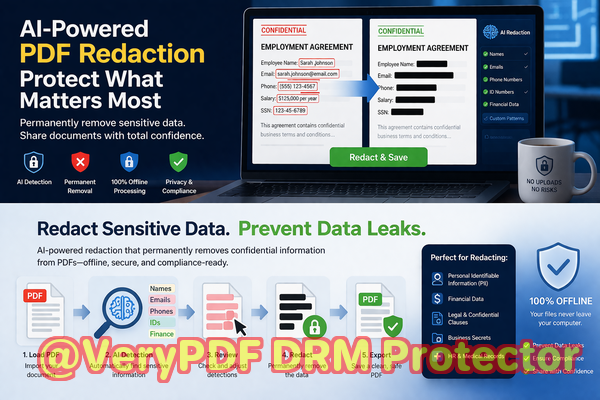
The practical workflow is simple and tailored for busy professionals. First, load your PDF into the tool. The AI scans the document, automatically identifying names, email addresses, phone numbers, ID numbers, financial data, and confidential clauses. You can review detected items to confirm accuracy, then apply redaction. Finally, export a clean PDF ready for safe sharing. It’s as straightforward as that.
Common types of data businesses should consider redacting include:
-
Personal identifiable information (PII) like names, emails, phone numbers, and government IDs
-
Financial data including invoices, payroll, account numbers, and transaction details
-
Business-sensitive information such as trade secrets, internal reports, or product strategies
-
Legal or confidential clauses in contracts, NDAs, or client agreements
The benefits are tangible. By using this tool, one company I worked with avoided a major compliance violation when preparing annual reports for external auditors. Another organization, tired of relying on online services, switched entirely to an offline workflow, preventing sensitive client data from ever leaving the office. In both cases, the AI-powered redaction ensured permanent removal of confidential information and gave the teams peace of mind.
I’ve found that mixing automation with human review provides the best results. AI identifies potential sensitive content quickly, while a final review ensures nothing slips through. This combination protects against human error, manual oversight, and the limitations of visual redaction.
I highly recommend this to anyone who needs to share documents safely without risking data leaks or compliance issues. With VeryPDF AI PDF Redaction Tool Command Line, you can finally have confidence that sensitive information is truly gone before your PDFs leave your hands.
Try it now and securely redact your PDFs: https://veryutils.com/smart-redact-server-ai-powered-pdf-redaction-software
Start your free trial today and ensure your sensitive data is permanently removed before sharing.
Frequently Asked Questions
1. How can I permanently remove sensitive data from a PDF instead of just hiding it?
The VeryPDF AI PDF Redaction Tool Command Line completely eliminates data, not just visually concealing it. Once redacted, the information cannot be recovered.
2. Can others recover redacted information from my PDF?
No. Unlike manual blackouts or annotations, the tool permanently removes the underlying content, making it impossible to retrieve.
3. Is it safe to use online PDF redaction tools?
Online tools pose a risk since files are uploaded to third-party servers. Sensitive data could be exposed or stored beyond your control.
4. Does this tool work completely offline?
Yes. All processing happens on your local machine, ensuring that confidential PDFs never leave your environment.
5. What types of sensitive data can be automatically detected and removed?
The AI detects PII, financial data, legal clauses, business secrets, and other confidential information.
6. How does AI detect sensitive data in PDFs?
It scans text, numbers, and patterns such as email addresses, phone numbers, IDs, and specific confidential phrases to identify content for redaction.
7. Can I review what will be redacted before applying it?
Absolutely. The tool allows a review step so you can confirm AI-identified items before permanent redaction.
8. How does this help with GDPR compliance?
By permanently removing personal data before sharing PDFs, you reduce the risk of accidental disclosure and maintain compliance with data protection regulations.
9. Can this tool handle large batches of PDFs?
Yes. Command line support allows batch processing, making it efficient for organizations with high volumes of sensitive documents.
10. What types of documents are best suited for this tool?
Legal contracts, HR files, financial reports, medical records, business agreements, and any PDF containing confidential data.
11. How easy is it to integrate into existing workflows?
The command-line interface allows seamless integration into automated workflows, saving time and reducing manual effort.
12. Will using this tool improve my company’s overall data security?
Definitely. By keeping processing offline and permanently removing sensitive data, it significantly reduces the risk of leaks, breaches, and compliance violations.
Tags/Keywords:
redact sensitive data, remove confidential information, PDF redaction tool, protect privacy in PDFs, prevent data leaks, offline PDF redaction, secure document sharing, GDPR compliance, AI-powered PDF redaction, batch PDF redaction