
Securely Redact Emails, Phone Numbers, and Names in PDFs Without Internet Risk
Last month, our legal team shared a critical contract with a partner, only to realize later that it still contained unredacted email addresses and personal details. One wrong click, and confidential client data could have leakedputting us at risk of regulatory fines and a serious compliance violation. For any business, a simple PDF can become a costly liability if sensitive data isn’t permanently removed before sharing.
Many companies underestimate how easy it is for confidential information to slip through. Here’s what I’ve seen firsthand:
Emails, phone numbers, and names scattered across PDFs can accidentally be exposed when documents are sent externally. Even when you think you’ve “blacked out” information, basic copy-paste or PDF recovery tools can often reveal it. And relying on free online redaction tools? That’s another risk entirelyyour sensitive files could be uploaded to unknown servers without your knowledge.
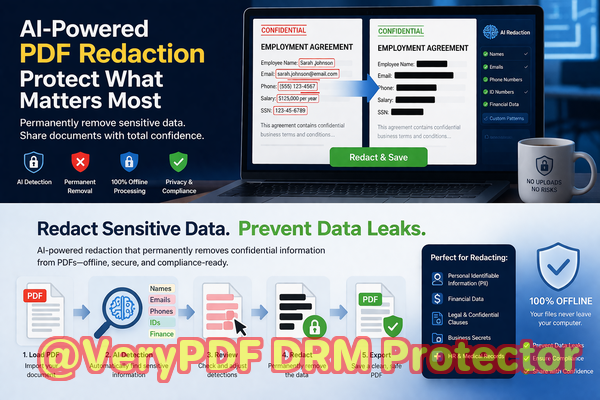
That’s where VeryPDF AI PDF Redaction Tool Command Line makes a real difference. With AI-powered detection, it automatically identifies sensitive datanames, emails, phone numbers, IDsand permanently removes it from your documents. Unlike traditional redaction, this isn’t just a visual overlay; the information is gone for good. Better yet, it runs completely offline, so your confidential files never leave your computer, ensuring 100% privacy.
Consider this real-world example: one HR department needed to send employee performance reports to an external consultant. Using manual redaction, they accidentally left employee IDs visible in some pages. By switching to VeryPDF’s offline AI redaction, they instantly detected and removed all PII, preventing potential GDPR violations and safeguarding employee privacy.
The tool is straightforward to integrate into daily workflows:
-
Load the PDF document.
-
Use AI to detect all sensitive data automatically.
-
Review flagged items for accuracy.
-
Apply permanent redaction.
-
Export a clean, shareable PDF with confidence.
Common types of data to redact include:
-
Personal identifiable information (PII) such as names, email addresses, phone numbers, and national IDs.
-
Financial information like bank account numbers, credit card details, and salary data.
-
Business-sensitive content, including proprietary formulas, strategies, and client lists.
-
Legal or confidential clauses in contracts and agreements.
I remember a case where a law firm shared a merger agreement with multiple stakeholders. Even though they thought sensitive clauses were hidden, a simple text extraction revealed confidential pricing terms. After implementing VeryPDF’s offline AI redaction, every confidential section was permanently removed before sharing, eliminating the risk of competitive exposure.
Many companies struggle with compliance because manual redaction is prone to errors. Employees might think that blacking out text is enough, but sophisticated tools can recover hidden content. VeryPDF’s solution ensures that once data is redacted, it cannot be restored.
Using offline redaction also solves another key problem: security. Online PDF redaction services can inadvertently expose documents to third-party servers, creating serious confidentiality risks. With VeryPDF, all processing occurs locally, eliminating potential leaks and meeting strict data protection standards like GDPR.
Let me break down the workflow I recommend:
-
Open your PDF in VeryPDF AI PDF Redaction Tool Command Line.
-
Run an AI scan to detect emails, phone numbers, names, and other sensitive content.
-
Review the detected items and select any additional custom data to redact.
-
Apply permanent redaction to remove all sensitive content.
-
Save or export the PDF securely for sharing.
This tool isn’t just for compliance officers. Legal teams, HR departments, finance managers, and content creators all face similar risks when sharing documents externally. Imagine sending invoices with client bank details or contracts with personal employee datawithout proper redaction, you’re opening the door to legal consequences and reputational damage.
Here are some scenarios where VeryPDF AI PDF Redaction proves invaluable:
-
A consultancy sharing client reports with third-party analysts.
-
A startup sending funding agreements to potential investors.
-
An HR team distributing salary breakdowns or performance reviews.
-
A law firm finalizing contracts with multiple parties.
Each time, AI-driven redaction ensures that sensitive information is permanently removed before the document leaves your computer.
The benefits are tangible:
-
Prevent accidental leaks no more overlooked emails or phone numbers exposing private data.
-
Ensure regulatory compliance GDPR, HIPAA, and other data protection regulations are easier to meet.
-
Enhance operational security fully offline processing prevents unauthorized access.
-
Boost efficiency automated detection reduces manual effort and human error.
I’ve seen teams save hours of painstaking manual redaction while gaining peace of mind knowing that sensitive data cannot be recovered. For anyone handling confidential documents, this tool transforms a risky process into a secure, reliable workflow.
I highly recommend this to anyone who needs to share documents safely without risking data leaks or compliance issues. Try it now and securely redact your PDFs: https://veryutils.com/smart-redact-server-ai-powered-pdf-redaction-software. Start your free trial today and ensure your sensitive data is permanently removed before sharing.
Frequently Asked Questions
How can I permanently remove sensitive data from a PDF instead of just hiding it?
VeryPDF AI PDF Redaction removes the data entirely, not just visually. Once redacted, the information cannot be restored.
Can others recover redacted information from my PDF?
No. The tool permanently deletes sensitive data, making recovery impossible even with advanced extraction methods.
Is it safe to use online PDF redaction tools?
Online tools pose risks because your documents are uploaded to third-party servers. Offline solutions like VeryPDF keep your files on your computer.
Does this tool work completely offline?
Yes, all redaction processes happen locally, ensuring full privacy and security.
What types of sensitive data can be automatically detected and removed?
It can detect emails, phone numbers, names, IDs, financial data, legal clauses, and other PII.
How can I ensure compliance with GDPR when sharing documents?
By permanently redacting all PII and confidential data before sharing, you meet GDPR requirements and reduce legal risk.
Can I review what will be redacted before applying changes?
Yes, the tool allows you to review detected items and manually select or deselect content for redaction.
Does it work on large or multi-page PDFs?
Absolutely. The AI engine efficiently handles PDFs of any size.
Can I use it for HR, finance, and legal documents?
Yes, it’s designed for all business documents containing sensitive information.
How does it compare to manual redaction?
Manual redaction is error-prone and time-consuming. AI-powered redaction is faster, more accurate, and ensures permanent data removal.
Are there additional security benefits beyond offline processing?
Yes. Permanent data removal, no cloud exposure, and compliance-ready workflows protect your business from accidental leaks and legal issues.
Tags/Keywords
redact sensitive data, remove confidential information, PDF redaction tool, protect privacy in PDFs, prevent data leaks, offline PDF redaction, secure document sharing, AI PDF redaction, GDPR compliance, permanent data removal