Prevent Unauthorized E-book Sharing Implement Hardware-Linked Document Locking to ensure your digital book only opens on the customers authorized devices

Prevent Unauthorized E-book Sharing: Implement Hardware-Linked Document Locking to Keep Your Digital Books Secure

As a professor, I’ve often experienced that sinking feeling when I realise a lecture PDF I painstakingly prepared has ended up circulating online. Last semester, I discovered a student had shared our course’s entire homework set through a group chat, and it wasn’t even encrypted or protected. That moment made me realise just how vulnerable our digital teaching materials can be. In an age where students can forward files in seconds or convert PDFs to Word documents with ease, keeping educational content secure is a real challenge.

Prevent Unauthorized E-book Sharing Implement Hardware-Linked Document Locking to ensure your digital book only opens on the customers authorized devices

I needed a solution that would let me focus on teaching, not policing files. That’s when I found VeryPDF DRM Protector. Unlike standard PDF protections or secure data rooms, it truly locks documents to authorized devices and prevents students from bypassing restrictions. It’s a game-changer for anyone distributing lecture slides, homework, or paid course materials online.

One of the most common pain points in modern classrooms is students sharing PDFs or assignments with classmates who aren’t enrolled. Even when you send files via email or a learning management system, there’s little stopping a student from forwarding them. Suddenly, content you intended for 30 students can end up in the hands of hundreds, and the risk of piracy increases. VeryPDF DRM Protector solves this by restricting PDF access to specific users and devices. Only the intended recipients can open your files, meaning even if a student tries to share the document, it won’t open on anyone else’s device.

Another headache is unauthorized printing or copying. I’ve had students who tried to copy entire chapters of my course notes into Word documents, not for study purposes but to resell them. With VeryPDF DRM Protector, you can disable copying, printing, and even screen capture. The software prevents files from being printed or limits print quality, stopping students from bypassing restrictions by creating PDFs or images of your documents. Dynamic watermarks also make it clear who accessed the document, which discourages redistribution. In one of my classes, a student tried to screenshot a protected homework PDF, and the system prevented it entirely. That simple safeguard saved hours of follow-up and reduced the temptation for students to share materials illegally.

Another significant issue I’ve faced is losing control over course content once it leaves my computer. Traditional cloud-based storage or secure data rooms make you believe files are safe online, but the moment someone shares login credentials, the system fails. VeryPDF DRM Protector keeps unprotected documents on your local machine until you distribute them, ensuring they are never exposed online without safeguards. It’s not just about encryption; it’s about preventing unauthorized use at every step. You can even revoke access after distribution. I once had to update a course midway through the semester; with a few clicks, I revoked old lecture PDFs and sent updated ones, ensuring students only had access to the correct content.

Setting up VeryPDF DRM Protector is surprisingly straightforward. Here are some practical steps I use in my classroom workflow:

  • Lock PDFs to devices: Assign each student’s PDF to their laptop, tablet, or USB stick. Unauthorized devices simply cannot open the document.

  • Prevent copying and printing: Disable copying, printing, and saving, or limit prints if necessary. This ensures homework or lecture notes aren’t reproduced without permission.

  • Apply dynamic watermarks: Include student names, emails, or access times on both on-screen views and printed copies. This deters sharing because any redistribution is easily traceable.

  • Control access duration: Set expiry dates, limit views, or revoke files instantly if necessary. You can even enforce these rules after distribution.

  • Stop screen captures: Block screen sharing via Zoom, Teams, or other platforms, and prevent third-party screen grab apps from capturing your content.

In practice, these controls transformed how I manage course materials. Last semester, I had a particularly large online lecture where multiple students attended from different countries. Using VeryPDF DRM Protector, I ensured that lecture slides were locked to each student’s device. No one could print, copy, or forward them, and I could even track who had viewed the files. This not only reduced unauthorized sharing but also gave me peace of mind that my intellectual property was secure.

Protecting e-books, homework, and lecture slides from piracy isn’t just about securityit’s about maintaining the integrity of your teaching. When students know that materials are secured and misuse can be traced, they respect the content more. I’ve noticed fewer requests for sharing files and less time spent policing homework submissions since implementing DRM-protected PDFs.

If you distribute paid course materials, such as e-books or specialised guides, VeryPDF DRM Protector becomes even more essential. The software’s encryption and licensing controls make it impossible for unauthorized users to access content. Files cannot be converted to Word, Excel, or images, ensuring that your materials retain their original value. Dynamic watermarks and device locking add extra layers of security, making piracy nearly impossible.

Here are a few practical tips for educators considering DRM-protected PDFs:

  • Plan your distribution carefully: Decide which documents need DRM protectionlecture notes, homework PDFs, and paid resources are a priority.

  • Communicate policies clearly: Let students know that content is protected and that redistribution is prohibited. Transparency encourages compliance.

  • Leverage expiry features: For temporary materials, set automatic expiry after a number of views or days to prevent indefinite access.

  • Use watermarks strategically: Apply dynamic watermarks to high-risk documents to deter photocopying and screenshotting.

  • Monitor access: Check logs or access reports to identify any unusual activity and take action if necessary.

Overall, VeryPDF DRM Protector simplifies content management, giving educators like me more time to focus on teaching rather than policing digital files. By controlling who can access PDFs, preventing copying, printing, and conversion, and tracking usage, it provides a comprehensive solution to the challenges of modern education.

I highly recommend this to anyone distributing PDFs to students. It’s not just about securityit’s about ensuring your hard work, your intellectual property, and your students’ learning experience remain protected. Don’t wait until your files are shared online without permission; take control today.

Try it now and protect your course materials: https://drm.verypdf.com

Start your free trial today and regain control over your PDFs.

Frequently Asked Questions

Q: How can I limit student access to PDFs?

A: VeryPDF DRM Protector allows you to lock PDFs to specific devices or USB sticks, ensuring only enrolled students can open the files.

Q: Can students still read PDFs without copying, printing, or converting them?

A: Yes. Students can view your PDFs normally, but all copying, printing, saving, or conversion is restricted according to your settings.

Q: How can I track who accessed my PDFs?

A: Dynamic watermarks display user-specific information, and you can monitor access logs to see who viewed or printed your files.

Q: Does it prevent PDF piracy and unauthorized sharing?

A: Absolutely. PDFs are locked to devices, screen sharing is blocked, and conversion or copying is disabled, making piracy extremely difficult.

Q: How easy is it to distribute protected lecture slides and homework?

A: VeryPDF DRM Protector integrates seamlessly with email, USB, and online distribution. Files are encrypted and protected before leaving your computer, ensuring safe delivery.

Q: Can I revoke access after distribution?

A: Yes, you can instantly revoke documents or individual user access at any time, even after the files have been sent.

Q: Are screen captures and recordings prevented?

A: Yes, the software blocks screen sharing, screenshots, and screen recording via third-party apps or virtual meetings.

Keywords: protect course PDFs, prevent PDF piracy, stop students sharing homework, secure lecture materials, prevent DRM removal, anti-conversion PDF DRM, hardware-locked PDF protection, dynamic watermarks, revoke PDF access, secure educational content

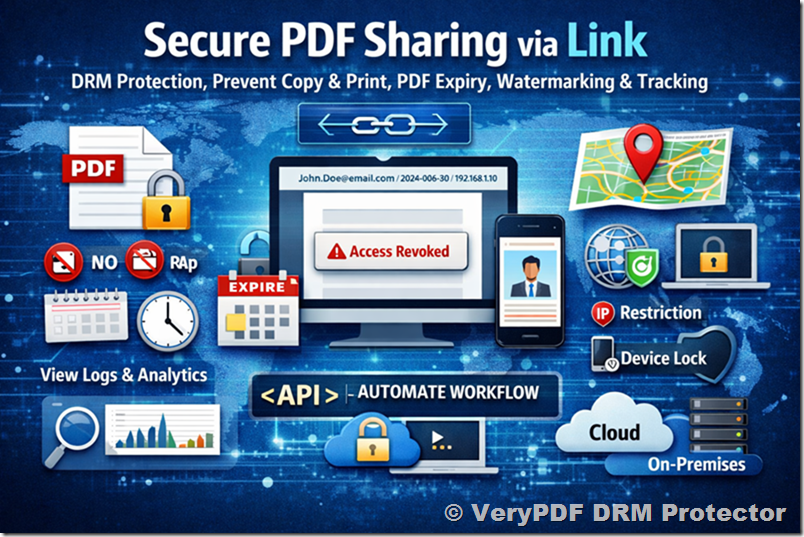
Stop Attaching Files Learn how to share PDF as a link that includes Instant Remote Revocation if the recipient goes rogue

Stop Attaching Files: Learn How to Share PDF as a Link with Instant Remote Revocation

As a professor, I’ve often felt the frustration of sharing lecture materials with my students, only to realize later that some PDFs have been forwarded, copied, or even converted without my permission. It’s a situation that many educators know too well: you spend hours preparing high-quality course content, and yet you have almost no control over who sees it or how it’s used. The last thing you want is your hard work circulating online, or worse, ending up in the hands of someone who wasn’t supposed to have it. That’s why I started looking for a smarter way to share PDFsone that keeps my materials secure, trackable, and, most importantly, under my control.

Stop Attaching Files Learn how to share PDF as a link that includes Instant Remote Revocation if the recipient goes rogue

In today’s classroom, distributing PDFs safely is more complicated than just emailing an attachment. Students often share homework with each other, and the temptation to convert lecture slides into editable formats like Word or Excel can be strong. I’ve seen instances where entire course modules were copied and circulated online, undermining both the learning experience and the effort that went into creating the content.

Enter VeryPDF DRM Protector, a tool that has completely changed how I share materials with my students. Unlike traditional methods that rely on passwords or insecure data rooms, DRM Protector ensures that my PDFs remain secure, even after distribution. Let me share some real-world challenges I faced and how this software solved them.

One of the biggest headaches was controlling access to lecture slides and homework assignments. Before DRM Protector, I had to trust that students would not forward files, print them excessively, or share them online. Some students would even attempt to remove passwords or convert PDFs into editable formats. With VeryPDF DRM Protector, I can now restrict access to specific users or enrolled students. Each PDF can be locked to a device, so even if someone tries to share the file, it simply won’t open on another computer or tablet. I can also enforce rules like limiting the number of prints, stopping all copying or editing, and applying dynamic watermarks that clearly identify the viewer. It’s like having a virtual classroom guard ensuring that my content stays where it belongs.

Another major pain point was the loss of control once a PDF left my hands. I remember sending a homework PDF to a student only to discover a week later that it had been shared outside the class. The dynamic revocation feature in DRM Protector changed everything. Even after a PDF has been distributed, I can instantly revoke access to a specific user or file. This means if a student goes rogue or if a link gets into the wrong hands, I can prevent further access immediately. It’s a relief to know that I don’t have to panic when files are “out there”control is back in my hands.

Preventing unauthorized conversion was also a key concern. Some students attempt to convert lecture PDFs into editable Word or Excel documents to modify answers or copy content more easily. DRM Protector stops this completely. PDFs cannot be converted, copied, or printed beyond the limits I set. Even screen captures are blocked, including print screen, third-party screenshot apps, and online meeting recordings like Zoom or WebEx. I’ve noticed a significant decrease in misuse simply because the software makes it difficult for students to bypass security without realizing they are being monitored.

Using DRM Protector is surprisingly straightforward. After a few simple steps, my PDFs are fully protected:

  • Restrict access to specific users or devices.

  • Stop copying, editing, or printing beyond the permissions I define.

  • Apply dynamic watermarks that display the user’s information to discourage sharing.

  • Set expirations for access based on dates, number of views, or prints.

  • Revoke documents instantly if a link or file is misused.

  • Prevent screen grabs and online sharing across multiple platforms.

One example that stands out is a recent paid workshop I ran. I had prepared detailed course materials for registered participants and was concerned about unauthorized sharing. By distributing the PDFs with DRM Protector, I was able to lock access to each participant’s device, prevent printing beyond two copies, and add a dynamic watermark with each user’s name. Midway through the course, I discovered a participant had tried to forward the PDF to someone else. Within seconds, I revoked their access. The result? They could no longer open the file, and the rest of the participants remained secure. It was a clear demonstration of how instant control can prevent piracy and misuse.

For educators looking to adopt this approach, here are some practical tips:

  • Distribute PDFs as secure links instead of attachments. This reduces the risk of files being forwarded unintentionally.

  • Lock files to devices for each student or participant. Even if a link leaks, the file will only open on the intended device.

  • Use dynamic watermarks to discourage photocopying or photographing screens.

  • Set clear expiration rules to control how long students can access a PDF.

  • Monitor usage and revoke access immediately if misuse is detected.

The benefits extend beyond security. By using DRM Protector, I’ve simplified my workflow. I no longer have to manually track who received which file, worry about lost PDFs, or stress about students sharing content. Everything is automated and controlled, allowing me to focus on teaching rather than policing materials.

I highly recommend VeryPDF DRM Protector to anyone distributing PDFs to students, especially if your content is high-value or paid. Whether it’s lecture slides, homework assignments, or online course materials, you can maintain full control, prevent piracy, and protect the integrity of your teaching. Stop attaching files and start sharing PDFs securely with instant remote revocation: https://drm.verypdf.com.

FAQs

How can I limit student access to my PDFs?

You can restrict access to specific students, lock files to devices, and set rules for viewing, printing, or sharing.

Can students read the PDFs without copying, printing, or converting them?

Yes, DRM Protector allows viewing while disabling copying, printing, editing, and conversion.

How can I track who accessed my files?

Dynamic watermarks and usage logs provide clear records of who opened the document, when, and where.

Does DRM Protector prevent PDF piracy and unauthorized sharing?

Absolutely. It blocks forwarding, copying, printing beyond limits, screen captures, and conversion to other formats.

Is it easy to distribute protected lecture slides and homework?

Yes. You can share secure links or distribute files directly, with all protections automatically enforced.

Can I revoke access if a student misuses a PDF?

Yes, documents and user access can be terminated instantly, even after distribution.

Are dynamic watermarks permanent and secure?

Yes, watermarks display user information and cannot be removed, discouraging photocopying or screen captures.

Keywords: protect course PDFs, prevent PDF piracy, stop students sharing homework, secure lecture materials, prevent DRM removal, anti-conversion PDF DRM, PDF access control, revoke PDFs instantly, dynamic watermark PDF, secure PDF link distribution

Stop E-book Piracy at the Source Use Invisible Forensic Watermarking to embed hidden buyer IDs into every PDF download for 100 accountability

Stop E-book Piracy at the Source: Use Invisible Forensic Watermarking to Embed Hidden Buyer IDs for 100% Accountability

As a professor, nothing frustrates me more than discovering that my carefully prepared lecture PDFs or homework assignments have been shared without my permission. Just last semester, I found one of my paid course PDFs circulating in an online student forum. Students were sharing it freely, and worse, some were converting the material to Word documents and making edits I hadn’t authorised. It made me realise that relying on traditional password-protected PDFs just isn’t enough. If you’re like me, you want your materials to reach the right studentsbut only the right studentsand stay secure. That’s where VeryPDF DRM Protector comes in.

Stop E-book Piracy at the Source Use Invisible Forensic Watermarking to embed hidden buyer IDs into every PDF download for 100 accountability

I’ve been using it in my courses, and it’s transformed how I manage digital content. Instead of worrying about unauthorized sharing or conversion, I can focus on teaching, knowing my PDFs are fully protected.

One of the biggest headaches in teaching today is controlling how PDFs are shared and used. Students often forward lecture slides to friends who aren’t enrolled, or upload homework PDFs to forums. Even with academic honesty policies, once a file leaves your hands, it’s almost impossible to track. The consequences go beyond lost revenue for paid coursesthey undermine the learning process and your authority over the material.

Another common problem is printing or converting PDFs to other formats. I’ve seen students convert lecture notes to editable Word documents, tweak answers in homework assignments, and redistribute them online. Traditional PDF security often fails here; a simple copy-paste or a screen capture bypasses protections easily. This not only compromises your intellectual property but also disrupts the controlled learning environment you’ve worked to create.

VeryPDF DRM Protector addresses these issues head-on. The software allows you to restrict PDF access strictly to enrolled students or specific users. You can prevent printing entirely, limit the number of prints, and block copying, forwarding, and even conversion to Word, Excel, or images. Dynamic, invisible watermarks embed buyer information into every PDF download, making it easy to trace unauthorized sharing.

In my experience, the invisible forensic watermarking is a game-changer. I remember distributing a set of homework PDFs for an online module. A few days later, I noticed one file had appeared on an external student forum. Because each PDF carried a hidden buyer ID, I could immediately identify the source, resolve the issue directly, and prevent further leaks. The time saved in tracking and resolving potential piracy incidents was immense.

Practical steps make it even simpler to protect your content:

  • Restrict access to enrolled students only: Lock PDFs to individual users or devices. No login credentials are needed, which means students can’t share access with others.

  • Prevent printing and copying: Disable printing, control the number of prints, and block copy-paste functions. Even screen capture apps can be prevented from grabbing your content.

  • Apply dynamic watermarks: Embed user information like name, email, and timestamp invisibly into every PDF. If a file leaks, you know exactly who accessed it.

  • Set expiry dates: Automatically expire PDF access after a certain number of views, prints, or days. This is perfect for timed assignments or subscription-based course materials.

  • Revoke access instantly: If a student drops the course or you detect suspicious activity, you can revoke PDF access immediately, even after distribution.

In practice, I’ve applied these protections to lecture slides and paid course PDFs. For example, during an advanced programming course, I distributed lecture notes with DRM protection and invisible watermarks. Not only did this prevent students from sharing PDFs with non-enrolled peers, but it also allowed me to track who had accessed specific content, ensuring that everyone stayed accountable.

Using VeryPDF DRM Protector also simplifies daily workflow. I no longer have to manually monitor forums for leaked PDFs or chase students to remove shared files. Once the DRM settings are applied, I can distribute course materials via web, email, or USB, confident that they remain secure. The software locks documents to specific devices or locations, so even if a file is forwarded, it simply won’t open on unauthorized computers or tablets.

Anti-piracy benefits are clear. VeryPDF DRM Protector stops students and hackers from bypassing PDF security, prevents unauthorized printing or copying, and blocks conversion to Word or image formats. Unlike browser-based PDF viewers, which are vulnerable to script injections or plugin hacks, VeryPDF’s client-based enforcement ensures that your PDFs remain secure in real-world classroom scenarios.

Here’s how I implement it step by step in my courses:

  1. Prepare your PDF content: Lecture slides, homework assignments, or paid course materials.

  2. Apply DRM protection: Open VeryPDF DRM Protector, set user restrictions, and choose whether to allow printing, copying, or forwarding.

  3. Embed invisible watermarks: Add buyer-specific information automatically to every download.

  4. Distribute securely: Share via email, web portal, or USB stickprotected PDFs are ready for safe delivery.

  5. Monitor and manage access: Track who views or prints PDFs, set expiries, and revoke access if necessary.

I’ve also found that students respect the boundaries set by DRM-protected PDFs. They understand that files are tied to their accounts or devices, and they’re less likely to attempt sharing when they know misuse can be traced back to them. It fosters a sense of accountability and integrity in the classroom.

For those of us distributing paid course materials online, the importance of DRM protection can’t be overstated. Without it, a single PDF leak can lead to widespread unauthorized distribution, lost revenue, and diminished control over your content. VeryPDF DRM Protector eliminates that risk while remaining easy to use and unobtrusive for students.

In summary, VeryPDF DRM Protector solves the core challenges of teaching with digital materials. It prevents students from sharing PDFs, stops unauthorized printing and copying, blocks conversion to other formats, and embeds invisible watermarks for traceability. I highly recommend this to anyone distributing PDFs to students. It keeps your lecture slides, homework, and paid course content secure while letting you focus on teaching.

Try it now and protect your course materials: https://drm.verypdf.com

Start your free trial today and regain control over your PDFs.

FAQs

How can I limit student access to PDFs?

You can restrict PDFs to enrolled students only, lock them to specific devices, and prevent forwarding. No login credentials are required, so files cannot be shared.

Can students still read PDFs without copying or printing?

Yes. Students can view content while DRM controls prevent printing, copying, or screen capturing. You maintain full control over how your material is consumed.

How do I track who accessed my files?

Invisible forensic watermarks embed user-specific information into every PDF download. If a file is leaked, you can identify the source immediately.

Does this prevent PDF piracy and unauthorized sharing?

Absolutely. VeryPDF DRM Protector blocks copying, printing, conversion, and screen grabbing. Unauthorized sharing is traceable and can be revoked instantly.

How easy is it to distribute protected lecture slides and homework?

Distribution is simple. Files can be shared via web, email, or USB. DRM settings remain enforced, and dynamic watermarks automatically protect every download.

Can I set expiration dates for PDFs?

Yes. You can automatically expire PDF access after a number of views, prints, days, or on a fixed date, perfect for timed assignments or subscription content.

Can I revoke access if a student drops the course?

Yes. You can instantly terminate access to any PDF, regardless of where it has been distributed.

Tags/Keywords

protect course PDFs, prevent PDF piracy, stop students sharing homework, secure lecture materials, prevent DRM removal, anti-conversion PDF DRM, control PDF printing, track PDF access, hide buyer IDs, stop content leaks

Next-Gen IP Protection for 2026 Secure your companys future with a Hardened PDF Kernel designed for the age of Generative AI

Next-Gen IP Protection for 2026: Secure Your Course PDFs Against Piracy and Misuse

Protect your PDFs from sharing, printing, or conversion with VeryPDF DRM Protector, keeping your lecture materials and homework safe.

Next-Gen IP Protection for 2026 Secure your companys future with a Hardened PDF Kernel designed for the age of Generative AI


I still remember the day a student emailed me, asking if they could “borrow” the lecture slides for a friend in another class. At first, I laughedit seemed harmless. But then I realised this wasn’t an isolated incident. Over the years, I’ve seen PDFs of my lectures, homework assignments, and even paid course materials floating around online without my permission. It was frustrating, time-consuming, and frankly, a little terrifying. How could I maintain control over my work while still sharing it efficiently with my students? That’s when I discovered VeryPDF DRM Protector, and it changed how I distribute my PDFs entirely.

In classrooms today, this is a common scenario. Students want easy access, and professors want security. But when PDFs can be printed, copied, converted to Word, or shared freely, it feels like there’s no middle ground. For anyone teaching online courses, distributing paid materials, or just trying to protect their intellectual property, this is a daily challenge.


One of the biggest headaches I face as an educator is students sharing course PDFs online. It’s often not maliciousjust convenience. A student wants to help a friend catch up, or perhaps they think sharing homework is a harmless shortcut. Yet, as soon as a file leaves my control, it can be duplicated endlessly, converted, or redistributed. The result? My work, which took hours to prepare, is freely available without context or attribution.

Another pain point is printing or copying. Even if students don’t share materials online, PDFs can be printed in full, then scanned or photographed. Screenshots, print-to-PDF tricks, and third-party capture tools can circumvent traditional password protections. This not only reduces the value of my course content but also creates a risk for plagiarism.

And then there’s content conversion. I’ve had situations where students converted my carefully formatted lecture PDFs into Word documents to modify or redistribute them. Layouts break, formulas disappear, and the content is no longer presented as intended. The integrity of my teaching materials suffers, and there’s no easy way to reclaim control.


This is where VeryPDF DRM Protector comes in. I started using it last year, and it’s been a game-changer for my teaching workflow.

The tool allows me to restrict PDF access to only enrolled students or specific users. Each file can be locked to a student’s device, meaning it’s impossible to forward it to someone else. Printing, copying, or even screen capturing can be disabled, or selectively limited. For example, I allow students to view slides on their laptops but prevent printing entirely, which stops them from scanning and sharing physical copies.

Dynamic watermarks are another lifesaver. Every time a student views or prints a PDF, their name, email, or access time appears on the page. Even if someone tries to photograph or photocopy the material, the watermark identifies the source instantly. One semester, a student attempted to share my homework PDFs in a group chat. Thanks to dynamic watermarks, I could track exactly whose account the files originated fromproblem solved before it spiralled out of control.

Perhaps the most impressive feature is the ability to revoke access instantly. A student left the course midway, and I could immediately disable their access to all distributed PDFs. No email notifications, no complicated proceduresjust full control at my fingertips. Expiry settings are equally handy; I can set files to automatically expire after a set number of views, prints, or days. This feature is perfect for timed homework assignments or limited-access resources.


For anyone new to DRM, here’s how I implement it in my courses:

  • Restrict access to enrolled students only: Each PDF is assigned to specific students, locked to their devices.

  • Control printing and copying: Prevent printing altogether or limit it to a specific number of high-quality prints. Copying text is blocked.

  • Stop PDF conversions: Students cannot convert my materials to Word, Excel, or images. This ensures formatting and integrity remain intact.

  • Add dynamic watermarks: Each page displays student-specific information, deterring screen captures or photocopies.

  • Revoke access instantly: If a student withdraws, or if a file is accidentally shared, I can terminate access in seconds.

  • Set expirations: Lecture slides or homework PDFs can automatically expire after a pre-set period or number of views.

Implementing these controls was easier than I imagined. VeryPDF DRM Protector doesn’t rely on complicated passwords, insecure plugins, or browser-based restrictions that students can bypass. All the encryption and DRM controls are built into the software itself. I can distribute my PDFs via email, web, USB, or even online class portals, confident that the content remains secure.


One real-life example stands out. Last year, I distributed a paid supplementary textbook PDF for my online course. Normally, I’d worry about students sharing it with other classes. With VeryPDF DRM Protector, I locked the PDF to each student’s device and applied dynamic watermarks. Even when a student tried to screen-capture pages during a Zoom session, the watermark identified the viewer, and printing was disabled. Not a single copy was leaked. It was a huge relief and saved me countless hours chasing down unauthorized distribution.

Another time, a teaching assistant accidentally sent lecture slides to a student not yet enrolled. Instead of panicking, I simply revoked access through the DRM system. The PDF was immediately inaccessible, preventing misuse without any follow-up emails or explanations.


The benefits of using VeryPDF DRM Protector go beyond just stopping piracy:

  • Maintains content integrity: PDFs remain exactly as intended, with formatting and content preserved.

  • Saves time: No need to chase down misplaced or shared files.

  • Reduces misuse: Students can’t forward, print, or convert materials without permission.

  • Provides peace of mind: Knowing your intellectual property is safe lets you focus on teaching.

I can honestly say that after integrating this into my workflow, distributing PDFs feels secure and effortless. For anyone teaching, creating online courses, or managing paid educational content, it’s a practical solution that actually works.


If you want to implement these protections in your classroom, here are some actionable tips:

  • Start with your most sensitive files: Lecture slides, homework PDFs, and paid content.

  • Use device-locking for student access: Each student can only open the PDF on their enrolled device.

  • Apply dynamic watermarks: Personalize each copy to track potential leaks.

  • Limit printing: Only allow what’s necessary or block entirely.

  • Set expirations: Automatically expire files after a course ends or an assignment deadline.

  • Revoke when needed: Instantly terminate access for withdrawn students or accidental sharing.

  • Distribute securely: Email, USB, or web portalsall safe with DRM applied.

These steps are simple but incredibly effective at maintaining control over your teaching materials while keeping students engaged.


In conclusion, VeryPDF DRM Protector has completely transformed how I handle my PDFs. No more worrying about unauthorized sharing, printing, or conversion. No more chasing down files that have been circulated without permission. The software gives me control, peace of mind, and the ability to distribute my materials efficiently and securely.

I highly recommend this to anyone distributing PDFs to students, whether it’s lecture slides, homework assignments, or paid course materials. If you want to stop piracy, maintain integrity, and simplify your workflow, this is the tool to use.

Try it now and protect your course materials: https://drm.verypdf.com

Start your free trial today and regain control over your PDFs.


FAQ

Q: How can I limit student access to PDFs?

A: VeryPDF DRM Protector allows you to lock PDFs to specific users or devices, ensuring only enrolled students can access the files.

Q: Can students still read the PDFs without copying, printing, or converting?

A: Yes. DRM settings allow students to view content normally while preventing printing, copying, or conversion.

Q: How do I track who accessed the files?

A: Dynamic watermarks display user-specific information, making it easy to identify who viewed or printed the PDF.

Q: Does it prevent PDF piracy and unauthorized sharing?

A: Absolutely. Access restrictions, device locks, and revocable permissions stop students or hackers from sharing files illegally.

Q: How easy is it to distribute protected lecture slides and homework?

A: Very easy. You can distribute PDFs via email, USB, web portals, or other channels without compromising security.

Q: Can I revoke access after distribution?

A: Yes. You can instantly terminate access for any user or PDF at any time.

Q: Are my PDFs protected against screen sharing or screenshot tools?

A: Yes. The software blocks screen sharing, print screen, and third-party capture apps.


Keywords/Tags

protect course PDFs, prevent PDF piracy, stop students sharing homework, secure lecture materials, prevent DRM removal, anti-conversion PDF DRM, PDF access control, educational content protection, dynamic watermarks, revoke PDF access

Invisible Forensic Watermarking for Legal Prove Chain of Custody for sensitive evidence with Visual Leak Traceability built into every page

Invisible Forensic Watermarking for Legal Prove Chain of Custody for Sensitive Evidence with Visual Leak Traceability Built Into Every Page

Ever had that sinking feeling when you realise a lecture PDF you painstakingly prepared is circulating online without your permission? I remember preparing a semester’s worth of materialsslides, homework, and additional readingsfor my advanced law class. Within days, I found snippets of my content shared in a student forum. As educators, we want to trust our students, but the reality is that digital materials are easily copied, printed, or shared without our knowledge. The struggle to maintain control over course PDFs while still making learning accessible is real. That’s where tools like VeryPDF DRM Protector make a world of difference.

Invisible Forensic Watermarking for Legal Prove Chain of Custody for sensitive evidence with Visual Leak Traceability built into every page

One of the most common headaches in the classroom is students sharing PDFs or assignments. Even when materials are meant for a small group, digital documents can easily be forwarded, uploaded, or posted online. I’ve seen this happen with homework assignments: a student takes a screenshot of a PDF, posts it in a group chat, and suddenly everyone has access to your carefully curated work. It’s frustrating, and it undermines both the learning process and the integrity of your course.

Another issue is unauthorized printing, copying, or converting. I once had a student convert my lecture slides to Word to reformat them for their own notes. While this might seem harmless, it opens the door to redistribution, unapproved edits, or worse, plagiarism. On top of that, controlling versions becomes nearly impossible, and the risk of outdated or misused content spreading is high.

Finally, losing control over paid or restricted course content is a major concern. For online courses, where students pay for access to premium materials, unauthorized sharing translates to lost revenue and compromised intellectual property. Traditional password-protected PDFs or browser-based viewers can be bypassed with ease, leaving sensitive materials exposed.

This is why I started using VeryPDF DRM Protector. It’s a practical solution that addresses these challenges head-on. The software allows me to restrict PDF access to enrolled students or specific users, preventing unauthorized printing, copying, forwarding, or DRM removal. It’s not just about locking filesit’s about managing how students interact with them. For instance, I can allow students to read lecture slides on their devices without letting them print or convert them. It’s a simple, effective way to maintain control over course materials.

One feature I particularly appreciate is the dynamic watermarking. Every page of a PDF can display information like the user’s name, email, date, and time. Even if someone attempts to print or take a screenshot, the watermark deters redistribution because it clearly identifies the source. I remember a moment last semester when a student tried to photocopy a set of homework PDFs. Seeing the watermark with their own name instantly made them think twice. This feature alone has saved me countless headaches and reinforced the seriousness of academic integrity in my classroom.

Using VeryPDF DRM Protector also simplifies my workflow. Previously, I had to send PDFs with password protection, check whether students could open them, and troubleshoot compatibility issues. Now, I simply protect the document, distribute it via email or my learning management system, and the DRM controls enforce security automatically. I can even revoke access instantly if neededif a student leaves the course or if a file was shared accidentally, I can terminate access without hassle.

Here’s how I use it effectively in my teaching practice:

  • Restrict PDF access: Lock files to specific students or devices. Only those enrolled can open them.

  • Prevent printing and copying: Stop unauthorized reproductions or conversions to Word, Excel, or images.

  • Add dynamic watermarks: Every page shows user-specific information to discourage sharing.

  • Control expiry and self-destruction: Set documents to expire after a number of views, prints, or on a specific date.

  • Revoke access anytime: If a file ends up in the wrong hands, terminate access instantly.

  • Stop screen sharing & screenshots: Prevent students from capturing PDFs during Zoom, WebEx, or screen recording apps.

Let me give a concrete example. Last year, I was preparing sensitive legal case studies for a graduate seminar. These PDFs contained real-world examples that could not be publicly disclosed. I used VeryPDF DRM Protector to lock the files to my students’ devices and added dynamic watermarks. Not only could they study the materials safely, but I also knew that if a PDF appeared elsewhere, I could trace it directly to the user who leaked it. This featurevisual leak traceability built into every pagegave me peace of mind and protected the chain of custody for sensitive evidence.

Another practical benefit is how easy it is to distribute protected materials. Unlike secure data rooms, where login credentials can be shared and screen captures circumvent protection, VeryPDF DRM Protector does not rely on credentials. Files are encrypted locally, and decryption keys are tied to the user’s device. I can send documents through email, USB, or LMS without worrying about accidental exposure.

If you’re looking for a straightforward setup, here’s a step-by-step approach I recommend:

  1. Prepare your PDF materials: Gather lecture slides, homework assignments, or paid course content.

  2. Apply VeryPDF DRM protection: Lock the document to specific users, enable dynamic watermarks, and set print or conversion restrictions.

  3. Set expiry or self-destruct rules: Choose if the file should expire after certain views, prints, or a fixed date.

  4. Distribute securely: Share the protected PDF via email, LMS, or USB. No passwords required.

  5. Monitor and revoke if needed: Track access and terminate permissions instantly if a file is compromised.

The anti-piracy benefits are impressive. PDFs cannot be converted to Word, Excel, or images, copied, or shared without leaving a trace. This prevents studentsor external partiesfrom bypassing security and ensures that your intellectual property remains yours. It also supports compliance with institutional policies or legal requirements when handling sensitive evidence or proprietary educational materials.

In my experience, using VeryPDF DRM Protector has transformed the way I manage digital content in my courses. It protects my materials from unauthorized distribution, maintains my control over PDFs, and reduces student misuse. I can focus more on teaching and less on policing content. I highly recommend this to anyone distributing PDFs to students.

Try it now and protect your course materials: https://drm.verypdf.com

Start your free trial today and regain control over your PDFs.

Frequently Asked Questions

Q: How can I limit student access to PDFs?

A: VeryPDF DRM Protector lets you lock PDFs to specific users or devices, ensuring only enrolled students can open them.

Q: Can students still read PDFs without copying, printing, or converting?

A: Yes. Students can view the files while all restrictions on copying, printing, or converting remain enforced.

Q: How can I track who accessed my files?

A: Dynamic watermarks display user-specific information, and access logs help you identify who opened or printed the PDFs.

Q: Does it prevent PDF piracy and unauthorized sharing?

A: Absolutely. DRM controls prevent redistribution, copying, conversions, screen grabs, and printing beyond your permissions.

Q: How easy is it to distribute protected lecture slides and homework?

A: Very easy. Files can be shared via email, LMS, USB, or other channels, with no credentials needed.

Q: Can I revoke access if a student leaves the course or a file is shared by mistake?

A: Yes. You can instantly terminate access to any PDF at any time, regardless of its location.

Q: Are watermarks permanent and non-removable?

A: Yes. Dynamic watermarks are embedded into every page and cannot be removed, even from printed copies.

Keywords: protect course PDFs, prevent PDF piracy, stop students sharing homework, secure lecture materials, prevent DRM removal, anti-conversion PDF DRM, dynamic watermarks, revoke PDF access, PDF content control, protect sensitive evidence