VeryPDF DRM Protector – Advanced PDF Security and DRM Protection to Secure/Protect PDF Files & Documents

Complete PDF Document Protection with DRM Controls

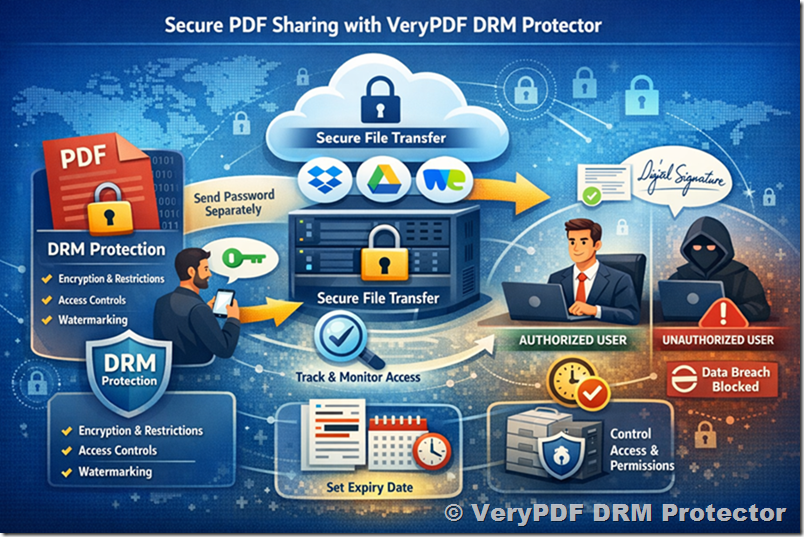
VeryPDF DRM Protector is advanced PDF security software that provides complete PDF protection and digital rights management (DRM) controls. It allows you to protect PDF files from unauthorized access, copying, printing, and sharing while maintaining full control over your secure PDF documents.

With powerful PDF DRM protection, you can easily manage who can open your files, what actions they can perform, and how long they can retain access. Control PDF expiry dates, revoke permissions remotely, and apply dynamic watermarks that display user-specific information to prevent data leaks and screen captures.

Unlike traditional password-based PDF encryption or certificate protection, VeryPDF DRM Protector enforces real digital rights management security, ensuring your confidential PDF files cannot be copied, printed, or distributed without authorization.

Whether you need to protect sensitive business documents, eBooks, reports, or training materials, VeryPDF DRM Protector provides the most effective solution for PDF access control, document usage monitoring, and data loss prevention. Safeguard your valuable content against piracy, unauthorized distribution, and misuse—quickly and easily.

Try it online now at https://drm.verypdf.com/online/

VeryPDF DRM Protector – Advanced PDF Security and DRM Protection to Secure/Protect PDF Files & Documents


Why Choose VeryPDF DRM Protector

Protect your intellectual property, training materials, reports, eBooks, research papers, or confidential documents with enterprise-grade PDF DRM controls that ensure your files remain secure—no matter where they go.

Powerful PDF Protection Without Passwords

  • No passwords or certificates required.
  • Stop copying, printing (or limit the number of prints), editing, and screen captures.
  • Prevent unauthorized PDF sharing and online distribution.
  • Control document expiry, revoke access instantly, and apply permanent or dynamic watermarks.

Comprehensive PDF DRM Security

VeryPDF DRM Protector stops unauthorized users from:

  • Viewing and printing protected PDFs
  • Modifying or copying text and images
  • Saving or sharing PDF content
  • Printing to file, PDF, or image printers
  • Capturing screens or using screen grabbers
  • Print to virtual PDF printers or virtual XPS printers

You Decide How PDFs Are Used

You can define:

  • When documents can no longer be viewed
  • When user accounts or subscriptions expire
  • Whether users can open protected PDFs offline or only when connected
  • Whether documents can be viewed in thin client or virtual environments

You Can Enforce

  • Number of allowed views
  • Number of allowed prints (or disable printing entirely)
  • Document expiry — by date, number of days, views, or prints
  • Document revocation at any time
  • Document retention periods and policies

Lock PDFs to Devices and USB Sticks

Ensure your documents stay under your control by locking them to:

  • Specific computers, mobile phones, or tablets
  • USB drives for portable, instant offline access
  • Web browsers for viewing via VeryPDF Web Viewer (no installation required)

This flexibility allows you to securely distribute and access documents across all major platforms.


Secure Document Distribution

Keep your files safe from the start.

  • Protect PDFs directly on your local computer — no uploading unprotected files to external servers.
  • Distribute protected PDFs via email, USB, or any file-sharing method.
  • Prevent unauthorized redistribution, piracy, or leakage.
  • Maintain total security both at rest and in transit.

Even after distribution, you can dynamically change permissions, revoke access, or update expiry rules.


Easy User & Document Management

The web-based administration system allows you to manage everything in one place:

  • Manage user accounts, access rights, and document permissions online (hosted on our servers or yours).
  • Manage subscription customers using our “Publications” feature.
  • Secure key management — completely automatic and transparent (no password handling).
  • Batch protect multiple PDFs via command line automation.
  • Integrate with your eCommerce platform for automatic license delivery and real-time tracking.

Get full control of your documents with simple setup and fast deployment.


Dynamic and Permanent PDF Watermarks for Maximum Security

VeryPDF DRM Protector enables you to add secure, dynamic, and permanent watermarks to your protected PDF documents both during viewing and printing. These DRM watermarks are an essential part of advanced PDF security, ensuring every page of your document is clearly traceable and protected against unauthorized use.

You can automatically insert identifying information such as:

  • User’s full name or ID
  • Email address or company name
  • Date and time of access or printing
  • IP address or unique document identifier

Each dynamic watermark is automatically generated for every authorized user, meaning that every viewed or printed copy carries visible ownership data. This discourages users from taking screenshots, photos, or making unauthorized printed copies, since each document clearly identifies who accessed it.

Unlike standard watermarks applied in Adobe Acrobat or Microsoft Office, VeryPDF DRM Protector’s watermarks are non-removable, tamper-proof, and permanently embedded into the PDF rendering layer. Even if someone tries to edit or convert the file, the watermark remains intact, protecting your intellectual property and ensuring full document traceability.

With VeryPDF DRM Protector, you gain professional-grade PDF watermark security, combining dynamic personalization, anti-copy protection, and digital rights management to keep your PDF documents safe and accountable at all times.


Protect Your Intellectual Property

Whether you’re a publisher, educator, business, or government organization, VeryPDF DRM Protector ensures complete protection of your sensitive or proprietary content.

Our DRM solution provides a multi-layered defense mechanism that goes far beyond password encryption—ensuring your content can only be opened using authorized, secure PDF Viewers.

Use Cases Include:

  • eBooks and digital publications
  • Training materials and courseware
  • Financial reports and legal documents
  • Corporate manuals and confidential proposals
  • Research and academic papers

Key Features Overview

VeryPDF DRM Protector creates secure PDF files that:

  • Have stronger protection than passwords
  • Cannot be shared or copied by unauthorized users
  • Are locked to specific devices or USB sticks
  • Block screen capture and print-screen tools
  • Include non-removable and dynamic watermarks
  • Allow fine control over printing (disable, limit, or allow)
  • Expire after a set number of views, prints, or days
  • Can be revoked anytime, even after delivery
  • Work online and offline
  • Display custom “unauthorized use” messages

For a complete overview see Features Summary.


Additional Highlights

  • Protect PDFs on your local computer – no cloud upload required
  • Distribute protected files just like normal files
  • Manage users and documents via online admin system
  • Transparent, automatic encryption key management
  • U.S. Government–strength AES encryption (NIST approved)
  • Real-time license tracking (sent, delivered, and opened)
  • Manage publication-based subscriptions
  • Protect interactive PDF forms from modification
  • View document usage statistics with charts and logs
  • Get started in less than 5 minutes

Why VeryPDF DRM Protector Is Better

Unlike traditional password protection or generic PDF encryption tools, VeryPDF DRM Protector gives you:

  • Persistent protection – files remain secure no matter where they go.
  • Real-time control – revoke or change permissions anytime.
  • True DRM enforcement – users cannot bypass protection with converters or editors.
  • Flexible deployment – view protected PDFs on Windows, Mac, iOS, Android, or browser.
  • Peace of mind – your documents are always under your control.

Get Started with VeryPDF DRM Protector

Experience powerful, easy-to-use, and highly secure PDF DRM protection trusted by professionals and organizations worldwide.

Safeguard your intellectual property, protect your business documents, and prevent unauthorized sharing today.

✅ Try VeryPDF DRM Protector Free Online at https://drm.verypdf.com/online/


About VeryPDF

VeryPDF is an expert in PDF, Office, and document security technologies.
We develop professional PDF tools for encryption, editing, conversion, and DRM protection.
Visit https://www.verypdf.com to learn more about our software solutions.

Free VeryPDF Reader and Free VeryPDF Web Viewer — The Ultimate Way to View and Protect DRM-Protected PDF Files

Protected PDF File Viewers – Installed or Zero-Installation Options

Our free Secure PDF Viewers allow you to open and read protected PDF files (VPDF files) on almost any operating system. You can choose to install the viewer on your Windows, macOS, iOS, or Android device for offline access, or use our zero-installation viewers, which let you securely view protected documents directly in a web browser on any platform — or even run the viewer from a USB drive without installing anything.

VeryPDF DRM Protector provides two powerful and completely free tools — the VeryPDF Reader (also known as the Secure PDF Viewer) and the VeryPDF Web Viewer. These applications allow authorized users to open, read, and interact with DRM-protected PDF documents in the safest possible way — without any risk of copying, printing, or sharing.

These free tools are available for Windows, Mac, iOS, Android, and Web browsers, offering both installed and zero-installation options to fit any user’s needs.

Let’s explore in detail what these two tools do, how they work, and why they are an essential part of secure document management.

Free VeryPDF Reader and Free VeryPDF Web Viewer — The Ultimate Way to View and Protect DRM-Protected PDF Files


1. Overview: What Are the Free VeryPDF Reader and Web Viewer?

The VeryPDF Reader (Secure PDF Viewer) and VeryPDF Web Viewer are specialized applications designed to open and view protected PDF files created using VeryPDF DRM Protector.

Protected PDF files are encrypted in a special format called VPDF (VeryPDF PDF Format). Unlike regular PDF files, VPDF files cannot be opened with standard PDF readers such as Adobe Acrobat Reader. Instead, they must be opened with a secure viewer that enforces digital rights management (DRM) policies — and that’s exactly what the VeryPDF Reader and Web Viewer do.

Both applications are completely free, and they are designed to make the process of viewing secure PDF documents simple, fast, and safe.

You can choose between two main types of viewers:

  • Installed Viewers – The traditional, offline-friendly application you can install on your device (Windows, Mac, iOS, Android).
  • Zero Installation Viewers – Browser-based or USB-based viewers that allow you to read protected PDFs without installing any software.

Together, these tools ensure that you can always open and read protected PDF documents — no matter where you are or what device you use.


2. Installed Viewers – VeryPDF Reader (Secure PDF Viewer)

The installed version of the VeryPDF Reader is a full-featured desktop or mobile application designed for users who want to view protected PDF files offline.

Once installed and licensed, the viewer allows you to open, read, and, if permitted by the document publisher, print or annotate the file — all while strictly following the security rules defined by the document owner.

Supported Platforms:

  • Windows
  • macOS
  • iOS
  • Android

You can download the installed viewer directly from the VeryPDF website.

Key Benefits:

  • Works offline (after initial license activation)
  • Faster performance for large or complex documents
  • More control over local security and access settings
  • Advanced features such as watermark display, print control, and document expiration

The installed viewer is ideal for professionals, educators, and businesses that regularly work with DRM-protected PDF documents.


3. Zero Installation Viewers – VeryPDF Web Viewer and Portable Viewer

Not everyone wants to install software — especially when accessing documents temporarily or on a shared device. For those users, VeryPDF offers zero-installation solutions:

3.1 VeryPDF Web Viewer

The VeryPDF Web Viewer allows you to view protected PDF files directly in your browser — without downloading or installing any software.

It works seamlessly on any operating system, including Windows, Mac, Linux, ChromeOS, iOS, and Android, as long as you have a modern browser and an internet connection.

This makes it ideal for organizations distributing secure documents to users who may not have permission to install software on their computers.

Features of VeryPDF Web Viewer:

  • Works online through any modern web browser
  • No installation or plug-ins required
  • Fully enforces DRM controls like copy prevention and watermarking
  • Always up-to-date (no need for software updates)
  • Easy access for users on corporate or restricted systems

The only requirement is that you must remain connected to the Internet while viewing the document because the Web Viewer must continuously validate your access rights.

3.2 VeryPDF Portable Viewer (Secure USB Viewer)

The Secure USB Viewer lets you run the viewer directly from a USB stick — with no installation required.

It’s perfect for users who need to carry protected documents and view them on different Windows computers while keeping everything self-contained and secure.

This portable viewer is only available from the document publisher, ensuring complete control over distribution and usage.


4. Secure PDF Viewing – How the Protection Works

The security system behind VeryPDF’s viewers is based on strong encryption and controlled licensing. Every protected PDF (VPDF file) is encrypted so that it can only be decrypted and viewed by authorized users through the Secure PDF Viewer.

Here’s how the process works:

Step 1 – License Activation

When you open a secure VPDF file for the first time, the VeryPDF Reader checks whether your device already has a valid decryption key. If not, it connects to the publisher’s authorization server to verify your license and download the necessary key. This happens automatically and securely over an encrypted connection.

Step 2 – Authorization and Access

If your license is valid, the decryption key is securely transferred to your viewer, and you can view the document immediately. If your access is denied, a custom message from the publisher will tell you how to request permission.

Step 3 – Offline Access

Once a document has been successfully opened and licensed, you can usually view it offline — unless the publisher has enforced online validation or time-based restrictions.

For example, a publisher may limit viewing to 30 days, allow printing only once, or require online checks every week.

Step 4 – On-the-Fly Decryption

All document decryption takes place in memory only, never on disk. The file is never stored in a decrypted form, preventing hackers or malware from recovering its contents.

There are no temporary files, no self-decrypting executables, and no insecure plug-ins — ensuring total document integrity.


5. Advanced Security Features

The free VeryPDF Reader and Web Viewer include powerful, built-in security measures that make it virtually impossible to bypass or compromise.

Key Security Highlights:

  • No Plug-ins Required
    Unlike many other PDF viewers, VeryPDF Reader does not rely on Adobe plug-ins or extensions, which are often a source of vulnerabilities.
  • No JavaScript Execution
    JavaScript is commonly used for malicious attacks in PDFs. The viewer blocks JavaScript entirely, eliminating this risk.
  • No Adobe Acrobat Dependency
    The viewer is fully independent of Adobe Acrobat and continues to function perfectly even when Adobe updates its software.
  • No Passwords Needed
    Access is controlled through secure license files, not passwords — so there’s nothing to forget, share, or crack.
  • No Temporary Files
    Decryption happens only in memory, ensuring no traces of the content are ever saved on your disk.
  • Automatic Copy Prevention
    Copy, paste, screen capture, and print-to-file operations are all automatically disabled.
  • Anti-Screenshot Technology
    The viewer detects and blocks screen capture tools, including the Windows Print Screen function and third-party grabbers.
  • Offline Access
    Once licensed, documents can be viewed without an Internet connection (depending on publisher settings).
  • Dynamic Watermarking
    Publishers can add watermarks showing user details (name, email, date, etc.) to discourage unauthorized sharing.
  • Language Support
    The Windows version supports multiple languages, including English, French, German, Spanish, Chinese, Dutch, Russian, Turkish, and Czech.

These features together ensure that even if someone gains access to a protected file, they cannot copy, share, or misuse it.


6. Enforcing PDF DRM Controls

The VeryPDF Reader and Web Viewer are not just about reading files — they are the enforcers of DRM (Digital Rights Management) controls set by the publisher.

Here are some examples of what publishers can control:

  • Whether a file can be printed (and how many times)
  • Whether color printing is allowed
  • Whether viewing is allowed only in certain locations or networks
  • How long the document remains accessible
  • How many times it can be opened
  • Whether it can be used on multiple devices
  • Whether it can be viewed in virtual machines or thin-client environments

All these rules are automatically enforced by the viewer. Users cannot bypass or modify them, and even VeryPDF cannot change them once published — only the original publisher can.

This gives full confidence that the DRM policies you apply will always remain effective.


7. Why Use VeryPDF Reader and Web Viewer?

There are many PDF viewers available, but only the VeryPDF Reader and Web Viewer provide true DRM-enforced document security with complete transparency to users.

Benefits for Publishers:

  • Protect intellectual property and confidential documents
  • Prevent file sharing and unauthorized access
  • Enforce expiration, usage limits, and watermarks
  • Distribute documents securely without worrying about passwords

Benefits for End Users:

  • Simple, user-friendly access to protected content
  • No need to manage or remember passwords
  • View documents securely across multiple platforms
  • Free to use, with both offline and online options

8. Persistent End-to-End Protection

One of the most powerful aspects of VeryPDF DRM technology is persistent protection.

Once a PDF document is protected and distributed, its security remains intact throughout its entire lifecycle — from creation and sharing to viewing and expiration.

Even if someone copies the VPDF file, it will remain useless without a valid license and the authorized viewer. The document is permanently tied to the licensed computer or user account.


9. Supported Operating Systems

VeryPDF’s secure viewers work across nearly all modern devices and platforms:

  • Windows
  • macOS
  • iOS
  • Android
  • Any system with a web browser (via Web Viewer)

The Web Viewer’s cross-platform design ensures you can always access protected content — whether you’re on a PC, tablet, or smartphone.


10. How to Get the Free Viewers

The free VeryPDF Reader (Secure PDF Viewer) can be downloaded directly from the VeryPDF website.

The VeryPDF Web Viewer and USB Portable Viewer, on the other hand, are distributed by the document publisher. You’ll receive an access link or USB device directly from them.

These tools are completely free for end users — there are no subscriptions, no hidden costs, and no advertisements.


11. The Bottom Line

The VeryPDF Reader and VeryPDF Web Viewer together form a complete, reliable, and user-friendly solution for securely viewing DRM-protected PDF documents.

They protect digital content against copying, printing, sharing, and other unauthorized actions — all while offering an easy and transparent experience for legitimate users.

If you need to share sensitive information, confidential reports, or copyrighted documents, these free tools ensure that your content remains protected at all times.

With VeryPDF DRM Protector, VeryPDF Reader, and VeryPDF Web Viewer, you can confidently control who accesses your documents, for how long, and under what conditions — ensuring complete document security from start to finish.

Why VeryPDF DRM Protector and ProtectedPDF.com Make PDF Cracking Extremely Hard and What You Can Do Instead

Short answer: PDFs protected with VeryPDF DRM Protector or ProtectedPDF.com are designed so that ordinary users cannot edit, save, copy, or print them. They use strong encryption, a secure viewer, and extra layers like screenshot prevention and dynamic (personalized) watermarks. The only rough, manual method to copy content is to photograph the screen and run OCR on the images — a slow, error-prone, and legally risky process. If you legitimately need pages from a protected book, the right path is to ask the publisher or use the allowed features of the platform, not to break the protection.

Why VeryPDF DRM Protector and ProtectedPDF.com Make PDF Cracking Extremely Hard and What You Can Do Instead


1. What DRM actually does — in plain language

Digital Rights Management (DRM) is a set of technical rules that the document owner applies to a digital file to control what people can do with it. For a DRM-protected PDF, the owner can decide whether people are allowed to:

  • Open the document at all (only authorized people can view it).
  • Save a local copy to disk.
  • Print the document (or limit the number of prints).
  • Copy text or images out of the document.
  • Take screenshots or screen recordings.
  • View the document only inside a special, secure viewer.

VeryPDF DRM Protector and ProtectedPDF.com implement these rules by encrypting the file and requiring the document to be opened inside a controlled environment (a secure viewer) that enforces the rules. In simple terms: the file can be made unreadable unless the viewer checks license rules and then displays the content while blocking disallowed actions.


2. Why “cracking” DRM is not like removing a password

A password on a regular PDF is a single barrier — sometimes that barrier can be removed by tools if the password is weak or known. Modern DRM is different:

  1. Encryption + licensing server — The file is encrypted, and a license or token from the DRM server lets the secure viewer decrypt and show it. Without that license, the file remains encrypted and unreadable.
  2. Secure viewer enforcement — Even when decrypted, the viewer enforces rules such as “no printing” or “no copying.” That means the file may never be given to ordinary apps that could save or print it.
  3. Active protections — Some DRM systems try to stop screenshots and block screen-capture tools while the document is open. They can also bind access to a device or IP address. This makes automated or easy copying much harder.

Because of these layers, there is usually no simple “remove DRM” button unless you control the license or the DRM server. Breaking those protections often requires attacking the service or the viewer — actions that are illegal in many places and technically difficult.


3. The brute-force fallback: taking photos and OCR

If you can display text on a screen, there is always a physical way to capture it: photograph the screen with a camera or phone and then run OCR (optical character recognition) to turn the images back into text. That is technically possible for most visual content. But there are several important practical and legal reasons why this is not an effective or safe “solution”:

  • Tedious and slow. Photographing hundreds of pages, aligning images, cleaning them up, and running OCR is time-consuming and error-prone. OCR introduces mistakes (incorrect words, weird punctuation) that need manual correction. For long books this is a huge effort.
  • Poor quality vs. original. The resulting text usually lacks formatting, correct line breaks, footnotes, high-quality images, and metadata. Tables, formulas, and diagrams are particularly hard to OCR well.
  • Watermarks and overlays. If the document shows dynamic watermarks (for example, the buyer’s name, email, or time of access across the pages), every captured image will contain that information. Those watermarks both deter sharing and create obvious provenance that links any leaked copy back to the original buyer. Dynamic watermarking is an effective deterrent against mass redistribution.
  • Legal risk. Reproducing copyrighted material without permission can violate copyright law, the service’s terms of use, and—depending on jurisdiction—anti-circumvention laws. Repeated copying and leaking can lead to civil lawsuits or criminal charges. Even if you “only” record a few pages, the act could be unlawful if the rights holder has not allowed it. We strongly discourage this.

So yes, photographing the screen and OCR is possible in theory. In practice, it is heavy work, yields lower quality, and may have legal consequences. DRM’s value is not that it makes copying absolutely impossible in a theoretical sense; its value is that it raises the cost and risk so high that most casual piracy becomes impractical.


4. Dynamic watermarking: why it matters

Dynamic watermarking is when the document displays personalized information on each page while you view it — for example, the buyer’s name, email, account ID, date, or a unique code. The watermark can be placed in visible places and can change with each view or print. This has two main effects:

  1. Deterrence. A would-be leaker sees their own name stamped across the page. That creates a psychological and practical barrier: distributing that copy would directly implicate them.
  2. Traceability. If a leaked copy appears online, the watermark provides clues to the original buyer or the source, which helps rights holders track and act against the leak.

Adding dynamic watermarking to strong DRM makes brute-force photo + OCR copies less attractive, because any leaked copy can be traced and because the watermark often spoils the quality of the reproduced content. VeryPDF supports dynamic watermarks and encourages combining watermarking with other DRM controls for stronger protection.


5. Why YouTube/Reddit “hacks” usually fail

You mentioned trying methods found on YouTube and Reddit. There are a few reasons those community tips often don’t work for modern DRM solutions:

  • Outdated advice. Many “how to remove DRM” guides were written for older, simpler protections. The modern stack (encryption + secure viewer + server licenses + screenshot prevention) is much harder.
  • Platform differences. Techniques that worked on one DRM product rarely port to another. VeryPDF/ProtectedPDF use their own secure viewer and server checks, so tricks that worked against a different vendor are often ineffective.
  • Viewer updates. DRM vendors update their viewers and server logic; a bypass that worked months ago may be patched quickly.
  • Risk of malware. Some “toolkits” or cracked viewers circulating on forums are malware or phishing attempts. Trying them risks your device and personal data, and using them is illegal.

Because of these reasons, following random forum hacks is both risky and unlikely to succeed against up-to-date DRM. The safer and legal routes are to use the platform’s permitted features or to request permission from the rights holder.


6. Direct answer to your question: How can I edit/save/print a DRM-protected PDF from ProtectedPDF.com?

Short, direct points — simple steps and legal advice:

  1. If the platform blocks editing/saving/printing, you cannot do it with ordinary software. ProtectedPDF.com and similar services intentionally block these actions. That is how the seller enforces the rules they set for the book. Trying standard editors or print-to-PDF printers will usually be blocked by the secure viewer.
  2. Check the viewer interface first. Some DRM viewers allow limited actions: they may let you print a limited number of pages, or export highlights, or save an excerpt if the publisher allowed it. Look for on-screen controls that say “Print,” “Download,” or “Export.” If those controls are greyed out, your account/license does not include those rights.
  3. Contact the publisher or seller. If you legitimately need a printed copy or an editable version for study, teaching, or accessibility, contact the seller or publisher. Explain your use and request permission or an accessible format. Publishers often provide alternative formats (PDF with printing allowed, a physical print, or an accessible e-text) for valid reasons.
  4. Use the platform’s support channels. If you bought the book on ProtectedPDF.com, use their help or support page to report the issue: ask whether printing or saving is allowed under your license. If the viewer is blocking actions you legitimately paid for, support can often fix it. (Do not attempt to bypass the viewer.)
  5. Accessibility exceptions. If you need the content because of a disability, many vendors have an accessibility process. Ask for an alternative copy or a rights adjustment under accessibility rules — publishers commonly accommodate this.
  6. Do not use or install cracked viewers or tools that claim to remove DRM. These are illegal in many countries and often carry malware. They also harm authors and publishers.

In short: you cannot legally and easily edit/save/print a DRM-protected PDF unless the rights holder or the platform gives permission. Contact the publisher or platform support for legitimate needs.


7. If you absolutely need a few pages for research or quoting

If your need is small and reasonable (for example, quoting a short passage for research, review, or private study), consider these lawful paths:

  • Fair use / fair dealing: In some countries, limited quotation for criticism, review, or academic research is allowed. The rules vary widely. A short quote accompanied by attribution is usually safe. For more substantial copying, check local laws or ask permission.
  • Ask for permission: Contact the publisher with a clear request: which pages you need, why, and how you will use them. Many publishers respond positively to specific, limited requests.
  • Use the allowed features of the platform: If the viewer lets you make notes or highlights, use those features and ask whether those can be exported in some way.
  • Accessibility requests: If your need is due to a disability, explicitly request an accessible format.

Again: taking screen photos or OCRing them for private study may be technically possible, but it still carries legal and ethical risk. It is better to ask for permission first.


8. Why DRM still matters — even if nothing is 100% failproof

Some people argue that “if something can be copied visually, DRM is pointless.” This argument ignores two important facts:

  1. Cost & effort matter. DRM turns casual copying (copy & paste, print to PDF, mass leak) into something that requires substantial time or technical skill. Most pirates prefer easy targets; DRM raises the bar so high that most thefts never happen.
  2. Traceability deters abuse. Dynamic watermarks tie leaked copies to specific buyers. That discourages people from redistributing files, because the risk of detection and consequences increases.

In short, DRM is not about being mathematically perfect; it’s about making illicit copying expensive, slow, and risky — which is enough to protect most rights holders’ business models.


9. What VeryPDF and ProtectedPDF.com do specifically

Based on the platforms’ technology and features, the systems provide:

  • Strong encryption and license checks. Files remain encrypted and require a license or token to open.
  • Secure viewer enforcement. Viewing happens inside a controlled player that blocks copy/print/save when the policy disallows it.
  • Screenshot and screen-capture protections. The viewer can attempt to prevent screen grabs and other capture methods.
  • Dynamic watermarks. Personalized, changing marks that show who viewed the document and when.
  • Configurable policies. The document owner decides whether to allow printing, saving, the number of views, expiry dates, and other limits.

These features combined are why ordinary cracks, “print to PDF” tricks, and simple tools from forums rarely work.


10. Practical checklist — what to do next if you bought a protected book

  1. Reopen the document inside the official ProtectedPDF/VeryPDF viewer and look for on-screen options (print, download, export). If any are available, use them.
  2. If a needed function is disabled, contact the seller/publisher and explain your need. Be specific (which pages, why, how will you use them).
  3. If you suspect the viewer is malfunctioning (you paid for printing but the button is disabled), contact ProtectedPDF or vendor support for help.
  4. If you need the content for accessibility reasons, explicitly request an accessible format. Publishers commonly comply.
  5. Never download or run cracked viewers or tools that promise DRM removal. They are illegal and dangerous.

11. Final words on ethics and consequences

Copyright protects creators who invest time and money to produce books, research, and art. Circumventing DRM to copy and redistribute content harms those creators and can expose you to legal risk. If your need is legitimate, rights holders and platforms generally offer lawful solutions: printing rights, excerpts, accessibility formats, or licensed downloads. Asking politely and following the platform’s support path is the correct and safe approach.

If you must quote or use small parts for research, education, or review, do so within the law in your country (fair use, fair dealing) and always attribute the author and publisher.


Useful resources

  • VeryPDF DRM Protector — a powerful software that provides PDF encryption, secure viewing, access control, and dynamic watermarking.
  • ProtectedPDF.com — an online DRM platform that protects PDFs with similar technology, preventing unauthorized copying, saving, or printing.

PDF Encryption and AES-256 Security Explained: How VeryPDF DRM Protector Ensures Strong Document Protection

In the digital world, protecting sensitive information contained in PDF documents is essential for individuals, educators, and businesses. PDF encryption ensures that only authorized users can access, view, or modify the document’s content. Over the years, Adobe Acrobat has introduced multiple encryption algorithms—each improving upon the previous in terms of strength, key size, and resistance to attacks.

VeryPDF DRM Protector fully supports all major encryption algorithms used in the evolution of Adobe PDF security, giving users flexible options to balance compatibility and security strength.

Supported PDF Encryption Algorithms in VeryPDF DRM Protector software,

Expand on the five major encryption methods already mentioned:

  • Acrobat 3.0 and later – 40-bit RC4
  • Acrobat 5.0 and later – 128-bit RC4
  • Acrobat 6.0 and later – 128-bit RC4 (Enhanced)
  • Acrobat 7.0 and later – 128-bit AES
  • Acrobat 9.0 and later – 256-bit AES

Each subsection can explain the key size, encryption speed, and real-world use cases.

PDF Encryption and AES-256 Security Explained: How VeryPDF DRM Protector Ensures Strong Document Protection

Below, we’ll explore each encryption algorithm and how it works, along with how VeryPDF DRM Protector supports and enhances them.


1. Acrobat 3.0 and Later — 40-bit RC4 Encryption

The earliest form of PDF encryption appeared in Acrobat 3.0, using the RC4 stream cipher with a 40-bit key length. This method allowed document authors to restrict printing, copying, and editing of PDF files.

  • Algorithm: RC4 (Rivest Cipher 4)
  • Key Length: 40 bits
  • Strength: Low by modern standards
  • Compatibility: Supported by all PDF readers since Acrobat 3.0

While 40-bit RC4 encryption was considered sufficient in the 1990s, advances in computing power have made it possible to break this encryption in minutes. It is now considered insecure and suitable only for maintaining backward compatibility with older systems.

VeryPDF DRM Protector supports 40-bit RC4 for users who need to share encrypted documents with legacy systems that cannot open modern encryption formats.


2. Acrobat 5.0 and Later — 128-bit RC4 Encryption

With Acrobat 5.0, Adobe introduced 128-bit RC4 encryption, which significantly improved security compared to the 40-bit version. This method increased the possible key combinations exponentially, making brute-force attacks far more difficult.

  • Algorithm: RC4 (Rivest Cipher 4)
  • Key Length: 128 bits
  • Strength: Moderate (better than 40-bit, but still outdated)
  • Compatibility: Acrobat 5.0 and later

This version of encryption added support for more granular permission settings, allowing document creators to control features like high-resolution printing, form filling, and commenting.

VeryPDF DRM Protector continues to support 128-bit RC4 for users who require compatibility with older Acrobat versions while maintaining stronger encryption than 40-bit RC4.


3. Acrobat 6.0 and Later — Enhanced 128-bit RC4 Encryption

Acrobat 6.0 further refined the RC4-based encryption system. While it still used 128-bit RC4, Adobe introduced improved key derivation methods and metadata encryption, making it slightly more secure than the earlier Acrobat 5.0 version.

  • Algorithm: RC4 (enhanced version)
  • Key Length: 128 bits
  • Strength: Moderate
  • Compatibility: Acrobat 6.0 and later

This method increased protection for the PDF metadata and enhanced password handling, making it more resistant to some known vulnerabilities of the earlier RC4 implementation.

VeryPDF DRM Protector supports this format, ensuring compatibility for documents that must remain accessible in environments using Acrobat 6.0 or similar tools.


4. Acrobat 7.0 and Later — 128-bit AES Encryption

With Acrobat 7.0, Adobe moved from the older RC4 algorithm to AES (Advanced Encryption Standard)—a modern symmetric encryption standard adopted worldwide for secure data protection.

  • Algorithm: AES (Advanced Encryption Standard)
  • Key Length: 128 bits
  • Strength: Strong (secure for most business and educational use cases)
  • Compatibility: Acrobat 7.0 and later

AES encryption provides a much higher level of security compared to RC4 because it’s based on block cipher operations rather than a stream cipher, making it more resistant to cryptographic attacks.

This version introduced AES in Cipher Block Chaining (CBC) mode, providing better protection against pattern-based attacks.

VeryPDF DRM Protector fully supports 128-bit AES encryption, allowing users to secure PDF documents with a modern and robust encryption standard that maintains excellent performance and wide compatibility.


5. Acrobat 9.0 and Later — 256-bit AES Encryption

The strongest and most modern encryption method for PDF files came with Acrobat 9.0, which introduced AES-256 encryption. This version uses the Advanced Encryption Standard with 256-bit keys, offering military-grade protection for sensitive data.

  • Algorithm: AES (Advanced Encryption Standard)
  • Key Length: 256 bits
  • Strength: Very Strong (industry standard for high-security applications)
  • Compatibility: Acrobat 9.0 and later

AES-256 encryption provides unparalleled resistance against brute-force and cryptanalytic attacks. It is widely used in government, defense, and enterprise-grade security environments.

VeryPDF DRM Protector supports 256-bit AES encryption as the highest available protection level. When this mode is selected, the resulting encrypted PDF cannot be opened or decrypted without proper authorization—ensuring full compliance with modern data protection standards.

PDF Encryption and AES-256 Security Explained: How VeryPDF DRM Protector Ensures Strong Document Protection


Summary of PDF Encryption Methods Supported by VeryPDF DRM Protector
Acrobat Version Encryption Algorithm Key Length Security Level Supported by VeryPDF DRM Protector
Acrobat 3.0+ RC4 40-bit Low
Acrobat 5.0+ RC4 128-bit Medium
Acrobat 6.0+ RC4 (Enhanced) 128-bit Medium
Acrobat 7.0+ AES 128-bit Strong
Acrobat 9.0+ AES 256-bit Very Strong

Encryption Algorithms and Key Lengths

PDF encryption relies on well-established cryptographic algorithms to protect document content from unauthorized access. The two main algorithms used throughout the evolution of PDF standards are RC4 and AES (Advanced Encryption Standard).

RC4 is a symmetric stream cipher, meaning the same algorithm is used for both encryption and decryption. While RC4 was once widely used, it is now considered insecure due to multiple vulnerabilities and has been officially deprecated starting with PDF 2.0.

AES, defined by the FIPS-197 standard, is a modern block cipher known for its strong security and efficiency. It has become the preferred encryption algorithm in newer versions of PDF and is also widely used in many other data protection applications.

Because encryption keys are long binary values that are difficult to handle directly, they are generated from user-friendly passwords composed of readable characters. Over time, as the PDF format and Adobe Acrobat have evolved, encryption methods have been improved to support stronger algorithms, longer encryption keys, and more advanced password mechanisms, significantly enhancing the overall security of protected PDF documents.

Encryption algorithms, key length, and password length in PDF versions
PDF and Acrobat version encryption algorithm and key length max. password length and

password encoding

PDF 1.1 – 1.3 (Acrobat 2-4) RC4 40-bit (weak, should not be used) 32 characters (Latin-1)
PDF 1.4 (Acrobat 5) RC4 128-bit(weak, should not be used) 32 characters (Latin-1)
PDF 1.5 (Acrobat 6) same as PDF 1.4, but different application of encryption method (weak, should not be used) 32 characters (Latin-1)
PDF 1.6 (Acrobat 7) and PDF 1.7 = ISO 32000-1 (Acrobat 8) AES-128 32 characters (Latin-1)
PDF 1.7 Adobe Extension Level 3 (Acrobat 9) AES-256 with shortcomings in password handling (weak; deprecated in PDF 2.0) 127 UTF-8 bytes (Unicode)
PDF 1.7 Adobe Extension Level 8 (Acrobat X/XI/DC) and PDF 2.0 = ISO 32000-2 AES-256 with improved password handling 127 UTF-8 bytes (Unicode)
Future extension of PDF 2.0 AES-256 in Galois Counter Mode (GCM) 127 UTF-8 bytes (Unicode)

Passwords and Encryption Key Derivation

In PDF encryption, the user or master password is not directly used to encrypt the document’s contents. Instead, the system derives a binary encryption key from the password, along with other parameters such as permission settings. This derived key is then used to perform the actual encryption. Importantly, the length of the encryption key (40, 128, or 256 bits) is independent of the password length, which means even short passwords can generate long encryption keys—though this does not necessarily ensure security.

Depending on the PDF version, different constraints apply to password length and encoding. In versions up to PDF 1.7 (ISO 32000-1), passwords were limited to 32 Latin-1 characters. Later, PDF 1.7 Adobe Extension Level 3 introduced Unicode support, extending password capacity to 127 bytes in UTF-8 encoding. Because UTF-8 uses variable-length encoding (1–4 bytes per character), the number of characters that can be used depends on the character set. For example, since most Japanese characters require 3 bytes in UTF-8, such a password can contain a maximum of 42 characters.

To ensure consistency, Unicode passwords undergo a normalization process known as SASLprep (defined in RFC 4013, based on Stringprep in RFC 3454). This process removes non-text characters, converts non-standard spaces to the regular ASCII space (U+0020), and normalizes the password to Unicode form NFKC. Special handling is also applied for bidirectional text, preventing confusion when right-to-left and left-to-right scripts are mixed within the same password.

The security strength of a protected PDF depends not only on the encryption key length but also on the complexity and quality of the password itself. Weak or predictable passwords—such as personal names, birthdays, or common words—can easily be broken through dictionary or brute-force attacks. Studies have shown that many users choose passwords based on easily guessed personal information, significantly weakening document protection. To maximize security, users should create strong, unpredictable passwords combining letters, numbers, and symbols.


Why Choose VeryPDF DRM Protector

While PDF encryption alone provides password protection and access restrictions, VeryPDF DRM Protector takes security to the next level by combining encryption with Digital Rights Management (DRM) controls.

With VeryPDF DRM Protector, you can:

  • Apply strong AES-256 encryption for ultimate protection
  • Control who can view, print, or copy your PDF content
  • Add dynamic watermarks and transparent PDF-based watermarks
  • Revoke access even after the file is distributed
  • Integrate with online license validation systems for advanced user management

Whether you need backward compatibility with legacy PDF versions or maximum modern protection, VeryPDF DRM Protector ensures your documents are secure and compliant with the strongest encryption standards available.


For more information or to try it online for free, please visit:
https://drm.verypdf.com/