[Solution] Custom Audio and Video DRM Protection Software – Secure, Encrypt, and Control Your Media Streaming Content in MP3, MP4, WAV, AVI, and MKV Formats

In today’s fast-growing digital world, audio and video content—especially in popular formats such as MP3, MP4, WAV, AVI, and MKV—are among the most valuable assets for content creators, educators, entertainment companies, and online training platforms. However, these media files are also some of the most vulnerable to piracy, unauthorized copying, and illegal redistribution.

While our VeryPDF DRM Protector software has been a proven solution for securing PDF and document content, many customers have asked us about protecting multimedia formats. In response, we developed a custom-built DRM protection software specifically designed to encrypt and control media streaming content for audio and video files, delivering enterprise-level security.

[Solution] Custom Audio and Video DRM Protection Software – Secure, Encrypt, and Control Your Media Streaming Content in MP3, MP4, WAV, AVI, and MKV Formats


Why You Need Audio and Video DRM Protection Software

Whether you’re running an e-learning platform, distributing premium music, sharing corporate training videos, or streaming entertainment content in formats like MP3, MP4, WAV, AVI, or MKV, you face common threats:

  • Unauthorized Downloading – Users attempting to save your media files locally without permission.
  • Content Sharing – Subscribers sharing access credentials or downloaded files with non-paying viewers.
  • Illegal Redistribution – Pirated versions of your media streaming content appearing on other websites or platforms.

A robust DRM software solution ensures you maintain control over who can view or listen to your content, how they access it, and for how long.


Our Custom DRM Solution – Key Features

Our custom-built audio and video DRM protection software is a server-side solution that you fully control, ensuring your MP3, MP4, WAV, AVI, and MKV files remain safe while being accessible to legitimate users.

1. Strong Encryption

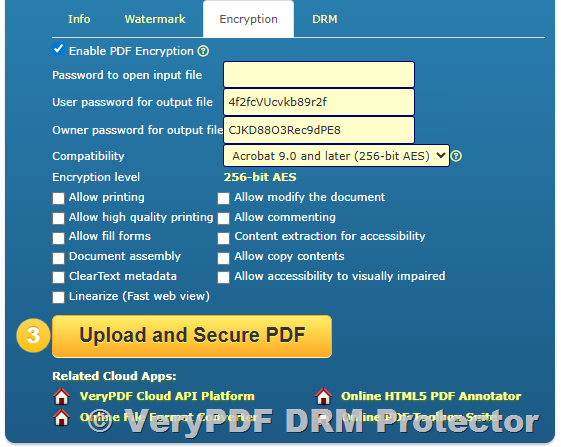
All audio and video files are protected using AES encryption, making it impossible for unauthorized users to directly access or download the raw media files. This ensures your media streaming content stays safe.

2. Secure Browser-Based Playback

Instead of exposing your original MP3, MP4, WAV, AVI, or MKV files, the system streams encrypted content securely through a web player. This allows viewers to enjoy your content without being able to save or share the source files.

3. Access Control & Restrictions

Control exactly who can view your content by implementing:

  • User-based authentication (account login required)
  • IP address restrictions
  • Device ID binding (limit playback to registered devices)
  • Playback time limits (e.g., expire after 7 days)

4. Dynamic Watermarking

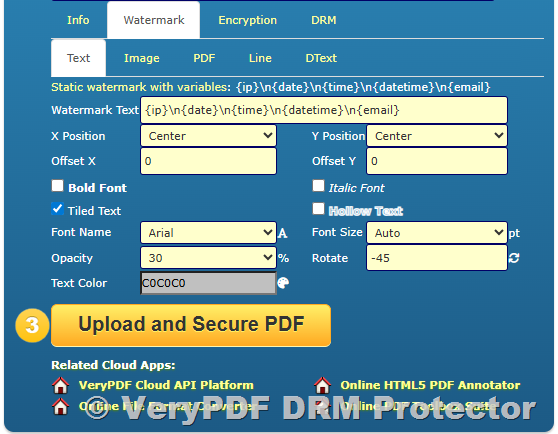
During playback, you can enable dynamic, user-specific watermarks containing identifiable information (such as username or email). This discourages screen recording and makes it easy to trace leaks.

5. Unlimited Usage

Once deployed on your servers, this DRM software lets you protect an unlimited number of MP3, MP4, WAV, AVI, and MKV files without per-file or per-user fees.

6. On-Premise Control

The entire DRM process runs on your own servers, ensuring maximum privacy, compliance, and full control over your media streaming content.


Integration and Compatibility

Our Audio and Video DRM Protection Software integrates seamlessly with your existing content delivery system. It works with:

  • Learning Management Systems (LMS)
  • Corporate Training Portals
  • Music and Video Subscription Platforms
  • Secure Video-On-Demand Services

We also provide technical documentation and deployment support, ensuring a smooth setup process for your IT team.


Why Choose Our DRM Protection Software?

  • Proven DRM expertise from years of securing digital documents and media streaming content.
  • Fully customizable features tailored to your platform’s needs.
  • No ongoing licensing costs for content protection.
  • Works for both on-demand and live streaming scenarios.
  • Supports MP3, MP4, WAV, AVI, MKV, and other popular formats.

Pricing

We offer this Audio and Video DRM Protection Software as a one-time purchase for lifetime use.
Pricing details are available upon request.


Next Steps

If you’re ready to encrypt and control your valuable media streaming content in MP3, MP4, WAV, AVI, and MKV formats, we can provide:

  • A live demo to showcase the DRM software in action.
  • A technical architecture overview to explain deployment and integration.
  • Assistance with customization to match your exact security requirements.

Contact us today to discuss your DRM needs and secure your audio and video content before it’s too late.

https://support.verypdf.com/

PDF DRM Protection Made Easy — PDF Security, Pricing, Dynamic Watermarks, and Custom Domains

In today’s digital learning and content distribution world, protecting your intellectual property has never been more important. Many educators, trainers, and businesses are looking for ways to prevent unauthorized sharing, copying, or distribution of their PDF files. VeryPDF DRM Protector provides a professional-grade solution to secure your PDF documents while allowing authorized users to access them easily.

Recently, Angela Elder inquired about the pricing for VeryPDF DRM Protector, how it works, and whether it can be used with a custom domain. Below is a comprehensive explanation that addresses these points in detail.

PDF DRM Protection Made Easy -- PDF Security, Pricing, Dynamic Watermarks, and Custom Domains 


Pricing for VeryPDF DRM Protector

The VeryPDF DRM Protector Starter Plan is priced at $99.95 per month.
You can subscribe directly from the official purchase page:
https://drm.verypdf.com/purchase/

This plan includes:

  • Access to the VeryPDF DRM Protector Cloud REST API
  • Secure PDF protection with customizable DRM policies
  • Dynamic watermarking (such as adding each viewer’s name, email, or unique ID)
  • Online PDF viewing without requiring users to download additional software
  • Cloud storage and secure file delivery
  • Technical support during your subscription period

How VeryPDF DRM Protector Works

The process is straightforward, yet extremely powerful. Once you subscribe to the Starter Plan, you can protect and distribute your PDF files in just a few steps:

1. Upload Your PDF

You upload your normal PDF file to the VeryPDF DRM Protector Cloud system (either through the web interface or the REST API).

2. Apply Protection & DRM Policies

You can apply various restrictions, including:

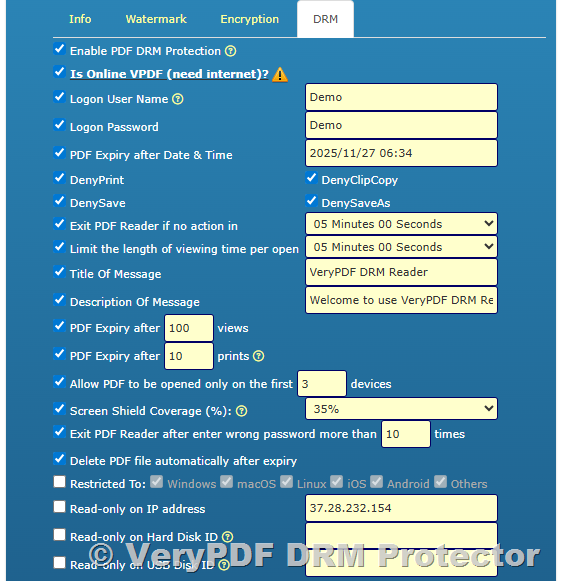
  • Preventing copy & paste
  • Disabling printing
  • Setting expiration dates for access
  • Limiting viewing to specific users or devices
  • Adding dynamic watermarks with the viewer’s name, email, or any text you choose

3. Generate Secure Viewing Links

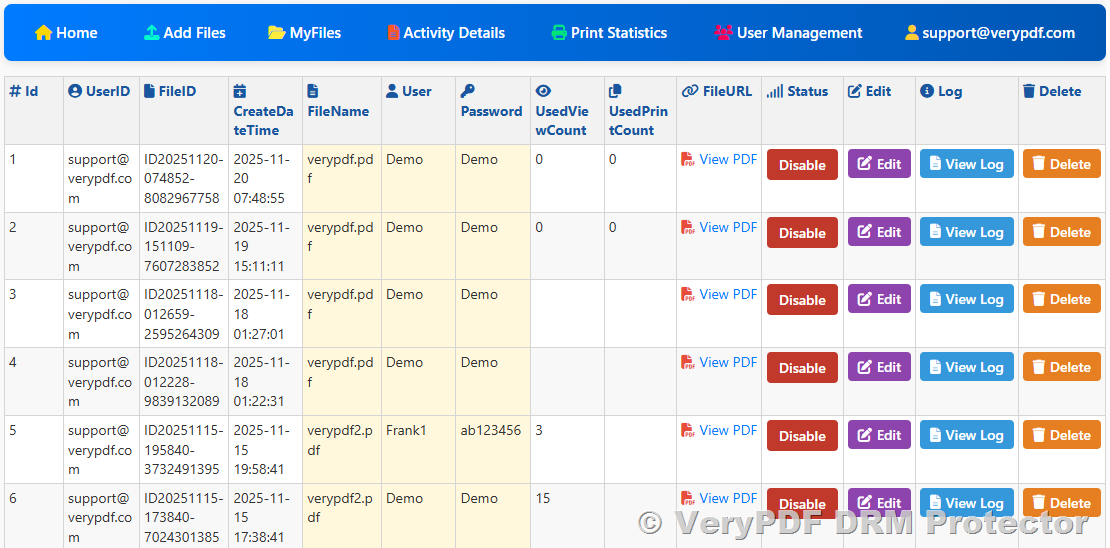
After the file is protected, the system generates a secure URL.
Example: https://yourdomain.com/view/securefile123
This link can be shared with your users via email, LMS platforms like Moodle, or embedded directly on your website.

4. Users View Online Without Extra Software

Your users can open the protected PDF directly in their browser using the VeryPDF Online PDF Reader. No special software installation is required. Access is controlled by the DRM rules you set.


Using Your Own Domain

If you have your own domain (e.g., training.yourcompany.com), VeryPDF can help you integrate the DRM Protector service so that your secure viewing links use your own domain name.

Benefits include:

  • Consistent branding
  • Increased trust from your users
  • Seamless integration into your existing website or LMS

This can be configured via domain mapping and API integration, so your customers never need to see a third-party URL.


Why Choose VeryPDF DRM Protector?

  • Strong Protection – 256-bit AES encryption ensures your files are safe from unauthorized access.
  • Dynamic Watermarking – Automatically insert the user’s personal details into the document as a visible deterrent to sharing.
  • Flexible Access Control – Define who can view, when they can view, and how they can interact with your files.
  • Easy Integration – Works with your website, LMS, or e-commerce platform via API.
  • No Software Hassles – Viewers simply click a link and view the document online.

Getting Started

If you’re ready to secure your PDF content, follow these steps:

  1. Visit the purchase page: https://drm.verypdf.com/purchase/
  2. Subscribe to the Starter Plan at $99.95/month
  3. Upload your PDF, set your DRM policies, and generate your secure viewing link
  4. Share the link with authorized users and enjoy peace of mind knowing your content is protected

Final Note:
Whether you are an educator, course creator, or business owner, VeryPDF DRM Protector offers a reliable way to protect your valuable documents while ensuring legitimate users have smooth access. With support for custom domains, dynamic watermarks, and easy online viewing, it’s an ideal solution for secure PDF distribution.

How VeryPDF DRM Protector Secures PDF Files and Enables Controlled Sharing

In today’s digital world, sharing PDF documents as email attachments is still one of the most common ways to exchange important information. However, traditional PDF files—viewed in standard PDF readers like Adobe Acrobat or Foxit—offer little to no real protection against copying, printing, forwarding, or taking screenshots.

If your organization needs to control exactly who can view a PDF, prevent unauthorized access, and block screenshots, you need a solution that goes beyond standard encryption and password protection. This is where VeryPDF DRM Protector comes in.

Below, we answer common questions about how our DRM technology works, and how it can be integrated into a cloud-based workflow.

How VeryPDF DRM Protector Secures PDF Files and Enables Controlled Sharing


1. How VeryPDF DRM Protector Prevents Screenshots

One of the biggest limitations of traditional PDF security is that once a file is opened in a standard viewer, the application has no control over the user’s system. Even if the file is password-protected, the content can be captured by a simple screenshot or screen recording tool.

With VeryPDF DRM Protector, things work differently:

  • Restricted Viewing Environment – DRM-protected PDF files cannot be opened in standard PDF viewers like Adobe Reader or Foxit. Instead, they can only be viewed in:

    • The VeryPDF Online PDF Reader (browser-based, secure streaming)
    • The VeryPDF Offline PDF Reader (Windows, macOS, iOS, Android)
  • Screenshot Protection – Our offline PDF reader actively monitors and blocks screenshot and screen recording attempts. On Windows and macOS, this includes preventing tools like Snipping Tool, Print Screen, and third-party capture software.
  • Encrypted Streaming in Online Reader – When using the online reader, the PDF is never delivered as a standard file. Instead, it is streamed in an encrypted format, meaning the actual document data is never exposed in a way that can be easily saved or copied.

By controlling the environment in which the PDF is viewed, VeryPDF DRM Protector ensures that sensitive content cannot be easily captured or redistributed.


2. Implementing a Controlled PDF Sharing Workflow

Let’s say you want to allow your clients to generate PDF documents from your web application and share them with their own customers—but only under strict access controls. You might have this workflow in mind:

  1. Client generates a technical specification inside your application.
  2. Client chooses to download the document as a PDF and specifies the recipient’s email domain (e.g., endclient.com).
  3. Your system encrypts the PDF so that only users with a matching email domain can open it.
  4. The PDF is sent as an email attachment to the recipient.
  5. When the recipient opens the file in the VeryPDF Reader:
    • They are prompted to enter their email address.
    • If the domain matches the one specified, they receive a One-Time Password (OTP) via email.
    • Upon entering the OTP, they gain access to the document.

With VeryPDF DRM Protector, this workflow is entirely possible and can be automated using our cloud-based DRM API. Once a PDF is protected, you receive a secure URL or file that you can deliver directly to the end recipient.


3. Understanding Pricing and Upload Limits

In the Starter Plan of VeryPDF DRM Protector:

  • Document Upload Limit – 500 documents in total.
  • “Upload” refers to the process of submitting a unique PDF file to our DRM platform to be encrypted and protected.
  • Once a document is uploaded and protected, it stays available for authorized viewing until you delete it, regardless of when it was uploaded.
  • If you exceed the 500-document total, you will need to upgrade to a higher-tier plan to continue uploading new documents.

This approach makes it easy to control costs while scaling protection according to your needs.


4. Why Standard PDF Security Isn’t Enough

Even if you use password protection, encryption, or watermarks in a traditional PDF, once the file is opened, the user can:

  • Take screenshots
  • Save an unprotected copy
  • Share the password with others

With VeryPDF DRM Protector, the PDF is locked to our controlled reader environment, meaning:

  • You can prevent printing, downloading, and copy-paste.
  • You can limit viewing to specific email addresses or domains.
  • You can set expiry dates or revoke access instantly.
  • You can track document access and usage.

Conclusion

If your business needs to send PDF files as email attachments while maintaining complete control over who can view them—and ensuring they cannot be screenshotted—VeryPDF DRM Protector offers a reliable, API-enabled, and cloud-based solution.

It works seamlessly for organizations that want to integrate secure PDF generation into their existing workflow, making it possible to:

  • Automate protection at the time of PDF creation.
  • Restrict access by email or domain.
  • Use OTP authentication for extra security.
  • Prevent screenshots and unauthorized redistribution.

For more information, or to request an API demo, visit: https://drm.verypdf.com/

How to Use VeryPDF Command Line Tools to Monitor and Convert Print Jobs

How to Use VeryPDF Command Line Tools to Monitor and Convert Print Jobs

Every business, large or small, has some kind of printing process in place. From invoices and receipts to packing slips and reports, documents are printed daily. But what happens when these printed documents are important to keep in digital format? Whether it’s for archiving purposes or simply improving workflow, capturing print jobs and converting them into electronic formats can save tons of time and headaches. That’s where VeryPDF Printer Capture to PDF or PNG Command Line and SDK for Developers comes into play.

How to Use VeryPDF Command Line Tools to Monitor and Convert Print Jobs

As someone who’s worked with a variety of print capture solutions, I can tell you: this tool isn’t just another generic option out there. It’s tailored for anyone looking to monitor print jobs, capture them as they print, and convert them to PDF or PNG formats automatically. Here’s a deeper dive into how to get the most out of it.

What is VeryPDF Printer Capture to PDF or PNG Command Line Tool?

If you’re in charge of managing print processes at any level, you’ve likely encountered the frustration of dealing with raw print datawhether it’s from a dot matrix printer, a legacy application, or even a system running Windows NT. The tool that solves these issues is VeryPDF’s Printer Capture.

Essentially, the software acts as a virtual printer that captures print data from any standard or legacy application. It doesn’t matter if the application is sending print data in raw formats like PCL or PostScript. VeryPDF’s capture tool will grab that data, reprocess it, and convert it into formats like PDF, PNG, TIFF, and others. What’s impressive here is its flexibilityit works with almost any printer connected to a Windows system, and there’s no need for users to change how they operate their applications.

Key Features of VeryPDF Printer Capture

  1. Monitor and Capture Print Jobs Automatically:

    The tool automatically detects print jobs and captures them as they are sent to the printer. It doesn’t require any user intervention, making it ideal for business environments where documents need to be captured continuously without stopping the workflow.

  2. Convert to Multiple Formats:

    The captured data can be converted into various formats, including PDF, PNG, TIFF, and JPEG. Whether you need a high-quality digital version of a document for archiving, or simply need to extract data, you have complete control over the output format.

  3. Supports Legacy and Modern Printers:

    VeryPDF’s tool works with both legacy dot matrix printers and modern inkjet/laser printers. Whether your system is stuck in the 90s or fully up to date, it’s got you covered. It supports popular formats like HP PCL, PostScript, Epson, and many others.

  4. Data Extraction:

    Not only does the software capture print jobs, but it also has a feature for extracting key data like barcodes, timestamps, and other metadata from the print job. This is particularly useful for integrating with other systems or exporting the data into structured formats like XML or CSV.

  5. Customizable Workflow:

    The tool can be configured to automatically store captured files in specific folders, or it can even be set up to trigger other actions post-capture, like emailing a PDF or sending the document to a document management system.

Who Needs VeryPDF Printer Capture?

This tool is ideal for a wide range of industries, especially those where print jobs need to be archived, processed, or converted to other formats. Here are some of the key audiences that would benefit from using VeryPDF Printer Capture:

  • Legal Firms and Offices: They often need to convert printed contracts, agreements, and other documents into PDF format for easy retrieval, search, and sharing.

  • Retailers: Retail businesses printing receipts, orders, and invoices can capture print jobs and store them digitally for future reference or auditing purposes.

  • Manufacturing and Warehouse Operations: For companies with automated systems or legacy SCADA systems that print data to old dot matrix printers, this tool is crucial for converting printouts into usable digital documents.

  • Government Agencies: Agencies that handle large volumes of printed documents often require automated solutions for converting printed material into digital formats for archiving and record-keeping.

Use Cases of VeryPDF Printer Capture

Here are a few practical scenarios where VeryPDF Printer Capture would be a game-changer:

1. Converting Legacy Printer Data to Digital Archives

Imagine you have an old legacy system in your factory, printing orders to a dot matrix printer. The data sent to the printer is often important, but you can’t store it on paper. Instead of manually retyping or scanning, the VeryPDF tool intercepts that print data and converts it to a PDF file, automatically storing it in a network folder.

2. Capturing Invoices and Receipts in Retail

Retail stores typically print hundreds, if not thousands, of receipts and invoices daily. Using VeryPDF, each receipt can be automatically captured as a PDF. This ensures that all documents are stored digitally, making them easier to access for auditing or customer service needs.

3. Automating Reports in Manufacturing

In manufacturing environments, reports, packing slips, and other documents need to be captured and archived. With VeryPDF, you can automatically convert these printed reports into easily searchable PDFs and store them in a central location for future reference.

4. Extracting Data from Print Jobs

If your print jobs contain key information like invoice numbers, dates, or barcodes, VeryPDF can extract and store that data in structured formats. This makes it easier to integrate with other systems, like accounting software or inventory management platforms.

Core Advantages of Using VeryPDF Printer Capture

  • Zero User Intervention: Once set up, the tool requires no manual input. It automatically captures and processes the print job in real-time.

  • Supports a Wide Range of Printer Formats: Whether you’re dealing with legacy PCL data or modern PostScript commands, the tool captures it all.

  • Flexible Output Options: Convert print data into PDFs, TIFFs, PNGs, and other popular formats for easy integration with document management systems.

  • Scalable for Business Needs: Whether you’re a small business or a large enterprise, this tool is flexible enough to handle various printing workflows and volumes.

  • Security & Compliance: Storing print jobs as digital files ensures that your documents are secure and compliant with industry regulations.

A Personal Experience Using VeryPDF Printer Capture

I’ve personally used the VeryPDF Printer Capture in a retail setting, where we needed to capture and convert hundreds of daily printed invoices. Initially, we were manually scanning each one or typing them into a system, which was time-consuming and error-prone. After implementing the VeryPDF solution, print jobs were automatically captured as PDFs and stored in a cloud folder.

What stood out the most was how seamlessly it integrated with the existing infrastructure. There was no need to install new printers or reconfigure existing workflowseverything ran as normal. The real-time capture was a game-changer, and over the months, the efficiency gains were undeniable.

Conclusion: Why You Should Consider VeryPDF Printer Capture

If you’re in charge of processing, archiving, or converting printed documents, this tool is an absolute must. It works flawlessly with both legacy and modern systems, automating the process of converting print data into digital formats. Whether you’re running a small business or a large enterprise, VeryPDF Printer Capture will save you hours of manual work, and its flexibility makes it adaptable to nearly any print job scenario.

I’d highly recommend this to anyone who deals with large volumes of printed materials and needs a simple, no-fuss way to capture and convert them into digital formats. It’s reliable, easy to configure, and makes digitizing printed documents a breeze.

Start your free trial now and boost your productivity.


FAQ

  1. How does VeryPDF Printer Capture work?

    VeryPDF Printer Capture intercepts print jobs from any Windows-based printer, converts the data into digital formats like PDF or PNG, and saves it to a designated folder or system.

  2. Can I use it with legacy printers?

    Yes, it works with both modern printers and legacy printers, including dot matrix printers, without requiring any changes to your existing print setup.

  3. What file formats does it support?

    It supports a wide range of file formats including PDF, PNG, TIFF, and JPEG.

  4. Is there an SDK for developers?

    Yes, VeryPDF Printer Capture also provides an SDK for developers who want to integrate the tool into their applications or automate the capture process.

  5. Can it handle large volumes of print jobs?

    Absolutely. The tool is designed to handle high-volume environments, making it ideal for businesses that need to capture and store large amounts of printed data automatically.

Tags/Keywords: VeryPDF Printer Capture, print job monitoring, PDF conversion, PNG conversion, capture printer output, automate print jobs, legacy system capture, document management.

Explore VeryPDF Printer Capture to PDF or PNG Command Line and SDK for Developers Royalty Free Software at: https://www.verypdf.com/app/hookprinter/

Capture Print Streams From Windows Services and Convert to Searchable PDFs

Capture Print Streams from Windows Services and Convert to Searchable PDFs with VeryPDF Printer Capture

Learn how to capture print streams from Windows services and convert them to searchable PDFs with VeryPDF Printer Capture software. Save time and streamline document management.

Capture Print Streams From Windows Services and Convert to Searchable PDFs


Ever felt the frustration of dealing with messy paper trails in your office? The constant back-and-forth with print jobs that seem to vanish in a blur of ink on paperonly to be archived in bulky filing cabinets? If you’re like me, you’ve probably spent countless hours trying to find a better way to capture and convert these print outputs into something more manageable. Here’s a real-world scenario: you’re working with legacy systems, where print data is often generated via serial or parallel ports, or older Windows services. These systems can’t easily be replaced, but that doesn’t mean you have to stay buried in paper forever. That’s where the VeryPDF Printer Capture to PDF or PNG Command Line tool comes in. This game-changing software helps capture those print streams and convert them into a digital format that’s far easier to manage.


As someone who’s had to deal with various document management headaches over the years, I can tell you that streamlining print data is one of the best ways to regain control of a chaotic office environment. Enter VeryPDF Printer Capture, a tool that works wonders when you’re trying to capture print streams from legacy systems and convert them to searchable PDFs or PNGs. Here’s how I found out just how valuable this tool could be in the real world.

How I Found the VeryPDF Printer Capture Solution

I had a client with a legacy system that required output to be captured from a dot matrix printer and stored digitally. They were working in a controlled pharmaceutical environment, using Windows NT 4.0 (yes, you read that right), and couldn’t change the OS. The system spit out data via the COM port, which was directly fed into the dot matrix printer. The task? Capture this print stream, convert it into something that could be archived, and make it searchablewithout changing the configuration of the existing system.

After some trial and error, I came across VeryPDF Printer Capture to PDF or PNG Command Line and SDK for Developers. It turned out to be the perfect fit. The software provides an easy way to capture print data from any Windows-based printer, process it, and convert it into a searchable PDF or an image format like PNG. It also works with many popular formats like PCL, PostScript, and even raw data from legacy applications.

Key Features That Stood Out to Me

1. Seamless Integration with Legacy Systems

I can’t tell you how many times I’ve been told, “We can’t touch the system configuration because it’s validated for pharmaceutical compliance.” That usually means no alterations to hardware or software. But with VeryPDF Printer Capture, it worked flawlessly without requiring changes to the existing environment. It hooked into the system and captured print streams as if the printer itself was doing the job.

2. Batch Processing Made Easy

This feature saved me more time than I can count. I was able to batch process hundreds of print jobs, saving hours of manual conversion work. The software allowed me to define automatic output settings, meaning documents were captured as PDFs or images and saved directly to a predefined network drive without user interaction. This feature alone helped streamline my workflow, especially when handling larger print jobs.

3. High Customization and Flexibility

The VeryPDF Printer Capture software isn’t a one-size-fits-all solution. With the SDK and command-line tools, I was able to customize output locations, naming conventions, and formats to fit the client’s specific needs. I could also configure the software to trigger specific actions after capturing print data, such as moving files to certain folders or even generating XML data for indexing. This level of customization is a huge advantage in environments that need strict control over document handling.

How It Saved Me Time and Effort

My team and I were able to implement the VeryPDF Printer Capture tool within a few hours, which was a relief given the tight timeline. What I didn’t expect was how quickly it started saving time once we started using it. Print jobs that used to take several hours to manually convert into PDFs or TIFFs were now processed in minutes, and the documents were automatically saved to the appropriate network folders.

Plus, the software’s ability to capture raw printer output like PCL files, which many other tools can’t handle, was a game-changer. It turned out to be especially useful when dealing with older applications that use non-standard print drivers.

Comparing to Other Solutions

While there are several print capture tools on the market, many of them simply can’t handle the variety of print formats or the customizations needed in complex environments. I’ve worked with other tools that were either overly complex or required too much manual intervention. What I love about VeryPDF Printer Capture is that it’s easy to set up and runs in the background without much input from the user.

For instance, some other software solutions struggle when dealing with print jobs that come from non-Windows applications, or they fail to capture the data from certain printer formats like PCL or PostScript. VeryPDF Printer Capture, however, handles these scenarios with ease, which saved me a lot of headaches.


Conclusion

When you’re dealing with legacy systems and the need for digitizing print data, the VeryPDF Printer Capture tool is one of the best solutions out there. It captures print data without needing to change the source system, processes it into PDFs or images, and offers customizations that are perfect for specific business needs.

If you’re tired of drowning in paper or struggling with converting print data manually, I’d highly recommend giving it a try. It saved me so much time, and I know it can do the same for you.

Click here to try it out for yourself: VeryPDF Printer Capture to PDF or PNG


Custom Development Services by VeryPDF

VeryPDF offers comprehensive custom development services to meet your unique technical needs. Whether you require specialized PDF processing solutions for Linux, macOS, Windows, or server environments, VeryPDF’s expertise spans a wide range of technologies and functionalities.

VeryPDF’s services include the development of utilities based on Python, PHP, C/C++, Windows API, Linux, Mac, iOS, Android, JavaScript, C#, .NET, and HTML5. VeryPDF specializes in creating Windows Virtual Printer Drivers capable of generating PDF, EMF, and image formats, as well as tools for capturing and monitoring printer jobs, which can intercept and save print jobs from all Windows printers into formats like PDF, EMF, PCL, Postscript, TIFF, and JPG. Additionally, VeryPDF provides solutions involving system-wide and application-specific hook layers to monitor and intercept Windows APIs, including file access APIs.

VeryPDF’s expertise extends to the analysis and processing of various document formats such as PDF, PCL, PRN, Postscript, EPS, and Office documents. The company offers technologies for barcode recognition and generation, layout analysis, OCR, and OCR table recognition for scanned TIFF and PDF documents. Other services include the development of report and document form generators, graphical and image conversion tools, and management tools for images and documents. VeryPDF also provides cloud-based solutions for document conversion, viewing, and digital signatures, as well as technologies for PDF security, digital signatures, DRM protection, TrueType font technology, and Office and PDF document printing.

If you have specific technical needs or require customized solutions, please contact VeryPDF through its support center at https://support.verypdf.com/ to discuss your project requirements.


FAQ

  1. What print formats does VeryPDF Printer Capture support?

    • It supports popular formats such as PCL, PostScript, TIFF, and JPEG, among others.

  2. Can I automate the capture of print jobs without user interaction?

    • Yes, the software can be configured for automated batch processing, saving significant time and effort.

  3. Does VeryPDF Printer Capture work with legacy systems?

    • Absolutely! It integrates seamlessly with legacy applications, even those using outdated print drivers or non-standard formats.

  4. Can I customize the capture output?

    • Yes, you can define naming conventions, output locations, and formats like PDF or PNG, depending on your needs.

  5. How do I get started with VeryPDF Printer Capture?


Tags or Keywords

  • Printer capture software

  • Convert print stream to PDF

  • Capture print data from Windows

  • Batch print processing

  • Legacy system print capture