Restrict Document Access – Lock PDF files to users, domain, location & device. Stop sharing, control use.

Restricting Document Access: How VeryPDF DRM Protector Can Safeguard Your PDF Files?

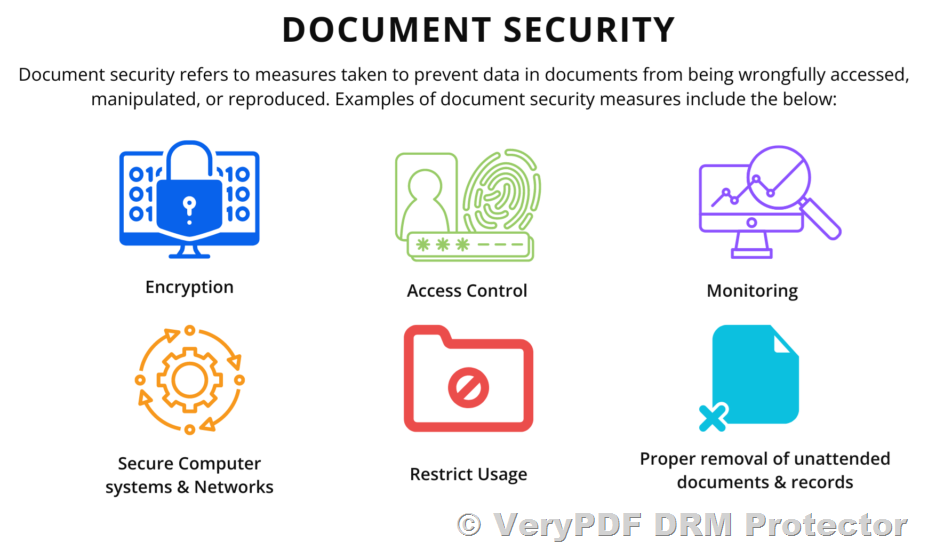
In today’s fast-paced, digital world, securing sensitive documents is paramount to protect intellectual property and confidential information. While there are various ways to secure files, one of the most effective solutions for protecting PDF documents is through access control features that lock documents to users, devices, locations, and domains. This approach prevents unauthorized access, sharing, and distribution of your files, giving you complete control over who can access, view, and use your PDFs.

With VeryPDF DRM Protector Online Application, businesses and individuals can implement strong encryption and licensing controls to safeguard their documents no matter where they are stored or accessed. Here’s how you can leverage VeryPDF DRM Protector to restrict document access effectively.

Restrict Document Access – Lock PDF files to users, domain, location & device. Stop sharing, control use.

Key Features of VeryPDF DRM Protector for Document Access Control

VeryPDF DRM Protector enables users to set detailed access restrictions on PDF documents. These restrictions ensure that your files remain secure and can only be accessed by the intended parties under specific conditions.

Locking PDFs to Specific Users

You can restrict access to PDF files by locking them to individual users or a group of users. This ensures that only authorized personnel can view or print the document, preventing unauthorized access from external parties. By setting up user-specific licenses, you can control who can access the document and prevent any unauthorized sharing.

Locking PDFs to Devices

In addition to locking files to specific users, you can also restrict access to PDF files based on the device used to open them. This means that even if a user tries to transfer the document to another device, it will remain inaccessible unless the device is authorized. This feature helps protect against unauthorized distribution and ensures that documents can only be viewed on registered devices, preventing breaches.

Restricting Access by Location or Domain

Sometimes, you may need to restrict access to certain geographic locations or specific domains. VeryPDF DRM Protector provides the option to lock documents to particular locations, ensuring that only users within certain IP address ranges or countries can access the content. This is particularly useful when working with external parties or mobile devices, as it ensures your documents can’t be accessed from unauthorized locations.

You can also lock access to your PDF files by domain, restricting document use to specific websites or IP addresses. This makes it easier to control where and by whom your documents can be accessed, further minimizing the risk of unauthorized sharing or theft.

Controlling Access Based on Country Location

VeryPDF DRM Protector allows you to restrict document access based on the user’s country of origin. If you’re dealing with international third parties or licensing issues, you can ensure that only users from approved countries can access your protected documents. If a user tries to access the file from a country outside the approved list, they will be denied access.

Device and Operating System Restrictions

One of the standout features of VeryPDF DRM Protector is its ability to lock PDF documents to specific devices or operating systems. This means that PDFs can be restricted to a particular operating system, such as Windows, and cannot be opened on unauthorized platforms like macOS, iOS, or Android.

By controlling document access at the device level, you ensure that protected documents can only be viewed on approved devices, whether it’s a laptop, desktop, or mobile device. This is especially useful in organizations that have strict security requirements and do not want sensitive documents to be accessed on non-secure devices.

Preventing Unauthorized Printing

Another important feature is the ability to restrict printing capabilities based on the device being used. For example, you can limit printing to only certain devices (such as Windows devices) or completely disable printing for added security. This ensures that even if a user has access to a document, they cannot share it by printing or distributing physical copies.

Why Choose VeryPDF DRM Protector for Document Access Control?

VeryPDF DRM Protector offers strong US Government-level encryption and DRM features to protect your documents. It prevents unauthorized access and stops the sharing and distribution of your PDFs, giving you peace of mind knowing your intellectual property is secure.

The ability to lock PDF files to individual users, devices, locations, and domains allows you to have granular control over who can view, print, or distribute your documents. Whether you’re in the business, education, or publishing industry, VeryPDF DRM Protector can help protect sensitive files, intellectual property, and confidential information.

How VeryPDF DRM Protector Works?

To get started with VeryPDF DRM Protector, simply upload your PDF document to the platform, set your desired access restrictions (user, device, location, or domain), and apply the DRM protection. The document will be locked according to your specifications, ensuring that only authorized users can access it under the defined conditions.

Conclusion

VeryPDF DRM Protector provides a comprehensive solution for restricting document access and protecting PDF files from unauthorized use. With robust encryption, DRM, and licensing controls, it ensures that your documents remain secure, no matter where they are accessed. Whether you need to lock your PDFs to specific users, devices, locations, or domains, VeryPDF DRM Protector offers the tools you need to safeguard your intellectual property and control the use of your sensitive documents.

For businesses and individuals looking to prevent unauthorized sharing, distribution, and access, VeryPDF DRM Protector is the ultimate tool for document security.

Restricting the Number of Prints for a PDF: Is It Possible?

In today’s digital era, protecting intellectual property and controlling document usage is a critical requirement for many industries. One specific use case involves providing users with a PDF document that they can print, but only once. This raises an important question: is there a way to limit the number of times a PDF document can be printed?

While the PDF format offers numerous security features, such as restricting copying or editing, it does not natively support limiting the number of prints. However, with the help of advanced tools like VeryPDF DRM Protector Online Application, this challenge can be addressed efficiently.

Restricting the Number of Prints for a PDF: Is It Possible?


Challenges of Limiting PDF Printing

By design, the PDF format is static. Once downloaded, a PDF behaves like a standalone document, and its permissions are challenging to enforce across different platforms. Some of the primary difficulties include:

  • Lack of Native Print Limitation: The PDF specification includes features to allow or disallow printing entirely but does not support setting a print count limit.
  • Bypass Vulnerabilities: Users can duplicate the original file, resetting any embedded restrictions, or use “print to PDF” functionality to create unrestricted copies.
  • Compatibility Issues: Not all PDF readers support advanced DRM features, making it difficult to ensure restrictions are consistently enforced.

A Modern Solution: VeryPDF DRM Protector Online Application

Despite the limitations of the PDF format, VeryPDF DRM Protector Online Application offers a robust solution to control how many times a PDF can be printed. By leveraging Digital Rights Management (DRM) technology, this application provides enhanced control over document usage, including printing restrictions.

Key Features

  • Print Count Limitation: Set a specific number of times a PDF can be printed, ensuring users cannot exceed the allowed limit.
  • Printing Control: Completely disable printing if needed or restrict printing to specific devices or locations.
  • Secure Encryption: Use advanced DRM encryption to protect your PDF from unauthorized modifications or duplication.
  • Cloud-Based Management: Manage printing permissions through an online interface without the need for complex installations.
  • User-Specific Access: Assign printing permissions to individual users, ensuring personalized control and security.

How It Works

Using VeryPDF DRM Protector to limit printing is straightforward:

  1. Upload Your Document: Start by uploading your PDF to the VeryPDF DRM Protector platform.
  2. Set Printing Permissions: Specify whether printing is allowed and, if so, define the maximum number of prints permitted.
  3. Apply DRM Protection: Encrypt the document with the desired restrictions.
  4. Distribute Securely: Share the document with users, knowing that printing limits are enforced.

Applications of Printing Restrictions

Restricting the number of prints for a PDF has practical applications across various industries:

  • Education: Limit the printing of exam papers or course materials to a single authorized copy per user.
  • Business: Protect sensitive reports or contracts by allowing only one printed version.
  • Publishing: Offer controlled access to premium content like eBooks or sheet music with restricted printing capabilities.

Conclusion

Although limiting the number of prints for a PDF is not natively supported by the format, tools like VeryPDF DRM Protector Online Application make it possible. By combining secure DRM encryption with advanced printing controls, this solution empowers businesses, educators, and publishers to manage document usage effectively.

If you’re looking to protect your intellectual property and maintain control over your content, consider using VeryPDF DRM Protector to set and enforce printing restrictions. It’s a reliable, user-friendly, and affordable solution to meet your specific needs.

Is It Possible to Restrict the Number of Physical Prints Made from a Single PDF?

In today’s digital-first world, creators of intellectual property, such as sheet music, are exploring ways to protect their work from unauthorized duplication. One common question is whether it’s possible to limit the number of physical prints that can be made from a PDF document. While some platforms like JW Pepper offer download limits based on purchase quantities, restricting physical printing from PDFs is far more complex. Let’s explore the possibilities and limitations of achieving this.

Is It Possible to Restrict the Number of Physical Prints Made from a Single PDF?


Understanding the Technical Challenges

From a technical standpoint, the PDF format is inherently static, meaning that once a document is downloaded, its permissions and functionality are mostly frozen. Although tools like Adobe Acrobat Pro offer features to control printing permissions (e.g., allow or block printing or limit to low-resolution printing), they lack native functionality to limit the number of times a document can be printed.

Here’s why restricting print counts from a PDF is challenging:

  1. Static Nature of PDFs: Once a user downloads a PDF, it essentially becomes a standalone file. Restrictions on printing would require interaction with the PDF every time a print command is issued, which isn’t part of the standard PDF specification.
  2. Bypassing Restrictions: Even if you could embed a script (such as JavaScript) to limit printing, it can be easily bypassed. Users can duplicate the original file, effectively resetting any embedded counter, or print to another PDF file, removing restrictions entirely.
  3. Compatibility Issues: Most PDF readers, including popular options like Adobe Reader, Preview on macOS, or third-party apps, do not fully support advanced scripting features, making such solutions unreliable.

Alternatives for Controlling Printing

Despite the limitations, here are some strategies to manage printing effectively:

1. Digital Rights Management (DRM) Solutions

Tools like VeryPDF DRM Protector offer robust options to control the usage of PDF files. With DRM, you can enforce strict printing permissions, such as disabling printing altogether or setting a maximum number of prints. Unlike static PDF permissions, DRM ensures these restrictions remain intact, even if the file is copied or shared.

2. Browser-Based Viewing and Printing

Hosting your document online and controlling printing through a browser can provide an additional layer of control. For example:

  • Limit the number of downloads or prints allowed per user.
  • Disable “print to PDF” functionality by embedding your document in a web viewer like PDF.js, which can restrict direct access to the original file.

However, even browser-based solutions have their limitations, as users can still capture screenshots or use print-to-PDF options provided by most modern browsers.

3. Watermarking

If controlling printing is infeasible, watermarking your documents can deter unauthorized use. By adding user-specific watermarks (e.g., “Licensed to John Smith”) to each copy, you make unauthorized distribution traceable.


Should You Worry About Unauthorized Copies?

While the idea of limiting printing sounds appealing, it’s essential to evaluate whether the effort is worth it. For example, in the sheet music industry, piracy often acts as a double-edged sword. While it may result in some revenue loss, it can also increase visibility and attract new customers.

As a budding creator, focusing on delivering high-quality, well-priced content and embracing watermarks or DRM solutions may be a better investment of your time and resources than implementing restrictive measures that may frustrate legitimate users.


Conclusion

Restricting the number of physical prints from a single PDF is technically challenging and often ineffective due to the static nature of PDFs and the ease of bypassing such controls. However, solutions like VeryPDF DRM Protector and browser-based printing management offer viable alternatives for creators seeking greater control over their intellectual property. By combining these tools with strategies like watermarking and leveraging the promotional benefits of wider access, you can balance protection with accessibility, ensuring your content reaches its intended audience securely.

Controlling How Many Times a PDF Can Be Printed (or Disabling Printing Entirely)?

The ability to control how many times a PDF can be printed, or even to disable printing entirely, has become a critical need for businesses and content creators looking to protect their intellectual property. Whether you are distributing discount coupons, confidential business documents, or subscription-based content, ensuring that users adhere to strict printing policies is essential for maintaining control and preventing unauthorized sharing or duplication. However, the technical and legal challenges surrounding this functionality have made it difficult to implement. Enter VeryPDF DRM Protector Online Application, a modern solution that addresses these challenges efficiently and affordably.

Controlling How Many Times a PDF Can Be Printed (or Disabling Printing Entirely)?

The Challenge of Controlling PDF Printing

Restricting PDF printing has historically been a daunting task. While some software solutions claim to enforce such controls, they often face limitations due to how operating systems handle printing tasks. For example:

  • Even if a PDF viewer restricts the number of times a user can press the “Print” button, operating systems allow users to modify printer driver settings to increase the number of copies printed.
  • Users can also print to file, creating a new document that can be shared without restrictions.
  • Some attempts to impose stricter controls, such as those by Sony in the past, have led to significant legal challenges for overstepping into OS-level control.

These challenges highlight the need for a robust yet compliant solution that can effectively restrict printing while respecting system boundaries and user rights.

Traditional Solutions and Their Limitations

Several companies have attempted to address this need with varying levels of success:

  1. Safeguard Software: This company provides software designed to control printing, but its high price point often puts it out of reach for many businesses and individual users.
  2. FileOpen Systems: This online subscription service circumvents the need for PDF downloads, allowing users to view and print documents under strict controls. While effective, it requires an ongoing subscription and may not suit every use case.
  3. Adobe Plugins: Many have hoped that Adobe, as the creator of the PDF format, would add native functionality to restrict printing. However, this feature remains absent from standard Adobe tools.

These options either come with significant costs, usability trade-offs, or technical limitations, leaving many users seeking a better alternative.

VeryPDF DRM Protector Online Application: A Modern Solution

VeryPDF DRM Protector Online Application offers a practical and affordable way to control PDF printing, addressing the limitations of traditional solutions. This application leverages digital rights management (DRM) technology to enforce robust printing restrictions that cannot be easily bypassed. Here’s how it works:

Key Features of VeryPDF DRM Protector

  • Printing Restrictions: With VeryPDF DRM Protector, you can set a limit on how many times a PDF can be printed or disable printing entirely. These restrictions are enforced through DRM encryption, ensuring they remain intact even if the PDF is shared.
  • Secure Document Encryption: The application encrypts your PDF with advanced DRM technology, protecting it from unauthorized modifications or duplications.
  • User-Specific Controls: Assign unique printing permissions to individual users or groups, ensuring tailored access based on your needs.
  • Affordable Pricing: Unlike expensive alternatives like Safeguard, VeryPDF DRM Protector provides cost-effective solutions for businesses of all sizes.
  • Cloud-Based Convenience: The online application allows you to manage your documents without the need for complex installations or infrastructure.

How It Works

Using VeryPDF DRM Protector is simple and straightforward:

  1. Upload Your Document: Start by uploading the PDF you want to protect onto the VeryPDF DRM Protector platform.
  2. Set Printing Permissions: Choose whether to allow printing, and if so, specify the maximum number of prints allowed.
  3. Apply DRM Protection: Encrypt the document with DRM controls, ensuring that the restrictions are securely embedded.
  4. Distribute the Protected PDF: Share the document confidently, knowing that your printing restrictions will be enforced.

Why Choose VeryPDF DRM Protector?

VeryPDF DRM Protector stands out from other solutions for several reasons:

  • Ease of Use: The intuitive interface makes it easy to upload, protect, and share documents without technical expertise.
  • Cross-Platform Compatibility: Protected PDFs can be accessed securely across devices and operating systems, ensuring a seamless experience for authorized users.
  • Comprehensive Security: Beyond printing restrictions, VeryPDF DRM Protector offers additional features like watermarking and access expiration to further safeguard your content.
  • Scalability: Whether you’re an individual user, a small business, or a large organization, VeryPDF DRM Protector scales to meet your needs.

Use Cases for Printing Restrictions

Restricting or disabling PDF printing has numerous practical applications, including:

  • Coupon Distribution: Limit users to printing a single copy of a discount coupon to prevent abuse and ensure fair usage.
  • Confidential Documents: Protect sensitive business documents by disabling printing, ensuring that they remain digital-only.
  • Subscription Content: Prevent subscribers from printing unlimited copies of eBooks, reports, or other premium content, encouraging renewals and protecting revenue streams.

Conclusion

While controlling how many times a PDF can be printed (or disabling printing entirely) has historically been challenging, VeryPDF DRM Protector Online Application provides a modern, affordable, and effective solution. By leveraging robust DRM technology, it ensures that your printing restrictions are securely enforced, protecting your intellectual property and maintaining control over your documents. Whether you’re a business, educator, or content creator, VeryPDF DRM Protector empowers you to share your PDFs with confidence and peace of mind.

How to Use Digital Rights Management to Set PDF Expiry Dates?

Managing the distribution and lifespan of PDF documents has become a critical need for many organizations. Whether you’re sharing time-sensitive course materials, protecting intellectual property, or ensuring subscription-based content remains secure, having an expiry date for your PDF files can be a game-changer. With VeryPDF DRM Protector, you can now achieve this efficiently and securely.

How to Use Digital Rights Management to Set PDF Expiry Dates?

Setting PDF Expiry Dates with VeryPDF DRM Protector

Unlike older methods, VeryPDF DRM Protector utilizes cutting-edge digital rights management (DRM) technology combined with strong encryption to ensure that the expiry date on your PDFs cannot be bypassed. This makes it an ideal choice for:

  • Educational institutions sharing temporary access to study materials.
  • Companies protecting confidential reports.
  • Subscription-based services delivering premium content.

With this feature, you can confidently share your documents, knowing they’ll become inaccessible after the specified timeframe, regardless of how or where they are forwarded.

Why Choose VeryPDF DRM Protector?

VeryPDF DRM Protector stands out as a robust solution for PDF protection. Here are some of its key advantages:

  1. Secure and Reliable Encryption: Strong DRM encryption ensures that unauthorized users cannot access or modify the document.
  2. User-Friendly Interface: The software is designed for ease of use, even for non-technical users.
  3. Cross-Platform Compatibility: Documents protected with VeryPDF DRM Protector can be viewed securely across devices and platforms.
  4. Customizable Expiry Options: Set expiry dates to meet your specific needs, such as a fixed date or a duration after the first access.
  5. Affordable Pricing: Compared to other DRM solutions like LockLizard and FileOpen, VeryPDF DRM Protector offers a cost-effective alternative without compromising on security.

Real-World Use Cases for PDF Expiry Dates

Here are some scenarios where setting a PDF expiry date with VeryPDF DRM Protector proves invaluable:

1. Educational Institutions

Schools and universities can use VeryPDF DRM Protector to distribute exam papers, course notes, or training materials that expire after a semester or course completion. This ensures that outdated information isn’t reused inappropriately.

2. Businesses

Organizations can protect sensitive internal reports by setting expiry dates, ensuring they remain secure and relevant only for the intended time.

3. Subscription Services

For businesses offering subscription-based content, setting expiry dates prevents users from retaining files indefinitely, encouraging renewed subscriptions.

How to Use VeryPDF DRM Protector to Set Expiry Dates?

Using VeryPDF DRM Protector to set expiry dates for your PDFs is simple:

  1. Install the Software: Download and install VeryPDF DRM Protector on your computer.
  2. Add Your Document: Import the PDF file you want to protect.
  3. Set Expiry Options: Choose the expiry settings, such as a specific date or a time period after first access.
  4. Encrypt and Save: Apply the DRM protection and save the document.
  5. Share Securely: Distribute the protected PDF knowing it is secured with an expiry date.

Conclusion

PDF expiry dates are not part of the standard PDF format but can be implemented effectively with DRM software like VeryPDF DRM Protector. This feature is particularly useful for organizations that need to control the distribution and lifespan of their documents. With its powerful encryption, ease of use, and affordability, VeryPDF DRM Protector provides an unparalleled solution for setting PDF expiry dates.

Don’t let outdated methods hold you back. Try VeryPDF DRM Protector today and take full control over your PDF documents!