How to Enforce PDF Viewing Limits to Prevent Document Overuse or Unauthorized Access

How to Enforce PDF Viewing Limits to Prevent Document Overuse or Unauthorized Access

Every time I’ve sent out sensitive PDF documents for review or distribution, there’s always been that nagging worry how do I stop people from sharing these files beyond what I intended?

How to Enforce PDF Viewing Limits to Prevent Document Overuse or Unauthorized Access

You might have felt it too the frustration of losing control over your intellectual property after you hit send. Whether it’s confidential reports, ebooks, training materials, or legal contracts, once a PDF is out there, it’s tough to control who sees it or how many times.

That’s where VeryPDF Document Security and DRM Copy Protection, Self Hosted Solution comes in. This isn’t your average PDF password system or a plugin that barely scratches the surface of protection. It’s a powerful, hands-on tool designed for folks like business owners, educators, and content creators who need real control over their PDFs no ifs, no buts.


Why You Need More Than Just Passwords or Basic PDF Protection

If you’ve ever tried using password protection on PDFs, you’ll know it’s often more trouble than it’s worth. Passwords get shared or cracked, and permission restrictions can be removed by anyone savvy enough.

The reality is, once you hand over a password, you lose control.

That’s why I was keen to find something that gave me actual control something that could:

  • Limit views or prints automatically,

  • Revoke access instantly if needed,

  • And lock PDFs to specific devices or locations to stop unauthorized sharing.

After digging around, I landed on VeryPDF’s self-hosted DRM solution. Here’s what I learned after trying it myself.


What Is VeryPDF Document Security and DRM Copy Protection?

At its core, VeryPDF’s solution is a self-hosted Digital Rights Management (DRM) system for PDFs. It lets you protect your documents right from your own servers no third-party clouds, no losing control.

You get the entire source code, so you can customise and integrate it as deeply as your business needs.

It’s designed to secure anything from legal contracts and confidential reports to training materials and ebooks basically any PDF where you want to control how it’s used.


Key Features That Made Me a Fan

1. Total Control Over Document Use

Once you protect a PDF with VeryPDF DRM, you can:

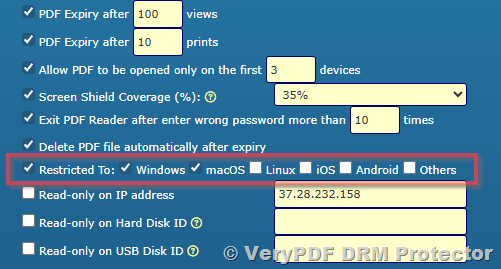
  • Stop copying, editing, and saving outright.

  • Limit printing, either stopping it or restricting the number of prints or print quality.

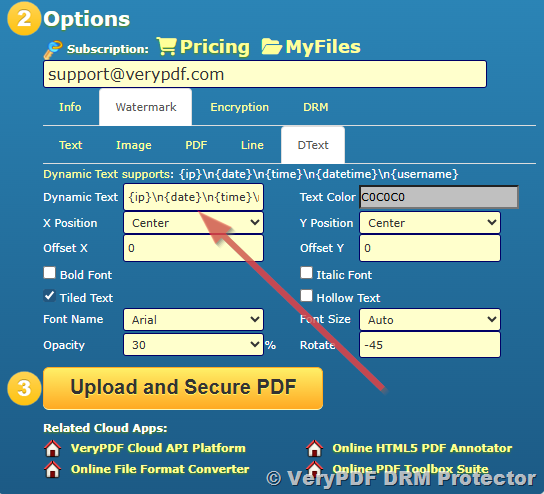
  • Add dynamic watermarks showing user info to discourage redistribution.

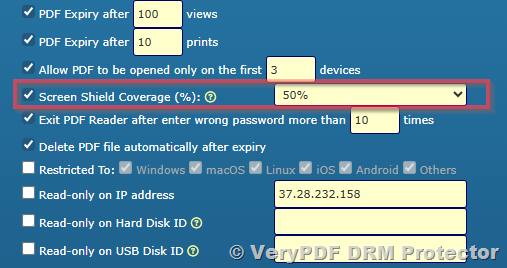
  • Set automatic expiry dates or limit the number of views and prints.

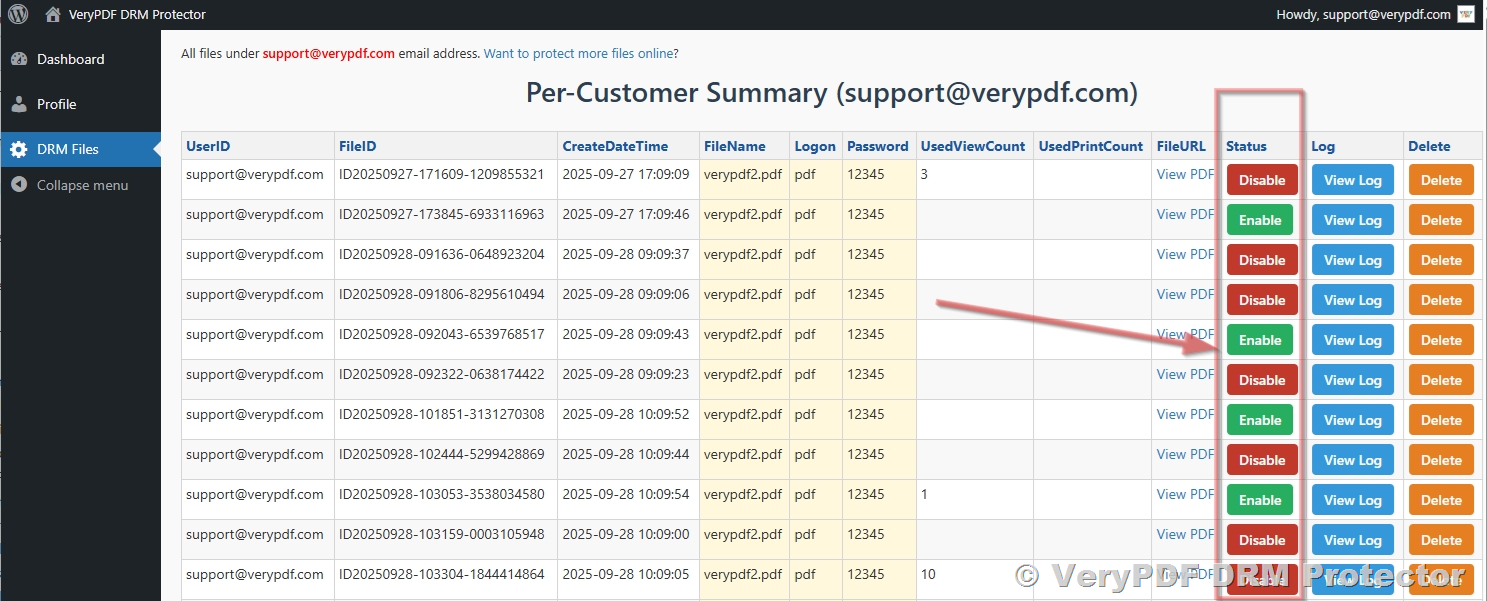
  • Revoke access instantly, even if the document has already been shared.

This level of granular control saved me so much headache. For instance, when sharing a sensitive training manual, I could limit it to just five views per user and set the file to expire after a month. Knowing it would self-destruct without me having to chase people down was a game changer.


2. Device and Location Locking

This feature is brilliant for keeping PDFs tied to specific users and places. I’ve dealt with cases where confidential documents floated around unintended networks or were copied onto personal devices.

With VeryPDF, you can:

  • Lock documents to a specific device,

  • Restrict access by geographic location,

  • Even control Bring Your Own Device (BYOD) use in corporate settings.

For example, I shared a draft legal contract only with a client’s designated office computers no forwarding allowed. That peace of mind alone is worth it.


3. Secure PDF Viewers, No Plugins Needed

Unlike many DRM solutions that rely on plugins or passwords, VeryPDF uses their own secure PDF viewer.

Why does that matter?

  • No plugins to install or disable security,

  • No temporary files or JavaScript vulnerabilities,

  • Document decryption happens purely in memory, so files aren’t stored unprotected anywhere.

This not only tightens security but avoids the common headaches of plugin conflicts or users accidentally breaking protections.


How This Compares to Other PDF Security Tools

I’ve used other PDF DRM and protection tools, and frankly, many fall short.

  • Passwords and permissions are often bypassed or removed.

  • Plugins can break with software updates or cause security risks.

  • Many cloud DRM solutions rely on third-party servers, which means losing control over your documents.

VeryPDF’s approach feels solid because it:

  • Provides full control with self-hosting,

  • Uses a dedicated secure viewer,

  • Employs transparent and simple key management,

  • And offers modular DRM controls that you can tweak per user or document.


Real-Life Use Cases Where This Tool Shines

  • Educational institutions sharing digital course materials securely with students, controlling expiry, and printing limits.

  • Law firms distributing sensitive contracts or case files locked to client devices to avoid leaks.

  • Publishers and authors protecting ebooks or training manuals from piracy and uncontrolled distribution.

  • Businesses enforcing compliance by logging and auditing document use, ensuring internal policies are met.

  • Any organisation that wants to protect trade secrets, intellectual property, or confidential documents in a practical way.


My Experience Using VeryPDF Document Security

I remember a time when I had to send an internal report to multiple regional offices. Before, I’d worry about the document being forwarded or printed endlessly.

With VeryPDF DRM, I could:

  • Lock the document to each office’s computers,

  • Restrict the number of prints,

  • Add watermarks showing who viewed or printed it,

  • And set the document to expire automatically after a month.

No chasing down folks to delete files, no worries about uncontrolled copies. It saved me hours of follow-ups and kept everything tight.

The best part? The system was straightforward to implement, and hosting it on our own servers meant our data never left our control. It felt like I finally had the keys to the kingdom when it came to PDF security.


Why I’d Recommend VeryPDF DRM Copy Protection

If you’re serious about protecting your PDFs from misuse or piracy, this self-hosted DRM solution is a no-brainer.

  • It eliminates the weaknesses of password protection,

  • Offers real-time control over document use,

  • And gives you peace of mind knowing your content stays secure.

I’d highly recommend this to anyone handling sensitive or revenue-generating documents who needs a practical way to prevent overuse or unauthorized access.

Start your free trial now and boost your document security: https://drm.verypdf.com/


Custom Development Services by VeryPDF

VeryPDF also provides tailored development services to suit your unique document security needs.

Whether you require PDF processing solutions on Linux, macOS, Windows, or server environments, their team offers expertise across multiple programming languages and platforms including Python, PHP, C/C++, JavaScript, .NET, and more.

They specialise in building Windows Virtual Printer Drivers for generating PDFs and images, intercepting and monitoring print jobs, and providing system-wide hooks for document access control.

From barcode recognition and OCR to report generation and cloud-based digital signatures, VeryPDF can develop custom solutions that integrate seamlessly with your workflows.

If you have specific technical requirements or need a tailored document protection system, reach out via their support centre: http://support.verypdf.com/


FAQs

1. How does VeryPDF DRM differ from basic PDF password protection?

Unlike password protection, which can be shared or cracked, VeryPDF DRM offers device locking, expiry controls, watermarking, and instant revocation, giving you real control.

2. Can I revoke access after the PDF has been distributed?

Yes, you can instantly revoke document access at any time, regardless of where the file is stored or who has it.

3. Is it possible to prevent printing or limit the number of prints?

Absolutely. You can stop printing entirely, limit print counts, or control print quality to protect your documents.

4. Does this solution require internet access for viewing protected PDFs?

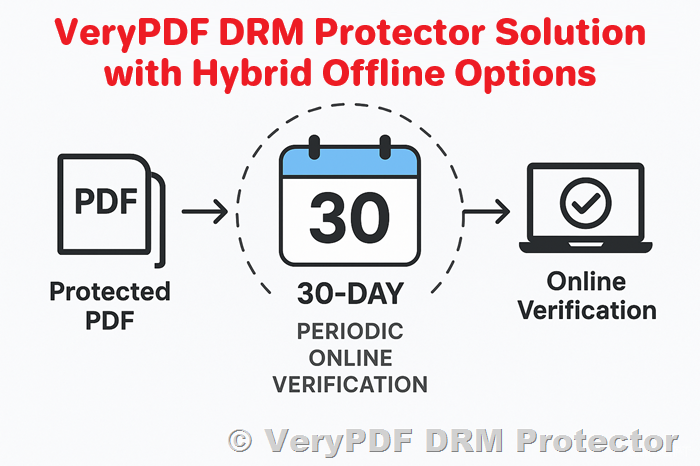
No, VeryPDF DRM supports total offline protection, allowing you to distribute documents on USB sticks with the secure viewer.

5. Can I integrate VeryPDF DRM with my existing systems?

Yes, the self-hosted solution provides full source code access, making integration and customization straightforward.


Tags / Keywords

  • PDF DRM copy protection

  • PDF document security

  • Prevent PDF unauthorized access

  • Secure PDF viewing limits

  • Self-hosted PDF DRM solution


This tool has been a game changer for me in securing PDFs and stopping unauthorized use. If you’re in the business of sharing sensitive documents, I’d urge you to give VeryPDF’s self-hosted DRM a serious look. It’s the kind of solution that finally puts control back in your hands.

Best Ways to Secure PDF Files for Distribution on USB Drives or External Media

Best Ways to Secure PDF Files for Distribution on USB Drives or External Media

Every time I’ve handed over sensitive documents on a USB stick, I’ve felt that nagging worry: What if someone copies, shares, or leaks this? You want to distribute PDFs securely, but USB drives and external media are notoriously risky. Files get copied, emailed, or shared without control. It’s a nightmare if those PDFs contain proprietary reports, training materials, or confidential contracts.

Best Ways to Secure PDF Files for Distribution on USB Drives or External Media

I’ve been there. That’s why discovering VeryPDF Document Security and DRM Copy Protection, Self Hosted Solution was a game-changer. This tool isn’t just another password lock or encryption layer. It’s a robust, practical way to protect PDFs distributed on USB drives or any external media with full control, even offline.

Let me break down how it works and why it’s been my go-to for protecting intellectual property, sensitive documents, and digital content in tricky distribution scenarios.


Why Traditional PDF Security Isn’t Enough

You probably already know that simple password protection or PDF restrictions won’t cut it.

  • Passwords get shared or cracked.

  • Permissions can be removed by savvy users or software.

  • Once a PDF is out, you lose all control.

  • Printing, copying, and screen grabs run rampant.

  • Plugins or JavaScript protections are flaky and insecure.

I’ve tried these before, and none of them kept my documents safe when distributed on physical drives. That’s where VeryPDF’s self-hosted DRM solution stands apart.


What is VeryPDF Document Security and DRM Copy Protection?

This is a self-hosted DRM system for PDF files, designed to let you:

  • Protect files from being copied, printed, or shared without your permission.

  • Set expiry dates and revoke access anytime.

  • Apply dynamic watermarks showing who opened or printed a file.

  • Lock document use to specific devices or locations.

  • Prevent screen capturing, printing to unprotected formats, and more.

It’s a secure, on-premise solution meaning your documents and keys never leave your servers. You don’t rely on third-party cloud services, so you have total control.

This is perfect if you’re distributing files on USB drives or external media where internet access is limited or you want the highest control level.


Who Is This For?

  • Businesses protecting training manuals, proprietary data, or financial reports.

  • Educators sharing paid courses or exam papers.

  • Publishers securing ebooks and copyrighted content.

  • Legal and consulting firms controlling confidential contracts.

  • Anyone who wants secure document distribution without relying on cloud services.

If you deal with confidential, sensitive, or revenue-generating PDF documents that need to be shared physically but stay secure, this solution fits like a glove.


Key Features That Made My Workflow Safer and Easier

  1. Complete Device & Location Locking

One of the biggest headaches with USB distribution is files ending up on random devices. VeryPDF lets you lock PDFs to specific machines or even geographic locations.

I could distribute training materials on USB sticks to clients, knowing the files wouldn’t open anywhere else. It stopped the sneaky “Hey, can you send that to your colleague?” problem right there.

  1. Dynamic Watermarks

Every time someone opens or prints a PDF, the document displays watermarks with user info like name, email, or IP address.

This was a huge deterrent in my experience. If anyone tried to redistribute files, the watermark made it easy to trace leaks back to the source. It adds a psychological layer of protection without inconveniencing legitimate users.

  1. Expiry & Access Revocation

You can set PDFs to expire after a certain date, number of views, or prints. Plus, you can revoke access instantly, even if files are already with users.

I’ve used this feature when a contract or report was time-sensitive. After the deadline, the document simply stopped working, no manual follow-ups needed. It gave me peace of mind that expired files wouldn’t linger in circulation.

  1. Prevent Screen Grabbing & Printing to PDF

Preventing users from capturing content via screenshots or virtual printers is tough, but VeryPDF’s secure viewer blocks screen sharing apps like Zoom or WebEx and disables printing to unprotected formats.

This kept my sensitive documents truly secure, even in environments where users might try to sneak copies via screen recording software.

  1. Offline Use with Full Security

Since the solution works completely offline once files are distributed with the secure viewer, it’s perfect for USB drive distribution where internet might not be available.

I was able to hand over USBs to partners at conferences, confident the files would stay locked down even without network access.


How Does VeryPDF Compare to Other PDF Security Tools?

I’ve tested several PDF DRM and security tools over the years, and here’s why VeryPDF stands out:

  • No plugins or JavaScript needed. Unlike other solutions that rely on fragile plugins, VeryPDF uses a dedicated secure PDF viewer to enforce protections. This reduces compatibility headaches.

  • No passwords to share or manage. Passwords can be cracked or shared without your knowledge. VeryPDF removes that risk by controlling access through licensing and device binding.

  • Self-hosted control. You run everything on your own servers, so your documents and security keys never leave your environment.

  • Flexible and granular DRM controls. You can set different expiry dates, print limits, or access permissions on a per-user basis, even for the same document.

  • Cost-effective licensing. Perpetual unlimited licenses save a ton compared to subscription-based services.

For me, it was the combination of security, control, and offline capability that sealed the deal.


Real-World Use Cases That Prove the Value

  • Legal firms sending confidential contracts on USB sticks to clients while preventing unauthorized sharing or printing.

  • Educational publishers distributing exam papers and training guides securely offline at campuses or workshops.

  • Corporate training teams delivering sensitive course materials via external drives to remote employees.

  • Content creators and ebook authors safeguarding revenue by locking PDFs distributed through offline channels.

  • Consulting companies sharing proprietary reports without risking leaks or redistribution.

In every case, users stayed in control, compliance improved, and piracy risks dropped significantly.


Summing Up

If you’re worried about how to secure PDF files for distribution on USB drives or external media, VeryPDF Document Security and DRM Copy Protection, Self Hosted Solution is hands-down one of the best options I’ve seen.

It tackles the weak spots of traditional PDF protection by giving you full control from device locks and watermarks to instant revocation and offline security.

I highly recommend this to anyone who regularly shares PDFs physically but wants to prevent leaks, piracy, or unauthorized access.

Start your free trial now and see how much safer your document distribution can be: https://drm.verypdf.com/


Custom Development Services by VeryPDF

VeryPDF offers tailored development services to meet your specific document security needs. Whether you require integrations with internal systems, custom DRM policies, or advanced document workflows, their team can help.

Their expertise spans multiple platforms and languages, including Python, PHP, C/C++, .NET, and more. From Windows virtual printer drivers and API hooks to cloud and mobile environments, VeryPDF can build customized solutions that fit your business perfectly.

If you need to secure documents on Linux, Mac, iOS, Android, or within complex enterprise environments, reach out via their support center at http://support.verypdf.com/ to discuss your project.


FAQs

1. How does VeryPDF DRM differ from simple PDF password protection?

Passwords can be shared, cracked, or removed, leaving your documents vulnerable. VeryPDF uses a secure viewer and licensing system to control access without passwords, making it far more secure.

2. Can I distribute protected PDFs offline on USB drives?

Yes. VeryPDF’s solution works fully offline once files and the secure viewer are deployed, perfect for USB or external media distribution.

3. Can I revoke access after distributing the PDF?

Absolutely. You can instantly revoke user access or document permissions, even if files are already with users.

4. Does the solution prevent screen captures or printing?

Yes. It blocks screen sharing apps, screenshot tools, and printing to unprotected formats, ensuring content can’t be copied easily.

5. Who is the ideal user for this product?

Businesses, educators, publishers, legal firms, and anyone needing to securely distribute sensitive PDF files without relying on cloud services.


Tags / Keywords

  • Secure PDF distribution on USB

  • PDF DRM copy protection

  • Offline PDF security

  • PDF file device locking

  • Prevent PDF piracy

  • USB drive PDF protection

  • Document security software

Why Offline PDF DRM Is Essential for Protecting High-Value Technical Documents

Why Offline PDF DRM Is Essential for Protecting High-Value Technical Documents

Meta Description:

Discover why offline PDF DRM protection is the only way to truly secure high-value documents without relying on cloud services.

Why Offline PDF DRM Is Essential for Protecting High-Value Technical Documents


Every time we handed over a new technical manual, we braced ourselves for leaks.

Not just because someone might try to steal itbut because someone always did.

We’d see them pop up on forums, chat groups, even competitor pitches. Our workhundreds of hours, thousands of dollarsgone in seconds.

That’s when we realised: passwords and permission settings weren’t enough. We needed control that didn’t vanish once a PDF was downloaded.

That’s how we found VeryPDF’s Document Security and DRM Copy Protectionthe self-hosted solution that finally gave us peace of mind.


The Real Problem with Traditional PDF Security

If you’ve ever tried locking a PDF with a password, you know how it goes:

  • The password gets shared.

  • Someone strips the permissions.

  • Or worsethey crack it open in seconds using online tools.

We tried several DRM systems. Most of them forced our files into third-party clouds. That wasn’t an option for us. We work with confidential specs, regulatory compliance docs, and internal IP.

That’s why we needed a fully offline, self-hosted DRM tooland VeryPDF delivered.


Why VeryPDF DRM Copy Protection Was a Game-Changer

I wasn’t expecting much when I downloaded the demo.

I’d been through enough clunky tools with half-baked features and plugin dependencies. But this was different.

Here’s what stood out immediately:

1. Self-Hosted, Full ControlNo Cloud Risks

You deploy the whole system on your own servers. That means:

  • No need to upload unprotected files anywhere.

  • No relying on someone else’s uptime or security standards.

  • Full control over how and where documents get protected.

We integrated it into our internal server environment in under a day. It even worked with our existing document workflows with zero need for external APIs or plugins.

2. Truly Offline PDF DRM Protection

Most solutions only work when users are online. That’s useless in the field.

With VeryPDF, you can burn the protected PDF + secure Viewer to a USB stick, and it still enforces:

  • Device locking

  • Location restrictions

  • Expiry rules

  • Print limits

  • Watermarks

  • Screenshot protection

Offline use. Same lockdown. No excuses.

3. Granular Access Control Without the Headaches

You can control how long someone can access a document, how many times they can open it, or whether they can print itper user.

No confusing rule builders. No policy spaghetti.

Just apply access rules at the time of protection and push out different expiry dates to different users for the same file.

Perfect for when we license the same document to multiple clients, each on a different contract.


How I Use It Daily

We produce high-value PDFs for industrial training programs.

They include engineering blueprints, internal safety protocols, and proprietary checklists.

Before VeryPDF, we’d:

  • Export the PDF

  • Add a password

  • Hope no one shares it

Now, we run it through the VeryPDF protection UI, and:

  • Lock it to a specific device

  • Add a dynamic watermark with the client’s name + timestamp

  • Set a 30-day expiry

  • Disable printing altogether

  • Burn it to USB or send via email

Each time it opens, the secure Viewer logs that activity (if online), which gives us proof of use.

And if someone tries to screenshot it? The Viewer blocks it. Same with screen sharing via Zoom or Teams.


Who This Is For

If you’re creating any document with real-world value, you need this.

Especially if you’re in:

  • Engineering (internal specs, training guides)

  • Education (online courses, paid eBooks)

  • Legal & Compliance (internal memos, audit trails)

  • Medical & Pharma (research data, protocols)

  • Publishing & IP-Heavy Fields

Or if you’re just sick of seeing your content pop up in places it shouldn’t be.


Why VeryPDF Wins Over Other DRM Tools

Let’s be bluntmost PDF protection software isn’t actually secure.

Here’s why VeryPDF wins:

  • No passwords: So nothing can be shared or removed.

  • No plugins or JavaScript: Which break and get bypassed.

  • Secure Viewer: Total control over how the document behaves, always.

  • Key management? Transparent. No manual setup or distribution required.

  • No cloud upload: You protect the file on your machine, distribute it however you like.

  • Works offline: Seriously, this one is huge. No dependency on a network.


My Favourite Features (with Real Examples)

Expiry & Self-Destruct

We set documents to expire after 5 opens or 14 dayswhichever comes first.

Print Control

We allow some clients to print once, others never. You can even block printing to virtual PDFs. No more printed leaks floating around.

Watermarking

Dynamic watermarks show user ID, date/time, even IP addressso if something leaks, we know exactly where it came from.

Device Locking

One training partner asked for access across two devices. We granted that. Another tried to sidestep the rule? Blocked instantly.

Total Offline Use

Our overseas partners can load everything onto a USB stick and run the Viewer without internet. Works like a charm.


The Bottom Line

This tool changed how we distribute content.

No more second-guessing. No more chasing leakers.

VeryPDF’s offline DRM gives us control even after the PDF leaves our hands.

If you’re creating high-value content and you’re serious about protecting itreally protecting ityou need to try this out.

I’d highly recommend this to anyone tired of patchwork PDF security.

Start your free trial now and protect your documents for real: https://drm.verypdf.com/


Custom Development Services by VeryPDF

Need something tailored to your setup?

VeryPDF offers custom development services that stretch way beyond just DRM.

Whether you’re working on Linux, macOS, Windows, or need server-side automation, their team builds PDF processing tools, secure virtual printer drivers, and API hooks that slot right into your environment.

Need to monitor print jobs, block unapproved file access, or analyse scanned document layouts? They’ve done it.

They also build tools for:

  • Barcode generation & recognition

  • OCR and form data extraction

  • PDF & image conversion

  • Document signing, DRM, and watermarking

  • Font handling and print optimisation

Contact their dev team to scope out your next project: http://support.verypdf.com/


FAQs

Q1: Can I protect PDFs completely offline?

Yes. You can run the entire DRM workflow offline, including Viewer use. It’s great for USB-based deployments or remote users.

Q2: What if I need to revoke a document after it’s been shared?

You can instantly revoke user accesseven after distributionthanks to the licensing server and secure Viewer integration.

Q3: Does the software work on macOS and Windows?

Yes, VeryPDF provides secure Viewers for both platforms, and they can even develop for Android or iOS upon request.

Q4: What happens if someone tries to screenshot a document?

The Viewer blocks screen grabbers, recording apps, and screen sharing tools like Zoom, WebEx, and Teams.

Q5: Can I get support for unique business use cases?

Absolutely. VeryPDF offers full custom development services for enterprise clients.


Tags / Keywords

  • offline PDF DRM protection

  • self-hosted document security

  • secure PDF sharing

  • prevent PDF piracy

  • PDF DRM without passwords

How to Enable Temporary PDF Access with Time-Limited DRM Permissions

How to Enable Temporary PDF Access with Time-Limited DRM Permissions

Meta Description:

Give secure, time-limited access to your PDFs without relying on passwords or pluginscontrol everything with VeryPDF DRM, self-hosted.


Every freelancer I know has that one story.

A client shared a confidential PDFsometimes a script, sometimes a business planand days later, it somehow ended up floating around on forums or group chats.

How to Enable Temporary PDF Access with Time-Limited DRM Permissions

Same thing happened to me.

One of my training guides for new contractors got leaked.

I had watermarked it.

I had password-protected it.

I even told them not to share it (classic move).

Didn’t matter.

That’s when I started looking for something better.

Something that didn’t just lock a file, but locked who could see it, when, and for how long.

That’s when I found VeryPDF Document Security and DRM Copy Protection.

And honestly? It fixed the problemdead.

Let me walk you through how I now share temporary access to PDFs with full control, no password-sharing, no plugin errors, no nonsense.


Why I Chose VeryPDF’s Self-Hosted DRM Protection

I’ve tested a bunch of DRM tools over the years.

Most of them look solid on paper. But when it’s showtime, they start falling apart:

  • Passwords get cracked

  • Plugins stop working after browser updates

  • PDFs get screen-grabbed or printed as images

  • Or worseusers find workarounds and strip the protections entirely

VeryPDF’s self-hosted DRM solution is different.

There’s no reliance on third-party cloud services.

You host everything on your own servers, with full control.

Plus, they actually provide source code access.

That means I could customise it to fit right into my existing system.

Zero fluff. Zero delays.


What the Software Actually Does (And Why It Works)

The core idea is simple:

You lock a PDF file to a specific user, device, time window, and permission set.

And it stays lockedeven if someone tries to forward it, screenshot it, or share it.

Here’s what I loved:

1. Time-Limited PDF Access That Actually Works

I set a training guide to expire after 5 days.

Another one was locked to 2 views per user.

It even let me set fixed calendar expiration dates for licensing documents.

You can:

  • Set PDFs to self-destruct after X views, days, or prints

  • Instantly revoke access, even after someone has downloaded the file

  • Apply different expiry rules per user, using the same file

It’s not just “expiry”it’s real-time dynamic control, and it’s all enforced by their secure PDF Viewer, not some janky plugin.

2. Lock Access to Devices and Locations

This was huge for me.

I had a client who insisted that documents stay inside their office.

I used IP restrictions and device-locking to make sure no one could forward the doc to their home computer.

Their eyes popped when I told them it was done without any software installs or password setups.

Device + location lock = zero BYOD loopholes.

3. No Plugins. No Passwords. No Problems.

I’ve had team members who couldn’t install plugins.

One was on a locked-down enterprise system.

Another used Linux.

With VeryPDF, the Viewer handles everything.

No browser plugins.

No JavaScript.

No passwords to manage or get cracked.

That also means:

  • No system vulnerabilities from plugin conflicts

  • No updates breaking your DRM

  • No excuses from users who “couldn’t open it”

Everything happens in memory. So there’s no decryptable temp file sitting on someone’s desktop. It’s tight.


Who This Is For (And Who It’s Not)

If you’re sharing PDFs with sensitive info, this tool is for you.

That means:

  • Coaches and course creators with premium content

  • Legal firms handling confidential contracts

  • HR and compliance teams distributing internal policy docs

  • Publishers and content creators selling digital ebooks

  • Anyone distributing high-value or confidential PDFs

If you’re just casually sending out a public newsletter, this is overkill.

But if leaks, piracy, or unauthorised access would burn you?

You need this.


What Makes It Better Than Password-Protected PDFs

Let’s talk about the real problems with password protection:

  • Anyone can share the password

  • Most PDF tools can remove passwords in seconds

  • You lose all control once the doc is opened

  • No analytics, no logs, no visibility

VeryPDF skips that entire mess.

You don’t hand over a keyyou grant access that can be revoked, monitored, restricted, or set to expire.

Way more control.

No risk of password-sharing.

And it actually works across Windows, Mac, Androidyou name it.


Real Use Case: Sharing Client Reports With Expiry + Watermarks

Here’s a real setup I used:

  • Client reports delivered in PDF

  • Set to expire in 7 days

  • Dynamic watermark added with their name, IP, and timestamp

  • Printing disabled

  • Screen recording + screenshot blocking enabled

  • Viewer logs enabled so I know if they even opened it

Best part? If someone tried to forward itit wouldn’t work.

It was locked to the device they first opened it on.

No plugins. No security headaches.


How It Saves Me Money (And Revenue)

Let’s not sugar-coat it.

Before this, I lost revenue to leaked content.

I also wasted hours managing passwords, fixing access issues, and explaining plugin setups.

Now?

  • I share files once

  • I know exactly who can access them

  • I control how long they live

  • And I’ve eliminated almost every “tech issue” from users

I also stopped using third-party cloud DRM services that billed me per document or per user.
VeryPDF is a one-time licenseand it runs on my servers.

If you’ve ever felt trapped paying monthly for a tool you barely control, you’ll get it.


Final Take

This isn’t just about security.

It’s about control.

I want to share what I’ve built, but on my terms.

And this tool gives me thatwithout the usual mess.

I’d highly recommend VeryPDF DRM Copy Protection to anyone dealing with sensitive or revenue-generating PDFs.

It’s simple, powerful, andmost importantlyit works.

Click here to try it out for yourself: https://drm.verypdf.com/


Need a Custom Build? VeryPDF Has You Covered

Got unique needs?

VeryPDF offers custom development services tailored to whatever platform or stack you’re working withLinux, macOS, Windows, Android, iOS, and more.

They’ll build tools that:

  • Capture print jobs and save them as PDF, EMF, or images

  • Monitor system APIs

  • Hook into your document processing workflows

  • Build or modify Windows Virtual Printer Drivers

  • Process PDFs, PCL, PRN, PostScript, Office docsyou name it

  • Add OCR, barcode detection, layout recognition

  • Create secure cloud platforms for document management, conversion, signing, and more

  • Add serious PDF encryption, digital signatures, DRM layers, and secure offline access

You can reach out directly to them at http://support.verypdf.com/ to build exactly what your organisation needs.


FAQs

Can I set different expiry dates for different users using the same PDF?

Yes. VeryPDF’s modular DRM lets you assign different expiry rules per user, even if the file itself is the same.

Does this work without an internet connection?

Yep. The Viewer supports offline document access. You can even distribute it on a USB stick for secure offline sharing.

Can someone still screen record or take a screenshot of my protected PDF?

Nope. It blocks screen recording tools, screen sharing apps, and screenshot attempts.

What happens if I need to revoke a document after it’s been sent?

You can revoke user or document access instantly, even if it’s already been downloaded.

Is there a cloud version or does it have to be self-hosted?

You can host it yourself or use their AWS setup if you prefer. But the self-hosted version gives you full control with no third-party risks.


Tags / Keywords

  • time-limited PDF access

  • DRM protected PDF files

  • PDF expiration control

  • secure PDF sharing

  • self-hosted PDF DRM

How to Implement VeryPDF JavaScript PDF Annotator in Online Legal Portals for Secure Document Annotation

How to Implement VeryPDF JavaScript PDF Annotator in Online Legal Portals for Secure Document Annotation

Meta Description

Discover how to embed VeryPDF’s JavaScript PDF Annotator into your legal platform for fast, secure, browser-based document markup and collaboration.


Every time a client uploaded a 20-page contract to our legal portal, I’d wince.

How to Implement VeryPDF JavaScript PDF Annotator in Online Legal Portals for Secure Document Annotation

Not because the deal was complicatedbecause reviewing and marking up those PDFs took forever.

We tried emailing versions back and forth, switching between tools, dealing with redlines and endless saves. And let’s not even talk about browser compatibility nightmares or clients asking, “Can I sign this in Safari?” Total chaos.

That was until I integrated the VeryPDF JavaScript PDF Annotator Source Code License into our system.


The problem with most PDF annotation tools

Most online PDF tools look prettyuntil you try to make them do actual legal work.

They’ll let you highlight, maybe scribble something, but:

  • They’re not built for team collaboration.

  • Annotations often don’t save correctly or get flattened too early.

  • They choke when you throw non-standard file formats at them.

  • Or worse: they force users to install browser plugins or software (a non-starter in most legal firms).

Law is serious business. I needed something that just workedevery time, in every browser, without a 30-minute training session.


How I discovered VeryPDF JavaScript PDF Annotator

A colleague sent me a demo link“Try this, it runs in your browser.”

I clicked it, loaded a sample contract, highlighted a clause, added a sticky note, and emailed the final PDF. Done.

It worked right out of the gate. No downloads, no lag, and everything stayed in the document exactly as I expected.

After reviewing the source code license, we decided to integrate it into our firm’s client portal. Here’s why that changed everything.


Why VeryPDF JavaScript PDF Annotator stands out

This thing is built like a tank. It’s not just a viewerit’s a full-on annotation powerhouse.

Here’s what sold me:

Security-first, zero-plugin tech

Legal teams don’t mess around with client confidentiality. With VeryPDF’s HTML5-based solution, documents stay in-browserno third-party uploads, no extensions, no risk.

Runs on Windows, Mac, Linux, iOS, Androidyou name it.

Real-time, multi-user collaboration

We had multiple lawyers commenting on the same draft in parallel.

Layered markups let each person’s feedback remain distinct. Want to burn annotations into the file? You can. Want to keep it editable? That’s possible too.

Rich, intuitive markup tools

No clunky toolbars. Everything’s just there:

  • Highlight key clauses

  • Strike through outdated terms

  • Add point comments, area feedback, or inline text notes

  • Freehand draw for more visual explanations

Even better: we could change colours, adjust font sizes, and control transparencyperfect for visually separating different reviewers.


Use cases legal teams will love

After rolling this out, our day-to-day improved instantly.

Contract negotiation reviews

Two lawyers from different firms mark up the same NDA in the portal. Comments are layered. Annotations saved. Version control? Built in.

Client onboarding

Clients upload scanned PDFs, we add visual instructionshighlighting where to sign, what to revisethen export the annotated version as a new PDF.

Internal compliance reviews

Our legal ops team reviews policies monthly. Now, instead of Word docs and email chains, they drop the docs into the annotator, mark them, and send links around.

No version confusion. No missing feedback.


What makes it better than other PDF solutions?

We’ve tried a bunch: Adobe, DocHub, online viewersyou name it.

VeryPDF wins on:

  • Speed Fast rendering, even on 50+ page docs.

  • Format support Over 50 file types: PDF, Office docs, Visio, CAD, images… it doesn’t break a sweat.

  • Cross-platform reliability Clients using IE (yep, still a thing)? Still works.

  • Customization With full source code access, we embedded the annotator directly into our own UI.

And when we needed something more specific?

VeryPDF’s dev team had our back.


Would I recommend it?

Absolutely.

If you manage legal docs, contracts, or regulatory reviewsand need fast, secure, browser-based annotationthis tool is a no-brainer.

Try it here: https://veryutils.com/html5-pdf-annotation-source-code-license


Custom Development Services by VeryPDF

Got a niche use case or a wild integration idea?

VeryPDF offers custom development services for just about anything you can imaginePDF manipulation, virtual printer drivers, file format conversion, OCR, barcode recognition, secure document workflowsyou name it.

They work across platforms: Windows, macOS, Linux, iOS, Android. Languages? Python, PHP, C/C++, .NET, JavaScriptyou’re covered.

Need PDF annotations embedded in a medical system? OCR table recognition for accounting software? Intercepting print jobs from all Windows printers? Yeah, they do that.

If it involves documents, images, or automationVeryPDF can build it.

Chat with them here: http://support.verypdf.com/


FAQ

Q1: Can I integrate this annotator into my existing client portal?

Yes, the source code license lets you embed and customise the annotator inside your own web app.

Q2: Is it secure for handling legal documents?

Absolutely. It’s HTML5-basedruns entirely in the browser. No third-party uploads or plugins.

Q3: Does it support collaborative commenting?

Yes. Multiple users can annotate at once with layered comments and markup tracking.

Q4: What file types can it handle?

Over 50 formatsPDF, Word, Excel, PowerPoint, CAD, images, and more (especially with VeryPDF Cloud API).

Q5: Can I burn annotations into the final document?

You can choose to burn them in or keep them editableit’s flexible.


Tags

  • JavaScript PDF Annotation

  • Legal document markup tool

  • Online PDF annotator for lawyers

  • Secure PDF annotation in browser

  • VeryPDF JavaScript PDF Annotator