
Protect Sensitive Data in PDFs: How AI Redaction Prevents Costly Business Risks
Sharing documents seems simpleuntil you realize a single unredacted PDF could expose your company to legal, financial, and reputational disaster. Last month, a mid-sized consulting firm shared a PDF contract with a partner, only to discover later it still contained employee personal data, including email addresses and salaries. That small oversight put them on the verge of a GDPR violation, triggered panic among compliance teams, and threatened client trust. This is not an isolated incident; businesses everywhere are facing the hidden costs of poor document redaction.
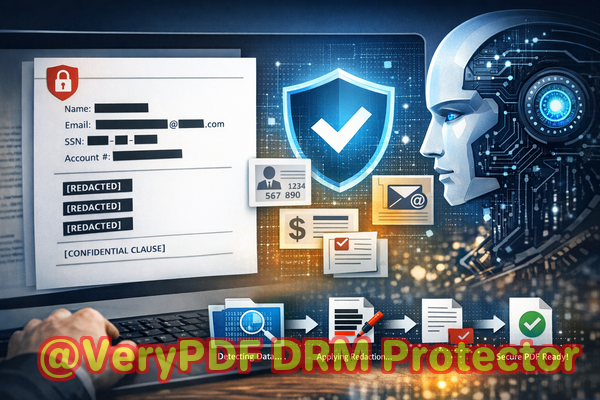
Manual redactionblackening text with a marker or using basic PDF toolsis no longer enough. Sensitive information can often be recovered from “redacted” PDFs, leaving companies exposed. Even well-meaning employees using free online tools may unknowingly upload confidential files to third-party servers, risking data leakage or intellectual property theft. The stakes are high, and the solutions need to be smarter.
The Real Business Pain Points of PDF Redaction
Every day, organizations handle PDFs that contain sensitive information, from financial records to client contracts. Here are the most common problems businesses face:
-
Accidental Exposure of Sensitive Data
Imagine sending a quarterly report to a partner or regulator, only to realize later that hidden employee IDs, client emails, or financial figures are still intact. Even a single exposed document can trigger compliance audits, fines, and legal action. Data breaches don’t just impact compliancethey erode trust with clients and partners.
-
Manual Redaction Errors
Traditional “blackout” methods are notoriously unreliable. Copying text from a supposedly redacted PDF can reveal information underneath. This risk is often underestimated, especially when employees assume visual concealment equals permanent deletion.
-
Unsafe Online Tools
Free online redaction tools seem convenient, but they introduce another risk: sensitive documents may be stored or cached on external servers. Companies handling intellectual property, HR data, or medical records can inadvertently share proprietary or regulated information with unknown third parties.
How AI-Powered PDF Redaction Solves These Risks
VeryPDF AI PDF Redaction Tool Command Line offers a practical, secure solution that addresses these challenges directly:
-
AI-Powered Detection: Automatically scans PDFs for sensitive data like names, emails, phone numbers, IDs, financial data, and legal clauses. No more manual hunting for hidden information.
-
Permanent Data Removal: Unlike simple blackout methods, redacted content is permanently deleted from the file. There’s no way for anyone to recover it.
-
Fully Offline Processing: Your documents never leave your computer, ensuring 100% privacy and preventing accidental exposure through cloud-based tools.
For example, one HR department used this tool to prepare employee records for a third-party audit. Previously, they had relied on a combination of manual redaction and online tools, which left gaps. With VeryPDF AI PDF Redaction, every PII field was automatically identified and removed, ensuring compliance and giving managers peace of mind.
Practical Examples of AI Redaction in Action
Consider the following real-life scenarios where VeryPDF’s tool mitigated risk:
-
Compliance Audit Preparation: A law firm needed to share client case files with a junior team but wanted to ensure privileged information was inaccessible. By running the files through the AI PDF Redaction tool, all confidential client identifiers and sensitive clauses were automatically removed before distribution.
-
Financial Report Sharing: A finance team often sends internal reports to external auditors. Redacting salaries and account numbers manually led to errors. Switching to AI-driven redaction eliminated mistakes, ensuring only necessary data was shared.
-
Contract Reviews: A marketing agency needed to share vendor contracts without exposing proprietary pricing details. AI redaction removed sensitive figures while keeping the rest of the document intact, streamlining legal review.
Step-by-Step Redaction Workflow
-
Load PDF: Open the file in VeryPDF AI PDF Redaction Tool Command Line.
-
Detect Sensitive Data: The AI automatically scans for predefined sensitive elements like names, emails, IDs, and financial data.
-
Review Suggestions: Users can verify flagged content before redaction to ensure accuracy.
-
Apply Redaction: Sensitive data is permanently removed.
-
Export Clean PDF: The resulting file is safe to share, fully compliant, and free of recoverable sensitive information.
Common Types of Data Businesses Should Redact
-
Personal Identifiable Information (PII): Names, email addresses, phone numbers, social security numbers.
-
Financial Data: Bank details, credit card numbers, salaries, or internal budgets.
-
Business Secrets: Proprietary strategies, pricing information, and internal memos.
-
Legal Clauses: Confidential terms in contracts, NDAs, or client agreements.
Privacy and Security Benefits You Can Measure
Using VeryPDF AI PDF Redaction Tool Command Line provides tangible results:
-
Prevents Data Leaks: Permanently removes sensitive information to avoid accidental exposure.
-
Eliminates Online Risk: Files never leave your secure environment, preventing leaks to third-party servers.
-
Ensures Compliance: Supports GDPR, HIPAA, and other privacy regulations by guaranteeing data is unrecoverable.
-
Reduces Human Error: AI automation ensures nothing is missed, minimizing costly mistakes from manual redaction.
Conclusion: Protect Your Business With AI PDF Redaction
Data privacy is no longer optionalit’s a business imperative. VeryPDF AI PDF Redaction Tool Command Line offers a simple, secure, and reliable way to permanently remove sensitive information from PDFs before sharing. Whether you manage HR files, legal documents, financial reports, or business contracts, this tool eliminates the risk of human error and ensures compliance with privacy regulations.
I highly recommend this to anyone who needs to share documents safely without risking data leaks or compliance issues. Try it now and securely redact your PDFs: https://veryutils.com/smart-redact-server-ai-powered-pdf-redaction-software. Start your free trial today and ensure your sensitive data is permanently removed before sharing.
Frequently Asked Questions
-
How can I permanently remove sensitive data from a PDF instead of just hiding it?
VeryPDF AI PDF Redaction permanently deletes the data, not just overlays it with black bars. Once redacted, it cannot be recovered.
-
Can others recover redacted information from my PDF?
No. The AI tool removes sensitive information entirely, ensuring there is no way to extract it later.
-
Is it safe to use online PDF redaction tools?
Online tools carry a risk of uploading sensitive data to third-party servers. Using offline AI redaction keeps files secure and private.
-
Does this tool work completely offline?
Yes. All processing occurs on your computer, guaranteeing full privacy and security.
-
What types of sensitive data can be automatically detected and removed?
Names, emails, phone numbers, social security numbers, bank details, legal clauses, and other PII or business-critical information.
-
How can I ensure compliance with GDPR when sharing documents?
By permanently removing personal data from PDFs using offline AI redaction, you prevent accidental exposure and demonstrate regulatory compliance.
-
Can I review the data before it’s redacted?
Yes. The tool allows users to review flagged information before applying permanent redaction.
-
Does AI redaction save time compared to manual methods?
Absolutely. Automated detection and removal dramatically reduce the time spent manually reviewing each document.
-
Can I redact large batches of documents at once?
Yes. The command-line tool supports batch processing, making it efficient for handling multiple files.
-
Will redaction affect the readability of non-sensitive content?
No. Only sensitive elements are removed, leaving the rest of the document intact and readable.
-
Is this solution suitable for all industries?
Yes. It’s ideal for legal, financial, HR, healthcare, and corporate sectors, anywhere sensitive data must be protected.
-
What happens if I accidentally miss sensitive information?
AI-powered detection reduces the chance of missed data significantly compared to manual methods, but users can adjust detection settings for extra assurance.
Relevant Keywords
redact sensitive data, remove confidential information, PDF redaction tool, protect privacy in PDFs, prevent data leaks, offline PDF redaction, secure document sharing, GDPR compliance, AI PDF redaction, permanent redaction