
How to Safely Redact Sensitive Data in PDFs with AI-Powered Offline Tools
Last month, our team sent a PDF report containing client contracts to a partner firm. It wasn’t until later that we realized personal emails and financial details were still visiblean oversight that could have triggered a major GDPR violation. This is a common scenario for many businesses: confidential information accidentally slips into shared documents, and the consequences can be costly.
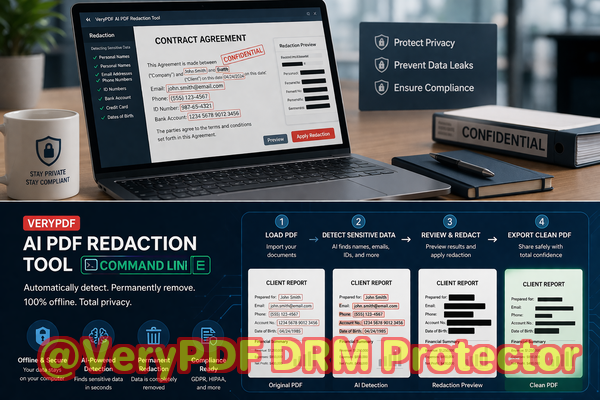
Businesses today handle sensitive data every daycontracts, HR files, financial reports, legal agreementsbut traditional redaction methods often fail to fully protect this information. Many companies still rely on manual blacking-out techniques or online tools, which can leave recoverable traces or expose files to third-party servers. That’s where AI-powered offline PDF redaction comes in, providing a reliable solution to permanently remove confidential data before sharing documents.
Sensitive Data Exposure and Compliance Risks
One of the biggest risks for businesses is unintentionally sharing PDFs that contain personally identifiable information (PII), financial data, or internal business secrets. Imagine sending an HR report that includes employee social security numbers, or a contract with hidden clauses revealing strategic negotiations. If these PDFs fall into the wrong hands, your company could face serious repercussions:
-
Compliance violations: GDPR, CCPA, and other data protection laws require strict handling of personal data. A single oversight could result in fines or legal action.
-
Reputation damage: Clients and partners lose trust if their confidential information is exposed.
-
Operational risks: Competitors gaining access to sensitive business information can compromise strategy and market position.
Manual redaction isn’t enough. Blacking out text with a highlighter or masking it in a PDF editor may look secure, but in reality, the underlying text can often be copied, searched, or extracted with simple tools. Even PDFs “redacted” online may end up stored on servers you don’t control, risking unintentional leaks.
AI-Powered Offline PDF Redaction as a Solution
VeryPDF AI PDF Redaction Tool Command Line addresses these real risks head-on. Designed for enterprise use, it offers fully offline, AI-driven detection and permanent removal of sensitive information from PDFs. Here’s how it solves key pain points:
-
Automatic detection of sensitive data: The tool can identify names, emails, phone numbers, ID numbers, financial information, and confidential clauses without manual tagging.
-
Permanent removal, not just hiding: Redacted data is fully removed from the PDF, ensuring it cannot be recovered.
-
Offline processing: Documents are never uploaded to any server, guaranteeing 100% privacy.
For example, a law firm recently switched from an online PDF redaction service to VeryPDF’s offline solution. Previously, sensitive case files were temporarily uploaded to a cloud platform, raising privacy concerns. With the offline AI tool, all documents remained within the firm’s secure network, completely eliminating the risk of exposure.
Practical Workflow for Redacting PDFs
Using the tool is straightforward, even for non-technical teams:
-
Load the PDF: Open your document in the command line interface.
-
Detect sensitive data: AI scans the document for PII, financial details, or other confidential information.
-
Review results: Confirm the detected items before redaction.
-
Apply redaction: The tool permanently removes the sensitive content.
-
Export the clean PDF: Share confidently, knowing the data is irrecoverable.
Common types of information businesses typically need to redact include:
-
Personal identifiable information (names, emails, addresses, IDs)
-
Financial data (bank accounts, payment details, invoices)
-
Business secrets (strategic plans, pricing models, internal communications)
-
Legal or confidential clauses in contracts
Real-Life Benefits and Examples
Consider a multinational company preparing a financial audit report for external auditors. By using VeryPDF AI PDF Redaction Tool offline, they automatically detected and removed employee salary information and sensitive client account details before sharing. The audit proceeded smoothly, and the company avoided potential compliance penalties.
In another instance, a marketing firm frequently collaborated with freelancers on confidential campaigns. Using traditional redaction methods, sensitive project timelines and budgets were occasionally leaked. Switching to the AI-powered offline tool ensured that no confidential campaign information left the company network, safeguarding both client trust and internal strategies.
Beyond compliance, there’s peace of mind. Knowing that sensitive documents cannot accidentally leak or be recovered from PDFs allows teams to collaborate efficiently without sacrificing privacy.
Conclusion: Why Every Business Should Adopt AI-Powered Offline Redaction
Redacting PDFs manually or via online services is no longer sufficient in today’s data-driven world. VeryPDF AI PDF Redaction Tool Command Line provides businesses with a robust, reliable, and privacy-focused solution to protect sensitive data.
I highly recommend this to anyone who needs to share documents safely without risking data leaks or compliance issues. Its AI-powered detection, permanent removal capabilities, and fully offline processing make it an essential tool for legal teams, HR departments, finance teams, and any organization handling confidential information.
Try it now and securely redact your PDFs: https://veryutils.com/smart-redact-server-ai-powered-pdf-redaction-software
Start your free trial today and ensure your sensitive data is permanently removed before sharing.
FAQs
1. How can I permanently remove sensitive data from a PDF instead of just hiding it?
VeryPDF AI PDF Redaction Tool removes the underlying data entirely, not just visually masking it. Redacted content cannot be recovered.
2. Can others recover redacted information from my PDF?
No. The tool ensures that redacted text or numbers are permanently deleted from the file.
3. Is it safe to use online PDF redaction tools?
Online tools carry the risk of uploading confidential documents to external servers, which could be exposed or stored without your knowledge.
4. Does this tool work completely offline?
Yes. All processing happens on your local computer, ensuring full privacy and security.
5. What types of sensitive data can be automatically detected and removed?
The AI can identify PII (names, emails, phone numbers, addresses), financial data, business secrets, and confidential legal clauses.
6. How does AI improve redaction accuracy compared to manual methods?
AI can scan entire documents and recognize patterns of sensitive data that humans might miss, reducing errors and overlooked information.
7. Can I review detected items before redaction?
Yes. The workflow allows you to confirm or deselect detected content before final removal.
8. Will this tool help with GDPR compliance?
Absolutely. By permanently removing personal data from shared PDFs, it supports GDPR and other data protection regulations.
9. Is technical expertise required to use the command line tool?
Minimal. The interface is user-friendly and includes clear step-by-step instructions for business professionals.
10. Can this tool handle large batches of PDFs?
Yes. It is designed for enterprise use, allowing multiple documents to be processed efficiently while maintaining privacy.
11. How can I integrate it into existing document workflows?
You can script the command line tool into automated workflows for contracts, HR files, audits, or financial reports, ensuring consistent and secure redaction.
12. Are there examples of businesses benefiting from offline redaction?
Yes. Law firms, financial institutions, marketing agencies, and multinational companies have used the tool to prevent data leaks and ensure compliance.
Keywords: redact sensitive data, remove confidential information, PDF redaction tool, protect privacy in PDFs, prevent data leaks, offline PDF redaction, secure document sharing, AI PDF redaction, permanent redaction, compliance-friendly PDFs