PDF Protection with PDF DRM Security to Protect PDF Files, PDF document protection with PDF DRM Controls

In a world where digital content can be easily shared, copied, or modified without authorization, protecting sensitive documents is a growing concern for businesses, educators, and content creators. PDFs, being a widely used document format, are especially vulnerable to unauthorized access and misuse. To address these challenges, VeryPDF DRM Protector offers a comprehensive solution to secure your PDF files with advanced Digital Rights Management (DRM) security.

This article explores the critical features of PDF DRM security and demonstrates how VeryPDF DRM Protector can safeguard your documents, ensuring they remain accessible only to authorized users. A free trial is available at VeryPDF DRM Protector.
PDF Protection with PDF DRM Security to Protect PDF Files, PDF document protection with PDF DRM Controls


Why Choose PDF DRM Security?

Conventional PDF security measures, like passwords and basic encryption, often fall short in providing adequate protection. Passwords can be shared, encryption can be bypassed, and users may still find ways to misuse the content. PDF DRM security offers a more robust approach, allowing document owners to control access, usage, and distribution with precision.

With VeryPDF DRM Protector, you can:

  • Stop unauthorized copying, modifying, and printing.
  • Prevent screenshots and unauthorized sharing.
  • Control document access with expiry dates, print limits, and device locks.
  • Apply permanent and dynamic watermarks for added accountability.

Key Features of VeryPDF DRM Protector

1. Prevent Unauthorized Access and Use

Protect your PDF files from:

  • Viewing and Printing: Restrict access to authorized users and manage print permissions.
  • Copying and Modifying: Disable content copying and editing to maintain the integrity of your documents.
  • Saving and Sharing: Prevent files from being saved or distributed to unauthorized individuals.
  • Screenshots: Block attempts to capture screen images using third-party tools.

2. Granular Control Over Document Access

VeryPDF DRM Protector gives you the flexibility to control how your documents are accessed and used:

  • Set Expiry Dates: Define when a document can no longer be viewed.
  • User Account Management: Specify user access duration and permissions.
  • Offline and Online Access: Decide if users can view documents offline or only with an active internet connection.
  • Usage Restrictions: Limit the number of views, prints, or days a document remains accessible.

3. Device Locking for Maximum Security

Lock PDFs to specific devices or platforms to prevent unauthorized access. Options include:

  • Device Locking: Restrict access to designated computers, tablets, or mobile devices.
  • USB Stick Access: Enable instant offline access without requiring installation.
  • Web Viewer: Allow secure viewing on any operating system without additional software.

4. Dynamic Watermarking

Watermarks are a vital tool for deterring unauthorized sharing. VeryPDF DRM Protector enables:

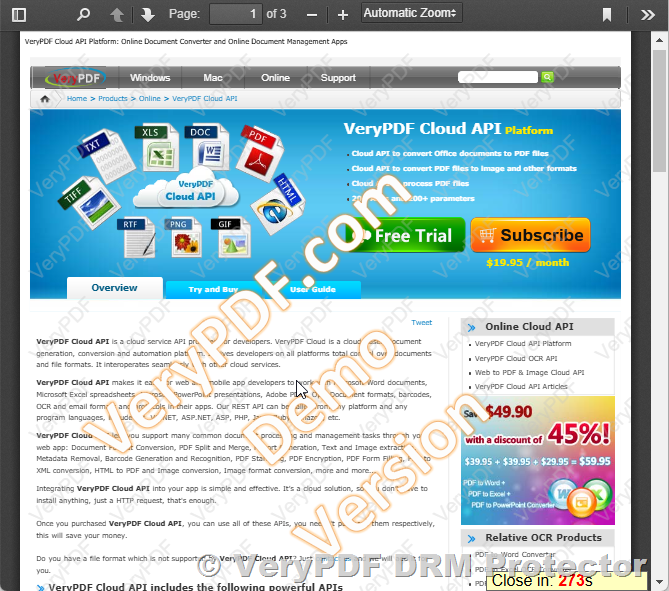
  • Dynamic Watermarks: Display user-specific information, such as names, email addresses, and timestamps, on viewed or printed documents.
  • Permanent Protection: Unlike watermarks from Adobe or other tools, these watermarks are permanent and cannot be removed.

5. Secure Document Distribution

Protect your PDFs locally, eliminating the risk of unprotected files being uploaded to external servers. Securely distribute your documents like any other file while maintaining complete control over their usage.


Advantages of VeryPDF DRM Protector

1. No Password Hassles

With VeryPDF DRM Protector, you don’t need to rely on passwords or certificates that can be easily shared or forgotten. The DRM controls ensure that your files are only accessible to intended recipients.

2. Superior Encryption

Using NIST-approved AES encryption, your documents are protected with government-level security.

3. Flexible Licensing and Monitoring

Automated license delivery and detailed tracking ensure you know who has accessed your files and when.

4. Customizable Permissions

Tailor document access settings for each user, including view limits, print restrictions, and expiry dates.

5. Cost-Effective Solution

With no limit on the number of documents or users, VeryPDF DRM Protector offers a fixed-price model that is both affordable and scalable.


Use Cases for VeryPDF DRM Protector

1. Corporate Document Security

Ensure sensitive business documents like financial reports, contracts, and internal policies are accessible only to authorized personnel.

2. Educational Material Protection

Safeguard digital textbooks, exam papers, and training materials from unauthorized distribution and sharing.

3. Content Publishing

Secure eBooks, research papers, and other intellectual property to prevent piracy and unauthorized duplication.


How VeryPDF DRM Protector Outshines Competitors?

  • No Cloud Dependency: Your documents remain secure on your local system, reducing exposure to external threats.
  • Dynamic Access Management: Update or revoke access permissions even after the document has been distributed.
  • All-in-One Administration: Manage user accounts, monitor document usage, and generate detailed reports using a single platform.
  • Comprehensive Security Features: From preventing screenshots to applying dynamic watermarks, VeryPDF DRM Protector provides a holistic approach to document security.

Get Started with VeryPDF DRM Protector

Protecting your PDF files has never been easier. With VeryPDF DRM Protector, you can secure your documents in just a few minutes. Whether you’re a business, educator, or publisher, this tool provides the ultimate solution for PDF security and distribution.

Try it for free today at VeryPDF DRM Protector.


Conclusion

PDF DRM security is a vital tool for safeguarding your documents in today’s digital landscape. With advanced features like dynamic watermarks, device locking, and granular access controls, VeryPDF DRM Protector ensures your PDFs remain secure, no matter where they are stored or shared.

Don’t leave your valuable content vulnerable to misuse. Start your free trial today and experience the unparalleled protection of VeryPDF DRM Protector. Visit VeryPDF DRM Protector to learn more.
How to Lock PDF Files to Specific Countries, Cities, or IP Addresses with VeryPDF DRM Protector?

In the digital age, protecting confidential and sensitive information is more crucial than ever. Whether you’re a business protecting trade secrets, a publisher safeguarding intellectual property, or an individual concerned about the privacy of personal data, ensuring that only the right people can access your PDF files is essential. While password protection and encryption are common methods to secure documents, they often don’t go far enough to restrict access based on location or specific network conditions. This is where Digital Rights Management (DRM) comes in, offering advanced features to lock PDF files to specific geographic locations and even to particular IP addresses. In this article, we’ll explore how DRM technology can be used to restrict PDF access based on countries, cities, or specific IP addresses—and why VeryPDF DRM Protector is the best solution for this purpose.

What is DRM and Why Is It Important?

Digital Rights Management (DRM) is a technology that controls how digital content is accessed, used, and distributed. DRM is used to protect sensitive information by allowing content creators and owners to control who can view, copy, print, or share their files. Unlike basic file protection methods like passwords, DRM provides much more granular control, including the ability to lock content based on geographic location or specific network conditions.

For businesses, DRM offers a way to safeguard intellectual property, financial documents, legal contracts, and other confidential data. For publishers, DRM can prevent unauthorized distribution of e-books or other digital media. But one of the most valuable features of DRM, especially for companies and organizations that operate across borders, is the ability to lock documents to specific countries, cities, or even IP ranges. This helps prevent unauthorized access from regions where the content should not be viewed.

How to Lock PDF Files to Specific Countries, Cities, or IP Addresses with VeryPDF DRM Protector?

Locking PDF Files to Specific Countries or Cities

One of the most powerful ways to secure your PDF documents is by restricting access based on location. This feature can be extremely useful for organizations that want to ensure their sensitive data is only accessible from specific geographic regions.

For example:

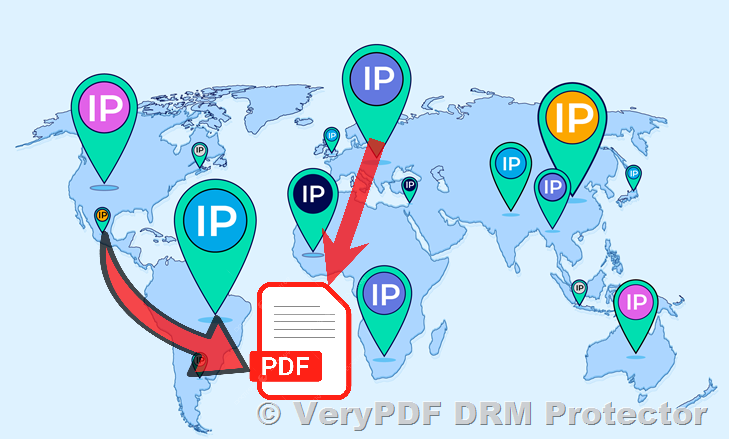
  • You can lock your PDF to a specific country: If your document is only intended for a particular country or region, DRM technology can restrict access to users in other areas. This is especially helpful for companies that deal with regional regulations or licensing agreements. For instance, if you are a content distributor and you want to make sure that your PDF is only available to customers in the United States, you can lock access to only those within the U.S.
  • You can lock your PDF to a specific city or even a city range: If your document should only be viewed by people in a certain city or metropolitan area, DRM allows you to set these boundaries. This could be beneficial for businesses with location-based licensing or regional events, such as training sessions or local conferences.
  • Block access from specific countries or cities: Conversely, you can restrict access to users in particular countries or cities. This might be needed if your document contains sensitive information that should not be accessible from regions with high security risks, or in countries where certain laws or agreements prevent access.

Restricting Access by IP Address or IP Range

Another way to secure your PDF files is by limiting access to specific IP addresses or ranges. This is ideal for organizations that want to ensure that their documents can only be accessed within certain networks or locations.

For instance:

  • Limit access to a particular IP address: This feature allows you to set your document to be accessible only from a specific IP address. This is perfect for companies that want to restrict access to their internal documents and ensure they are only viewed within the organization’s network, such as when you want to secure access to sensitive company reports or proprietary research.
  • Limit access to a range of IP addresses: If you want to allow users within a specific office building or a network of connected devices to view the document, you can configure the DRM settings to only allow access from specific IP ranges. This could be helpful for businesses that want to ensure only employees working in the office, or within a particular facility, can access confidential information.
  • Block specific IP addresses or ranges: You can also block access from certain IP addresses that may pose a threat or be outside of the authorized zones. This is ideal for preventing unauthorized access from suspicious locations or from regions where access should be restricted.

Global and User-Based Control

In addition to location-based restrictions, DRM also offers more global control over who can access your files. You can control access on a per-user basis or for all users across the globe.

  • Global restrictions: You can globally block access to your PDF document from specific countries or regions. This is an ideal solution for businesses with international content that must comply with various regulations or for documents that should not be shared outside certain geographic areas.
  • User-based control: DRM technology allows you to set different restrictions based on individual users. This means that you can allow specific users access to a document regardless of their location, while blocking others from accessing the same document. This feature is particularly useful for high-value, confidential documents like contracts, research papers, or executive reports that require strict access control.

How VeryPDF DRM Protector Can Help?

Now that we understand the power of locking PDFs to specific countries, cities, or IP addresses, it’s important to explore how VeryPDF DRM Protector can help you implement these protections. VeryPDF offers a robust DRM solution that allows you to lock PDF files to specific geographic locations or network conditions, providing an extra layer of security to prevent unauthorized access.

Here are some key features of VeryPDF DRM Protector that can help you lock your PDF documents:

  • Geographic Locking: You can lock your PDF files to specific countries, cities, or even prevent access from particular regions or countries. This ensures that your sensitive documents are only accessible to authorized users based on their geographic location.
  • IP Address Restriction: You can restrict access to your PDF files based on IP addresses or IP ranges. This is ideal for companies that want to control access within their own networks or restrict access to certain facilities or offices.
  • Easy Setup: Unlike other DRM solutions that can be complex and difficult to implement, VeryPDF DRM Protector offers a simple setup with no software installation required. You can configure the security settings directly through their online platform.
  • Global Control and Flexibility: Whether you want to block access globally or customize access for specific users or regions, VeryPDF DRM Protector provides flexible, easy-to-manage security settings that allow you to control access on your terms.

Try VeryPDF DRM Protector Today

If you’re looking for an affordable, user-friendly DRM solution that can help you lock your PDF documents to specific locations or IP addresses, look no further than VeryPDF DRM Protector. With its wide range of features and ease of use, VeryPDF DRM Protector provides the control and security you need to protect your sensitive files from unauthorized access.

Try it out for yourself today with a seven-day free trial available at VeryPDF DRM Protector. Secure your PDFs and ensure that only the right people in the right places can access your sensitive documents.

Conclusion

In today’s digital world, data security is paramount. By locking your PDF files to specific countries, cities, or IP addresses, you can prevent unauthorized access and ensure that your confidential documents remain protected. VeryPDF DRM Protector offers an easy-to-use, affordable solution for businesses, content creators, and individuals looking to safeguard their PDFs and control who can access them. Give it a try today and take the first step toward securing your sensitive content.

Digital Rights Management: How to Restrict and Prevent PDF Copy, Print, and Forwarding

In an increasingly digital world, securing sensitive information is more critical than ever. Whether you’re a business owner, an author, or a professional managing confidential documents, ensuring that your PDFs stay protected is essential. Digital Rights Management (DRM) is the key to controlling how others interact with your documents, preventing unauthorized copying, printing, and forwarding. In this article, we’ll explore what DRM is, how it works, and how VeryPDF DRM Protector can help you safeguard your PDF files.

Digital Rights Management: How to Restrict and Prevent PDF Copy, Print, and Forwarding

What is Digital Rights Management (DRM)?

Digital Rights Management (DRM) refers to a suite of technologies that enable content owners to control how their digital content is accessed, used, and distributed. Often referred to as “copy protection” or “copy prevention,” DRM ensures that sensitive content, such as intellectual property or confidential business documents, remains secure.

While DRM doesn’t eliminate the risk entirely, it makes unauthorized distribution, copying, and printing much more challenging. DRM systems can prevent recipients from printing, copying, or forwarding your PDF files, offering an added layer of security for your documents.

Who Uses DRM?

DRM is essential for anyone who needs to protect sensitive or confidential documents. Some common users of DRM include:

  • Book Publishers: To protect e-books from illegal distribution and piracy.
  • Training Providers: To safeguard their proprietary training materials and intellectual property.
  • Finance and Real Estate Firms: For secure transactions and due diligence processes, where sensitive financial or legal documents are exchanged.
  • Corporations: For internal documents containing confidential information, ensuring compliance with laws like HIPAA or GDPR.

Why Isn’t DRM More Widespread?

Despite its benefits, DRM is not as widespread as one might expect. The main barriers are ease of use and cost. Many DRM solutions require both the sender and the recipient to install special software, which can be cumbersome and impractical, especially in corporate settings where installing third-party software is restricted.

Additionally, some DRM solutions are costly and require significant technical expertise to implement. However, VeryPDF DRM Protector provides an affordable and easy-to-use solution that balances both security and simplicity.

What DRM Cannot Do

While DRM is powerful, it does have limitations. For example, DRM cannot stop someone from recording the document with an external device (such as a mobile phone or screen recorder). This is known as the “analogue hole.” However, features like watermarking can discourage unauthorized distribution by visibly identifying the content.

Despite these limitations, DRM remains an effective way to prevent the most common forms of digital document theft, such as unauthorized copying, printing, or forwarding.

How VeryPDF DRM Protector Can Help?

VeryPDF DRM Protector is a comprehensive and user-friendly DRM solution designed to protect your PDF files. Here are some key features that make it an excellent choice for securing your documents:

  1. ScreenShield: Restricting viewing to narrow sections at a time, this feature makes it more difficult for users to take screenshots or capture the entire document using external devices.
  2. Dynamic Watermarking: Personalized watermarks are added to documents, showing recipient details (such as name or email), which act as a deterrent for unauthorized sharing.
  3. Copy Protection: Prevent the copying of text or images from your PDFs, ensuring that recipients cannot easily duplicate or distribute the content.
  4. Printing Restrictions: VeryPDF DRM Protector allows you to control printing by restricting the number of prints or disabling printing entirely, reducing the risk of sensitive information being leaked through hard copies.
  5. File Tracking and Revocation: With DRM, you can track who accesses your files and revoke access at any time. This feature is crucial if you suspect that a document has been improperly shared or accessed by unauthorized individuals.

How to Choose a DRM Solution?

When selecting a DRM solution, keep the following factors in mind:

  • Simplicity: Choose a solution that is easy to use for both the sender and the recipient. Ensure that it doesn’t require cumbersome installation or technical steps.
  • Formats: Check whether the DRM solution supports the formats you need (e.g., PDF, Word, Excel, PowerPoint).
  • Comprehensive Protection: Ensure that the DRM solution offers the features necessary to protect your documents, such as access control, file tracking, watermarking, and expiration dates.

Why Choose VeryPDF DRM Protector?

VeryPDF DRM Protector stands out for its simplicity and affordability. It is a zero-install solution, making it incredibly user-friendly for both the sender and recipient. Here’s why it’s the best choice for protecting your PDF files:

  • Simplicity: VeryPDF DRM Protector is quick to set up, with no complicated installations required.
  • Multiple Format Support: Protect not only PDFs but also Word, Excel, PowerPoint, images, and video files.
  • Comprehensive Features: Beyond just DRM, the solution offers encryption, access control, permissions, file tracking, and watermarking all in one package.
  • Affordable: It’s one of the most cost-effective DRM solutions available, without sacrificing security.

You can start using VeryPDF DRM Protector today with a seven-day free trial. Try it for yourself and see how it can help you secure your documents and protect your sensitive content from unauthorized distribution.

Visit VeryPDF DRM Protector to get started and protect your PDFs now!

How to Prevent PDF Files from Downloading, Printing, and Screenshots? Disable print screen, stop screen capture & prevent PDF screenshots

In an era where information security is paramount, businesses and individuals often need to protect sensitive PDF documents from being downloaded, printed, or captured as screenshots. Whether it’s a legal document, financial report, or confidential contract, preventing unauthorized distribution is crucial. While it’s difficult to ensure complete security, there are several techniques available to reduce the risks of exposure and unauthorized sharing.

How to Prevent PDF Files from Downloading, Printing, and Screenshots? Disable print screen, stop screen capture & prevent PDF screenshots

Challenges of PDF Security

PDFs are widely used for document sharing due to their versatility and compatibility across different devices. However, the very nature of PDFs — designed for easy viewing and printing — can make them difficult to secure. While password protection and permissions can limit access, they do not prevent users from printing, downloading, or taking screenshots.

Despite efforts to block these features with JavaScript or other methods, it is nearly impossible to fully restrict a user’s ability to capture or share content once it is displayed on their screen. Tools like the Snipping Tool or third-party apps can easily bypass these protections.

The Flash Conversion Approach

One of the ideas often proposed is converting PDFs to Flash. By converting PDFs into Flash files, users may have a harder time saving or printing them. Flash offers some control over how content is displayed in a browser, but it comes with its own set of limitations and security risks. As Flash has been deprecated and is no longer supported in most modern browsers, this is no longer a viable option for protecting sensitive documents.

Why JavaScript and Client-Side Methods Are Ineffective

Several developers attempt to use client-side JavaScript to disable the print screen option or prevent users from downloading and printing PDFs. For example, a script might attempt to hide content when a print screen key is pressed:


$(document).ready(function() {
  $(window).keyup(function(e) {
    if (e.keyCode == 44) {
      $("body").hide();
    }
  }); 
});
    

However, this method is ineffective. Users can bypass such protections using other tools or simply take screenshots with external devices like smartphones. Furthermore, browsers have limitations when it comes to preventing users from accessing content directly or using operating system-level screen capture tools.

More Robust Solutions: Digital Rights Management (DRM)

For those looking for more robust protection, Digital Rights Management (DRM) is a far more effective solution. DRM tools, such as VeryPDF DRM Protector, provide advanced features for controlling how PDF documents are accessed, shared, and protected. These solutions allow for the following capabilities:

  • Preventing Downloads and Printing: With DRM, users can be restricted from downloading or printing the document altogether, ensuring that the PDF remains secure and cannot be shared through traditional means.
  • Disabling Screenshot Capture: DRM solutions can also disable the ability to take screenshots of the document. This means that even if a user attempts to capture the screen using screen capture tools or a mobile device, the content will be protected.
  • Watermarking and Digital Fencing: Some DRM tools offer digital watermarking, adding unique identifiers to each document to deter unauthorized sharing. They may also incorporate “fencing,” a feature that limits the document’s visibility, allowing users to see only a small portion of the document at a time.
  • Timed Access and View Limits: DRM solutions often come with the ability to set expiration dates or restrict the number of times a document can be viewed. This prevents unauthorized distribution and ensures that the document is only available for a specific period.

Fencing: A Practical Approach to Protecting Content

One innovative feature offered by secure document sharing apps like iDeals is known as “fencing.” Fencing overlays the PDF with a digital masking screen, allowing the user to read only a small section of the document at a time. This feature forces the user to scroll through the entire document, reducing the likelihood of capturing large portions of the content in a single screenshot.

While users can still take screenshots of each line or section, it requires significantly more effort to capture the entire document, making it less likely for the content to be shared or stolen.

Conclusion

While it’s true that there is no perfect solution for preventing the download, printing, or screenshotting of PDF documents, using Digital Rights Management (DRM) software like VeryPDF DRM Protector offers the best level of protection. By integrating DRM into your document sharing strategy, you can effectively control how your PDFs are viewed and distributed, significantly reducing the risk of unauthorized access.

Whether you’re sharing sensitive financial reports, legal contracts, or proprietary research, DRM solutions provide an essential layer of security, allowing you to safeguard your content from unauthorized use while still providing access to authorized individuals. If you’re serious about document protection, investing in DRM tools is the way to go.

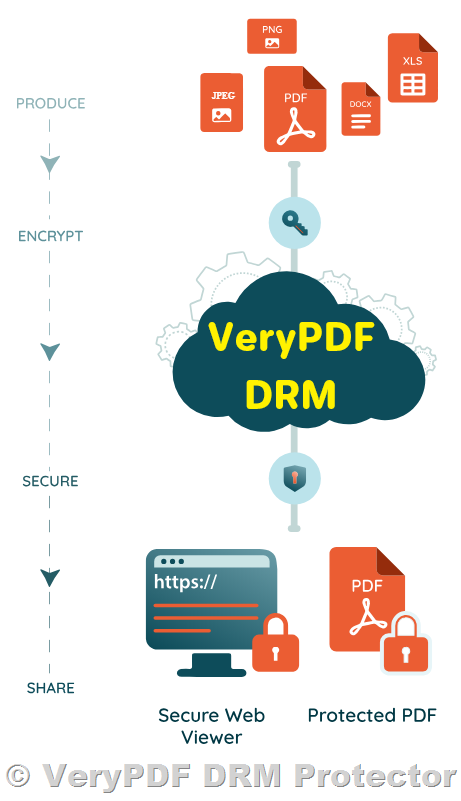
Secure Browser-Based Viewer for Protected PDF Files: Safeguard Web Viewer

In today’s fast-paced business environment, the need for secure, accessible, and efficient document sharing has never been greater. Whether for confidential contracts, sensitive financial reports, or proprietary research, businesses must be able to protect their documents from unauthorized access while ensuring seamless viewing for authorized users. The Safeguard Web Viewer provides an innovative solution for viewing protected PDF files directly in the browser without the need for any additional software or plug-ins.

What is Safeguard Web Viewer?

The Safeguard Web Viewer is a cloud-based, browser-based PDF viewer designed to view protected PDF files processed by the Web Publisher. It enables secure document access without requiring any installations, downloads, or administrator privileges. This makes it the perfect tool for organizations that need to provide secure access to PDF documents across a range of devices and operating systems—without worrying about security vulnerabilities associated with plug-ins or outdated software.

With Safeguard Web Viewer, organizations can ensure that sensitive PDF files are protected and accessible, no matter the environment. Whether on a corporate network, remote access, or using a mobile device, the Web Viewer enables organizations to offer a consistent and secure experience to their users.

Secure Browser-Based Viewer for Protected PDF Files: Safeguard Web Viewer

Key Features of Safeguard Web Viewer

  • No Installation Required: As a fully browser-based solution, the Safeguard Web Viewer requires no installation, making it ideal for organizations with strict IT policies or environments where software installation is restricted.
  • No Downloads or Plug-Ins: Unlike other solutions that rely on insecure downloads or plug-ins, Safeguard Web Viewer ensures that no third-party applications need to be installed or executed, reducing potential security risks.
  • No Flash or Self-Extracting Exes: Many traditional viewing tools rely on Flash or self-extracting executables (EXEs), both of which pose security risks. Safeguard Web Viewer eliminates these risks, offering a safer, more stable solution for viewing PDF files.
  • Works with All Major Browsers: The Web Viewer is compatible with the most commonly used web browsers, including Microsoft Edge, Chrome, Firefox, Safari, and more, ensuring it will work across a variety of platforms.
  • Cross-Device Compatibility: Whether you’re using a desktop computer, tablet, or smartphone, Safeguard Web Viewer functions on any device, offering true portability for your protected PDF documents.
  • Single Sign-On (SSO) Integration: For organizations with advanced security needs, Safeguard Web Viewer integrates seamlessly with an eCommerce API to enable single sign-on (SSO), streamlining the authentication process and ensuring secure access.
  • Requires an Internet Connection: The viewer operates directly through a web browser, meaning an internet connection is required for users to access and view the documents.

Benefits of Using Safeguard Web Viewer

  • No Software Installation for IT Departments: With no need for IT teams to install or configure software on individual devices, Safeguard Web Viewer saves time and reduces the workload for IT departments. There are no issues with administrator privileges or the need for custom installations, making it a straightforward solution for both users and IT staff.
  • Cost-Effective: There are no licenses to purchase or register, reducing costs for the organization. As a browser-based solution, there are no ongoing expenses for software installation or updates.
  • Eliminates Firewall and Network Issues: Many traditional document viewers require changes to firewall settings or network configurations. With Safeguard Web Viewer, there are no firewall issues to resolve, making it easier for users to access protected files from anywhere.
  • Truly Portable: Unlike traditional desktop software, Safeguard Web Viewer works across all devices and operating systems, offering true portability. Authorized users can securely access protected PDFs on smartphones, tablets, laptops, or desktops, wherever they are.
  • No Licensing Complexity: Since users don’t need to register, the viewer is easy to use, and there are no complexities related to managing software licenses, giving users seamless access to the protected content.

Supported Operating Systems and Browsers

The Safeguard Web Viewer is designed to work across a range of devices and browsers, supporting the following configurations:

  • Windows: Microsoft Edge, Internet Explorer 11, Chrome 37, Firefox 32, Opera 25, Comodo Dragon 33
  • Mac: Safari 6.1.6, Chrome 37, Firefox 32, Opera 24
  • iOS: Safari 7, Chrome 37, Opera Mini 8 (Note: Opera Mini is NOT supported)
  • Android: Firefox 32, Chrome 37, Opera 24
  • Linux: Firefox 32, Chrome 37
  • Chrome OS: Chrome 37

Conclusion

In today’s digital world, businesses require flexible and secure solutions to protect their sensitive documents. The Safeguard Web Viewer provides a browser-based solution for viewing protected PDF files without the need for software installation, plug-ins, or other security risks. With its wide compatibility across devices and operating systems, ease of integration, and user-friendly design, Safeguard Web Viewer ensures that your organization can deliver secure, portable, and accessible document viewing without compromising on security.

By eliminating installation requirements and licensing complexities, this solution saves time, money, and resources, all while keeping your documents safe. If you’re looking for a secure and efficient way to view protected PDFs, Safeguard Web Viewer is the perfect solution for your needs.