Easily Protect Proprietary Research and Analytics in PDF Format from Leaks

Title: Easily Protect Proprietary Research and Analytics in PDF Format from Leaks

Meta Description: Discover how to secure your PDFs and proprietary research with VeryPDF DRM Protector, ensuring your sensitive content stays safe from leaks.

Easily Protect Proprietary Research and Analytics in PDF Format from Leaks


Every Monday morning, I’d check my email inbox, only to find a slew of messages from my eBook customers. They were always thrilled with the content, but there was a constant worry in the back of my mind: were my ebooks being shared or distributed without my consent? I’ve put hours of work into creating valuable content, and the thought of it being pirated or leaked was unbearable.

That’s when I stumbled across VeryPDF DRM Protector for Amazon eBook Seller. I was sceptical at first, but after using it for a few months, I can confidently say that this tool has been a game-changer in securing my intellectual property.

What is VeryPDF DRM Protector for Amazon eBook Seller?

If you’re an Amazon eBook seller or content creator, you’ve likely faced the dilemma of protecting your work from unauthorized sharing. VeryPDF DRM Protector helps you do just that. It offers a simple, yet powerful solution for protecting your ebooks, PDFs, and other digital content from theft or unwanted distribution.

The best part? You don’t need to download anything or create an account to get started. You can protect your documents directly from the web with no hassle, and it’s completely free to try out!

Key Features and My Experience with Them

  1. Control Distribution

    One of the biggest concerns for any content creator is losing control over who can access and share their materials. With VeryPDF DRM Protector, I can set clear boundaries.

    • Printing, copying, or sharing? It’s a no-go.

    • I love how I can password-protect my ebooks and prevent unauthorized users from copying or distributing them. This has saved me countless headaches, knowing my content is in safe hands.

  2. Revocable Access

    I once had a customer who lost their ebook, and I wasn’t sure how to handle the situation. With this tool, I can easily revoke access to any document at any time.

    • If someone shares my work without permission, I can simply remove their access.

    • Plus, I can set expiration dates on my content. I’ve used this feature for promotional ebooks that are only available for a limited time, ensuring my work isn’t hanging around past its prime.

  3. Tracking and Analytics

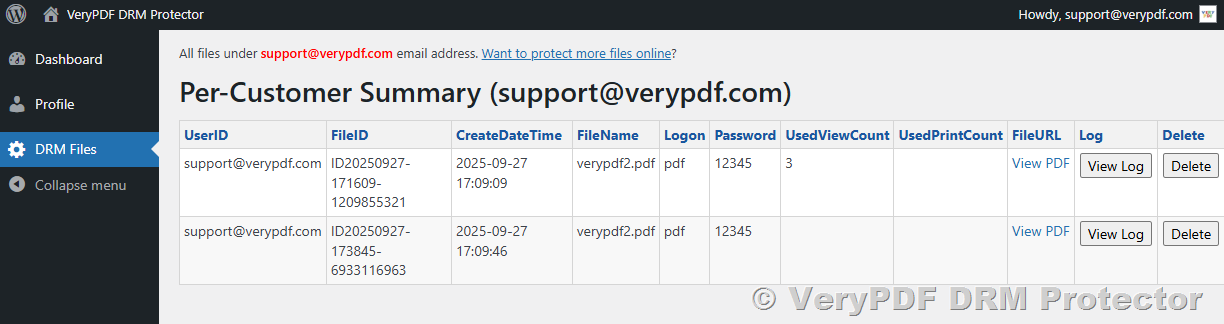
    Tracking who’s accessing my content is crucial. With VeryPDF DRM Protector, I can see exactly who’s reading my ebook, how long they’re spending on each page, and whether they’ve attempted to print or download it.

    • I had no idea who was interacting with my content before, and now I can keep tabs on everything.

    • This has helped me adjust my marketing strategies and even offer better customer service.

  4. Dynamic Watermarking

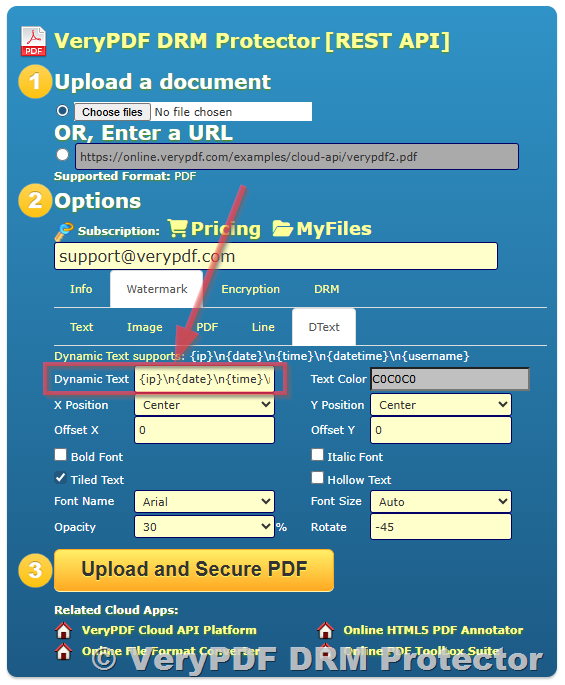
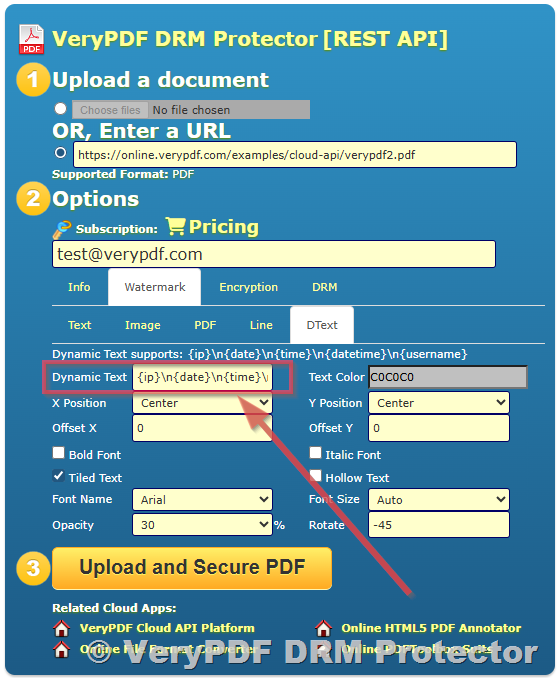
    Watermarking is a powerful deterrent against piracy, and with VeryPDF DRM Protector, I can easily add watermarks that include the recipient’s email address and other identifiers.

    • This means if my ebook ever gets shared without permission, I can trace it back to the original person.

    • The dynamic watermarks are applied automatically, saving me the hassle of manually adding them.

  5. Screen Shield

    Have you ever caught someone trying to screenshot your sensitive documents? It’s frustrating.

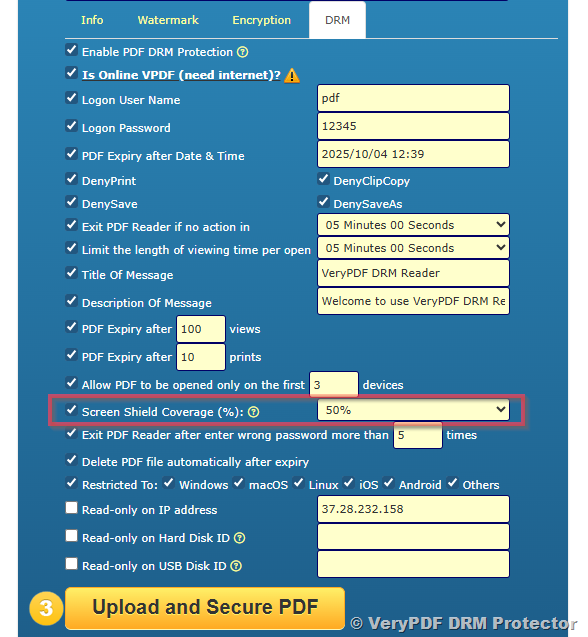
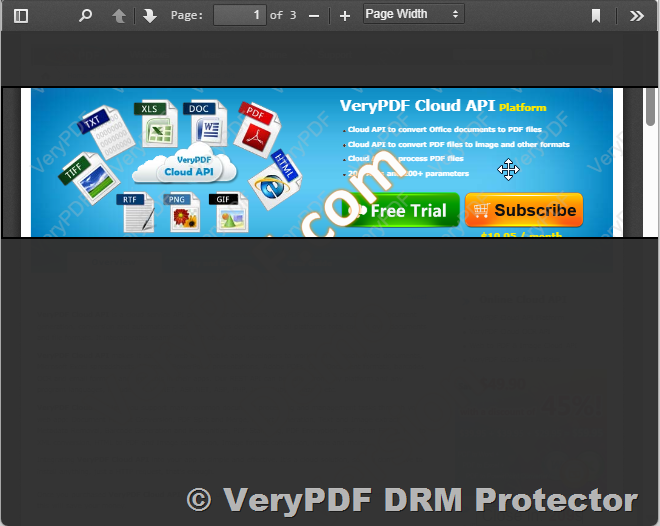
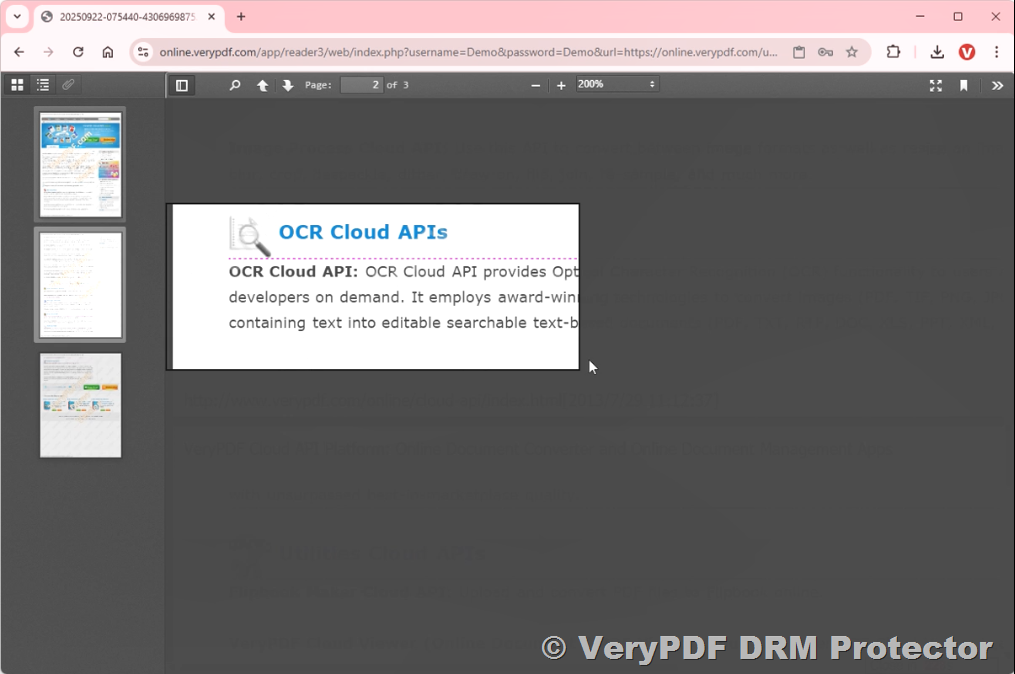
    • VeryPDF DRM Protector’s Screen Shield feature reduces the viewable area of the document, discouraging screenshots.

    • It’s a neat trick that makes it harder for unauthorized users to steal content while viewing it.

The Core Advantages of VeryPDF DRM Protector

When it comes to protecting sensitive content, VeryPDF DRM Protector is a no-brainer. The ease of use and robust features have made my life easier in several ways. Compared to other DRM tools I’ve tried, this one stands out in terms of simplicity and comprehensive protection. Here’s why:

  • Easy Setup: It’s ready to go in minutes. No complicated installations or configurations.

  • Secure Encryption: Files are protected with 256-bit AES encryption, which is the gold standard in security.

  • Compliant: It meets the ISO 27001 security standard, so I know my content is safe.

  • Multiple File Support: Whether it’s PDFs, images, or even videos, I can protect a wide range of formats.

  • Affordable: You get a lot of value for the price especially with its free trial option.

Scenarios Where DRM Protector Shines

  • eBook Protection: As an Amazon seller, I can ensure my ebooks are only accessed by legitimate buyers, without worrying about pirated copies floating around.

  • Training Materials: If you’re offering online courses or exclusive training, DRM Protector ensures that only paying customers can access your content.

  • Sensitive Research or Analytics: Protect your proprietary research and data, preventing leaks to competitors or unauthorized users.

Conclusion

If you’re an eBook seller or anyone managing sensitive digital content, I highly recommend giving VeryPDF DRM Protector for Amazon eBook Seller a try. It has not only saved me from potential losses but also given me peace of mind knowing that my intellectual property is well-secured.

Click here to try it out for yourself: https://drm.verypdf.com/

Start your free trial now and protect your valuable content.


Custom Development Services by VeryPDF

VeryPDF offers a range of custom development services tailored to meet your specific needs. From creating specialised PDF processing solutions for macOS, Windows, and Linux, to integrating DRM protection into your existing systems, VeryPDF can craft solutions that suit any business model.

If you’re looking for a tailored solution for your organisation, reach out to VeryPDF at http://support.verypdf.com/.


FAQs

1. Can I protect more than just PDFs with VeryPDF DRM Protector?

Yes! You can protect a variety of file formats, including images, videos, and audio files.

2. How long does it take to set up DRM protection?

The setup is quick and easy. You can have your documents protected in just a few minutes.

3. Can I track who is accessing my protected content?

Absolutely! You can monitor user activity, including views, downloads, prints, and more.

4. Is the DRM protection permanent?

You can revoke or adjust access at any time, making it easy to manage permissions as your needs change.

5. Does it work with Amazon eBooks?

Yes, this solution is perfect for eBook sellers on Amazon, ensuring your content stays safe from unauthorized sharing.


Tags or Keywords

  • DRM for Amazon eBooks

  • Protect PDF documents

  • Digital rights management

  • Secure content distribution

  • Prevent document leaks

Why Static Passwords Cant Protect PDF eBooks Use DRM Instead

Why Static Passwords Can’t Protect PDF eBooks: Use DRM Instead

Every Amazon eBook seller knows the struggle.

Why Static Passwords Cant Protect PDF eBooks  Use DRM Instead

You spend hours crafting your book, pouring your heart into it, only to see it pirated or shared without your consent. You’ve tried protecting your PDFs with static passwords, hoping they’ll do the trick.

But let’s face it, they don’t.

Static passwords are easy to crack, share, and guess, leaving your valuable content exposed. This is where VeryPDF DRM Protector for Amazon eBook Seller steps in to save the day.


The Problem with Static Passwords

When it comes to protecting eBooks, static passwords have become the standard go-to for many. The idea seems simple enough: restrict access to your content with a password.

But, here’s the thing: static passwords just don’t cut it. They can be shared, guessed, or leaked. Once the password is out there, your eBook is exposed, no matter how much time and effort you spent perfecting it.

And that’s not even mentioning the pain of remembering passwords for every eBook you publish. It’s a hassle that causes more harm than good.


Enter VeryPDF DRM Protector: The Real Solution

I’ve been there, so I get it. You need something stronger, something more secure. VeryPDF DRM Protector for Amazon eBook Seller is the answer.

This software provides Digital Rights Management (DRM) that gives you full control over your eBooks. It’s a simple, secure, and easy-to-use solution that doesn’t require complicated plugins or clunky setups.

What I love about it is the seamless online setup. No downloads, no credit card needed, just login and you’re good to go.


Key Features That Made Me a Fan

  1. Complete Control Over Distribution

    You can easily control who accesses your eBook, where they access it, and for how long. You’re no longer relying on static passwords that are vulnerable to sharing and cracking.

    With DRM, you can restrict printing, copying, downloading, and even set access dates. Want your eBook to expire after 10 views? Done.

    I’ve used this feature for some sensitive materials, and it’s a game-changer. The ability to revoke access at any time and keep track of users’ activity is pure gold.

  2. Watermarking that Works

    I remember one author friend of mine had his eBook pirated, and someone even posted it online with no shame. With VeryPDF’s dynamic watermarking, this would’ve been impossible.

    The software automatically adds a watermark with the recipient’s details like their email on every page. So even if someone shares or screenshots your work, you’ll know exactly who did it.

  3. Track User Activity

    This is one of my favourite features. VeryPDF allows you to see who viewed your file, where they viewed it from, and how many times. It’s like having your own analytics dashboard for your eBooks.

    Not only does this give you peace of mind, but you can also see if there are any unusual patternslike a bunch of people downloading it in the same areaand respond accordingly.


Why VeryPDF DRM Protector Beats the Rest

I’ve used other DRM solutions in the past, but what sets VeryPDF apart is how straightforward and effective it is. Unlike some systems that come with complicated interfaces or need hours of setup, this software just works.

Other tools tend to be limited in what they can securesome protect PDFs but don’t handle multimedia. VeryPDF can protect images, audio files, videos, and documents, making it a one-stop-shop for all your digital content protection needs.

Plus, with features like AES encryption (which is as secure as it gets) and compliance with ISO 27001, you can be sure your content is safe, both from a technical and legal perspective.


Who Should Use This?

If you’re an Amazon eBook seller, content creator, or anyone who shares sensitive digital materials, this software is for you. It’s particularly useful for:

  • Authors protecting their self-published eBooks.

  • Course creators who want to safeguard their training materials.

  • Business owners distributing valuable PDFs, images, and videos.


My Recommendation

After seeing the power of VeryPDF DRM Protector, I can’t recommend it enough. If you’re serious about protecting your eBooks and digital content, this is the tool you need.

Don’t rely on static passwords that can be easily cracked. Take control of your distribution, secure your content, and protect your intellectual property.

Click here to try it out for yourself: https://drm.verypdf.com/


Custom Development Services by VeryPDF

In addition to DRM solutions, VeryPDF offers custom development services to tailor solutions to your specific needs. Whether you’re working on a complex system, require integrations, or need help with specific document formats, VeryPDF’s expert team is ready to assist. From custom watermarking solutions to tailored encryption methods, they can build the perfect security solution for your business.


FAQ

1. What is DRM and why should I use it?

DRM stands for Digital Rights Management. It’s a system that lets you control access to your digital content and prevent unauthorized distribution, copying, or downloading. Using DRM protects your eBooks and ensures only authorized users can access your materials.

2. Can I set expiry dates for my eBooks with DRM Protector?

Yes! You can set expiry dates for access to your eBooks, ensuring that your content becomes unavailable after a set time or number of views.

3. Is the watermarking feature customizable?

Absolutely. The dynamic watermarking feature can automatically add user-specific information, such as email addresses, to each page of your document, making it easy to track and trace unauthorized sharing.

4. How does VeryPDF DRM Protector protect against screenshots?

VeryPDF includes a feature called Screen Shield, which reduces the visible area of documents to discourage users from taking screenshots.

5. Can I integrate DRM Protector with other business systems?

Yes, VeryPDF DRM Protector supports integration with Learning Management Systems (LMS), eCommerce platforms, and more through REST APIs.


Tags/Keywords

  • eBook protection

  • DRM for Amazon

  • secure eBooks

  • PDF encryption

  • digital rights management

Protect Your Amazon eBook Launch with Unshareable, Expiring PDF Versions

Protect Your Amazon eBook Launch with Unshareable, Expiring PDF Versions

Meta Description:

Secure your Amazon eBook with VeryPDF DRM Protector, ensuring that your content remains unshared, protected, and expiring as needed.

Protect Your Amazon eBook Launch with Unshareable, Expiring PDF Versions


Every time I upload a new eBook to Amazon, I feel a mix of excitement and anxiety.

Excitement because it’s a new project, a potential bestseller.

But also anxiety, because let’s face itkeeping an eBook secure in the wild world of the internet is tough.

You can never be sure who’s downloading, sharing, or even printing your work, right?

Especially if you’re offering a free sample or early access to your content.

So, what’s the solution to this modern digital dilemma?

Enter VeryPDF DRM Protector for Amazon eBook Sellerthe real game-changer I’ve been looking for.


How VeryPDF DRM Protector Solves the Security Problem

When I first stumbled upon VeryPDF DRM Protector, I was just looking for something to prevent people from copying and sharing my PDFs. Simple, right? But the more I explored, the more I realised it was about way more than that.

A Quick Rundown of Its Features:

1. Prevent Unauthorized Sharing

No more worrying about someone downloading your book and redistributing it.

You can block printing, copying, or downloading altogether. All it takes is a couple of clicks.

2. Set Expiry Dates & Restrictions

You can set up your PDF to expire after a certain number of views or days. This is perfect for offering time-limited access, ensuring readers can’t just hang on to it forever.

3. Watermarking

One feature that stood out to me was the dynamic watermarking. It automatically adds a watermark with the recipient’s email. It’s a fantastic deterrent for anyone thinking of pirating your eBook. You can literally track who is leaking your material.

4. Control Access Anytime

Here’s the kicker. You can revoke access to your eBook at any time. Got a pirated copy floating around? Revoke it instantly. No need to rely on slow customer service.

5. Analytics and Tracking

This tool gives you insights into who’s reading your content, how long they’ve spent on it, and whether they’ve printed or downloaded it. So, you always know who is accessing your content and can act quickly if needed.


Why VeryPDF DRM Protector is Perfect for Amazon eBook Sellers

As an Amazon eBook seller, your top priority should be making sure your content is protected, especially when you have something valuable, like a new release or a free preview.

That’s why I love how VeryPDF DRM Protector works behind the scenes to ensure your eBook is kept safe without you needing to fiddle with complicated settings.

Target Audience

If you’re a self-published author or even a publisher selling digital books on Amazon, this is for you. The tool’s simple interface makes it accessible to anyone, regardless of their tech skills. I’ve used it without any problems, and I’m no expert.

Real-World Use Cases

  • Launches & Promotions: Perfect for giving access to advanced readers or limited-time promotions. Set expiry dates and revoke access if something goes wrong.

  • Multi-Format Protection: You can protect not only PDFs but also images, videos, and audio files. If you sell multimedia books, this is huge.

  • Corporate Training Materials: If you’re selling educational content, keep it secure with full access control.


The Core Advantages I’ve Noticed

When it comes to content protection, the biggest selling point for me is how much control I have. Here’s why:

  • No Plugins, No Hassle: It doesn’t require any complex plugins or add-ons. Everything’s cloud-based, so you don’t have to worry about compatibility issues.

  • Government-Grade Encryption: We’re talking 256-bit AES encryption, which is used for top-secret government documents. If it’s good enough for them, it’s good enough for me!

  • Simple Integration: I could integrate the tool into my existing workflow without breaking a sweat. It’s not clunky or confusing.


Is This Tool Worth It?

I can confidently say that VeryPDF DRM Protector is a must-have for anyone serious about protecting their digital content.

If you’re an Amazon eBook seller (or someone who deals with sensitive digital content), this tool is worth every penny.

For me, it’s saved countless hours of worry. I no longer have to manually track downloads or worry about unauthorized sharing.

If you’re tired of seeing your work pirated or shared without permission, give this a shot.

Click here to try it out for yourself: https://drm.verypdf.com/


Custom Development Services by VeryPDF

VeryPDF also offers custom development services to meet your unique technical needs. Whether you require specialized PDF processing solutions for Linux, macOS, Windows, or server environments, VeryPDF’s expertise spans a wide range of technologies and functionalities.

Their services cover everything from creating Windows Virtual Printer Drivers to developing custom solutions involving OCR, document form generators, and barcode recognition.

If you have specific technical needs, reach out to VeryPDF at support.verypdf.com to discuss your project requirements.


Frequently Asked Questions (FAQs)

1. What file formats can I protect with VeryPDF DRM Protector?

You can protect a variety of formats, including PDFs, images, videos, and audio files.

2. Can I set different access permissions for different users?

Yes, you can set specific access permissions, including limiting views, downloads, and prints.

3. How do I revoke access to a document after it’s been distributed?

You can easily revoke access by logging into your VeryPDF DRM account and using the revoke option.

4. Does VeryPDF DRM Protector offer free trials?

Yes, there’s a free version available for users to try before committing.

5. Is the service secure?

Absolutely. VeryPDF DRM Protector uses 256-bit AES encryption and is compliant with ISO 27001 standards.


Tags/Keywords:

VeryPDF DRM Protector, Amazon eBook DRM, protect eBooks from piracy, digital rights management for eBooks, secure Amazon eBook distribution, protect PDF files, Amazon eBook security

How to Combine Dynamic Watermarking with Screenshot Blocking for Total PDF Security

How to Combine Dynamic Watermarking with Screenshot Blocking for Total PDF Security

Every time I release a new eBook, the excitement of seeing it in the hands of eager readers is quickly followed by a lingering fear of unauthorized sharing. I’ve spent countless hours crafting my content, and the last thing I want is for it to end up in the wrong hands. That’s where VeryPDF DRM Protector for Amazon eBook Seller comes in, offering a seamless and robust solution to protect my valuable digital content. If you’re selling eBooks on Amazon or anywhere else, securing your work should be a priority. Let’s dive into how this powerful tool combines dynamic watermarking and screenshot blocking to give you total PDF security.

How to Combine Dynamic Watermarking with Screenshot Blocking for Total PDF Security

What Is VeryPDF DRM Protector for Amazon eBook Seller?

At first glance, VeryPDF DRM Protector might seem like just another piece of software to add to your toolkit. But once you dive deeper into its features, you’ll realize how indispensable it truly is. It’s designed specifically for eBook sellers who want to protect their digital assets while ensuring a smooth, user-friendly experience. With VeryPDF DRM Protector, you can:

  • Control access to your documents: Limit who can view, download, or print your eBooks.

  • Track user activity: See when and where your content was accessed, whether it was printed, or even downloaded.

  • Watermark documents: Add dynamic, user-specific watermarks that discourage piracy.

  • Block screenshots: Prevent users from easily sharing your work via screenshots.

The Power of Dynamic Watermarking

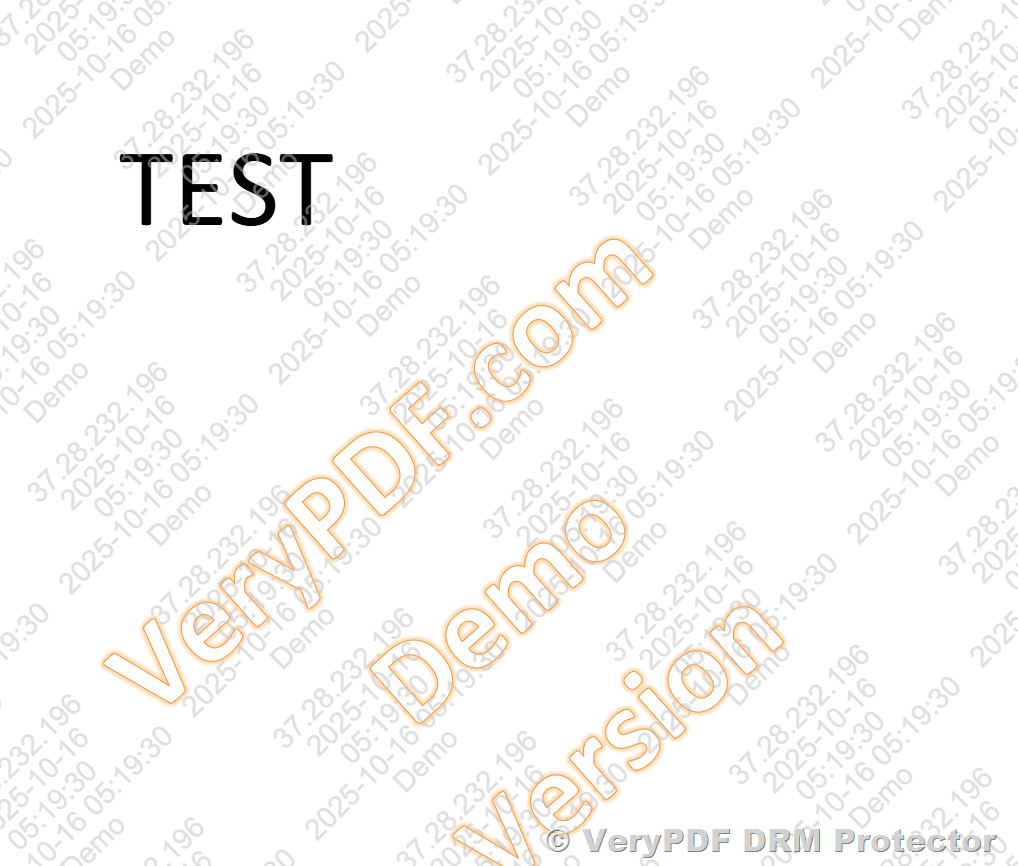
One of the standout features of VeryPDF DRM Protector is its dynamic watermarking capability. Unlike static watermarks that can be easily ignored, dynamic watermarks are customized in real-time with the recipient’s email address or other personal information. This means that if someone tries to share your eBook without permission, the watermark will clearly identify who the leak came from.

This feature has saved me time and energy in preventing piracy. For example, after applying dynamic watermarks to my eBooks, I discovered that a pirated copy had surfaced online. Thanks to the watermark, I quickly traced it back to the user who had shared it, and took swift action to revoke their access.

Screenshot Blocking: The Unsung Hero

There’s nothing more frustrating than a user screenshotting your valuable eBook and distributing it for free. With VeryPDF Screen Shield, this becomes a non-issue. This feature reduces the visible area of your eBook, making screenshots nearly impossible.

I’ve tested this out myselftrying to take a screenshot on my own eBook with Screen Shield enabled. Not only was the quality poor, but large portions of the content were blocked. It’s a small, yet incredibly effective feature that adds an extra layer of protection to your content.

Real-World Use Cases

VeryPDF DRM Protector is not just for eBook sellers. Whether you’re distributing training materials, manuals, or even course content, the features of VeryPDF DRM Protector can be adapted to suit a variety of industries. Here are a few scenarios where this tool truly shines:

  • eBook authors and publishers: Protect your intellectual property and control who can access your eBooks.

  • Training organizations: Prevent unauthorized access to your educational content.

  • Documentaries and media producers: Safeguard your videos, images, and audio files from being pirated.

  • Corporate environments: Secure internal documents and presentations to avoid leaks.

Core Advantages of VeryPDF DRM Protector

What sets VeryPDF DRM Protector apart from other DRM solutions? A few core advantages stand out:

  • Ease of Use: No complex setup or need for a user account. Just upload your content, apply DRM protections, and you’re done.

  • Comprehensive Control: From watermarking to screenshot blocking, you’re in complete control of your content’s security.

  • Analytics: Gain detailed insights into who is viewing, downloading, or printing your content.

  • Flexible Permissions: Set expiry dates, restrict access based on IP addresses, and more.

  • Multi-Platform Support: Protect not just PDFs, but also images, audio files, and videos, all within the same platform.

Why I Recommend VeryPDF DRM Protector

If you’re an eBook seller like me, protecting your work should be at the top of your to-do list. VeryPDF DRM Protector for Amazon eBook Seller has not only saved me time and effort, but it’s also provided me with peace of mind knowing that my content is secure. The combination of dynamic watermarking and screenshot blocking is a game-changer in the world of digital rights management. The analytics features also give you a clear picture of how your content is being accessed, making it easy to stay in control.

I’d highly recommend this tool to anyone who deals with sensitive documents or eBooks. Whether you’re an author, publisher, or business owner, VeryPDF DRM Protector will take the headache out of content protection.

Click here to try it out for yourself, and take your content security to the next level!


Custom Development Services by VeryPDF

VeryPDF offers extensive custom development services to cater to your unique requirements. Whether you’re using Linux, macOS, or Windows, VeryPDF can develop tailored solutions to suit your business. From PDF processing to specialized DRM tools, VeryPDF has the expertise you need.

Whether you require custom watermarking or advanced PDF processing solutions, VeryPDF can help. Get in touch with them through their support centre at http://support.verypdf.com/ to discuss your project.


FAQ

1. What file formats can be protected with VeryPDF DRM Protector?

VeryPDF DRM Protector supports various formats, including PDF, images, videos, and audio files.

2. How can I track user activity?

The software provides detailed insights into who viewed your content, when, and for how long, along with whether it was printed or downloaded.

3. Can I revoke access to content after distribution?

Yes, you can revoke access to your eBooks and documents at any time, even after they have been distributed.

4. Does VeryPDF DRM Protector prevent screen capturing?

Yes, with the VeryPDF Screen Shield feature, it blocks screenshots by reducing the visible area of your document.

5. Can I set expiration dates for my content?

Absolutely. You can set expiry dates for your eBooks, or restrict access after a certain number of views or prints.


Tags

  • Digital Rights Management (DRM)

  • eBook Protection

  • Dynamic Watermarking

  • Screenshot Blocking

  • PDF Security

Ultimate eBook Protection with VeryPDF DRM Protector: Features, Use Cases, and Customization Options

As digital publishing becomes the new standard, safeguarding intellectual property like eBooks is more critical than ever. Authors, publishers, and content creators are increasingly looking for advanced digital rights management (DRM) solutions to prevent unauthorized sharing, copying, downloading, and printing of their valuable content.

VeryPDF DRM Protector offers a powerful and flexible platform tailored to these needs. In this article, we explore common customer concerns and questions about protecting eBooks, and how VeryPDF’s solution addresses each of them with precision and adaptability.

Ultimate eBook Protection with VeryPDF DRM Protector: Features, Use Cases, and Customization Options


1. Can Customer’s IP and Address Be Included in the Watermark?

Short Answer: Not currently in the default version, but customization is available.

While the official version of the VeryPDF DRM system does not include a feature to embed the customer’s IP address or physical address in the watermark by default, this functionality can be added upon request. Including such personal identifiers in a visible or invisible watermark can act as a strong deterrent against unauthorized sharing, as each distributed file becomes traceable back to a specific user.

This level of personalization makes every protected file uniquely identifiable, enhancing accountability and security.


2. Restricting All User Actions: No Downloading, Printing, Copying, or Sharing

Yes – Full control is possible.

One of the standout features of the VeryPDF DRM Protector is the ability to fully restrict the recipient’s actions after purchasing the eBook. You can disable:

  • Downloading of the file

  • Printing of any page

  • Copying of text or images

  • Sharing of the file with unauthorized users

This ensures that your content remains locked down and can only be consumed in the way you allow. For example, if you only want the user to view it online with no capability to extract or forward the file, the DRM system enforces that policy strictly.


3. Limit Access to One or Two Personal Devices Only

Yes – Device limitation is built-in.

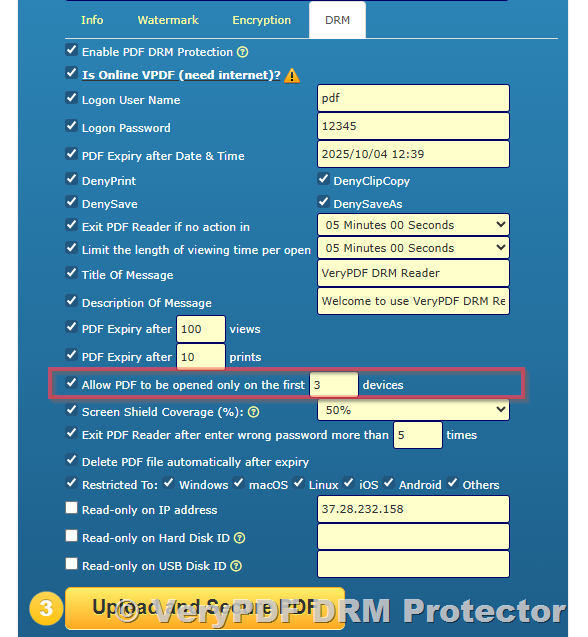
Another commonly requested feature is the ability to restrict access to only one or two personal devices. This means that a single eBook purchase cannot be spread across multiple desktops, laptops, tablets, or smartphones.

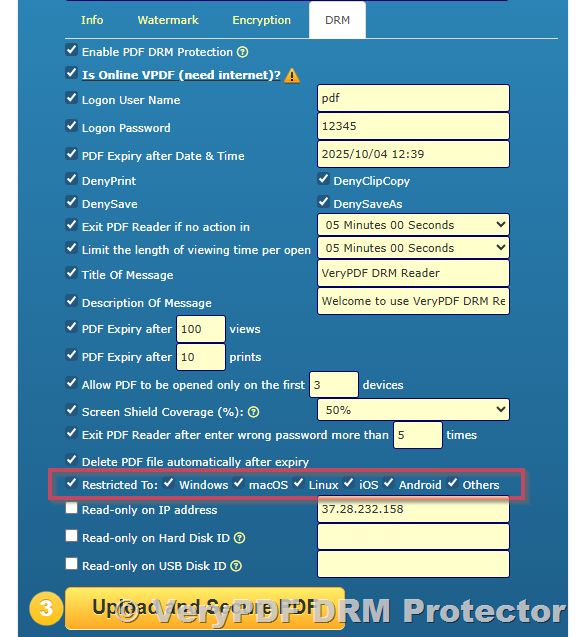
VeryPDF’s DRM system binds the content to a device ID or browser fingerprint, limiting the usage scope. For example, a customer can be allowed to access the eBook on just a desktop and a phone, ensuring that access remains private and limited.


4. Responsive Viewing Experience on All Devices

Yes – Mobile and desktop reading is optimized.

Whether your customer is reading on a large desktop monitor or a small smartphone screen, the Secure Web Viewer included with VeryPDF DRM adjusts the eBook’s layout to fit the screen automatically. This ensures a smooth, legible, and comfortable reading experience, no matter the device.

There’s no need for users to zoom, scroll horizontally, or squint. The PDF pages are scaled responsively to offer the best possible usability across devices.


5. Where Will the Protected File Be Hosted?

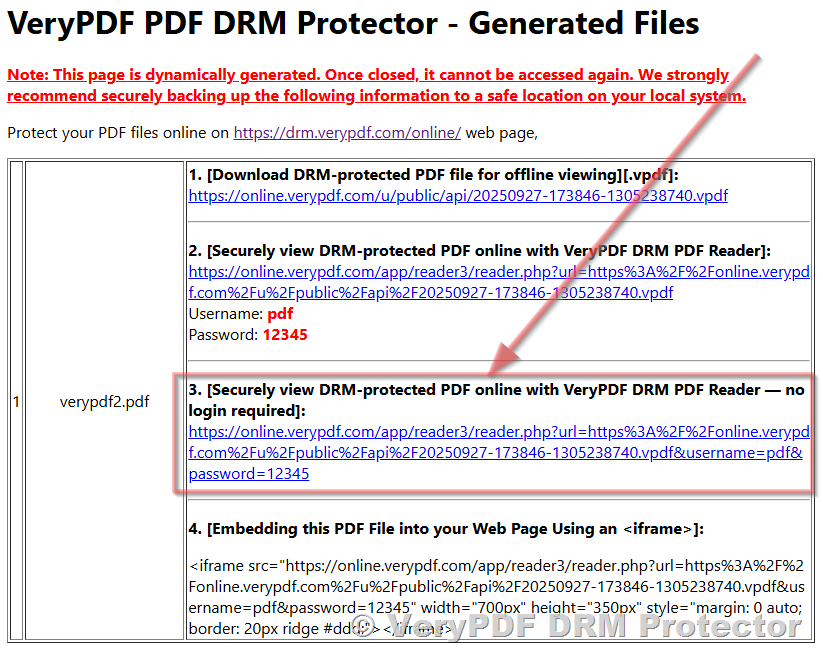
Once you upload your original PDF file for protection on the VeryPDF DRM Online Platform, the system processes it and returns:

  • A secure, protected version of your file

  • One or more unique URL links to access or share the protected file

You can choose to download the protected file to your own server or use the generated URLs to give customers access via email, web store, or embedded iframe.


6. One-Time Download, One-Time Use with Device Binding

Yes – Strong enforcement is possible.

Many content owners want to enable only a single download per purchase, and lock the file to one or two specific devices. VeryPDF DRM Protector enables you to do this with the following mechanisms:

  • Each file is uniquely protected per user.

  • One-time use download URLs can be generated.

  • The file, once opened, can be locked to one or two connected devices, after which no further access is allowed from new devices.

This approach ensures that each customer receives a custom copy of the book that cannot be redistributed.


7. Can DRM Protection Be Applied Locally Instead of Uploading to a Server?

Currently, file protection is done via VeryPDF’s online DRM server. You upload your unprotected PDF file to the platform, and the system applies protection before giving you back a secure version.

You can then:

  • Download the protected file to your local system.

  • Distribute the secure URLs generated by the system to your customers.

  • Use the REST API to automate file protection and delivery workflows on your own store.

While local DRM application is not supported in the official version, custom on-premises solutions can be discussed for enterprise-level users or special cases.


8. How is the Protected File Delivered to the Customer?

There are two primary delivery methods:

a) Email Access Link

Once the file is protected, you can email the unique access link to the customer. This link can be auto-generated via the API during a successful store transaction.

b) Embedded Web Viewer on Your Store

You can embed the protected file’s viewing link in an iframe within your website. This way, the customer never leaves your website and views the eBook securely inside your digital storefront.

Both options can be automated based on purchase activity.


9. Per-Purchase Custom Protection and Link Generation

Yes, this is supported and strongly encouraged for tight control.

For each customer who purchases the book, the system allows you to create a fresh DRM-protected copy and generate a new unique link. This ensures:

  • No two customers receive the same link.

  • Download or view history is trackable.

  • Each access URL is restricted to the intended user and number of devices.

This model significantly reduces the risk of piracy and unauthorized sharing.


10. Conclusion: Comprehensive Control with Flexibility

VeryPDF DRM Protector offers a robust and highly customizable solution for protecting eBooks and sensitive documents. Whether you’re an author selling a single book or a publisher managing a library of titles, the platform allows you to:

  • Enforce strict DRM policies

  • Limit device usage

  • Customize watermarks

  • Prevent all forms of misuse

  • Deliver content securely via URL or embed

With optional features like IP-based watermarking, per-user file generation, and automated REST API integration, VeryPDF provides everything needed to control and monetize your digital assets safely and efficiently.


To get started, visit: https://drm.verypdf.com/online/

If you have specific needs beyond the default functionality, you can contact the VeryPDF team for custom feature development tailored to your business model.