 The Growing Problem of Content Sharing in the Classroom
As a professor, I often find myself wrestling with the challenge of ensuring my course materials remain secure. Each semester, I upload lecture slides, reading assignments, and even homework PDFs to my university's portal, expecting only enrolled students to access them. But, time and again, I worry about the risk of these materials being shared without my permission. It's a frustrating reality many educators face — how do we stop students from sharing PDF files on unauthorized platforms or converting them into other formats like Word or image files? What if someone manages to print, copy, or share these materials illegally? The concern is not just about academic integrity, but also about maintaining control over what we've worked hard to create.
If you've ever found yourself in a similar situation, you're not alone. The good news is that there's a solution: VeryPDF DRM Protector. This tool offers a straightforward yet powerful way to protect your PDF documents from unauthorized access, sharing, printing, and even editing. In this article, we'll dive into the pain points educators face, how DRM protection can be the answer, and why this tool is a game-changer for managing digital content in the classroom.
The Growing Problem of Content Sharing in the Classroom
Let's start with a familiar scenario: You've spent hours crafting the perfect lecture slides, complete with detailed notes and diagrams that will help your students grasp complex topics. You upload them to your course portal, confident that only the students enrolled in your class will have access. But then you hear rumors: some of your students have been sharing your PDFs with others, or worse, uploading them to third-party platforms.
Suddenly, your carefully designed content is floating around in the digital ether, accessible to anyone with the link. Not only does this violate academic integrity, but it also puts you in a position where you can no longer control the distribution of your hard work.
This issue isn't unique to just lecture slides — homework assignments, exam papers, and any paid course materials are equally vulnerable. The digital age has made content distribution easier, but it has also created avenues for content piracy. As a result, many professors and educational content creators feel like their work is being undermined by unauthorized sharing and distribution.
The Solution: DRM Protection to Safeguard Your PDFs
This is where VeryPDF DRM Protector comes in. The tool provides a robust and comprehensive solution for protecting your PDF files from unauthorized access, copying, sharing, and even editing. Let's break down how it addresses common teaching pain points.
1. Preventing Unauthorized Sharing
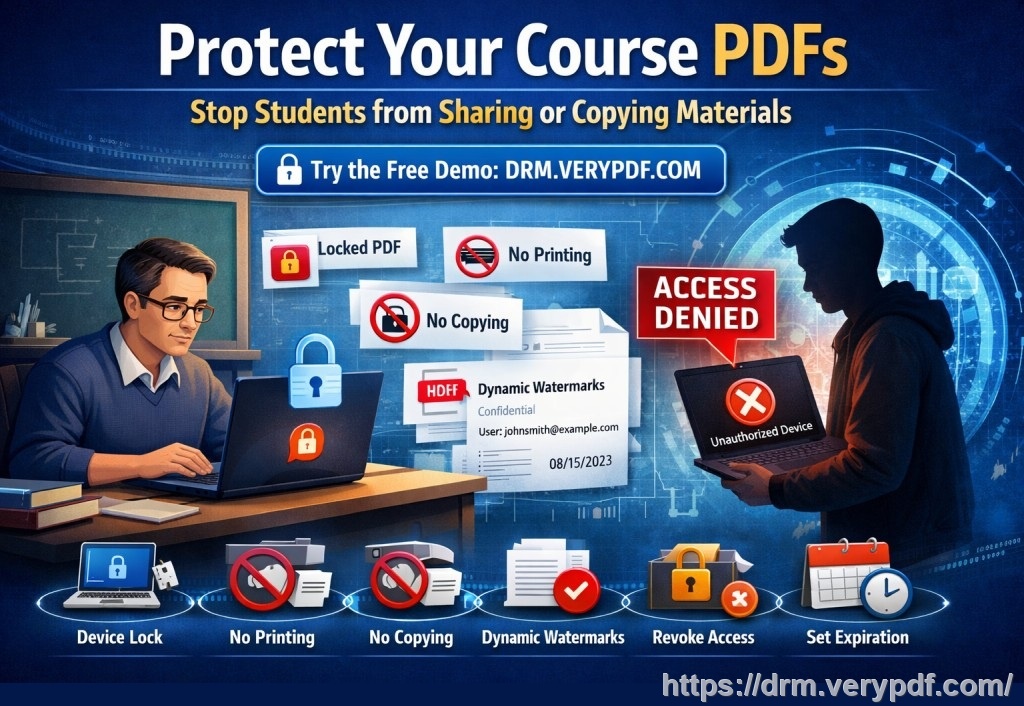
Imagine that your class materials are locked down in a way that only authorized students can access them. VeryPDF DRM Protector allows you to restrict access to specific individuals or devices. By locking PDFs to particular devices or users, you ensure that only the right people can view your materials. No more worrying about students sharing the content with unauthorized users.
2. Stopping Copying and Printing
One of the major frustrations for educators is when students copy or print their materials, especially if they're doing so to share or redistribute. With DRM protection, you can completely block printing and copying or set limitations on how much content can be printed. You can also enforce print quality, ensuring that the printed versions of your materials don't compromise the clarity or formatting you've worked hard to achieve.
3. Preventing PDF Conversion
Another common issue is the conversion of PDFs into other formats, such as Word, Excel, or even images. With VeryPDF DRM Protector, you can stop this from happening. The tool ensures that your PDFs remain locked in their original format, making it impossible for students to convert them without proper authorization. This feature is particularly useful when you want to ensure that your materials are used only in the way you intended.
4. Watermarking for Anti-Piracy
One of the most effective ways to deter unauthorized redistribution is by adding dynamic watermarks to your PDFs. These watermarks can display user-specific information such as names, email addresses, or even timestamps. Not only do these watermarks act as a deterrent, but they also help you trace the source if your content is leaked or shared without permission.
5. Expiry and Revocation Features
Let's face it — sometimes we need to revoke access to certain materials after a specific period. With DRM protection, you can set expiration dates for your PDFs, ensuring that students can only access them within a defined window. Additionally, if you ever need to revoke access to a document after distribution, you can do so instantly, which provides peace of mind knowing you can always maintain control.
Real-Life Benefits and Examples
While these features sound great in theory, they've made a tangible difference in my teaching experience. For example, last semester I noticed that some of my students had been sharing lecture slides from previous years with classmates who hadn't enrolled. By using VeryPDF DRM Protector, I was able to restrict access to the current enrolled students only and prevent the sharing of these materials. No more worries about content leaking or being misused.
Another scenario I faced was when students were converting PDF homework assignments into Word documents to plagiarize or reformat. With DRM protection in place, this became impossible. Now, I can confidently share homework PDFs, knowing that the formatting will remain intact and that no one can alter or copy my work.
I also love the dynamic watermarking feature. Not only does it act as a visible deterrent, but it also helps me track if a specific student shared a document that they weren't supposed to. The watermark displays their name and email, making them accountable for any unauthorized distribution.
Conclusion: Why DRM Protection is Essential for Educators
If you're tired of worrying about content piracy, unauthorized sharing, and loss of control over your teaching materials, VeryPDF DRM Protector is the solution you've been searching for. It provides the peace of mind you need to distribute your PDFs securely, knowing they're fully protected against unauthorized access and misuse.
I highly recommend this tool to any educator who distributes PDF documents to students. It's easy to use, offers a range of powerful features, and most importantly, it ensures your hard work stays in the right hands. Protect your course materials today by trying VeryPDF DRM Protector. You can start your free trial now and regain control over your PDFs.
Try it now and protect your course materials: https://drm.verypdf.com
Frequently Asked Questions
1. How can I limit student access to PDFs?
You can lock PDFs to specific users or devices, ensuring that only the right students have access. This prevents unauthorized sharing or redistribution.
2. Can students still read the PDFs without copying, printing, or converting?
Yes, you can restrict copying, printing, and converting entirely or limit the number of prints and views allowed, ensuring students can only use the material as intended.
3. How can I track who accessed my protected PDFs?
With dynamic watermarks, you can track the user's name, email, or other identifying information every time the document is viewed or printed.
4. Does DRM protection prevent PDF piracy and unauthorized sharing?
Absolutely. It prevents students from sharing, printing, or converting your PDFs. You can also revoke access at any time, even after distribution.
5. How easy is it to distribute protected lecture slides and homework?
It's simple. You can distribute protected PDFs via email, web, or USB, ensuring secure access for your students without any complicated setup.
6. Can I apply DRM protection to a batch of files?
Yes, VeryPDF DRM Protector supports batch processing, so you can easily apply security settings to multiple PDFs at once, saving you time.
7. What happens if a student tries to bypass the protection?
The tool prevents common attempts to bypass the DRM, such as copying, printing, or converting the PDF. Plus, the dynamic watermark acts as a deterrent to discourage unauthorized distribution.
Tags or Keywords
-
protect course PDFs
-
prevent PDF piracy
-
stop students sharing homework
-
secure lecture materials
-
prevent DRM removal
-
anti-conversion PDF DRM